phone NISSAN LEAF 2019 Owner´s Manual
[x] Cancel search | Manufacturer: NISSAN, Model Year: 2019, Model line: LEAF, Model: NISSAN LEAF 2019Pages: 610, PDF Size: 7.11 MB
Page 354 of 610
• “Number” — Speak this command toplace a call by inputting numbers.
• For 7- and 10-digit phone numbers, speak the numbers. When finished, say
“Dial” to initiate the call. Say “Correction”
at any time in the process to correct a
misspoken or misinterpreted number.
• For phone numbers with more digits or special characters, say “Special Num-
ber”, then speak the digits. Up to 24 dig-
its can be entered. Available special
characters are “star”, “pound”, “plus” and
“pause”. When finished, say “Dial” to initi-
ate the call. Say “Correction” at any time
in the process to correct a misspoken
or misinterpreted number or character.
• “Redial” — Speak this command to dial the number of the last outgoing call.
The system will display “Redialing
phonebook entry will be displayed if
available, otherwise the number being
redialed will be displayed.
• “Call Back” — Speak this command to dial the number of the last incoming
call. The system will display “Calling
back
available, otherwise the number being
called back will be displayed.
RECEIVING A CALL
When a call is received by the phone con-
nected to the vehicle’s Bluetooth® Hands-
Free Phone System, the call information is
displayed on the control panel display.
Press the
button to accept the call.
Press the
button to reject the call.
DURING A CALL
When a call is active, press thebutton
to access additional options. Speak one of
the following commands.
• “Send” — Speak this command followed by the digits to enter digits during the phone
call.
• “Mute On” or “Mute Off ” — Speak the com- mand to mute or unmute the system.
• “Transfer Call” — Speak this command to transfer the call to the handset. To transfer
the call back from the handset to the
Bluetooth® Hands-Free Phone System,
press the
button and confirm when
prompted. If supported by the phone, the Bluetooth®
Hands-Free Phone System allows for call
waiting functionality. If a call is received
while another call is already active, a mes-
sage will be displayed on the screen. Press
the
button to hold the active call and
switch to the second call. Press the
button to reject the second call.
While the second call is active, pressing the
button will allow the same com-
mands that are available during any calls
as well as two additional commands:
• “Switch Call” — Speak this command to hold the second call and switch back to
the original call.
• “End Other Call” — Speak this command to stay with the second call and end the
original call.
Press the
button to accept the call.
Press the
button to reject the call.
ENDING A CALL
To end an active call, press thebutton.
Monitor, climate, audio, phone and voice recognition systems4-75
Page 355 of 610
TEXT MESSAGING (IF SO
EQUIPPED)
WARNING
• Laws in some jurisdictions may re- strict the use of “Text-to-Speech”.
Check local regulations before using
this feature.
• Laws in some jurisdictions may re- strict the use of some of the applica-
tions and features, such as social
networking and texting. Check local
regulations for any requirements.
• Use the text messaging feature af- ter stopping your vehicle in a safe
location. If you have to use the fea-
ture while driving, exercise extreme
caution at all times so full attention
may be given to vehicle operation.
• If you are unable to devote full at- tention to vehicle operation while
using the text messaging feature,
pull off the road to a safe location
and stop your vehicle.
NOTE:
Many phones may require special per-
mission to enable text messaging.
Check the phone’s screen during
Bluetooth® pairing. For some phones,
you may need to enable ‘Notifications’
in the phone’s Bluetooth® menu for text
messages to appear on the head unit.
Please consult your phone’s Owner’s
Manual. Text message integration re-
quires that the phone support MAP
(Message Access Profile) for both re-
ceiving and sending text messages.
Some phones may not support all text
messaging features. For additional in-
formation about compatibility, please
visit www.nissanusa.com/bluetooth or
www.nissan.ca/bluetooth, as well as
your device’s Owner’s Manual.
The system allows for the sending and re-
ceiving of text messages through the ve-
hicle interface. Sending a text message:
1. Press the
button on the steering
wheel.
2. Say “Phone” af ter the tone.
3. Say “Send Text” af ter the tone.
4. The system will provide a list of available commands in order to determine the
recipient of the text message. Choose
from the following:
• (a name)
• Missed Calls
• Incoming Calls
• Outgoing Calls
For additional information, refer to
“Voice commands” in this section.
5. Once a recipient is chosen, the system prompts for which message to send.
Five predefined messages are available.
To choose one of the predefined mes-
sages, speak one of the following af ter
the tone:
• “Driving, can’t text”
• “Call me”
• “On my way ”
• “Running late”
4-76Monitor, climate, audio, phone and voice recognition systems
Page 356 of 610
Reading a text message:
1. Press the
button on the steering
wheel.
2. Say “Messaging” af ter the tone.
3. Say “Read Text” af ter the tone.
The text message, sender and delivery
time are shown on the screen. Use the tun-
ing switch to scroll through all text mes-
sages if more than one are available. Press
the
button to exit the text message
screen. Press the
button to access the
following options for replying to the text
message:
• Call Back
Speak this command to call the sender of
the text message using the Bluetooth®
Hands-Free Phone System.
• Send Text
Speak this command to send a text
message response to the sender of the
text message.
• Read Text Speak this command to read the text
message again. • Previous Text
Speak this command to move to the
previous text message.
• Next Text Speak this command to move to the
next text message.
NOTE:
Text messages are only displayed if
the vehicle speed is less than 5 mph
(8 km/h).
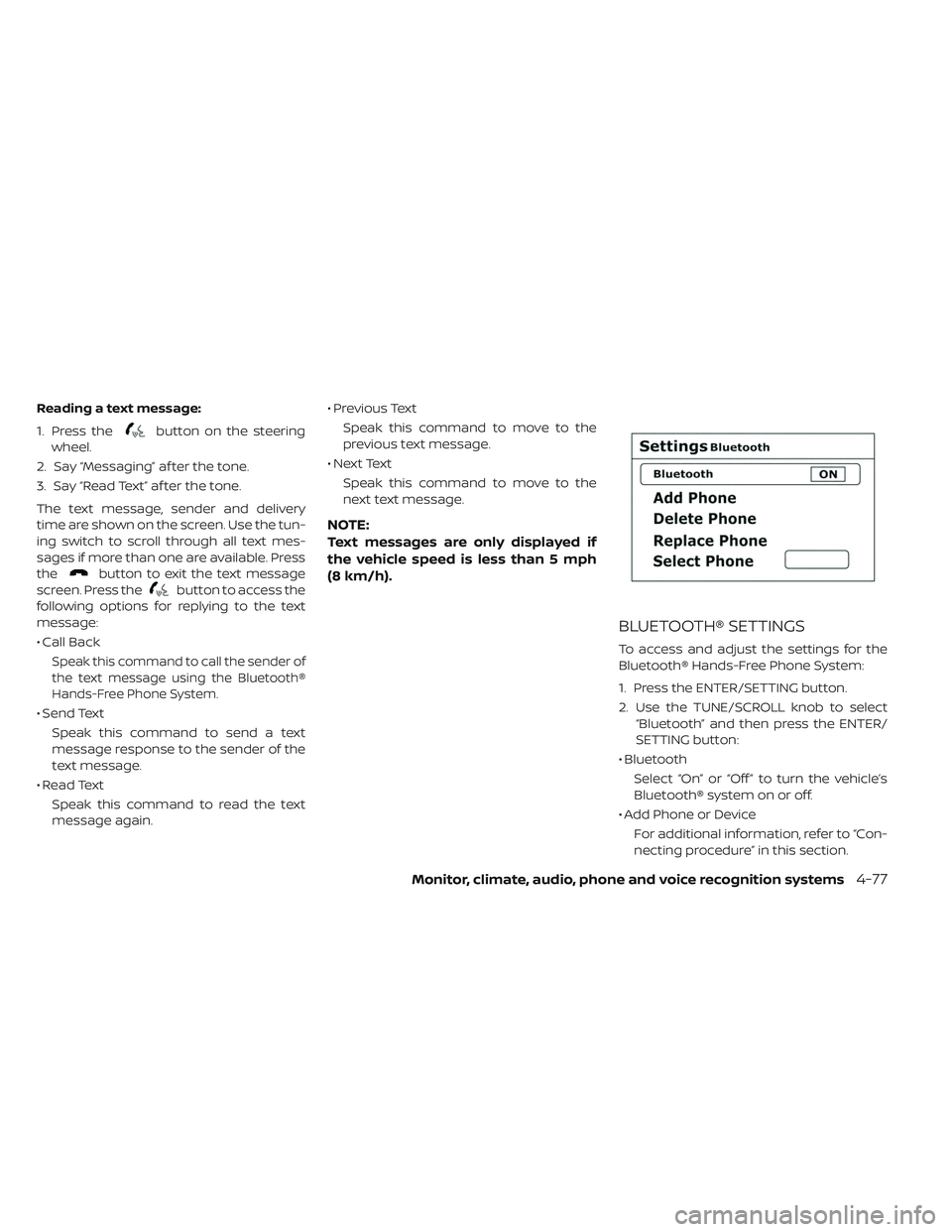
BLUETOOTH® SETTINGS
To access and adjust the settings for the
Bluetooth® Hands-Free Phone System:
1. Press the ENTER/SETTING button.
2. Use the TUNE/SCROLL knob to select “Bluetooth” and then press the ENTER/
SETTING button:
• Bluetooth Select “On” or “Off ” to turn the vehicle’s
Bluetooth® system on or off.
• Add Phone or Device For additional information, refer to “Con-
necting procedure” in this section.
Monitor, climate, audio, phone and voice recognition systems4-77
Page 357 of 610
• Delete Phone or DeviceSelect to delete a phone from the dis-
played list. The system will ask to confirm
before deleting the phone.
• Replace Phone Select to replace a phone from the dis-
played list. When a selection is made, the
system will ask to confirm before pro-
ceeding. The recorded phonebook for
the phone being deleted will be saved as
long as the new phone’s phonebook is
the same as the old phone’s phonebook.
• Select Phone or Device Select to connect to a previously con-
nected phone from the displayed list.
• Phonebook Download Select to turn on or off the automatic
download of a connected phone’s
phonebook.
• Show Incoming Calls Select “Driver Only” to have incoming call
information displayed only in the vehicle
information display. Select “Both” to have
incoming call information displayed in
both the vehicle information display and
the center display screen. • Text Message (if so equipped)
Select to turn text message feature in
vehicle on or off.
• New Text Sound (if so equipped) Select to adjust the volume of the sound
that plays when a new text is received by
a phone connected to the Bluetooth®
Hands-Free Phone System. The setting
all the way to the lef t indicates that the
new text sound will be muted.
• Show Incoming Text (if so equipped) Select “Driver Only” to have incoming
text messages displayed only in the ve-
hicle information display. Select “Both” to
have incoming text messages displayed
in both the vehicle information display
and the center display screen. Select
“None” to have no display of incoming
text messages.
• Auto Reply (if so equipped) Select to turn on or off the Auto Reply
function. When enabled, the vehicle will
automatically send a predefined text
message to the sender when a text
message is received while driving. • Auto Reply Message
Select to choose the message that is
sent when the Auto Reply function is en-
abled.
• Vehicle Signature On/Off Select to choose whether or not the ve-
hicle signature is added to outgoing text
messages from the vehicle. This mes-
sage cannot be changed or customized.
MANUAL CONTROL
While using the Voice Recognition system,
it is possible to select menu options by
using the steering wheel controls instead
of speaking voice commands. This can be
especially helpful if the noise of driving
makes it difficult for Voice Recognition sys-
tem to accurately interpret commands.
The manual control mode does not allow
dialing a phone number by digits. The user
may select an entry from the Phonebook
or Recent Calls lists. To re-activate Voice
Recognition, exit the manual control mode
by pressing and holding the PHONE/END
button. At that time, pressing the
PHONE/SEND
button will start the
Hands Free Phone System.
4-78Monitor, climate, audio, phone and voice recognition systems
Page 358 of 610
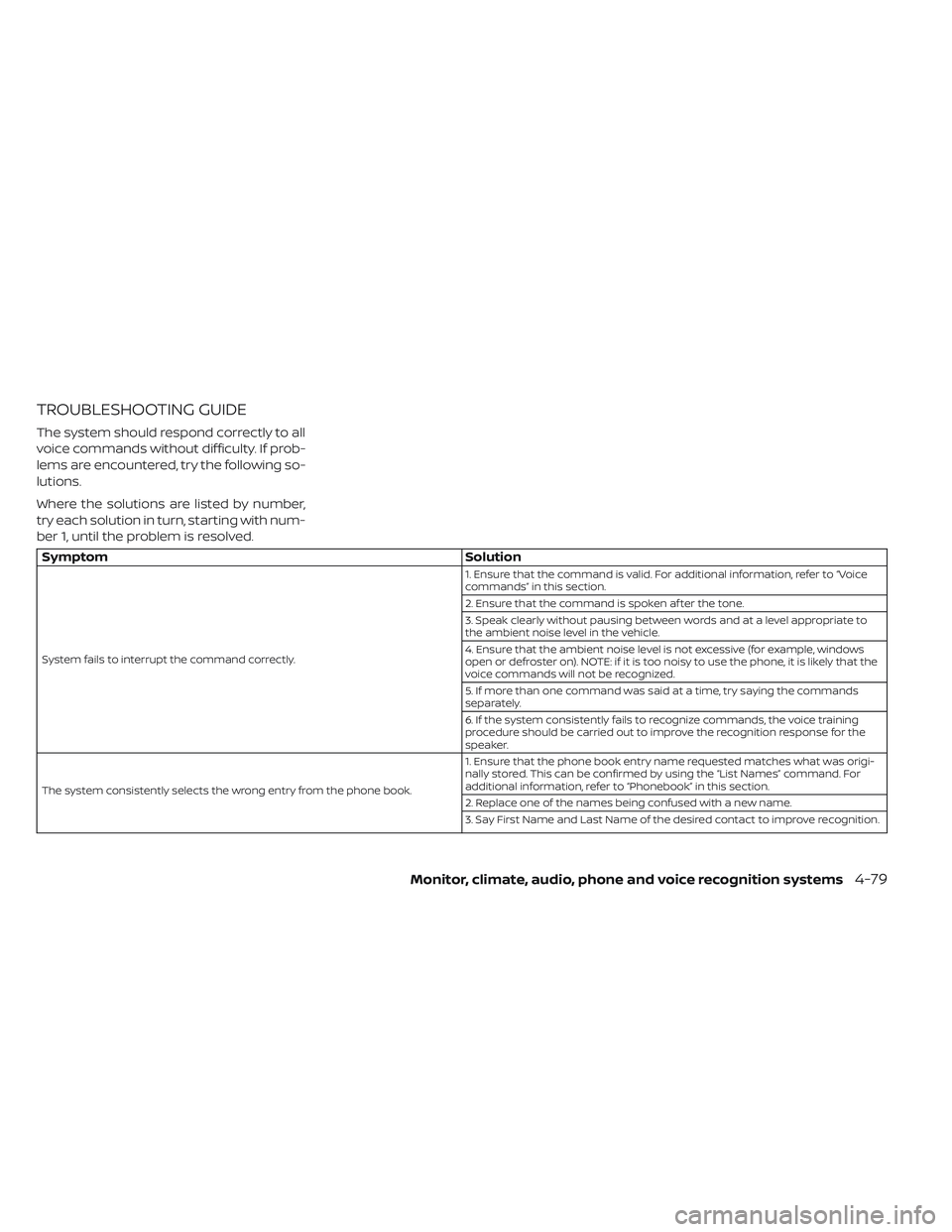
TROUBLESHOOTING GUIDE
The system should respond correctly to all
voice commands without difficulty. If prob-
lems are encountered, try the following so-
lutions.
Where the solutions are listed by number,
try each solution in turn, starting with num-
ber 1, until the problem is resolved.
SymptomSolution
System fails to interrupt the command correctly. 1. Ensure that the command is valid. For additional information, refer to “Voice
commands” in this section.
2. Ensure that the command is spoken af ter the tone.
3. Speak clearly without pausing between words and at a level appropriate to
the ambient noise level in the vehicle.
4. Ensure that the ambient noise level is not excessive (for example, windows
open or defroster on). NOTE: if it is too noisy to use the phone, it is likely that the
voice commands will not be recognized.
5. If more than one command was said at a time, try saying the commands
separately.
6. If the system consistently fails to recognize commands, the voice training
procedure should be carried out to improve the recognition response for the
speaker.
The system consistently selects the wrong entry from the phone book. 1. Ensure that the phone book entry name requested matches what was origi-
nally stored. This can be confirmed by using the “List Names” command. For
additional information, refer to “Phonebook” in this section.
2. Replace one of the names being confused with a new name.
3. Say First Name and Last Name of the desired contact to improve recognition.
Monitor, climate, audio, phone and voice recognition systems4-79
Page 359 of 610

NOTES
4-80Monitor, climate, audio, phone and voice recognition systems
Page 373 of 610
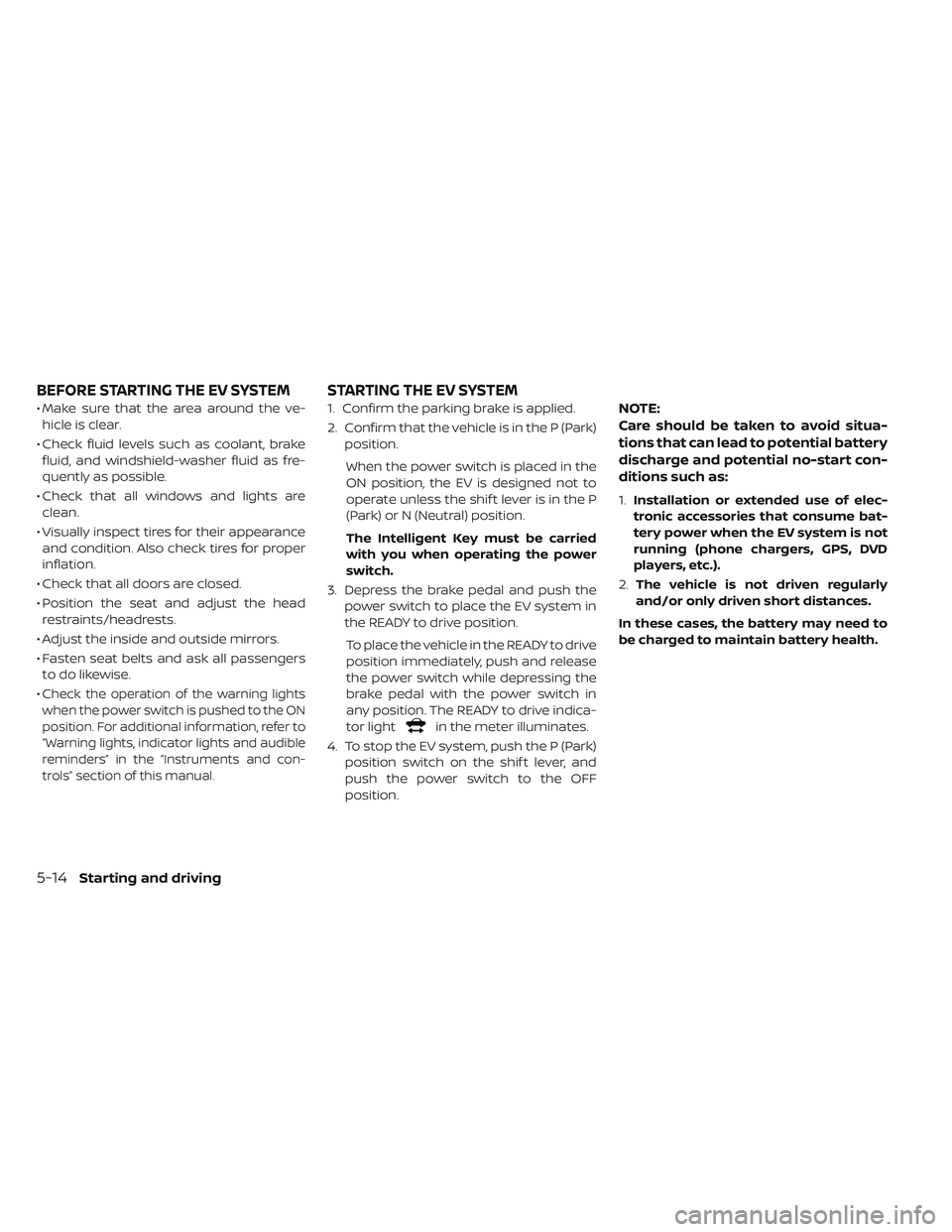
• Make sure that the area around the ve-hicle is clear.
• Check fluid levels such as coolant, brake fluid, and windshield-washer fluid as fre-
quently as possible.
• Check that all windows and lights are clean.
• Visually inspect tires for their appearance and condition. Also check tires for proper
inflation.
• Check that all doors are closed.
• Position the seat and adjust the head restraints/headrests.
• Adjust the inside and outside mirrors.
• Fasten seat belts and ask all passengers to do likewise.
•
Check the operation of the warning lights
when the power switch is pushed to the ON
position. For additional information, refer to
“Warning lights, indicator lights and audible
reminders” in the “Instruments and con-
trols” section of this manual.
1. Confirm the parking brake is applied.
2. Confirm that the vehicle is in the P (Park) position.
When the power switch is placed in the
ON position, the EV is designed not to
operate unless the shif t lever is in the P
(Park) or N (Neutral) position.
The Intelligent Key must be carried
with you when operating the power
switch.
3. Depress the brake pedal and push the power switch to place the EV system in
the READY to drive position.
To place the vehicle in the READY to drive
position immediately, push and release
the power switch while depressing the
brake pedal with the power switch in
any position. The READY to drive indica-
tor light
in the meter illuminates.
4. To stop the EV system, push the P (Park) position switch on the shif t lever, and
push the power switch to the OFF
position.
NOTE:
Care should be taken to avoid situa-
tions that can lead to potential battery
discharge and potential no-start con-
ditions such as:
1.Installation or extended use of elec-
tronic accessories that consume bat-
tery power when the EV system is not
running (phone chargers, GPS, DVD
players, etc.).
2. The vehicle is not driven regularly
and/or only driven short distances.
In these cases, the battery may need to
be charged to maintain battery health.
BEFORE STARTING THE EV SYSTEM STARTING THE EV SYSTEM
5-14Starting and driving
Page 544 of 610
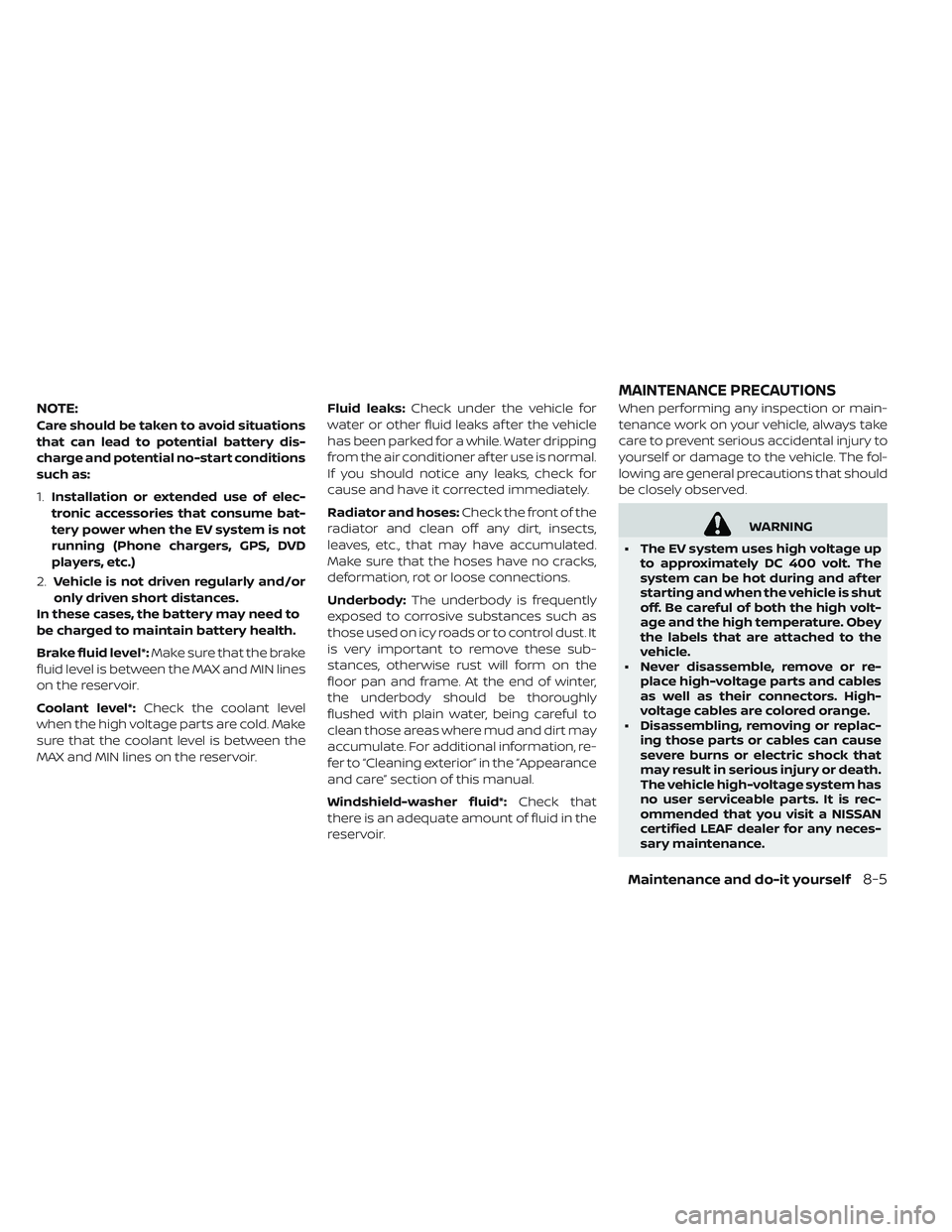
NOTE:
Care should be taken to avoid situations
that can lead to potential battery dis-
charge and potential no-start conditions
such as:
1.Installation or extended use of elec-
tronic accessories that consume bat-
tery power when the EV system is not
running (Phone chargers, GPS, DVD
players, etc.)
2. Vehicle is not driven regularly and/or
only driven short distances.
In these cases, the battery may need to
be charged to maintain battery health.
Brake fluid level*: Make sure that the brake
fluid level is between the MAX and MIN lines
on the reservoir.
Coolant level*: Check the coolant level
when the high voltage parts are cold. Make
sure that the coolant level is between the
MAX and MIN lines on the reservoir. Fluid leaks:
Check under the vehicle for
water or other fluid leaks af ter the vehicle
has been parked for a while. Water dripping
from the air conditioner af ter use is normal.
If you should notice any leaks, check for
cause and have it corrected immediately.
Radiator and hoses: Check the front of the
radiator and clean off any dirt, insects,
leaves, etc., that may have accumulated.
Make sure that the hoses have no cracks,
deformation, rot or loose connections.
Underbody: The underbody is frequently
exposed to corrosive substances such as
those used on icy roads or to control dust. It
is very important to remove these sub-
stances, otherwise rust will form on the
floor pan and frame. At the end of winter,
the underbody should be thoroughly
flushed with plain water, being careful to
clean those areas where mud and dirt may
accumulate. For additional information, re-
fer to “Cleaning exterior” in the “Appearance
and care” section of this manual.
Windshield-washer fluid*: Check that
there is an adequate amount of fluid in the
reservoir. When performing any inspection or main-
tenance work on your vehicle, always take
care to prevent serious accidental injury to
yourself or damage to the vehicle. The fol-
lowing are general precautions that should
be closely observed.
WARNING
• The EV system uses high voltage up to approximately DC 400 volt. The
system can be hot during and af ter
starting and when the vehicle is shut
off. Be careful of both the high volt-
age and the high temperature. Obey
the labels that are attached to the
vehicle.
• Never disassemble, remove or re- place high-voltage parts and cables
as well as their connectors. High-
voltage cables are colored orange.
• Disassembling, removing or replac- ing those parts or cables can cause
severe burns or electric shock that
may result in serious injury or death.
The vehicle high-voltage system has
no user serviceable parts. It is rec-
ommended that you visit a NISSAN
certified LEAF dealer for any neces-
sary maintenance.
MAINTENANCE PRECAUTIONS
Maintenance and do-it yourself8-5
Page 545 of 610
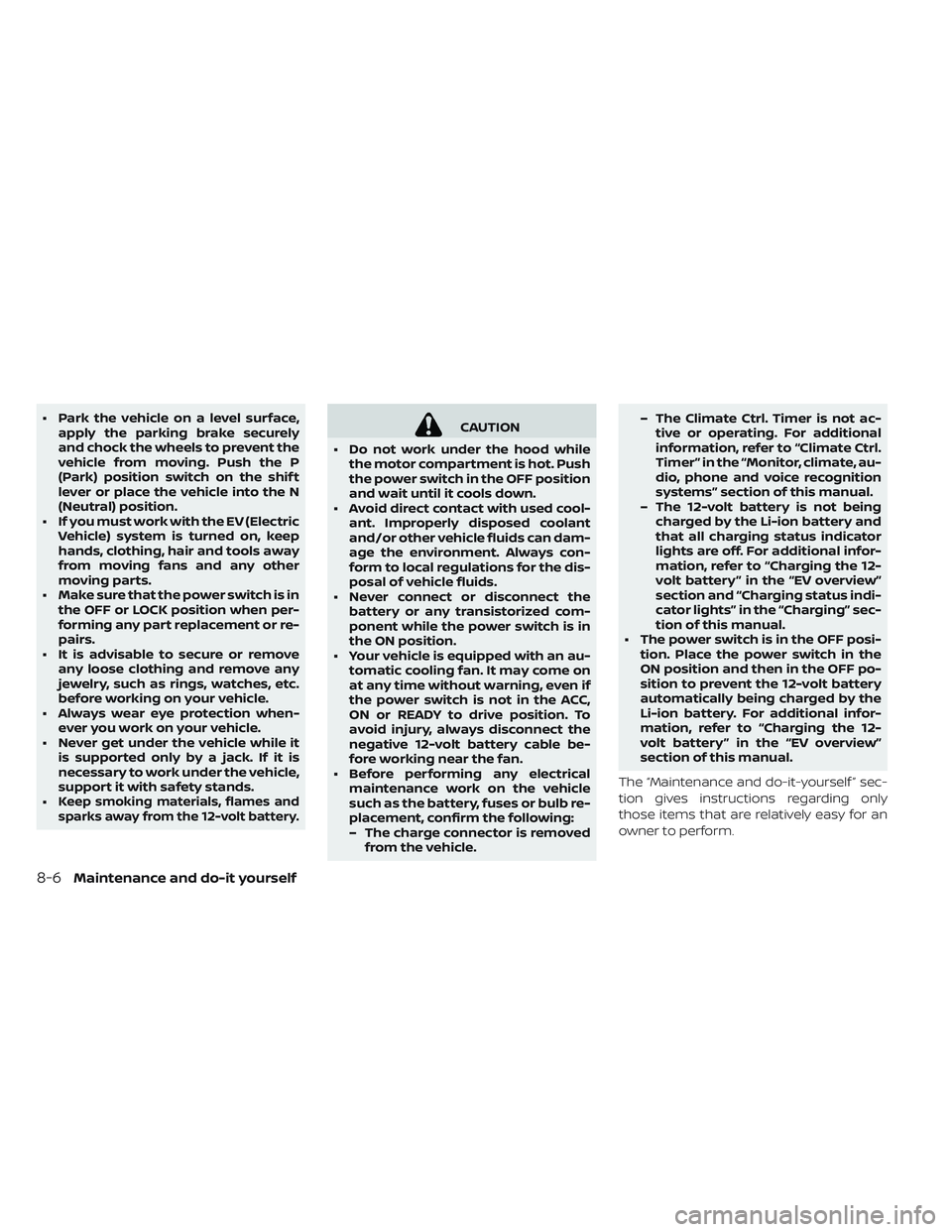
• Park the vehicle on a level surface,apply the parking brake securely
and chock the wheels to prevent the
vehicle from moving. Push the P
(Park) position switch on the shif t
lever or place the vehicle into the N
(Neutral) position.
• If you must work with the EV (Electric Vehicle) system is turned on, keep
hands, clothing, hair and tools away
from moving fans and any other
moving parts.
• Make sure that the power switch is in the OFF or LOCK position when per-
forming any part replacement or re-
pairs.
• It is advisable to secure or remove any loose clothing and remove any
jewelry, such as rings, watches, etc.
before working on your vehicle.
• Always wear eye protection when- ever you work on your vehicle.
• Never get under the vehicle while it is supported only by a jack. If it is
necessary to work under the vehicle,
support it with safety stands.
•
Keep smoking materials, flames and
sparks away from the 12-volt battery.
CAUTION
• Do not work under the hood while the motor compartment is hot. Push
the power switch in the OFF position
and wait until it cools down.
• Avoid direct contact with used cool- ant. Improperly disposed coolant
and/or other vehicle fluids can dam-
age the environment. Always con-
form to local regulations for the dis-
posal of vehicle fluids.
• Never connect or disconnect the battery or any transistorized com-
ponent while the power switch is in
the ON position.
• Your vehicle is equipped with an au- tomatic cooling fan. It may come on
at any time without warning, even if
the power switch is not in the ACC,
ON or READY to drive position. To
avoid injury, always disconnect the
negative 12-volt battery cable be-
fore working near the fan.
• Before performing any electrical maintenance work on the vehicle
such as the battery, fuses or bulb re-
placement, confirm the following:
– The charge connector is removedfrom the vehicle. – The Climate Ctrl. Timer is not ac-
tive or operating. For additional
information, refer to “Climate Ctrl.
Timer” in the “Monitor, climate, au-
dio, phone and voice recognition
systems” section of this manual.
– The 12-volt battery is not being charged by the Li-ion battery and
that all charging status indicator
lights are off. For additional infor-
mation, refer to “Charging the 12-
volt battery ” in the “EV overview”
section and “Charging status indi-
cator lights” in the “Charging” sec-
tion of this manual.
• The power switch is in the OFF posi- tion. Place the power switch in the
ON position and then in the OFF po-
sition to prevent the 12-volt battery
automatically being charged by the
Li-ion battery. For additional infor-
mation, refer to “Charging the 12-
volt battery ” in the “EV overview”
section of this manual.
The “Maintenance and do-it-yourself ” sec-
tion gives instructions regarding only
those items that are relatively easy for an
owner to perform.
8-6Maintenance and do-it yourself
Page 552 of 610
NOTE:
Care should be taken to avoid situations
that can lead to potential battery dis-
charge and potential no-start conditions
such as:
1.Installation or extended use of elec-
tronic accessories that consume bat-
tery power when the EV system is not
running (Phone chargers, GPS, DVD
players, etc.)
2. Vehicle is not driven regularly and/or
only driven short distances.
In these cases, the battery may need to
be charged to maintain battery healthWARNING
• Do not expose the 12-volt battery to flames or electrical sparks. Hydro-
gen gas generated by the 12-volt
battery is explosive. Do not allow 12-
volt battery fluid to contact your
skin, eyes, fabrics or painted sur-
faces. Af ter touching a 12-volt bat-
tery or 12-volt battery cap, do not
touch or rub your eyes. Thoroughly
wash your hands. If the acid con-
tacts your eyes, skin or clothing, im-
mediately flush with water for at
least 15 minutes and seek medical
attention.
• Do not operate the vehicle if the fluid in the 12-volt battery is low. Low 12-
volt battery fluid can cause a higher
load on the 12-volt battery which
can generate heat, reduce battery
life, and in some cases lead to an
explosion. • When working on or near a 12-volt
battery, always wear suitable eye
protection and remove all jewelry.
• 12-volt battery posts, terminals and related accessories contain lead and
lead compounds. Wash hands af ter
handling.
• Keep the 12-volt battery out of the reach of children.
Maintenance and do-it yourself8-13