phone NISSAN LEAF 2019 Owner´s Manual
[x] Cancel search | Manufacturer: NISSAN, Model Year: 2019, Model line: LEAF, Model: NISSAN LEAF 2019Pages: 610, PDF Size: 7.11 MB
Page 314 of 610
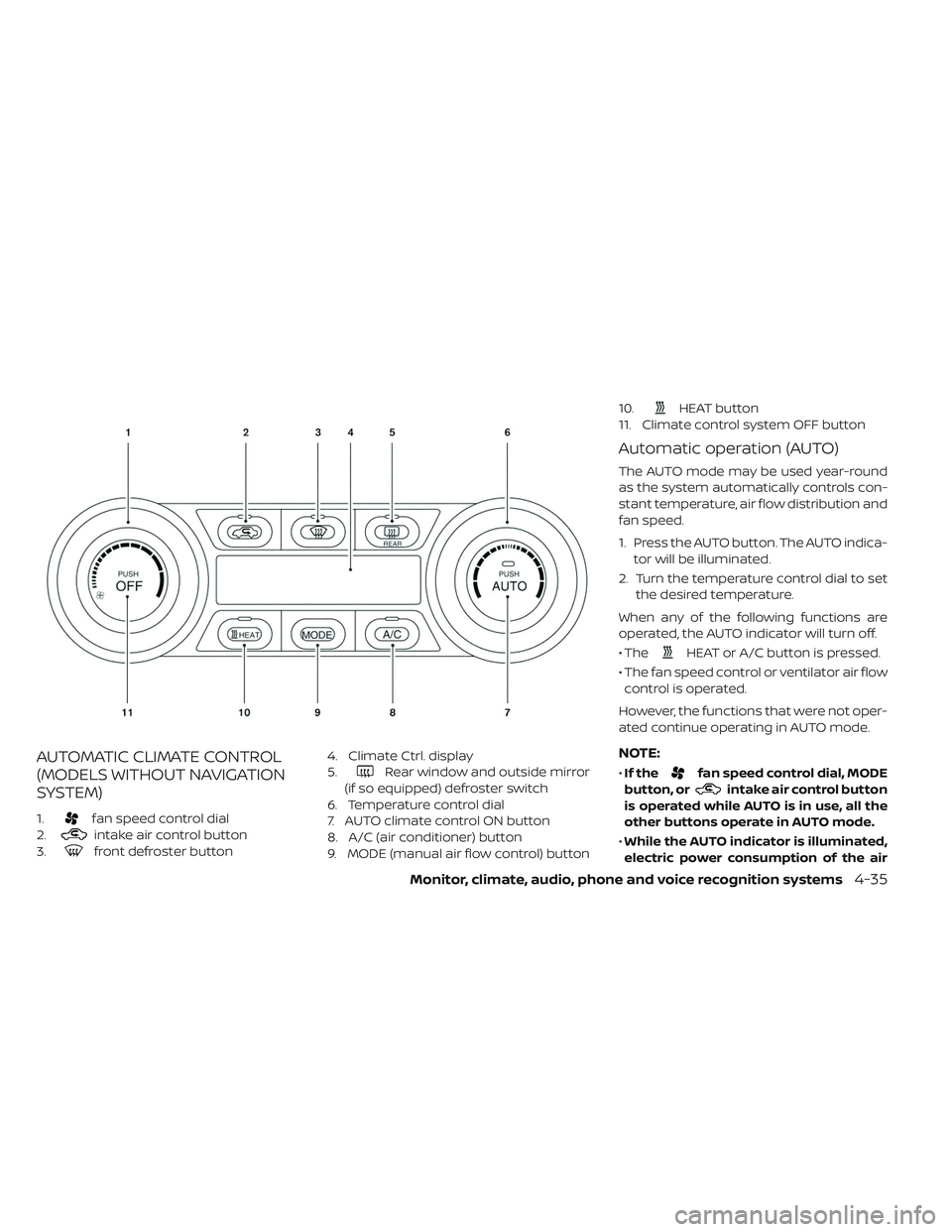
AUTOMATIC CLIMATE CONTROL
(MODELS WITHOUT NAVIGATION
SYSTEM)
1.fan speed control dial
2.
intake air control button
3.
front defroster button 4. Climate Ctrl. display
5.
Rear window and outside mirror
(if so equipped) defroster switch
6. Temperature control dial
7. AUTO climate control ON button
8. A/C (air conditioner) button
9. MODE (manual air flow control) button 10.
HEAT button
11. Climate control system OFF button
Automatic operation (AUTO)
The AUTO mode may be used year-round
as the system automatically controls con-
stant temperature, air flow distribution and
fan speed.
1. Press the AUTO button. The AUTO indica- tor will be illuminated.
2. Turn the temperature control dial to set the desired temperature.
When any of the following functions are
operated, the AUTO indicator will turn off.
• The
HEAT or A/C button is pressed.
• The fan speed control or ventilator air flow control is operated.
However, the functions that were not oper-
ated continue operating in AUTO mode.
NOTE:
• If thefan speed control dial, MODE
button, or
intake air control button
is operated while AUTO is in use, all the
other buttons operate in AUTO mode.
• While the AUTO indicator is illuminated,
electric power consumption of the air
Monitor, climate, audio, phone and voice recognition systems4-35
Page 315 of 610
conditioner can be economized com-
pared to the amount consumed while
the AUTO indicator is not illuminated.
The HEAT indicator light and the A/C indi-
cator light illuminates according to the
operation modes of the climate control
system.
Operation
mode A/C
indicator HEAT
indicator
Cooling
(HEAT off ) ON
OFF
Heating
(A/C off ) OFF ON
Manual operation
The manual mode can be used to control
the heater and air conditioner to your de-
sired temperature. The HEAT indicator light and the A/C indi-
cator light illuminates according to the op-
eration modes.
Operation
mode
A/C
indicator HEAT
indicator
Cooling
(HEAT off ) ON
OFF
Dehumidi-
fied heating ON
ON
Heating
(A/C off ) OFF ON
Ventilation OFF OFF
Cooling:
1. Press the A/C button to illuminate the A/C indicator light.
2. Press the
HEAT button to turn off
the HEAT indicator light.
• Do not set the temperature higher than the outside air temperature. Doing so may
prevent the temperature from being con-
trolled properly.
• A visible mist may be seen coming from the ventilators in hot, humid conditions as
the air is cooled rapidly. This does not indi-
cate a malfunction. Dehumidified heating:
1. Press the A/C button to illuminate the
A/C indicator light.
2. Press the
HEAT button to illuminate
the HEAT indicator light
NOTE:
Electric power consumption of climate
control increases while A/C button indi-
cator and
HEAT button indicator si-
multaneously illuminate. As a result, the
driving range may be decreased.
Heating (A/C off ):
1. Press the
HEAT button to illuminate
the HEAT indicator light.
2. Press the A/C button to turn off the A/C indicator light.
• Do not set temperature lower than the outside air temperature. Doing so may
prevent the temperature from being con-
trolled properly.
• If the windows fog up, use dehumidified heating instead of the A/C off heating.
4-36Monitor, climate, audio, phone and voice recognition systems
Page 316 of 610
Ventilation:
Press the
HEAT button and A/C but-
ton if the indicator lights are on so that
both indicator lights turn off.
NOTE:
• The ventilation mode requires a lower
power consumption, so cruising dis-
tance will increase.
• In ventilation mode, temperature is not
indicated on the air conditioner display.
Dehumidified defrosting/defogging:
Press the
front defroster button (the
indicator light will illuminate).
• To remove moisture or fog on the front window quickly, set the temperature to
the high temperature and the fan speed
to their maximum level.
• Af ter the windshield is cleared, press the
front defroster button again (the in-
dicator light will turn off ).
• When the
front defroster button is
pressed, the air conditioner will automati-
cally turn on to defog the windshield.
The outside air recirculation mode will
be selected to improve the defogging
performance. Fan speed control:
Turn the
fan speed control dial to
manually control the fan speed.
Press the AUTO button to change the fan
speed to the automatic mode.
Air flow control:
Press the MODE button to change the air
flow mode.
— Air flows from the center and side
ventilators.
—Air flows from the center and side
ventilators and foot outlets.
—Air flows mainly from the foot
outlets.
—Air flows from the defroster out-
lets and foot outlets.
—
Air flows from the defroster vents.
Temperature control:
Turn the temperature control dial to set the
desired temperature. Recirculation:
Press the
intake air control button to
change the air circulation mode. When the
indicator light illuminates, the flowing air is
recirculated inside the vehicle.
When the outside temperature exceeds
70°F (21°C) the air conditioning system may
default to air recirculation mode automati-
cally to reduce overall power consumption.
To exit air recirculation mode, deselect the
air recirculation button (indicator will turn
off ) to enter fresh mode.
Fresh air:
Press the
intake air control button to
change the air circulation mode. When the
indicator light does not illuminate, the flow-
ing air is drawn from outside the vehicle.
Automatic air intake control:
In the AUTO mode, the intake air will be
controlled automatically. When the outside
temperature exceeds 70°F (21°C), the air
conditioning system may default to air re-
circulation mode automatically to reduce
overall power consumption.
Monitor, climate, audio, phone and voice recognition systems4-37
Page 317 of 610
To set the automatic control mode, press
and hold the
intake air control button.
The indicator light will blink twice and the
inside/outside circulation will then be con-
trolled automatically. When in automatic
mode, the indicator light will come on when
inside air recirculation is active.
Rear window and outside mirror (if so
equipped) defroster switch:
For additional information, refer to “Rear
window and outside mirror (if so equipped)
defroster switch” in the “Instruments and
controls” section of this manual
To turn the system off
To turn off the climate control, press the
Climate control system OFF button. The
same operating mode (Heater or A/C) that
was active when the system is turned off is
active when system is turned back on.
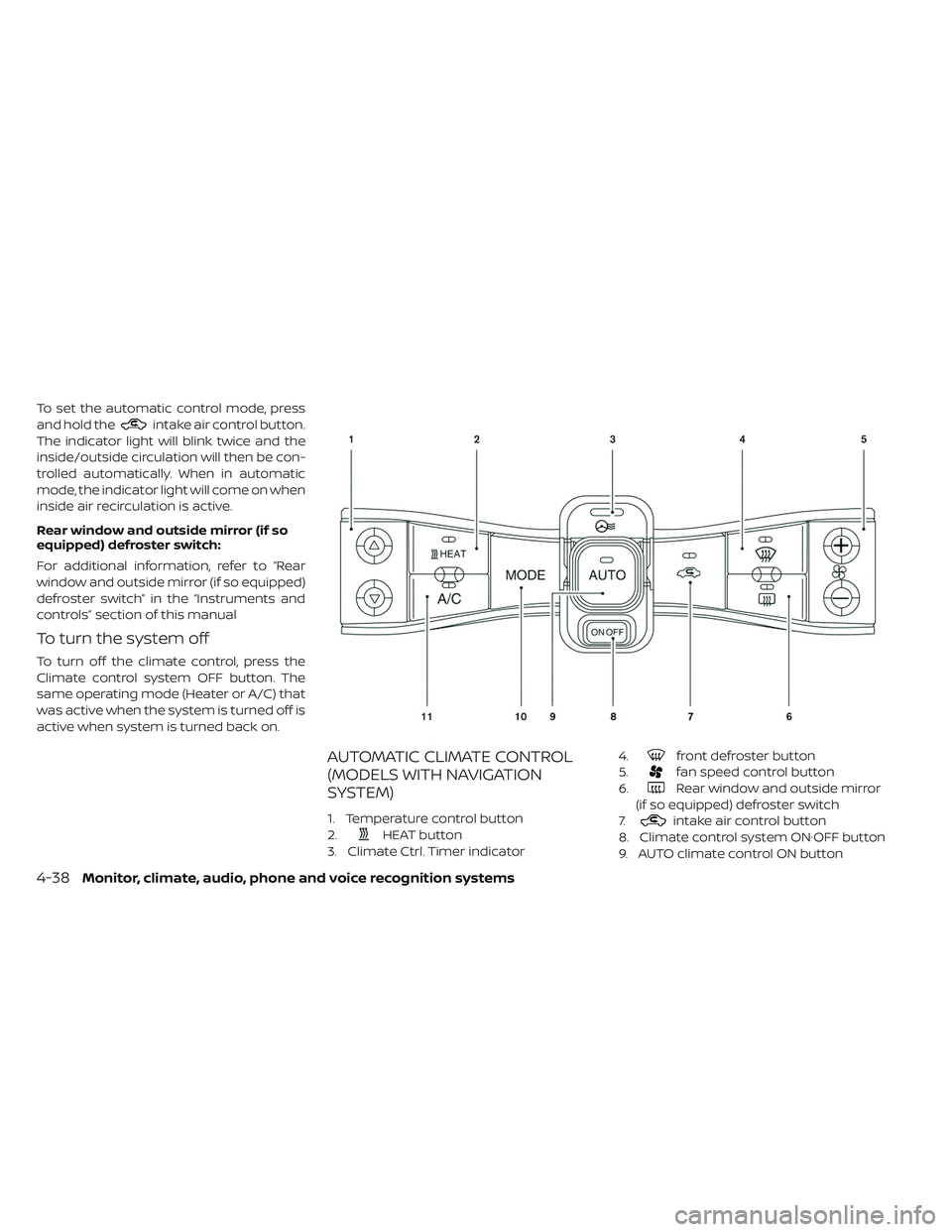
AUTOMATIC CLIMATE CONTROL
(MODELS WITH NAVIGATION
SYSTEM)
1. Temperature control button
2.
HEAT button
3. Climate Ctrl. Timer indicator 4.
front defroster button
5.
fan speed control button
6.
Rear window and outside mirror
(if so equipped) defroster switch
7.
intake air control button
8. Climate control system ON·OFF button
9. AUTO climate control ON button
4-38Monitor, climate, audio, phone and voice recognition systems
Page 318 of 610
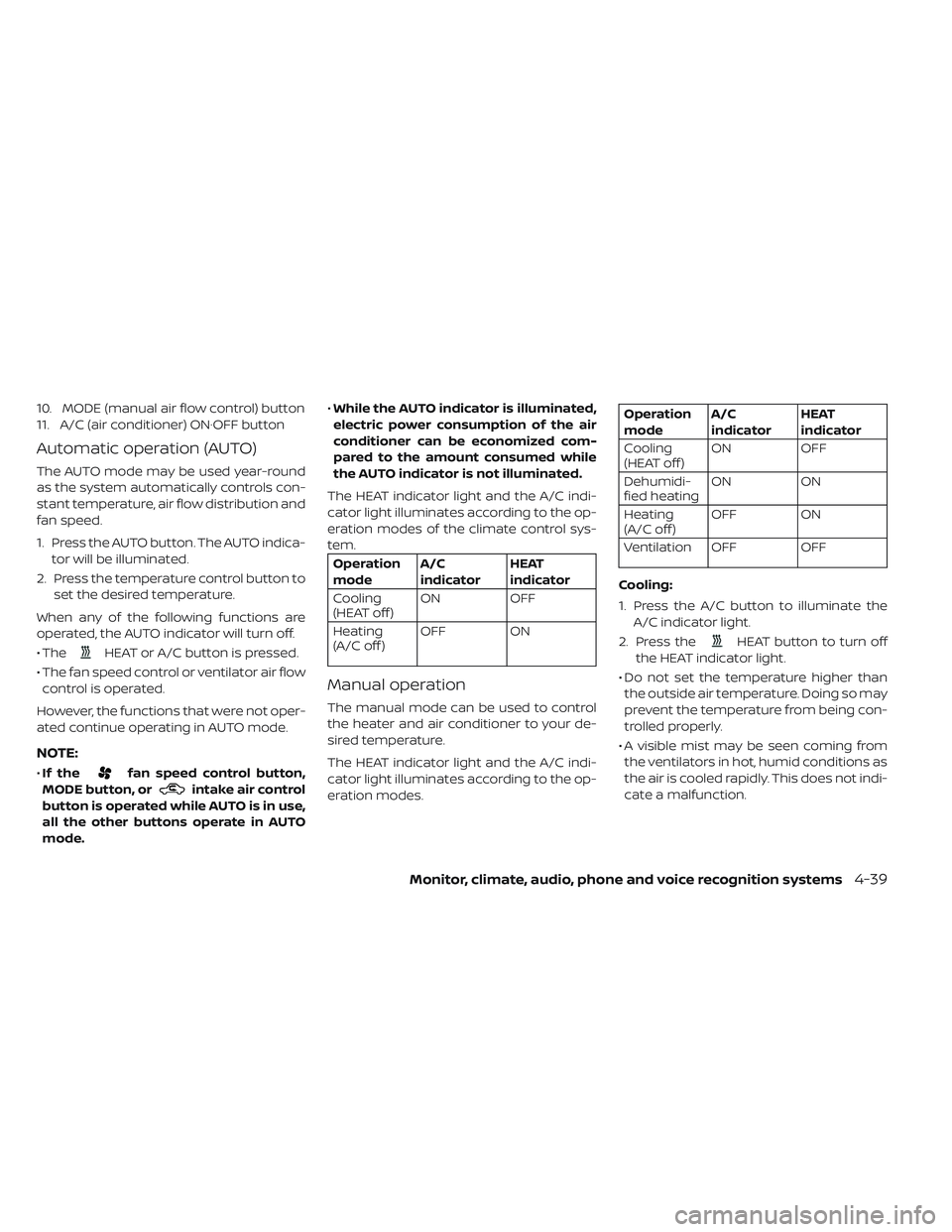
10. MODE (manual air flow control) button
11. A/C (air conditioner) ON·OFF button
Automatic operation (AUTO)
The AUTO mode may be used year-round
as the system automatically controls con-
stant temperature, air flow distribution and
fan speed.
1. Press the AUTO button. The AUTO indica-tor will be illuminated.
2. Press the temperature control button to set the desired temperature.
When any of the following functions are
operated, the AUTO indicator will turn off.
• The
HEAT or A/C button is pressed.
• The fan speed control or ventilator air flow control is operated.
However, the functions that were not oper-
ated continue operating in AUTO mode.
NOTE:
• If thefan speed control button,
MODE button, or
intake air control
button is operated while AUTO is in use,
all the other buttons operate in AUTO
mode. •
While the AUTO indicator is illuminated,
electric power consumption of the air
conditioner can be economized com-
pared to the amount consumed while
the AUTO indicator is not illuminated.
The HEAT indicator light and the A/C indi-
cator light illuminates according to the op-
eration modes of the climate control sys-
tem.
Operation
mode A/C
indicator HEAT
indicator
Cooling
(HEAT off ) ON
OFF
Heating
(A/C off ) OFF ON
Manual operation
The manual mode can be used to control
the heater and air conditioner to your de-
sired temperature.
The HEAT indicator light and the A/C indi-
cator light illuminates according to the op-
eration modes.
Operation
modeA/C
indicator HEAT
indicator
Cooling
(HEAT off ) ON
OFF
Dehumidi-
fied heating ON
ON
Heating
(A/C off ) OFF ON
Ventilation OFF OFF
Cooling:
1. Press the A/C button to illuminate the A/C indicator light.
2. Press the
HEAT button to turn off
the HEAT indicator light.
• Do not set the temperature higher than the outside air temperature. Doing so may
prevent the temperature from being con-
trolled properly.
• A visible mist may be seen coming from the ventilators in hot, humid conditions as
the air is cooled rapidly. This does not indi-
cate a malfunction.
Monitor, climate, audio, phone and voice recognition systems4-39
Page 319 of 610
Dehumidified heating:
1. Press the A/C button to illuminate theA/C indicator light.
2. Press the
HEAT button to illuminate
the HEAT indicator light
NOTE:
Electric power consumption of climate
control increases while A/C button indi-
cator and
HEAT button indicator si-
multaneously illuminate. As a result, the
driving range may be decreased.
Heating (A/C off ):
1. Press the
HEAT button to illuminate
the HEAT indicator light.
2. Press the A/C button to turn off the A/C indicator light.
• Do not set temperature lower than the outside air temperature. Doing so may
prevent the temperature from being con-
trolled properly.
• If the windows fog up, use dehumidified heating instead of the A/C off heating. Ventilation:
Press the
HEAT button and A/C but-
ton if the indicator lights are on so that
both indicator lights turn off.
NOTE:
• The ventilation mode requires a lower
power consumption, so cruising dis-
tance will increase.
• In ventilation mode, temperature is not
indicated on the navigation monitor or
on the air conditioner display.
Dehumidified defrosting/defogging:
Press the
front defroster button (the
indicator light will illuminate).
• To remove moisture or fog on the front window quickly, set the temperature to
the high temperature and the fan speed
to their maximum level.
• Af ter the windshield is cleared, press the
front defroster button again (the in-
dicator light will turn off ).
• When the
front defroster button is
pressed, the air conditioner and heater will
automatically turn on to defog the wind-
shield. The outside air recirculation mode will be selected to improve the defogging
performance.
Fan speed control:
Press the
fan speed control button to
manually control the fan speed.
Press the AUTO button to change the fan
speed to the automatic mode.
Air flow control:
Press the MODE button to change the air
flow mode.
— Air flows from the center and side
ventilators.
—Air flows from the center and side
ventilators and foot outlets.
—Air flows mainly from the foot
outlets.
—Air flows from the defroster out-
lets and foot outlets.
—Air flows from the defroster
vents.
Temperature control:
Press the temperature control buttons to
set the desired temperature.
4-40Monitor, climate, audio, phone and voice recognition systems
Page 320 of 610
Air recirculation:
Press the
intake air control button to
change the air circulation mode. When the
indicator light illuminates, the flowing air is
recirculated inside the vehicle.
When the outside temperature exceeds
70°F (21°C) the air conditioning system may
default to air recirculation mode automati-
cally to reduce overall power consumption.
To exit air recirculation mode, deselect the
air recirculation button (indicator will turn
off ) to enter fresh mode.
Outside air circulation:
Press the
intake air control button to
change the air circulation mode. When the
indicator light does not illuminate, the flow-
ing air is drawn from outside the vehicle.
Automatic air intake control:
In the AUTO mode, the intake air will be
controlled automatically. When the outside
temperature exceeds 70°F (21°C), the air
conditioning system may default to air re-
circulation mode automatically to reduce
overall power consumption. To set the automatic control mode, press
and hold the
intake air control button.
The indicator light will blink twice and the
inside/outside circulation will then be con-
trolled automatically. When in automatic
mode, the indicator light will come on when
inside air recirculation is active.
Rear window and outside mirror (if so
equipped) defroster switch:
For additional information, refer to “Rear
window and outside mirror (if so equipped)
defroster switch” in the “Instruments and
controls” section of this manual
To turn the system off
To turn off the climate control, press the
Climate control system ON·OFF button.
The same operating mode (Heater or A/C)
that was active when the system is turned
off is active when system is turned back on.
CLIMATE CTRL. TIMER
This function pre-heats or pre-cools the
passenger compartment of the vehicle to
the temperature before driving. This helps
reduce power consumption from the Li-ion
battery.
The Climate Ctrl. Timer operates the air con-
ditioner using power from the charger or the
Li-ion battery. While the charging connector
is connected to the vehicle, electric power
from the Li-ion battery is not used.
The Climate Ctrl. Timer function allows two
timer settings.
Once the Climate Ctrl. Timer is set, it will
complete air conditioning by the time that
is set. It is not necessary to set the Climate
Ctrl. Timer every day.
WARNING
Even if the Climate Ctrl. Timer is set, the
temperature in the passenger com-
partment may become high or low if
the system automatically stops. Do not
leave children or adults who would
normally require the support of others
alone in your vehicle. Pets should not
be lef t alone either. On hot, sunny days,
temperatures in a closed vehicle could
quickly become high enough to cause
severe or possibly fatal injuries to
people or animals. Also on cold days,
temperature in a vehicle could become
low enough to cause severe or pos-
sible fatal injuries to people or animals.
Monitor, climate, audio, phone and voice recognition systems4-41
Page 321 of 610
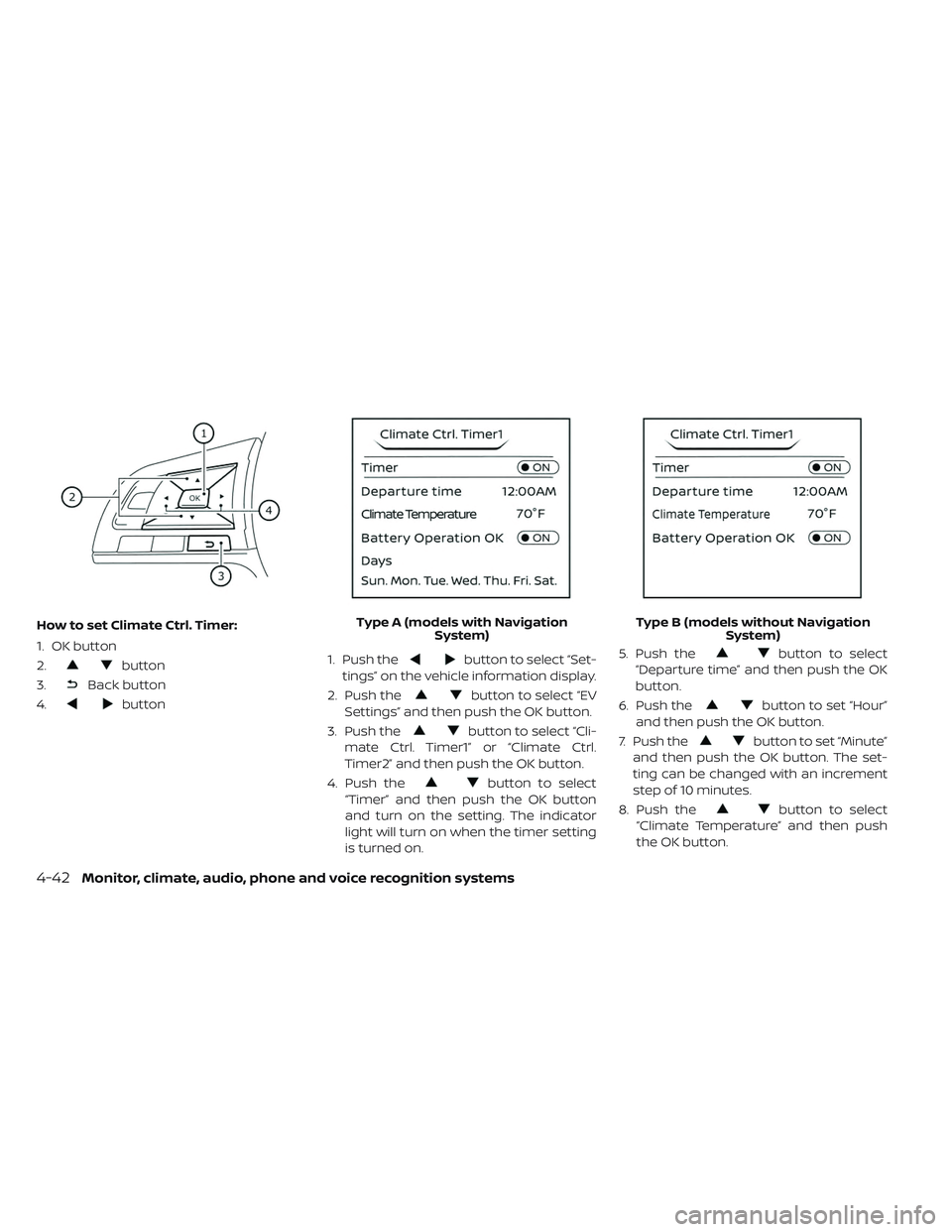
How to set Climate Ctrl. Timer:
1. OK button
2.
button
3.
Back button
4.
button 1. Push the
button to select “Set-
tings” on the vehicle information display.
2. Push the
button to select “EV
Settings” and then push the OK button.
3. Push the
button to select “Cli-
mate Ctrl. Timer1” or “Climate Ctrl.
Timer2” and then push the OK button.
4. Push the
button to select
“Timer” and then push the OK button
and turn on the setting. The indicator
light will turn on when the timer setting
is turned on. 5. Push the
button to select
“Departure time” and then push the OK
button.
6. Push the
button to set “Hour”
and then push the OK button.
7. Push the
button to set “Minute”
and then push the OK button. The set-
ting can be changed with an increment
step of 10 minutes.
8. Push the
button to select
“Climate Temperature” and then push
the OK button.
Type A (models with Navigation
System) Type B (models without Navigation
System)
4-42Monitor, climate, audio, phone and voice recognition systems
Page 322 of 610
9. Push thebutton to set Climate
Temperature and then push the OK
button.
10. * Push the
button to select
"Days" and then push the OK button.
The current day of the week is dis-
played with an underline.
Push the
button to select the
days of the week you wish to activate
the Climate Control system and then
push the OK button. The indicator light
of the selected button will turn on.
11. * Af ter setting the day of the week, push the Back button and return to the pre-
vious screen.
The set day of the week is lit in white.
12. Af ter the setting is complete, place the power switch in the OFF position, and
then connect the charge connector to
the vehicle.
* models with Navigation System Info:
The Climate Ctrl. Timer does not activate if
the charge connector is not connected to
the vehicle. When the “Battery Operation
OK” is turned on and the charging connec-
tor is not connected to the vehicle, the Cli-
mate Ctrl. Timer will activate for 15 minutes.
When the outside temperature is high, the
interior temperature may not reach the set
temperature within the 15 minutes.
Turn "Battery Operation OK" to OFF when it
is not necessary to operate air condition-
ing timer in order to prevent Li-ion battery
from discharging.
For models without Navigation System, the
Climate Ctrl. Timer operates repeatedly ev-
ery day once it is turned on.
Operating tips for using Climate
Ctrl. Timer
• The Climate Ctrl. Timer will only start when
the power switch is in the LOCK/OFF or
ACC position.
• To turn off the Climate Ctrl. Timer function, turn off the “Climate Ctrl. Timer1” and
"Climate Ctrl. Timer2" setting in the video
information display using the
button on the steering wheel. The start
and stop time settings will not be deleted
even if the Climate Ctrl. Timer function is
turned off.
• While the Climate Ctrl. Timer is operating, the Climate Ctrl. Timer indicator and the
charging status indicator lights flash. If the
Climate Ctrl. Timer is set to activate, the
Climate Ctrl. Timer indicator illuminates.*
• If the Climate Ctrl. Timer starts operating while the vehicle is being charged, the
time required for charging will be longer.
• Operating the Climate Ctrl. Timer or re- mote climate control in an environment
where the temperature is low may de-
crease the rate of battery charge.
• Timer setting can also be changed while Climate Ctrl. Timer is operated. When the
power position is switched to OFF, the air
conditioner starts or enters waiting mode
depending on the new timer settings.
• When the difference in temperature be- tween the air conditioner setting tem-
perature and the temperature outside the
vehicle is large, the temperature inside the
vehicle may not be maintained at the set-
ting temperature.
Monitor, climate, audio, phone and voice recognition systems4-43
Page 323 of 610
• The charging status indicator lights illumi-nate in a specific pattern when the Li-ion
battery warmer operates. The charging
status indicator lights use the same pat-
tern to indicate 12–volt battery charging,
Climate Ctrl. Timer operation or Remote
Climate Control operation. The charging
status indicator lights do not change if the
Li-ion battery warmer operates at the
same time as the above features.
•
The temperature in the passenger com-
partment may not be comfortable if enter-
ing the vehicle too soon before or too long
af ter the scheduled time of departure.
• Air conditioning is limited to the capacity of the electric power when the charge
connector is connected. Therefore, the
temperature may not reach the set tem-
perature due to limitations in air condi-
tioning performance, if ambient tempera-
ture is excessively high or low, or if the
charge connector is connected to a 120–
volt plug outlet.
• The Climate Ctrl. Timer operates the cli- mate control function so that a comfort-
able temperature is provided in the pas-
senger compartment at the scheduled time of departure. The climate control is
set to stop at the scheduled time of
departure.
• Depending on the facilities of charging station, there may be time when it is not
available for charging. Confirm the avail-
ability of the charging facility before set-
ting the Climate Ctrl. Timer. Be sure that
the power switch of the charger is turned
on when setting the Climate Ctrl. Timer.
• When the power switch is turned OFF af- ter changing the setting, the new setting
will be applied.
*models with Navigation SystemRemote climate control
This vehicle incorporates a communica-
tion device that is called a TCU (Telematics
Control Unit). The communication connec-
tion between this unit and Nissan Data
Center allows for various remote function
services.
Even when away from the vehicle, climate
control can be started by accessing the
Web Owner Portal using a cellular phone or
a personal computer. When operation is started, or at the set
start time, the Nissan Data Center ac-
cesses the vehicle. When the vehicle re-
ceives a command for remote operation,
the climate control immediately turns ON
and operates for the specified period of
time. Confirmation of the ON/OFF of the
climate control operation can be checked
by accessing the Web Owner Portal, or by
e-mail.
Completing registration for the
NissanConnect® EV and Services is neces-
sary before using the service. For additional
information, refer to the NissanConnect®
Manual (for Leaf ).WARNING
• Radio waves could adversely affect electric medical equipment. For ad-
ditional information, refer to your
electric medical equipment manu-
facturer for the possible effect on
pacemakers before using the re-
mote climate control.
4-44Monitor, climate, audio, phone and voice recognition systems