climate control NISSAN LEAF 2019 Owner´s Manual
[x] Cancel search | Manufacturer: NISSAN, Model Year: 2019, Model line: LEAF, Model: NISSAN LEAF 2019Pages: 610, PDF Size: 7.11 MB
Page 351 of 610
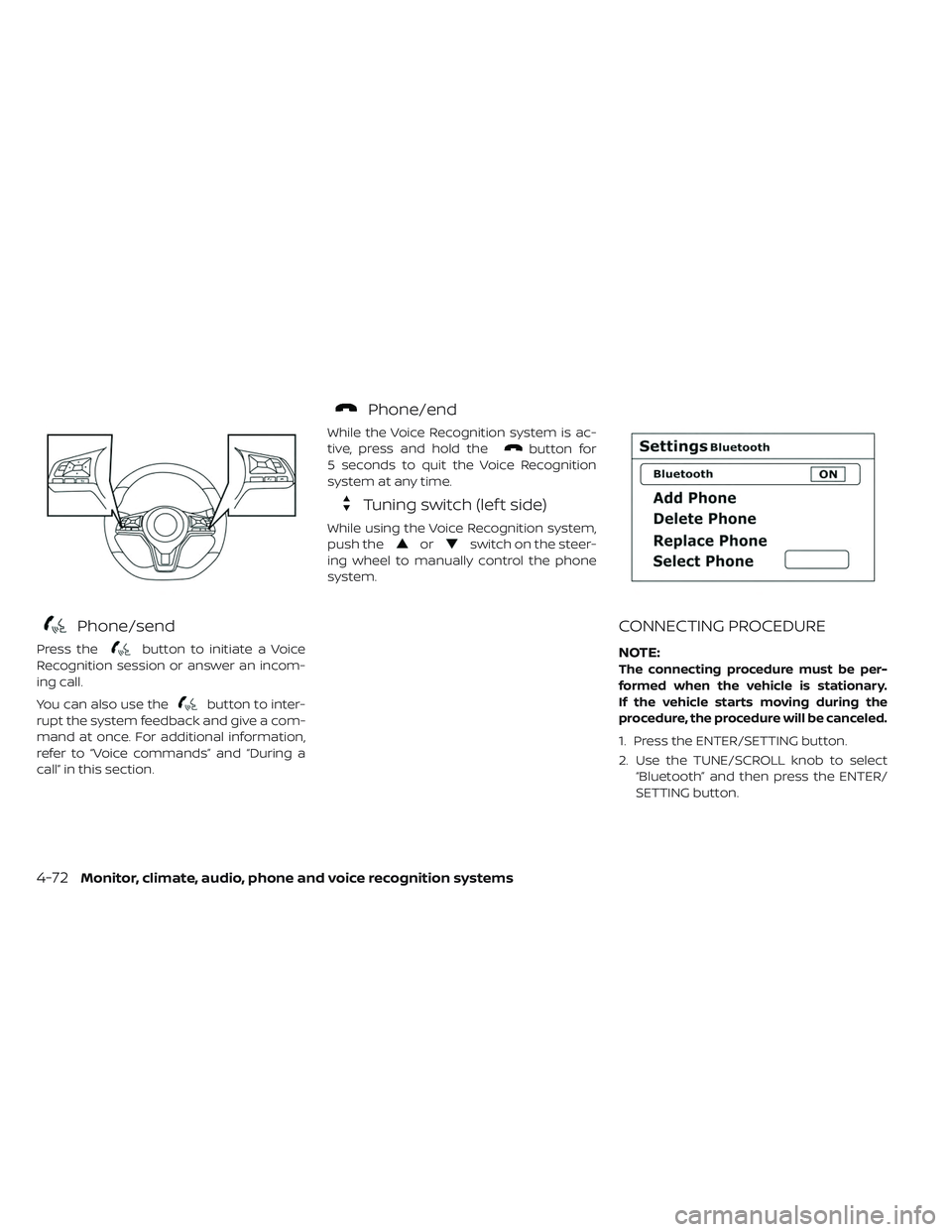
Phone/send
Press thebutton to initiate a Voice
Recognition session or answer an incom-
ing call.
You can also use the
button to inter-
rupt the system feedback and give a com-
mand at once. For additional information,
refer to “Voice commands” and “During a
call” in this section.
Phone/end
While the Voice Recognition system is ac-
tive, press and hold the
button for
5 seconds to quit the Voice Recognition
system at any time.
Tuning switch (lef t side)
While using the Voice Recognition system,
push the
orswitch on the steer-
ing wheel to manually control the phone
system.
CONNECTING PROCEDURE
NOTE:
The connecting procedure must be per-
formed when the vehicle is stationary.
If the vehicle starts moving during the
procedure, the procedure will be canceled.
1. Press the ENTER/SETTING button.
2. Use the TUNE/SCROLL knob to select “Bluetooth” and then press the ENTER/
SETTING button.
4-72Monitor, climate, audio, phone and voice recognition systems
Page 354 of 610
• “Number” — Speak this command toplace a call by inputting numbers.
• For 7- and 10-digit phone numbers, speak the numbers. When finished, say
“Dial” to initiate the call. Say “Correction”
at any time in the process to correct a
misspoken or misinterpreted number.
• For phone numbers with more digits or special characters, say “Special Num-
ber”, then speak the digits. Up to 24 dig-
its can be entered. Available special
characters are “star”, “pound”, “plus” and
“pause”. When finished, say “Dial” to initi-
ate the call. Say “Correction” at any time
in the process to correct a misspoken
or misinterpreted number or character.
• “Redial” — Speak this command to dial the number of the last outgoing call.
The system will display “Redialing
phonebook entry will be displayed if
available, otherwise the number being
redialed will be displayed.
• “Call Back” — Speak this command to dial the number of the last incoming
call. The system will display “Calling
back
available, otherwise the number being
called back will be displayed.
RECEIVING A CALL
When a call is received by the phone con-
nected to the vehicle’s Bluetooth® Hands-
Free Phone System, the call information is
displayed on the control panel display.
Press the
button to accept the call.
Press the
button to reject the call.
DURING A CALL
When a call is active, press thebutton
to access additional options. Speak one of
the following commands.
• “Send” — Speak this command followed by the digits to enter digits during the phone
call.
• “Mute On” or “Mute Off ” — Speak the com- mand to mute or unmute the system.
• “Transfer Call” — Speak this command to transfer the call to the handset. To transfer
the call back from the handset to the
Bluetooth® Hands-Free Phone System,
press the
button and confirm when
prompted. If supported by the phone, the Bluetooth®
Hands-Free Phone System allows for call
waiting functionality. If a call is received
while another call is already active, a mes-
sage will be displayed on the screen. Press
the
button to hold the active call and
switch to the second call. Press the
button to reject the second call.
While the second call is active, pressing the
button will allow the same com-
mands that are available during any calls
as well as two additional commands:
• “Switch Call” — Speak this command to hold the second call and switch back to
the original call.
• “End Other Call” — Speak this command to stay with the second call and end the
original call.
Press the
button to accept the call.
Press the
button to reject the call.
ENDING A CALL
To end an active call, press thebutton.
Monitor, climate, audio, phone and voice recognition systems4-75
Page 357 of 610
• Delete Phone or DeviceSelect to delete a phone from the dis-
played list. The system will ask to confirm
before deleting the phone.
• Replace Phone Select to replace a phone from the dis-
played list. When a selection is made, the
system will ask to confirm before pro-
ceeding. The recorded phonebook for
the phone being deleted will be saved as
long as the new phone’s phonebook is
the same as the old phone’s phonebook.
• Select Phone or Device Select to connect to a previously con-
nected phone from the displayed list.
• Phonebook Download Select to turn on or off the automatic
download of a connected phone’s
phonebook.
• Show Incoming Calls Select “Driver Only” to have incoming call
information displayed only in the vehicle
information display. Select “Both” to have
incoming call information displayed in
both the vehicle information display and
the center display screen. • Text Message (if so equipped)
Select to turn text message feature in
vehicle on or off.
• New Text Sound (if so equipped) Select to adjust the volume of the sound
that plays when a new text is received by
a phone connected to the Bluetooth®
Hands-Free Phone System. The setting
all the way to the lef t indicates that the
new text sound will be muted.
• Show Incoming Text (if so equipped) Select “Driver Only” to have incoming
text messages displayed only in the ve-
hicle information display. Select “Both” to
have incoming text messages displayed
in both the vehicle information display
and the center display screen. Select
“None” to have no display of incoming
text messages.
• Auto Reply (if so equipped) Select to turn on or off the Auto Reply
function. When enabled, the vehicle will
automatically send a predefined text
message to the sender when a text
message is received while driving. • Auto Reply Message
Select to choose the message that is
sent when the Auto Reply function is en-
abled.
• Vehicle Signature On/Off Select to choose whether or not the ve-
hicle signature is added to outgoing text
messages from the vehicle. This mes-
sage cannot be changed or customized.
MANUAL CONTROL
While using the Voice Recognition system,
it is possible to select menu options by
using the steering wheel controls instead
of speaking voice commands. This can be
especially helpful if the noise of driving
makes it difficult for Voice Recognition sys-
tem to accurately interpret commands.
The manual control mode does not allow
dialing a phone number by digits. The user
may select an entry from the Phonebook
or Recent Calls lists. To re-activate Voice
Recognition, exit the manual control mode
by pressing and holding the PHONE/END
button. At that time, pressing the
PHONE/SEND
button will start the
Hands Free Phone System.
4-78Monitor, climate, audio, phone and voice recognition systems
Page 513 of 610
The hill start assist system automatically
keeps the brakes applied to help prevent
the vehicle from rolling backwards in the
time it takes the driver to release the brake
pedal and apply the accelerator when the
vehicle is stopped on a hill.
Hill start assist will operate automatically
under the following conditions:
• The shif t lever is placed in the D (Drive), Bmode, or R (Reverse) position.
• The vehicle is stopped completely on a hill by applying the brake.
The maximum holding time is 2 seconds.
Af ter 2 seconds the vehicle will begin to roll
back and hill start assist will stop operating
completely.
Hill start assist will not operate when the
shif t lever is placed in the N (Neutral) or P
(Park) position or on a flat and level road.
CAUTION
To prevent damage to the Li-ion bat-
tery: Do not store the vehicle in tem-
peratures below -13°F (-25°C) for over
seven days. If the outside temperature
is -13°F (-25°C) or less, the Li-ion battery
may freeze and it cannot be charged or
provide power to run the vehicle. Move
the vehicle to a warm location.
NOTE:
• Connect the charger to the vehicle and
place the power switch in the OFF posi-
tion when parking the vehicle if tem-
peratures may go below -4°F (-20°C). For
models with 40 kWh battery model, this
provides external power to the Li-ion
battery warmer (if so equipped) when it
operates and does not discharge the Li-
ion battery. Vehicle driving range is re-
duced if the Li-ion battery warmer (if so
equipped) operates (Li-ion battery tem-
perature approximately -4°F (-20°C) or
colder) while driving the vehicle. You
may need to charge the Li-ion battery
sooner than in warmer temperatures. •
The Li-ion battery requires more time to
charge when the Li-ion battery warmer
(if so equipped) operates.
•
The predicted charging time displayed
on the meter and navigation system (if so
equipped) increases when the Li-ion bat-
tery warmer (if so equipped) operates.
• Vehicle range may be substantially re-
duced in extremely cold conditions (for
example under -4°F (-20°C)).
• Using the climate control system to
heat the cabin when outside tempera-
ture is below 32°F (0°C) uses more elec-
tricity and affects vehicle range more
than when using the heater when the
temperature is above 32°F (0°C).
• Climate control performance is reduced
when using the Climate Ctrl. Timer or
Remote Climate Control while the Li-ion
battery warmer (if so equipped) oper-
ates (for models with 40 kWh battery
model). Set only the charging timer [End
Time] when charging in cold weather.
The vehicle automatically determines
when to start charging to fully charge
the Li-ion battery, even if the Li-ion bat-
tery warmer operates. Charging ends
before the set end time if the Li-ion bat-
tery is fully charged.
COLD WEATHER DRIVING
5-154Starting and driving
Page 592 of 610
Do not tow a trailer with your vehicle.Towing your vehicle with all four wheels on
the ground is sometimes called flat towing.
This method is typically used when towing
a vehicle behind a recreational vehicle,
such as a motor home.
CAUTION
• Failure to follow these guidelines can result in severe reduction gear
damage.
• DO NOT tow this vehicle with all four wheels on the ground (flat towing).
• For emergency towing procedures refer to “Towing your vehicle” in the
“In case of emergency ” section of
this manual. DOT (Department Of Transportation) Qual-
ity Grades: All passenger car tires must
conform to federal safety requirements in
addition to these grades.
Quality grades can be found where appli-
cable on the tire sidewall between tread
shoulder and maximum section width. For
example:
Treadwear 200 Traction AA Temperature A
TREADWEAR
The treadwear grade is a comparative rat-
ing based on the wear rate of the tire when
tested under controlled conditions on a
specified government test course. For ex-
ample, a tire graded 150 would wear one
and one-half (1 1/2) times as well on the
government course as a tire graded 100.
The relative performance of tires depends
upon actual conditions of their use how-
ever, and may depart significantly from the
norm due to variations in driving habits,
service practices and differences in road
characteristics and climate.
TOWING A TRAILER
FLAT TOWINGUNIFORM TIRE QUALITY GRADING
Technical and consumer information9-13
Page 596 of 610
![NISSAN LEAF 2019 Owner´s Manual of your vehicle data. See Owner's Manual or
NISSAN Owner's portal webpage for terms
and details.” If you touch [OK], your vehicle will
transmit data as designed in connection
with the vehicl](/img/5/40306/w960_40306-595.png "NISSAN LEAF 2019 Owner´s Manual of your vehicle data. See Owner's Manual or
NISSAN Owner's portal webpage for terms
and details.” If you touch [OK], your vehicle will
transmit data as designed in connection
with the vehicl")
of your vehicle data. See Owner's Manual or
NISSAN Owner's portal webpage for terms
and details.” If you touch [OK], your vehicle will
transmit data as designed in connection
with the vehicle telematics system. If you
touch [Decline] your vehicle will not transmit
data. However, the telematics features refer-
enced above, and perhaps others, will not be
available to you. The vehicle’s static naviga-
tion system will remain operational, and you
will be able to access your radio and climate
controls.
Telematics features are dependent on cel-
lular data transmission. Some areas may
have limited or no cellular connectivity, re-
sulting in a loss or interruption of data
transmission and, as a result, certain fea-
tures may be temporarily unavailable. Even
if areas with good signal reception, cellular
connectivity can be adversely affected by
things such as tall buildings, apartments,
tunnels, underground parking, mountain-
ous areas, etc. Even if the signal strength
bar of the in-vehicle data communication
module indicates good reception, connec-
tivity may be disrupted. This does not indi-
cate a malfunction. Operate the system
again af ter a few minutes to restoreconnectivity.NissanConnect® EV & Services
or NissanConnect® Services telematics
features are offered as a convenience to
the vehicle owner. NISSAN is not respon-
sible for, and owner assumes all risk of,
interruptions in service or errors based
on incomplete or inaccurate data.
NissanConnect® EV & Services or
NissanConnect® Services communica-
tions may be received at a verified e-mail
address or by SMS/text messaging-
enabled mobile phone. Standard text rates
and/or data usage may apply depending
on your carrier.
If your vehicle’s telematics account is ac-
tive, and you are not the original owner,
please contact NISSAN at the website or
phone number above as soon as possible
to update the telematics enrollment infor-
mation. Upon sale of the vehicle, please
contact NISSAN at the website or phone
number above so that NISSAN’s records
may be updated. NissanConnect® EV &
Services or NissanConnect® Services sub-
scription services will automatically termi-
nate at the end of the initial free term if you
do not wish to renew your subscription
agreement at the prices then in effect.A. INTRODUCTION
This product Telematic Control Unit Gen2K
incorporates the following sof tware:
1. the sof tware developed by, or developed
for, Ficosa International, S.A. (“Ficosa”),
2. the sof tware owned by third party and licensed to Ficosa,
3. the sof tware licensed under the GNU GENERAL PUBLIC LICENSE, Version 2
(“GPL”),
4. the sof tware licensed under the GNU LIBRARY GENERAL PUBLIC LICENSE, Ver-
sion 2.0 or the GNU LESSER GENERAL
PUBLIC LICENSE, Version 2.1 (collectively
“LGPL”), the Mozilla Public license v2
(“MPL”), the GPL-2.0 license with-
OpenSSL-exception (“GPLOpenSSL”) and
GNU GENERAL PUBLIC LICENSE, Version
3 with GCC exception (together with the
GPL sof tware, jointly “Copylef t Sof t-
ware”), and/or
5.
open sourced sof tware licensed under
terms and conditions other than Copylef t
Sof tware.
TELEMATIC CONTROL UNIT GEN2K
Technical and consumer information9-17
Page 604 of 610
10 Index
1
12-volt battery.................8-12
A
ABS (Anti-lock Braking System) ......5-148
ADDITIONAL DATA RECORDING (on vehicles
equipped with optional ProPILOT Assist) . .9-20
Advanced air bag system..........1-49
Air bag system ...........1-49, 1-52, 1-58
Air bag warning labels ............1-61
Air bag warning light ..........1-61, 2-24
Air conditioner ............4-31, 9-3, 9-9
Air conditioner specification label ......9-9
Air conditioning system refrigerant and
lubricant recommendations .........9-3
Alarm, How to stop alarm
(refer to, vehicle security system) ......2-49
Alcohol, drugs and driving ..........5-9
Antenna .....................4-67
Anti-lock Braking System (ABS) ......5-148
Anti-lock braking system (ABS) warning
light .......................2-18
Anti-lock Braking System (ABS) warning
light .......................2-18
Antifreeze ...................5-155
Appearance care ..............7-2,7-4 At home af ter driving
............EV-22
Audible reminders...............2-27
Audio System (models without Navigation
System) .....................4-46
Autolight switch ................2-54
Autolight system ...............2-54
Automatic ....................3-6
Automatic climate control
(models with Navigation System) .....4-38
Automatic climate control
(models without Navigation System) . . .4-35
Automatic door locks .............3-6
Automatic Emergency Braking (AEB) . . .5-112
Automatic Emergency Braking (AEB)
with Pedestrian Detection .........5-119
Avoiding collision and rollover ........5-7
B
Battery.........EV-2, 2-8, 2-57, 8-12, 8-22
Battery saver system.............2-57
Before driving your vehicle
(models with navigation system) .....EV-15
Before starting system ............5-14
Blind Spot Warning (BSW) ..........5-37
Bluetooth® hands-free phone system
without navigation system .........4-68
Bluetooth® streaming audio ........4-65Booster seats
.................1-39
Brake.....2-19, 2-20, 5-19, 5-20, 5-146, 5-148, 8-10, 8-17
Brake fluid ...................8-10
Brake precautions ..............5-146
Brake system .................5-146
BRAKE system warning light (yellow) . . . .2-19
BRAKE warning light (red) ..........2-20
Brakes......................8-17
Bulb replacement ...........8-25, 8-26
C
Car phone or CB radio ............4-68
Care of wheels .................7-3
Ceiling light ...................2-74
Changing coolant ...............8-9
Charge .....................2-63
Charge port lid .................3-20
Charge port lid switch ............2-63
Charging . . .CH-2, CH-10, CH-11, CH-17, CH-25, CH-35, CH-38, CH-51, 3-20, 9-4
Charging information .............9-21
Charging methods .............CH-44
Charging related indicator light ......CH-51
Charging related remote function . . . .CH-50
Charging status indicator light ......CH-51
Charging the Li-ion battery ........EV-12
Page 605 of 610
Charging troubleshooting guide.....CH-57
Chassis control ................5-152
Checking ..................2-17, 8-9
Checking bulbs .................2-17
Checking coolant level .............8-9
Child restraints ...........1-21, 1-25, 1-39
Child safety ....................1-18
Child safety rear door lock ...........3-6
Child seat belts .................1-18
Circuit breaker, Fusible link ..........8-20
Cleaning ......................7-3
Cleaning aluminum alloy wheels .......7-3
Cleaning exterior and interior .......7-2,7-4
Climate control .................4-46
Climate control operation ...........4-31
Climate control service ............4-46
Climate control system ............4-31
Climate control system refrigerant and
lubricant recommendations .........4-46
Climate Ctrl. Timer ...............4-41
Clock .......................2-13
Clock setting (models without Navigation
System) .....................4-56
Cold tire pressures ...............9-23
Cold weather driving .............5-154
Console box ...................2-67
coolant ......................8-8
Coolant ....................8-9, 9-2
Cooling system .................8-8
Corrosion protection ..............7-7
Cruise control ..................5-54 Cup holders
...................2-68
D
Defroster switch, Rear window and outside
mirror defroster switch ............2-53
Dimensions and weights ............9-6
Display, vehicle information .........2-28
Door locks ..................3-4, 3-6
Doors .......................3-4
Driving ................5-4, 5-15, 5-154
Driving range ..................2-10
Driving the vehicle ..............EV-18
Driving vehicle ..................5-15
E
e-Pedal......................2-14
e-Pedal system .................5-22
ECO........................2-60
ECO drive report ................5-143
ECO mode ....................2-14
ECO Mode ...................5-142
ECO switch ...................2-60
Efficient use of your vehicle ........EV-23
Electric shif t control system .........5-15
Electronic parking brake ...........5-20
Emergency charge .....CH-11, CH-17, CH-25
Emergency EV (Electric Vehicle)
shut off ...................5-12, 6-3 Emergency shutoff system
.........EV-10
Emission control information label ......9-8
EV Characteristics ..............EV-11
EV system ....................EV-2
EV unique information ............EV-25
Event Data Recorder (EDR) ..........9-19
EVSE (Electric Vehicle Supply Equipment) ....
CH-11, CH-17, CH-25
Exterior appearance care ...........7-2
F
F.M.V.S.S./C.M.V.S.S. certification label .....9-8
Flashers (Refer to hazard warning flasher
switch) .......................6-2
Flat tire ......................6-3
Flat towing ....................9-13
Floor mat cleaning ...............7-5
Fluid ................8-8, 8-10, 8-11, 9-2
FM/AM/SAT Radio with Compact Disc (CD)
Player.......................4-55
Fog light bulb replacement .........8-26
Fog light switch .................2-59
Fog lights ....................8-26
For Intelligent Key system ...........3-6
Front passenger air bag and status light. . .1-52
Front-seat mounted side-impact
supplemental air bag system ........1-58
Fuses .......................8-18
Fusible links ...................8-20
10-2Index
Page 608 of 610
Rear window and outside mirror defroster
switch......................2-53
Rear window wiper and washer switch . .2-52
Rear window wiper and washer switch . .2-52
Rear window wiper blade ...........8-17
RearView Monitor ................4-4
Recommended fluids/lubricants and
capacities .....................9-2
Reduction gear fluid ..............8-10
Remote charge ...............CH-50
Remote climate control ............4-44
Remote keyless entry function,
For Intelligent Key system ...........3-14
Remote keyless operation ..........3-14
Repairing flat tire.................6-4
Repairing tire ...................6-6
Replacement ..................8-25
Reporting safety defects ...........9-14
Road accident precautions .........EV-10
Roadside assistance program ........6-2
Rollover......................5-7
Roof-mounted curtain side-impact
supplemental air bag system ........1-58
S
Safety....................1-18, 9-14
Scene guide......EV-12, EV-15, EV-17, EV-18,
EV-21, EV-22
Seat belt cleaning ................7-7 Seat belt extenders
...............1-17
Seat belt hook ..................1-17
Seat belt maintenance .............1-18
Seat belt usage .................1-11
Seat belt warning light ............2-23
Seat belt(s) . . .1-11, 1-13, 1-14, 1-16, 1-17, 1-18, 1-19, 1-20, 1-60, 2-23, 7-7
Seatbelts.....................1-11
Seat belts with pretensioners ........1-60
Seat(s), Seats ................1-2, 2-60
Security system ................2-48
Security system (NISSAN Vehicle Immobilizer
System), EV system start ........2-49, 5-13
Servicing climate control ...........4-46
Shif ting ......................5-15
Shoulder belt height adjustment .......1-17
Shoulder belt height adjustment,
Forfrontseats..................1-17
Small children ..................1-19
Specifications ..................9-4
Speedometer ...................2-7
Starting .............5-4, 5-14, 6-10, 6-14
Starting your vehicle .............EV-17
Status light, Front passenger air bag . . . .1-52
Steering ..............2-62, 3-23, 5-146
Steering wheel switch for audio control . .4-66
Stopping the vehicle ..............6-5
Storage .....................2-66
Stowing golf bags ...............2-70
Sun visors ....................3-23
Supplemental air bag warning labels . . . .1-61Supplemental air bag warning light. .1-61, 2-24
Supplemental restraint system
.......1-43
Switch . . . .2-53, 2-54, 2-59, 2-60, 2-63, 3-5, 6-2
T
Telematic Control Unit Gen2K ........9-17
Telematics overview ..............9-15
Temperature ...................2-8
Tether strap child restraints .........1-25
Thef t (NISSAN Vehicle Immobilizer System),
traction motor start ...........2-49, 5-13
Three-point type ................1-14
Tilt steering column ..............3-23
Tilting steering column ............3-23
Tire........................2-21
Tire and Loading information label ......9-9
Tire and Loading Information label .....8-32
Tire chains ....................8-37
Tire dressing ...................7-4
Tire pressure ..................8-33
Tire pressure monitoring system (TPMS) . .6-3
Tire Pressure Monitoring System (TPMS) . .5-4
Tire rotation ...................8-38
Tires. . .5-4, 6-3, 7-4, 8-30, 8-32, 8-33, 8-36, 8-37, 8-38, 9-5, 9-9, 9-13
Tonneau cover .................2-69
Top........................1-25
Top tether strap .................1-25
Tow truck towing ................6-14
Index10-5