power steering NISSAN LEAF 2020 Owner´s Manual
[x] Cancel search | Manufacturer: NISSAN, Model Year: 2020, Model line: LEAF, Model: NISSAN LEAF 2020Pages: 596, PDF Size: 4.33 MB
Page 187 of 596
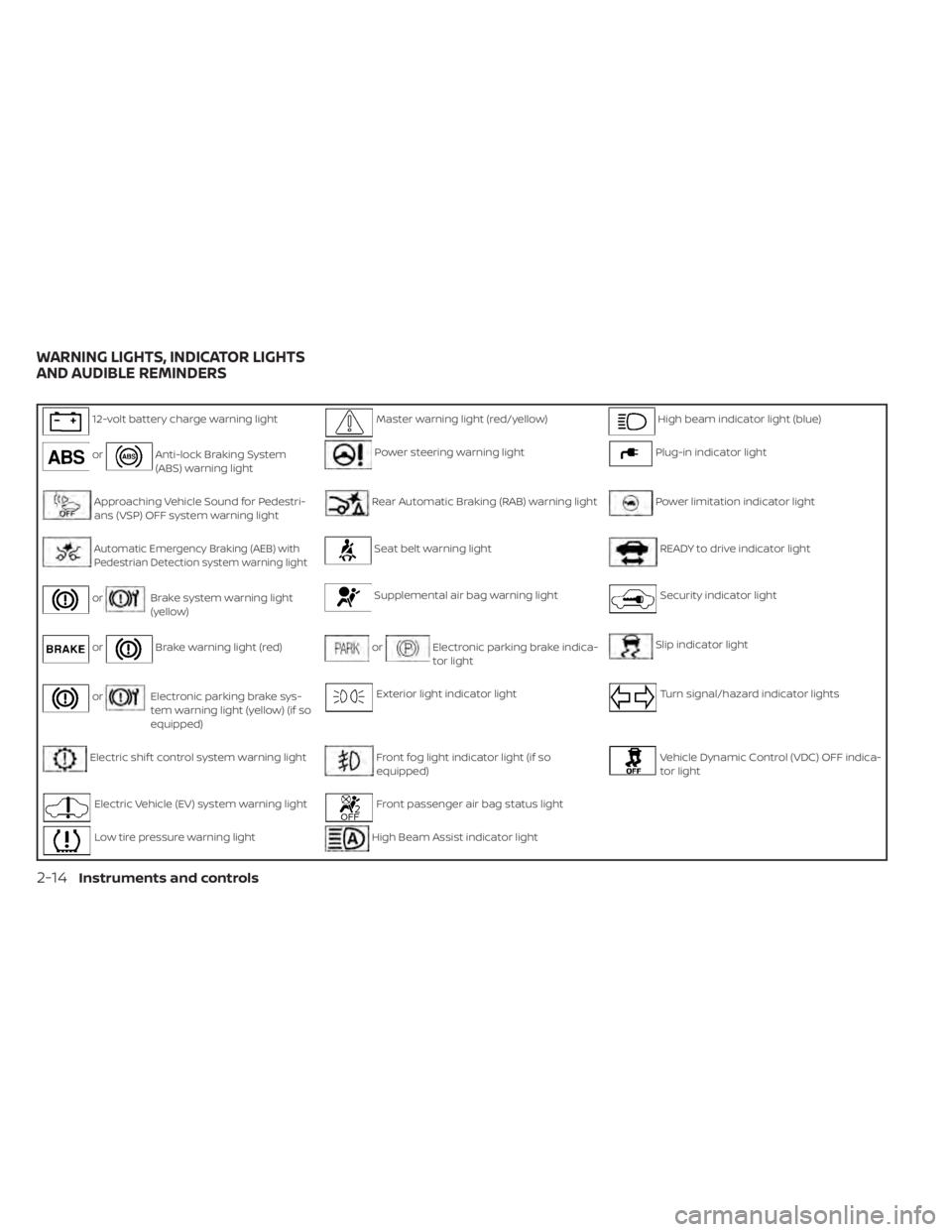
12-volt battery charge warning lightMaster warning light (red/yellow)High beam indicator light (blue)
orAnti-lock Braking System
(ABS) warning lightPower steering warning lightPlug-in indicator light
Approaching Vehicle Sound for Pedestri-
ans (VSP) OFF system warning lightRear Automatic Braking (RAB) warning lightPower limitation indicator light
Automatic Emergency Braking (AEB) withPedestrian Detection system warning lightSeat belt warning lightREADY to drive indicator light
orBrake system warning light
(yellow)Supplemental air bag warning lightSecurity indicator light
orBrake warning light (red)orElectronic parking brake indica-
tor lightSlip indicator light
orElectronic parking brake sys-
tem warning light (yellow) (if so
equipped)Exterior light indicator lightTurn signal/hazard indicator lights
Electric shif t control system warning lightFront fog light indicator light (if so
equipped)Vehicle Dynamic Control (VDC) OFF indica-
tor light
Electric Vehicle (EV) system warning lightFront passenger air bag status light
Low tire pressure warning lightHigh Beam Assist indicator light
WARNING LIGHTS, INDICATOR LIGHTS
AND AUDIBLE REMINDERS
2-14Instruments and controls
Page 193 of 596
WARNING
• Radio waves could adversely affect
electric medical equipment. Those
who use a pacemaker should contact
the electric medical equipment
manufacturer for the possible influ-
ences before use.
• If the light does not illuminate when
the power switch is placed in the ON
position, have the vehicle checked. It
is recommended that you visit a
NISSAN certified LEAF dealer as soon
as possible for this service.
• If the light illuminates while driving,
avoid sudden steering maneuvers or
abrupt braking, reduce vehicle
speed, pull off the road to a safe loca-
tion and stop the vehicle as soon as
possible. Driving with under-inflated
tires may permanently damage the
tires and increase the likelihood of
tire failure. Serious vehicle damage
could occur and may lead to an acci-
dent and could result in serious per-
sonal injury or death. Check the tire
pressure for all four tires. Adjust the
tire pressure to the recommended
COLD tire pressure shown on the Tire and Loading Information label to
turn the low tire pressure warning
light OFF. If the light still illuminates
while driving af ter adjusting the tire
pressure, a tire may be flat or the
TPMS may be malfunctioning. If you
have a flat tire, replace it with a re-
placement tire as soon as possible. If
no tire is flat and all tires are properly
inflated, have the vehicle checked. It
is recommended that you visit a
NISSAN certified LEAF dealer for this
service.
• When replacing a wheel without the
TPMS such as a spare tire, the TPMS
will not function and the low tire
pressure warning light will flash for
approximately 1 minute. The light will
remain on af ter 1 minute. Have the
system checked. It is recommended
that you visit a NISSAN certified LEAF
dealer as soon as possible for tire re-
placement and/or system resetting.
• Replacing tires with those not origi-
nally specified by NISSAN could af-
fect the proper operation of the
TPMS.CAUTION
• The TPMS is not a substitute for the
regular tire pressure check. Be sure
to check the tire pressure regularly.
• If the vehicle is being driven at
speeds of less than 16 mph (25 km/h),
the TPMS may not operate correctly.
• Be sure to install the specified size of
tires to the four wheels correctly.
Master warning light
(red/yellow)
There are two types of master warning
lights: yellow and red. These lights illumi-
nate if any warning lights or indicator lights
are illuminated or if various vehicle infor-
mation warnings appear in the vehicle in-
formation display.
Yellow master warning light
This light illuminates when a yellow warn-
ing light within the vehicle information dis-
play is illuminated or when a message is
displayed on the vehicle information dis-
play.
2-20Instruments and controls
Page 194 of 596
Red master warning light
This light illuminates when a red warning
light within the vehicle information display
is illuminated or when a warning is dis-
played on the vehicle information display.
Power steering
warning light
When the power switch is in the ON posi-
tion, the electric power steering warning
light illuminates and turns off when the
power switch is placed in the READY to
drive position. This indicates the electric
power steering system is operational.
If the electric power steering warning light
illuminates while the READY to drive indica-
tor light is ON, it may indicate the electric
power steering system is not functioning
properly and may need servicing. Have the
electric power steering system checked. It
is recommended that you visit a NISSAN
certified LEAF dealer for this service.
When the electric power steering warning
light illuminates while the READY to drive
indicator is ON, the power assist to the
steering will cease operation but you will
still have control of the vehicle. At this time,
greater steering efforts are required to op-erate the steering wheel, especially in
sharp turns and at low speeds.
For additional information, refer to “Power
steering system” in the “Starting and driv-
ing” section of this manual.
Rear Automatic Braking
(RAB) warning light
This light comes on when the power switch
is placed in the ON position. It turns off af ter
the EV system is started.
This light illuminates when the RAB system
is turned off in the vehicle information dis-
play.
If the light illuminates when the RAB sys-
tem is on, it may indicate that the system is
unavailable. For additional information, re-
fer to “Rear Automatic Braking (RAB)” in the
“Starting and driving” section of this
manual.
Seat belt
warning light
The light and chime remind you to fasten
your seat belts. The light illuminates when-
ever the power switch is placed in the ON
position, and will remain illuminated until
the driver’s seat belt is fastened. At thesame time, the chime will sound for ap-
proximately 6 seconds unless the driver’s
seat belt is securely fastened.
The seat belt warning light for the front
passenger will illuminate if the seat belt is
not fastened when the front passenger’s
seat is occupied. The front passenger seat
belt warning light does not activate until 5
seconds af ter the power switch is in the ON
position.
For additional information, refer to “Seat
belts” in the “Safety — Seats, seat belts and
supplemental restraint system” section of
this manual for precautions on seat belt
usage.
Supplemental air bag
warning light
Af ter turning the power switch to the ON
position, the supplemental air bag warning
light will illuminate. The supplemental air
bag warning light will turn off af ter about 7
seconds if the supplemental front air bag
and supplemental side air bag, curtain
side-impact air bag systems and/or pre-
tensioner seat belt are operational.
If any of the following conditions occur, the
front air bag, side air bag, curtain air bag
and pretensioner systems need servicing
Instruments and controls2-21
Page 207 of 596

1. Push brake and power switch to drive
2. No Key Detected
3. Key Battery Low
4. EV system operation for discharged In-telligent Key system indicator
5. Door open
6. Low battery charge indicator
7. Driver alert
8. Low outside air temperature
9. Low Washer Fluid (if so equipped)
10. Reminder Turn OFF Headlights
11. Tire Pressure Low — Add Air
12. Cruise control indicator (if so equipped)
13. Intelligent Cruise Control (ICC) indica- tors (if so equipped)
14. Shif t to Park
15. Key System Error: See Owner’s Manual
16. Release Parking Brake
17. ProPILOT Assist (if so equipped)/ Intelligent Lane Intervention (I-LI)/
Intelligent Blind Spot Intervention (I-BSI)
indicator 18. Not Available Seat Belt Not Fastened (if
so equipped)
19. Malfunction: See Owner’s Manual
20. Indicators for maintenance
21. Steering Assist indicator (if so equipped)
22. Steering Assist warning (if so equipped)
23. Not Available Front Radar Blocked
24. Unavailable Side Radar Obstruction
25. Not Available Visibility is Impaired (if so equipped)
26. Not Available Bad Weather (if so equipped)
27. Driver Attention Alert Take a Break? (if so equipped)
28. Driver Attention Alert System Fault (if so equipped)
29. Unavailable High Cabin Temperature
30. Not Available Parking Brake On (if so equipped)
31. Not Available Poor Road Conditions (if so equipped)
32. Currently not available (if so equipped) 33. Not Available System Malfunction
34. Press Brake Pedal (if so equipped)
35. Lane Departure Warning (LDW)
indicator
36. Vehicle ahead detection indicator
37. Shipping Mode On Push Storage Fuse
38. Blind Spot Warning (BSW) indicator
39. Rear Automatic Braking (RAB) system warning indicator
40. Headlight System Error: See Owner’s Manual (if so equipped)
41. When Parked Apply Parking Brake
42. T/M system malfunction Visit dealer
43. Check position of shif t lever
44. Chassis Control System Error: See Owner’s Manual
45. Press brake pedal to operate e-Pedal switch
46. Rear Door Alert is activated
47. Check Rear Seat For All Articles
48. e-Pedal system failure! Press brake pedal to slow or stop (if so equipped)
49. Parking Sensor
2-34Instruments and controls
Page 214 of 596
Rear Automatic Braking (RAB)
system warning indicator
This indicator illuminates to indicate the
status of the Rear Automatic Braking (RAB)
system.
For additional information, refer to “Rear
Automatic Braking (RAB)” in the “Starting
and driving” section of this manual.
Headlight System Error: See
Owner’s Manual (if so equipped)
This warning appears when the LED head-
lights are not functioning properly.
If this warning appears, have your system
checked. It is recommended that you visit a
NISSAN certified LEAF dealer for this ser-
vice.
When Parked Apply Parking Brake
This warning appears if there is a malfunc-
tion in the electric shif t control system. This
warning appears when the parking brake
is not applied, even af ter the vehicle has
been parked. The master warning light
(red) also illuminates and the chime
sounds.
If the power switch cannot be placed in the
OFF position, apply the parking brake andthen place the power switch in the OFF
position. The warning turns off and the
chime stops.
If this warning appears, have your system
checked. It is recommended that you visit a
NISSAN certified LEAF dealer for this ser-
vice.
T/M system malfunction Visit
dealer
This warning appears if there is a malfunc-
tion in the electric shif t control system but
operation of the electric shif t control is still
possible. The master warning light (yellow)
also illuminates and the chime sounds.
When this occurs, check the shif t position
indicator by the shif t lever or in the vehicle
information display to make sure that
shif ting has been performed properly. It is
recommended that you contact a NISSAN
certified LEAF dealer as soon as possible.
Check position of shif t lever
This warning appears if the system cannot
detect the shif t position. Make sure the ve-
hicle is placed in a position properly.
The master warning light (yellow) also illu-
minates and the chime sounds. Check the
shif t position of the vehicle.
Chassis Control System Error: See
Owner’s Manual
This warning appears if the chassis control
is not functioning properly. Have the sys-
tem checked. It is recommended that you
visit a NISSAN certified LEAF dealer for this
service. For additional information, refer to
“Chassis control” in the “Starting and driv-
ing” section of this manual.
Press brake pedal to operate
e-Pedal switch
This indicator appears when trying to turn
the e-Pedal off without depressing the
brake pedal when the vehicle is stopped.
Depress the brake pedal before pulling the
e-Pedal switch.
Rear Door Alert is activated
When the system is enabled, this message
appears when the Rear Door Alert system
is active and can remind the driver to check
the back seat.
• Using the steering wheel switch, a driver
can select “Dismiss Message” to clear the
display for a period of time. If no selection
is made, this message automatically
turns off af ter a period of time.
Instruments and controls2-41
Page 230 of 596
•Do not place anything hard or heavy
on the seat or pierce it with a pin or
similar object. This may result in
damage to the heater.
• Any liquid spilled on the heated seat
should be removed immediately with
a dry cloth.
• When cleaning the seat, never use
gasoline, thinner, or any similar
materials.
• If any malfunctions are found or the
heated seat does not operate, turn
the switch off and have the system
checked. It is recommended that you
visit a NISSAN certified LEAF dealer
for this service. The heated steering wheel system is de-
signed to operate only when the surface
temperature of the steering wheel is below
approximately 68°F (20°C).
Push the heated steering wheel switch to
warm the steering wheel when the power
switch is in the ACC or ON position.
If the surface temperature of the steering
wheel is below approximately 68°F (20°C),
the system will heat the steering wheel and
cycle off and on to maintain a temperature
above 68°F (20°C). The indicator light will
remain on as long as the system is on. Push the switch again to turn the heated
steering wheel system off manually. The
indicator light turns off.
NOTE:
• If the surface temperature of the steer-
ing wheel is above 68°F (20°C) when the
switch is turned on, the system will not
heat the steering wheel. This is not a
malfunction.
• If the outside temperature is low (ap- proximately 50°F (10°C) or less) and the
Climate Control Timer or Remote Cli-
mate Control are used, the steering
wheel heater will automatically oper-
ate in the following conditions.– When using the Climate Control Timer: Operates from approximately
15 minutes before the set departure
time until the set departure time.
– When using Remote Climate Control: Operates 15 minutes af ter Remote
Climate Control starts.
• The heated steering wheel consumes less power than the heater and can be
used to either help extend vehicle
range by reducing heater use or to
maximize comfort by supplementing
the heater.
LIC3804
HEATED STEERING WHEEL SWITCH (if
so equipped)
Instruments and controls2-57
Page 232 of 596
The dynamic driver assistance switch is
used to temporarily turn on and off the
Intelligent Lane Intervention (I-LI) and Intel-
ligent Blind Spot Intervention (I-BSI) sys-
tems that are activated using the settings
menu of the vehicle information display.
The I-LI and I-BSI systems must be turned
on with the dynamic driver assistance
switch every time the power switch is
placed in the ON position.
The I-LI system warns the driver with a
warning and a chime, and helps assist the
driver to return the vehicle to the center of
the traveling lane by applying the brakes to
the lef t or right wheels individually (for ashort period of time). For additional infor-
mation, refer to “Intelligent Lane Interven-
tion (I-LI)” in the “Starting and driving” sec-
tion and “Vehicle information display” in the
“Instruments and controls” section of this
manual.
The I-BSI system helps alert the driver of
other vehicles in adjacent lanes when
changing lanes, and helps assist the driver
to return the vehicle to the center of the
traveling lane. For additional information,
refer to “Intelligent Blind Spot Intervention
(I-BSI)” in the “Starting and driving” section
of this manual.
The Steering Assist switch is used to en-
able and disable the Steering Assist sys-
tem that is activated using the settings
menu of the vehicle information display.
The Steering Assist system controls the
steering system, when ProPILOT Assist is
engaged, to help keep your vehicle near
the center of the lane when driving. For
additional information, refer to “ProPILOT
Assist" and “Intelligent Lane Intervention (I-
LI)” in the “Starting and driving” section of
this manual.
LIC4290LIC3932
DYNAMIC DRIVER ASSISTANCE
SWITCH (for vehicles without
ProPILOT Assist) (if so equipped) STEERING ASSIST SWITCH (for
models with ProPILOT Assist) (if so
equipped)
Instruments and controls2-59
Page 250 of 596
3 Pre-driving checks and adjustments
Keys.............................................3-2NISSAN Intelligent Key® .......................3-2
NISSAN Vehicle Immobilizer System
keys..........................................3-3
Doors ...........................................3-4
Locking with key (driver’s side only) ...........3-5
Locking with inside lock knob ................3-5
Locking with power door lock switch .........3-6
Automatic door locks ........................3-6
Child safety rear door lock ....................3-6
NISSAN Intelligent Key® system .................. 3-7
NISSAN Intelligent Key® operating range
of the door lock/unlock function .............3-8
Door locks/unlocks precaution ...............3-9
NISSAN Intelligent Key® operation ...........3-10
12-volt battery saver system ................3-12
Warning signals ............................. 3-12
Troubleshooting guide ......................3-12
How to use remote keyless entry
function ..................................... 3-14Hood
........................................... 3-18
Rear hatch ..................................... 3-19
Secondary rear hatch release ...............3-20
Charge port lid ................................. 3-21
Opening charge port lid .....................3-21
Charge port cap ............................ 3-23
Steering wheel ................................. 3-23
Tilt/Telescopic operation ....................3-24
Sun visors ...................................... 3-24
Vanity mirrors ............................... 3-25
Mirrors ......................................... 3-25
Manual anti-glare rearview mirror
(if so equipped) .............................. 3-25
Automatic anti-glare rearview mirror
(if so equipped) .............................. 3-25
Outside mirrors ............................. 3-26
Page 284 of 596
Backing up behind a projecting
object
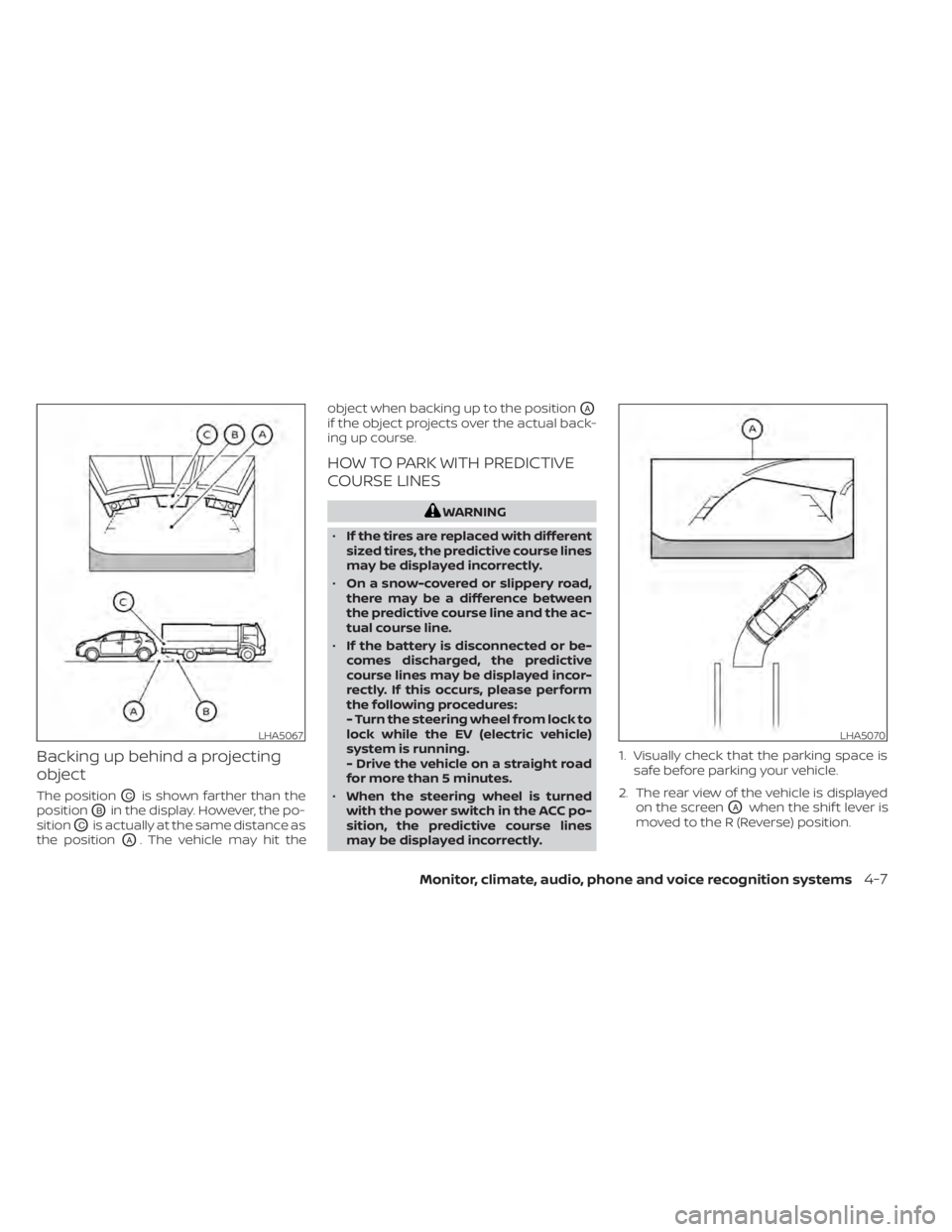
The positionOCis shown farther than the
position
OBin the display. However, the po-
sition
OCis actually at the same distance as
the position
OA. The vehicle may hit the object when backing up to the position
OA
if the object projects over the actual back-
ing up course.
HOW TO PARK WITH PREDICTIVE
COURSE LINES
WARNING
• If the tires are replaced with different
sized tires, the predictive course lines
may be displayed incorrectly.
• On a snow-covered or slippery road,
there may be a difference between
the predictive course line and the ac-
tual course line.
• If the battery is disconnected or be-
comes discharged, the predictive
course lines may be displayed incor-
rectly. If this occurs, please perform
the following procedures:
- Turn the steering wheel from lock to
lock while the EV (electric vehicle)
system is running.
- Drive the vehicle on a straight road
for more than 5 minutes.
• When the steering wheel is turned
with the power switch in the ACC po-
sition, the predictive course lines
may be displayed incorrectly. 1. Visually check that the parking space is
safe before parking your vehicle.
2. The rear view of the vehicle is displayed on the screen
OAwhen the shif t lever is
moved to the R (Reverse) position.
LHA5067LHA5070
Monitor, climate, audio, phone and voice recognition systems4-7
Page 294 of 596
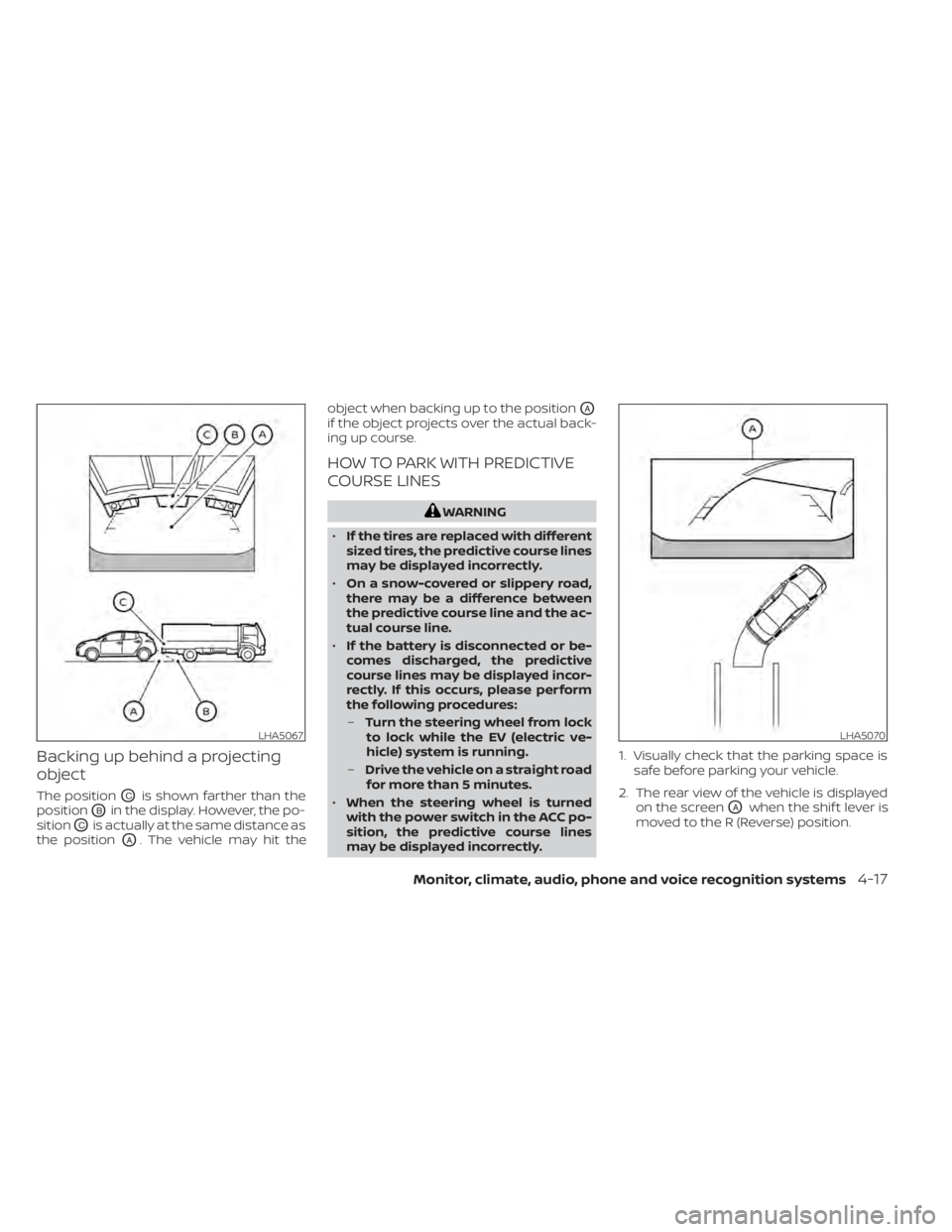
Backing up behind a projecting
object
The positionOCis shown farther than the
position
OBin the display. However, the po-
sition
OCis actually at the same distance as
the position
OA. The vehicle may hit the object when backing up to the position
OA
if the object projects over the actual back-
ing up course.
HOW TO PARK WITH PREDICTIVE
COURSE LINES
WARNING
• If the tires are replaced with different
sized tires, the predictive course lines
may be displayed incorrectly.
• On a snow-covered or slippery road,
there may be a difference between
the predictive course line and the ac-
tual course line.
• If the battery is disconnected or be-
comes discharged, the predictive
course lines may be displayed incor-
rectly. If this occurs, please perform
the following procedures:
– Turn the steering wheel from lock
to lock while the EV (electric ve-
hicle) system is running.
– Drive the vehicle on a straight road
for more than 5 minutes.
• When the steering wheel is turned
with the power switch in the ACC po-
sition, the predictive course lines
may be displayed incorrectly. 1. Visually check that the parking space is
safe before parking your vehicle.
2. The rear view of the vehicle is displayed on the screen
OAwhen the shif t lever is
moved to the R (Reverse) position.
LHA5067LHA5070
Monitor, climate, audio, phone and voice recognition systems4-17