power steering NISSAN LEAF 2020 Owner´s Manual
[x] Cancel search | Manufacturer: NISSAN, Model Year: 2020, Model line: LEAF, Model: NISSAN LEAF 2020Pages: 596, PDF Size: 4.33 MB
Page 295 of 596
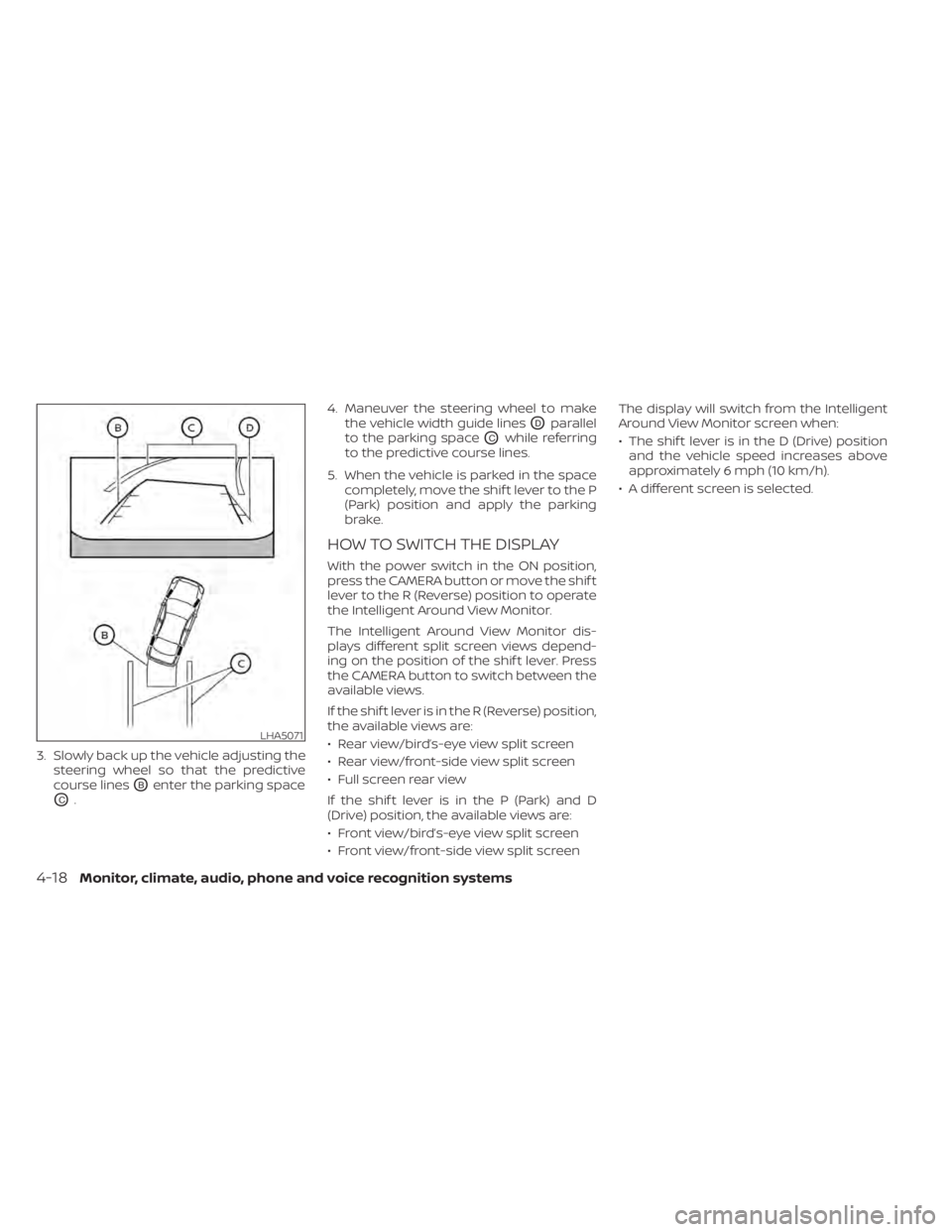
3. Slowly back up the vehicle adjusting thesteering wheel so that the predictive
course lines
OBenter the parking space
OC. 4. Maneuver the steering wheel to make
the vehicle width guide lines
ODparallel
to the parking space
OCwhile referring
to the predictive course lines.
5. When the vehicle is parked in the space completely, move the shif t lever to the P
(Park) position and apply the parking
brake.
HOW TO SWITCH THE DISPLAY
With the power switch in the ON position,
press the CAMERA button or move the shif t
lever to the R (Reverse) position to operate
the Intelligent Around View Monitor.
The Intelligent Around View Monitor dis-
plays different split screen views depend-
ing on the position of the shif t lever. Press
the CAMERA button to switch between the
available views.
If the shif t lever is in the R (Reverse) position,
the available views are:
• Rear view/bird’s-eye view split screen
• Rear view/front-side view split screen
• Full screen rear view
If the shif t lever is in the P (Park) and D
(Drive) position, the available views are:
• Front view/bird’s-eye view split screen
• Front view/front-side view split screen The display will switch from the Intelligent
Around View Monitor screen when:
• The shif t lever is in the D (Drive) position
and the vehicle speed increases above
approximately 6 mph (10 km/h).
• A different screen is selected.
LHA5071
4-18Monitor, climate, audio, phone and voice recognition systems
Page 317 of 596
9. Press thebutton to set Cli-
mate Temperature and then press the
OK button.
10. * Press the
button to select
"Days" and then press the OK button.
The current day of the week is dis-
played with an underline.
Press the
button to select the
days of the week you wish to activate
the Climate Control system and then
press the OK button. The indicator light
of the selected button will turn on.
11. * Af ter setting the day of the week, press the Back button and return to the pre-
vious screen.
The set day of the week is lit in white.
12. Af ter the setting is complete, place the power switch in the OFF position, and
then connect the charge connector to
the vehicle.
* models with Navigation System Info
The Climate Ctrl. Timer does not activate if
the charge connector is not connected to
the vehicle. When the “Battery Operation
OK” is turned on and the charging connec-
tor is not connected to the vehicle, the Cli-
mate Ctrl. Timer will activate for 15 minutes.
When the outside temperature is high, the
interior temperature may not reach the set
temperature within the 15 minutes.
Turn "Battery Operation OK" to OFF when it
is not necessary to operate air condition-
ing timer in order to prevent Li-ion battery
from discharging.
For models without Navigation System, the
Climate Ctrl. Timer operates repeatedly ev-
ery day once it is turned on.
Operating tips for using Climate
Ctrl. Timer
• The Climate Ctrl. Timer will only start
when the power switch is in the LOCK/
OFF or ACC position. • To turn off the Climate Ctrl. Timer func-
tion, turn off the “Climate Ctrl. Timer1” and
"Climate Ctrl. Timer2" setting in the video
information display using the
button on the steering wheel. The start
and stop time settings will not be deleted
even if the Climate Ctrl. Timer function is
turned off.
• While the Climate Ctrl. Timer is operating, the Climate Ctrl. Timer indicator and the
charging status indicator lights flash. If
the Climate Ctrl. Timer is set to activate,
the Climate Ctrl. Timer indicator illumi-
nates.*
• If the Climate Ctrl. Timer starts operating while the vehicle is being charged, the
time required for charging will be longer.
• Operating the Climate Ctrl. Timer or re- mote climate control in an environment
where the temperature is low may de-
crease the rate of battery charge.
4-40Monitor, climate, audio, phone and voice recognition systems
Page 325 of 596
AEB with Pedestrian Detection system
limitations................................. 5-129
System temporarily unavailable ............5-131
System malfunction ........................ 5-132
System maintenance ......................5-133
Rear Automatic Braking (RAB) .................5-134
RAB system operation ......................5-135
Turning the RAB system on/off .............5-136
RAB system limitations .....................5-137
System malfunction ........................ 5-138
System maintenance ......................5-139
Intelligent Forward Collision Warning (I-FCW) . . 5-139 I-FCW System operation ....................5-140
Turning the I-FCW system on/off ...........5-142
I-FCW system limitations ...................5-143
System temporarily unavailable ............5-147
System malfunction ........................ 5-148
System maintenance ......................5-148
Intelligent Driver Alertness (I-DA)
(if so equipped) ................................ 5-150
I-DA system operation .....................5-150
How to enable/disable the I-DA system ....5-151
I-DA system limitations .....................5-152
ECO Mode ..................................... 5-152
Increasing power economy ...................5-153ECO drive report
.............................. 5-154
Parking/parking on hills .......................5-155
Power steering system ........................5-156
Brake system ................................. 5-157
Brake precautions .......................... 5-157
Anti-lock Braking System (ABS) .............5-159
Brake Assist ................................ 5-160
Vehicle Dynamic Control (VDC) system ........5-160
Chassis control ............................... 5-162
Intelligent Trace Control ....................5-162
Intelligent Ride Control .....................
5-163
R
ear sonar system (RSS) ......................5-163
System operation .......................... 5-164
How to enable/disable the rear sonar
system ..................................... 5-166
Sonar limitations ........................... 5-167
System temporarily unavailable ............5-167
System maintenance ......................5-167
Hill start assist system ........................5-168
Cold weather driving .......................... 5-169
Freeing a frozen door lock ..................5-169
Antifreeze .................................. 5-169
12-volt battery .............................. 5-169
Draining of coolant water ..................5-170
Page 328 of 596
• The low tire pressure warning light doesnot automatically turn off when the tire
pressure is adjusted. Af ter the tire is in-
flated to the recommended pressure, the
vehicle must be driven at speeds above
16 mph (25 km/h) to activate the TPMS
and turn off the low tire pressure warning
light. Use a tire pressure gauge to check
the tire pressure.
• The “Tire Pressure Low - Add Air” warning also appears on the vehicle information
display when the low tire pressure warn-
ing light is illuminated and low tire pres-
sure is detected. The “Tire Pressure Low -
Add Air” warning turns off when the low
tire pressure warning light turns off.
• The “Tire Pressure Low - Add Air” warning appears each time the power switch is
placed in the ON position as long as the
low tire pressure warning light remains
illuminated.
• The “Tire Pressure Low - Add Air” warning does not appear if the low tire pressure
warning light illuminates to indicate a
TPMS malfunction. • Tire pressure rises and falls depending on
the heat caused by operation of the ve-
hicle and the outside temperature. Do
not reduce the tire pressure af ter driving
because the tire pressure rises af ter driv-
ing. Low outside temperature can lower
the temperature of the air inside the tire,
which can cause a lower tire inflation
pressure. This may cause the low tire
pressure warning light to illuminate. If the
warning light illuminates in low ambient
temperature, check the tire pressure for
all four tires.
• The pressure of all tires can also be checked on the display screen. The order
of the tire pressure figures displayed on
the screen does not correspond with the
actual order of the tire position.
For additional information, refer to “Low tire
pressure warning light” in the “Instruments
and controls” section and “Tire Pressure
Monitoring System (TPMS)” in the “In case of
emergency” section of this manual.WARNING
• Radio waves could adversely affect
electric medical equipment. Those
who use a pacemaker should contact
the electric medical equipment
manufacturer for the possible influ-
ences before use.
• If the low tire pressure warning light
illuminates while driving, avoid sud-
den steering maneuvers or abrupt
braking, reduce vehicle speed, pull
off the road to a safe location and
stop the vehicle as soon as possible.
Driving with under-inflated tires may
permanently damage the tires and
increase the likelihood of tire failure.
Serious vehicle damage could occur
and may lead to an accident and
could result in serious personal in-
jury. Check the tire pressure for all
four tires. Adjust the tire pressure to
the recommended COLD tire pres-
sure shown on the Tire and Loading
Information label to turn the low tire
pressure warning light off. If the tire is
flat, repair it as soon as possible. (For
additional information, refer to “Flat
tire” in the “In case of emergency ”
section of this manual.)
Starting and driving5-5
Page 330 of 596
TPMS with Easy-Fill Tire Alert
When tire pressure is low, the low tire pres-
sure warning light illuminates.
This vehicle provides visual and audible
signals to help you inflate the tires to the
recommended COLD tire pressure.
Vehicle set-up:
1. Park the vehicle in a safe and level place.
2. Apply the parking brake and push the P(Park) position switch on the shif t lever.
3. Place the power switch in the ON posi- tion. Do not place in the READY to drive
mode.
Operation:
1. Add air to the tire.
2. Af ter a few seconds, the hazard indica- tors will start flashing.
3. When the designated pressure is reached, the horn beeps once and the
hazard indicators stop flashing.
4. Perform the above steps for each tire. • If the tire is over-inflated more thanapproximately 4 psi (30 kPa), the horn
beeps and the hazard indicators flash
three times. To correct the pressure,
push the core of the valve stem on the tire briefly to release pressure. When
the pressure reaches the designated
pressure, the horn beeps once.
• If the hazard indicator does not flash within approximately 15 seconds af ter
starting to inflate the tire, it indicates
that the Easy-Fill Tire Alert is not oper-
ating.
• The TPMS will not activate the Easy-Fill Tire Alert under the following condi-
tions:– If there is interference from an exter- nal device or transmitter.
– The air pressure from the inflation device is not sufficient to inflate the
tire, such as those using a power
socket.
– If electrical equipment is being used in or near the vehicle.
– There is a malfunction in the TPMS.
– There is a malfunction in the horn or hazard indicators.
– If the Easy-Fill Tire Alert does not op- erate due to TPMS interference,
move the vehicle about 3 f t (1 m)
backward or forward and try again.
If the Easy-Fill Tire Alert is not working, use a
tire pressure gauge.
AVOIDING COLLISION AND
ROLLOVER
WARNING
Failure to operate this vehicle in a safe
and prudent manner may result in loss
of control or an accident.
Be alert and drive defensively at all times.
Obey all traffic regulations. Avoid excessive
speed, high speed cornering, or sudden
steering maneuvers because these driving
practices could cause you to lose control of
your vehicle. As with any vehicle, a loss of
control could result in a collision with
other vehicles or objects or cause the ve-
hicle to rollover, particularly if the loss of
control causes the vehicle to slide side-
ways. Be attentive at all times, and avoid
driving when tired. Never drive when under
the influence of alcohol or drugs (including
prescription or over-the-counter drugs
which may cause drowsiness). Always
wear your seat belt as outlined in “Seat
belts” in the “Safety — Seats, seat belts and
supplemental restraint system” section of
this manual, and also instruct your passen-
gerstodoso.
Starting and driving5-7
Page 354 of 596
WARNING
Failure to follow the warnings and in-
structions for proper use of the I-LI sys-
tem could result in serious injury or
death.
• The I-LI system will not steer the ve-
hicle or prevent loss of control. It is
the driver’s responsibility to stay
alert, drive safely, keep the vehicle in
the traveling lane, and be in control of
the vehicle at all times. •
The I-LI system is primarily intended
for use on well-developed freeways
or highways. It may not detect the
lane markers in certain road,
weather, or driving conditions.
The I-LI system must be turned on with the
ProPILOT Assist switch on the steering
wheel (models with ProPILOT Assist) or the
dynamic driver assistance switch (models
without ProPILOT Assist) every time the
power switch is placed in the ON position.
The I-LI system will operate when the ve-
hicle is driven at speeds of approximately
37 mph (60 km/h) and above, and only
when the lane markings are clearly visible
on the road.
The I-LI system warns the driver when the
vehicle has lef t the center of the traveling
lane with an indicator in the vehicle infor-
mation display and a steering vibration.
The system helps assist the driver to return
the vehicle to the center of the traveling
lane by applying the brakes to the lef t or
right wheels individually (for a short period
of time). The I-LI system monitors the lane markers
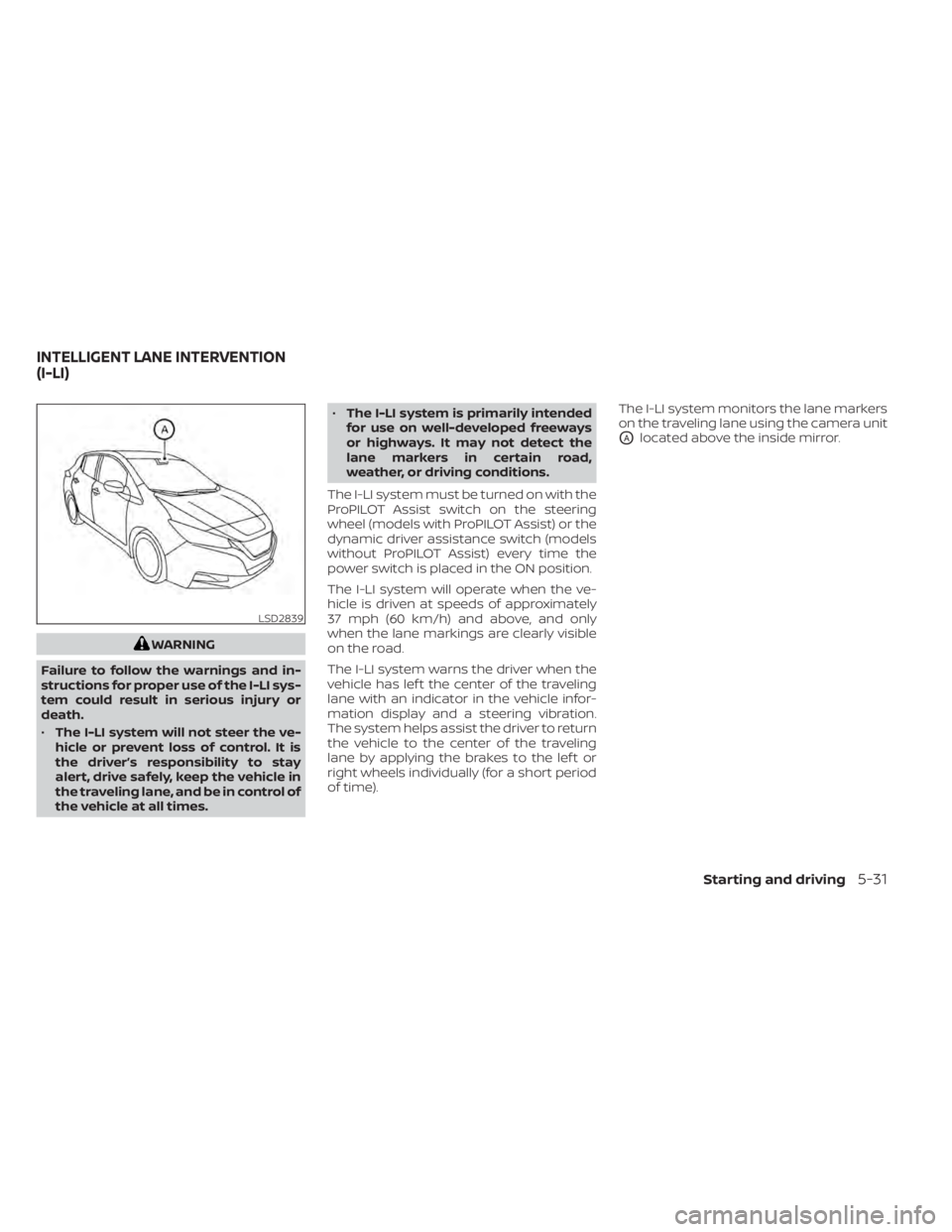
on the traveling lane using the camera unit
OAlocated above the inside mirror.
LSD2839
INTELLIGENT LANE INTERVENTION
(I-LI)
Starting and driving5-31
Page 425 of 596
HOW TO ENABLE/DISABLE THE
STEERING ASSIST
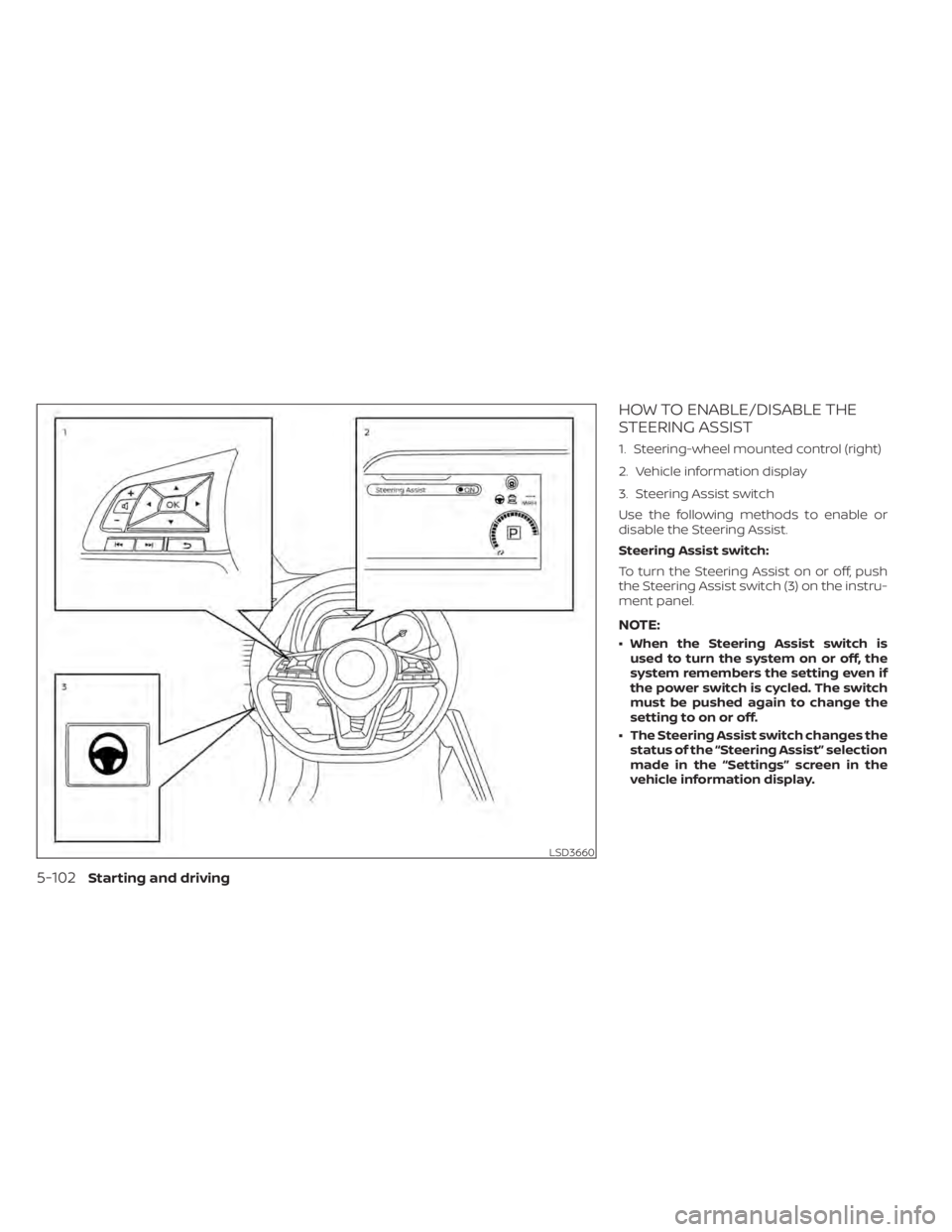
1. Steering-wheel mounted control (right)
2. Vehicle information display
3. Steering Assist switch
Use the following methods to enable or
disable the Steering Assist.
Steering Assist switch:
To turn the Steering Assist on or off, push
the Steering Assist switch (3) on the instru-
ment panel.
NOTE:
• When the Steering Assist switch isused to turn the system on or off, the
system remembers the setting even if
the power switch is cycled. The switch
must be pushed again to change the
setting to on or off.
• The Steering Assist switch changes the status of the “Steering Assist” selection
made in the “Settings” screen in the
vehicle information display.
LSD3660
5-102Starting and driving
Page 473 of 596
WARNING
Failure to follow the warnings and in-
structions for proper use of the I-DA
system could result in serious injury or
death.
• The I–DA system is only a warning to
inform the driver of a potential lack
of driver attention or drowsiness. It
will not steer the vehicle or prevent
loss of control.
• The I–DA system does not detect and
provide an alert of the driver’s lack of
attention or fatigue in every
situation.
• It its the driver’s responsibility to:
– stay alert,
– drive safely,
– keep the vehicle in the traveling
lane,
– be in control of the vehicle at all
times,
– avoid driving when tired,
– avoid distractions (texting, etc.).
The I–DA system helps alert the driver if the
system detects a lack of attention or driv-
ing fatigue. The system monitors driving style and
steering behavior over a period of time,
and it detects changes from the normal
pattern. If the system detects that driver
attention is decreasing over a period of
time, the system uses audible and visual
warnings to suggest that the driver take a
break.
I-DA SYSTEM OPERATION
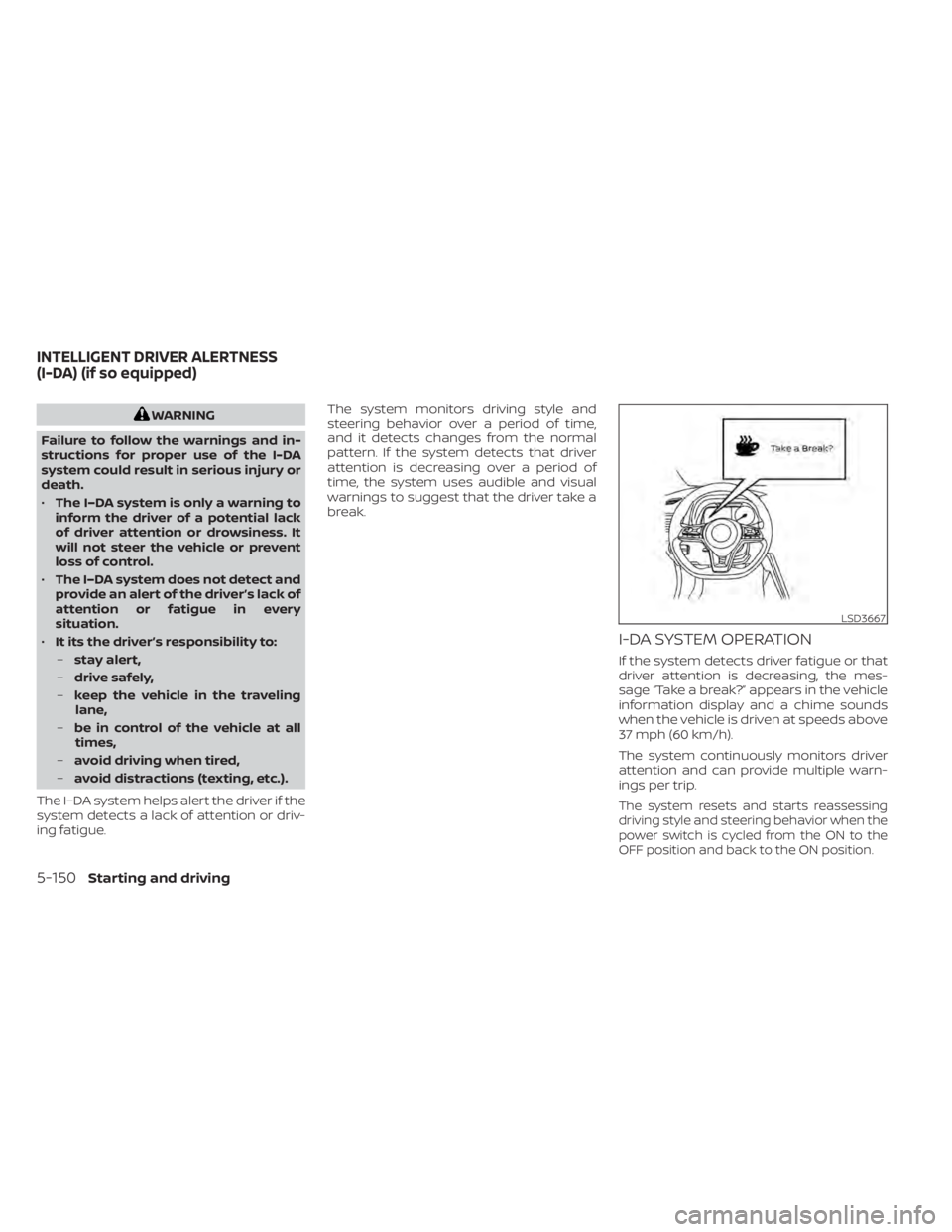
If the system detects driver fatigue or that
driver attention is decreasing, the mes-
sage “Take a break?” appears in the vehicle
information display and a chime sounds
when the vehicle is driven at speeds above
37 mph (60 km/h).
The system continuously monitors driver
attention and can provide multiple warn-
ings per trip.
The system resets and starts reassessing
driving style and steering behavior when the
power switch is cycled from the ON to the
OFF position and back to the ON position.
LSD3667
INTELLIGENT DRIVER ALERTNESS
(I-DA) (if so equipped)
5-150Starting and driving
Page 477 of 596
battery conditions. In the D (Drive) posi-
tion, when the accelerator pedal is re-
leased, the regenerative brake system
provides some deceleration and some
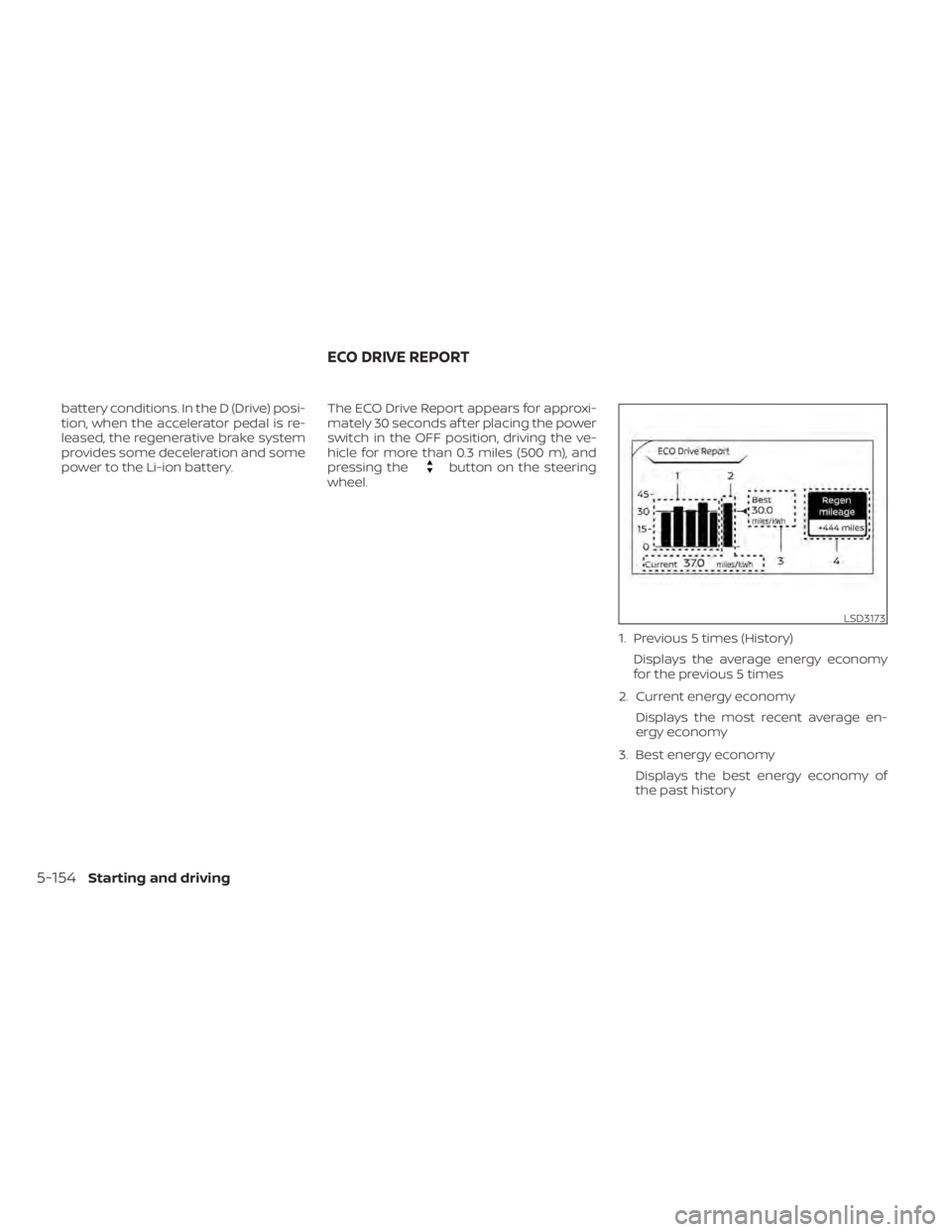
power to the Li-ion battery.The ECO Drive Report appears for approxi-
mately 30 seconds af ter placing the power
switch in the OFF position, driving the ve-
hicle for more than 0.3 miles (500 m), and
pressing the
button on the steering
wheel.
1. Previous 5 times (History)Displays the average energy economy
for the previous 5 times
2. Current energy economy Displays the most recent average en-
ergy economy
3. Best energy economy Displays the best energy economy of
the past history
LSD3173
ECO DRIVE REPORT
5-154Starting and driving
Page 479 of 596
1. Firmly apply the parking brake.
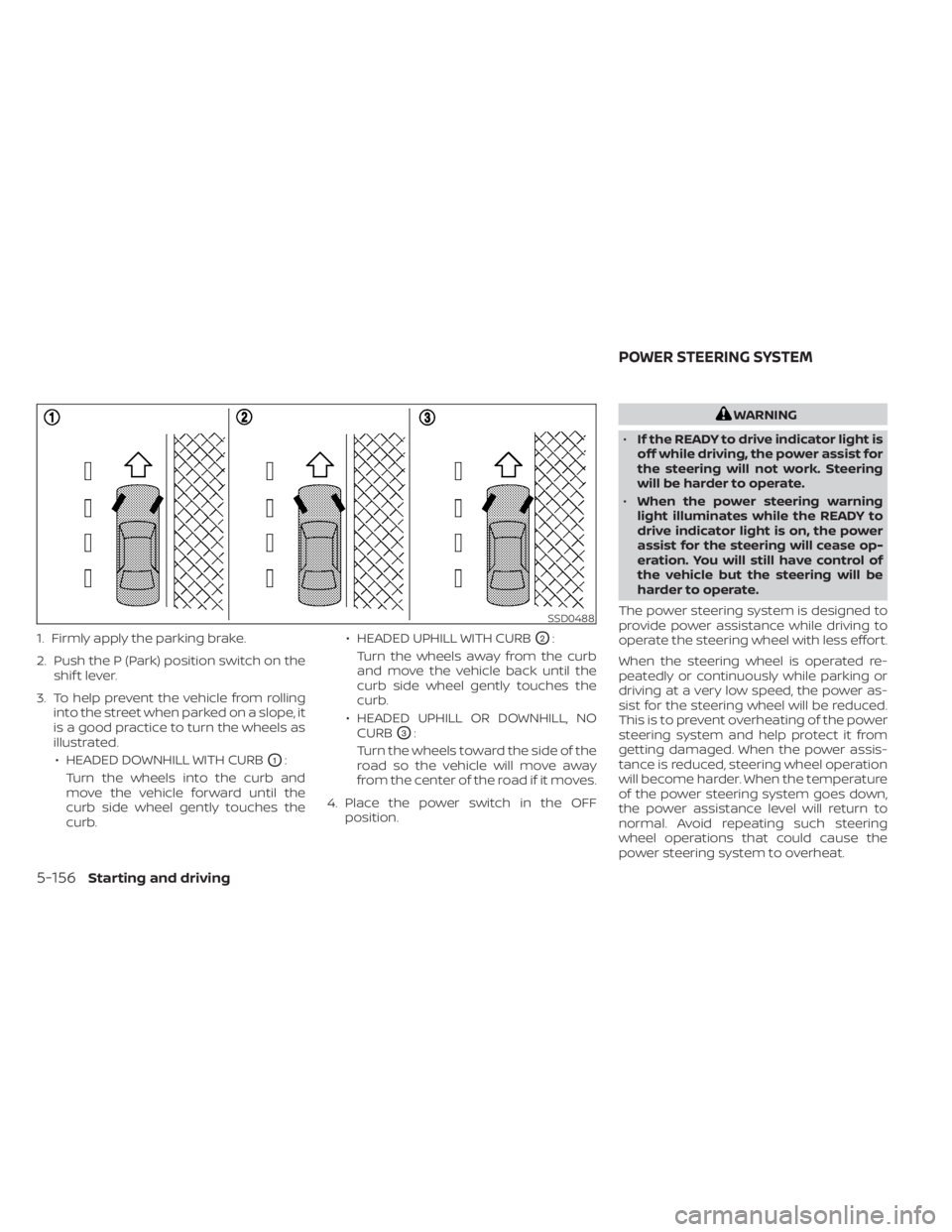
2. Push the P (Park) position switch on theshif t lever.
3. To help prevent the vehicle from rolling into the street when parked on a slope, it
is a good practice to turn the wheels as
illustrated.
• HEADED DOWNHILL WITH CURB
O1:
Turn the wheels into the curb and
move the vehicle forward until the
curb side wheel gently touches the
curb. • HEADED UPHILL WITH CURB
O2:
Turn the wheels away from the curb
and move the vehicle back until the
curb side wheel gently touches the
curb.
• HEADED UPHILL OR DOWNHILL, NO CURB
O3:
Turn the wheels toward the side of the
road so the vehicle will move away
from the center of the road if it moves.
4. Place the power switch in the OFF position.
WARNING
• If the READY to drive indicator light is
off while driving, the power assist for
the steering will not work. Steering
will be harder to operate.
• When the power steering warning
light illuminates while the READY to
drive indicator light is on, the power
assist for the steering will cease op-
eration. You will still have control of
the vehicle but the steering will be
harder to operate.
The power steering system is designed to
provide power assistance while driving to
operate the steering wheel with less effort.
When the steering wheel is operated re-
peatedly or continuously while parking or
driving at a very low speed, the power as-
sist for the steering wheel will be reduced.
This is to prevent overheating of the power
steering system and help protect it from
getting damaged. When the power assis-
tance is reduced, steering wheel operation
will become harder. When the temperature
of the power steering system goes down,
the power assistance level will return to
normal. Avoid repeating such steering
wheel operations that could cause the
power steering system to overheat.
SSD0488
POWER STEERING SYSTEM
5-156Starting and driving