service NISSAN LEAF 2020 Owner´s Manual
[x] Cancel search | Manufacturer: NISSAN, Model Year: 2020, Model line: LEAF, Model: NISSAN LEAF 2020Pages: 596, PDF Size: 4.33 MB
Page 163 of 596
• A child restraint or other object press-ing against the rear or the seatback.
• A rear passenger pushing or pulling on the back of the front passenger seat.
pushing or pulling on the seatback of
the front passenger seat.
• Forcing the front seat or seatback against an object on the seat or floor
behind it.
• An object placed under the front pas- senger seat.
• An object placed between the seat cushion and center console.
If the vehicle is moving, please come to a
stop when it is safe to do so. Check and
correct any of the above conditions. Re-
start the vehicle and wait 1 minute.
NOTE:
A system check will be performed during
which the front passenger air bag status
light will remain lit for about 7 seconds
initially.
If the light is still OFF af ter this, the small
adult, child or child restraint should be re-
positioned in the rear seat and the vehicle
should be checked as soon as possible. It is
recommended that you visit a NISSAN cer-
tified LEAF dealer for this service. 3. If the light is OFF with no front passenger
and no objects on the front passenger
seat the vehicle should be checked as
soon as possible. It is recommended
that you visit a NISSAN certified LEAF
dealer for this service.
Other supplemental front-impact air
bag precautions
WARNING
• Do not place any objects on the
steering wheel pad or on the instru-
ment panel. Also, do not place any
objects between any occupant and
the steering wheel or instrument
panel. Such objects may become
dangerous projectiles and cause in-
jury if the front air bags inflate.
• Do not place objects with sharp
edges on the seat. Also, do not place
heavy objects on the seat that will
leave permanent impressions in the
seat. Such objects can damage the
seat or occupant classification sen-
sor (weight sensor). This can affect
the operation of the air bag system
and result in serious personal injury. •
Do not use water or acidic cleaners
(hot steam cleaners) on the seat. This
can damage the seat or occupant
classification sensor. This can also
affect the operation of the air bag
system and result in serious personal
injury.
• Immediately af ter inflation, several
front air bag system components will
be hot. Do not touch them; you may
severely burn yourself.
• No unauthorized changes should be
made to any components or wiring
of the supplemental air bag system.
This is to prevent accidental inflation
of the supplemental air bag or dam-
age to the supplemental air bag
system.
• Do not make unauthorized changes
to your vehicle’s electrical system,
suspension system or front end
structure. This could affect proper
operation of the front air bag system.
1-56Safety–Seats, seat belts and supplemental restraint system
Page 168 of 596
•It is recommended that you visit a
NISSAN certified LEAF dealer for work
on and around the knee air bag. It is
also recommended that you visit a
NISSAN certified LEAF dealer for in-
stallation of electrical equipment.
The SRS wiring harnesses* should
not be modified or disconnected. Un-
authorized electrical test equipment
and probing devices should not be
used on the knee air bag system.
*The SRS wiring harness or connectors
are yellow or orange for easy identifica-
tion.
When selling your vehicle, we request that
you inform the buyer about the knee air
bag system and guide the buyer to the
appropriate sections in this manual.
Seat belt with pretensioner(s)
(front and rear outboard seats)
WARNING
• The pretensioner(s) cannot be re-
used af ter activation. They must be
replaced together with the retractor
and buckle as a unit. •
If the vehicle becomes involved in a
collision but pretensioner(s) are not
activated, be sure to have the preten-
sioner system checked and, if neces-
sary, replaced. It is recommended
that you visit a NISSAN certified LEAF
dealer for this service.
• No unauthorized changes should be
made to any components or wiring
of the pretensioner system. This is to
prevent damage to or accidental ac-
tivation of the pretensioner(s). Tam-
pering with the pretensioner system
may result in serious personal injury.
• It is recommended that you visit a
NISSAN certified LEAF dealer for work
around and on the pretensioner sys-
tem. It is also recommended that you
visit a NISSAN certified LEAF dealer
for installation of electrical equip-
ment. Unauthorized electrical test
equipment and probing devices
should not be used on the preten-
sioner system.
• If you need to dispose of the preten-
sioner(s) or scrap the vehicle, it is rec-
ommended that you visit a NISSAN
certified LEAF dealer for this service.
Incorrect disposal procedures could
cause personal injury. The pretensioner system may activate
with the supplemental air bag system in
certain types of collisions. Working with the
seat belt retractor, the pretensioner(s) help
tighten the seat belt when the vehicle be-
comes involved in certain types of colli-
sions, helping to restrain front and rear out-
board seat occupants.
The pretensioner(s) are encased with the
seat belt retractor and to the seat belt an-
chor affixed to the floor of the vehicle.
These seat belts are used the same way as
conventional seat belts.
When pretensioner(s) activate, smoke is re-
leased and a loud noise may be heard. This
smoke is not harmful and does not indi-
cate a fire. Care should be taken not to
inhale it, as it may cause irritation and
choking. Those with a history of a breath-
ing condition should get fresh air promptly.
Af ter the pretensioner(s’) activation, load
limiters allow the seat belt to release web-
bing (if necessary) to reduce forces against
the chest.
The supplemental air bag warning light
is used to indicate malfunctions in the
pretensioner system. For additional infor-
mation, refer to “Supplemental air bag
Safety–Seats, seat belts and supplemental restraint system1-61
Page 169 of 596
warning light” in this section. If the opera-
tion of the supplemental air bag warning
light indicates there is a malfunction, have
the system checked. It is recommended
that you visit a NISSAN certified LEAF dealer
for this service.
When selling your vehicle, we request that
you inform the buyer about the preten-
sioner system and guide the buyer to the
appropriate sections in this Owner’s
Manual.
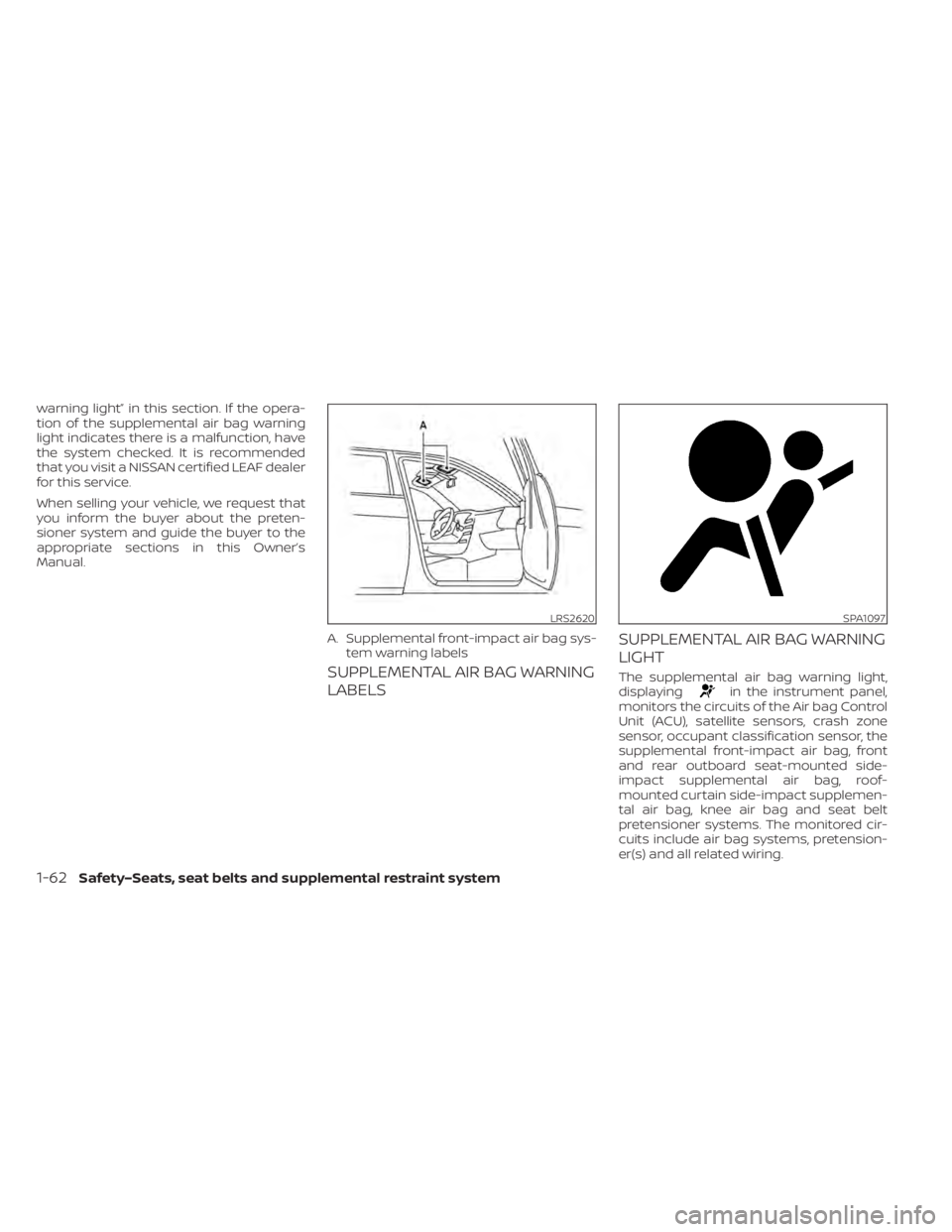
SUPPLEMENTAL AIR BAG WARNING
LABELSSUPPLEMENTAL AIR BAG WARNING
LIGHTThe supplemental air bag warning light,
displayingin the instrument panel,
monitors the circuits of the Air bag Control
Unit (ACU), satellite sensors, crash zone
sensor, occupant classification sensor, the
supplemental front-impact air bag, front
and rear outboard seat-mounted side-
impact supplemental air bag, roof-
mounted curtain side-impact supplemen-
tal air bag, knee air bag and seat belt
pretensioner systems. The monitored cir-
cuits include air bag systems, pretension-
er(s) and all related wiring.
LRS2620
A. Supplemental front-impact air bag sys- tem warning labels
SPA1097
1-62Safety–Seats, seat belts and supplemental restraint system
Page 170 of 596
When the power switch is in the ON posi-
tion, the supplemental air bag warning
light illuminates for about 7 seconds and
then turns off. This means the system is
operational.
If any of the following conditions occur, the
front air bag, side air bag, curtain air bag,
knee air bag and pretensioner systems
need servicing:
• The supplemental air bag warning lightremains on af ter approximately 7 sec-
onds.
• The supplemental air bag warning light flashes intermittently.
• The supplemental air bag warning light does not come on at all.
Under these conditions, the front air bag,
side air bag, curtain air bag, knee air bag
and pretensioner systems may not oper-
ate properly. They must be checked and
repaired. It is recommended that you visit
the nearest NISSAN certified LEAF dealer
for this service.WARNING
If the supplemental air bag warning
light is on, it could mean that the front
air bag, side air bag, curtain air bag,
knee air bag and/or pretensioner sys-
tems will not operate in an accident. To
help avoid injury to yourself or others,
have your vehicle checked as soon as
possible. It is recommended that you
visit a NISSAN certified LEAF dealer for
this service.
Repair and replacement
procedure
The front air bags, side air bags, curtain air
bags, knee air bags and pretensioner(s) are
designed to activate on a one-time-only
basis. As a reminder, unless it is damaged,
the supplemental air bag warning light will
remain illuminated af ter inflation has oc-
curred. These systems should be repaired
and/or replaced as soon as possible. It is
recommended that you visit a NISSAN cer-
tified LEAF dealer for this service. When maintenance work is required on the
vehicle, the front air bags, side air bags,
curtain air bags, knee air bags and preten-
sioner(s) and related parts should be
pointed out to the person performing the
maintenance. The power switch should al-
ways be in the LOCK position when work-
ing under the hood or inside the vehicle.
WARNING
• Once a front air bag, side air bag, cur-
tain air bag or knee air bag has in-
flated, the air bag module will not
function again and must be replaced.
Additionally, the activated preten-
sioner(s) must also be replaced. The
air bag module and pretensioner(s)
should be replaced. It is recom-
mended that you visit a NISSAN cer-
tified LEAF dealer for this service. The
air bag modules and pretensioner
system cannot be repaired.
• The front air bag, side air bag, curtain
air bag and knee air bag systems,
and pretensioner system should be
inspected if there is any damage to
the front end or side portion of the
vehicle. It is recommended that you
visit a NISSAN certified LEAF dealer
for this service.
Safety–Seats, seat belts and supplemental restraint system1-63
Page 171 of 596
•If you need to dispose of a supple-
mental air bag or pretensioner sys-
tem or scrap the vehicle, it is recom-
mended that you visit a NISSAN
certified LEAF dealer for this service.
Correct supplemental air bag and
pretensioner system disposal proce-
dures are set forth in the appropriate
NISSAN Service Manual. Incorrect
disposal procedures could cause
personal injury.
• If there is an impact to your vehicle
from any direction, your Occupant
Classification Sensor (OCS) should be
checked. It is recommended that you
visit a NISSAN certified LEAF dealer to
verif y it is still functioning correctly.
The OCS should be checked even if no
air bags deploy as a result of the im-
pact. Failure to verif y proper OCS
function may result in an improper
air bag deployment resulting in in-
jury or death.
1-64Safety–Seats, seat belts and supplemental restraint system
Page 180 of 596
Changing the display:
Pushing the TRIP RESET switch
O1located
on the lef t side of the instrument panel
changes the display as follows:
Odometer →TRIP A →TRIP B →Odometer
For additional information about the ve-
hicle information display, refer to “Vehicle
information display” in this section.
Resetting the trip odometer:
Pushing the TRIP RESET switch
O1for ap-
proximately 1 second resets the currently
displayed trip odometer to zero.
LI-ION BATTERY TEMPERATURE
GAUGE
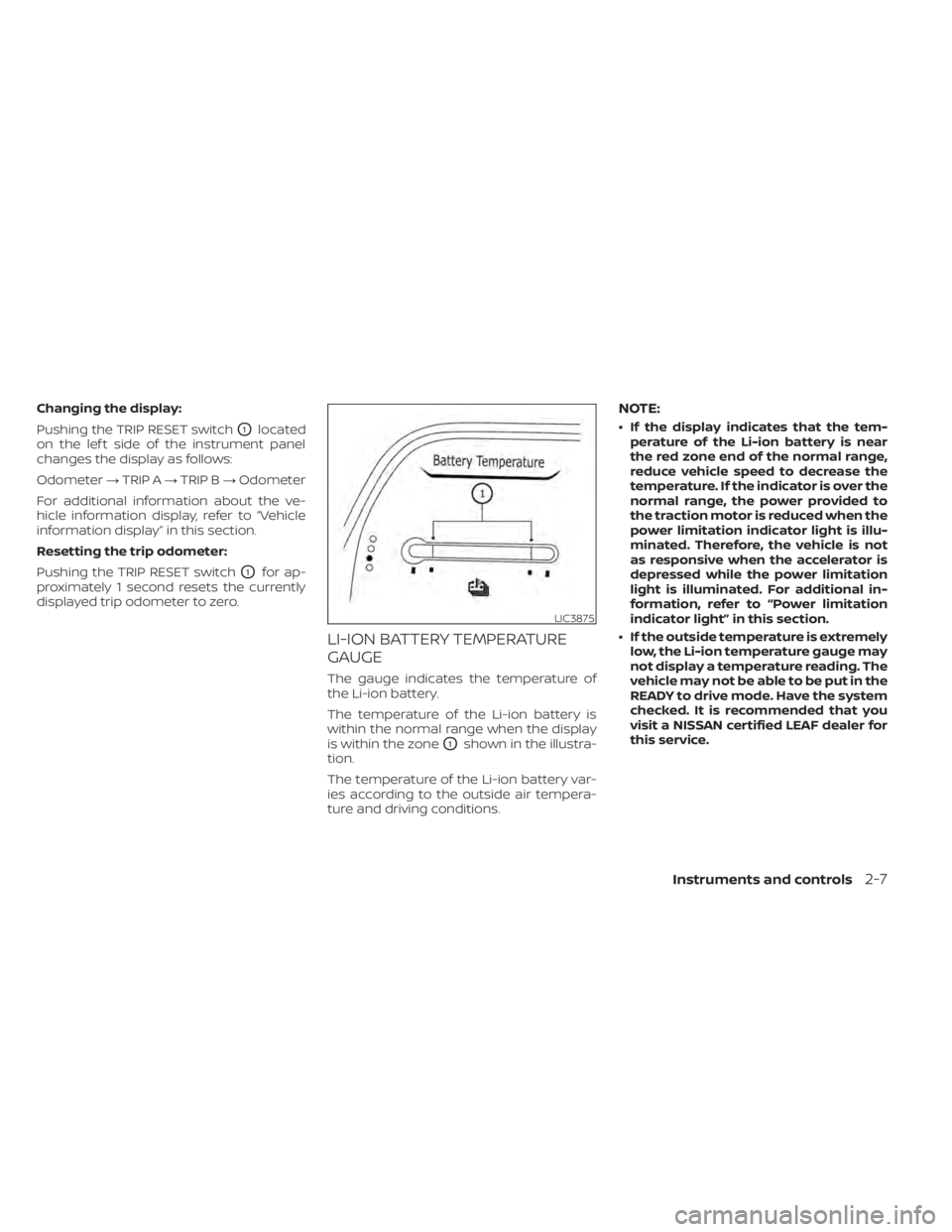
The gauge indicates the temperature of
the Li-ion battery.
The temperature of the Li-ion battery is
within the normal range when the display
is within the zone
O1shown in the illustra-
tion.
The temperature of the Li-ion battery var-
ies according to the outside air tempera-
ture and driving conditions.
NOTE:
• If the display indicates that the tem- perature of the Li-ion battery is near
the red zone end of the normal range,
reduce vehicle speed to decrease the
temperature. If the indicator is over the
normal range, the power provided to
the traction motor is reduced when the
power limitation indicator light is illu-
minated. Therefore, the vehicle is not
as responsive when the accelerator is
depressed while the power limitation
light is illuminated. For additional in-
formation, refer to “Power limitation
indicator light” in this section.
• If the outside temperature is extremely low, the Li-ion temperature gauge may
not display a temperature reading. The
vehicle may not be able to be put in the
READY to drive mode. Have the system
checked. It is recommended that you
visit a NISSAN certified LEAF dealer for
this service.
LIC3875
Instruments and controls2-7
Page 188 of 596
CHECKING LIGHTS
With all doors closed, apply the parking
brake, fasten the seat belts and place the
power switch for LEAF to the ON position
without starting the EV system. The follow-
ing lights (if so equipped) will come on:
,,or,;
The following lights (if so equipped) come
on briefly and then turn off:
or(yellow),,or
(red),or,,,,
,,,
If any light does not come on or operate in
a way other than described, it may indicate
a burned-out bulb and/or a system mal-
function. Have the system checked. It is
recommended that you visit a NISSAN cer-
tified LEAF dealer for this service.
Some indicators and warnings are also dis-
played on the vehicle information display.
For additional information, refer to “Vehicle
information display” in this section.
WARNING LIGHTS
For additional information, refer to “Vehicle
information display” in this section.
12-volt battery charge
warning light
The DC/DC converter converts 400 volt Li-
ion battery voltage to charge the 12-volt
battery.
This light illuminates continuously af ter the
bulb is checked when the power switch is
in the ON position, and turns off when the
power switch is placed in the READY to
drive position.
When this warning light illuminates, a
chime sounds and the following warnings
are also displayed.
• Master warning (red)
• EV system warning light
The following messages also flash on and
off on the vehicle information display.
If the vehicle is being driven; “Stop the ve-
hicle” and if the vehicle is stopped; “When
parked apply parking brake”. When these
messages flash, immediately stop the ve-
hicle in a safe location, pull the parking
brake switch and push the P (Park) position
switch on the shif t lever to place the vehicle
in the P (Park) position. The warning on the
meter and the chime stops when the park-
ing brake is operated or the vehicle is in the
P (Park) position. Have the system checked.It is recommended that you visit a NISSAN
certified LEAF dealer for this service.CAUTION
• The DC/DC converter system may
not be functioning properly if the 12-
volt battery charge warning light illu-
minates continuously when the
power switch is in the READY to drive
position. Immediately stop the ve-
hicle in a safe location and have the
system checked. It is recommended
that you visit a NISSAN certified LEAF
dealer for this service.
• The DC/DC converter system may
not be functioning properly if the 12-
volt warning light illuminates con-
tinuously when the power switch is in
the READY to drive position. Do not
charge the 12-volt battery while this
warning light is illuminated. It may
lead to a malfunction of the DC/DC
converter system. Have the system
checked. It is recommended that you
visit a NISSAN certified LEAF dealer
for this service.
Instruments and controls2-15
Page 189 of 596
NOTE:
• If the vehicle does not go into theREADY to drive position (when the
power switch is pushed and the brake
pedal is depressed), jump-start the ve-
hicle to place the power switch in the
READY to drive position. For additional
information, refer to “Jump starting” in
the “In case of emergency ” section of
this manual.
• Do not jump-start the vehicle if the conditions below occur. Have the sys-
tem checked. It is recommended that
you visit a NISSAN certified LEAF dealer
for this service:– If the 12-volt charge warning light turns off when the vehicle is in the
READY to drive mode, the 12-volt bat-
tery may be discharged or there may
be a malfunction in the 12-volt bat-
tery related system.
– If the 12-volt charge warning light continues to illuminate when the ve-
hicle is in the READY to drive mode,
there may be a malfunction in the
DC/DC converter. Have the system
checked. It is recommended that you
visit a NISSAN certified LEAF dealer
for this service.
orAnti-lock
Braking System
(ABS) warning
light
When the power switch is in the ON or
READY to drive position, the Anti-lock Brak-
ing System (ABS) warning light illuminates
and then turns off. This indicates the ABS is
operational.
If the ABS warning light illuminates while
the power switch is in the READY to drive
position, or while driving, it may indicate the
ABS is not functioning properly. Have the
system checked. It is recommended that
you visit a NISSAN certified LEAF dealer for
this service.
If an ABS malfunction occurs, the anti-lock
function is turned off. The brake system
then operates normally, but without anti-
lock assistance. For additional information,
refer to “Brake system” in the “Starting and
driving” section of this manual.
Approaching Vehicle
Sound for Pedestrians
(VSP) system OFF
warning light
The Approaching Vehicle Sound for Pedes-
trians (VSP) system OFF warning light is
located on the instrument panel.
This light comes on if there is a malfunction
in the VSP system.
If the VSP system OFF warning light illumi-
nates while the power switch is in the ON
position, or in the READY to drive position, it
may indicate the VSP system is not func-
tioning properly. Have the system checked.
It is recommended that you visit a NISSAN
certified LEAF dealer for this service.
For additional information, refer to “Ap-
proaching Vehicle Sound for Pedestrians
(VSP) system” in the “EV overview” section of
this manual.
Automatic Emergency
Braking (AEB) with
Pedestrian Detection
system warning light
This light comes on when the power switch
is placed in the ON position. It turns off af ter
the EV system is started.
2-16Instruments and controls
Page 190 of 596
This light illuminates when the AEB with
Pedestrian Detection system is set to OFF
in the vehicle information display.
If the light illuminates when the AEB with
Pedestrian Detection system is on, it may
indicate that the system is unavailable. For
additional information, refer to “Automatic
Emergency Braking (AEB) with Pedestrian
Detection” and “Intelligent Forward Colli-
sion Warning (I-FCW)” in the “Starting and
driving” section of this manual.
orBrake system
warning light
(yellow)
This light functions for both the coopera-
tive regenerative brake and the electroni-
cally driven intelligent brake systems.
When the power switch is placed in the ON
position or in the READY to drive position,
the light remains illuminated for about 2 or
3 seconds. If the light illuminates at any
other time, it may indicate that the coop-
erative regenerative brake and/or the elec-
tronically driven intelligent brake systems
are not functioning properly. Have the sys-
tem checked. It is recommended that you
visit a NISSAN certified LEAF dealer for this
service.If the BRAKE warning light (red) also illumi-
nates, stop the vehicle immediately and
have the system checked. It is recom-
mended that you visit a NISSAN certified
LEAF dealer for this service. For additional
information, refer to “Brake system” in the
“Starting and driving” section of this
manual.
WARNING
• Pressing the brake pedal when the
power switch position is not in the
ON or READY to drive position and/or
low brake fluid level may increase the
stopping distance and braking will
require greater pedal effort as well as
pedal travel.
• If the brake fluid level is below the
minimum or MIN mark on the brake
fluid reservoir, do not drive until the
brake system has been checked. It is
recommended that you visit a
NISSAN certified LEAF dealer for this
service. •
The cooperative regenerative brake
system may not be working properly
if the brake system warning light illu-
minates when the READY to drive in-
dicator light is ON. If you judge it to be
safe, drive carefully to the nearest
service station for repairs. Otherwise,
have your vehicle towed because
driving could be dangerous.
orBrake warning
light (red)
When the power switch is placed in the ON
position or in the READY to drive position,
the light remains illuminated for about a
few seconds. If the light illuminates at any
other time, it may indicate that the hydrau-
lic brake system is not functioning properly.
If the BRAKE warning light illuminates, stop
the vehicle immediately and have the sys-
tem checked. It is recommended that you
visit a NISSAN certified LEAF dealer for this
service.
Parking brake indicator
When the power switch is placed in the ON
position, the light comes on when the park-
ing brake is applied.
Instruments and controls2-17
Page 191 of 596
Low brake fluid warning light
When the power switch is in the ON posi-
tion, the light warns of a low brake fluid
level. If this warning light illuminates, the
Vehicle Dynamic Control (VDC) warning
light and the brake system warning light
(yellow) also illuminate.
If the light illuminates while the power
switch is in the READY to drive position with
the parking brake not applied, stop the ve-
hicle and perform the following items.
1. Check the brake fluid level. If brake fluid isnecessary, add fluid and have the sys-
tem checked. It is recommended that
you visit a NISSAN certified LEAF dealer
for this service. For additional informa-
tion, refer to “Brake fluid” in the “Mainte-
nance and do-it-yourself ” section of this
manual.
2. If the brake fluid level is correct, have the warning system checked. It is recom-
mended that you visit a NISSAN certified
LEAF dealer for this service.WARNING
• Your brake system may not be work-
ing properly if the warning light is on.
Driving could be dangerous. If you
judge the brake system to be safe,
drive carefully to the nearest service
station for repairs. Otherwise, have
your vehicle towed because driving it
could be dangerous.
• Pressing the brake pedal when the
power switch position is not in the
ON or READY to drive position and/or
low brake fluid level may increase the
stopping distance and braking will
require greater pedal effort as well as
pedal travel.
• If the brake fluid level is below the
minimum or MIN mark on the brake
fluid reservoir, do not drive until the
brake system has been checked. It is
recommended that you visit a
NISSAN certified LEAF dealer for this
service.orElectronic parking
brake system warning
light (yellow) (if so
equipped)
The electronic parking brake system warn-
ing light function for the electronic braking
brake system. When the power switch is
placed in the ON position, the light illumi-
nates for a few seconds. If the warning light
illuminates at any other time, it may indi-
cate that the electronic parking brake sys-
tem is not function properly. Have the sys-
tem checked immediately. It is
recommended that you visit a NISSAN cer-
tified LEAF dealer for this service.
Electric shif t control
system warning light
This light illuminates to warn when a mal-
function occurs in the electric shif t control
system. When the master warning light illu-
minates, the chime sounds and the mes-
sage, “When parked apply parking brake”, is
displayed on the vehicle information dis-
play.
When the power switch is in the OFF posi-
tion, the chime sounds continuously. Make
sure the parking brake is applied.
2-18Instruments and controls