lock NISSAN LEAF 2020 Owner´s Manual
[x] Cancel search | Manufacturer: NISSAN, Model Year: 2020, Model line: LEAF, Model: NISSAN LEAF 2020Pages: 596, PDF Size: 4.33 MB
Page 144 of 596
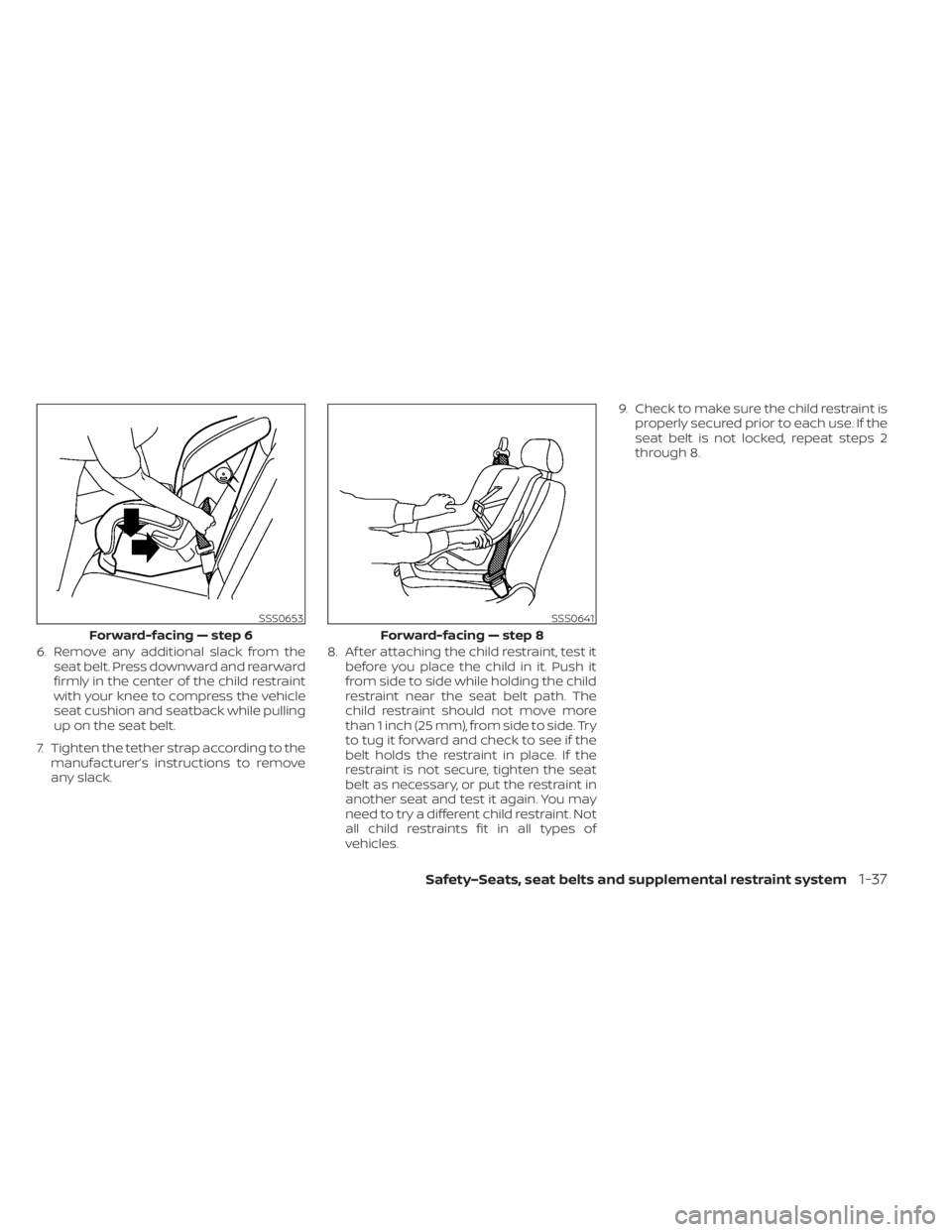
6. Remove any additional slack from theseat belt. Press downward and rearward
firmly in the center of the child restraint
with your knee to compress the vehicle
seat cushion and seatback while pulling
up on the seat belt.
7. Tighten the tether strap according to the manufacturer’s instructions to remove
any slack. 8. Af ter attaching the child restraint, test it
before you place the child in it. Push it
from side to side while holding the child
restraint near the seat belt path. The
child restraint should not move more
than 1 inch (25 mm), from side to side. Try
to tug it forward and check to see if the
belt holds the restraint in place. If the
restraint is not secure, tighten the seat
belt as necessary, or put the restraint in
another seat and test it again. You may
need to try a different child restraint. Not
all child restraints fit in all types of
vehicles. 9. Check to make sure the child restraint is
properly secured prior to each use. If the
seat belt is not locked, repeat steps 2
through 8.
SSS0653
Forward-facing — step 6
SSS0641
Forward-facing — step 8
Safety–Seats, seat belts and supplemental restraint system1-37
Page 147 of 596
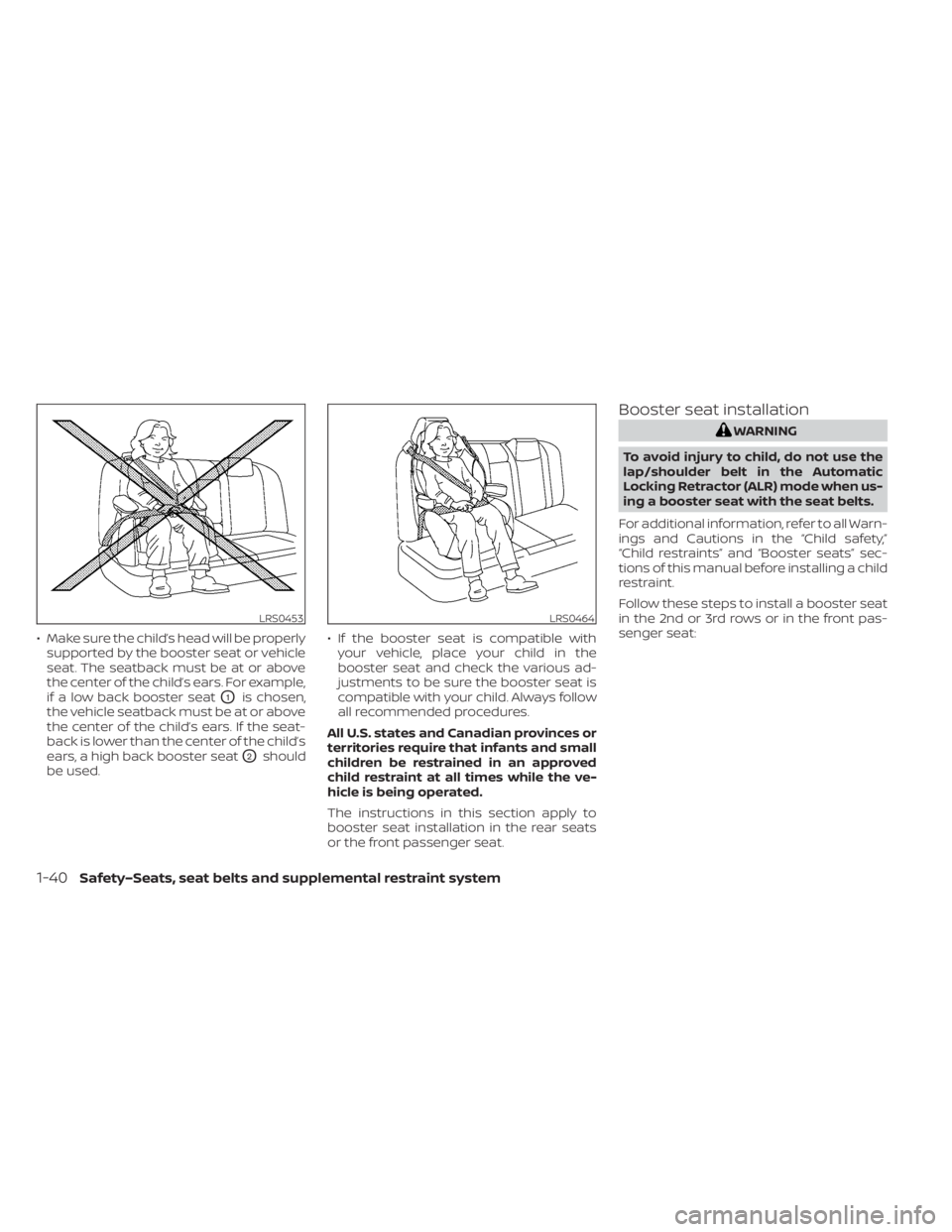
• Make sure the child’s head will be properlysupported by the booster seat or vehicle
seat. The seatback must be at or above
the center of the child’s ears. For example,
if a low back booster seat
O1is chosen,
the vehicle seatback must be at or above
the center of the child’s ears. If the seat-
back is lower than the center of the child’s
ears, a high back booster seat
O2should
be used. • If the booster seat is compatible with
your vehicle, place your child in the
booster seat and check the various ad-
justments to be sure the booster seat is
compatible with your child. Always follow
all recommended procedures.
All U.S. states and Canadian provinces or
territories require that infants and small
children be restrained in an approved
child restraint at all times while the ve-
hicle is being operated.
The instructions in this section apply to
booster seat installation in the rear seats
or the front passenger seat.
Booster seat installation
WARNING
To avoid injury to child, do not use the
lap/shoulder belt in the Automatic
Locking Retractor (ALR) mode when us-
ing a booster seat with the seat belts.
For additional information, refer to all Warn-
ings and Cautions in the “Child safety,”
“Child restraints” and “Booster seats” sec-
tions of this manual before installing a child
restraint.
Follow these steps to install a booster seat
in the 2nd or 3rd rows or in the front pas-
senger seat:
LRS0453LRS0464
1-40Safety–Seats, seat belts and supplemental restraint system
Page 162 of 596
4. Remain in this position for 30 secondsallowing the system to classif y the front
passenger before the vehicle is put into
motion.
5. Ensure proper classification by checking the front passenger air bag status light.
NOTE:
This vehicle’s occupant classification
sensor system generally keeps the clas-
sification locked during driving, so it is
important that you confirm that the
front passenger is properly classified
prior to driving. However, the occupant
classification sensor may recalculate the
weight of the occupant under some con-
ditions (both while driving and when
stopped), so front passenger seat occu-
pants should continue to remain seated
as outlined above.
Troubleshooting
If you think the front passenger air bag
status light is incorrect:
1. If the light is ON with an adult occupyingthe front passenger seat:
• Occupant is a small adult — the air bag light is functioning as intended. The
front passenger air bag and passen-
ger knee air bag are suppressed. However, if the occupant is not a small
adult, then this may be due to the following
conditions that may be interfering with the
weight sensors:
• Occupant is not sitting upright, lean-ing against the seatback, and cen-
tered on the seat cushion with his/her
feet comfortably extended to the floor.
• A child restraint or other object press- ing against the rear of the seatback.
• A rear passenger pushing or pulling on the back of the front passenger seat.
• Forcing the front seat or seatback against an object on the seat or floor
behind it.
• An object placed under the front pas- senger seat.
• An object placed between the seat cushion and center console or be-
tween the seat cushion and the door.
If the vehicle is moving, please come to a
stop when it is safe to do so. Check and
correct any of the above conditions. Re-
start the vehicle and wait 1 minute.
NOTE:
A system check will be performed during
which the front passenger air bag status
light will remain lit for about 7 seconds
initially.
If the light is still ON af ter this, the person
should be advised not to ride in the front
passenger seat and the vehicle should be
checked as soon as possible. It is recom-
mended that you visit a NISSAN certified
LEAF dealer for this service.
2. If the light is OFF with a small adult, child or child restraint occupying the front
passenger seat.
This may be due to the following condi-
tions that may be interfering with the
weight sensors:
• Small adult or child is not sitting up- right, leaning against the seatback,
and centered on the seat cushion with
his/her feet comfortably extended to
the floor.
• The child restraint is not properly in- stalled, as outlined in the “Child re-
straints” section of this manual.
• An object weighting over 9.1 lbs. (4 kg) hanging on the seat or placed in the
seatback pocket (if so equipped).
Safety–Seats, seat belts and supplemental restraint system1-55
Page 170 of 596
When the power switch is in the ON posi-
tion, the supplemental air bag warning
light illuminates for about 7 seconds and
then turns off. This means the system is
operational.
If any of the following conditions occur, the
front air bag, side air bag, curtain air bag,
knee air bag and pretensioner systems
need servicing:
• The supplemental air bag warning lightremains on af ter approximately 7 sec-
onds.
• The supplemental air bag warning light flashes intermittently.
• The supplemental air bag warning light does not come on at all.
Under these conditions, the front air bag,
side air bag, curtain air bag, knee air bag
and pretensioner systems may not oper-
ate properly. They must be checked and
repaired. It is recommended that you visit
the nearest NISSAN certified LEAF dealer
for this service.WARNING
If the supplemental air bag warning
light is on, it could mean that the front
air bag, side air bag, curtain air bag,
knee air bag and/or pretensioner sys-
tems will not operate in an accident. To
help avoid injury to yourself or others,
have your vehicle checked as soon as
possible. It is recommended that you
visit a NISSAN certified LEAF dealer for
this service.
Repair and replacement
procedure
The front air bags, side air bags, curtain air
bags, knee air bags and pretensioner(s) are
designed to activate on a one-time-only
basis. As a reminder, unless it is damaged,
the supplemental air bag warning light will
remain illuminated af ter inflation has oc-
curred. These systems should be repaired
and/or replaced as soon as possible. It is
recommended that you visit a NISSAN cer-
tified LEAF dealer for this service. When maintenance work is required on the
vehicle, the front air bags, side air bags,
curtain air bags, knee air bags and preten-
sioner(s) and related parts should be
pointed out to the person performing the
maintenance. The power switch should al-
ways be in the LOCK position when work-
ing under the hood or inside the vehicle.
WARNING
• Once a front air bag, side air bag, cur-
tain air bag or knee air bag has in-
flated, the air bag module will not
function again and must be replaced.
Additionally, the activated preten-
sioner(s) must also be replaced. The
air bag module and pretensioner(s)
should be replaced. It is recom-
mended that you visit a NISSAN cer-
tified LEAF dealer for this service. The
air bag modules and pretensioner
system cannot be repaired.
• The front air bag, side air bag, curtain
air bag and knee air bag systems,
and pretensioner system should be
inspected if there is any damage to
the front end or side portion of the
vehicle. It is recommended that you
visit a NISSAN certified LEAF dealer
for this service.
Safety–Seats, seat belts and supplemental restraint system1-63
Page 173 of 596
2 Instruments and controls
Cockpit.........................................2-2
Instrument Panel ................................2-4
Meters and Gauges .............................2-5
Speedometer and odometer .................2-6
Li-ion battery temperature gauge ............ 2-7
Power meter .................................2-8
Driving range .................................2-9
Li-ion battery available charge gauge ........2-9
Li-ion battery capacity level gauge ..........2-12
Outside air temperature .....................2-12
Clock ........................................ 2-13
ECO mode indicator ......................... 2-13
e-Pedal system indicator ....................2-13
Warning lights, indicator lights and audible
reminders ...................................... 2-14
Checking lights .............................. 2-15
Warning lights ............................... 2-15
Indicator lights .............................. 2-22
Audible reminders ........................... 2-24
Vehicle information display .....................2-25
How to use the vehicle information
display ...................................... 2-26
Startup display .............................. 2-26
Settings ..................................... 2-26
Vehicle information display warnings
and indicators ............................... 2-33Warning information displays (MODELS
WITH A NAVIGATION SYSTEM)
................2-42
Security systems ............................... 2-43
Vehicle security system .....................2-43
NISSAN Vehicle Immobilizer System .........2-44
Wiper and washer switch .......................2-46
Washer operation ...........................2-47
Rear wiper operation ........................2-47
Rear window and outside mirror
(if so equipped) defroster switch ...............2-48
Headlight and turn signal switch ...............2-49
Headlight switch ............................ 2-49
LED Daytime Running Lights (DRL)
system (if so equipped) ......................2-53
Instrument brightness control ..............2-54
Turn signal switch ........................... 2-54
Fog light switch (if so equipped) ................2-55
Horn ........................................... 2-55
EC
O switch ..................................... 2-55
Heated seat switches (if so equipped) ..........2-56
Heated steering wheel switch (if so equipped) . . 2-57
E-call (SOS) button (if so equipped) .............2-58
Charge port lid switch .......................... 2-58
Immediate Charge switch ......................2-58
Page 178 of 596
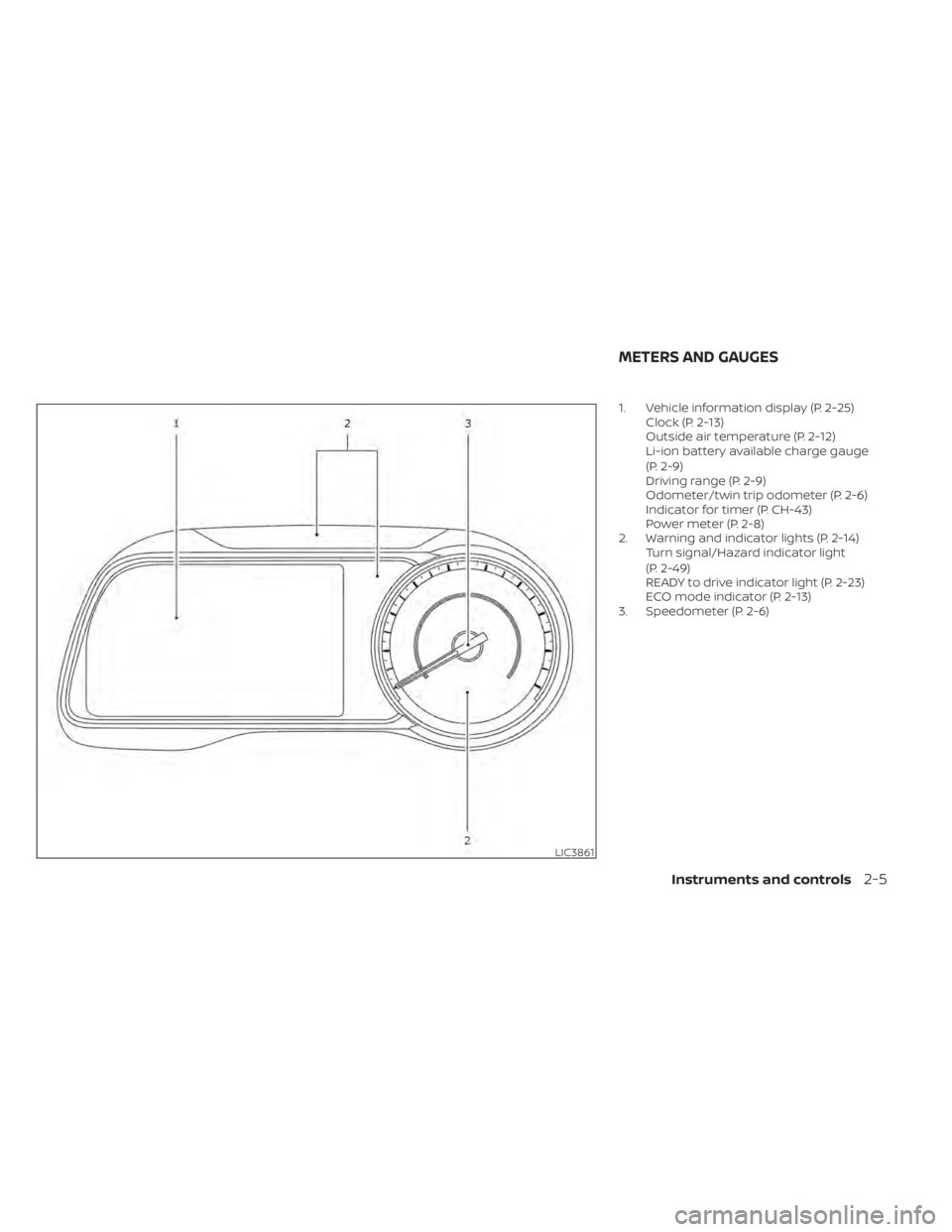
1. Vehicle information display (P. 2-25)Clock (P. 2-13)
Outside air temperature (P. 2-12)
Li-ion battery available charge gauge
(P. 2-9)
Driving range (P. 2-9)
Odometer/twin trip odometer (P. 2-6)
Indicator for timer (P. CH-43)
Power meter (P. 2-8)
2. Warning and indicator lights (P. 2-14) Turn signal/Hazard indicator light
(P. 2-49)
READY to drive indicator light (P. 2-23)
ECO mode indicator (P. 2-13)
3. Speedometer (P. 2-6)
LIC3861
METERS AND GAUGES
Instruments and controls2-5
Page 186 of 596
CLOCK
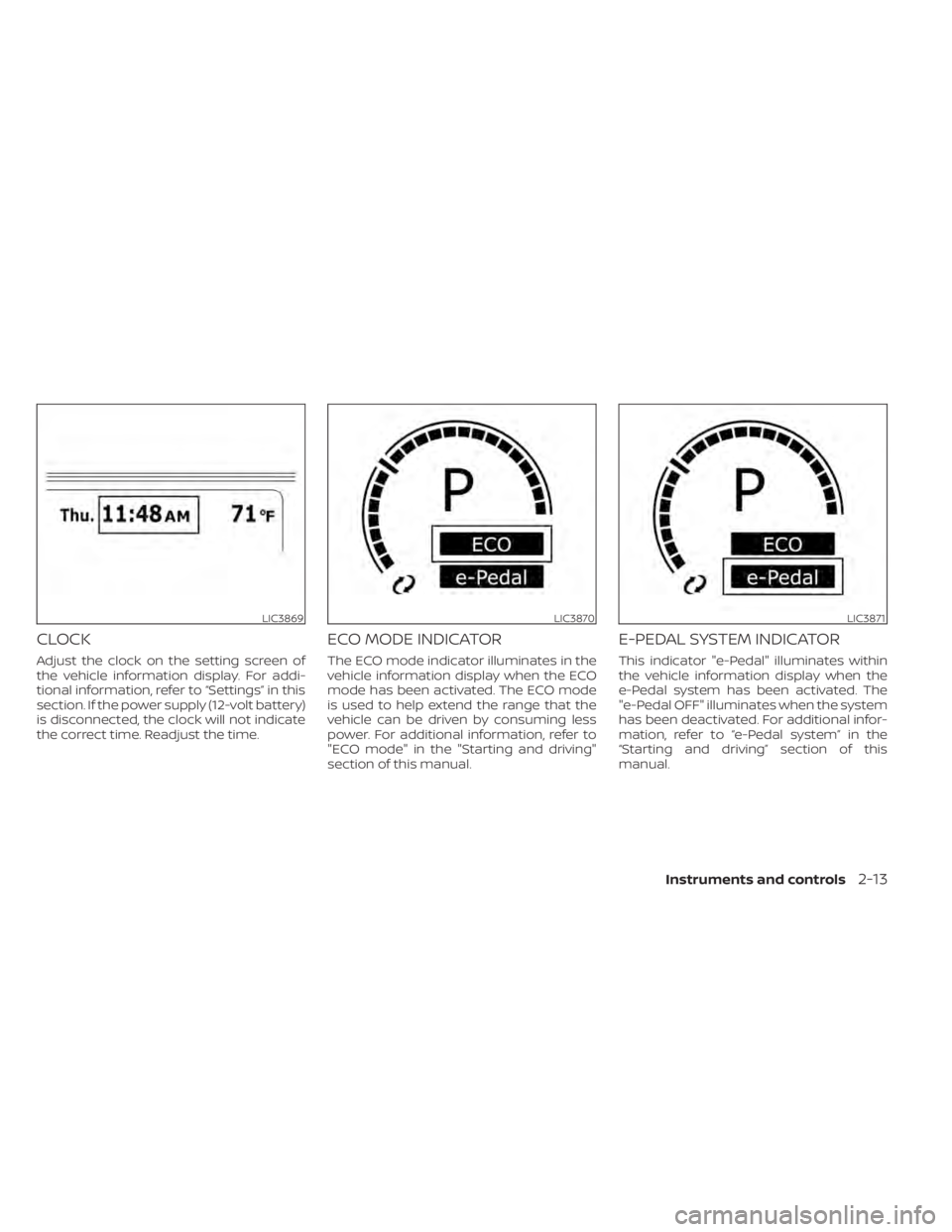
Adjust the clock on the setting screen of
the vehicle information display. For addi-
tional information, refer to “Settings” in this
section. If the power supply (12-volt battery)
is disconnected, the clock will not indicate
the correct time. Readjust the time.
ECO MODE INDICATOR
The ECO mode indicator illuminates in the
vehicle information display when the ECO
mode has been activated. The ECO mode
is used to help extend the range that the
vehicle can be driven by consuming less
power. For additional information, refer to
"ECO mode" in the "Starting and driving"
section of this manual.
E-PEDAL SYSTEM INDICATOR
This indicator "e-Pedal" illuminates within
the vehicle information display when the
e-Pedal system has been activated. The
"e-Pedal OFF" illuminates when the system
has been deactivated. For additional infor-
mation, refer to “e-Pedal system” in the
“Starting and driving” section of this
manual.
LIC3869LIC3870LIC3871
Instruments and controls2-13
Page 187 of 596
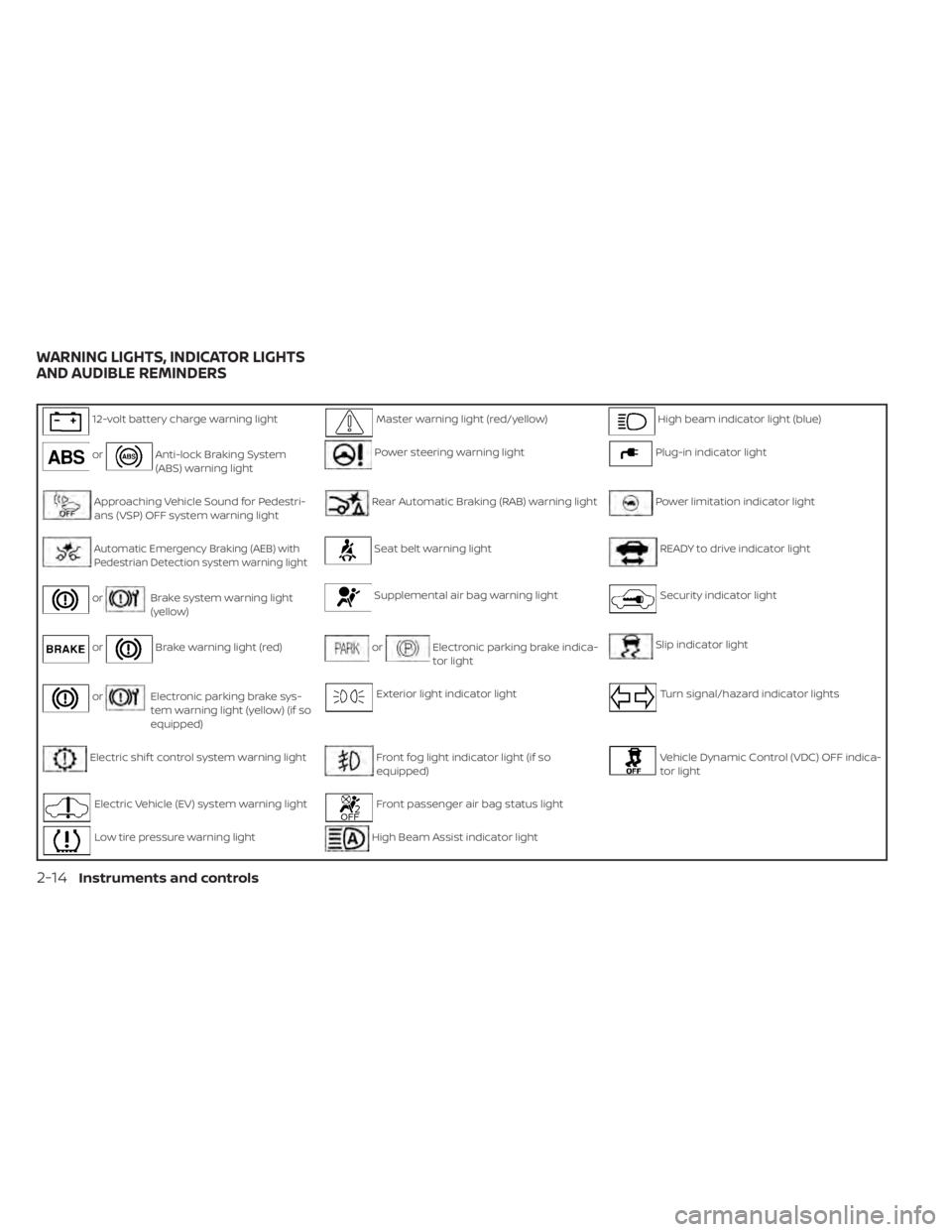
12-volt battery charge warning lightMaster warning light (red/yellow)High beam indicator light (blue)
orAnti-lock Braking System
(ABS) warning lightPower steering warning lightPlug-in indicator light
Approaching Vehicle Sound for Pedestri-
ans (VSP) OFF system warning lightRear Automatic Braking (RAB) warning lightPower limitation indicator light
Automatic Emergency Braking (AEB) withPedestrian Detection system warning lightSeat belt warning lightREADY to drive indicator light
orBrake system warning light
(yellow)Supplemental air bag warning lightSecurity indicator light
orBrake warning light (red)orElectronic parking brake indica-
tor lightSlip indicator light
orElectronic parking brake sys-
tem warning light (yellow) (if so
equipped)Exterior light indicator lightTurn signal/hazard indicator lights
Electric shif t control system warning lightFront fog light indicator light (if so
equipped)Vehicle Dynamic Control (VDC) OFF indica-
tor light
Electric Vehicle (EV) system warning lightFront passenger air bag status light
Low tire pressure warning lightHigh Beam Assist indicator light
WARNING LIGHTS, INDICATOR LIGHTS
AND AUDIBLE REMINDERS
2-14Instruments and controls
Page 189 of 596
NOTE:
• If the vehicle does not go into theREADY to drive position (when the
power switch is pushed and the brake
pedal is depressed), jump-start the ve-
hicle to place the power switch in the
READY to drive position. For additional
information, refer to “Jump starting” in
the “In case of emergency ” section of
this manual.
• Do not jump-start the vehicle if the conditions below occur. Have the sys-
tem checked. It is recommended that
you visit a NISSAN certified LEAF dealer
for this service:– If the 12-volt charge warning light turns off when the vehicle is in the
READY to drive mode, the 12-volt bat-
tery may be discharged or there may
be a malfunction in the 12-volt bat-
tery related system.
– If the 12-volt charge warning light continues to illuminate when the ve-
hicle is in the READY to drive mode,
there may be a malfunction in the
DC/DC converter. Have the system
checked. It is recommended that you
visit a NISSAN certified LEAF dealer
for this service.
orAnti-lock
Braking System
(ABS) warning
light
When the power switch is in the ON or
READY to drive position, the Anti-lock Brak-
ing System (ABS) warning light illuminates
and then turns off. This indicates the ABS is
operational.
If the ABS warning light illuminates while
the power switch is in the READY to drive
position, or while driving, it may indicate the
ABS is not functioning properly. Have the
system checked. It is recommended that
you visit a NISSAN certified LEAF dealer for
this service.
If an ABS malfunction occurs, the anti-lock
function is turned off. The brake system
then operates normally, but without anti-
lock assistance. For additional information,
refer to “Brake system” in the “Starting and
driving” section of this manual.
Approaching Vehicle
Sound for Pedestrians
(VSP) system OFF
warning light
The Approaching Vehicle Sound for Pedes-
trians (VSP) system OFF warning light is
located on the instrument panel.
This light comes on if there is a malfunction
in the VSP system.
If the VSP system OFF warning light illumi-
nates while the power switch is in the ON
position, or in the READY to drive position, it
may indicate the VSP system is not func-
tioning properly. Have the system checked.
It is recommended that you visit a NISSAN
certified LEAF dealer for this service.
For additional information, refer to “Ap-
proaching Vehicle Sound for Pedestrians
(VSP) system” in the “EV overview” section of
this manual.
Automatic Emergency
Braking (AEB) with
Pedestrian Detection
system warning light
This light comes on when the power switch
is placed in the ON position. It turns off af ter
the EV system is started.
2-16Instruments and controls
Page 197 of 596
The READY to drive indicator light will turn
off in the following conditions.
• Certain EV system malfunctions.
• The READY to drive indicator light turnsoff immediately before the Li-ion battery
is completely discharged. If the Li-ion bat-
tery becomes completely discharged,
the vehicle must be charged in order to
be driven. For additional information, re-
fer to “Low battery charge indicator” in
this section.
Security
indicator light
This light blinks when the power switch is in
the ACC, OFF or LOCK position. This func-
tion indicates the security system
equipped on the vehicle is operational.
If the security system is malfunctioning,
this light will remain on while the power
switch is in the ON position. For additional
information, refer to “Security systems” in
this section.
Slip indicator light
This indicator light will blink when the VDC
system or the traction control system is
operating, thus alerting that the vehicle is nearing its traction limits. The road surface
may be slippery.
You may feel or hear the system working;
this is normal. The light will blink for a few
seconds af ter the VDC system stops limit-
ing wheel spin.
The indicator light also comes on when
you place the power switch in the ON posi-
tion.
The light will turn off af ter approximately 2
seconds if the system is operational. If the
light does not come on, have the system
checked. It is recommended that you visit a
NISSAN certified LEAF dealer for this ser-
vice.
Turn signal/hazard
indicator lights
This light flashes when the turn signal
switch lever or hazard switch is turned on.
Vehicle Dynamic Control
(VDC) OFF indicator light
This light illuminates when the Vehicle Dy-
namic Control (VDC) is turned off in the
vehicle information display. This indicates
that the VDC system is not operating. For
additional information, refer to “Vehicle Dy-namic Control (VDC) system” in the “Start-
ing and driving” section of this manual.
AUDIBLE REMINDERS
Brake pad wear warning
The disc brake pads have audible wear
warnings. When a brake pad requires re-
placement, it will make a high pitched
scraping sound when the vehicle is in mo-
tion. This scraping sound will first occur
only when the brake pedal is depressed.
Af ter more wear of the brake pad, the
sound will always be heard even if the
brake pedal is not depressed. Have the
brakes checked as soon as possible if the
warning sound is heard.
Electric shif t control system
reminder chime
If an improper shif t operation is performed,
for safety reasons a chime will sound and
at the same time, depending on the condi-
tions, the operation will be canceled or the
shif t position will switch to the N (Neutral)
position.
For additional information, refer to “Driving
the vehicle” in the “Starting and driving” sec-
tion of this manual.
2-24Instruments and controls