display NISSAN LEAF 2020 Owner´s Manual
[x] Cancel search | Manufacturer: NISSAN, Model Year: 2020, Model line: LEAF, Model: NISSAN LEAF 2020Pages: 596, PDF Size: 4.33 MB
Page 6 of 596

If you see the symbol above, it means“Do
not do this” or“Do not let this happen”.
If you see a symbol similar to those above
in an illustration, it means the arrow points
to the front of the vehicle.
Arrows in an illustration that are similar to
those above indicate movement or action.
Arrows in an illustration that are similar to
those above call attention to an item in the
illustration.
[ ]: Indicates a key/item displayed on the
screen.
CALIFORNIA PERCHLORATE
ADVISORY
Some vehicle parts, such as lithium bat-
teries, may contain perchlorate material.
The following advisory is provided: “Per-
chlorate Material - special handling may
apply. For additional information, refer
to www.dtsc.ca.gov/hazardouswaste/
perchlorate.” © 2019 NISSAN NORTH AMERICA, INC.
All rights reserved. No part of this Owner’s
Manual may be reproduced or stored in a
retrieval system, or transmitted in any
form, or by any means, electronic, me-
chanical, photocopying, recording or oth-
erwise, without the prior written permis-
sion of Nissan North America, Inc.
SIC0697
Page 15 of 596
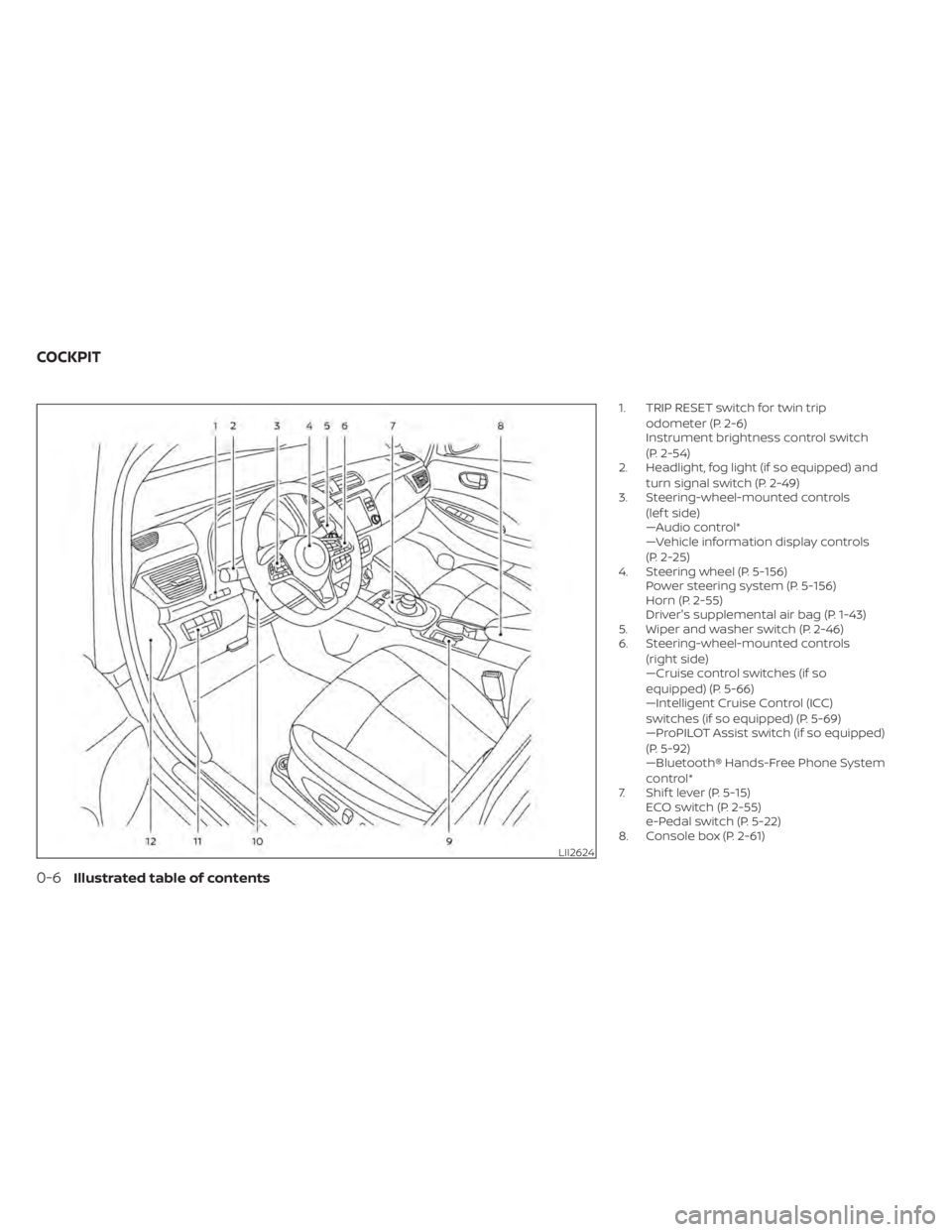
1. TRIP RESET switch for twin tripodometer (P. 2-6)
Instrument brightness control switch
(P. 2-54)
2. Headlight, fog light (if so equipped) and
turn signal switch (P. 2-49)
3. Steering-wheel-mounted controls
(lef t side)
—Audio control*
—Vehicle information display controls
(P. 2-25)
4. Steering wheel (P. 5-156) Power steering system (P. 5-156)
Horn (P. 2-55)
Driver's supplemental air bag (P. 1-43)
5. Wiper and washer switch (P. 2-46)
6. Steering-wheel-mounted controls
(right side)
—Cruise control switches (if so
equipped) (P. 5-66)
—Intelligent Cruise Control (ICC)
switches (if so equipped) (P. 5-69)
—ProPILOT Assist switch (if so equipped)
(P. 5-92)
—Bluetooth® Hands-Free Phone System
control*
7. Shif t lever (P. 5-15) ECO switch (P. 2-55)
e-Pedal switch (P. 5-22)
8. Console box (P. 2-61)
LII2624
COCKPIT
0-6Illustrated table of contents
Page 18 of 596
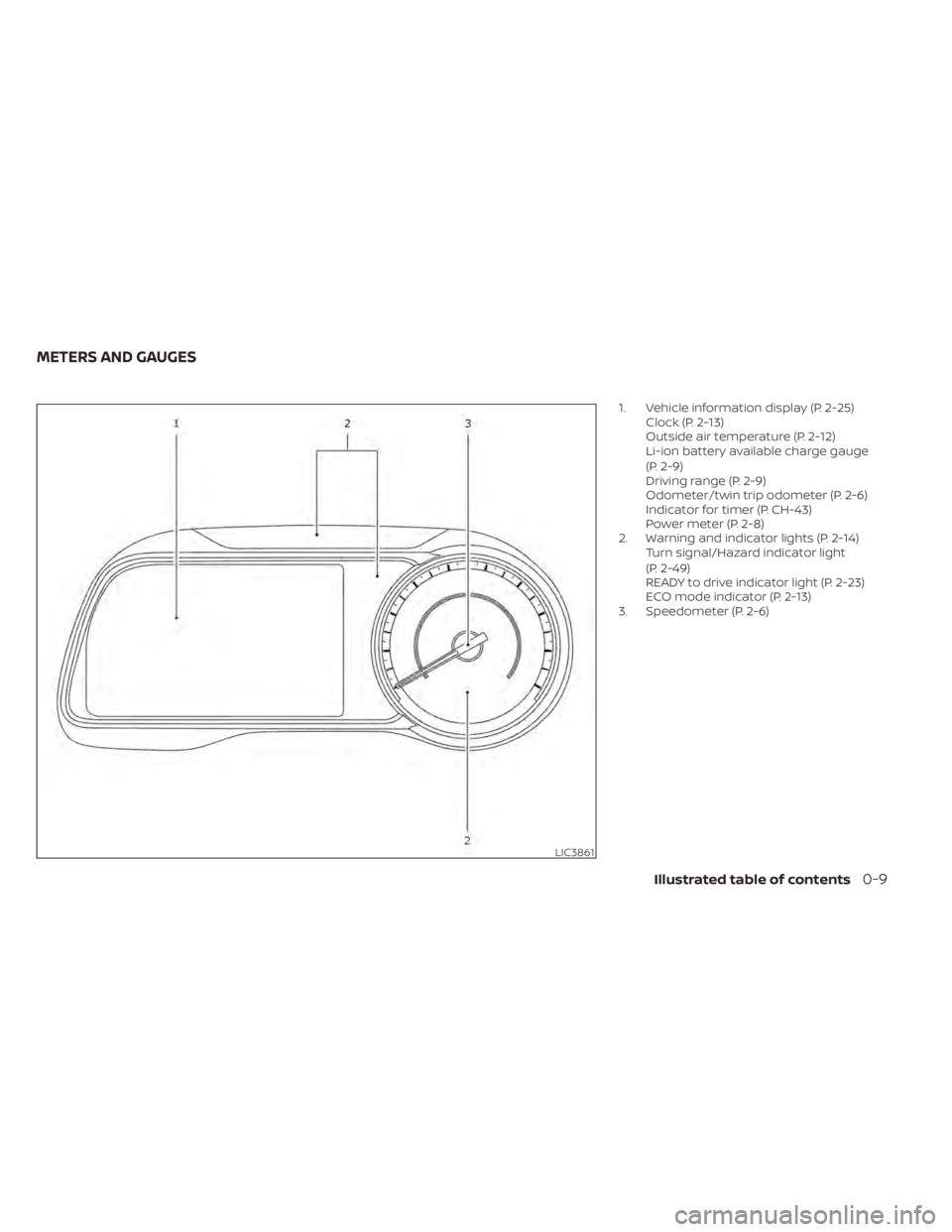
1. Vehicle information display (P. 2-25)Clock (P. 2-13)
Outside air temperature (P. 2-12)
Li-ion battery available charge gauge
(P. 2-9)
Driving range (P. 2-9)
Odometer/twin trip odometer (P. 2-6)
Indicator for timer (P. CH-43)
Power meter (P. 2-8)
2. Warning and indicator lights (P. 2-14) Turn signal/Hazard indicator light
(P. 2-49)
READY to drive indicator light (P. 2-23)
ECO mode indicator (P. 2-13)
3. Speedometer (P. 2-6)
LIC3861
METERS AND GAUGES
Illustrated table of contents0-9
Page 24 of 596
NOTE:
• If the outside temperature is −13°F(−25°C) or less, the Li-ion battery may
freeze and it cannot be charged or pro-
vide power to run the vehicle. Move the
vehicle to a warm location.
• The capacity of the Li-ion battery in your vehicle to hold a charge will, like
all such batteries, decrease with time
and usage. As the battery ages and ca-
pacity decreases, this will result in a
decrease from the vehicle’s initial mile-
age range. This is normal, expected,
and not indicative of any defect in your
Li-ion battery.
• The Li-ion battery has limited service life, and when its charging capacity
falls below a specific level, the EV sys-
tem warning light will illuminate. Own-
ers should bring their vehicle in for in-
spection and possible battery
replacement.
• It is recommended that you visit a NISSAN certified LEAF dealer for infor-
mation about recycling or disposal of
the Li-ion battery. Do not attempt to
recycle or dispose of the Li-ion battery
yourself.
DRIVING WITH A DISCHARGED
LI-ION BATTERY
When a destination is set in the navigation
system (if so equipped) that exceeds the
available vehicle range, the navigation sys-
tem automatically searches the location of
nearby charging stations. When the nearby
charging station locations are displayed,
charge the Li-ion battery as soon as possible.
Warning lights illuminate on the instru-
ment panel and messages are displayed
on the vehicle information display to in-
form you that the Li-ion battery charge is
low. Instructions are also displayed on the
navigation system screen (if so equipped)
to direct you to nearby charging stations.
The vehicle's range is very limited when
these warning lights illuminate and mes-
sages are displayed. Follow the instruc-
tions on the navigation system screen (if so
equipped) and immediately charge the ve-
hicle at the nearest charging station.
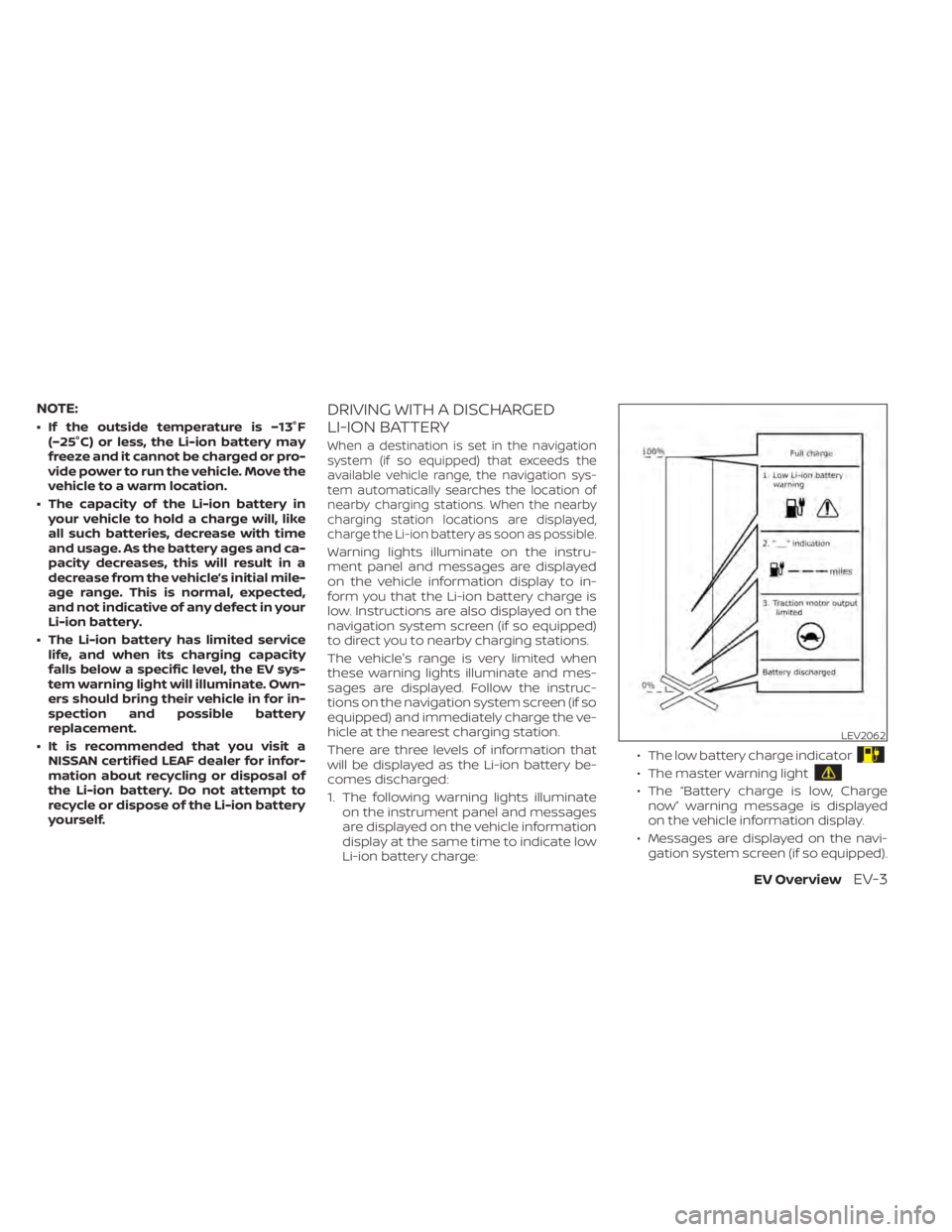
There are three levels of information that
will be displayed as the Li-ion battery be-
comes discharged:
1. The following warning lights illuminate on the instrument panel and messages
are displayed on the vehicle information
display at the same time to indicate low
Li-ion battery charge: • The low battery charge indicator
• The master warning light
• The “Battery charge is low, Charge
now” warning message is displayed
on the vehicle information display.
• Messages are displayed on the navi- gation system screen (if so equipped).
LEV2062
EV OverviewEV-3
Page 25 of 596
• For additional information, refer to“Low battery charge indicator” in the
“Instruments and controls” section of
this manual.
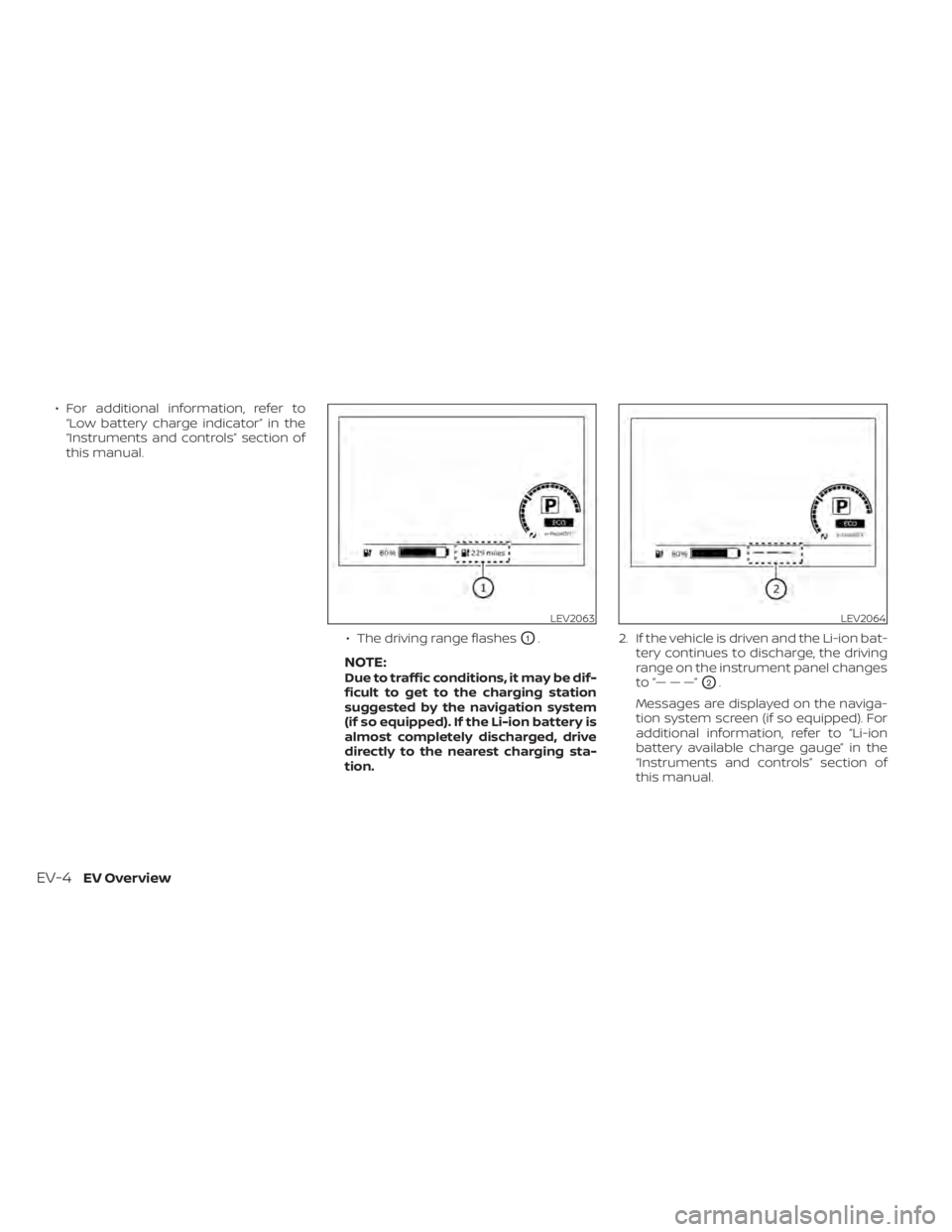
• The driving range flashes
O1.
NOTE:Due to traffic conditions, it may be dif-
ficult to get to the charging station
suggested by the navigation system
(if so equipped). If the Li-ion battery is
almost completely discharged, drive
directly to the nearest charging sta-
tion.2. If the vehicle is driven and the Li-ion bat-
tery continues to discharge, the driving
range on the instrument panel changes
to “— — —”O2.
Messages are displayed on the naviga-
tion system screen (if so equipped). For
additional information, refer to “Li-ion
battery available charge gauge” in the
“Instruments and controls” section of
this manual.
LEV2063LEV2064
EV-4EV Overview
Page 27 of 596
NOTE:
•Connect the charger to the vehicle and
place the power switch in the OFF posi-
tion when parking the vehicle if tem-
peratures may go below -1°F (-17°C). This
provides external power to the Li-ion
battery warmer when it operates and
does not discharge the Li-ion battery.
• The charging status indicator lights il- luminate in a specific pattern when the
Li-ion battery warmer operates. The
charging status indicator lights use the
same pattern to indicate 12-volt bat-
tery charging, Climate Ctrl. Timer op-
eration or Remote Climate Control op-
eration (models with Navigation
System). The charging status indicator
lights do not change if the Li-ion bat-
tery warmer operates at the same time
as the above features. For additional
information, refer to “Charging status
indicator lights” in the “Charging” sec-
tion of this manual.
• The Li-ion battery warmer uses Li-ion battery power to operate, even if the
vehicle is connected to a charger when:– The vehicle's power switch is in the ON position.
– There is no electrical power being supplied to the charging equipment. • When the Li-ion battery warmer is al-
ready in operation using an external
power source, it will continue to use the
external power even if the power
switch is placed in the ON position.
• Vehicle driving range is reduced if the Li-ion battery warmer operates (Li-ion
battery temperature approximately
-1°F (-17°C) or colder) while driving the
vehicle. You may need to charge the
Li-ion battery sooner than in warmer
temperatures.
• The Li-ion battery requires more time to charge when the Li-ion battery
warmer operates.
• The predicted charging time displayed on the meter and navigation system (if
so equipped) increases when the Li-ion
battery warmer operates.
• Climate control performance is re- duced when using the Climate Ctrl.
Timer or Remote Climate Control
(models with Navigation System) while
the Li-ion battery warmer operates.
• The Li-ion battery may not charge to the expected level using the charging
timer while the Li-ion battery warmer
operates. For models with 62 kWh battery
CAUTION
The Li-ion battery warmer does not op-
erate if the normal charger is not con-
nected to the vehicle. To help prevent
the Li-ion battery from freezing, do not
leave the vehicle in an environment if
temperatures may go below -4°F
(-20°C) unless the vehicle is connected
to a charger.
The Li-ion battery warmer helps to prevent
the Li-ion battery from freezing when the
temperature is cold. The Li-ion battery
warmer automatically turns on when the
Li-ion battery temperature is approxi-
mately -4°F (-20°C) or colder and outside
temperature is approximately -11°F (-24°C)
or colder. The Li-ion battery warmer auto-
matically turns off when the Li-ion battery
temperature is approximately 0°F (-18°C) or
higher, or outside temperature is approxi-
mately -8°F (-22°C) or higher.
The Li-ion battery warmer operates when
the normal charger is connected to the
vehicle, and it automatically uses electrical
power from either the external source or
from the Li-ion battery.
EV-6EV Overview
Page 29 of 596

• The predicted charging time displayedon the meter increases when the Li-ion
battery warmer uses electrical power
from the Li-ion battery.
• The Climate Ctrl. Timer or Remote Cli- mate Control (models with Navigation
System) does not turn on while the Li-
ion battery warmer operates. This is
not a malfunction.
• The charging timer or remote charge (models with Navigation System) does
not turn on while the Li-ion battery
warmer operates. This is not a mal-
function.
• The Li-ion battery may not be charged to the expected level using the charg-
ing timer while the Li-ion battery
warmer operates.
• If the Li-ion battery warmer automati- cally stops because of the Li-ion bat-
tery temperature or outside tempera-
ture change, charging will continue
until the Li-ion battery is fully charged.HIGH-VOLTAGE COMPONENTS
WARNING
• The EV system uses high voltage up
to approximately DC 400 volt. The
system can be hot during and af ter
starting and when the vehicle is shut
off. Be careful of both the high volt-
age and the high temperature. Fol-
low the warning labels that are at-
tached to the vehicle.
• Never disassemble, remove or re-
place high-voltage parts and cables
as well as their connectors because
they can cause severe burns or elec-
tric shock that may result in serious
injury or death. High-voltage cables
are colored orange. The vehicle high
voltage system has no user service-
able parts. It is recommended that
you take your vehicle to a NISSAN
certified LEAF dealer for any neces-
sary maintenance.
HIGH VOLTAGE PRECAUTIONS
EV-8EV Overview
Page 38 of 596

STARTING YOUR VEHICLE
1. Depress the brake pedalO1.
2. Push the power switch
O2.
3. Check that the READY to drive indicator light
O3illuminates. For additional infor-
mation, refer to “READY to drive indicator
light” in the “Instruments and controls”
section of this manual.
4. For models with Navigation System: If route guidance is necessary, enter the
destination in the navigation system.
For additional information, refer to the
NissanConnect® Manual (for Leaf ). 5. Check the Li-ion battery level and the
estimated driving range shown on the
meter. For additional information, refer
to “Driving range” in the “Instruments
and controls” section of this manual.
NOTE:
• For additional information, refer to“Range” in this section.
• Before driving, compare the driving distance to the destination displayed
on the navigation system screen (if so
equipped) with the estimated driving
range shown on the meter. Determine
if it will be necessary to charge the Li-
ion battery before or while driving to
your planned destination.
• If it is necessary to charge the Li-ion battery, use the navigation system (if
so equipped) to search for available
charging stations on your planned
driving route.
LEV2066
LEV2093
EV OverviewEV-17
Page 41 of 596
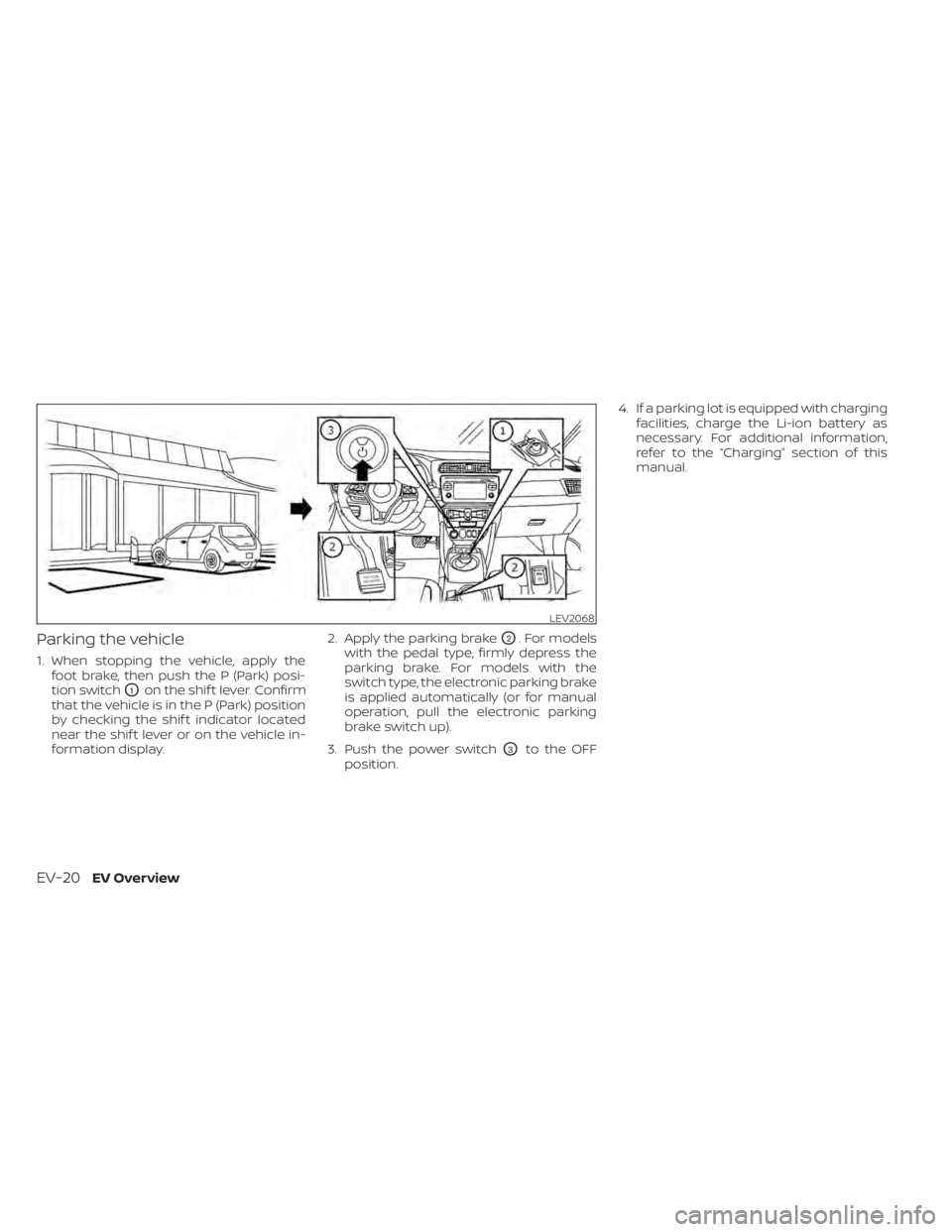
Parking the vehicle
1. When stopping the vehicle, apply thefoot brake, then push the P (Park) posi-
tion switch
O1on the shif t lever. Confirm
that the vehicle is in the P (Park) position
by checking the shif t indicator located
near the shif t lever or on the vehicle in-
formation display. 2. Apply the parking brake
O2. For models
with the pedal type, firmly depress the
parking brake. For models with the
switch type, the electronic parking brake
is applied automatically (or for manual
operation, pull the electronic parking
brake switch up).
3. Push the power switch
O3to the OFF
position. 4. If a parking lot is equipped with charging
facilities, charge the Li-ion battery as
necessary. For additional information,
refer to the “Charging” section of this
manual.
LEV2068
EV-20EV Overview
Page 42 of 596

CHARGING AFTER DRIVING
Charging the Li-ion battery
When you return home, connect the ve-
hicle to the charging device installed at
your home or the EVSE plugged to outlet
using the normal charge connector.
Charge the vehicle or set the charging
timer function to have the vehicle charge
at a specific time. For additional informa-
tion, refer to “Charging timer” in the “Charg-
ing” section of this manual.1. When the power switch is turned off, the
settings of the charging timer, and the
Climate Ctrl. Timer and the charge con-
nector lock functions are displayed on
the vehicle information display. For addi-
tional information, refer to “Vehicle infor-
mation display” in the “Instruments and
controls” section of this manual.
2. Open the charge port lid and charge port cap. For additional information, re-
fer to “Charge port lid” in the “Pre-driving
checks and adjustments” section of this
manual. 3. Connect the charge connector to the
vehicle.
4. When the charging timer is turned on, charging starts at the set time. When the
charging timer is not turned on, charg-
ing starts immediately.
NOTE:
• Charging can be started remotely, evenif the charging timer is set up.
• When you have forgotten to connect the charge connector at home, there is
a function that can notif y you via a text
message capable cellular phone, inter-
net enabled smart phone or personal
computer. For additional information,
refer to “Charging related remote func-
tion” in the “Charging” section of this
manual (models with Navigation Sys-
tem).
• NISSAN recommends that you connect the normal charge cable when getting
out of the vehicle, even if it is not going
to be used. By doing this, you can get
the most out of the remote climate
control (models with Navigation Sys-
tem) and Climate Ctrl. Timer functions
the next time you use the vehicle.
LEV2099
EV OverviewEV-21