lights NISSAN LEAF 2022 Owner´s Manual
[x] Cancel search | Manufacturer: NISSAN, Model Year: 2022, Model line: LEAF, Model: NISSAN LEAF 2022Pages: 618, PDF Size: 4.3 MB
Page 247 of 618
CAUTION
Do not use for extended periods of time
with the power switch in the OFF posi-
tion. This could result in a discharged
12-volt battery.
CONSOLE LIGHT (if so equipped)
The console light will turn on whenever the
parking lights or headlights are illuminated.
The console light brightness can be ad-
justed with the illumination brightness
control in the vehicle information display.
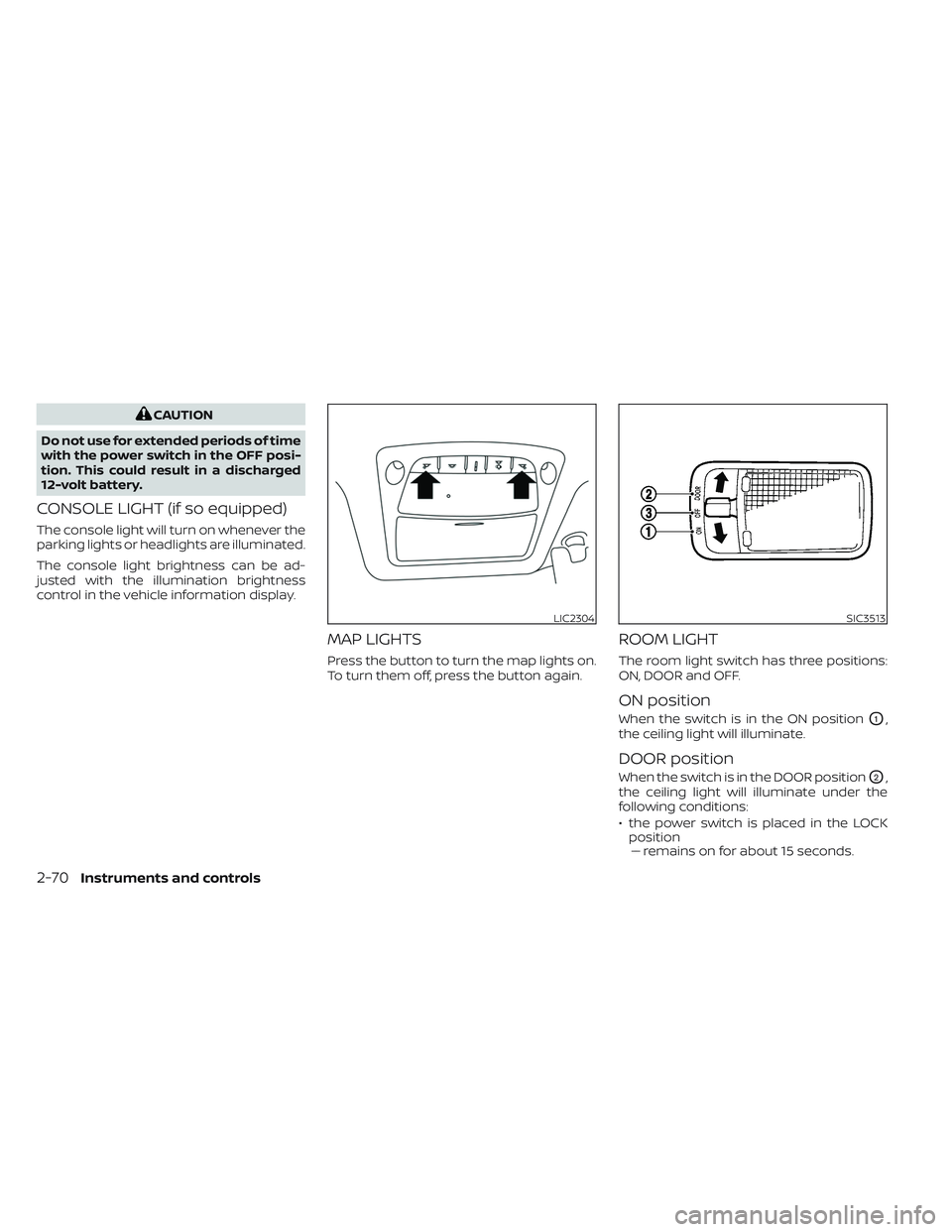
MAP LIGHTS
Press the button to turn the map lights on.
To turn them off, press the button again.
ROOM LIGHT
The room light switch has three positions:
ON, DOOR and OFF.
ON position
When the switch is in the ON positionO1,
the ceiling light will illuminate.
DOOR position
When the switch is in the DOOR positionO2,
the ceiling light will illuminate under the
following conditions:
• the power switch is placed in the LOCK position–– remains on for about 15 seconds.
LIC2304SIC3513
2-70Instruments and controls
Page 248 of 618
• doors are unlocked by pushing theUNLOCKbutton or the request
switch, with the power switch in the LOCK
position –– remains on for about 15 seconds.
• any door is opened and then closed with the power switch in the LOCK position–– remains on for about 15 seconds.
• any door is opened while the power switch in the ACC or ON position– – remains on while the door is opened.
When the door is closed, the light turns
off.
The light will automatically turn off af ter
10 minutes when the light remains illu-
minated to prevent the battery from be-
coming discharged.
OFF position
When the switch is in the OFF positionO3,
the ceiling light will not illuminate, regard-
less of the condition.
CARGO LIGHT
The light illuminates when the rear hatch is
opened. When the rear hatch is closed, the
light goes off. For additional information,
see “Exterior and interior lights” (P. 8-23). The HomeLink® Universal Transceiver pro-
vides a convenient way to consolidate the
functions of up to three individual hand-
held transmitters into one built-in device.
HomeLink® Universal Transceiver:
• Will operate most radio frequency de-
vices such as garage doors, gates, home
and office lighting, entry door locks and
security systems.
• Is powered by your vehicle's 12–volt bat- tery. No separate batteries are required. If
the vehicle's 12–volt battery is discharged
or is disconnected, HomeLink® will retain
all programming.
When the HomeLink® Universal Trans-
ceiver is programmed, retain the original
transmitter for future programming pro-
cedures (Example: new vehicle pur-
chases). Upon sale of the vehicle, the
programmed HomeLink® Universal
Transceiver buttons should be erased for
security purposes. For additional infor-
mation, see “Programming HomeLink®”
(P. 2-72).
WARNING
• Your vehicle's EV system should be
turned off while programming the
HomeLink® Universal Transceiver. For
additional information, see “Push-
button power switch” (P. 5-9).
• Do not use the HomeLink® Universal
Transceiver with any garage door
opener that lacks safety stop and re-
verse features as required by federal
safety standards. (These standards
became effective for opener models
manufactured af ter April 1, 1982). A
garage door opener which cannot
detect an object in the path of a clos-
ing garage door and then automati-
cally stop and reverse, does not meet
current federal safety standards. Us-
ing a garage door opener without
these features increases the risk of
serious injury or death.
• During the programming procedure
your garage door or security gate will
open and close (if the transmitter is
within range). Make sure that people
or objects are clear of the garage
door, gate, etc. that you are
programming.
HOMELINK® UNIVERSAL
TRANSCEIVER (if so equipped)
Instruments and controls2-71
Page 262 of 618
• To prevent the Intelligent Key from beinglef t inside the vehicle, make sure you
carry the Intelligent Key with you and then
lock the doors.
• Do not pull the door handle before push- ing the door handle request switch. The
door will be unlocked but will not open.
Release the door handle once and pull it
again to open the door.
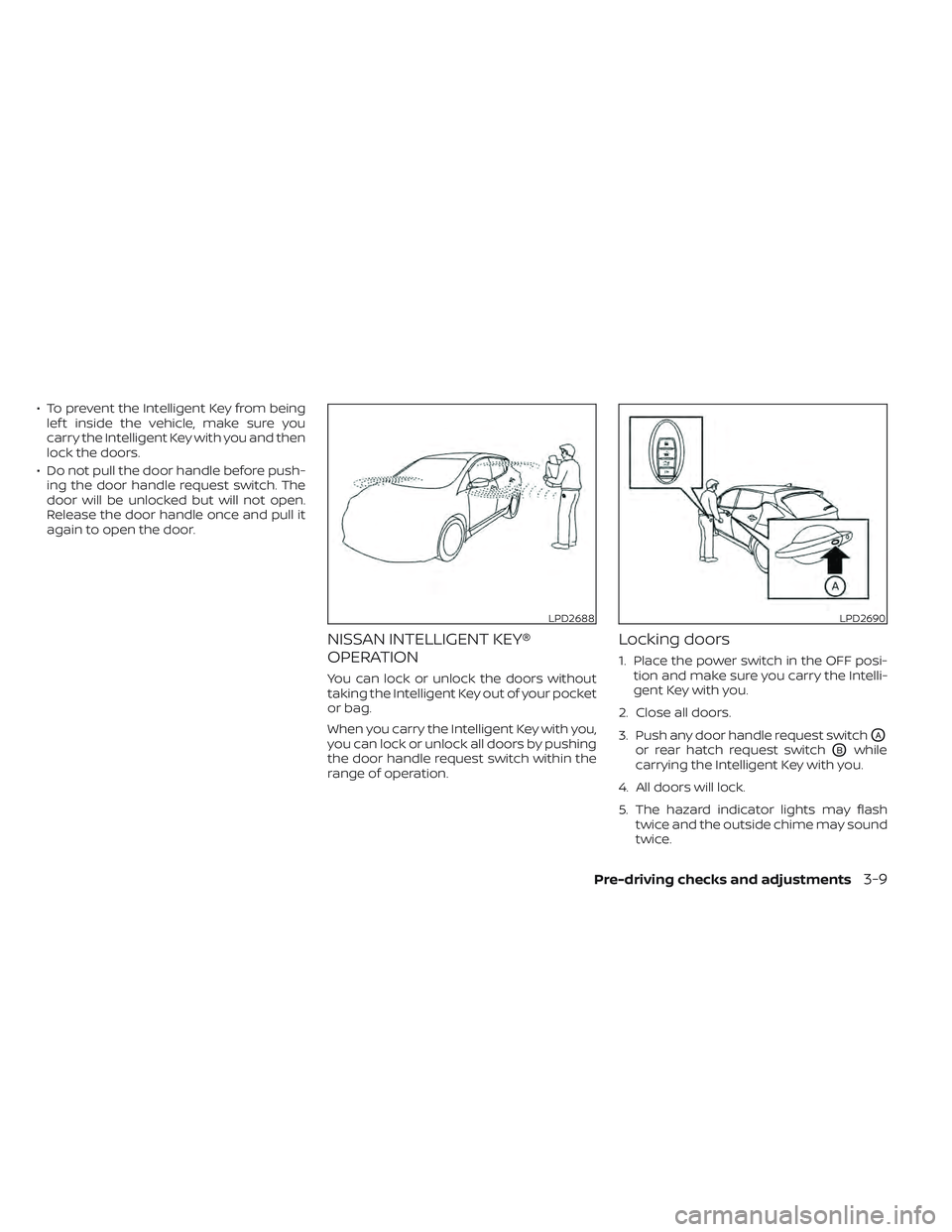
NISSAN INTELLIGENT KEY®
OPERATION
You can lock or unlock the doors without
taking the Intelligent Key out of your pocket
or bag.
When you carry the Intelligent Key with you,
you can lock or unlock all doors by pushing
the door handle request switch within the
range of operation.
Locking doors
1. Place the power switch in the OFF posi- tion and make sure you carry the Intelli-
gent Key with you.
2. Close all doors.
3. Push any door handle request switch
OA
or rear hatch request switchOBwhile
carrying the Intelligent Key with you.
4. All doors will lock.
5. The hazard indicator lights may flash twice and the outside chime may sound
twice.
LPD2688LPD2690
Pre-driving checks and adjustments3-9
Page 264 of 618
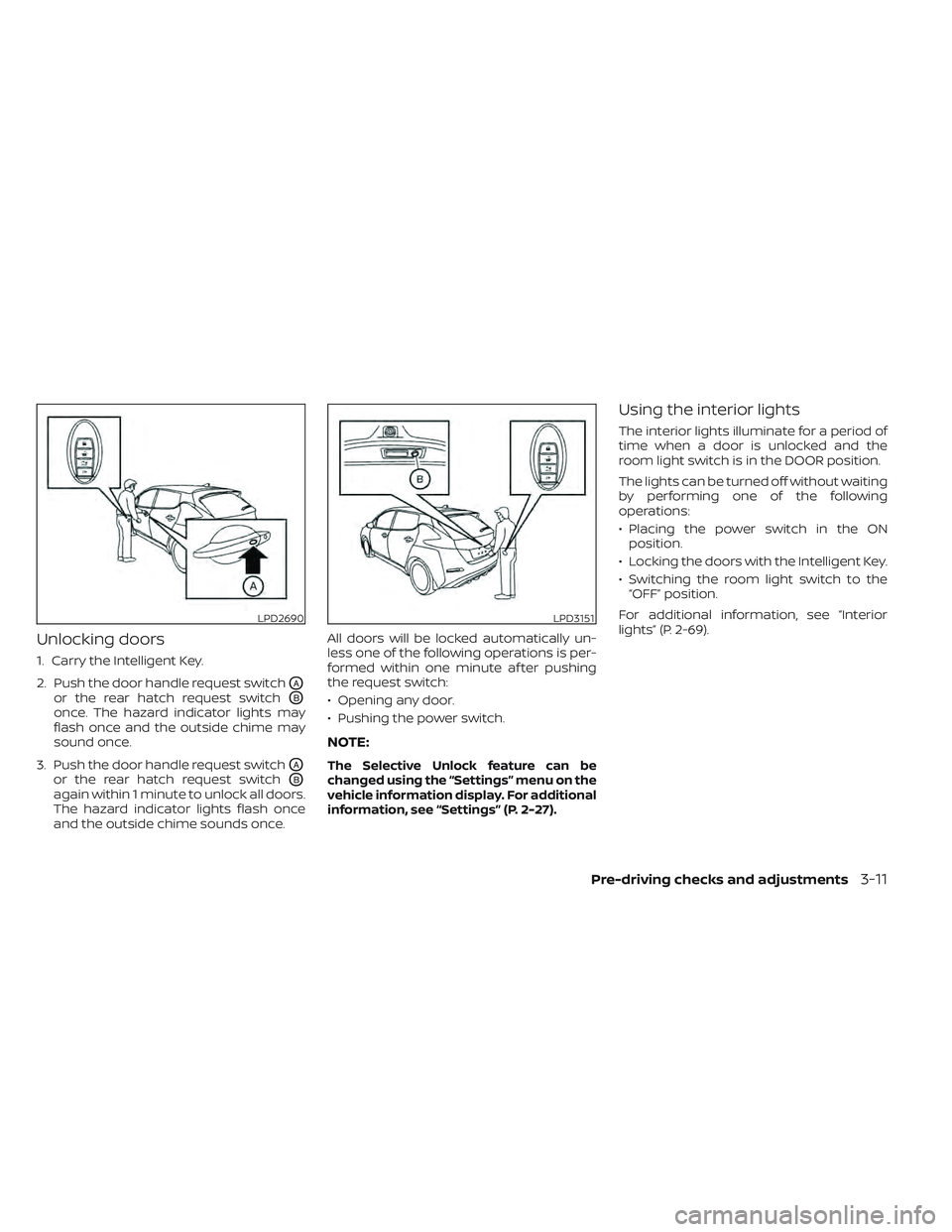
Unlocking doors
1. Carry the Intelligent Key.
2. Push the door handle request switch
OA
or the rear hatch request switchOB
once. The hazard indicator lights may
flash once and the outside chime may
sound once.
3. Push the door handle request switch
OA
or the rear hatch request switchOB
again within 1 minute to unlock all doors.
The hazard indicator lights flash once
and the outside chime sounds once. All doors will be locked automatically un-
less one of the following operations is per-
formed within one minute af ter pushing
the request switch:
• Opening any door.
• Pushing the power switch.
NOTE:
The Selective Unlock feature can be
changed using the “Settings” menu on the
vehicle information display. For additional
information, see “Settings” (P. 2-27).
Using the interior lights
The interior lights illuminate for a period of
time when a door is unlocked and the
room light switch is in the DOOR position.
The lights can be turned off without waiting
by performing one of the following
operations:
• Placing the power switch in the ON
position.
• Locking the doors with the Intelligent Key.
• Switching the room light switch to the “OFF” position.
For additional information, see “Interior
lights” (P. 2-69).
LPD2690LPD3151
Pre-driving checks and adjustments3-11
Page 266 of 618
CAUTION
• Do not allow the Intelligent Key,
which contains electrical compo-
nents, to come into contact with wa-
ter or salt water. This could affect the
system function.
• Do not drop the Intelligent Key.
• Do not strike the Intelligent Key
sharply against another object.
• Do not change or modif y the Intelli-
gent Key.
• Wetting may damage the Intelligent
Key. If the Intelligent Key gets wet,
immediately wipe until it is com-
pletely dry.
• Do not place the Intelligent Key for an
extended period in an area where
temperatures exceed 140°F (60°C).
• Do not attach the Intelligent Key with
a key holder that contains a magnet.
• Do not place the Intelligent Key near
equipment that produces a magnetic
field, such as a TV, audio equipment,
personal computers or cellular
phone.
• When locking the doors using the In-
telligent Key, be sure not to leave the
key in the vehicle.Locking doors
1. Place the power switch in the LOCK position.
2. Close all doors.
3. Press the
button on the Intelli-
gent Key.
4. The hazard indicator lights flash twice and the horn beeps once.
5. All doors and the rear hatch will be locked.
WARNING
Af ter locking the doors using the Intel-
ligent Key, be sure that the doors have
been securely locked by operating the
door handles. Failure to follow these in-
structions may result in inadvertently
unlocking the doors, which may de-
crease the safety and security of your
vehicle.
Unlocking doors
1. Press thebutton on the Intelligent
Key to unlock the driver’s door.
2. The hazard indicator lights flash once.
3.
Press thebutton again within 1 min-
ute to unlock all doors and rear hatch.
All doors and rear hatch will be locked au-
tomatically unless one of the following op-
erations is performed within 1 minute af ter
pressing the
button:
• Opening any doors or rear hatch.
• Pushing the power switch.
Using the interior lights
The interior lights illuminate for a period of
time when a door is unlocked and the
room light switch is in the DOOR position.
The lights can be turned off without waiting
by performing one of the following
operations:
• Placing the power switch in the ON position.
• Locking the doors with the Intelligent Key.
• Switching the room light switch to the “OFF” position.
For additional information, see “Interior
lights” (P. 2-69).
Pre-driving checks and adjustments3-13
Page 267 of 618
Opening charge port lid
The charge port lid may be opened by
pressing and holding thebutton.
For additional information, see "Opening
charge port lid" (P. 3-20).
Using the panic alarm
If you are near your vehicle and feel threat-
ened, you may activate the panic alarm to
call attention by pressing and holding the
button on the Intelligent Key for lon-
ger than 1 second.
The panic alarm and headlights will stay on
for a period of time.
The panic alarm stops when:
• It has run for a period of time.
• Any button is pressed on the Intelligent Key. (Note: The
button must be
pushed for more than 1 second.)
Setting hazard indicator and horn
mode
This vehicle is set in hazard indicator and
horn mode when you first receive the
vehicle.
In hazard indicator and horn mode, when
the
button is pressed, the hazard
indicator flashes twice and the horn chirps
once. When the
button is pressed, the
hazard indicator flashes once.
If horns are not necessary, the system can
be switched to the hazard indicator mode.
In hazard indicator mode, when the
button is pressed, the hazard indicator
flashes twice. When thebutton is
pressed, neither the hazard indicator nor
the horn operates.
3-14Pre-driving checks and adjustments
Page 274 of 618
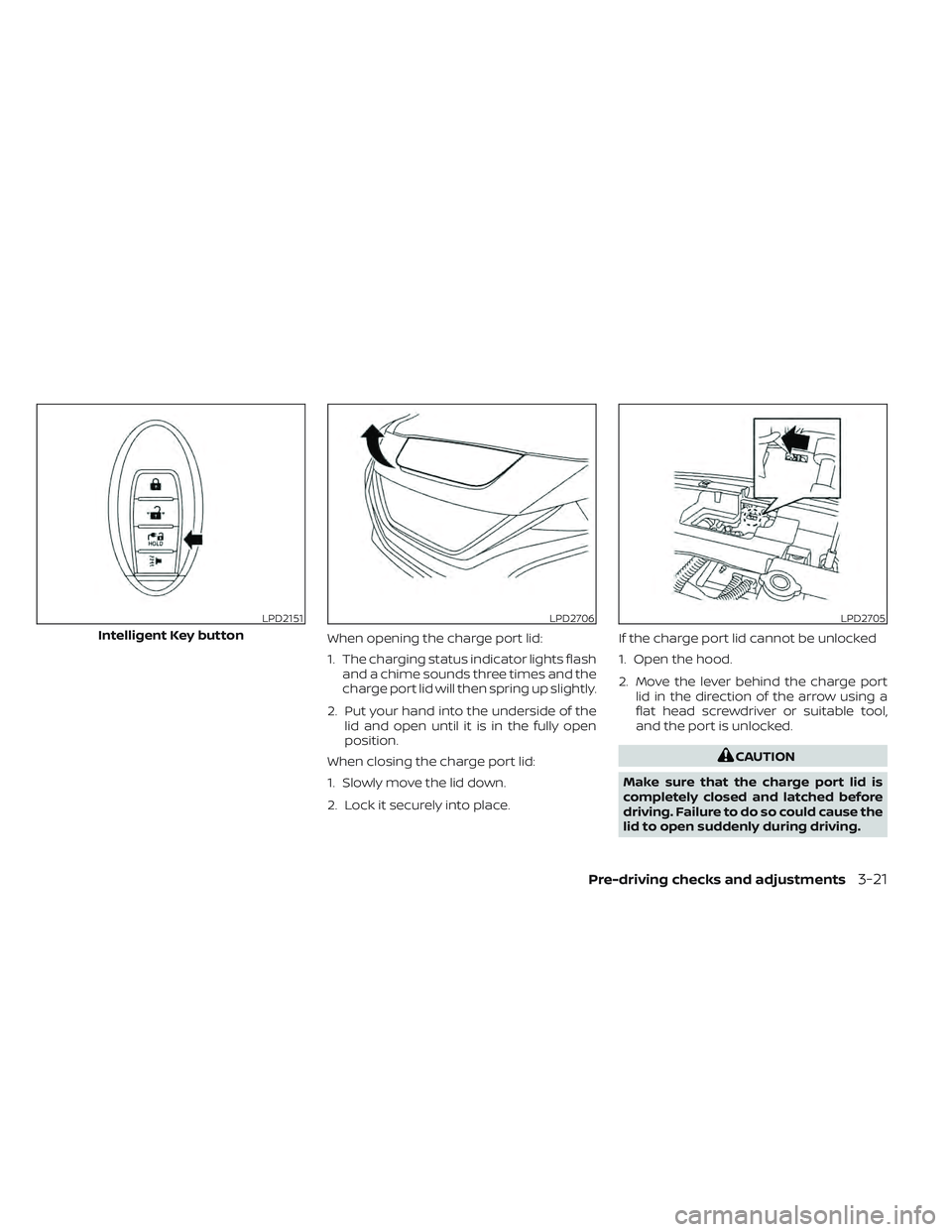
When opening the charge port lid:
1. The charging status indicator lights flashand a chime sounds three times and the
charge port lid will then spring up slightly.
2. Put your hand into the underside of the lid and open until it is in the fully open
position.
When closing the charge port lid:
1. Slowly move the lid down.
2. Lock it securely into place. If the charge port lid cannot be unlocked
1. Open the hood.
2. Move the lever behind the charge port
lid in the direction of the arrow using a
flat head screwdriver or suitable tool,
and the port is unlocked.
CAUTION
Make sure that the charge port lid is
completely closed and latched before
driving. Failure to do so could cause the
lid to open suddenly during driving.
LPD2151
Intelligent Key button
LPD2706LPD2705
Pre-driving checks and adjustments3-21
Page 277 of 618
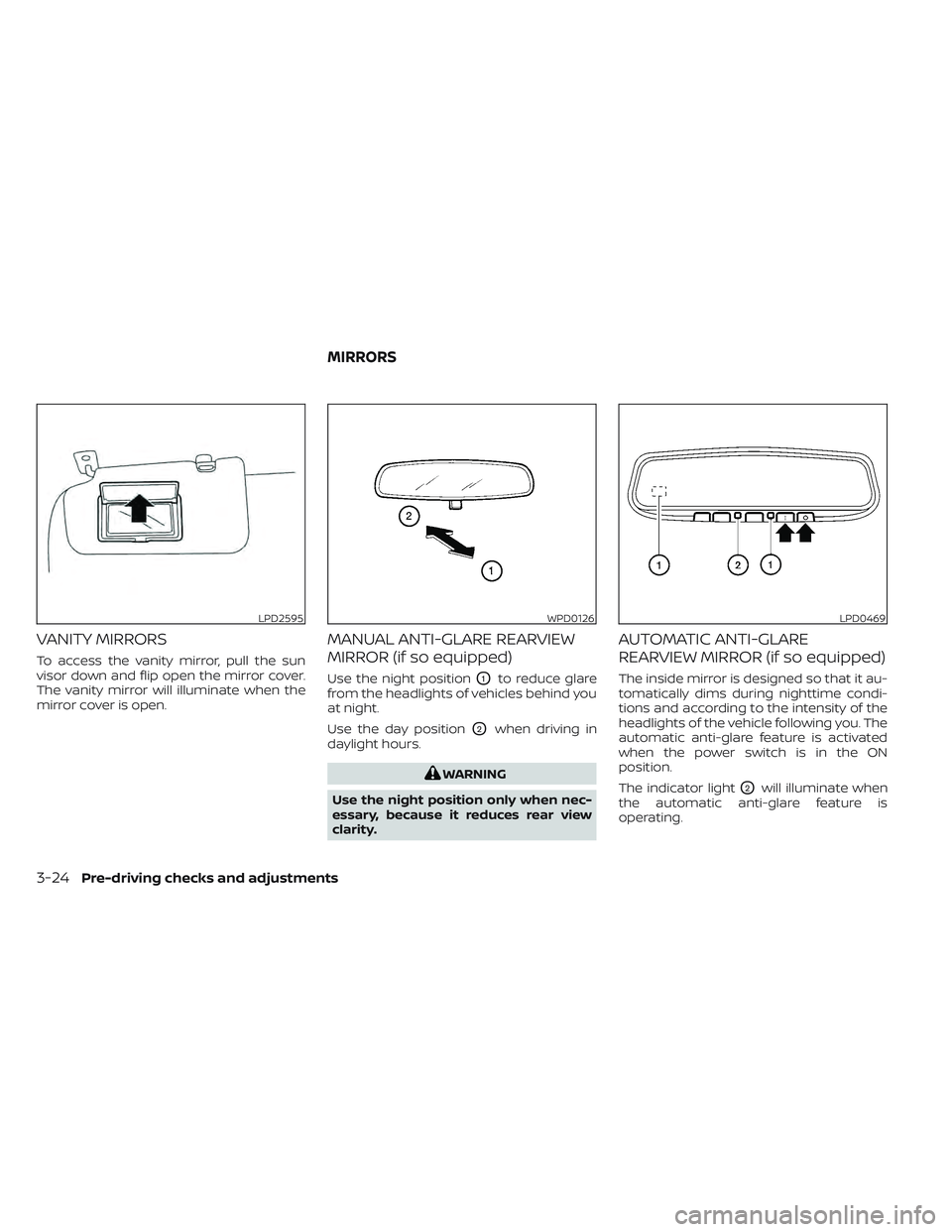
VANITY MIRRORS
To access the vanity mirror, pull the sun
visor down and flip open the mirror cover.
The vanity mirror will illuminate when the
mirror cover is open.
MANUAL ANTI-GLARE REARVIEW
MIRROR (if so equipped)
Use the night positionO1to reduce glare
from the headlights of vehicles behind you
at night.
Use the day position
O2when driving in
daylight hours.
WARNING
Use the night position only when nec-
essary, because it reduces rear view
clarity.
AUTOMATIC ANTI-GLARE
REARVIEW MIRROR (if so equipped)
The inside mirror is designed so that it au-
tomatically dims during nighttime condi-
tions and according to the intensity of the
headlights of the vehicle following you. The
automatic anti-glare feature is activated
when the power switch is in the ON
position.
The indicator light
O2will illuminate when
the automatic anti-glare feature is
operating.
LPD2595WPD0126LPD0469
MIRRORS
3-24Pre-driving checks and adjustments
Page 313 of 618
Ventilation
Press the
HEAT button and A/C but-
ton if the indicator lights are on so that
both indicator lights turn off.
NOTE:
• The ventilation mode requires a lower power consumption, so cruising dis-
tance will increase.
•
In ventilation mode, temperature is not
indicated on the air conditioner display.
Dehumidified defrosting/defogging
Press the
front defroster button (the
indicator light will illuminate).
• To remove moisture or fog on the front window quickly, set the temperature to
the high temperature and the fan speed
to their maximum level.
• Af ter the windshield is cleared, press the
front defroster button again (the in-
dicator light will turn off ).
• When the
front defroster button is
pressed, the air conditioner will automati-
cally turn on to defog the windshield.
The outside air recirculation mode will
be selected to improve the defogging
performance. Fan speed control
Turn the
fan speed control dial to
manually control the fan speed.
Press the AUTO button to change the fan
speed to the automatic mode.
Air flow control
Press the MODE button to change the air
flow mode.
Air flows from the center and
side ventilators.
Air flows from the center and
side ventilators and foot outlets.
Air flows mainly from the foot
outlets.
Air flows from the defroster out-
lets and foot outlets.
Air flows from the defroster
vents. Temperature control
Turn the temperature control dial to set the
desired temperature.
Recirculation
Press the
intake air control button to
change the air circulation mode. When the
indicator light illuminates, the flowing air is
recirculated inside the vehicle.
When the outside temperature exceeds
70°F (21°C) the air conditioning system may
default to air recirculation mode automati-
cally to reduce overall power consumption.
To exit air recirculation mode, deselect the
air recirculation button (indicator will turn
off ) to enter fresh mode.
Fresh air
Press the
intake air control button to
change the air circulation mode. When the
indicator light does not illuminate, the flow-
ing air is drawn from outside the vehicle.
Automatic air intake control
In the AUTO mode, the intake air will be
controlled automatically. When the outside
temperature exceeds 70°F (21°C), the air
conditioning system may default to air re-
circulation mode automatically to reduce
overall power consumption.
4-34Monitor, climate, audio, phone and voice recognition systems
Page 316 of 618
Dehumidified heating
1. Press the A/C button to illuminate theA/C indicator light.
2. Press the
HEAT button to illuminate
the HEAT indicator light
NOTE:
Electric power consumption of climate
control increases while A/C button indi-
cator and
HEAT button indicator si-
multaneously illuminate. As a result, the
driving range may be decreased.
Heating (A/C off )
1. Press the
HEAT button to illuminate
the HEAT indicator light.
2. Press the A/C button to turn off the A/C indicator light.
• Do not set temperature lower than the outside air temperature. Doing so may
prevent the temperature from being
controlled properly.
• If the windows fog up, use dehumidi- fied heating instead of the A/C off
heating. Ventilation
Press the
HEAT button and A/C but-
ton if the indicator lights are on so that
both indicator lights turn off.
NOTE:
• The ventilation mode requires a lower power consumption, so cruising dis-
tance will increase.
• In ventilation mode, temperature is not indicated on the navigation monitor or
on the air conditioner display.
Dehumidified defrosting/defogging
Press the
front defroster button (the
indicator light will illuminate).
• To remove moisture or fog on the front window quickly, set the temperature to
the high temperature and the fan speed
to their maximum level.
• Af ter the windshield is cleared, press the
front defroster button again (the in-
dicator light will turn off ).
• When the
front defroster button is
pressed, the air conditioner and heater
will automatically turn on to defog the
windshield. The outside air recirculation
mode will be selected to improve the de-
fogging performance. Fan speed control
Press the
fan speed control button to
manually control the fan speed.
Press the AUTO button to change the fan
speed to the automatic mode.
Air flow control
Press the MODE button to change the air
flow mode.
Air flows from the center and
side ventilators.
Air flows from the center and
side ventilators and foot outlets.
Air flows mainly from the foot
outlets.
Air flows from the defroster out-
lets and foot outlets.
Air flows from the defroster
vents.
Monitor, climate, audio, phone and voice recognition systems4-37