lights NISSAN LEAF 2022 Owner´s Manual
[x] Cancel search | Manufacturer: NISSAN, Model Year: 2022, Model line: LEAF, Model: NISSAN LEAF 2022Pages: 618, PDF Size: 4.3 MB
Page 86 of 618
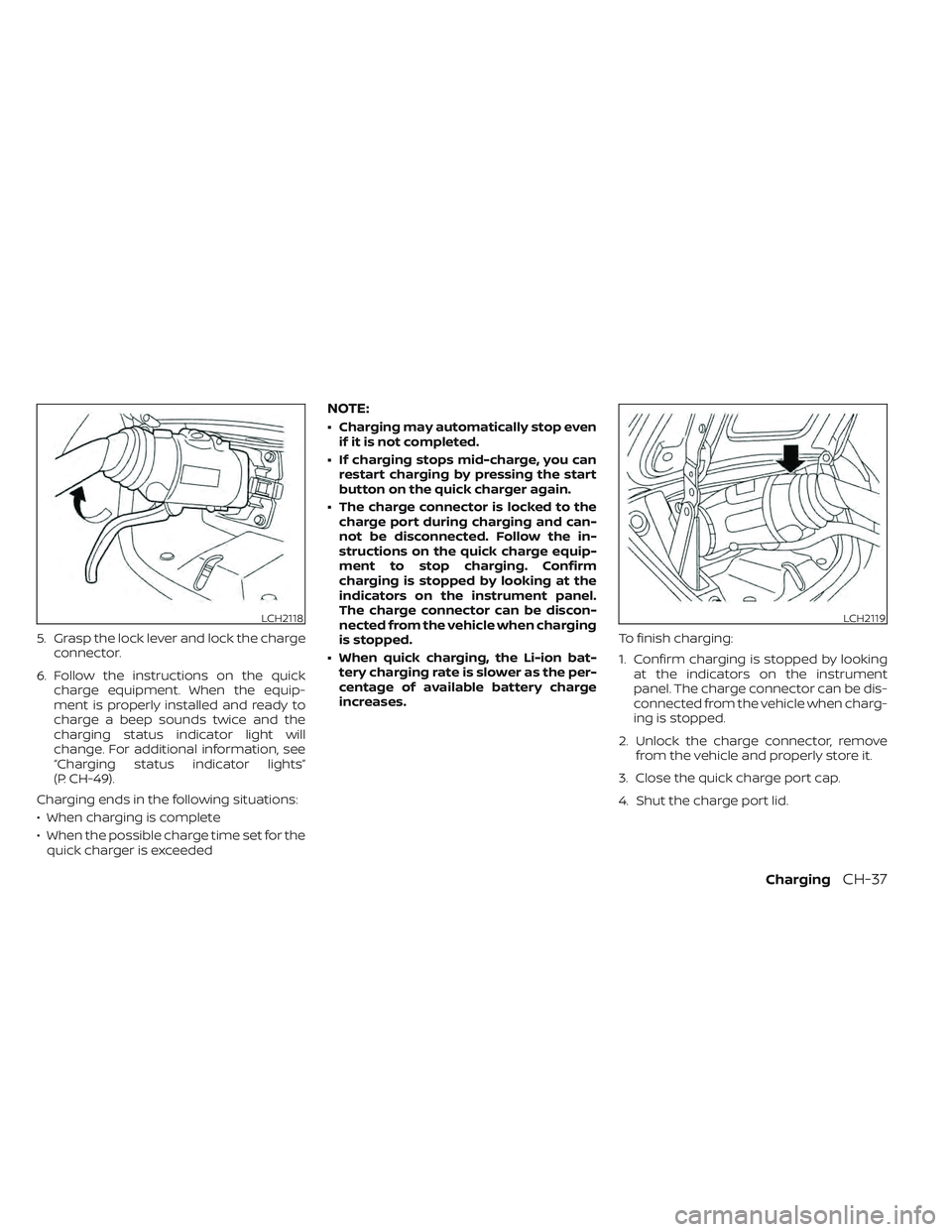
5. Grasp the lock lever and lock the chargeconnector.
6. Follow the instructions on the quick charge equipment. When the equip-
ment is properly installed and ready to
charge a beep sounds twice and the
charging status indicator light will
change. For additional information, see
“Charging status indicator lights”
(P. CH-49).
Charging ends in the following situations:
• When charging is complete
• When the possible charge time set for the quick charger is exceeded
NOTE:
• Charging may automatically stop even if it is not completed.
• If charging stops mid-charge, you can restart charging by pressing the start
button on the quick charger again.
• The charge connector is locked to the charge port during charging and can-
not be disconnected. Follow the in-
structions on the quick charge equip-
ment to stop charging. Confirm
charging is stopped by looking at the
indicators on the instrument panel.
The charge connector can be discon-
nected from the vehicle when charging
is stopped.
• When quick charging, the Li-ion bat- tery charging rate is slower as the per-
centage of available battery charge
increases. To finish charging:
1. Confirm charging is stopped by looking
at the indicators on the instrument
panel. The charge connector can be dis-
connected from the vehicle when charg-
ing is stopped.
2. Unlock the charge connector, remove from the vehicle and properly store it.
3. Close the quick charge port cap.
4. Shut the charge port lid.
LCH2118LCH2119
ChargingCH-37
Page 89 of 618
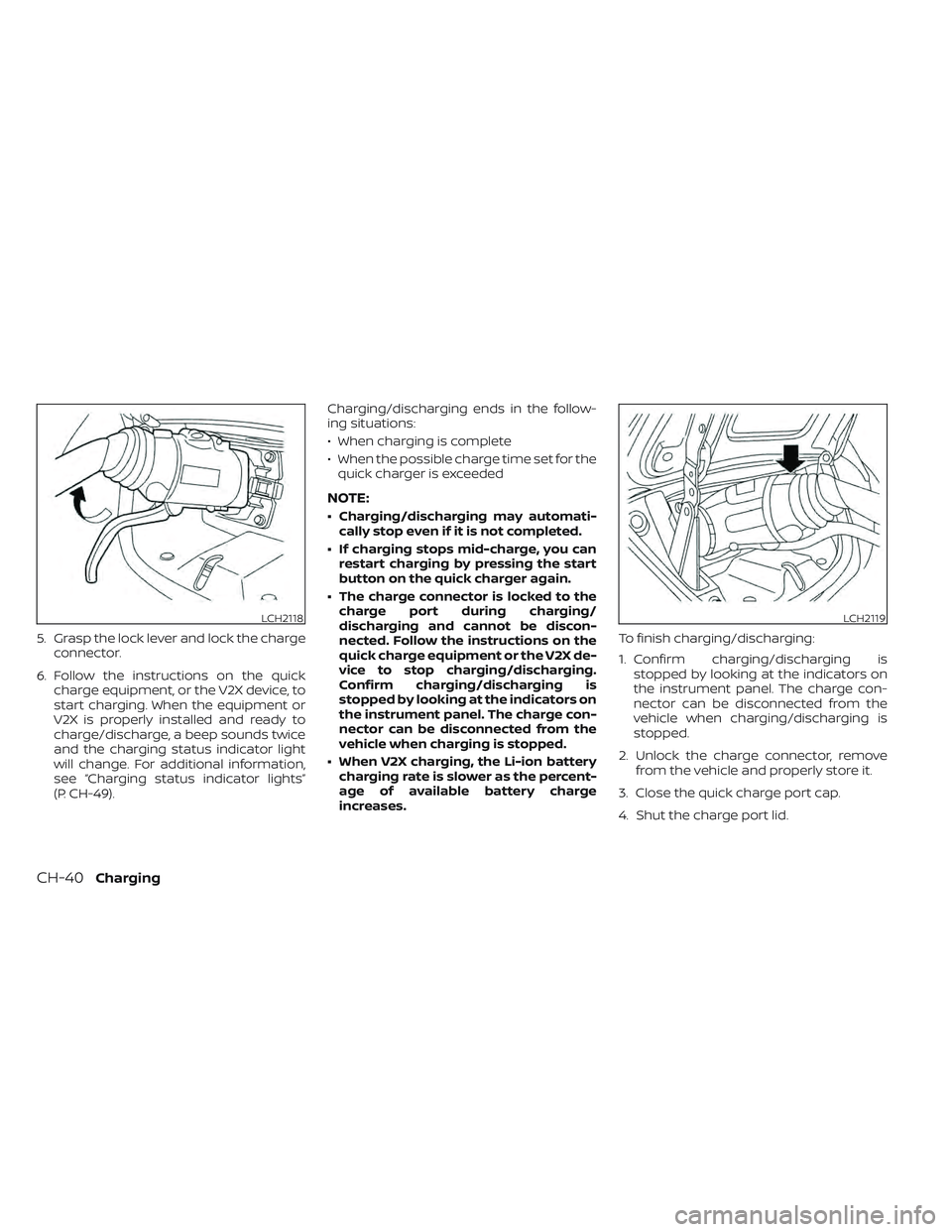
5. Grasp the lock lever and lock the chargeconnector.
6. Follow the instructions on the quick charge equipment, or the V2X device, to
start charging. When the equipment or
V2X is properly installed and ready to
charge/discharge, a beep sounds twice
and the charging status indicator light
will change. For additional information,
see “Charging status indicator lights”
(P. CH-49). Charging/discharging ends in the follow-
ing situations:
• When charging is complete
• When the possible charge time set for the
quick charger is exceeded
NOTE:
• Charging/discharging may automati- cally stop even if it is not completed.
• If charging stops mid-charge, you can restart charging by pressing the start
button on the quick charger again.
• The charge connector is locked to the charge port during charging/
discharging and cannot be discon-
nected. Follow the instructions on the
quick charge equipment or the V2X de-
vice to stop charging/discharging.
Confirm charging/discharging is
stopped by looking at the indicators on
the instrument panel. The charge con-
nector can be disconnected from the
vehicle when charging is stopped.
• When V2X charging, the Li-ion battery charging rate is slower as the percent-
age of available battery charge
increases. To finish charging/discharging:
1. Confirm charging/discharging is
stopped by looking at the indicators on
the instrument panel. The charge con-
nector can be disconnected from the
vehicle when charging/discharging is
stopped.
2. Unlock the charge connector, remove from the vehicle and properly store it.
3. Close the quick charge port cap.
4. Shut the charge port lid.
LCH2118LCH2119
CH-40Charging
Page 97 of 618
IMMEDIATE CHARGE
When a charging timer is not turned on,
charging automatically starts when a nor-
mal or trickle charge connector is con-
nected to the vehicle.
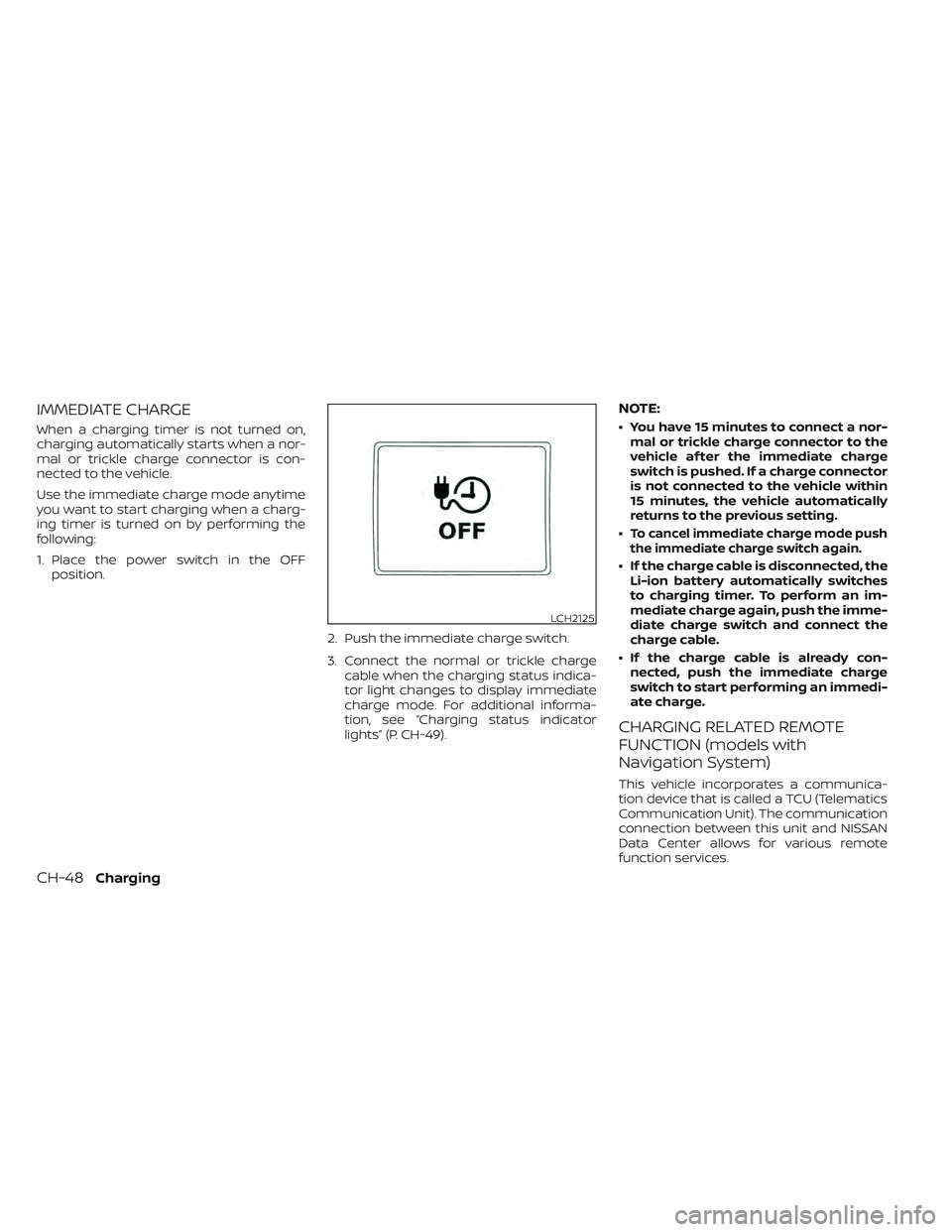
Use the immediate charge mode anytime
you want to start charging when a charg-
ing timer is turned on by performing the
following:
1. Place the power switch in the OFFposition.
2. Push the immediate charge switch.
3. Connect the normal or trickle chargecable when the charging status indica-
tor light changes to display immediate
charge mode. For additional informa-
tion, see “Charging status indicator
lights” (P. CH-49).
NOTE:
• You have 15 minutes to connect a nor-mal or trickle charge connector to the
vehicle af ter the immediate charge
switch is pushed. If a charge connector
is not connected to the vehicle within
15 minutes, the vehicle automatically
returns to the previous setting.
•
To cancel immediate charge mode push
the immediate charge switch again.
• If the charge cable is disconnected, the Li-ion battery automatically switches
to charging timer. To perform an im-
mediate charge again, push the imme-
diate charge switch and connect the
charge cable.
• If the charge cable is already con- nected, push the immediate charge
switch to start performing an immedi-
ate charge.
CHARGING RELATED REMOTE
FUNCTION (models with
Navigation System)
This vehicle incorporates a communica-
tion device that is called a TCU (Telematics
Communication Unit). The communication
connection between this unit and NISSAN
Data Center allows for various remote
function services.
LCH2125
CH-48Charging
Page 98 of 618
•Remote battery status check:
The charging status of the Li-ion battery
can be checked using the
“NissanConnect® EV & Services”, or
“NissanConnect®”, or Owners Portal even
if you are not in the vehicle.
• Remote start charge:
The function of starting the Li-ion battery
charge or starting the heater and air con-
ditioner is available using your personal
computer or internet enabled smart
phone.
• Plug-in reminder:
A notification e-mail will be sent to your
personal computer or internet enabled
smart phone if the plug is not connected
at the specific time you selected, af ter
turning off the power switch.
NOTE:
• Establishing the NissanConnect® EV & Services, or NissanConnect® is neces-
sary before using this service. For
additional information, refer to the
NissanConnect® Manual.
• To check the Li-ion battery charging status using an internet enabled smart
phone or personal computer, the fol-
lowing conditions must be met: – The vehicle must be located in a cel-
lular phone coverage area.
– The cellular phone must be located in an area with cellular phone
coverage.
– If using a computer, the computer must be connected to the internet.
– Some cellular phones are not com- patible and cannot be used to check
the Li-ion battery charging status.
Please confirm beforehand.
• Certain remote functions require a compatible smart phone, which is not
included with the vehicle.
• NissanConnect® EV & Services, or NissanConnect® information system
features are included through a sub-
scription service which requires owner
consent to activate. The subscription
must be active to use these features.
• NissanConnect® EV & Services, or NissanConnect® communications may
be received at a verified e-mail address
or by SMS/text messaging-enabled
mobile phone.
• Standard text rates and/or data usage may apply depending on your carrier.
CHARGING STATUS INDICATOR
LIGHTS
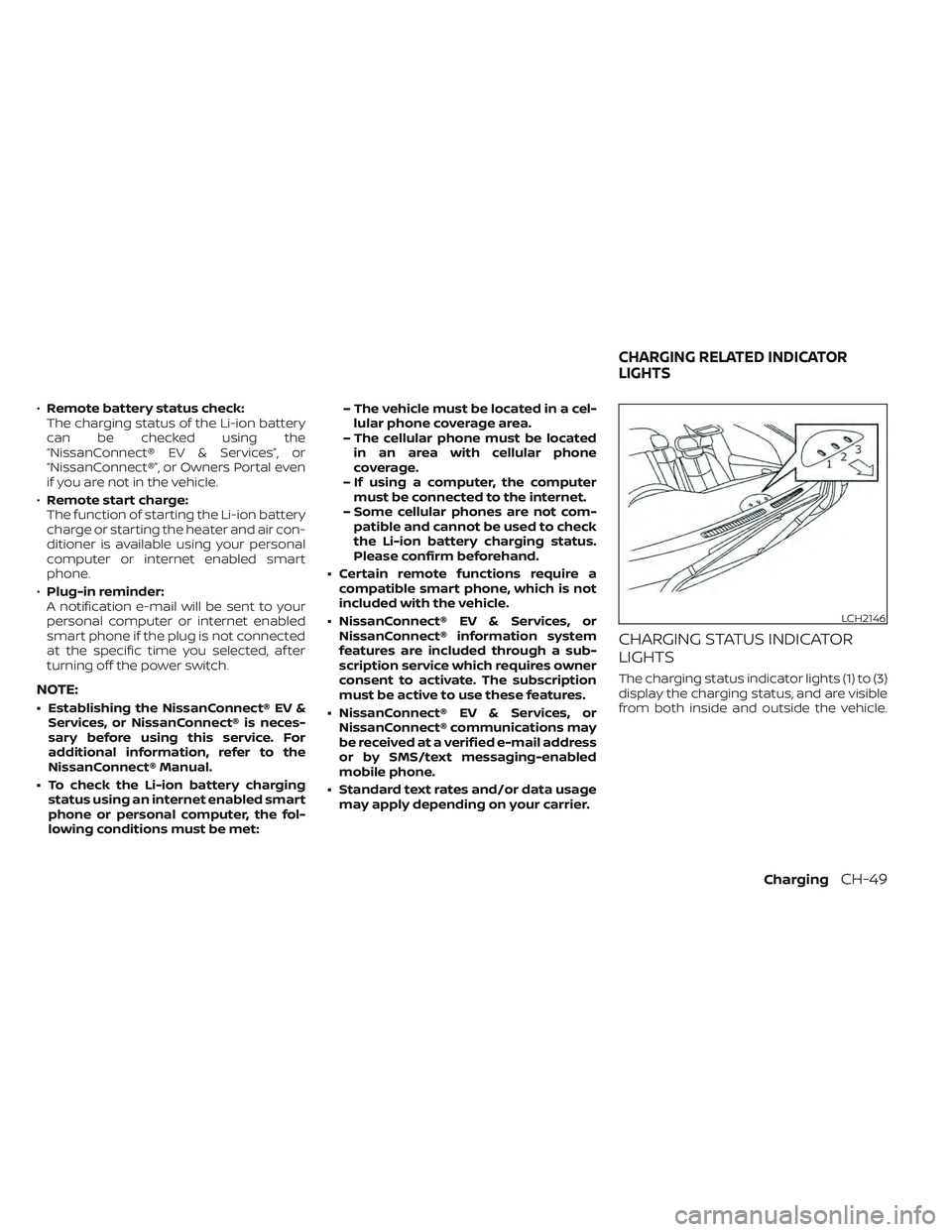
The charging status indicator lights (1) to (3)
display the charging status, and are visible
from both inside and outside the vehicle.
LCH2146
CHARGING RELATED INDICATOR
LIGHTS
ChargingCH-49
Page 99 of 618
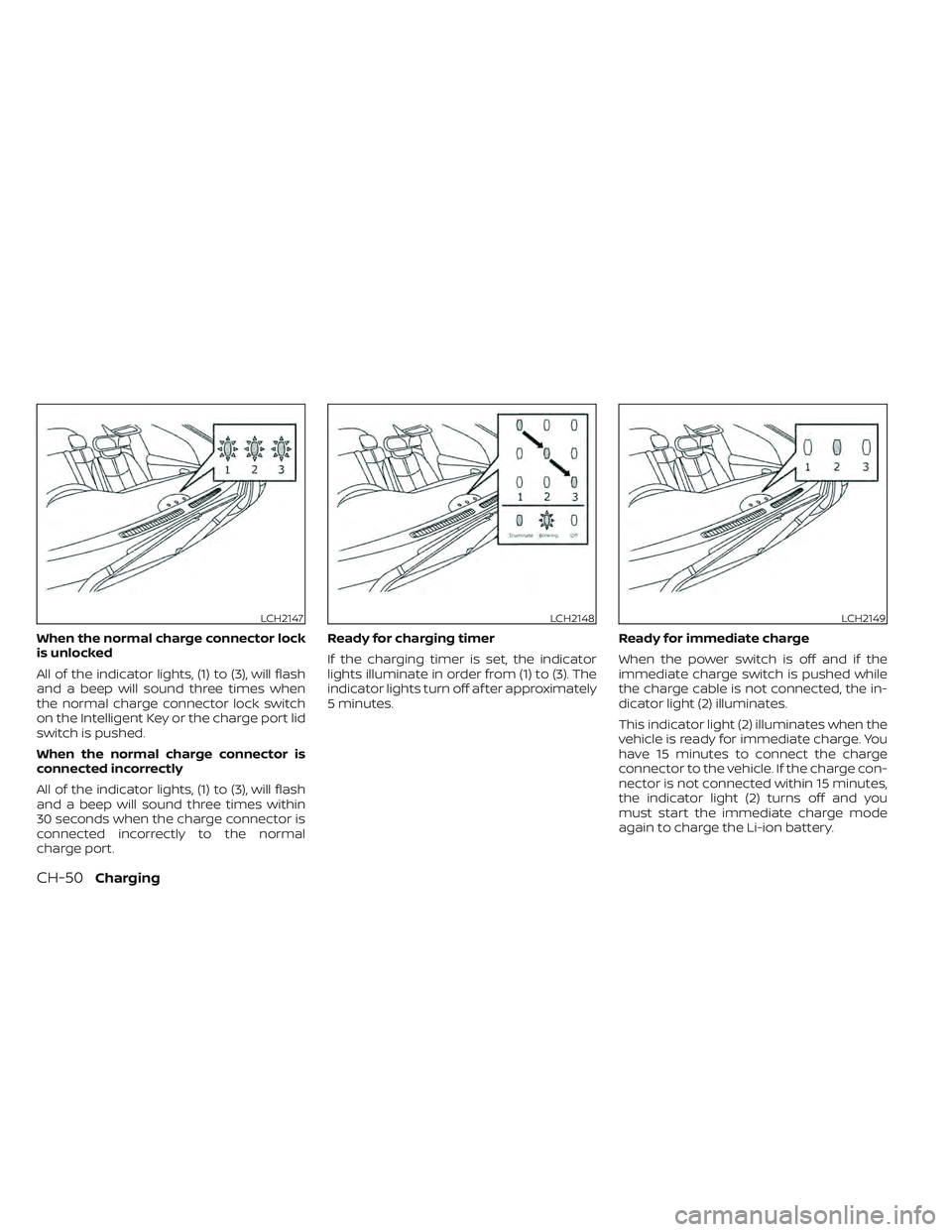
When the normal charge connector lock
is unlocked
All of the indicator lights, (1) to (3), will flash
and a beep will sound three times when
the normal charge connector lock switch
on the Intelligent Key or the charge port lid
switch is pushed.
When the normal charge connector is
connected incorrectly
All of the indicator lights, (1) to (3), will flash
and a beep will sound three times within
30 seconds when the charge connector is
connected incorrectly to the normal
charge port.Ready for charging timer
If the charging timer is set, the indicator
lights illuminate in order from (1) to (3). The
indicator lights turn off af ter approximately
5 minutes.
Ready for immediate charge
When the power switch is off and if the
immediate charge switch is pushed while
the charge cable is not connected, the in-
dicator light (2) illuminates.
This indicator light (2) illuminates when the
vehicle is ready for immediate charge. You
have 15 minutes to connect the charge
connector to the vehicle. If the charge con-
nector is not connected within 15 minutes,
the indicator light (2) turns off and you
must start the immediate charge mode
again to charge the Li-ion battery.
LCH2147LCH2148LCH2149
CH-50Charging
Page 100 of 618
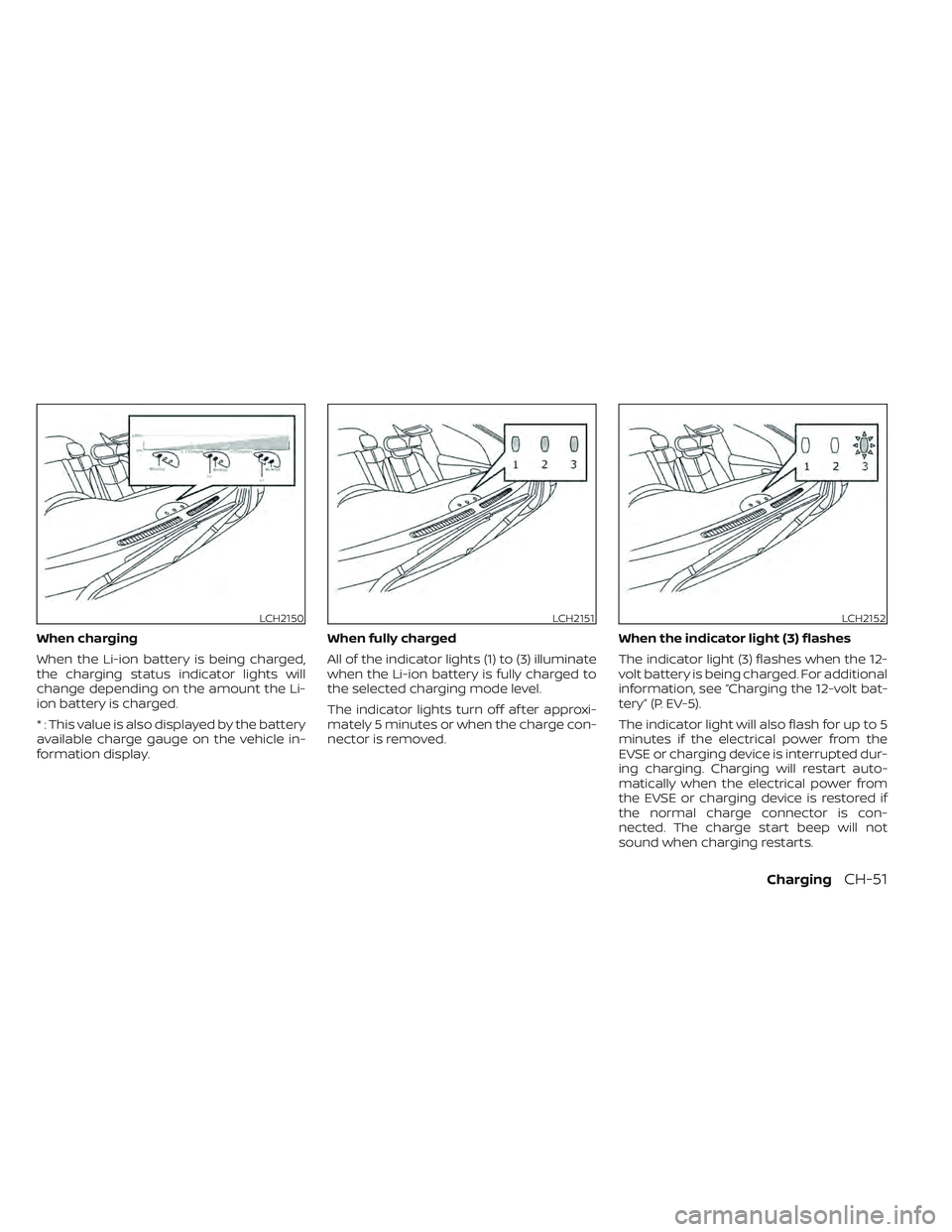
When charging
When the Li-ion battery is being charged,
the charging status indicator lights will
change depending on the amount the Li-
ion battery is charged.
* : This value is also displayed by the battery
available charge gauge on the vehicle in-
formation display.When fully charged
All of the indicator lights (1) to (3) illuminate
when the Li-ion battery is fully charged to
the selected charging mode level.
The indicator lights turn off af ter approxi-
mately 5 minutes or when the charge con-
nector is removed.
When the indicator light (3) flashes
The indicator light (3) flashes when the 12-
volt battery is being charged. For additional
information, see “Charging the 12-volt bat-
tery” (P. EV-5).
The indicator light will also flash for up to 5
minutes if the electrical power from the
EVSE or charging device is interrupted dur-
ing charging. Charging will restart auto-
matically when the electrical power from
the EVSE or charging device is restored if
the normal charge connector is con-
nected. The charge start beep will not
sound when charging restarts.
LCH2150LCH2151LCH2152
ChargingCH-51
Page 101 of 618
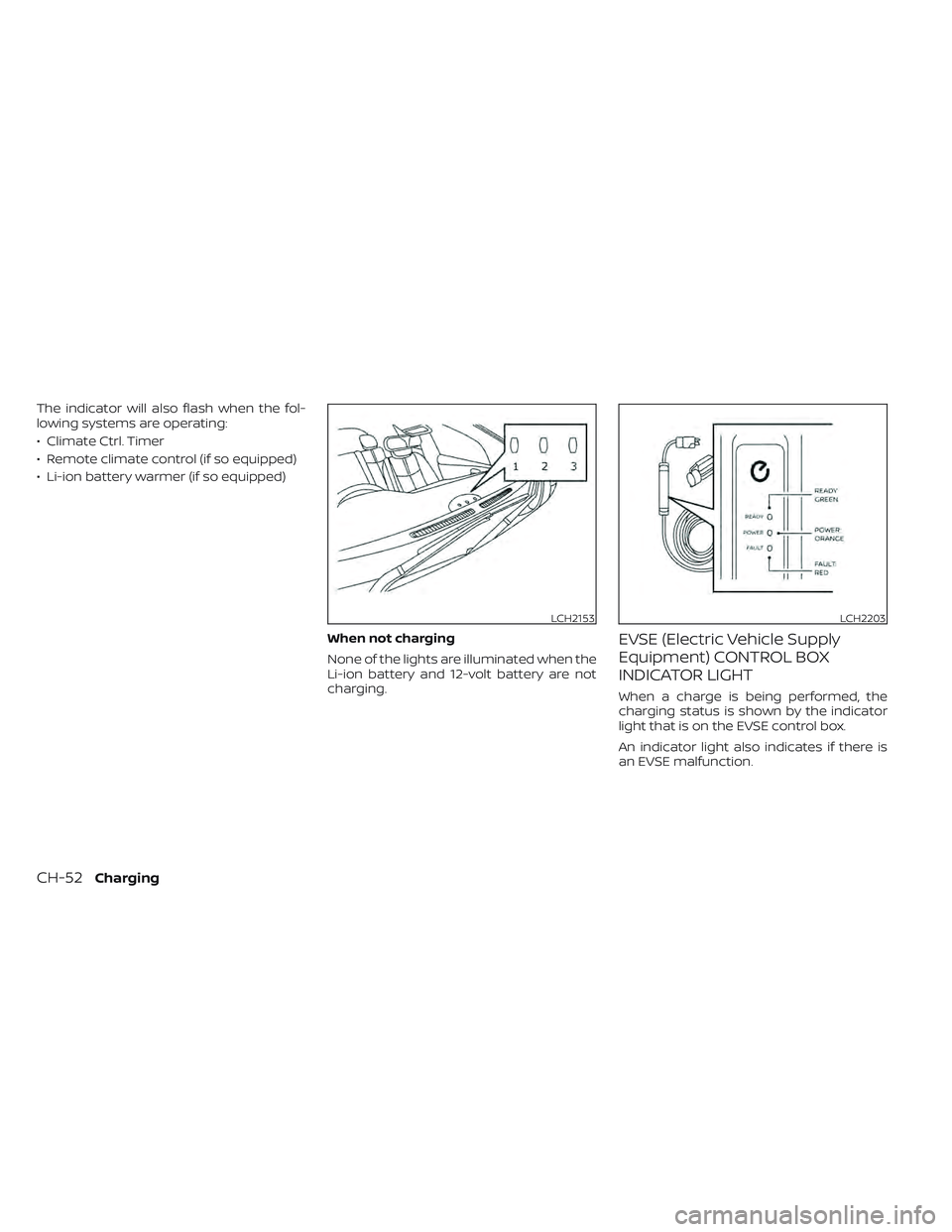
The indicator will also flash when the fol-
lowing systems are operating:
• Climate Ctrl. Timer
• Remote climate control (if so equipped)
• Li-ion battery warmer (if so equipped)When not charging
None of the lights are illuminated when the
Li-ion battery and 12-volt battery are not
charging.
EVSE (Electric Vehicle Supply
Equipment) CONTROL BOX
INDICATOR LIGHT
When a charge is being performed, the
charging status is shown by the indicator
light that is on the EVSE control box.
An indicator light also indicates if there is
an EVSE malfunction.
LCH2153LCH2203
CH-52Charging
Page 177 of 618
2 Instruments and controls
Cockpit.........................................2-2
Instrument Panel ................................2-4
Meters and Gauges .............................2-5
Speedometer and odometer .................2-5
Li-ion battery temperature gauge ............ 2-7
Power meter ................................. 2-7
Driving range .................................2-8
Li-ion battery available charge gauge ........2-9
Li-ion battery capacity level gauge ..........2-12
Outside air temperature .....................2-12
Clock ........................................ 2-12
ECO mode indicator ......................... 2-13
e-Pedal system indicator ....................2-13
Warning lights, indicator lights and audible
reminders ...................................... 2-14
Checking lights .............................. 2-15
Warning/Indicator lights (red) ...............2-15
Warning/Indicator lights (yellow) ............2-18
Warning/Indicator lights (other) .............2-24
Audible reminders ........................... 2-25
Vehicle information display .....................2-26
How to use the vehicle information
display ...................................... 2-26
Startup display .............................. 2-27
Settings ..................................... 2-27
Vehicle information display warnings
and indicators ............................... 2-34Warning information displays
(models with a navigation system)
..........2-42
Security systems ............................... 2-42
Vehicle security system .....................2-42
NISSAN Vehicle Immobilizer System .........2-44
Wiper and washer switch .......................2-45
Washer operation ........................... 2-46
Rear wiper operation ........................ 2-46
Rear window and outside mirror
(if so equipped) defroster switch ...............2-47
Headlight and turn signal switch ...............2-48
Headlight switch ............................ 2-48
LED Daytime Running Lights (DRL)
system (Type A) (if so equipped) .............2-53
LED Daytime Running Lights (DRL)
system (Type B) (if so equipped) .............
2-53
Instrument
brightness control ..............2-54
Turn signal switch ........................... 2-54
Fog light switch (if so equipped) ................2-55
Horn ........................................... 2-55
ECO switch ..................................... 2-56
Heated seat switches (if so equipped) ..........2-56
Heated steering wheel switch (if so equipped) . . 2-57
Emergency call (SOS) button (if so equipped) . . . 2-58
Charge port lid switch .......................... 2-58
Immediate Charge switch ......................2-59
Page 178 of 618
Dynamic driver assistance switch
(for vehicles without ProPILOT Assist)
(if so equipped)................................. 2-59
Steering Assist switch (for models with
ProPILOT Assist) (if so equipped) ................2-60
Rear Door Alert ................................. 2-60
Power outlet ................................... 2-61
USB/iPod® charging ports ......................2-62
Storage ........................................ 2-62
Seatback Pocket (if so equipped) ............2-62
Storagetray................................. 2-63
Glovebox ................................... 2-63
Console box ................................. 2-63
Overhead sunglasses storage ...............2-64
Cup holders ................................. 2-64
Tonneau cover (if so equipped) ..............2-65
Stowing golf bags ........................... 2-66
Windows ....................................... 2-67Power windows
............................. 2-67
Interior lights ................................... 2-69
Console light (if so equipped) ................2-70
Map lights ................................... 2-70
Room light .................................. 2-70
Cargo light .................................. 2-71
HomeLink® Universal Transceiver
(if so equipped) ................................. 2-71
Programming HomeLink® ...................2-72
Programming HomeLink® for Canadian
customers and gate openers ...............2-73
Operating the HomeLink® Universal
Transceiver ..................................2-74
Programming trouble-diagnosis ............2-74
Clearing the programmed information ......2-74
Reprogramming a single HomeLink®
button ...................................... 2-75
If your vehicle is stolen ......................2-75
Page 182 of 618
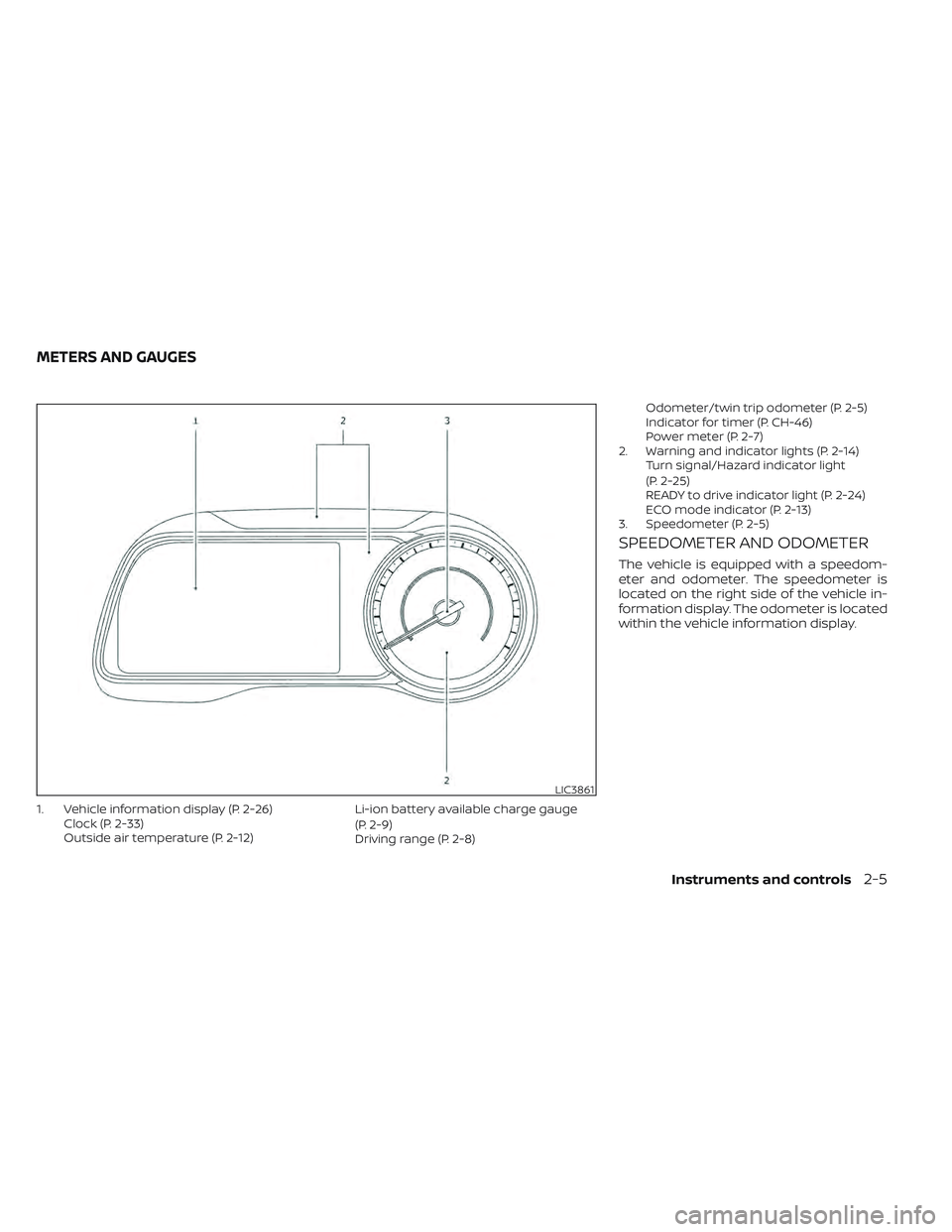
1. Vehicle information display (P. 2-26)Clock (P. 2-33)
Outside air temperature (P. 2-12) Li-ion battery available charge gauge
(P. 2-9)
Driving range (P. 2-8)Odometer/twin trip odometer (P. 2-5)
Indicator for timer (P. CH-46)
Power meter (P. 2-7)
2. Warning and indicator lights (P. 2-14) Turn signal/Hazard indicator light
(P. 2-25)
READY to drive indicator light (P. 2-24)
ECO mode indicator (P. 2-13)
3. Speedometer (P. 2-5)
SPEEDOMETER AND ODOMETER
The vehicle is equipped with a speedom-
eter and odometer. The speedometer is
located on the right side of the vehicle in-
formation display. The odometer is located
within the vehicle information display.
LIC3861
METERS AND GAUGES
Instruments and controls2-5