battery NISSAN LEAF 2023 Owners Manual
[x] Cancel search | Manufacturer: NISSAN, Model Year: 2023, Model line: LEAF, Model: NISSAN LEAF 2023Pages: 612, PDF Size: 7.42 MB
Page 232 of 612
If the ambient image sensor is damaged
due to an accident, it is recommended that
you visit a NISSAN certified LEAF dealer for
this service.
Battery saver system
• When the headlight switch is in theorposition while the power switch
is in the ON position, the lights will auto-
matically turn off 45 seconds af ter the
power switch has been placed in the OFF
position.
• When the headlight switch remains in the
orposition af ter the lights
automatically turn off, the lights will turn
on when the power switch is placed in the
ON position.
CAUTION
• When you turn on the headlight
switch again af ter the lights auto-
matically turn off, the lights will not
turn off automatically. Be sure to turn
the light switch to the AUTO or OFF
position when you leave the vehicle
for extended periods of time, other-
wise the battery will be discharged. •
Never leave the light switch on when
the power switch is in the OFF, ACC or
ON position for extended periods of
time even if the headlights turn off
automatically.
LED DAYTIME RUNNING LIGHTS
(DRL) SYSTEM (Type A) (if so
equipped)
The LED portion of the headlights auto-
matically illuminates at 100% intensity
when the power switch is in the READY to
drive position with the parking brake re-
leased. The LED DRL system operates with
the headlight switch in the OFF (if so
equipped) or
position. Turn headlight
switch to theposition for full illumina-
tion when driving at night.
If the parking brake is applied before the
power switch is in the READY to drive posi-
tion, the LED DRL system does not operate.
The LED DRL system illuminates once the
parking brake is released. The LED DRL sys-
tem will remain on until the power switch is
pushed to the OFF position.
WARNING
When the LED DRL system is active, tail
lights on your vehicle are not on. It is
necessary at dusk to turn on your
headlights. Failure to do so could cause
an accident injuring yourself and
others.
LED DAYTIME RUNNING LIGHTS
(DRL) SYSTEM (Type B) (if so
equipped)
The LED DRL automatically illuminate at
100% intensity when the power switch is in
the READY to drive position. The LED Day-
time Running Lights (DRL) operate with the
headlight switch in the OFF (if so equipped)
or
position. When you turn the head-
light switch to theposition for full
illumination, the LED lights switch from LED
DRL to the park function.
The LED DRL will remain on until the power
switch is placed in the OFF position.
It is necessary at dusk to turn the headlight
switch ON for interior controls and
switches to illuminate, as those remain
OFF while the switch is in the OFF position.
Instruments and controls2-55
Page 241 of 612
CAUTION
• The outlet and plug may be hot dur-
ing or immediately af ter use.
• Do not use with accessories that ex-
ceed a 12-volt, 120W (10A) power
draw.
• Do not use double adapters or more
than one electrical accessory.
• Use the power outlet with the power
switch is in the ON or READY to Drive
position to avoid discharging the 12-
volt battery. •
Avoid using the power outlet when
the air conditioner, headlights or rear
window defroster are on.
• This power outlet is not designed for
use with a cigarette lighter unit.
• Push the plug in as far as it will go. If
good contact is not made, the plug
may overheat or the internal tem-
perature fuse may open.
• Before inserting or disconnecting a
plug, make sure that the electrical
accessory being used is turned OFF.
• When not in use, be sure to close the
cap. Do not allow water to contact
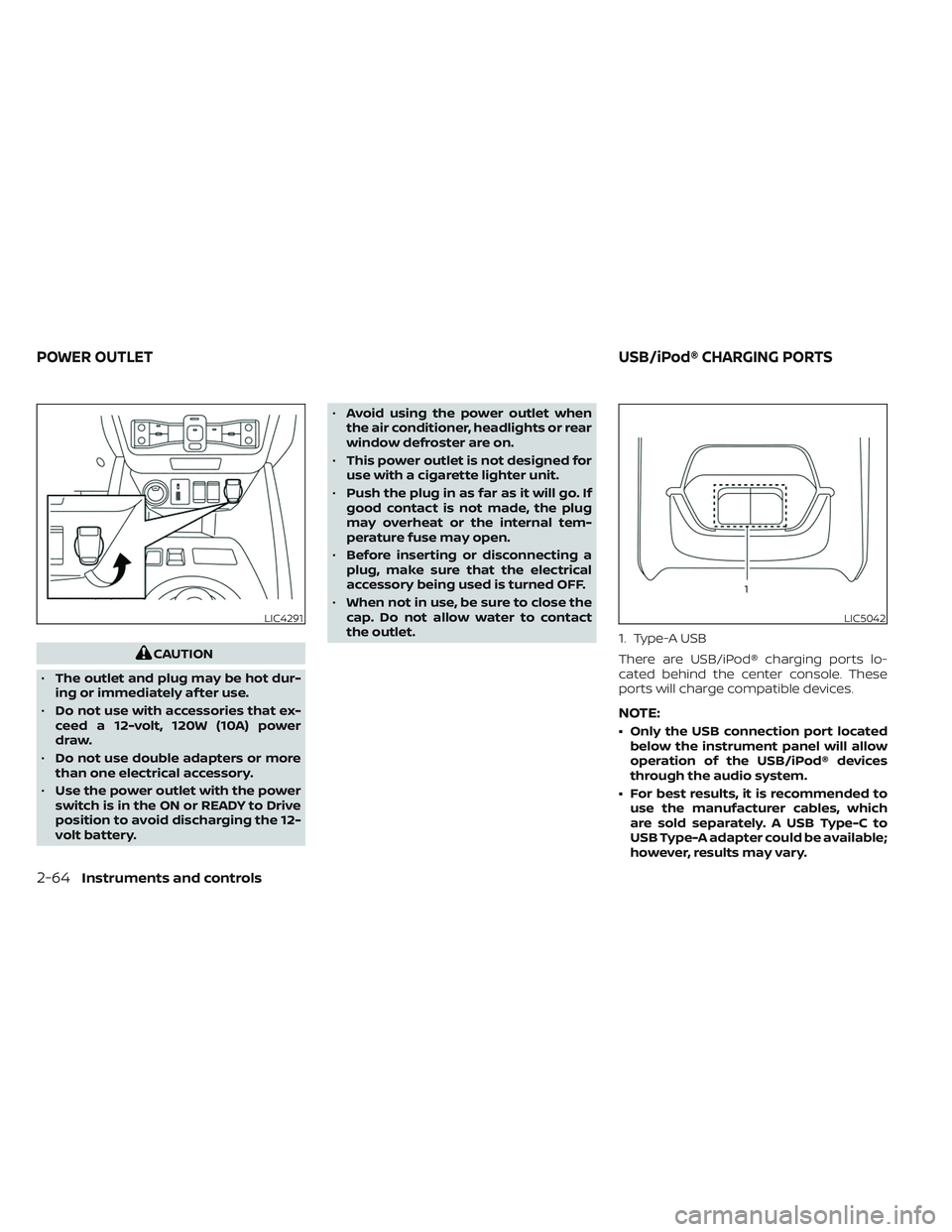
the outlet. 1. Type-A USB
There are USB/iPod® charging ports lo-
cated behind the center console. These
ports will charge compatible devices.
NOTE:
• Only the USB connection port located
below the instrument panel will allow
operation of the USB/iPod® devices
through the audio system.
• For best results, it is recommended to use the manufacturer cables, which
are sold separately. A USB Type-C to
USB Type-A adapter could be available;
however, results may vary.
LIC4291LIC5042
POWER OUTLET USB/iPod® CHARGING PORTS
2-64Instruments and controls
Page 249 of 612
If the windows do not close
automatically
If the power window automatic function
(closing only) does not operate properly,
perform the following procedure to initial-
ize the power window system.
1. Place the power switch in the ONposition.
2. Close the door.
3. Open the window completely by operat- ing the power window switch.
4. Pull the power window switch and hold it to close the window, and then hold the
switch more than 3 seconds af ter the
window is closed completely.
5. Release the power window switch. Op- erate the window by the automatic
function to confirm the initialization is
complete.
If the power window automatic function
does not operate properly af ter perform-
ing the procedure above, have your vehicle
serviced. It is recommended that you visit a
NISSAN certified LEAF dealer for this
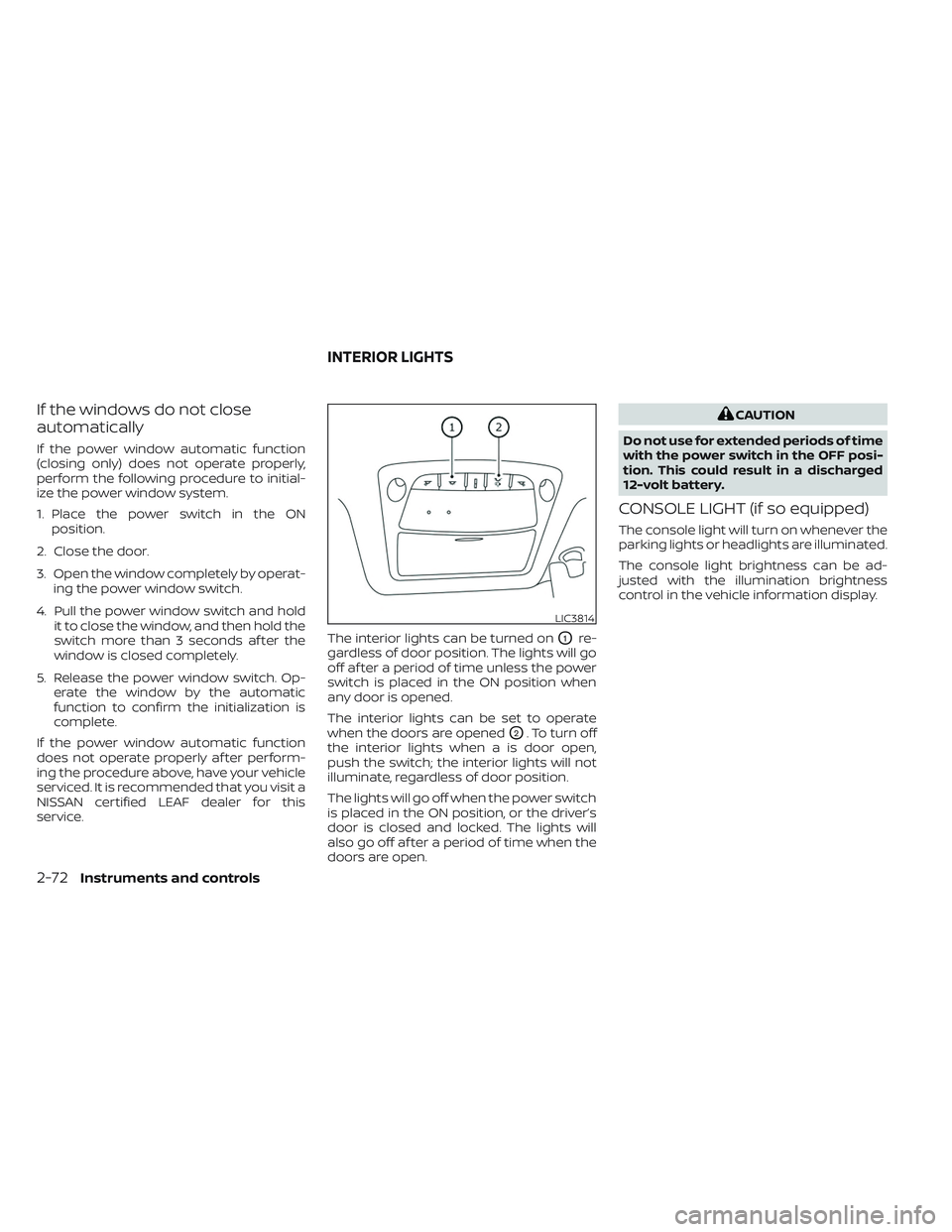
service. The interior lights can be turned on
O1re-
gardless of door position. The lights will go
off af ter a period of time unless the power
switch is placed in the ON position when
any door is opened.
The interior lights can be set to operate
when the doors are opened
O2. To turn off
the interior lights when a is door open,
push the switch; the interior lights will not
illuminate, regardless of door position.
The lights will go off when the power switch
is placed in the ON position, or the driver’s
door is closed and locked. The lights will
also go off af ter a period of time when the
doors are open.
CAUTION
Do not use for extended periods of time
with the power switch in the OFF posi-
tion. This could result in a discharged
12-volt battery.
CONSOLE LIGHT (if so equipped)
The console light will turn on whenever the
parking lights or headlights are illuminated.
The console light brightness can be ad-
justed with the illumination brightness
control in the vehicle information display.
LIC3814
INTERIOR LIGHTS
2-72Instruments and controls
Page 250 of 612
MAP LIGHTS
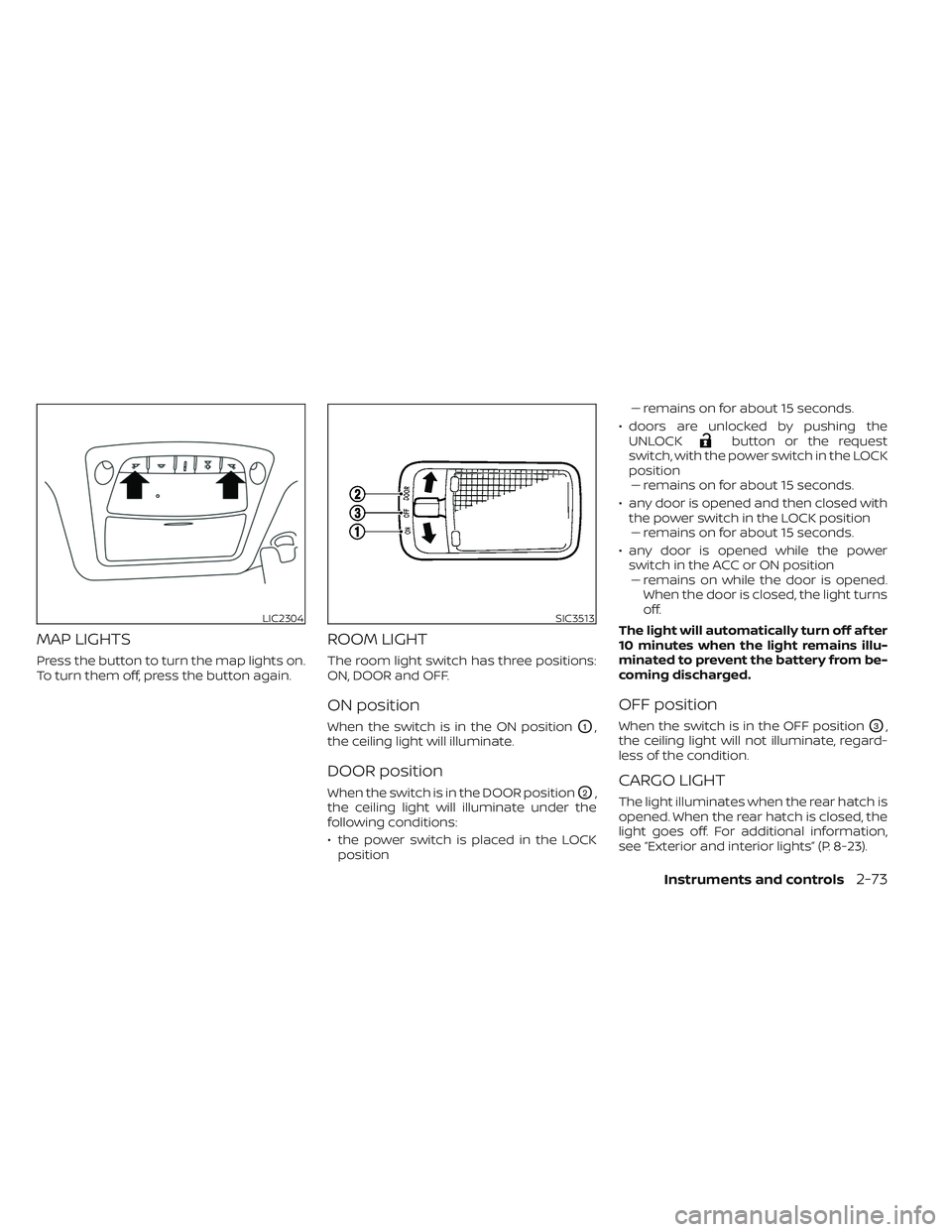
Press the button to turn the map lights on.
To turn them off, press the button again.
ROOM LIGHT
The room light switch has three positions:
ON, DOOR and OFF.
ON position
When the switch is in the ON positionO1,
the ceiling light will illuminate.
DOOR position
When the switch is in the DOOR positionO2,
the ceiling light will illuminate under the
following conditions:
• the power switch is placed in the LOCK position –– remains on for about 15 seconds.
• doors are unlocked by pushing the UNLOCK
button or the request
switch, with the power switch in the LOCK
position –– remains on for about 15 seconds.
• any door is opened and then closed with the power switch in the LOCK position–– remains on for about 15 seconds.
• any door is opened while the power switch in the ACC or ON position– – remains on while the door is opened.
When the door is closed, the light turns
off.
The light will automatically turn off af ter
10 minutes when the light remains illu-
minated to prevent the battery from be-
coming discharged.
OFF position
When the switch is in the OFF positionO3,
the ceiling light will not illuminate, regard-
less of the condition.
CARGO LIGHT
The light illuminates when the rear hatch is
opened. When the rear hatch is closed, the
light goes off. For additional information,
see “Exterior and interior lights” (P. 8-23).
LIC2304SIC3513
Instruments and controls2-73
Page 252 of 612
3 Pre-driving checks and adjustments
Keys.............................................3-2NISSAN Intelligent Key® .......................3-2
NISSAN Vehicle Immobilizer System
keys..........................................3-3
Doors ...........................................3-4
Locking with key .............................3-5
Locking with inside lock knob ................3-5
Locking with power door lock switch .........3-5
Automatic door locks ........................3-6
Child safety rear door lock ....................3-6
NISSAN Intelligent Key® system ..................3-6
Operating range .............................3-8
Door locks/unlocks precaution ...............3-8
NISSAN Intelligent Key® Operation ............3-9
How to use the remote keyless entry
function ..................................... 3-12
12-volt battery saver system ................3-16
Warning signals ............................. 3-16Troubleshooting guide
......................3-16
Hood ........................................... 3-18
Rear hatch ..................................... 3-19
Secondary rear hatch release ...............3-19
Charge port lid ................................. 3-20
Opening charge port lid .....................3-20
Charge port cap ............................ 3-22
Steering wheel ................................. 3-22
Tilt and telescopic operation ................3-23
Sun visors ...................................... 3-23
Vanity mirrors ............................... 3-24
Mirrors ......................................... 3-24
Manual anti-glare rearview mirror
(if so equipped) .............................. 3-24
Automatic anti-glare rearview mirror ........3-24
Outside mirrors ............................. 3-25
Page 253 of 612
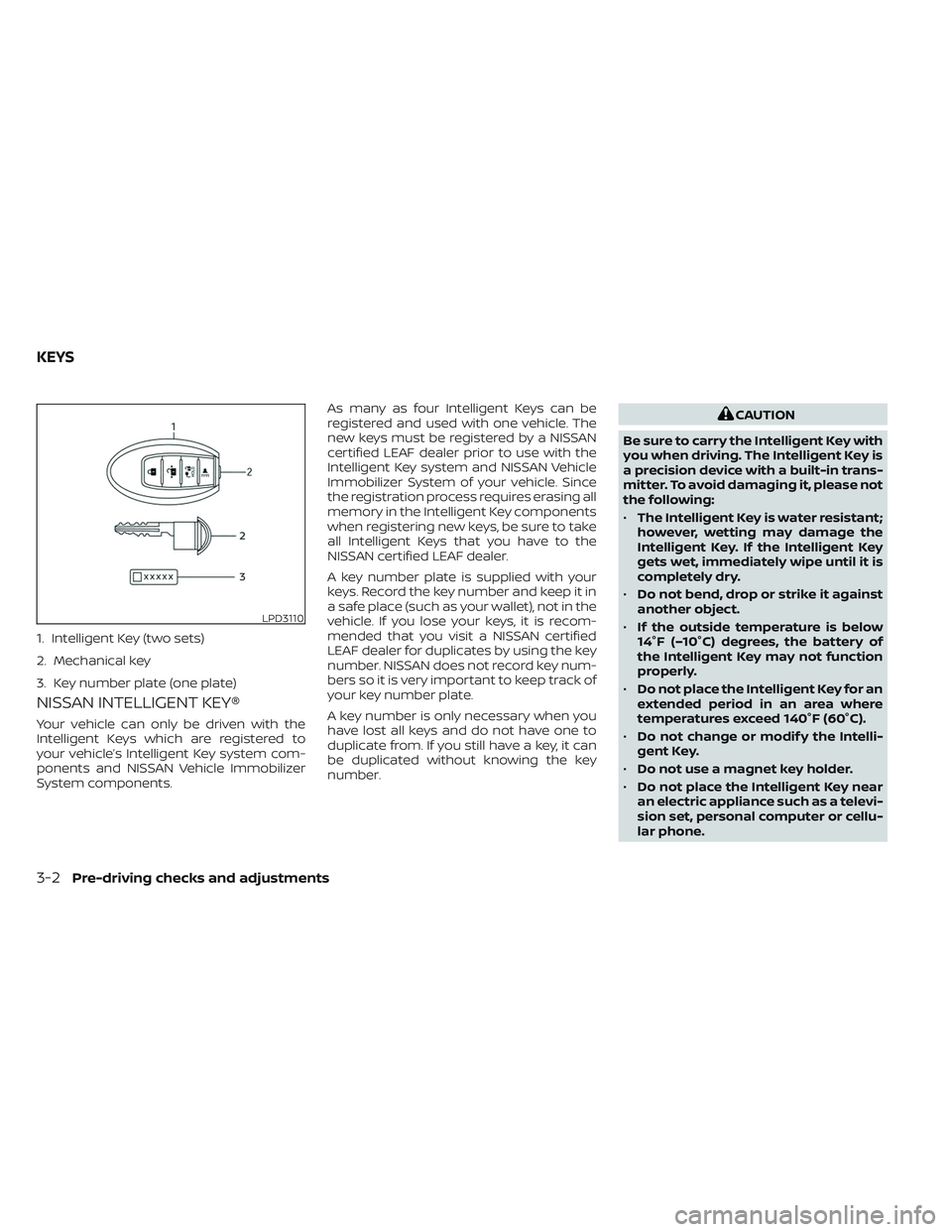
NISSAN INTELLIGENT KEY®
Your vehicle can only be driven with the
Intelligent Keys which are registered to
your vehicle’s Intelligent Key system com-
ponents and NISSAN Vehicle Immobilizer
System components.As many as four Intelligent Keys can be
registered and used with one vehicle. The
new keys must be registered by a NISSAN
certified LEAF dealer prior to use with the
Intelligent Key system and NISSAN Vehicle
Immobilizer System of your vehicle. Since
the registration process requires erasing all
memory in the Intelligent Key components
when registering new keys, be sure to take
all Intelligent Keys that you have to the
NISSAN certified LEAF dealer.
A key number plate is supplied with your
keys. Record the key number and keep it in
a safe place (such as your wallet), not in the
vehicle. If you lose your keys, it is recom-
mended that you visit a NISSAN certified
LEAF dealer for duplicates by using the key
number. NISSAN does not record key num-
bers so it is very important to keep track of
your key number plate.
A key number is only necessary when you
have lost all keys and do not have one to
duplicate from. If you still have a key, it can
be duplicated without knowing the key
number.
CAUTION
Be sure to carry the Intelligent Key with
you when driving. The Intelligent Key is
a precision device with a built-in trans-
mitter. To avoid damaging it, please not
the following:
• The Intelligent Key is water resistant;
however, wetting may damage the
Intelligent Key. If the Intelligent Key
gets wet, immediately wipe until it is
completely dry.
• Do not bend, drop or strike it against
another object.
• If the outside temperature is below
14°F (–10°C) degrees, the battery of
the Intelligent Key may not function
properly.
• Do not place the Intelligent Key for an
extended period in an area where
temperatures exceed 140°F (60°C).
• Do not change or modif y the Intelli-
gent Key.
• Do not use a magnet key holder.
• Do not place the Intelligent Key near
an electric appliance such as a televi-
sion set, personal computer or cellu-
lar phone.
LPD3110
1. Intelligent Key (two sets)
2. Mechanical key
3. Key number plate (one plate)
KEYS
3-2Pre-driving checks and adjustments
Page 258 of 612
CAUTION
Be sure to carry the Intelligent Key with
you when operating the vehicle.
The Intelligent Key is capable of receiving
and transmitting radio waves. The Intelli-
gent Key system transmits weak radio
waves from various distances. Environ-
mental conditions may interfere with the
operation of the Intelligent Key system un-
der the following operating conditions:
• When operating near a location where strong radio waves are transmitted, such
as a TV tower, power station and broad-
casting station.
• When in possession of wireless equip- ment, such as a cellular telephone, trans-
ceiver or a CB radio.
• When the Intelligent Key is in contact with or covered by metallic materials.
• When any type of radio wave remote con- trol is used nearby.
• When the Intelligent Key is placed near an electric appliance such as a personal
computer.
• When the vehicle is parked near a parking meter. In such cases, correct the operating condi-
tions before using the Intelligent Key func-
tion or use the mechanical key.
Although the life of the battery varies de-
pending on the operating conditions, the
battery’s life is approximately two years. If
the battery is discharged, replace it with a
new one.
When the Intelligent Key battery is low, the
“Key Battery Low” indicator illuminates in
the vehicle information display. For addi-
tional information, see “Key Battery Low”
(P. 2-36).
Since the Intelligent Key is capable of re-
ceiving radio waves, if the key is lef t near
equipment which transmits strong radio
waves, such as signals from a TV and per-
sonal computer, the battery life may be-
come shorter.
For additional information, see “NISSAN In-
telligent Key® battery replacement” (P. 8-19).
Pay special attention that the vehicle bat-
tery is not completely discharged.
As many as four Intelligent Keys can be
registered and used with one vehicle. For
information about the purchase and use of
additional Intelligent Keys, it is recom-
mended that you visit a NISSAN certified
LEAF dealer.
Pre-driving checks and adjustments3-7
Page 259 of 612
OPERATING RANGE
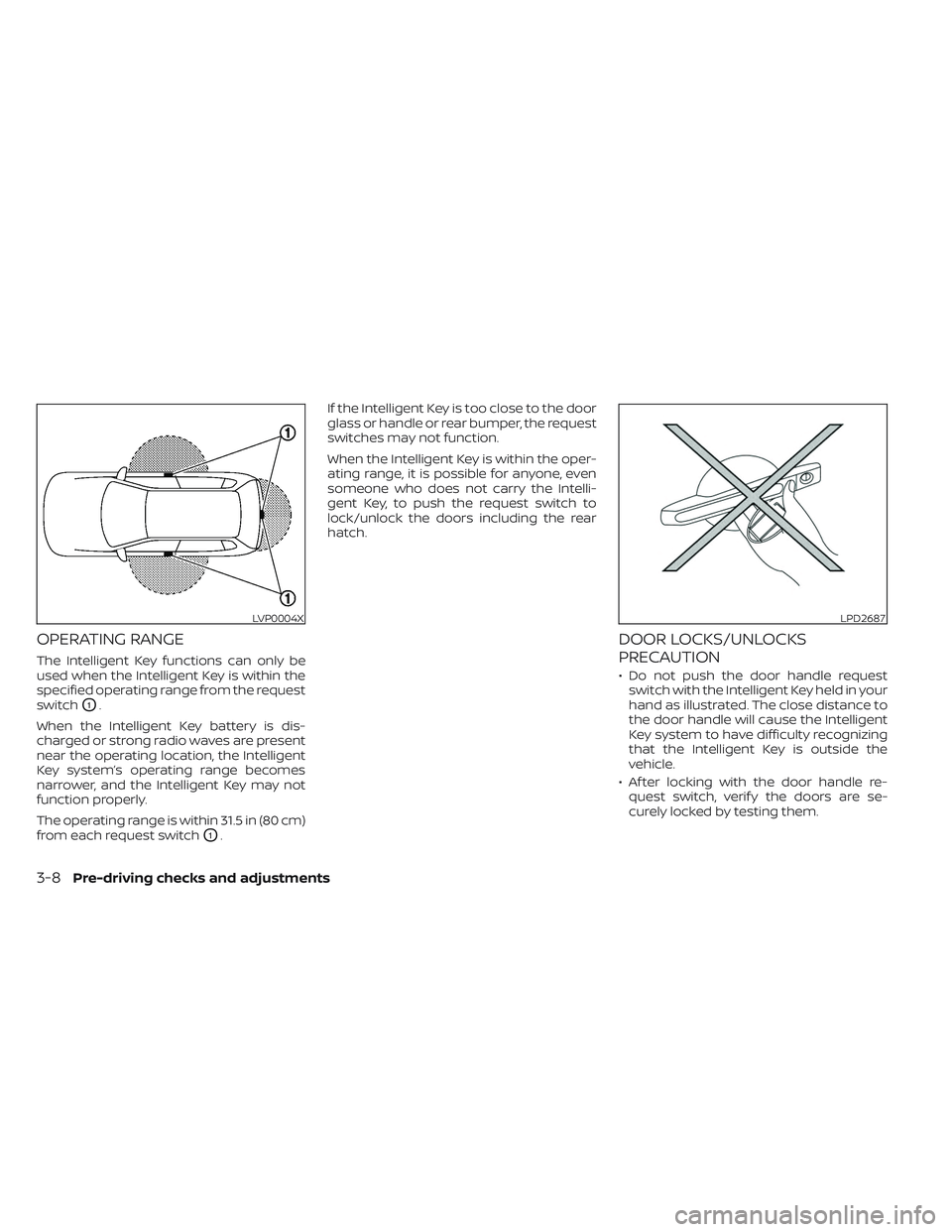
The Intelligent Key functions can only be
used when the Intelligent Key is within the
specified operating range from the request
switch
O1.
When the Intelligent Key battery is dis-
charged or strong radio waves are present
near the operating location, the Intelligent
Key system’s operating range becomes
narrower, and the Intelligent Key may not
function properly.
The operating range is within 31.5 in (80 cm)
from each request switch
O1. If the Intelligent Key is too close to the door
glass or handle or rear bumper, the request
switches may not function.
When the Intelligent Key is within the oper-
ating range, it is possible for anyone, even
someone who does not carry the Intelli-
gent Key, to push the request switch to
lock/unlock the doors including the rear
hatch.
DOOR LOCKS/UNLOCKS
PRECAUTION
• Do not push the door handle request
switch with the Intelligent Key held in your
hand as illustrated. The close distance to
the door handle will cause the Intelligent
Key system to have difficulty recognizing
that the Intelligent Key is outside the
vehicle.
• Af ter locking with the door handle re- quest switch, verif y the doors are se-
curely locked by testing them.
LVP0004XLPD2687
3-8Pre-driving checks and adjustments
Page 263 of 612
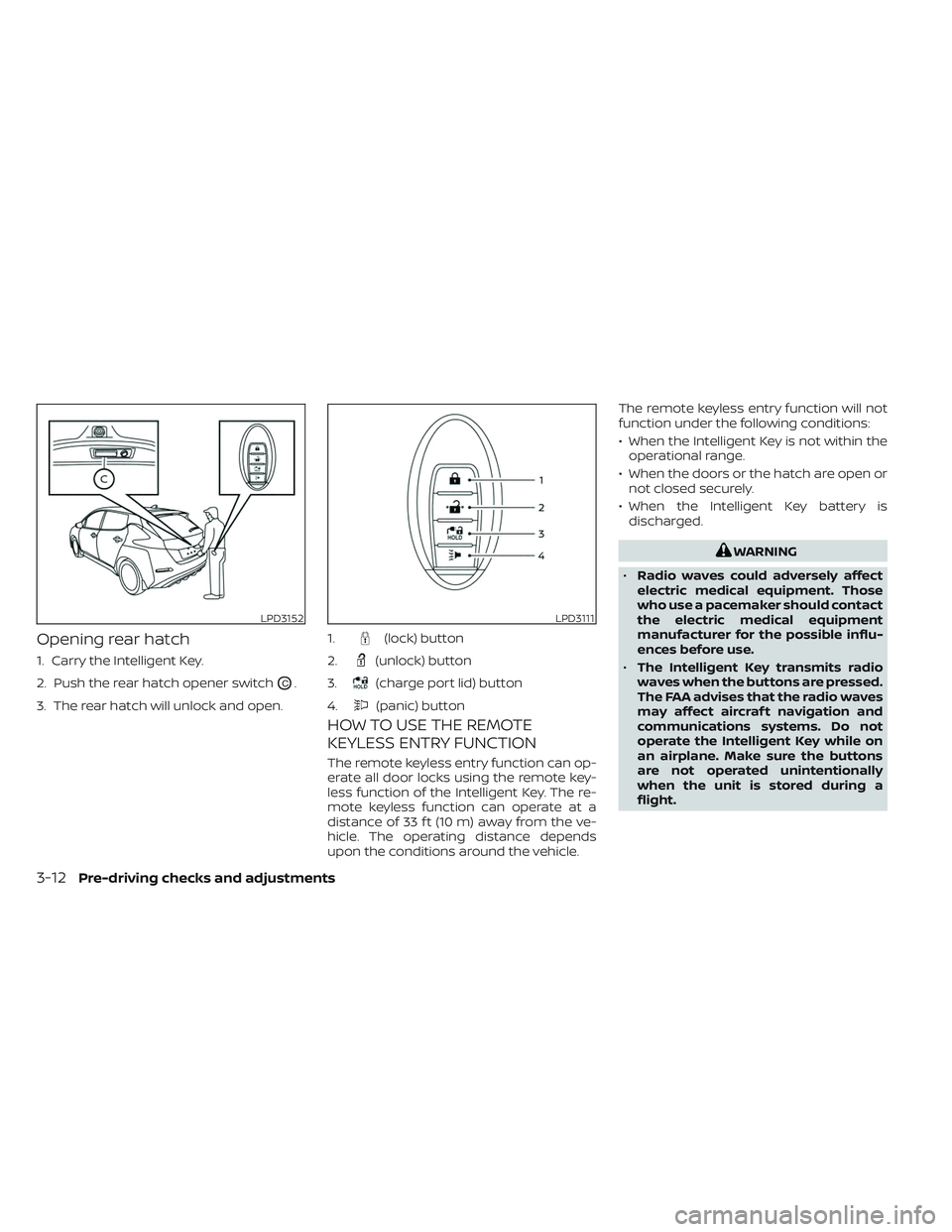
Opening rear hatch
1. Carry the Intelligent Key.
2. Push the rear hatch opener switch
OC.
3. The rear hatch will unlock and open.
HOW TO USE THE REMOTE
KEYLESS ENTRY FUNCTION
The remote keyless entry function can op-
erate all door locks using the remote key-
less function of the Intelligent Key. The re-
mote keyless function can operate at a
distance of 33 f t (10 m) away from the ve-
hicle. The operating distance depends
upon the conditions around the vehicle. The remote keyless entry function will not
function under the following conditions:
• When the Intelligent Key is not within the
operational range.
• When the doors or the hatch are open or not closed securely.
• When the Intelligent Key battery is discharged.
WARNING
• Radio waves could adversely affect
electric medical equipment. Those
who use a pacemaker should contact
the electric medical equipment
manufacturer for the possible influ-
ences before use.
• The Intelligent Key transmits radio
waves when the buttons are pressed.
The FAA advises that the radio waves
may affect aircraf t navigation and
communications systems. Do not
operate the Intelligent Key while on
an airplane. Make sure the buttons
are not operated unintentionally
when the unit is stored during a
flight.
LPD3152LPD3111
1.(lock) button
2.
(unlock) button
3.
(charge port lid) button
4.
(panic) button
3-12Pre-driving checks and adjustments
Page 267 of 612
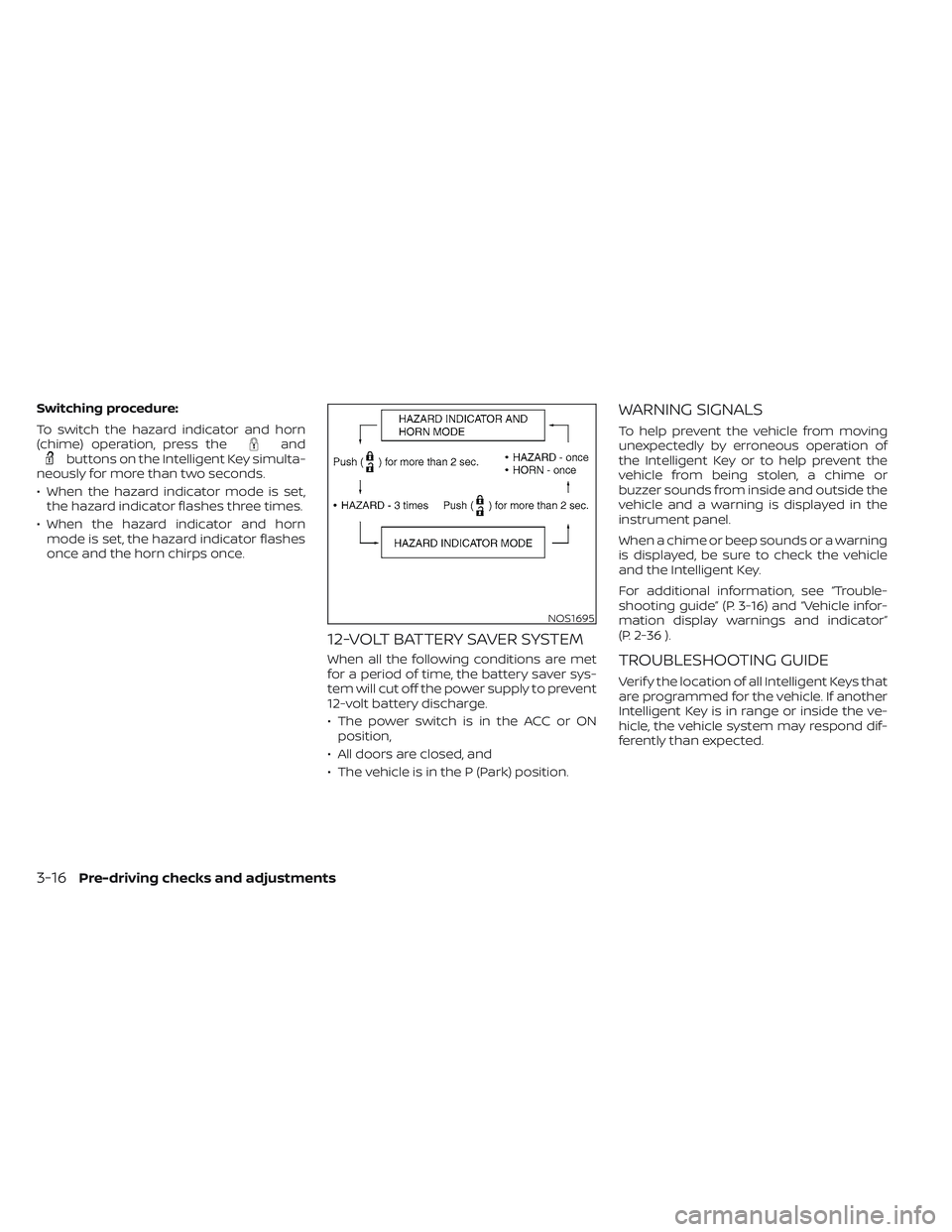
Switching procedure:
To switch the hazard indicator and horn
(chime) operation, press the
andbuttons on the Intelligent Key simulta-
neously for more than two seconds.
• When the hazard indicator mode is set, the hazard indicator flashes three times.
• When the hazard indicator and horn mode is set, the hazard indicator flashes
once and the horn chirps once.
12-VOLT BATTERY SAVER SYSTEM
When all the following conditions are met
for a period of time, the battery saver sys-
tem will cut off the power supply to prevent
12-volt battery discharge.
• The power switch is in the ACC or ONposition,
• All doors are closed, and
• The vehicle is in the P (Park) position.
WARNING SIGNALS
To help prevent the vehicle from moving
unexpectedly by erroneous operation of
the Intelligent Key or to help prevent the
vehicle from being stolen, a chime or
buzzer sounds from inside and outside the
vehicle and a warning is displayed in the
instrument panel.
When a chime or beep sounds or a warning
is displayed, be sure to check the vehicle
and the Intelligent Key.
For additional information, see “Trouble-
shooting guide” (P. 3-16) and “Vehicle infor-
mation display warnings and indicator”
(P. 2-36 ).
TROUBLESHOOTING GUIDE
Verif y the location of all Intelligent Keys that
are programmed for the vehicle. If another
Intelligent Key is in range or inside the ve-
hicle, the vehicle system may respond dif-
ferently than expected.
NOS1695
3-16Pre-driving checks and adjustments