battery NISSAN LEAF 2023 Manual Online
[x] Cancel search | Manufacturer: NISSAN, Model Year: 2023, Model line: LEAF, Model: NISSAN LEAF 2023Pages: 612, PDF Size: 7.42 MB
Page 191 of 612
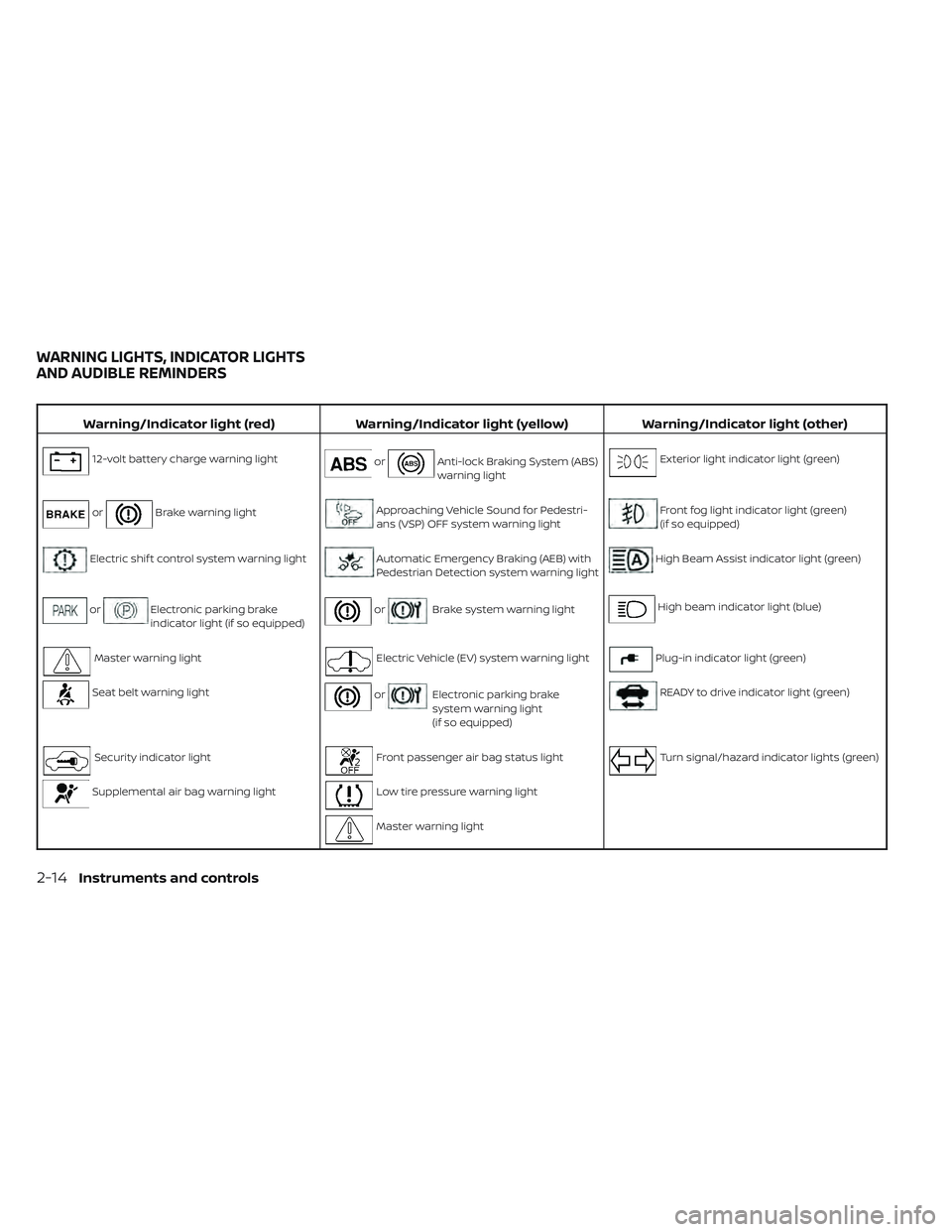
Warning/Indicator light (red)Warning/Indicator light (yellow) Warning/Indicator light (other)
12-volt battery charge warning lightorAnti-lock Braking System (ABS)
warning lightExterior light indicator light (green)
orBrake warning lightApproaching Vehicle Sound for Pedestri-
ans (VSP) OFF system warning lightFront fog light indicator light (green)
(if so equipped)
Electric shif t control system warning lightAutomatic Emergency Braking (AEB) with
Pedestrian Detection system warning lightHigh Beam Assist indicator light (green)
orElectronic parking brake
indicator light (if so equipped)orBrake system warning lightHigh beam indicator light (blue)
Master warning lightElectric Vehicle (EV) system warning lightPlug-in indicator light (green)
Seat belt warning lightorElectronic parking brake
system warning light
(if so equipped)READY to drive indicator light (green)
Security indicator lightFront passenger air bag status lightTurn signal/hazard indicator lights (green)
Supplemental air bag warning lightLow tire pressure warning light
Master warning light
WARNING LIGHTS, INDICATOR LIGHTS
AND AUDIBLE REMINDERS
2-14Instruments and controls
Page 193 of 612
CHECKING LIGHTS
With all doors closed, apply the parking
brake, fasten the seat belts and place the
power switch for LEAF to the ON position
without starting the EV system. The follow-
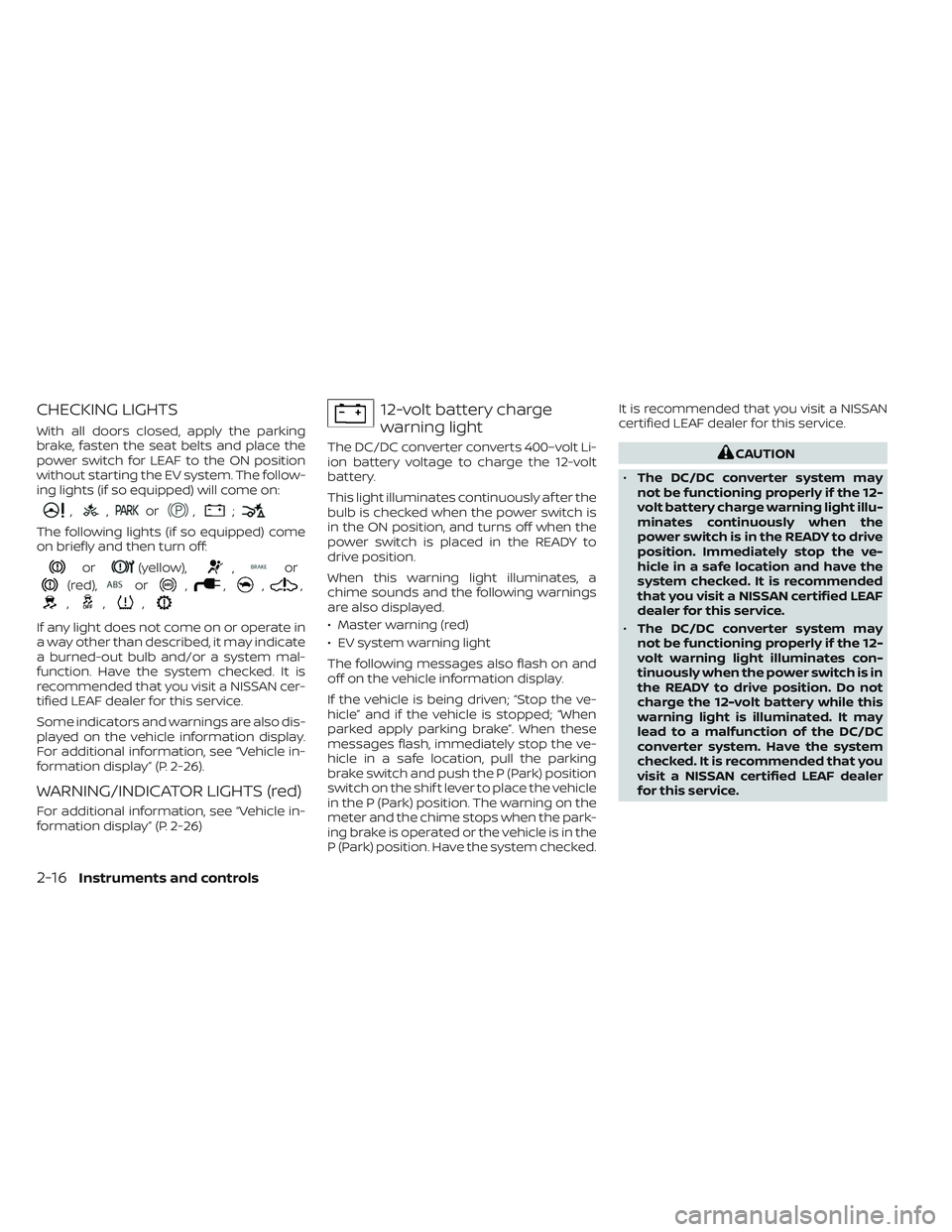
ing lights (if so equipped) will come on:
,,or,;
The following lights (if so equipped) come
on briefly and then turn off:
or(yellow),,or
(red),or,,,,
,,,
If any light does not come on or operate in
a way other than described, it may indicate
a burned-out bulb and/or a system mal-
function. Have the system checked. It is
recommended that you visit a NISSAN cer-
tified LEAF dealer for this service.
Some indicators and warnings are also dis-
played on the vehicle information display.
For additional information, see “Vehicle in-
formation display” (P. 2-26).
WARNING/INDICATOR LIGHTS (red)
For additional information, see “Vehicle in-
formation display” (P. 2-26)
12-volt battery charge
warning light
The DC/DC converter converts 400–volt Li-
ion battery voltage to charge the 12-volt
battery.
This light illuminates continuously af ter the
bulb is checked when the power switch is
in the ON position, and turns off when the
power switch is placed in the READY to
drive position.
When this warning light illuminates, a
chime sounds and the following warnings
are also displayed.
• Master warning (red)
• EV system warning light
The following messages also flash on and
off on the vehicle information display.
If the vehicle is being driven; “Stop the ve-
hicle” and if the vehicle is stopped; “When
parked apply parking brake”. When these
messages flash, immediately stop the ve-
hicle in a safe location, pull the parking
brake switch and push the P (Park) position
switch on the shif t lever to place the vehicle
in the P (Park) position. The warning on the
meter and the chime stops when the park-
ing brake is operated or the vehicle is in the
P (Park) position. Have the system checked.It is recommended that you visit a NISSAN
certified LEAF dealer for this service.CAUTION
• The DC/DC converter system may
not be functioning properly if the 12-
volt battery charge warning light illu-
minates continuously when the
power switch is in the READY to drive
position. Immediately stop the ve-
hicle in a safe location and have the
system checked. It is recommended
that you visit a NISSAN certified LEAF
dealer for this service.
• The DC/DC converter system may
not be functioning properly if the 12-
volt warning light illuminates con-
tinuously when the power switch is in
the READY to drive position. Do not
charge the 12-volt battery while this
warning light is illuminated. It may
lead to a malfunction of the DC/DC
converter system. Have the system
checked. It is recommended that you
visit a NISSAN certified LEAF dealer
for this service.
2-16Instruments and controls
Page 197 of 612
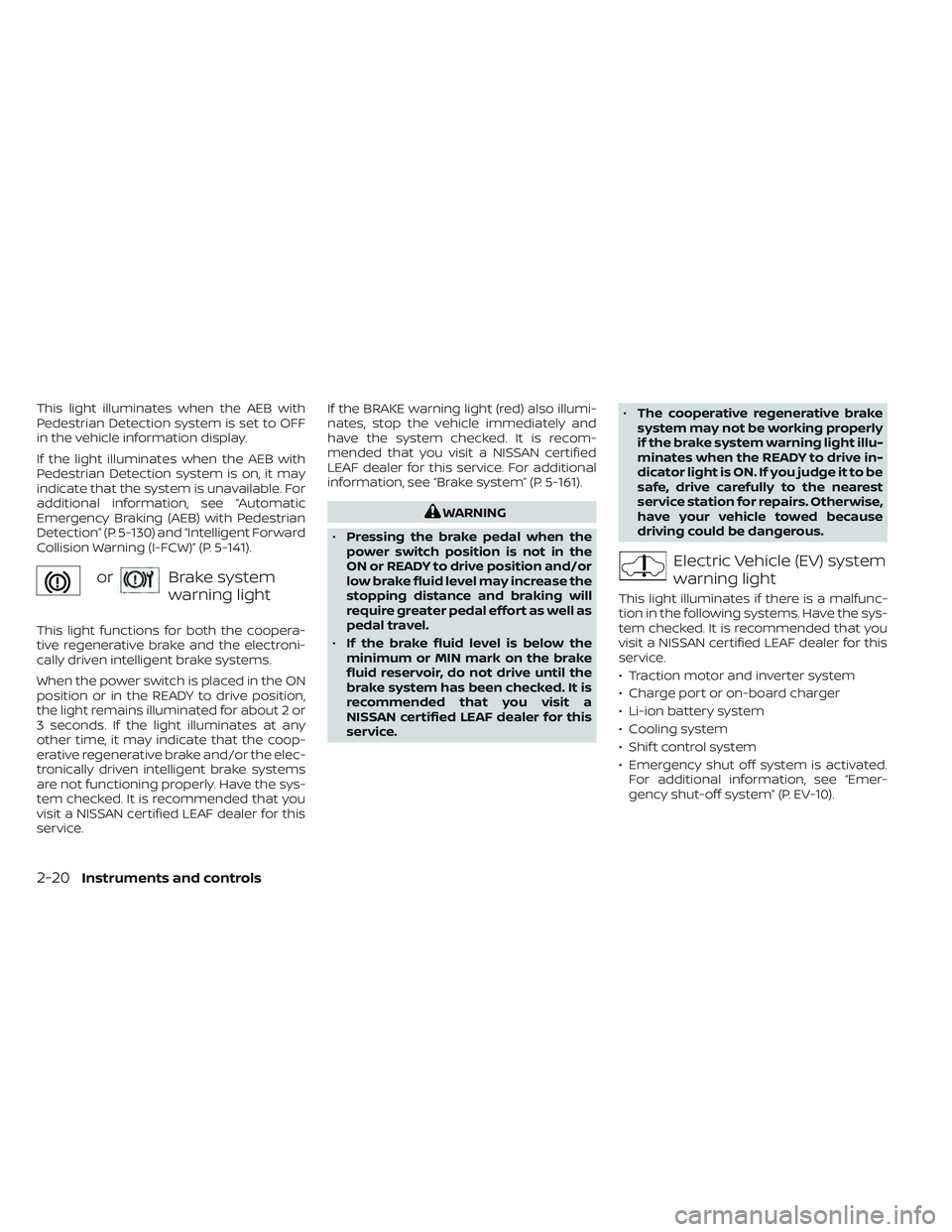
This light illuminates when the AEB with
Pedestrian Detection system is set to OFF
in the vehicle information display.
If the light illuminates when the AEB with
Pedestrian Detection system is on, it may
indicate that the system is unavailable. For
additional information, see “Automatic
Emergency Braking (AEB) with Pedestrian
Detection” (P. 5-130) and “Intelligent Forward
Collision Warning (I-FCW)” (P. 5-141).
orBrake system
warning light
This light functions for both the coopera-
tive regenerative brake and the electroni-
cally driven intelligent brake systems.
When the power switch is placed in the ON
position or in the READY to drive position,
the light remains illuminated for about 2 or
3 seconds. If the light illuminates at any
other time, it may indicate that the coop-
erative regenerative brake and/or the elec-
tronically driven intelligent brake systems
are not functioning properly. Have the sys-
tem checked. It is recommended that you
visit a NISSAN certified LEAF dealer for this
service.If the BRAKE warning light (red) also illumi-
nates, stop the vehicle immediately and
have the system checked. It is recom-
mended that you visit a NISSAN certified
LEAF dealer for this service. For additional
information, see “Brake system” (P. 5-161).
WARNING
• Pressing the brake pedal when the
power switch position is not in the
ON or READY to drive position and/or
low brake fluid level may increase the
stopping distance and braking will
require greater pedal effort as well as
pedal travel.
• If the brake fluid level is below the
minimum or MIN mark on the brake
fluid reservoir, do not drive until the
brake system has been checked. It is
recommended that you visit a
NISSAN certified LEAF dealer for this
service. •
The cooperative regenerative brake
system may not be working properly
if the brake system warning light illu-
minates when the READY to drive in-
dicator light is ON. If you judge it to be
safe, drive carefully to the nearest
service station for repairs. Otherwise,
have your vehicle towed because
driving could be dangerous.
Electric Vehicle (EV) system
warning light
This light illuminates if there is a malfunc-
tion in the following systems. Have the sys-
tem checked. It is recommended that you
visit a NISSAN certified LEAF dealer for this
service.
• Traction motor and inverter system
• Charge port or on-board charger
• Li-ion battery system
• Cooling system
• Shif t control system
• Emergency shut off system is activated. For additional information, see “Emer-
gency shut-off system” (P. EV-10).
2-20Instruments and controls
Page 200 of 612
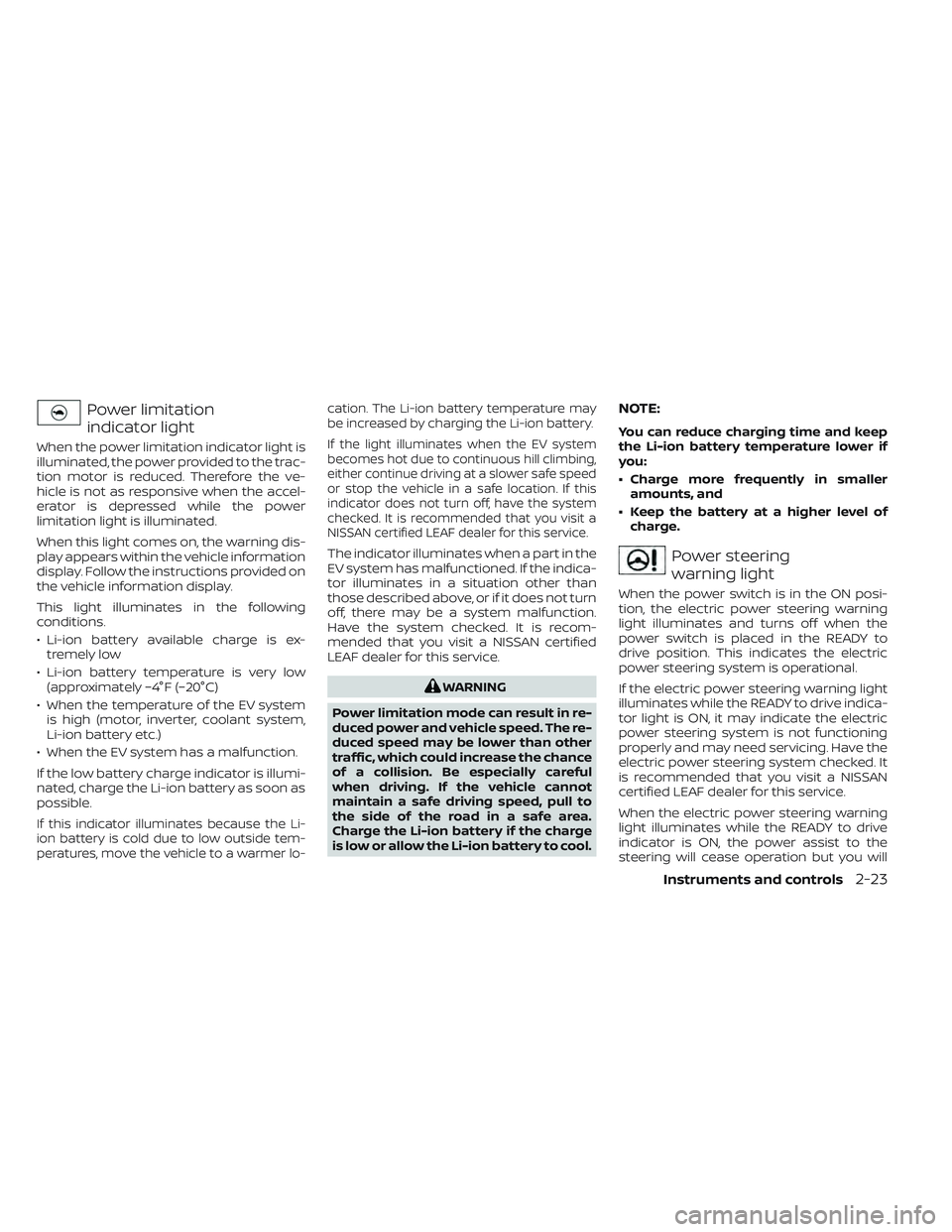
Power limitation
indicator light
When the power limitation indicator light is
illuminated, the power provided to the trac-
tion motor is reduced. Therefore the ve-
hicle is not as responsive when the accel-
erator is depressed while the power
limitation light is illuminated.
When this light comes on, the warning dis-
play appears within the vehicle information
display. Follow the instructions provided on
the vehicle information display.
This light illuminates in the following
conditions.
• Li-ion battery available charge is ex-tremely low
• Li-ion battery temperature is very low (approximately −4°F (−20°C)
• When the temperature of the EV system is high (motor, inverter, coolant system,
Li-ion battery etc.)
• When the EV system has a malfunction.
If the low battery charge indicator is illumi-
nated, charge the Li-ion battery as soon as
possible.
If this indicator illuminates because the Li-
ion battery is cold due to low outside tem-
peratures, move the vehicle to a warmer lo- cation. The Li-ion battery temperature may
be increased by charging the Li-ion battery.
If the light illuminates when the EV system
becomes hot due to continuous hill climbing,
either continue driving at a slower safe speed
or stop the vehicle in a safe location. If this
indicator does not turn off, have the system
checked. It is recommended that you visit a
NISSAN certified LEAF dealer for this service.
The indicator illuminates when a part in the
EV system has malfunctioned. If the indica-
tor illuminates in a situation other than
those described above, or if it does not turn
off, there may be a system malfunction.
Have the system checked. It is recom-
mended that you visit a NISSAN certified
LEAF dealer for this service.
WARNING
Power limitation mode can result in re-
duced power and vehicle speed. The re-
duced speed may be lower than other
traffic, which could increase the chance
of a collision. Be especially careful
when driving. If the vehicle cannot
maintain a safe driving speed, pull to
the side of the road in a safe area.
Charge the Li-ion battery if the charge
is low or allow the Li-ion battery to cool.
NOTE:
You can reduce charging time and keep
the Li-ion battery temperature lower if
you:
• Charge more frequently in smaller amounts, and
• Keep the battery at a higher level of charge.
Power steering
warning light
When the power switch is in the ON posi-
tion, the electric power steering warning
light illuminates and turns off when the
power switch is placed in the READY to
drive position. This indicates the electric
power steering system is operational.
If the electric power steering warning light
illuminates while the READY to drive indica-
tor light is ON, it may indicate the electric
power steering system is not functioning
properly and may need servicing. Have the
electric power steering system checked. It
is recommended that you visit a NISSAN
certified LEAF dealer for this service.
When the electric power steering warning
light illuminates while the READY to drive
indicator is ON, the power assist to the
steering will cease operation but you will
Instruments and controls2-23
Page 202 of 612
High beam indicator light
(blue)
This light illuminates when the headlight
high beam is on and goes out when the low
beam is selected.
Plug-in
indicator light (green)
This light illuminates when the charge con-
nector is connected to the vehicle and
blinks during charging.
NOTE:
If the charge connector is connected to
the vehicle, the power switch cannot be
placed in the READY to drive position.
READY to drive
indicator light (green)
The READY to drive indicator light illumi-
nates when the EV system is powered and
the vehicle may be driven.
The READY to drive indicator light will turn
off in the following conditions.
• Certain EV system malfunctions.• The READY to drive indicator light turns
off immediately before the Li-ion battery
is completely discharged. If the Li-ion bat-
tery becomes completely discharged,
the vehicle must be charged in order to
be driven. For additional information, see
“Low battery charge indicator” (P. 2-38).
Turn signal/hazard
indicator lights (green)
This light flashes when the turn signal
switch lever or hazard switch is turned on.
AUDIBLE REMINDERS
Brake pad wear warning
The disc brake pads have audible wear
warnings. When a brake pad requires re-
placement, it will make a high-pitched
scraping sound when the vehicle is in mo-
tion. This scraping sound will first occur
only when the brake pedal is depressed.
Af ter more wear of the brake pad, the
sound will always be heard even if the
brake pedal is not depressed. Have the
brakes checked as soon as possible if the
warning sound is heard.
Electric shif t control system
reminder chime
If an improper shif t operation is performed,
for safety reasons a chime will sound and
at the same time, depending on the condi-
tions, the operation will be canceled or the
shif t position will switch to the N (Neutral)
position.
For additional information, see “Driving the
vehicle” (P. 5-14).
Key reminder chime
A chime will sound if the driver's side door is
opened while the power switch is pushed
to the ON or ACC position.
Make sure that the power switch is pushed
to the OFF position, and take the Intelligent
Key with you when leaving the vehicle.
Light reminder chime
The light reminder chime will sound when
the driver side door is opened with the light
switch in the
orposition, and
the power switch is in the ACC, OFF or LOCK
position.
Turn the light switch off when you leave the
vehicle.
Instruments and controls2-25
Page 203 of 612
Parking brake reminder chime
A chime sounds if the parking brake is set
and the vehicle is driven. The chime will
stop if the parking brake is released or the
vehicle speed returns to zero.
Power switch reminder chime
The power switch reminder chime will
sound when the driver's door is opened
while the power switch is in the ON or
READY to drive position. Push the power
switch to the OFF position.
12-volt battery charge
warning chime
If the 12-volt battery charge warning light
illuminates, the chime will sound when a
warning message is displayed in the ve-
hicle information display.When the chime sounds, immediately stop
the vehicle in a safe location and push the P
(Park) position switch on the shif t lever and
apply the parking brake. The 12-volt battery
charge warning light turns off and the
chime will stop when the parking brake is
applied or the vehicle is placed in the P
(Park) position. Have the system checked. It
is recommended that you visit a NISSAN
certified LEAF dealer for this service. For
additional information, see “12-volt battery
charge warning light” (P. 2-16).
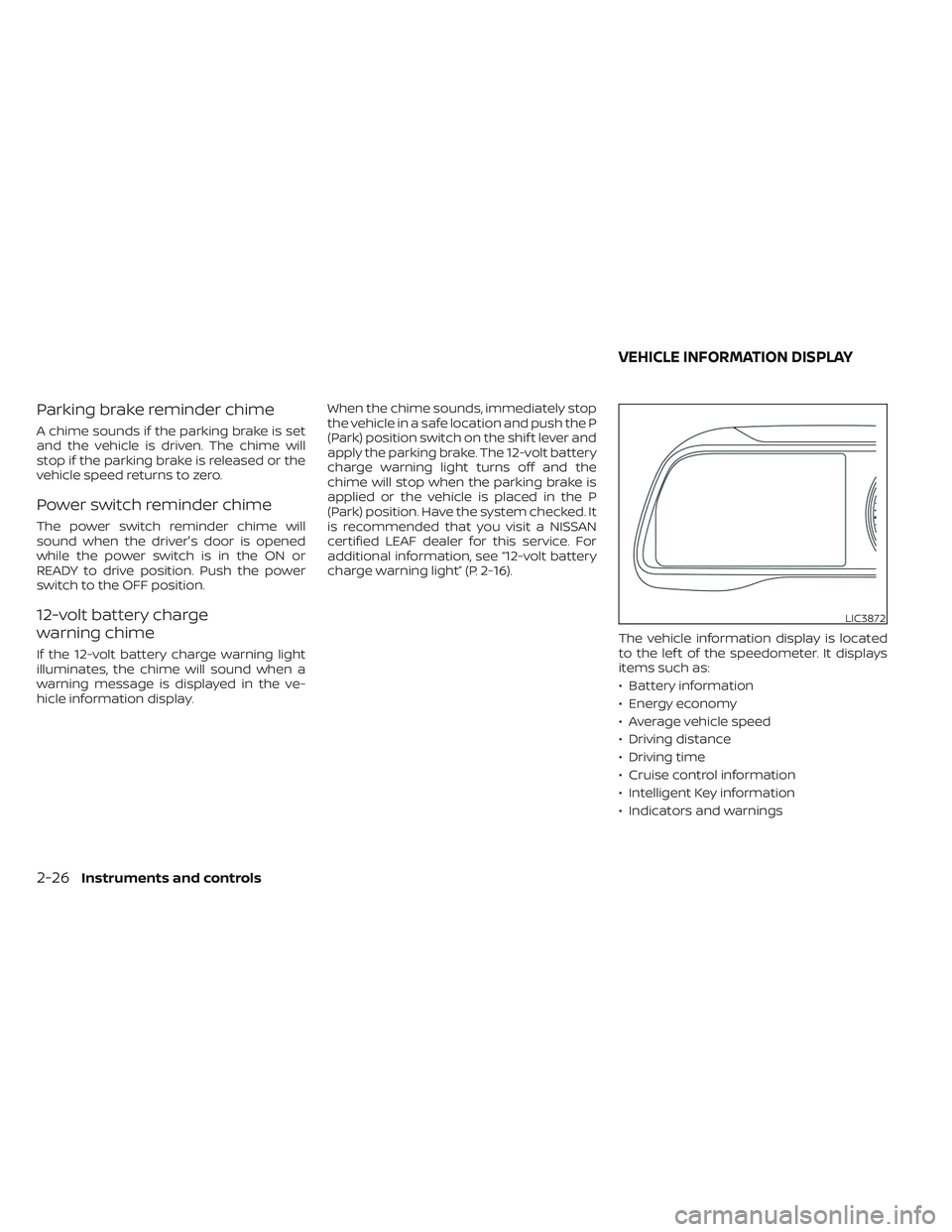
The vehicle information display is located
to the lef t of the speedometer. It displays
items such as:
• Battery information
• Energy economy
• Average vehicle speed
• Driving distance
• Driving time
• Cruise control information
• Intelligent Key information
• Indicators and warnings
LIC3872
VEHICLE INFORMATION DISPLAY
2-26Instruments and controls
Page 204 of 612
HOW TO USE THE VEHICLE
INFORMATION DISPLAY
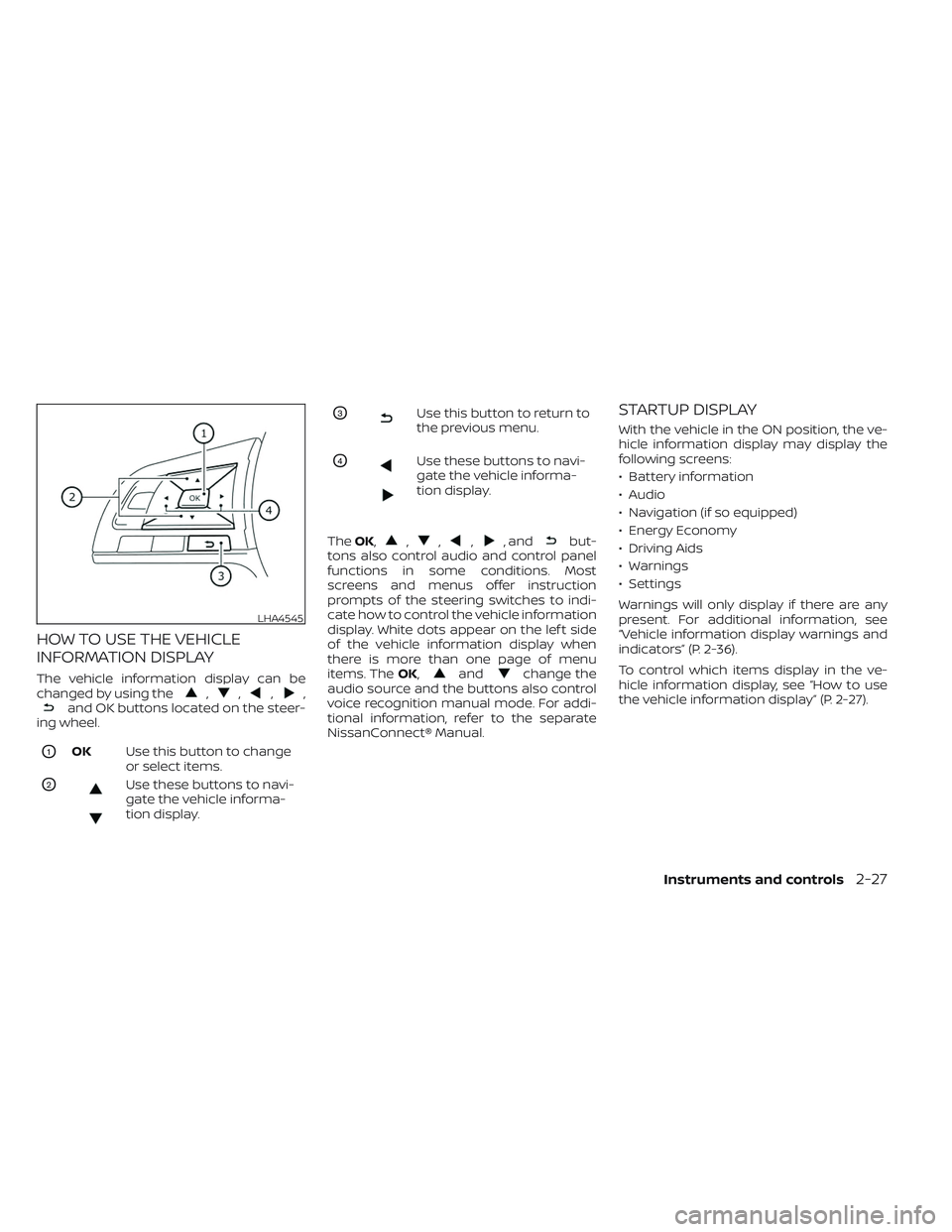
The vehicle information display can be
changed by using the,,,,and OK buttons located on the steer-
ing wheel.
O1OK Use this button to change
or select items.
O2Use these buttons to navi-
gate the vehicle informa-
tion display.
O3Use this button to return to
the previous menu.
O4Use these buttons to navi-
gate the vehicle informa-
tion display.
The OK,
,,,, andbut-
tons also control audio and control panel
functions in some conditions. Most
screens and menus offer instruction
prompts of the steering switches to indi-
cate how to control the vehicle information
display. White dots appear on the lef t side
of the vehicle information display when
there is more than one page of menu
items. The OK,
andchange the
audio source and the buttons also control
voice recognition manual mode. For addi-
tional information, refer to the separate
NissanConnect® Manual.
STARTUP DISPLAY
With the vehicle in the ON position, the ve-
hicle information display may display the
following screens:
• Battery information
• Audio
• Navigation (if so equipped)
• Energy Economy
• Driving Aids
• Warnings
• Settings
Warnings will only display if there are any
present. For additional information, see
“Vehicle information display warnings and
indicators” (P. 2-36).
To control which items display in the ve-
hicle information display, see “How to use
the vehicle information display” (P. 2-27).
LHA4545
Instruments and controls2-27
Page 213 of 612
VEHICLE INFORMATION DISPLAY
WARNINGS AND INDICATORS
Some of the following warning messages
may not be equipped on your vehicle.
EV system operation for
discharged Intelligent Key
system indicator
This indicator appears when the Intelligent
Key battery is running out of power and
when the Intelligent Key system and ve-
hicle are not communicating normally.
If this indicator appears, touch the power
switch with the Intelligent Key while de-
pressing the brake pedal. For additional in-
formation, see “NISSAN Intelligent Key® bat-
tery discharge” (P. 5-12).
Key Battery Low
This indicator appears when the Intelligent
Key battery is running out of power.
If this indicator appears, replace the bat-
tery with a new one. For additional infor-
mation, see “NISSAN Intelligent Key® bat-
tery replacement” (P. 8-19).
Key System Error: See
Owner’s Manual
Af ter the power switch is placed in the ON
position, this warning appears for a period
of time and then turns off.
The Key System Error message warns of a
malfunction with the Intelligent Key sys-
tem. If the warning appears while the mo-
tor is stopped, it may be impossible to start
the motor.
If the warning appears while the motor is
running, you can drive the vehicle. However,
have it repaired as soon as possible. It is
recommended that you visit a NISSAN cer-
tified LEAF dealer for this service.
No Key Detected
This warning appears in either of the fol-
lowing conditions:
No key inside the vehicle:
This warning appears when the door is
closed with the Intelligent Key lef t outside
the vehicle and the power switch in the
ACC or ON position. Make sure that the
Intelligent Key is inside the vehicle.Unregistered Intelligent Key:
This warning appears when the power
switch is placed in the ON, ACC or READY to
drive position and the Intelligent Key can-
not be recognized by the system. You can-
not place the power switch in the READY to
drive position with an unregistered key. Use
an Intelligent Key that has been registered.
For additional information, see “NISSAN In-
telligent Key® system” (P. 3-6).
Brightness indicator
This indicator shows the brightness ad-
justment of the instrument panel. For addi-
tional information, see “Instrument bright-
ness control” (P. 2-56).
Chassis Control System Error: See
Owner’s Manual
This warning appears if the chassis control
is not functioning properly. Have the sys-
tem checked. It is recommended that you
visit a NISSAN certified LEAF dealer for this
service. For additional information, see
“Chassis control” (P. 5-167).
2-36Instruments and controls
Page 215 of 612
Driver alert
This warning appears when the previously
set time for a break is reached. You can set
the time for up to 6 hours in the setting
menu. For additional information, see “Ve-
hicle information display” (P. 2-26).
e—Pedal system failure! Press brake
pedal to slow or stop
This warning appears when the e-Pedal
system is malfunctioning. Have the system
checked. It is recommended that you visit a
NISSAN certified LEAF dealer for this
service.
Indicators for maintenance
These indicators appear when the cus-
tomer set distance comes for replacing
tires or other maintenance items. You can
set or reset the distance for replacing tires
and other maintenance items.
WARNING
The tire replacement indicator is not a
substitute for regular tire checks, in-
cluding tire pressure checks. For addi-
tional information, see “Changing
wheels and tires” (P. 8-35). Many factors including tire inflation, alignment, driv-
ing habits and road conditions affect
tire wear and when tires should be re-
placed. Setting the tire replacement in-
dicator for a certain driving distance
does not mean your tires will last that
long. Use the tire replacement indicator
as a guide only and always perform
regular tire checks. Failure to perform
regular tire checks, including tire pres-
sure checks could result in tire failure.
Serious vehicle damage could occur
and may lead to a collision, which could
result in serious personal injury or
death.
For scheduled maintenance items and in-
tervals, see “Maintenance and schedules”
(P. 9-6).
Headlight System Error: See Owner’s
Manual
This warning appears when the LED head-
lights are not functioning properly.
If this warning appears, have your system
checked. It is recommended that you visit a
NISSAN certified LEAF dealer for this
service.
Low battery charge
indicator
This light appears when the available Li-ion
battery charge is getting low. Charge as
soon as it is possible, preferably before the
Li-ion battery available charge gauge
reaches 0%.
NOTE:
The low battery charge indicator turns
off immediately before the Li-ion battery
is completely discharged and the vehicle
will stop. If the Li-ion battery becomes
completely discharged, the vehicle must
be charged in order to be driven.
Low outside air
temperature
The outside air temperature is displayed in
°F or °C in the range of −20°F to 140°F (−30°C
to 60°C).
The outside air temperature mode in-
cludes a low temperature warning feature.
If the outside air temperature is below 37°F
(3°C), the warning is displayed on the
screen.
2-38Instruments and controls
Page 221 of 612
WARNING INFORMATION DISPLAYS
(models with a navigation
system)
Low battery warning
When the low battery charge indicatorand the master warning light (yellow)illuminate, the system displays a
message on the navigation system screen
that warns the driver that the Li-ion battery
power level is low.
1. The notification is displayed on the up- per lef t side of the STATUS screen. Touch
[Show] to display the screen showing
detailed information.
2. The system displays a message screen and announces the contents of the
message to warn that the Li-ion battery
power level is low. Check the message
displayed on the screen.
Touch [YES] to search for charging sta-
tions within the estimated driving range.
3. Touch
or press the MAPbutton to
return to the vehicle location screen.
NOTE:
• The low battery warning can be set to off. For additional information, refer to
the NissanConnect® Manual.
• When the battery power level is low, the system automatically obtains
charging station information.
Your vehicle has two types of security sys-
tems, as follows:
• Vehicle security system
• NISSAN Vehicle Immobilizer System
The security status is shown by the secu-
rity indicator light.
VEHICLE SECURITY SYSTEM
The vehicle security system provides visual
and audio alarm signals if someone opens
the doors or rear hatch when the system is
armed. It is not, however, a motion detec-
tion type system that activates when a ve-
hicle is moved or when a vibration occurs.
JVC0067X
SECURITY SYSTEMS
2-44Instruments and controls