battery NISSAN LEAF 2023 Owners Manual
[x] Cancel search | Manufacturer: NISSAN, Model Year: 2023, Model line: LEAF, Model: NISSAN LEAF 2023Pages: 612, PDF Size: 7.42 MB
Page 268 of 612
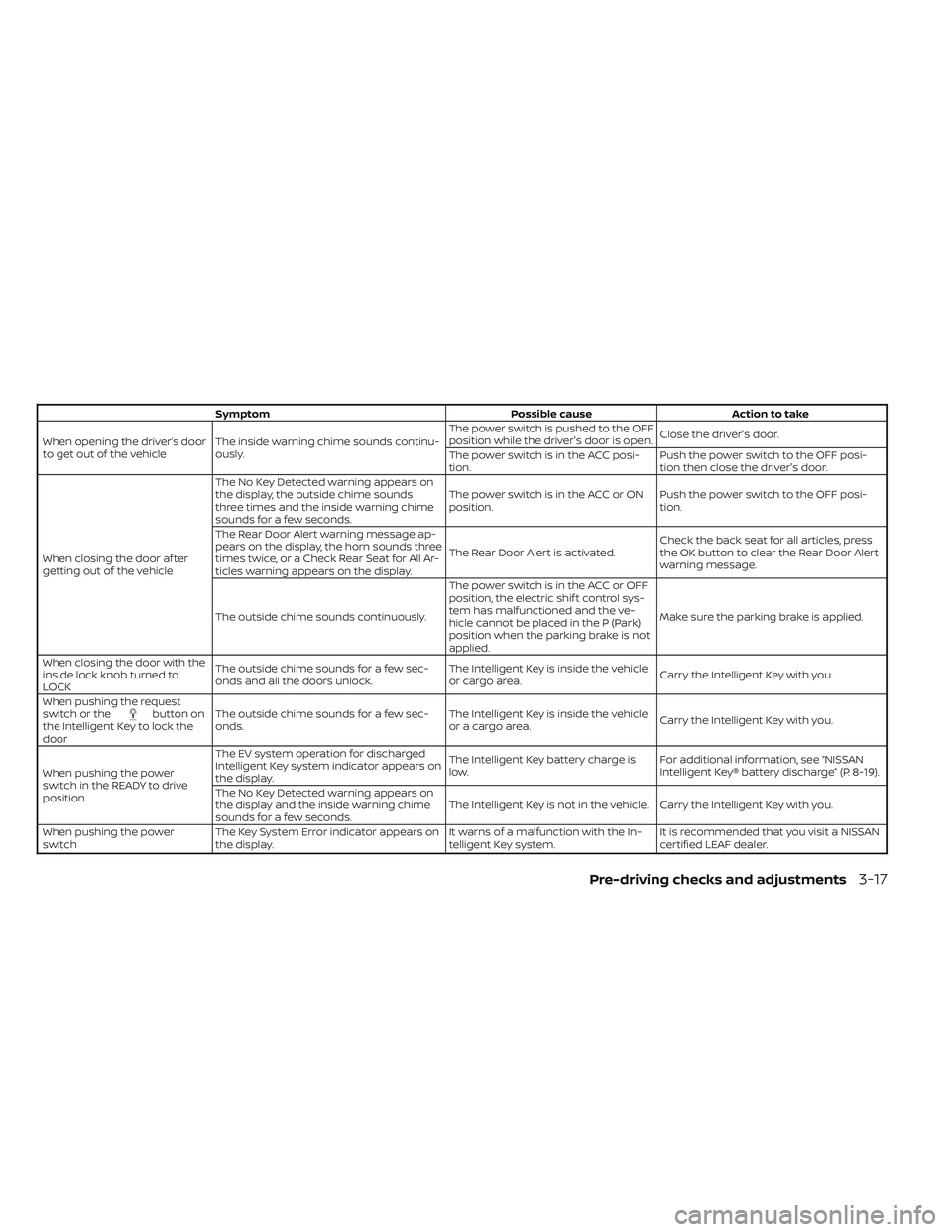
SymptomPossible causeAction to take
When opening the driver’s door
to get out of the vehicle The inside warning chime sounds continu-
ously. The power switch is pushed to the OFF
position while the driver's door is open.
Close the driver's door.
The power switch is in the ACC posi-
tion. Push the power switch to the OFF posi-
tion then close the driver's door.
When closing the door af ter
getting out of the vehicle The No Key Detected warning appears on
the display, the outside chime sounds
three times and the inside warning chime
sounds for a few seconds.
The power switch is in the ACC or ON
position.
Push the power switch to the OFF posi-
tion.
The Rear Door Alert warning message ap-
pears on the display, the horn sounds three
times twice, or a Check Rear Seat for All Ar-
ticles warning appears on the display. The Rear Door Alert is activated.
Check the back seat for all articles, press
the OK button to clear the Rear Door Alert
warning message.
The outside chime sounds continuously. The power switch is in the ACC or OFF
position, the electric shif t control sys-
tem has malfunctioned and the ve-
hicle cannot be placed in the P (Park)
position when the parking brake is not
applied.Make sure the parking brake is applied.
When closing the door with the
inside lock knob turned to
LOCK The outside chime sounds for a few sec-
onds and all the doors unlock.
The Intelligent Key is inside the vehicle
or cargo area.
Carry the Intelligent Key with you.
When pushing the request
switch or the
button on
the Intelligent Key to lock the
door The outside chime sounds for a few sec-
onds.
The Intelligent Key is inside the vehicle
or a cargo area.
Carry the Intelligent Key with you.
When pushing the power
switch in the READY to drive
position The EV system operation for discharged
Intelligent Key system indicator appears on
the display.
The Intelligent Key battery charge is
low.
For additional information, see “NISSAN
Intelligent Key® battery discharge” (P. 8-19).
The No Key Detected warning appears on
the display and the inside warning chime
sounds for a few seconds. The Intelligent Key is not in the vehicle. Carry the Intelligent Key with you.
When pushing the power
switch The Key System Error indicator appears on
the display. It warns of a malfunction with the In-
telligent Key system.It is recommended that you visit a NISSAN
certified LEAF dealer.
Pre-driving checks and adjustments3-17
Page 270 of 612
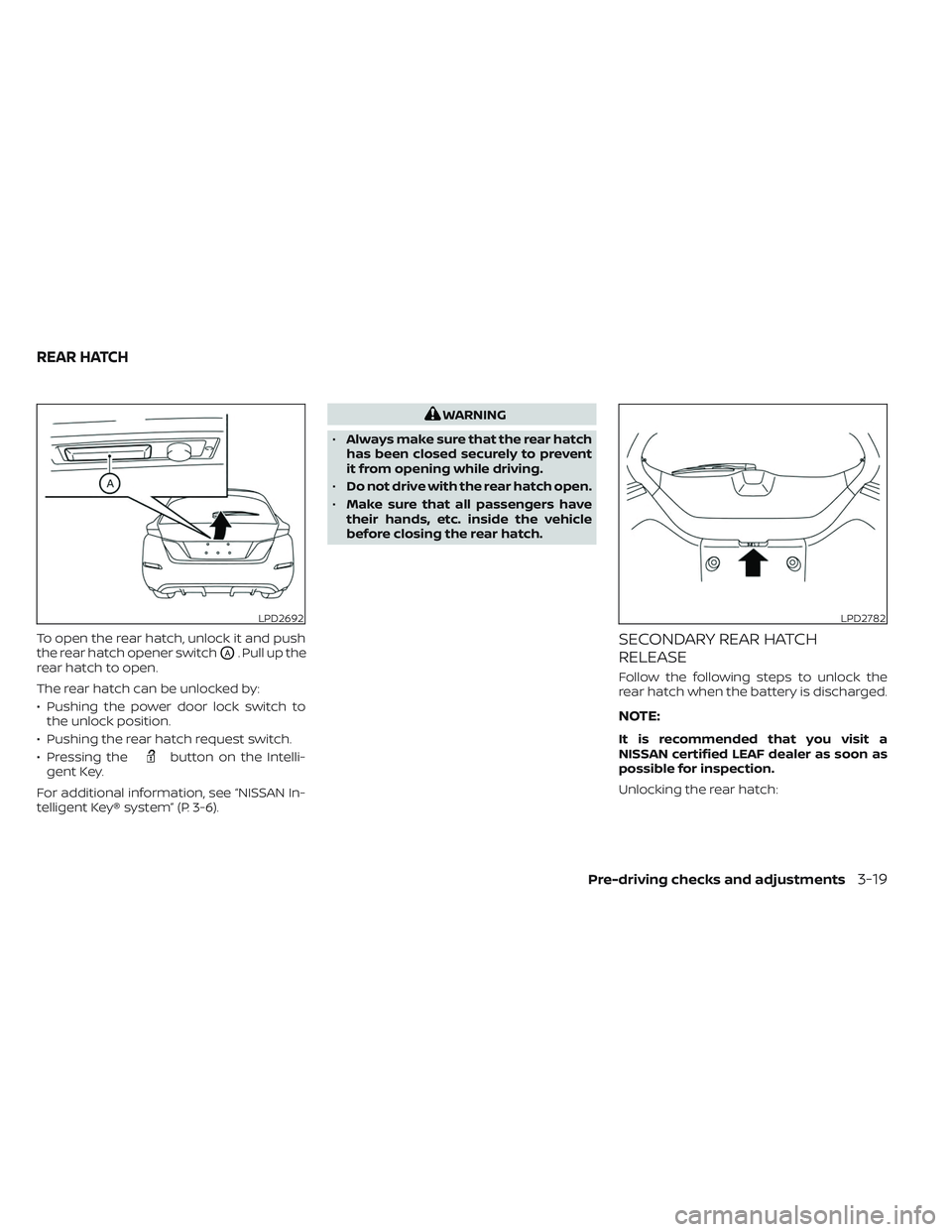
To open the rear hatch, unlock it and push
the rear hatch opener switch
OA. Pull up the
rear hatch to open.
The rear hatch can be unlocked by:
• Pushing the power door lock switch to the unlock position.
• Pushing the rear hatch request switch.
• Pressing the
button on the Intelli-
gent Key.
For additional information, see “NISSAN In-
telligent Key® system” (P. 3-6).
WARNING
• Always make sure that the rear hatch
has been closed securely to prevent
it from opening while driving.
• Do not drive with the rear hatch open.
• Make sure that all passengers have
their hands, etc. inside the vehicle
before closing the rear hatch.
SECONDARY REAR HATCH
RELEASE
Follow the following steps to unlock the
rear hatch when the battery is discharged.
NOTE:
It is recommended that you visit a
NISSAN certified LEAF dealer as soon as
possible for inspection.
Unlocking the rear hatch:
LPD2692LPD2782
REAR HATCH
Pre-driving checks and adjustments3-19
Page 284 of 612
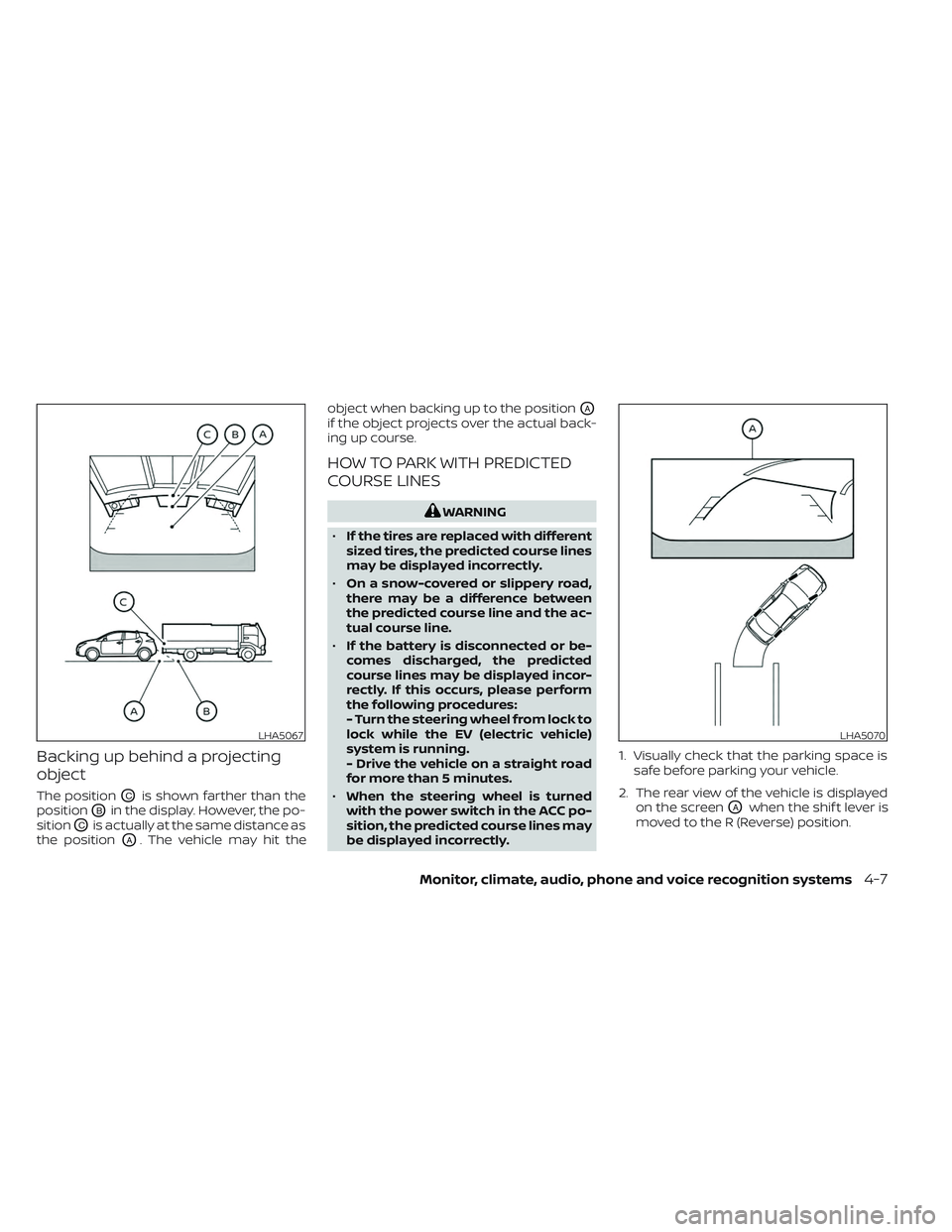
Backing up behind a projecting
object
The positionOCis shown farther than the
position
OBin the display. However, the po-
sition
OCis actually at the same distance as
the position
OA. The vehicle may hit the object when backing up to the position
OA
if the object projects over the actual back-
ing up course.
HOW TO PARK WITH PREDICTED
COURSE LINES
WARNING
• If the tires are replaced with different
sized tires, the predicted course lines
may be displayed incorrectly.
• On a snow-covered or slippery road,
there may be a difference between
the predicted course line and the ac-
tual course line.
• If the battery is disconnected or be-
comes discharged, the predicted
course lines may be displayed incor-
rectly. If this occurs, please perform
the following procedures:
- Turn the steering wheel from lock to
lock while the EV (electric vehicle)
system is running.
- Drive the vehicle on a straight road
for more than 5 minutes.
• When the steering wheel is turned
with the power switch in the ACC po-
sition, the predicted course lines may
be displayed incorrectly. 1. Visually check that the parking space is
safe before parking your vehicle.
2. The rear view of the vehicle is displayed on the screen
OAwhen the shif t lever is
moved to the R (Reverse) position.
LHA5067LHA5070
Monitor, climate, audio, phone and voice recognition systems4-7
Page 294 of 612
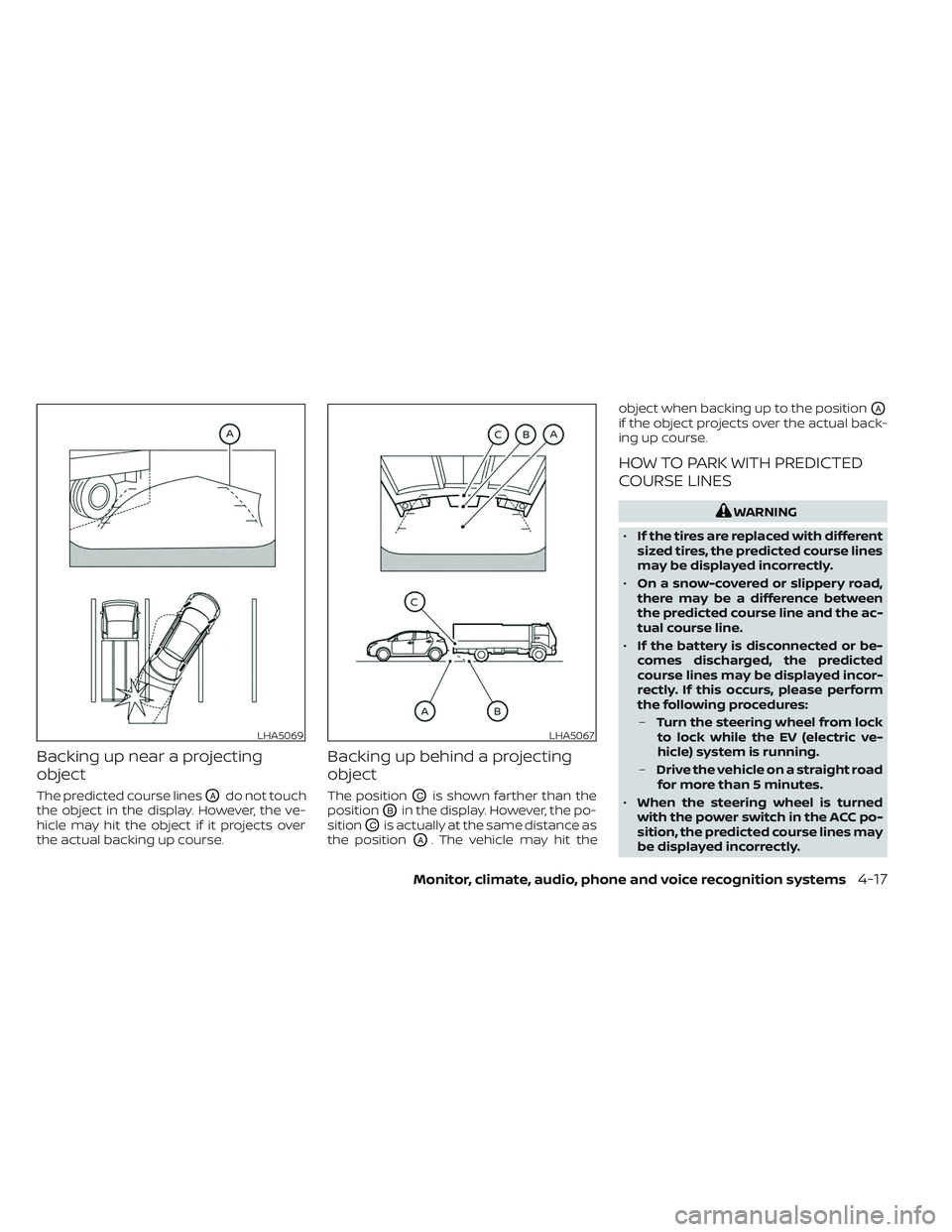
Backing up near a projecting
object
The predicted course linesOAdo not touch
the object in the display. However, the ve-
hicle may hit the object if it projects over
the actual backing up course.
Backing up behind a projecting
object
The positionOCis shown farther than the
position
OBin the display. However, the po-
sition
OCis actually at the same distance as
the position
OA. The vehicle may hit the object when backing up to the position
OA
if the object projects over the actual back-
ing up course.
HOW TO PARK WITH PREDICTED
COURSE LINES
WARNING
• If the tires are replaced with different
sized tires, the predicted course lines
may be displayed incorrectly.
• On a snow-covered or slippery road,
there may be a difference between
the predicted course line and the ac-
tual course line.
• If the battery is disconnected or be-
comes discharged, the predicted
course lines may be displayed incor-
rectly. If this occurs, please perform
the following procedures:
– Turn the steering wheel from lock
to lock while the EV (electric ve-
hicle) system is running.
– Drive the vehicle on a straight road
for more than 5 minutes.
• When the steering wheel is turned
with the power switch in the ACC po-
sition, the predicted course lines may
be displayed incorrectly.
LHA5069LHA5067
Monitor, climate, audio, phone and voice recognition systems4-17
Page 315 of 612
Temperature control
Press the temperature control buttons to
set the desired temperature.
Air recirculation
Press the
intake air control button to
change the air circulation mode. When the
indicator light illuminates, the flowing air is
recirculated inside the vehicle.
When the outside temperature exceeds
70°F (21°C) the air conditioning system may
default to air recirculation mode automati-
cally to reduce overall power consumption.
To exit air recirculation mode, deselect the
air recirculation button (indicator will turn
off ) to enter fresh mode.
Outside air circulation
Press the
intake air control button to
change the air circulation mode. When the
indicator light does not illuminate, the flow-
ing air is drawn from outside the vehicle.
Automatic air intake control
In the AUTO mode, the intake air will be
controlled automatically. When the outside
temperature exceeds 70°F (21°C), the air
conditioning system may default to air re-
circulation mode automatically to reduce
overall power consumption. To set the automatic control mode, press
and hold the
intake air control button.
The indicator light will blink twice and the
inside/outside circulation will then be con-
trolled automatically. When in automatic
mode, the indicator light will come on when
inside air recirculation is active.
Rear window and outside mirror (if so
equipped) defroster switch
For additional information, see “Rear win-
dow and outside mirror (if so equipped)
defroster switch” (P. 2-49).
To turn the system off
To turn off the climate control, press the
Climate control system ON·OFF button.
The same operating mode (Heater or A/C)
that was active when the system is turned
off is active when system is turned back on.
CLIMATE CTRL. TIMER
This function pre-heats or pre-cools the
passenger compartment of the vehicle to
the temperature before driving. This helps
reduce power consumption from the Li-ion
battery.
The Climate Ctrl. Timer operates the air
conditioner using power from the charger
or the Li-ion battery. While the charging connector is connected to the vehicle,
electric power from the Li-ion battery is not
used.
The Climate Ctrl. Timer function allows two
timer settings.
Once the Climate Ctrl. Timer is set, it will
complete air conditioning by the time that
is set. It is not necessary to set the Climate
Ctrl. Timer every day.
WARNING
Even if the Climate Ctrl. Timer is set, the
temperature in the passenger com-
partment may become high or low if
the system automatically stops. Do not
leave children or adults who would nor-
mally require the support of others
alone in your vehicle. Pets should not
be lef t alone either. On hot, sunny days,
temperatures in a closed vehicle could
quickly become high enough to cause
severe or possibly fatal injuries to
people or animals. Also on cold days,
temperature in a vehicle could become
low enough to cause severe or possible
fatal injuries to people or animals.
4-38Monitor, climate, audio, phone and voice recognition systems
Page 317 of 612
5. Press thebutton to select “De-
parture time” and then press the OK
button.
6. Press the
button to set “Hour”
and then press the OK button.
7. Press the
button to set “Minute”
and then press the OK button. The set-
ting can be changed with an increment
step of 10 minutes.
8. Press the
button to select
“Climate Temperature” and then press
the OK button.
9. Press the
button to set Cli-
mate Temperature and then press the
OK button.
10. * Press the
button to select
"Days" and then press the OK button.
The current day of the week is dis-
played with an underline.
Press the
button to select the
days of the week you wish to activate
the Climate Control system and then
press the OK button. The indicator light
of the selected button will turn on. 11. * Af ter setting the day of the week, press
the Back button and return to the pre-
vious screen.
The set day of the week is lit in white.
12. Af ter the setting is complete, place the power switch in the OFF position, and
then connect the charge connector to
the vehicle.
* models with Navigation System
Info
The Climate Ctrl. Timer does not activate if
the charge connector is not connected to
the vehicle. When the “Battery Operation
OK” is turned on and the charging connec-
tor is not connected to the vehicle, the Cli-
mate Ctrl. Timer will activate for 15 minutes.
When the outside temperature is high, the
interior temperature may not reach the set
temperature within the 15 minutes.
Turn "Battery Operation OK" to OFF when it
is not necessary to operate air condition-
ing timer in order to prevent Li-ion battery
from discharging.
For models without Navigation System, the
Climate Ctrl. Timer operates repeatedly ev-
ery day once it is turned on.
Operating tips for using Climate
Ctrl. Timer
• The Climate Ctrl. Timer will only start when the power switch is in the LOCK/
OFF or ACC position.
• To turn off the Climate Ctrl. Timer func- tion, turn off the “Climate Ctrl. Timer1” and
"Climate Ctrl. Timer2" setting in the video
information display using the
button on the steering wheel. The start
and stop time settings will not be deleted
even if the Climate Ctrl. Timer function is
turned off.
• While the Climate Ctrl. Timer is operating, the Climate Ctrl. Timer indicator and the
charging status indicator lights flash. If
the Climate Ctrl. Timer is set to activate,
the Climate Ctrl. Timer indicator
illuminates.*
• If the Climate Ctrl. Timer starts operating while the vehicle is being charged, the
time required for charging will be longer.
• Operating the Climate Ctrl. Timer or re- mote climate control in an environment
where the temperature is low may de-
crease the rate of battery charge.
4-40Monitor, climate, audio, phone and voice recognition systems
Page 318 of 612
• Timer setting can also be changed whileClimate Ctrl. Timer is operated. When the
power position is switched to OFF, the air
conditioner starts or enters waiting
mode depending on the new timer
settings.
• When the difference in temperature be- tween the air conditioner setting tem-
perature and the temperature outside
the vehicle is large, the temperature in-
side the vehicle may not be maintained
at the setting temperature.
• The charging status indicator lights illu- minate in a specific pattern when the Li-
ion battery warmer operates. The charg-
ing status indicator lights use the same
pattern to indicate 12–volt battery charg-
ing, Climate Ctrl. Timer operation or Re-
mote Climate Control operation. The
charging status indicator lights do not
change if the Li-ion battery warmer oper-
ates at the same time as the above
features.
• The temperature in the passenger com- partment may not be comfortable if en-
tering the vehicle too soon before or too
long af ter the scheduled time of
departure. • Air conditioning is limited to the capacity
of the electric power when the charge
connector is connected. Therefore, the
temperature may not reach the set tem-
perature due to limitations in air condi-
tioning performance, if ambient tem-
perature is excessively high or low, or if
the charge connector is connected to a
120–volt plug outlet.
• The Climate Ctrl. Timer operates the cli- mate control function so that a comfort-
able temperature is provided in the pas-
senger compartment at the scheduled
time of departure. The climate control is
set to stop at the scheduled time of
departure.
• Depending on the facilities of charging station, there may be time when it is not
available for charging. Confirm the avail-
ability of the charging facility before set-
ting the Climate Ctrl. Timer. Be sure that
the power switch of the charger is turned
on when setting the Climate Ctrl. Timer.
• When the power switch is turned OFF af- ter changing the setting, the new setting
will be applied.
*models with Navigation SystemRemote climate control
This vehicle incorporates a communica-
tion device that is called a TCU (Telematics
Control Unit). The communication connec-
tion between this unit and Nissan Data
Center allows for various remote function
services.
Even when away from the vehicle, climate
control can be started by accessing the
Web Owner Portal using a cellular phone or
a personal computer.
When operation is started, or at the set
start time, the Nissan Data Center ac-
cesses the vehicle. When the vehicle re-
ceives a command for remote operation,
the climate control immediately turns ON
and operates for the specified period of
time. Confirmation of the ON/OFF of the
climate control operation can be checked
by accessing the Web Owner Portal, or by
e-mail.
Completing registration for the
NissanConnect® EV Services is necessary
before using the service. For additional in-
formation, refer to the NissanConnect®
Manual.
Monitor, climate, audio, phone and voice recognition systems4-41
Page 319 of 612
WARNING
• Radio waves could adversely affect
electric medical equipment. For ad-
ditional information, refer to your
electric medical equipment manu-
facturer for the possible effect on
pacemakers before using the remote
climate control.
• Even if the remote climate control is
set, the temperature in the passen-
ger room may become high if the
system automatically stops. Do not
leave children or adults who would
normally require the support of oth-
ers alone in your vehicle. Pets should
not be lef t alone either. On hot, sunny
days, temperatures in a closed ve-
hicle could quickly become high
enough to cause severe or possibly
fatal injuries to people or animals.
NOTE:
• To check the Li-ion battery charging status using an internet enabled smart
phone or personal computer.– The vehicle must be located in a cel- lular phone coverage area.
– The cellular phone must be located in an area with cellular phone
coverage. – The computer must be connected to
the internet.
• Some cellular phones are not compat- ible with this system and cannot be
used to check the Li-ion battery charg-
ing status. Confirm this beforehand.
Operating tips
• When the charge connector is con-nected, the climate control operates us-
ing electric power. When the charge con-
nector is disconnected from the vehicle,
the climate control operates using ve-
hicle battery electric power.
• The climate control can be operated for a maximum of 2 hours when the charge
connector is connected to the vehicle, or
a maximum of 15 minutes when the
charge connector is disconnected.
• The remote climate control will only start to operate when the power switch is in
the LOCK/OFF or ACC position.
• Remote climate control operation is not available when the vehicle is in an area of
cellular communication range. • Communication becomes unavailable
when the vehicle is not used for two
weeks or more. When the power switch is
placed in the ON position, communica-
tion with the Nissan Data Center can be
restored.
• Air conditioning is limited to the capacity of the electric power when the charge
connector is connected to the vehicle.
Therefore, the temperature may not
reach a comfortable level due to perfor-
mance of the air conditioning being lim-
ited, if the outside temperature is exces-
sively high or low, or if the charge
connector is connected to a 110 – 120-volt
outlet.
• If the power switch is in the ON position or the charge connector is disconnected,
while the remote climate control is being
operated, remote climate control opera-
tion is automatically stopped and an
e-mail is sent.
• If remote climate control operation is started while the vehicle is in normal
charge mode, the climate control oper-
ates in climate control priority mode and
charging is continued.
4-42Monitor, climate, audio, phone and voice recognition systems
Page 320 of 612
• If remote climate control operation isstarted and charging is stopped while
the vehicle is in quick charge mode, cli-
mate control operation is also stopped.
• If the quick charge connector is con- nected and charging is not performed,
remote climate control operation starts
using the battery electric power of the
vehicle.
Servicing climate control
The climate control system in your NISSAN
is charged with a refrigerant designed with
the environment in mind. This refrigerant
will not harm the earth’s ozone layer. Spe-
cial charging equipment and lubricant are
required when servicing your NISSAN cli-
mate control. Using improper refrigerants
or lubricants will cause severe damage to
your climate control system. For additional
information, see “Recommended fluids/
lubricants and capacities” (P. 10-2).
It is recommended that you visit a NISSAN
certified LEAF dealer to service your envi-
ronmentally friendly climate control
system. The vehicle is equipped with a shark fin
antenna.
When installing a CB, ham radio or car
phone in your vehicle, be sure to observe
the following precautions; otherwise, the
new equipment may adversely affect the
EV control system and other electronic
parts.
WARNING
• A cellular phone should not be used
for any purpose while driving so full
attention may be given to vehicle op-
eration. Some jurisdictions prohibit
the use of cellular phones while
driving.
• If you must make a call while your
vehicle is in motion, the hands-free
cellular phone operational mode is
highly recommended. Exercise ex-
treme caution at all times so full at-
tention may be given to vehicle
operation.
• If you are unable to devote full atten-
tion to vehicle operation while talk-
ing on the phone, pull off the road to
a safe location and stop your vehicle.
ANTENNA CAR PHONE OR CB RADIO
Monitor, climate, audio, phone and voice recognition systems4-43
Page 323 of 612
5 Starting and driving
Precautions when starting and driving..........5-4
Tire Pressure Monitoring System
(TPMS) .......................................5-4
Avoiding collision and rollover ................5-7
Off-roadrecovery ............................5-8
Rapid air pressure loss .......................5-8
Drinking alcohol/drugs and driving ...........5-9
Push-button power switch ......................5-9
NISSAN Intelligent Key® system ..............5-10
Operating range for EV start function .......5-10
Power switch operation ......................5-11
Power switch positions ......................5-12
Emergency EV shut off ......................5-12
NISSAN Intelligent Key® battery
discharge ................................... 5-12
NISSAN Vehicle Immobilizer System .........5-13
Before starting the EV system ..................5-13
Starting the EV system ......................... 5-14
Driving the vehicle .............................. 5-14
Electric shif t control system .................5-14
Parking brake .................................. 5-18
Pedal type ................................... 5-19
Switch type (models with electronic
parking brake system) ......................5-19
e-Pedal system ................................ 5-21
e-Pedal system operation ...................5-21e-Pedal system limitations
..................5-24
System malfunction ......................... 5-24
Lane Departure Warning (LDW) .................5-25
LDW system operation ......................5-26
How to enable/disable the LDW system .....5-27
LDW system limitations .....................5-27
System temporarily unavailable .............5-28
System malfunction ......................... 5-29
System maintenance .......................5-29
Intelligent Lane Intervention (I-LI) ...............5-30
I-LI system operation ........................ 5-31
How to enable/disable the I-LI system ......5-32
I-LI system limitations .......................5-33
System temporarily unavailable .............5-34
System malfunction ......................... 5-35
S
ystem maintenance ....................... 5-35
Blind Spot Warning (BSW) .......................5-36
BSW system operation ......................5-37
How to enable/disable the BSW system .....5-38
BSW system limitations .....................5-39
BSW driving situations .......................5-40
System temporarily unavailable .............5-43
System maintenance .......................5-44
Intelligent Blind Spot Intervention (I-BSI) ........5-45
I-BSI system operation ......................5-47
How to enable/disable the I-BSI system .....5-48