lights NISSAN LEAF 2023 User Guide
[x] Cancel search | Manufacturer: NISSAN, Model Year: 2023, Model line: LEAF, Model: NISSAN LEAF 2023Pages: 612, PDF Size: 7.42 MB
Page 29 of 612
• The charging status indicator lights il-luminate in a specific pattern when the
Li-ion battery warmer operates. The
charging status indicator lights use the
same pattern to indicate 12-volt bat-
tery charging, Climate Ctrl. Timer op-
eration or Remote Climate Control op-
eration (models with Navigation
System). The charging status indicator
lights do not change if the Li-ion bat-
tery warmer operates at the same time
as the above features. For additional
information, see “Charging status indi-
cator lights” (P. CH-49).
• The Li-ion battery warmer uses Li-ion battery power to operate, even if the
vehicle is connected to a charger when:– The vehicle's power switch is in the ON position.
– There is no electrical power being supplied to the charging equipment.
• When the Li-ion battery warmer is al- ready in operation using an external
power source, it will continue to use the
external power even if the power
switch is placed in the ON position. • Vehicle driving range is reduced if the
Li-ion battery warmer operates (Li-ion
battery temperature approximately
-1°F (-17°C) or colder) while driving the
vehicle. You may need to charge the
Li-ion battery sooner than in warmer
temperatures.
• The Li-ion battery requires more time to charge when the Li-ion battery
warmer operates.
• The predicted charging time displayed on the meter and navigation system (if
so equipped) increases when the Li-ion
battery warmer operates.
• Climate control performance is re- duced when using the Climate Ctrl.
Timer or Remote Climate Control
(models with Navigation System) while
the Li-ion battery warmer operates.
• The Li-ion battery may not charge to the expected level using the charging
timer while the Li-ion battery warmer
operates. For models with 60 kWh battery
CAUTION
The Li-ion battery warmer does not op-
erate if the normal charger is not con-
nected to the vehicle. To help prevent
the Li-ion battery from freezing, do not
leave the vehicle in an environment if
temperatures may go below -4°F
(-20°C) unless the vehicle is connected
to a charger.
The Li-ion battery warmer helps to prevent
the Li-ion battery from freezing when the
temperature is cold. The Li-ion battery
warmer automatically turns on when the
Li-ion battery temperature is approxi-
mately -4°F (-20°C) or colder and outside
temperature is approximately -11°F (-24°C)
or colder. The Li-ion battery warmer auto-
matically turns off when the Li-ion battery
temperature is approximately 0°F (-18°C) or
higher, or outside temperature is approxi-
mately -8°F (-22°C) or higher.
The Li-ion battery warmer operates when
the normal charger is connected to the
vehicle, and it automatically uses electrical
power from either the external source or
from the Li-ion battery.
EV-6EV Overview
Page 30 of 612
NOTE:
• Connect the charger to the vehicle andplace the power switch in the OFF po-
sition when parking the vehicle if tem-
peratures may go below -4°F (-20°C).
The Li-ion battery warmer automati-
cally uses electrical power from either
the external source or from the Li-ion
battery, based on the amount of re-
maining Li-ion battery.
• The charging status indicator lights il- luminate in a specific pattern when the
Li-ion battery warmer operates. The
charging status indicator lights use the
same pattern to indicate 12–volt bat-
tery charging, Climate Ctrl. Timer op-
eration or Remote Climate Control op-
eration (models with Navigation
System). The charging status indicator
lights do not change if the Li-ion bat-
tery warmer operates at the same time
as the above features. For additional
information, see “Charging status indi-
cator lights” (P. CH-49). • The automatic climate control auto-
matically turns on when the Li-ion bat-
tery warmer uses electrical power
from the Li-ion battery. This is not a
malfunction. When the Li-ion battery
warmer operates, the temperature in-
side the vehicle may be warmed up.
• The Li-ion battery will be automatically charged when the Li-ion battery
warmer uses electrical power from an
extended source. When outside tem-
perature goes below -4°F (-20°C) for
many days, frequent Li-ion battery
warmer operation may occur, and
more electric power will be charged
from an external source. Do not con-
nect the normal charger to the vehicle
if you do not want to turn on the Li-ion
battery warmer. In this case, do not
leave the vehicle in an environment if
temperatures may go below -4°F
(-20°C).
• When the Li-ion battery warmer is al- ready in operation using an external
source, it will continue to use the exter-
nal power even if the power switch is
placed in the ON position. • The Li-ion battery warmer will stop if
the power switch is placed in the ON
position while the Li-ion battery
warmer is using electrical power from
the Li-ion battery. To turn on the Li-ion
battery warmer again, place the power
switch in the OFF position.
• The Li-ion battery warmer will stop if the charging connector is removed
from the normal charger while the Li-
ion battery warmer is operating. To
turn on the Li-ion battery warmer
again, connect the charging connector
to the vehicle. The Li-ion battery
warmer will operate again af ter about
1 hour.
• The Li-ion battery warmer will stop if the charging connector of the quick
charger is connected to the vehicle
while the Li-ion battery warmer is op-
erating. To turn on the Li-ion battery
warmer again, remove the charging
connector of the quick charger from
the vehicle.
• The Li-ion battery requires more time to charge to the expected level when
the Li-ion battery warmer operates.
EV OverviewEV-7
Page 33 of 612
•Leaks or damage to the Li-ion bat-
tery may result in a fire. If you dis-
cover them, contact emergency ser-
vices immediately. Since the fluid
leak may be lithium manganate from
the Li-ion battery, never touch the
fluid leak inside or outside the ve-
hicle. If the fluid contacts your skin or
eyes, wash it off immediately with a
large amount of water and receive
immediate medical attention to help
avoid serious injury.
• If a fire occurs in the EV, leave the
vehicle as soon as possible. Only use
a type ABC, BC or C fire extinguisher
that is meant for use on electrical
fires. Using a small amount of water
or the incorrect fire extinguisher can
result in serious injury or death from
electrical shock.
• If your vehicle needs to be towed, do
it with the front wheels raised. If the
front wheels are on the ground when
towing, the traction motor may gen-
erate electricity. This may damage
the components of the EV system
and cause a fire. •
If you are not able to safely assess
the vehicle due to vehicle damage, do
not touch the vehicle. Leave the ve-
hicle and contact emergency ser-
vices. Advise first responders that
this is an electric vehicle.
• In the event of an accident that re-
quires body repair and painting, the
Li-ion battery pack and high voltage
parts such as the inverter, including
the wire harness, should be removed
prior to painting. It is recommended
that you visit a NISSAN certified LEAF
dealer for this service. Li-ion battery
packs exposed to heat in the paint
booth will experience capacity loss.
Damaged Li-ion battery packs may
also pose safety risks to untrained
mechanics and repair personnel.
EMERGENCY SHUT-OFF SYSTEM
The emergency shut-off system is acti-
vated and the high-voltage system auto-
matically turns off in the following
conditions:
- Front and side collisions in which the air
bags are deployed.
- Certain rear collisions.
- Certain EV system malfunctions. For the above collisions and certain other
EV system malfunctions, the READY to drive
indicator light will turn off. For additional
information, see “Warning lights, indicator
lights and audible reminders” (P. 2-14).
The emergency shut-off activates for the
above collisions to minimize risk of an
event that could cause injury or an acci-
dent. If the emergency shut-off system ac-
tivates, the EV system may not be switched
to the READY to drive position; it is recom-
mended that you visit a NISSAN certified
LEAF dealer. Even if the power switch is
switched to the READY to drive position, the
system may shut-off suddenly. Therefore,
drive cautiously to the nearest certified re-
pair facility; it is recommended that you
visit a NISSAN certified LEAF dealer for
service.
EV-10EV Overview
Page 50 of 612
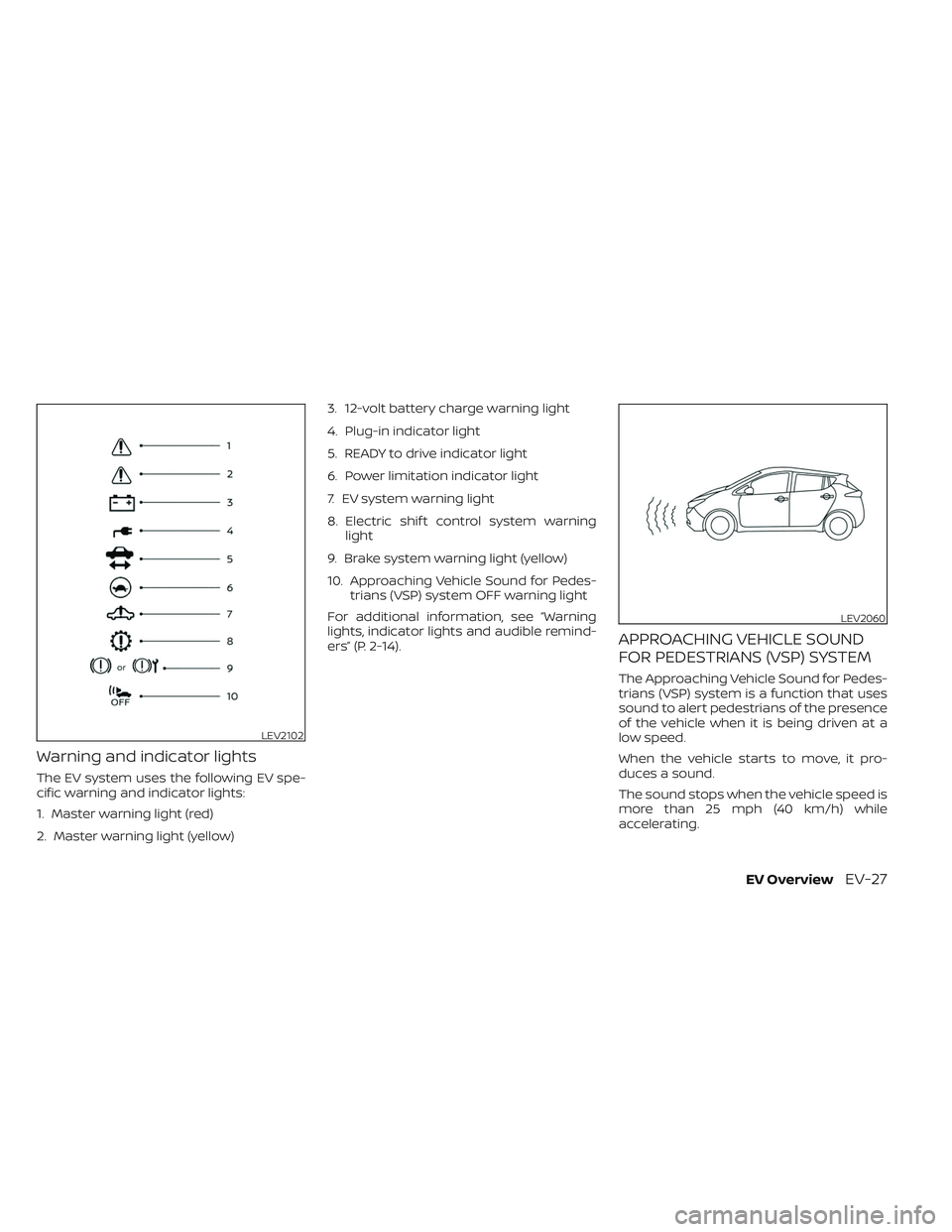
Warning and indicator lights
The EV system uses the following EV spe-
cific warning and indicator lights:
1. Master warning light (red)
2. Master warning light (yellow)3. 12-volt battery charge warning light
4. Plug-in indicator light
5. READY to drive indicator light
6. Power limitation indicator light
7. EV system warning light
8. Electric shif t control system warning
light
9. Brake system warning light (yellow)
10. Approaching Vehicle Sound for Pedes- trians (VSP) system OFF warning light
For additional information, see “Warning
lights, indicator lights and audible remind-
ers” (P. 2-14).
APPROACHING VEHICLE SOUND
FOR PEDESTRIANS (VSP) SYSTEM
The Approaching Vehicle Sound for Pedes-
trians (VSP) system is a function that uses
sound to alert pedestrians of the presence
of the vehicle when it is being driven at a
low speed.
When the vehicle starts to move, it pro-
duces a sound.
The sound stops when the vehicle speed is
more than 25 mph (40 km/h) while
accelerating.
LEV2102
LEV2060
EV OverviewEV-27
Page 52 of 612
Charging
Precautions on charging......................CH-2
Types of charge and how to charge the Li-ion
battery........................................ CH-5
How to normal charge (AC 220–240
volt) by charging device ....................CH-9
How to trickle charge (AC 110–120 volt)
byL1EVSE.................................. CH-11
How to trickle charge (AC 110–120 volt)
byL1&L2EVSE............................ CH-18
How to normal charge (AC 220–240
volt)byL1&L2EVSE....................... CH-26
How to quick charge ......................CH-35
How to charge/discharge using quick
charge port ............................... CH-38Charge connector lock system
............CH-41
Charging methods ........................... CH-43
Charging timer ............................ CH-43
Timer Display ............................. CH-46
Immediate charge ........................ CH-48
Charging related remote function
(models with Navigation System) ..........CH-48
Charging related indicator lights .............CH-49
Charging status indicator lights ...........CH-49
EVSE (Electric Vehicle Supply
Equipment) control box indicator light .....CH-52
Charging troubleshooting guide .............CH-56
Page 60 of 612
Charging stations or V2X charging/
discharging devices using this standard
are UL certified and safe to use in the US.
While supported by NISSAN, this connector
may not become the US SAE standard. V2X
charging/discharging is possible (even
several times a day). If the battery tempera-
ture is near the red zone, in order to protect
the battery, power of the V2X charging/
discharging will be limited.
For additional information, consult a V2X
device manufacturer or a V2X charging/
discharging service provider.
Power limitation mode
This mode protects the health and opera-
tion of the vehicle's Li-ion battery. This
mode operates in certain extreme condi-
tions (heat, cold, low state of charge). Power
available to vehicle systems, including its
traction motor, is limited resulting in limited
performance, acceleration and top speed.
Charging may be automatically termi-
nated, especially with repeated quick
charging in extreme hot weather.Checking Li-ion battery charge
The three methods for checking the
amount of charge are as follows:
• Check by using the Li-ion battery avail-
able charge gauge on the vehicle infor-
mation display when the power switch is
placed in the ON position. For additional
information, see “Li-ion battery available
charge gauge” (P. 2-9) and “Low battery
charge indicator” (P. 2-38).
• Check by using an internet enabled smart phone or personal computer. For
additional information, refer to the
“NissanConnect® Manual”.
• Check by using the charging status indi- cator light. For additional information, see
“Charging status indicator lights”
(P. CH-49).
NOTE:
• During the charge operation, charge continues when the power switch is
placed in the ON position.
• The Li-ion battery cannot be charged if the quick charge connector and the
normal charge connector are con-
nected at the same time. If another
charge connector is connected mid-
charge, charging will stop. • For safety reasons, it is not possible to
switch to the READY to drive position
while a charge connector is connected.
• During charging, it is possible that the radio may be inaudible due to noise by
the electromagnetic wave.
HOW TO NORMAL CHARGE (AC
220–240 volt) BY CHARGING
DEVICE
WARNING
• If you use any medical electric de-
vices, such as an implantable cardiac
pacemaker or an implantable cardio-
vascular defibrillator, check with the
electric medical device manufac-
turer concerning the effects that
charging may have on implanted de-
vices before starting the charge op-
eration. Charging may affect the
operation.
• Be sure to follow the precautions for
using the charging device that can be
installed in your home. Failing to do
so could result in serious injury or
death.
ChargingCH-9
Page 61 of 612
CAUTION
Do not use any charging equipment
that is not compatible with the LEAF.
Doing so could prevent the Li-ion bat-
tery from charging properly or could
result in damage to the vehicle or Li-ion
battery.
• Normal charge uses the charging device (AC 220 - 240 volt, 16A or 32A) that can be
installed in your home to charge the Li-
ion battery.
• Immediate charge, charging timer and remote charge (models with Navigation
System) can be performed in the normal
charge mode. For additional information,
see “Charging methods” (P. CH-43).
• The charging equipment communicates with the vehicle before Li-ion battery
charging starts. If this communication
does not occur because other equip-
ment is used, the Li-ion battery will not
charge. • NISSAN recommends that you connect
the charging device when getting out of
the vehicle, even if it is not going to be
used. By doing this, you can get the most
out of the remote climate control (mod-
els with Navigation System) and Climate
Ctrl. Timer functions the next time you
use the vehicle.
To start normal charge:
1. Push the P (Park) position switch to place the vehicle in the P (Park) position and
apply the parking brake.
2. When charging the Li-ion battery, place the power switch in the OFF position.
When the power switch is in the ON po-
sition, the Li-ion battery will not start
charging.
3. Open the charge port lid and charge port cap. For additional information, see
“Charge port lid” (P. 3-20) and “Charge
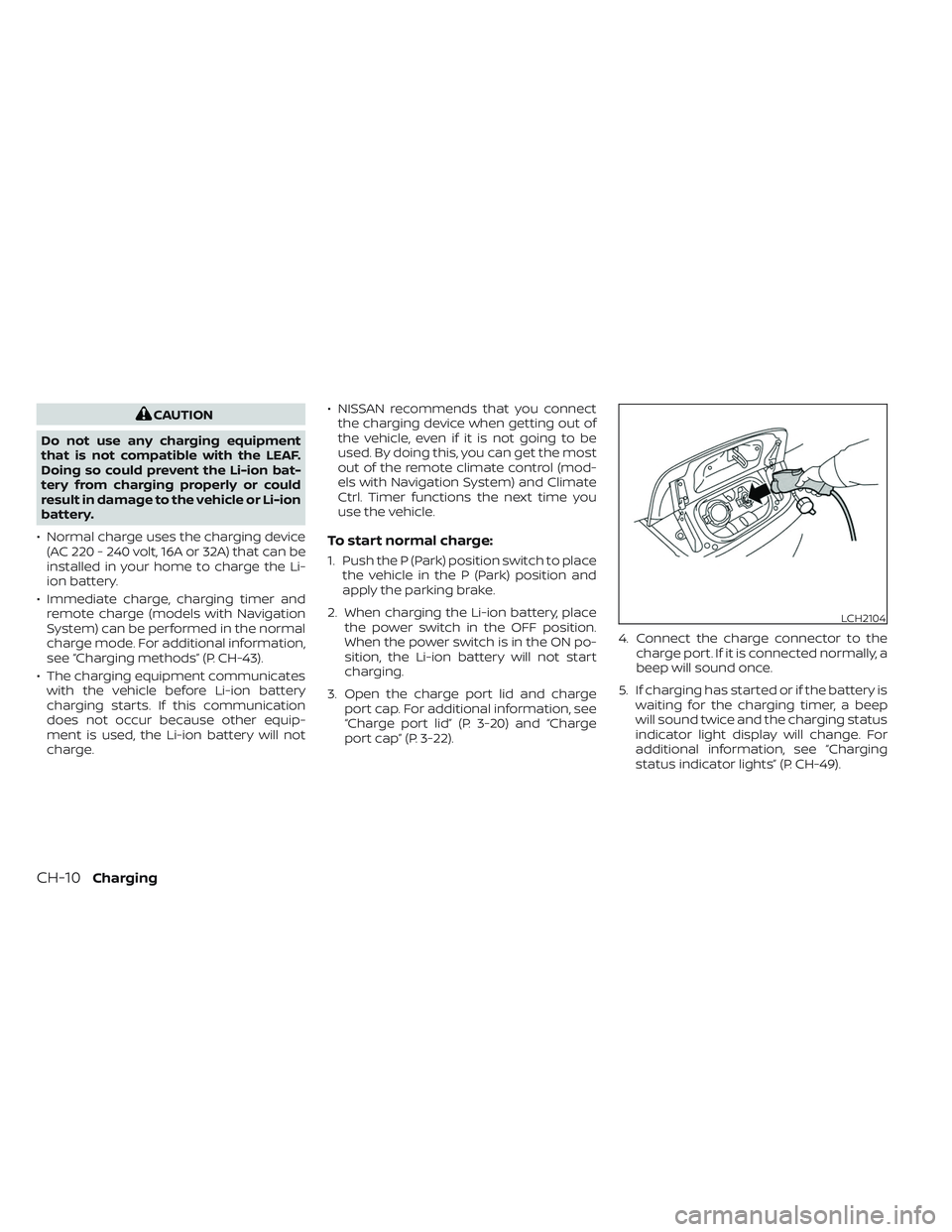
port cap” (P. 3-22). 4. Connect the charge connector to the
charge port. If it is connected normally, a
beep will sound once.
5. If charging has started or if the battery is waiting for the charging timer, a beep
will sound twice and the charging status
indicator light display will change. For
additional information, see “Charging
status indicator lights” (P. CH-49).
LCH2104
CH-10Charging
Page 66 of 612
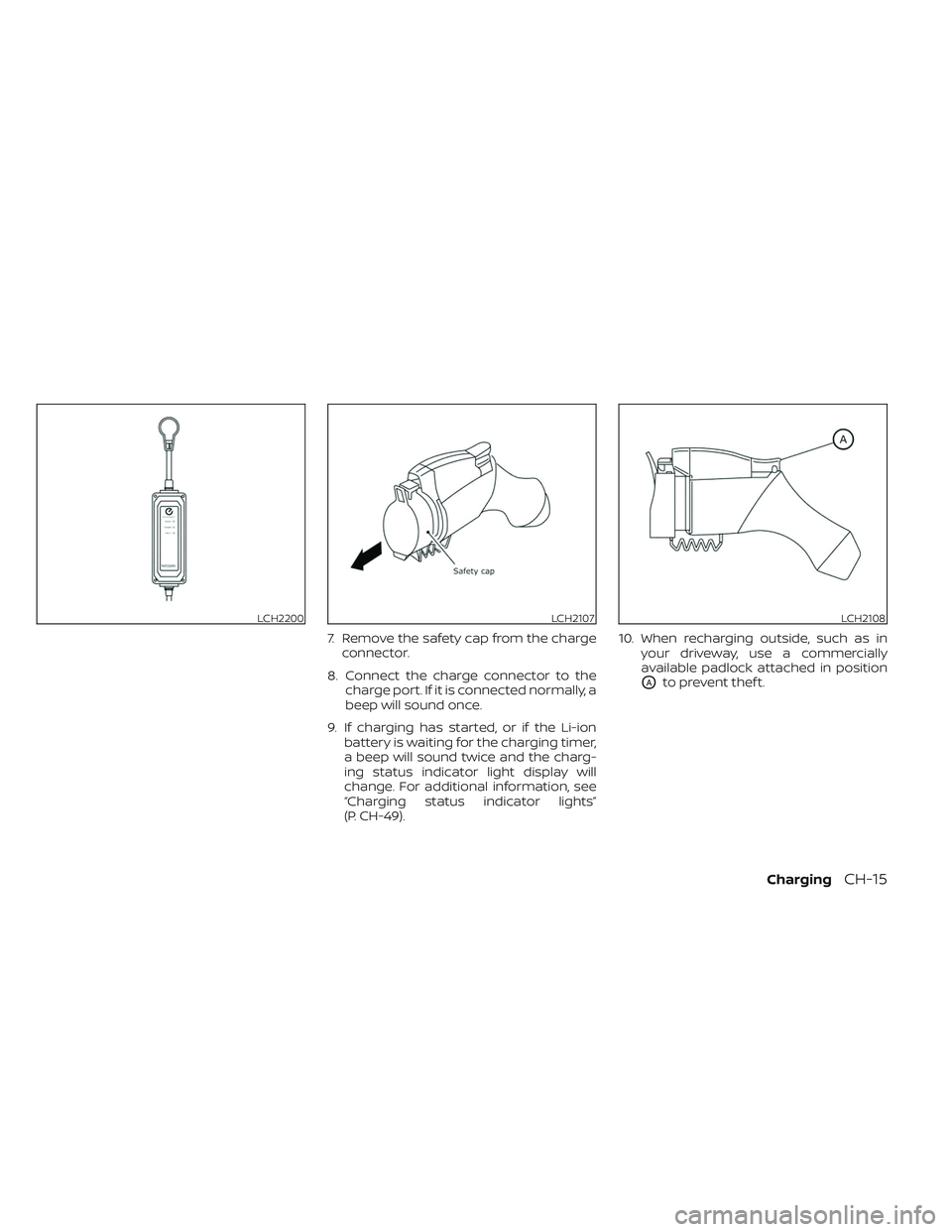
7. Remove the safety cap from the chargeconnector.
8. Connect the charge connector to the charge port. If it is connected normally, a
beep will sound once.
9. If charging has started, or if the Li-ion battery is waiting for the charging timer,
a beep will sound twice and the charg-
ing status indicator light display will
change. For additional information, see
“Charging status indicator lights”
(P. CH-49). 10. When recharging outside, such as in
your driveway, use a commercially
available padlock attached in position
OAto prevent thef t.
LCH2200LCH2107LCH2108
ChargingCH-15
Page 74 of 612
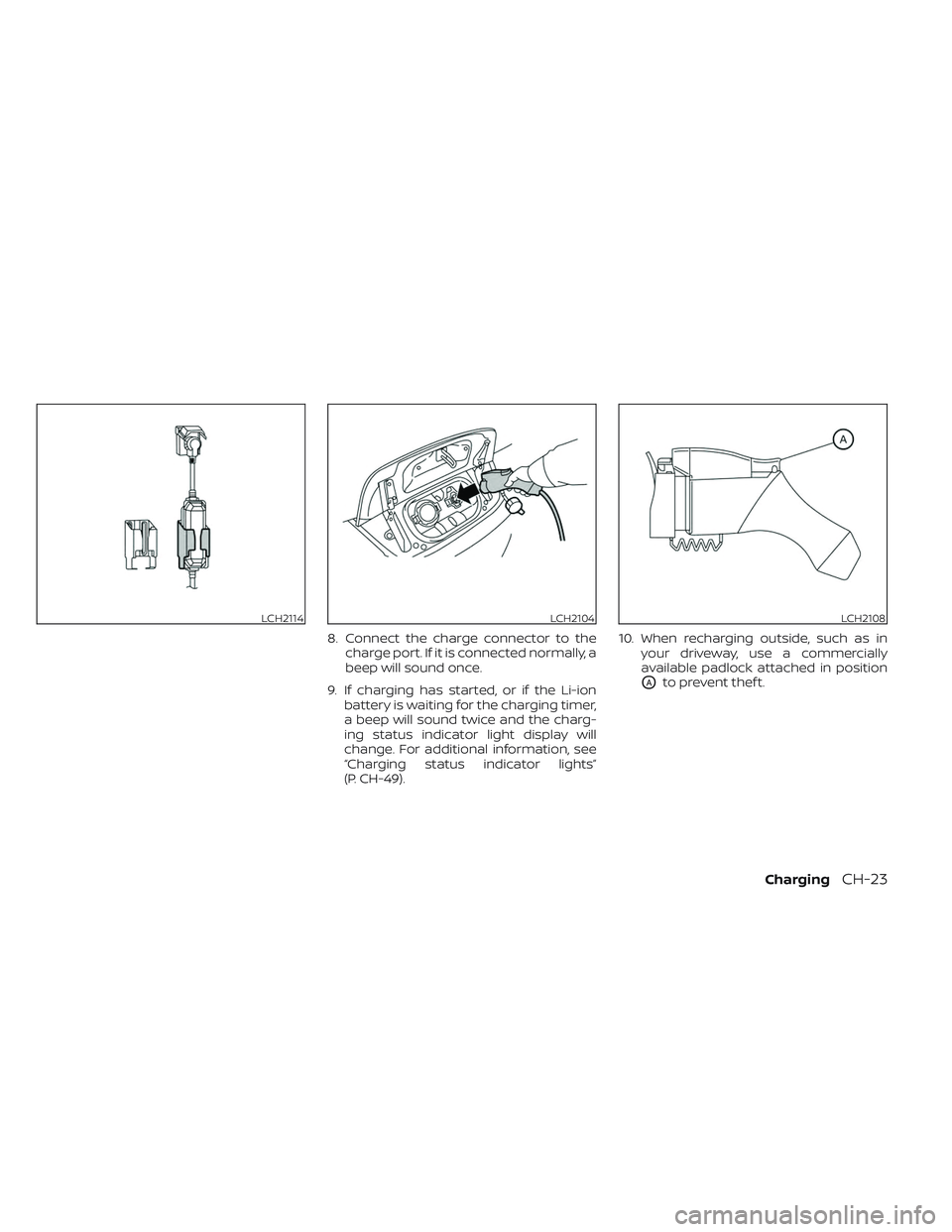
8. Connect the charge connector to thecharge port. If it is connected normally, a
beep will sound once.
9. If charging has started, or if the Li-ion battery is waiting for the charging timer,
a beep will sound twice and the charg-
ing status indicator light display will
change. For additional information, see
“Charging status indicator lights”
(P. CH-49). 10. When recharging outside, such as in
your driveway, use a commercially
available padlock attached in position
OAto prevent thef t.
LCH2114LCH2104LCH2108
ChargingCH-23
Page 83 of 612
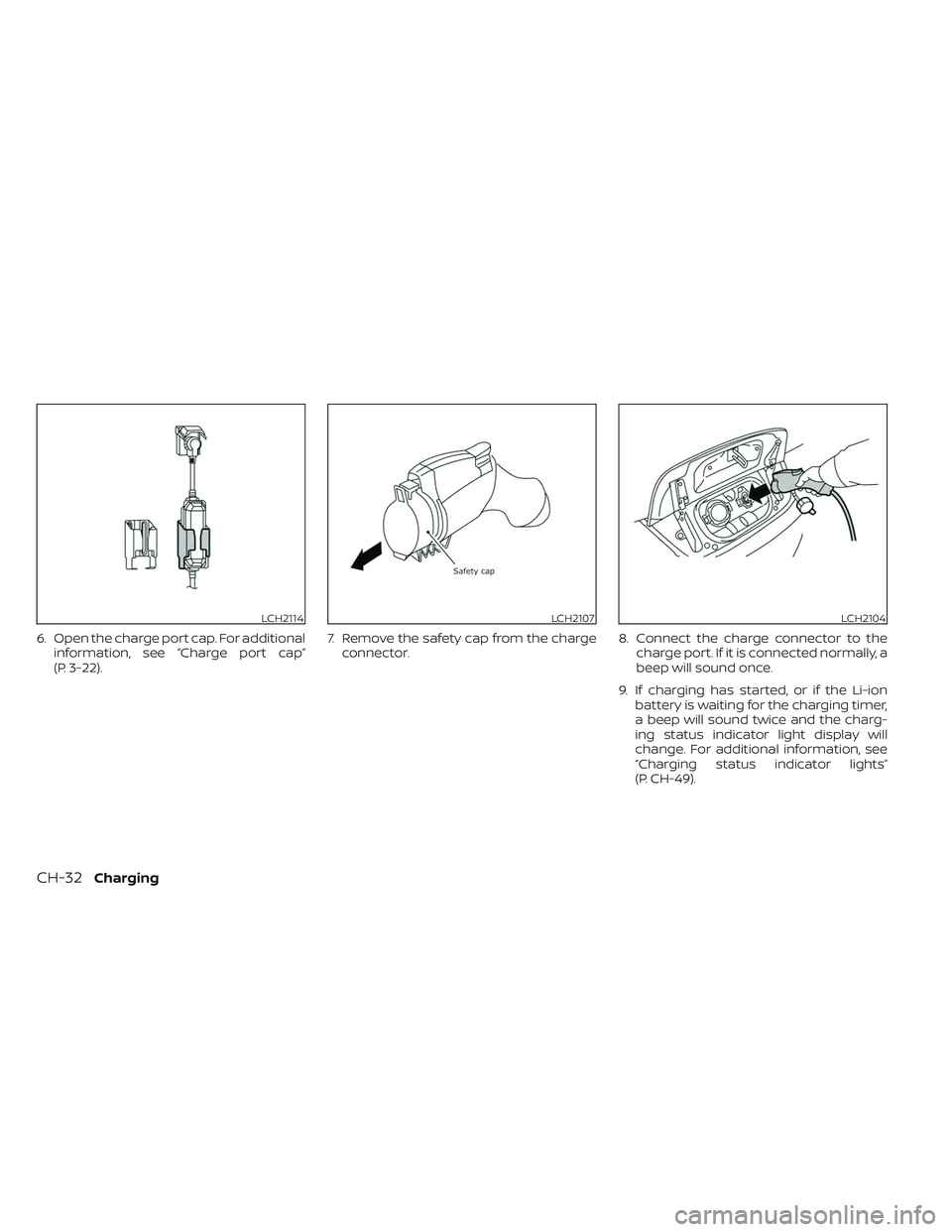
6. Open the charge port cap. For additionalinformation, see “Charge port cap”
(P. 3-22). 7. Remove the safety cap from the charge
connector. 8. Connect the charge connector to the
charge port. If it is connected normally, a
beep will sound once.
9. If charging has started, or if the Li-ion battery is waiting for the charging timer,
a beep will sound twice and the charg-
ing status indicator light display will
change. For additional information, see
“Charging status indicator lights”
(P. CH-49).
LCH2114LCH2107LCH2104
CH-32Charging