AUX NISSAN MAXIMA 2010 Owner´s Manual
[x] Cancel search | Manufacturer: NISSAN, Model Year: 2010, Model line: MAXIMA, Model: NISSAN MAXIMA 2010Pages: 457, PDF Size: 4.66 MB
Page 274 of 457
SOURCE select switch
Push the source select switch to change the
mode in the following sequence:
Models without Navigation System:
AM!FM1!FM2!XM1!XM2!XM3
(satellite radio, if so equipped)!USB* (if so
equipped)!CD/DVD*!Music Box** (if so
equipped)!AUX*!AM.
Models with Navigation System:
AM!FM1!FM2!XM1!XM2!XM3
(satellite radio, if so equipped)!CD/DVD*!
Music Box**!USB/iPodT*!BluetoothTAu-
dio*!AUX*!AM.
* These modes are only available when compat-
ible media storage is inserted into the device.
** This mode is only available when music has
been downloaded into the Music Box system.
Volume control switch
Push the volume control switch to increase or
decrease the volume.
Menu control
switch/ENTER button
While the display is showing a MAP, STATUS or
Audio screen, tilt the Menu Control switch up-
ward or downward to select a station, track, CDor folder. For most audio sources, tilting the
switch up/down for more than 1.5 seconds pro-
vides a different function than a tilting up/down
for less than 1.5 seconds.
AM and FM:
cTilt up/down for less than 1.5 seconds to
increase or decrease the preset station.
cTilt up/down for more than 1.5 seconds to
seek up or down to the next station.
cPress the ENTER button to show the list of
preset stations.
XM (if so equipped):
cTilt up/down for less than 1.5 seconds to
increase or decrease the preset station.
cTilt up/down for more than 1.5 seconds to
go to the next or previous category.
cPress the ENTER button to show the XM
Menu.
iPodT(if so equipped):
cTilt up/down for less than 1.5 seconds to
increase or decrease the track number.
cPress the ENTER button to show the iPod
Menu.CD:
cTilt up/down for less than 1.5 seconds to
increase or decrease the track number.
cTilt up/down for more than 1.5 seconds to
increase or decrease the folder number (if
playing compressed audio files) .
cPress the ENTER button to show the CD
Menu.
DVD (if so equipped):
cTilt up/down for less than 1.5 seconds to
increase or decrease the track number.
cTilt up/down for more than 1.5 seconds to
increase or decrease the title number.
cPress the ENTER button to select an item
from the DVD display.
cWhen the transparent operation menu ap-
pears, the switch will control the menu.
USB (if so equipped):
cTilt up/down for less than 1.5 seconds to
increase or decrease the track number.
cTilt up/down for more than 1.5 seconds to
increase or decrease the folder number.
cPress the ENTER button to show the USB
Menu.
4-114Monitor, climate, audio, phone and voice recognition systems
Page 275 of 457
Music Box (if so equipped):
cTilt up/down for less than 1.5 seconds to
increase or decrease the track number.
cTilt up/down for more than 1.5 seconds to
increase or decrease the album (folder)
number (if playing compressed audio files) .
cPress the ENTER button to show the Music
Box Menu.
BluetoothTAudio (if so equipped):
cTilt up/down for less than 1.5 seconds to
increase or decrease the track number.
AUX:
cPress the ENTER button to show the AUX
Menu.
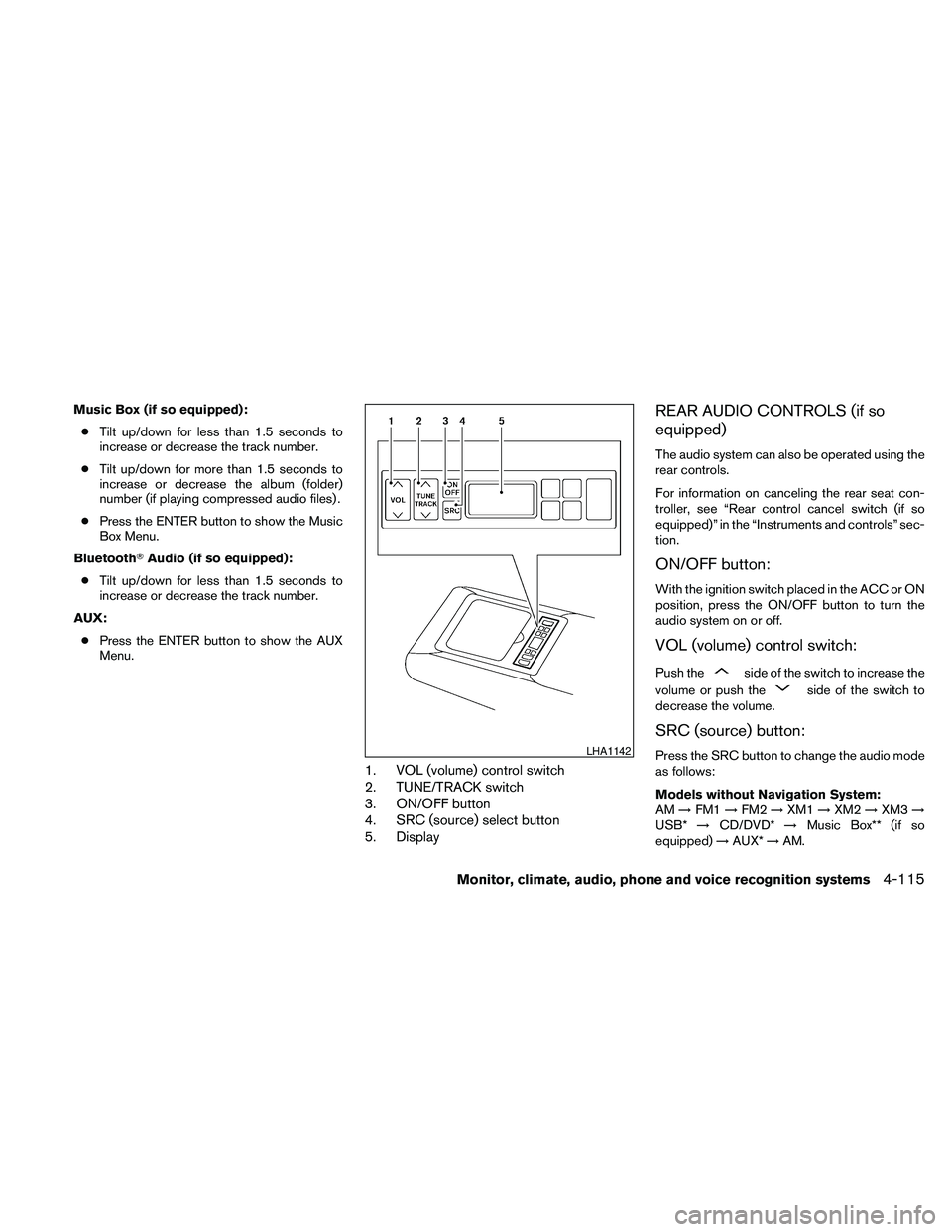
1. VOL (volume) control switch
2. TUNE/TRACK switch
3. ON/OFF button
4. SRC (source) select button
5. Display
REAR AUDIO CONTROLS (if so
equipped)
The audio system can also be operated using the
rear controls.
For information on canceling the rear seat con-
troller, see “Rear control cancel switch (if so
equipped)” in the “Instruments and controls” sec-
tion.
ON/OFF button:
With the ignition switch placed in the ACC or ON
position, press the ON/OFF button to turn the
audio system on or off.
VOL (volume) control switch:
Push theside of the switch to increase the
volume or push the
side of the switch to
decrease the volume.
SRC (source) button:
Press the SRC button to change the audio mode
as follows:
Models without Navigation System:
AM!FM1!FM2!XM1!XM2!XM3!
USB*!CD/DVD*!Music Box** (if so
equipped)!AUX*!AM.LHA1142
Monitor, climate, audio, phone and voice recognition systems4-115
Page 276 of 457
Models with Navigation System:
AM!FM1!FM2!XM1!XM2!XM3!
CD/DVD*!Music Box**!USB/iPodT*!
BluetoothTAudio!AUX*!AM.
* These modes are only available when compat-
ible media storage is inserted into the device.
** This mode is only available when music has
been downloaded into the Music Box system.
TUNE/TRACK control switch:
AM/FM:
cPush the
orside of the switch
to select the next or previous preset station.
cPush and hold the
orside of
the switch to select the next or previous
station.
XM:
cPush the
orside of the switch
to select the next or previous preset station.
cPush and hold the
orside of
the switch to select the next or previous
category.CD:
cPush the
orside of the switch
to select the next track or the beginning of
the current track.
CD/USB (if so equipped) with MP3/WMA:
cPush the
orside of the switch
to select the next track or the beginning of
the current track.
cPush and hold the
orside of
the switch to change folders.
CD/DVD/USB (if so equipped) with com-
pressed audio files:
cPush the
orside of the switch
to select the next track or the beginning of
the current track.
cPush and hold the
orside of
the switch to change folders.
iPodT(if so equipped):
cPush the
orside of the switch
to select the next or previous track.Music Box hard-disk drive audio system (if
so equipped):
cPush the
orside of the switch
to select the next or the beginning of the
current track.
cPush and hold the
orside of
the switch to change the playlist.
BluetoothTAudio (if so equipped):
cPush the
orside of the switch
to select the next track or beginning of the
current track.
ANTENNA
Window antenna
The antenna pattern is printed inside the rear
window.
CAUTION
cDo not place metalized film near the
rear window glass or attach any metal
parts to it. This may cause poor recep-
tion or noise.
cWhen cleaning the inside of the rear
window, be careful not to scratch or
damage the rear window antenna.
Lightly wipe along the antenna with a
dampened soft cloth.
4-116Monitor, climate, audio, phone and voice recognition systems
Page 321 of 457
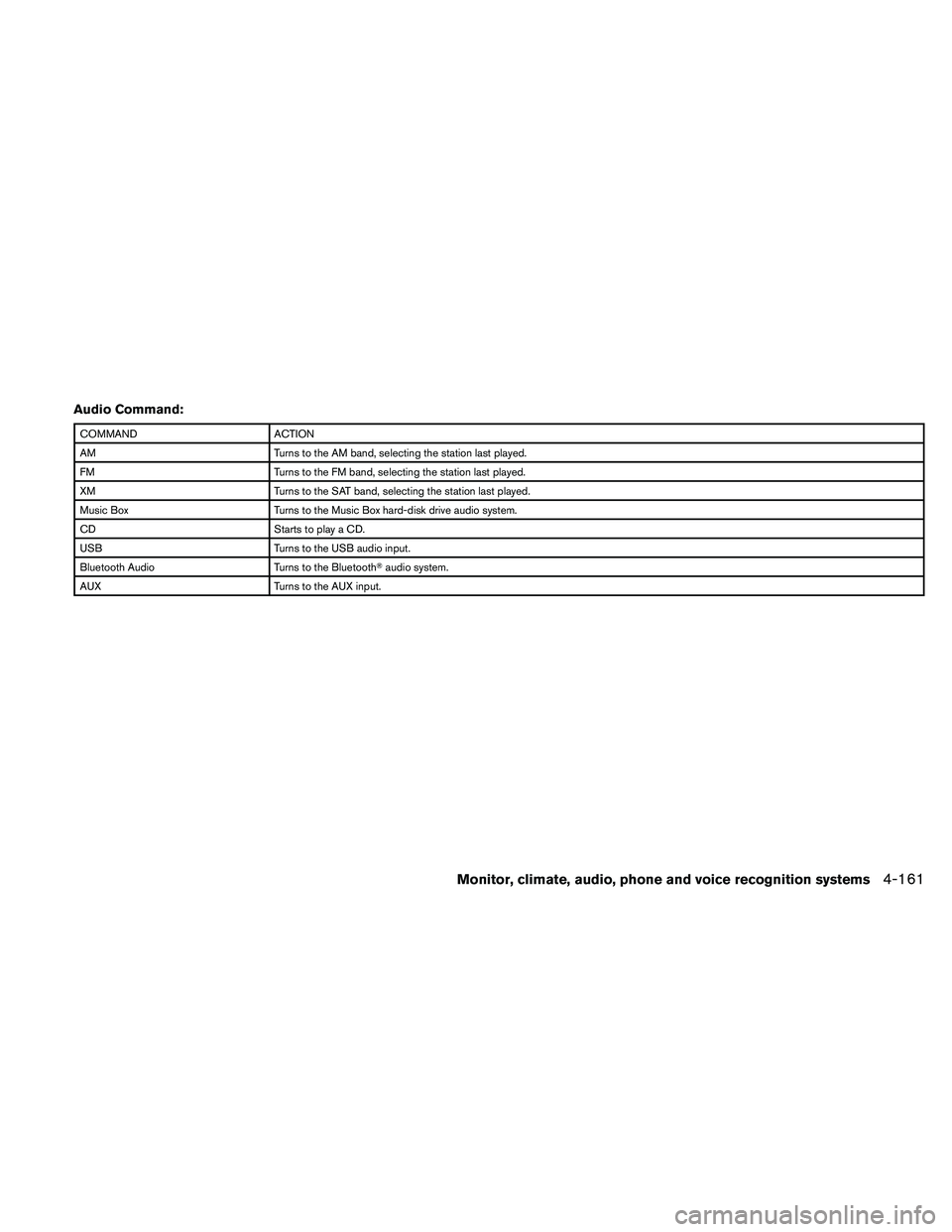
Audio Command:
COMMAND ACTION
AM Turns to the AM band, selecting the station last played.
FM Turns to the FM band, selecting the station last played.
XM Turns to the SAT band, selecting the station last played.
Music Box Turns to the Music Box hard-disk drive audio system.
CD Starts to play a CD.
USB Turns to the USB audio input.
Bluetooth Audio Turns to the BluetoothTaudio system.
AUX Turns to the AUX input.
Monitor, climate, audio, phone and voice recognition systems4-161
Page 449 of 457
10 Index
A
Air bag
(See supplemental restraint system).....1-39
Air bag system
Front (See supplemental front impact
air bag system)...............1-46
Air bag warning light...........1-53, 2-14
Air cleaner housing filter............8-17
Air conditioner
Air conditioner service...........4-48
Air conditioner specification label.....9-11
Air conditioner system refrigerant and
oil recommendations.............9-6
Heater and air conditioner
controls................4-41, 4-44
Rear seat air conditioner..........4-47
Servicing air conditioner..........4-48
Alarm system
(See vehicle security system).........2-24
Anchor point locations.............1-25
Antenna....................4-116
Anti-lock brake warning light......2-10, 2-11
Anti-lock Braking System (ABS)........5-23
Armrests.....................1-7
Audible reminders...............2-16
Audio system..................4-48
BluetoothTaudio.............4-109
Compact Disc (CD) changer.......4-66
Compact disc (CD) player.....4-72, 4-79
FM-AM radio with compact disc (CD)
changer...................4-64FM/AM/SAT radio with CD/DVD player . .4-75
FM/AM/SAT radio with compact disc
(CD) player.................4-69
Audio System
iPodTPlayer.............4-92, 4-93
Music Box hard-disk drive audio
system...............4-96, 4-102
Audio system
Radio....................4-48
Rear audio controls............4-115
Audio System
Settings...............4-70, 4-76
Audio system
Steering wheel audio control switch . . .4-113
USB interface............4-87, 4-88
Autolight switch.................2-30
Automatic
Automatic drive positioner.........3-29
Automatic power window switch.....2-43
Automatic transmission position indicator
light.....................2-14
Transmission selector lever lock
release....................5-16
Automatic anti-glare inside mirror.......3-25
Automatic door locks..............3-6
AUX jack....................4-68
B
Battery......................8-13
Charge warning light............2-11
Before starting the engine...........5-10Belt (See drive belt)..............8-15
Block heater
Engine....................5-27
BluetoothTaudio...............4-109
BluetoothThands-free phone
system.................4-117, 4-132
Booster seats..................1-36
Brake
Anti-lock Braking System (ABS)......5-23
Brake fluid..................8-12
Brake light (See stop light).........8-26
Brake system................5-22
Brake warning light.............2-11
Brake wear indicators........2-16, 8-19
Parking brake operation..........5-17
Self-adjusting brakes............8-19
Brakes......................8-19
Break-in schedule...............5-19
Brightness control
Instrument panel..............2-32
Brightness/contrast button.......4-15, 4-31
Bulb check/instrument panel..........2-10
Bulb replacement................8-26
C
Capacities and recommended
fuel/lubricants...................9-2
Car phone or CB radio............4-117
Cargo net....................2-41
Cargo (See vehicle loading information) . . .9-12
CD care and cleaning.............4-112