trunk NISSAN MAXIMA 2010 Owner´s Manual
[x] Cancel search | Manufacturer: NISSAN, Model Year: 2010, Model line: MAXIMA, Model: NISSAN MAXIMA 2010Pages: 457, PDF Size: 4.66 MB
Page 10 of 457
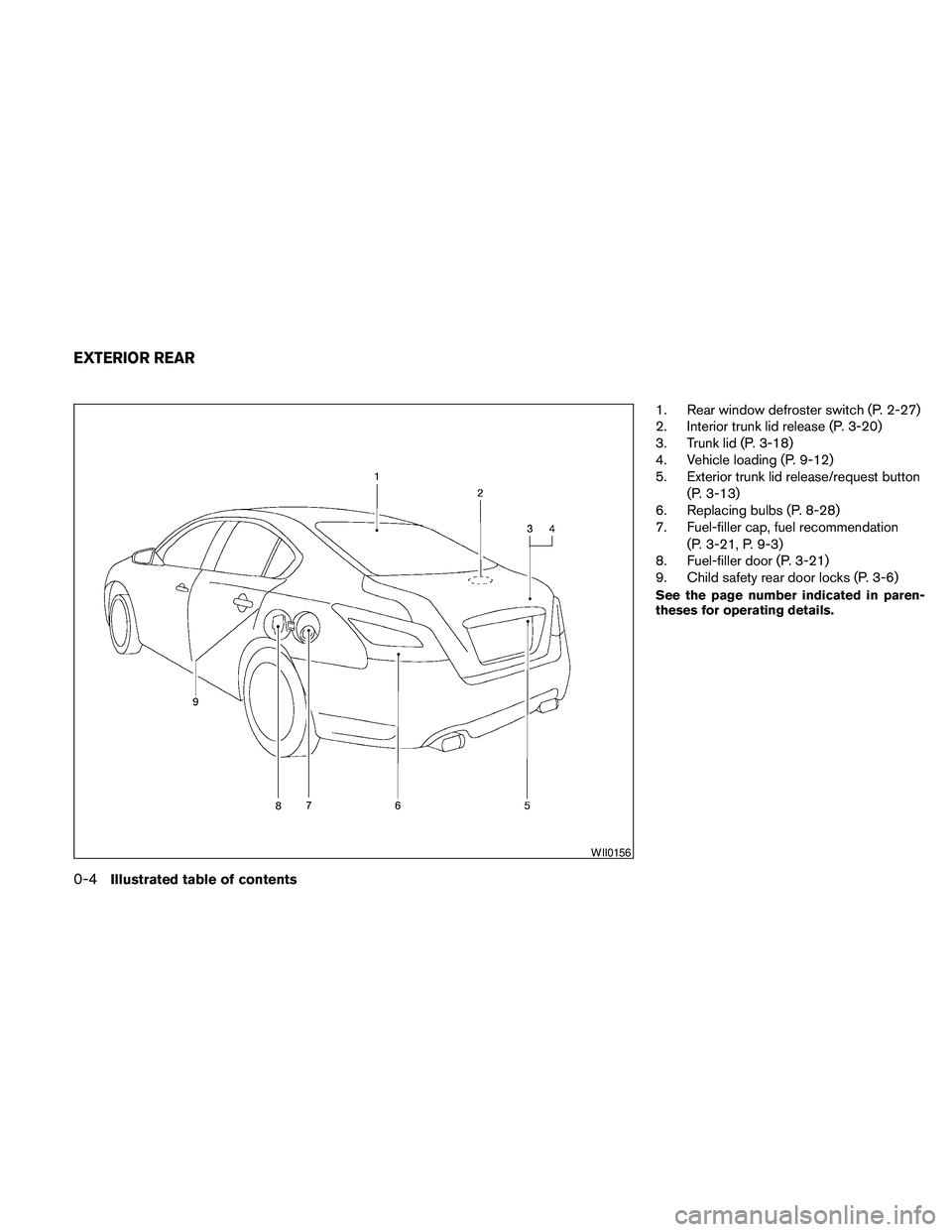
1. Rear window defroster switch (P. 2-27)
2. Interior trunk lid release (P. 3-20)
3. Trunk lid (P. 3-18)
4. Vehicle loading (P. 9-12)
5. Exterior trunk lid release/request button
(P. 3-13)
6. Replacing bulbs (P. 8-28)
7. Fuel-filler cap, fuel recommendation
(P. 3-21, P. 9-3)
8. Fuel-filler door (P. 3-21)
9. Child safety rear door locks (P. 3-6)
See the page number indicated in paren-
theses for operating details.
WII0156
EXTERIOR REAR
0-4Illustrated table of contents
Page 11 of 457
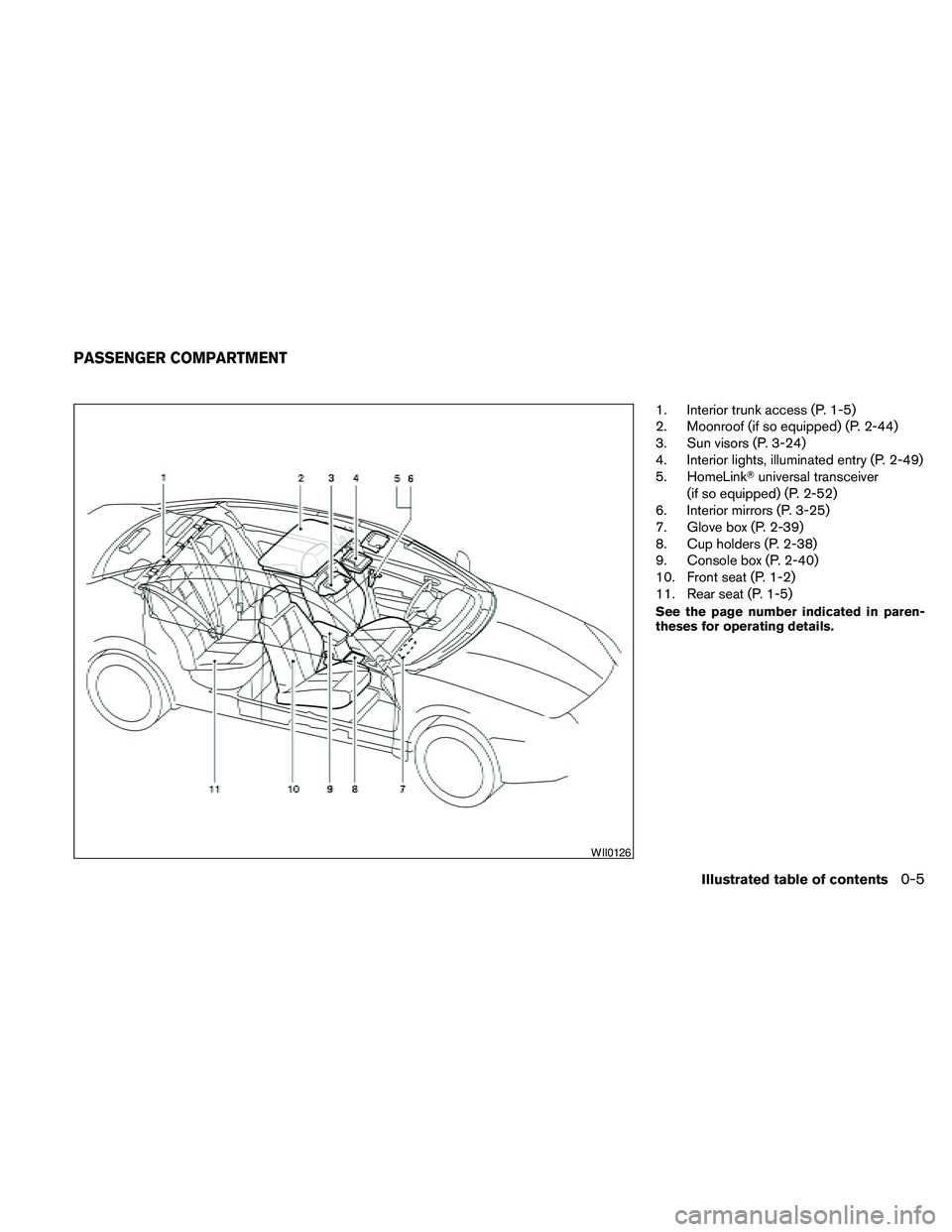
1. Interior trunk access (P. 1-5)
2. Moonroof (if so equipped) (P. 2-44)
3. Sun visors (P. 3-24)
4. Interior lights, illuminated entry (P. 2-49)
5. HomeLinkTuniversal transceiver
(if so equipped) (P. 2-52)
6. Interior mirrors (P. 3-25)
7. Glove box (P. 2-39)
8. Cup holders (P. 2-38)
9. Console box (P. 2-40)
10. Front seat (P. 1-2)
11. Rear seat (P. 1-5)
See the page number indicated in paren-
theses for operating details.
WII0126
PASSENGER COMPARTMENT
Illustrated table of contents0-5
Page 13 of 457
24. Vehicle Dynamic Control (VDC) OFF
switch (P. 2-36)
Outside mirror controls (P. 3-27)
Heated steering wheel switch
(if so equipped) (P. 2-35)
Trunk lid release switch (P. 3-20)
Rear control cancel switch
(if so equipped) (P. 2-48)
* Refer to the separate Navigation System
Owner’s Manual (if so equipped) .
See the page number indicated in paren-
theses for operating details.
Illustrated table of contents0-7
Page 21 of 457
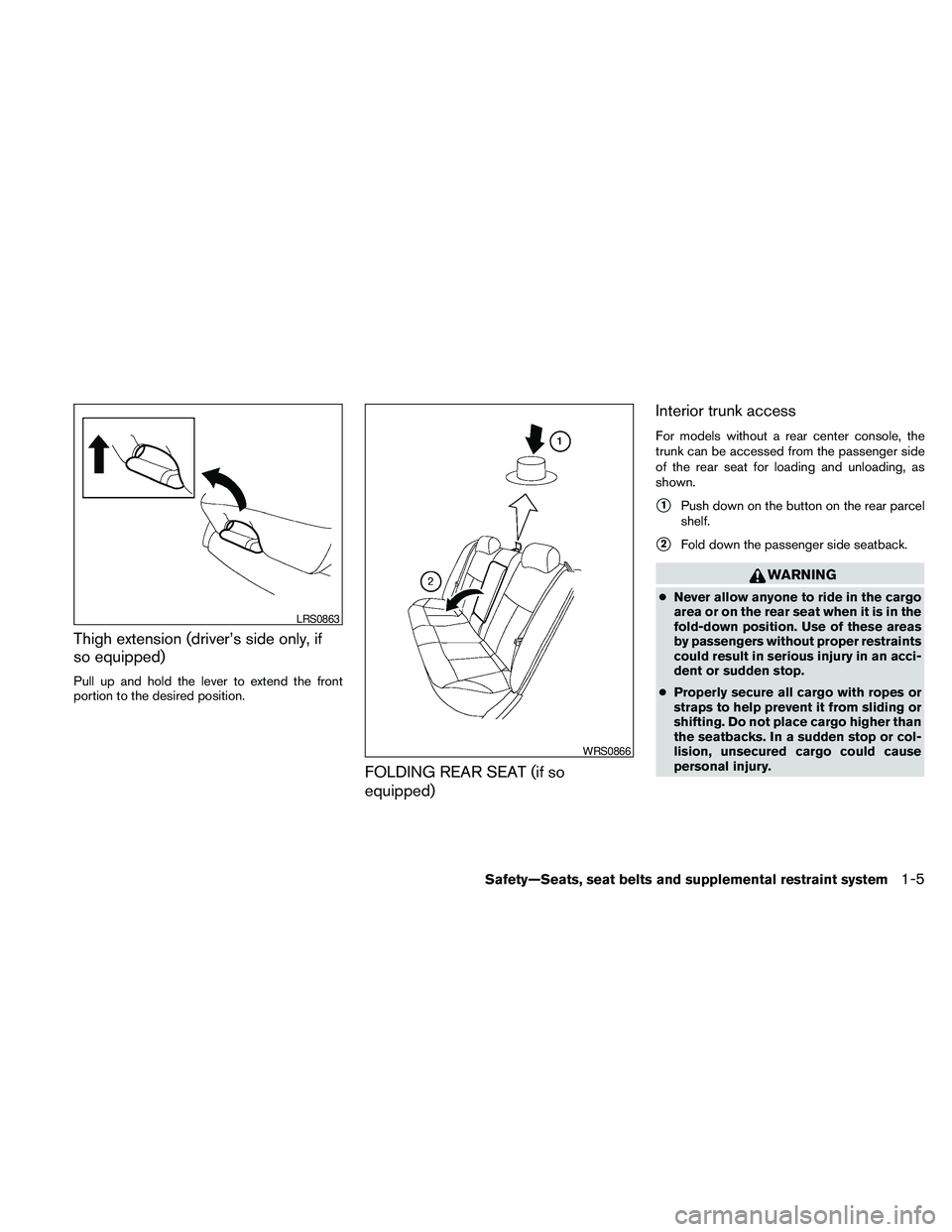
Thigh extension (driver’s side only, if
so equipped)
Pull up and hold the lever to extend the front
portion to the desired position.
FOLDING REAR SEAT (if so
equipped)Interior trunk access
For models without a rear center console, the
trunk can be accessed from the passenger side
of the rear seat for loading and unloading, as
shown.
s1Push down on the button on the rear parcel
shelf.
s2Fold down the passenger side seatback.
WARNING
cNever allow anyone to ride in the cargo
area or on the rear seat when it is in the
fold-down position. Use of these areas
by passengers without proper restraints
could result in serious injury in an acci-
dent or sudden stop.
cProperly secure all cargo with ropes or
straps to help prevent it from sliding or
shifting. Do not place cargo higher than
the seatbacks. In a sudden stop or col-
lision, unsecured cargo could cause
personal injury.
LRS0863
WRS0866
Safety—Seats, seat belts and supplemental restraint system1-5
Page 22 of 457
cWhen returning the seatbacks to the
upright position, be certain they are
completely secured in the latched posi-
tion. If they are not completely secured,
passengers may be injured in an acci-
dent or sudden stop.
cClosely supervise children when they
are around cars to prevent them from
playing and becoming locked in the
trunk where they could be seriously in-
jured. Keep the car locked, with the rear
seatback and trunk lid securely latched
when not in use, and prevent children’s
access to car keys.
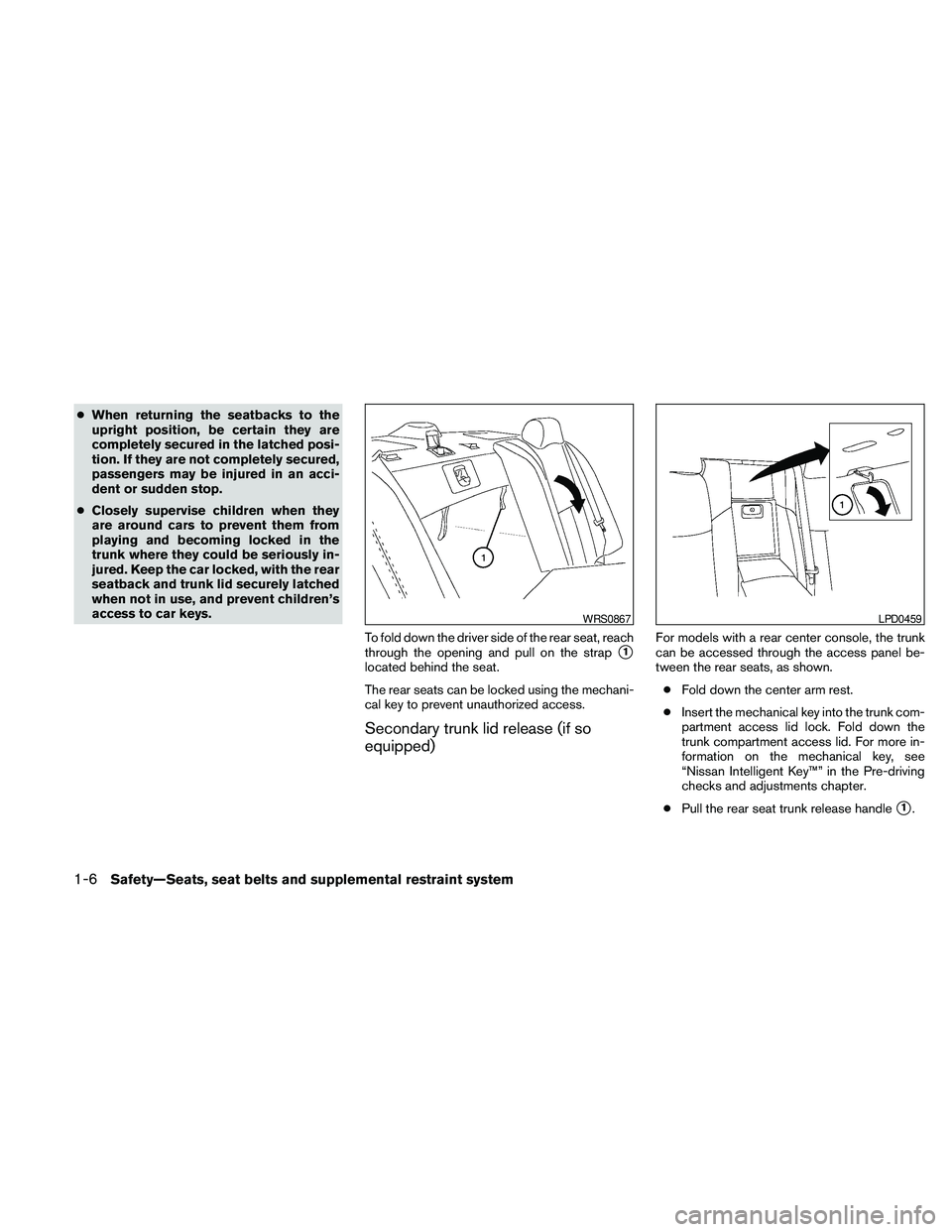
To fold down the driver side of the rear seat, reach
through the opening and pull on the strap
s1
located behind the seat.
The rear seats can be locked using the mechani-
cal key to prevent unauthorized access.
Secondary trunk lid release (if so
equipped)
For models with a rear center console, the trunk
can be accessed through the access panel be-
tween the rear seats, as shown.
cFold down the center arm rest.
cInsert the mechanical key into the trunk com-
partment access lid lock. Fold down the
trunk compartment access lid. For more in-
formation on the mechanical key, see
“Nissan Intelligent Key™” in the Pre-driving
checks and adjustments chapter.
cPull the rear seat trunk release handle
s1.
WRS0867LPD0459
1-6Safety—Seats, seat belts and supplemental restraint system
Page 73 of 457
Power windows...............................2-42
Moonroof (if so equipped).........................2-44
Automatic moonroof...........................2-44
Dual Panel Moonroof (if so equipped)...............2-46
Automatic moonroof...........................2-46
Rear Control Cancel Switch (if so equipped)........2-48
Rear power sun shade (if so equipped).............2-48
Interior light......................................2-49
Console light..................................2-50
Personal lights...................................2-50
Front.........................................2-50
Rear.........................................2-51Trunk light.......................................2-52
HomeLinkTuniversal transceiver (if so equipped).....2-52
Programming HomeLinkT.......................2-53
Programming HomeLinkTfor Canadian
customers....................................2-54
Operating the HomeLinkTuniversal
transceiver....................................2-54
Programming trouble-diagnosis.................2-54
Clearing the programmed information............2-54
Reprogramming a single HomeLinkTbutton......2-55
If your vehicle is stolen.........................2-55
Page 75 of 457
24. Vehicle Dynamic Control (VDC) OFF
switch (P. 2-36)
Outside mirror controls (P. 3-27)
Heated steering wheel switch
(if so equipped) (P. 2-35)
Trunk lid release switch (P. 3-20)
Rear control cancel switch
(if so equipped) (P. 2-48)
* Refer to the separate Navigation System
Owner’s Manual (if so equipped) .
See the page number indicated in paren-
theses for operating details.
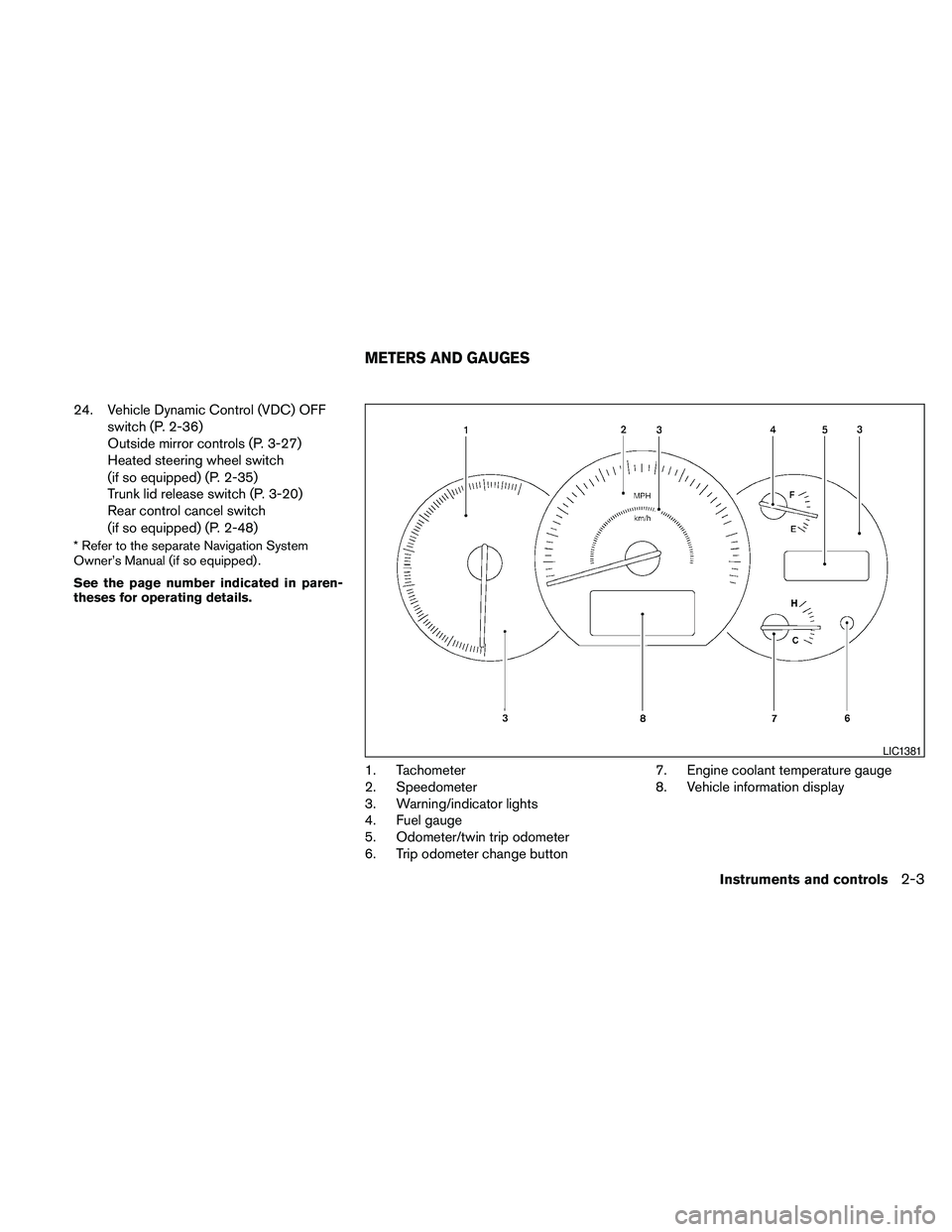
1. Tachometer
2. Speedometer
3. Warning/indicator lights
4. Fuel gauge
5. Odometer/twin trip odometer
6. Trip odometer change button7. Engine coolant temperature gauge
8. Vehicle information display
LIC1381
METERS AND GAUGES
Instruments and controls2-3
Page 94 of 457
Vehicle information display warnings
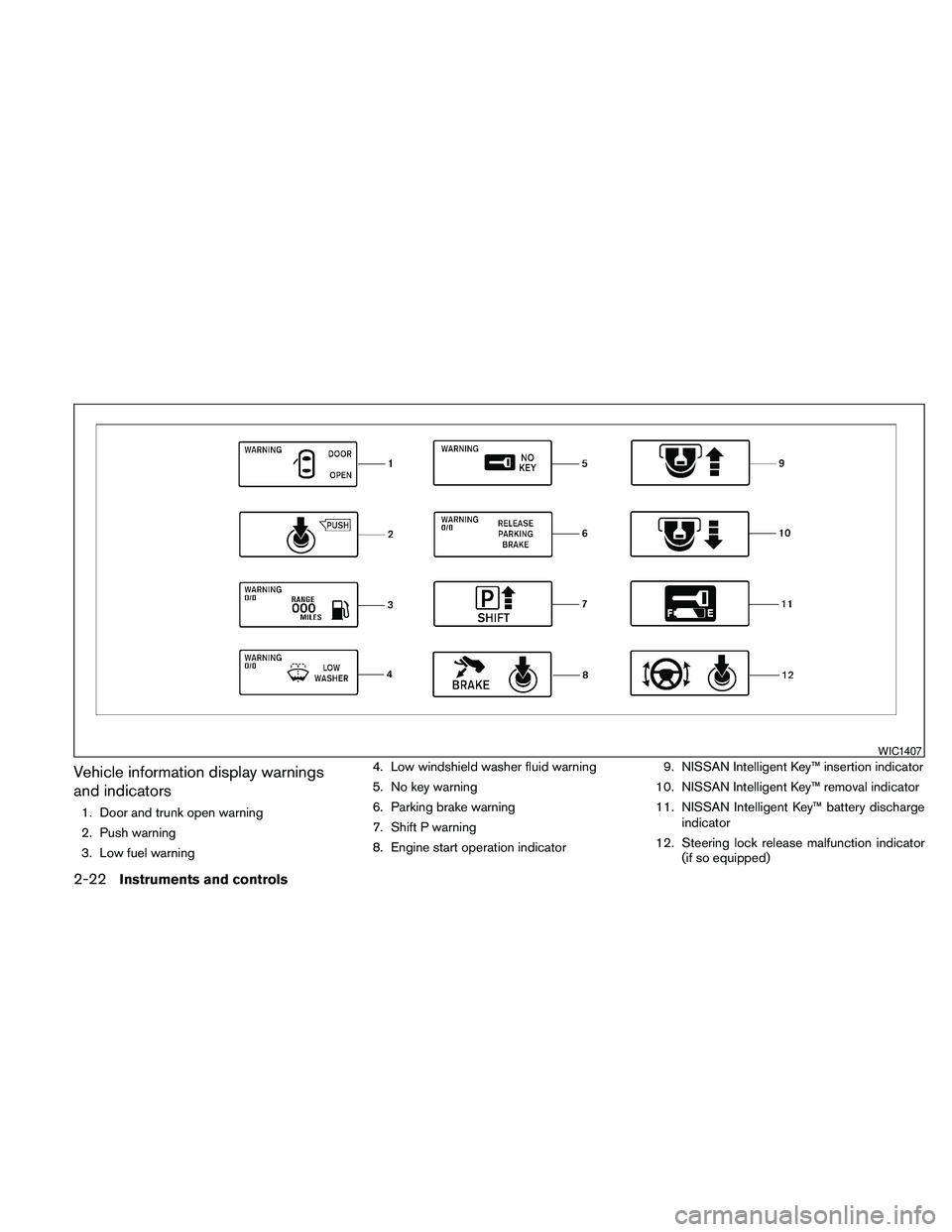
and indicators
1. Door and trunk open warning
2. Push warning
3. Low fuel warning4. Low windshield washer fluid warning
5. No key warning
6. Parking brake warning
7. Shift P warning
8. Engine start operation indicator9. NISSAN Intelligent Key™ insertion indicator
10. NISSAN Intelligent Key™ removal indicator
11. NISSAN Intelligent Key™ battery discharge
indicator
12. Steering lock release malfunction indicator
(if so equipped)
WIC1407
2-22Instruments and controls
Page 95 of 457
Door and trunk open warning
This warning illuminates when a door or the trunk
has been opened when the engine is running.
Push warning
After the Shift P warning illuminates, the Push
warning will illuminate if the ignition switch is
placed in the ACC position when the shift selec-
tor is moved to the P (Park) position.
See “Shift P warning” in this section for additional
information.
To turn off the Push warning, place the ignition
switch in the ON position and then to the LOCK
position.
Low fuel warning
This warning illuminates when the fuel level in the
fuel tank is getting low. Refuel as soon as it is
convenient, preferably before the fuel gauge
reaches E (Empty) .There will be a small re-
serve of fuel in the tank when the fuel
gauge needle reaches E (Empty) .
Low windshield washer fluid warning
This warning illuminates when the windshield
washer fluid is at a low level. Add windshield
washer fluid as necessary. See “Window washer
fluid” in the “Maintenance and do-it-yourself”
section of this manual.No key warning
This warning illuminates following two condi-
tions:
1. When the ignition switch is pushed and the
Intelligent Key cannot be recognized by the
system. If this warning illuminates, you can-
not start the engine.
Check for the following causes and perform
the assigned remedies:
– The battery of the Intelligent Key carried
with you is discharged completely. Re-
place the battery with a new one.
– The Intelligent Key carried with you is not
registered to the system. Use the regis-
tered Intelligent Key.
– You do not have an Intelligent Key with
you. Carry an Intelligent Key with you.
2. When the door is closed with the Intelligent
Key left outside the vehicle and the ignition
switch is placed in the ACC or ON position.
A chime will also sound.
Parking brake warning
This warning illuminates when the parking brake
is set and the vehicle is driven.SHIFT P warning
This warning illuminates when the ignition switch
is pushed to stop the engine with the shift selec-
tor in any position except in the P (Park) position.
If this warning illuminates, the ignition switch is in
the OFF position. Move the shift selector to the P
(Park) position or push the ignition switch to the
ON position.
An inside warning chime will also sound.
If the shift selector is moved to the P (Park)
position, the Push warning will appear. Refer to
“Push warning” in this section.
For additional information about Intelligent Key,
see “NISSAN Intelligent Key™” in the “Pre-driving
checks and adjustments” section.
Engine start operation indicator
This indicator illuminates when the ignition switch
is in the LOCK, OFF, ACC or ON position with
the shift selector in the P (Park) position.
This indicator means that the engine will start by
pushing the push-button ignition switch with the
brake pedal depressed.
Instruments and controls2-23
Page 96 of 457
NISSAN Intelligent Key™ insertion indica-
tor
This indicator illuminates when the Intelligent Key
needs to be inserted into the Intelligent Key port.
(For example, the Intelligent Key battery is dis-
charged.)
If this indicator illuminates, insert the Intelligent
Key into the Intelligent Key port in the correct
direction. See “Push-button ignition switch” in
the “Starting and driving” section.
NISSAN Intelligent Key™ removal indicator
This indicator illuminates when the driver’s door
is opened with the ignition switch placed in the
OFF position and the Intelligent Key placed in the
Intelligent Key port. A key reminder chime also
sounds.
If this indicator illuminates, remove the Intelligent
Key from the Intelligent Key port and take it with
you when leaving the vehicle.
NISSAN Intelligent Key™ battery discharge
indicator
This indicator illuminates when the Intelligent Key
battery is running out of power.
If this indicator illuminates, replace the battery
with a new one. See “NISSAN Intelligent Key™” in
the “Maintenance and do-it-yourself” section.Steering lock release malfunction indica-
tor (if so equipped)
This indicator illuminates when the steering
wheel cannot be released from the LOCK posi-
tion.
If this indicator illuminates, push the ignition
switch while lightly turning the steering wheel
right and left.
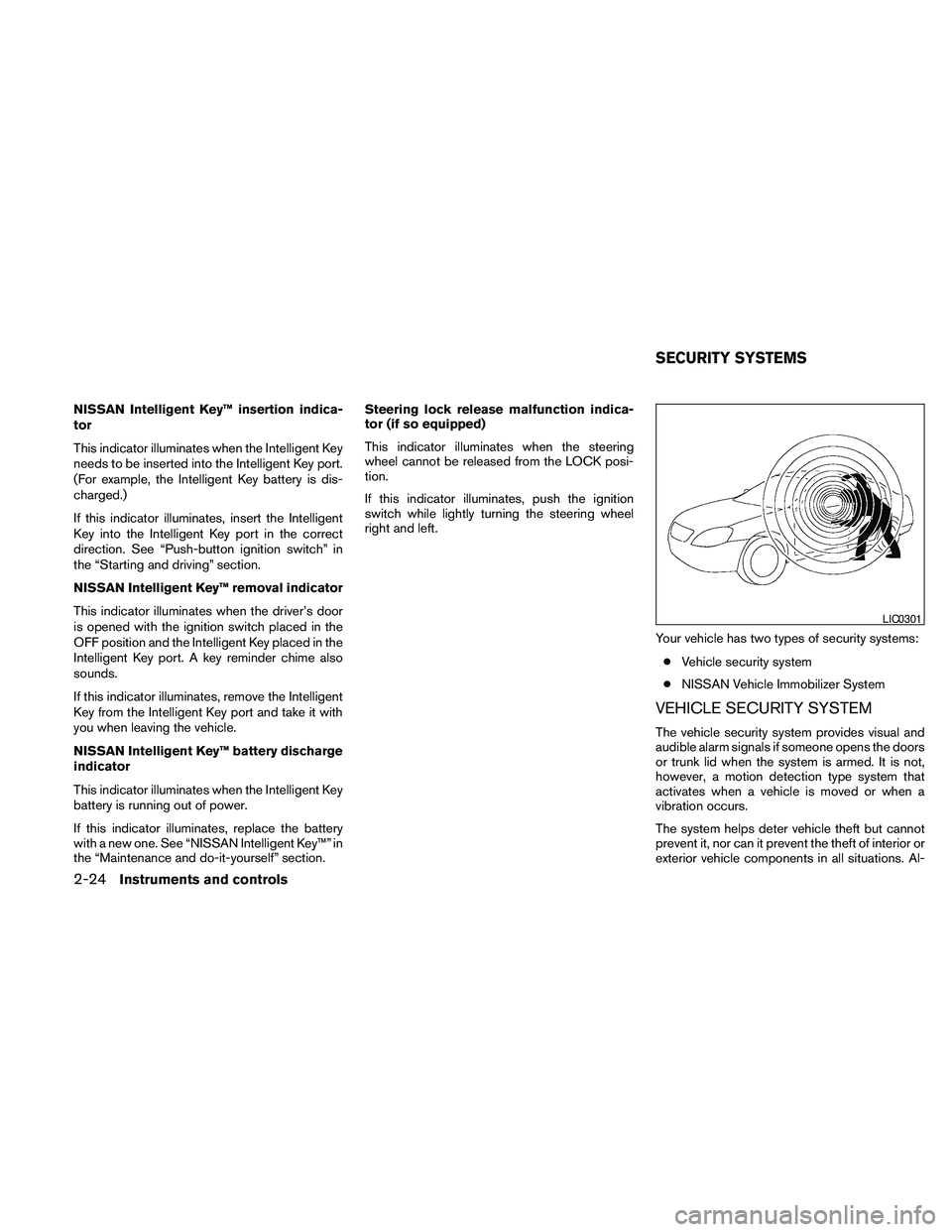
Your vehicle has two types of security systems:
cVehicle security system
cNISSAN Vehicle Immobilizer System
VEHICLE SECURITY SYSTEM
The vehicle security system provides visual and
audible alarm signals if someone opens the doors
or trunk lid when the system is armed. It is not,
however, a motion detection type system that
activates when a vehicle is moved or when a
vibration occurs.
The system helps deter vehicle theft but cannot
prevent it, nor can it prevent the theft of interior or
exterior vehicle components in all situations. Al-
LIC0301
SECURITY SYSTEMS
2-24Instruments and controls