display NISSAN MAXIMA 2010 Owner´s Manual
[x] Cancel search | Manufacturer: NISSAN, Model Year: 2010, Model line: MAXIMA, Model: NISSAN MAXIMA 2010Pages: 457, PDF Size: 4.66 MB
Page 194 of 457
When the shift selector is shifted into the R
(Reverse) position, the monitor display shows the
view to the rear of the vehicle.
The system is designed as an aid to the driver in
detecting large stationary objects to help avoid
damaging the vehicle. The system will not detect
small objects below the bumper and may not
detect objects close to the bumper or on the
ground.
WARNING
cThe rear view camera is a convenience
but it is not a substitute for proper back-
ing up. Always turn and check that it is
safe to do so before backing up. Always
back up slowly.
cObjects viewed in the RearView Moni-
tor differ from actual distance because
a wide-angle lens is used.
cMake sure that the trunk is securely
closed when backing up.
cUnderneath the bumper and the corner
areas of the bumper cannot be viewed
on the RearView Monitor because of its
monitoring range limitation.
cDo not put anything on the rear view
camera. The rear view camera is in-
stalled above the license plate.cWhen washing the vehicle with high-
pressure water, be sure not to spray it
around the camera. Otherwise, water
may enter the camera unit causing wa-
ter condensation on the lens, a mal-
function, fire or an electric shock.
cDo not strike the camera. It is a preci-
sion instrument. Otherwise, it may mal-
function or cause damage resulting in a
fire or an electric shock.CAUTION
Do not scratch the camera lens when
cleaning dirt or snow from the lens.
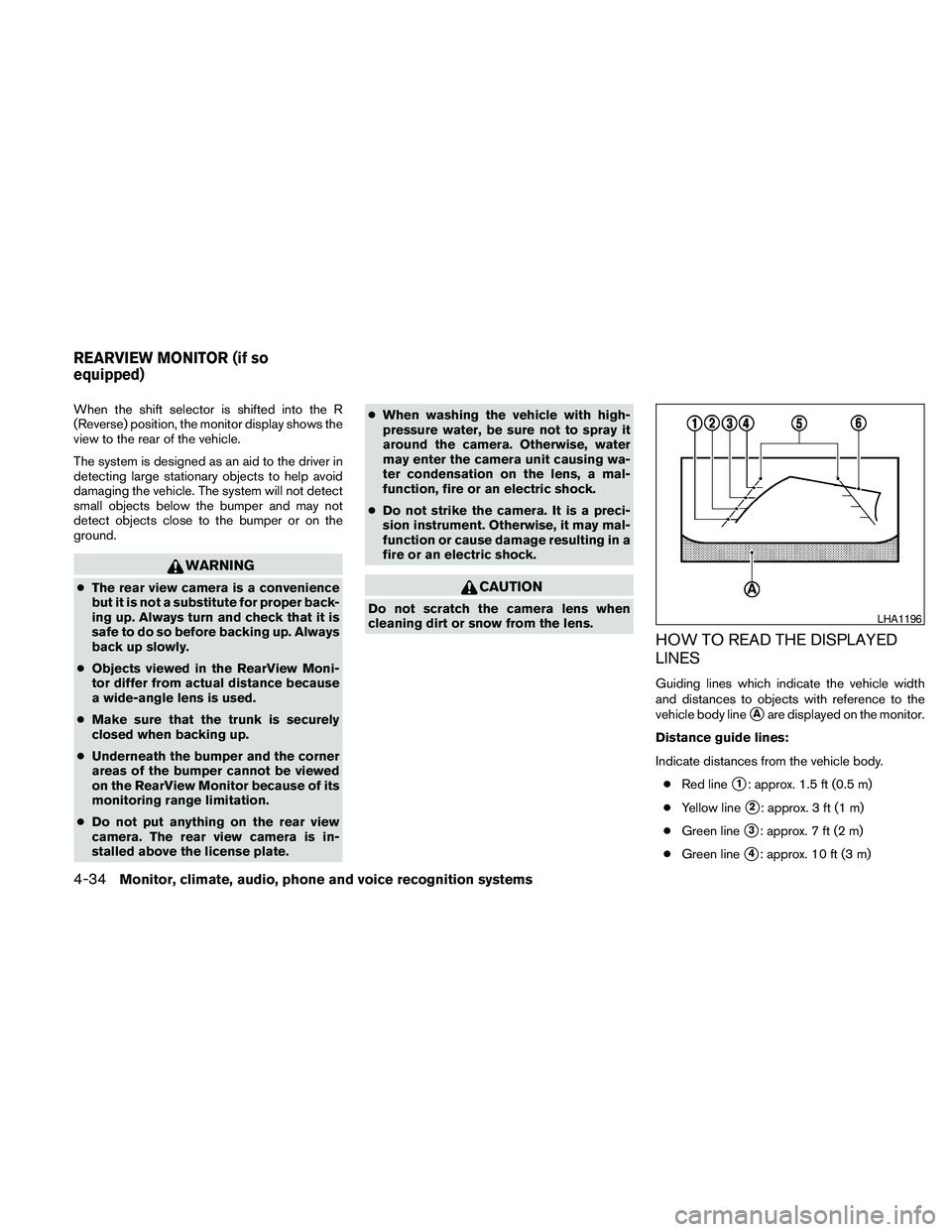
HOW TO READ THE DISPLAYED
LINES
Guiding lines which indicate the vehicle width
and distances to objects with reference to the
vehicle body line
sAare displayed on the monitor.
Distance guide lines:
Indicate distances from the vehicle body.
cRed line
s1: approx. 1.5 ft (0.5 m)
cYellow line
s2: approx. 3 ft (1 m)
cGreen line
s3: approx. 7 ft (2 m)
cGreen line
s4: approx. 10 ft (3 m)
LHA1196
REARVIEW MONITOR (if so
equipped)
4-34Monitor, climate, audio, phone and voice recognition systems
Page 195 of 457
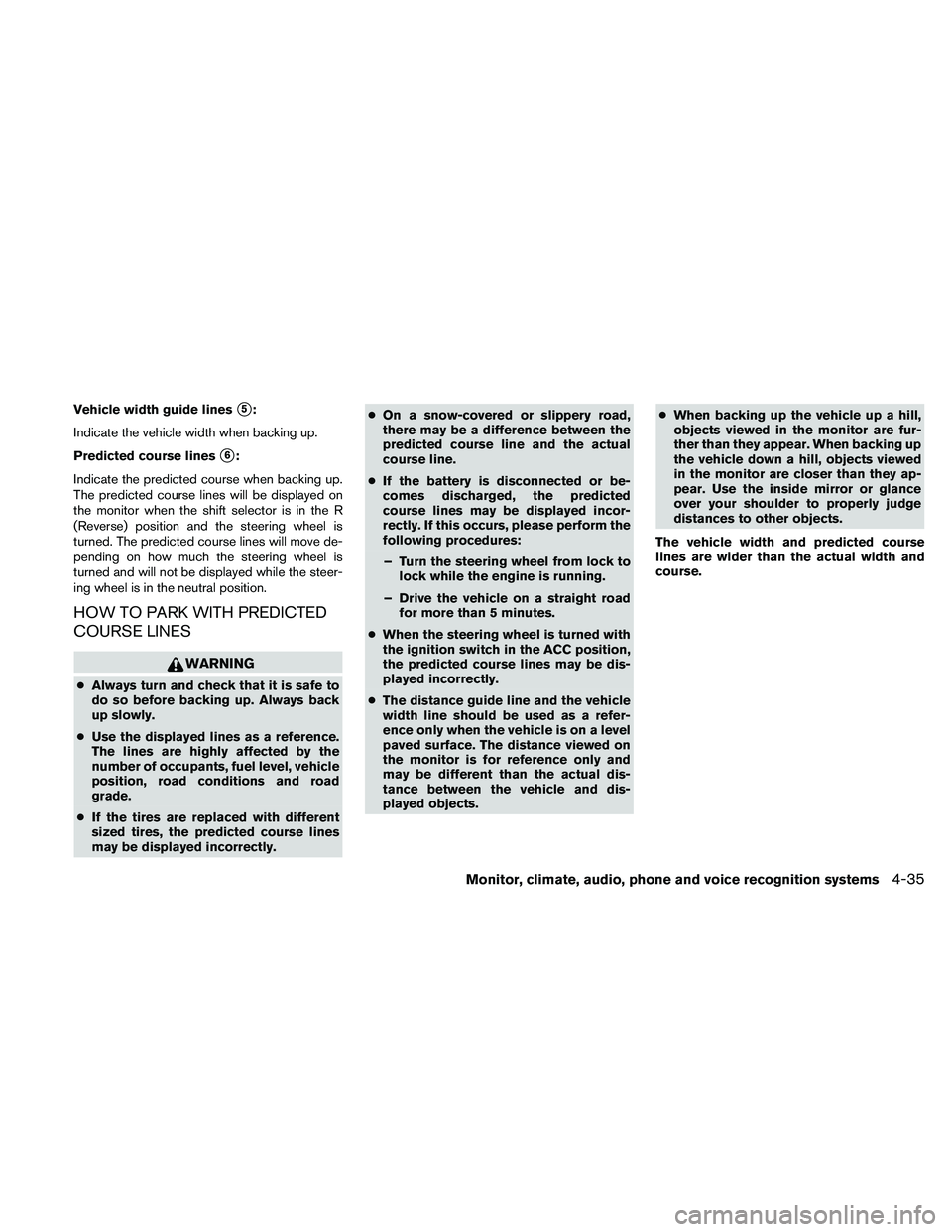
Vehicle width guide liness5:
Indicate the vehicle width when backing up.
Predicted course lines
s6:
Indicate the predicted course when backing up.
The predicted course lines will be displayed on
the monitor when the shift selector is in the R
(Reverse) position and the steering wheel is
turned. The predicted course lines will move de-
pending on how much the steering wheel is
turned and will not be displayed while the steer-
ing wheel is in the neutral position.
HOW TO PARK WITH PREDICTED
COURSE LINES
WARNING
cAlways turn and check that it is safe to
do so before backing up. Always back
up slowly.
cUse the displayed lines as a reference.
The lines are highly affected by the
number of occupants, fuel level, vehicle
position, road conditions and road
grade.
cIf the tires are replaced with different
sized tires, the predicted course lines
may be displayed incorrectly.cOn a snow-covered or slippery road,
there may be a difference between the
predicted course line and the actual
course line.
cIf the battery is disconnected or be-
comes discharged, the predicted
course lines may be displayed incor-
rectly. If this occurs, please perform the
following procedures:
– Turn the steering wheel from lock to
lock while the engine is running.
– Drive the vehicle on a straight road
for more than 5 minutes.
cWhen the steering wheel is turned with
the ignition switch in the ACC position,
the predicted course lines may be dis-
played incorrectly.
cThe distance guide line and the vehicle
width line should be used as a refer-
ence only when the vehicle is on a level
paved surface. The distance viewed on
the monitor is for reference only and
may be different than the actual dis-
tance between the vehicle and dis-
played objects.cWhen backing up the vehicle up a hill,
objects viewed in the monitor are fur-
ther than they appear. When backing up
the vehicle down a hill, objects viewed
in the monitor are closer than they ap-
pear. Use the inside mirror or glance
over your shoulder to properly judge
distances to other objects.
The vehicle width and predicted course
lines are wider than the actual width and
course.
Monitor, climate, audio, phone and voice recognition systems4-35
Page 196 of 457
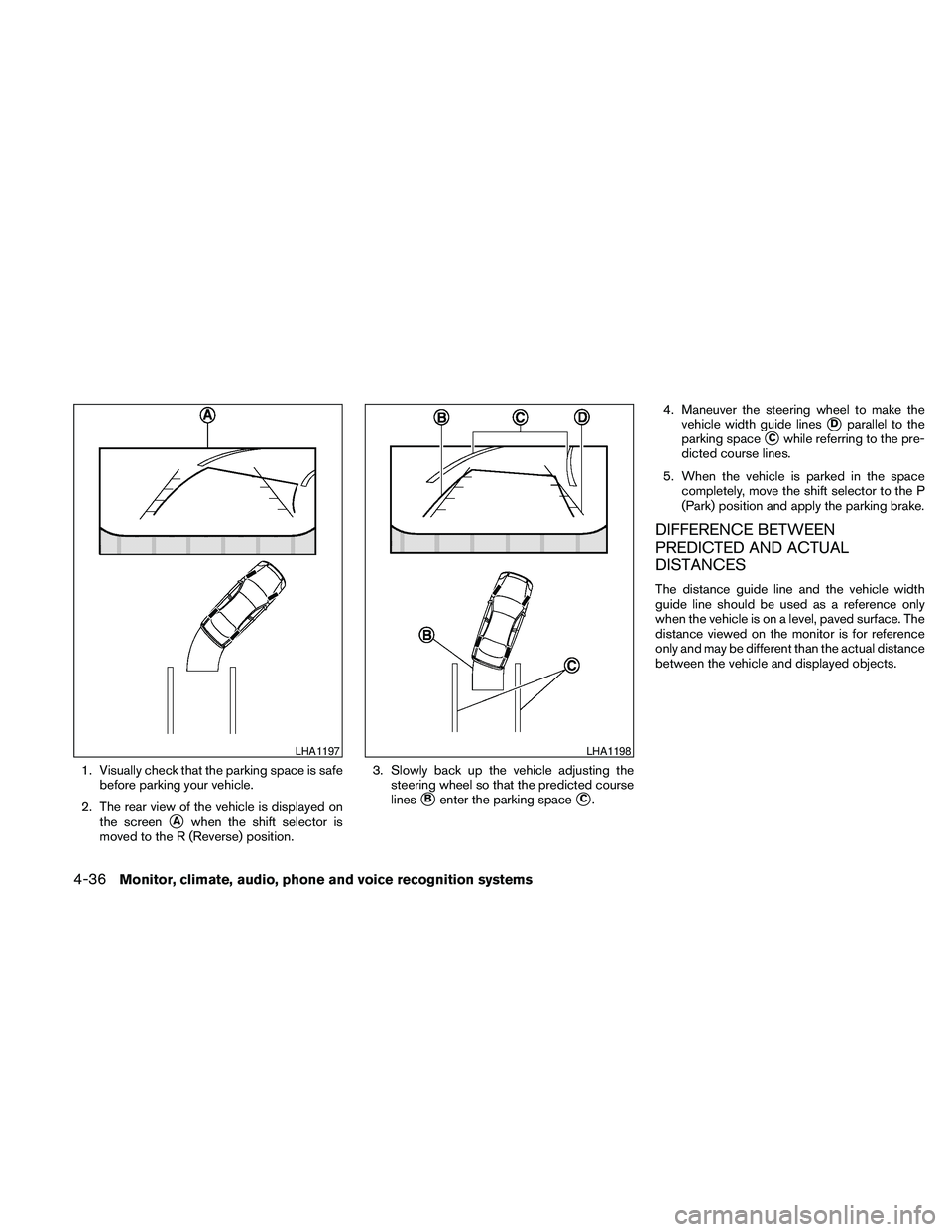
1. Visually check that the parking space is safe
before parking your vehicle.
2. The rear view of the vehicle is displayed on
the screen
sAwhen the shift selector is
moved to the R (Reverse) position.3. Slowly back up the vehicle adjusting the
steering wheel so that the predicted course
lines
sBenter the parking spacesC.4. Maneuver the steering wheel to make the
vehicle width guide lines
sDparallel to the
parking space
sCwhile referring to the pre-
dicted course lines.
5. When the vehicle is parked in the space
completely, move the shift selector to the P
(Park) position and apply the parking brake.
DIFFERENCE BETWEEN
PREDICTED AND ACTUAL
DISTANCES
The distance guide line and the vehicle width
guide line should be used as a reference only
when the vehicle is on a level, paved surface. The
distance viewed on the monitor is for reference
only and may be different than the actual distance
between the vehicle and displayed objects.
LHA1197LHA1198
4-36Monitor, climate, audio, phone and voice recognition systems
Page 197 of 457
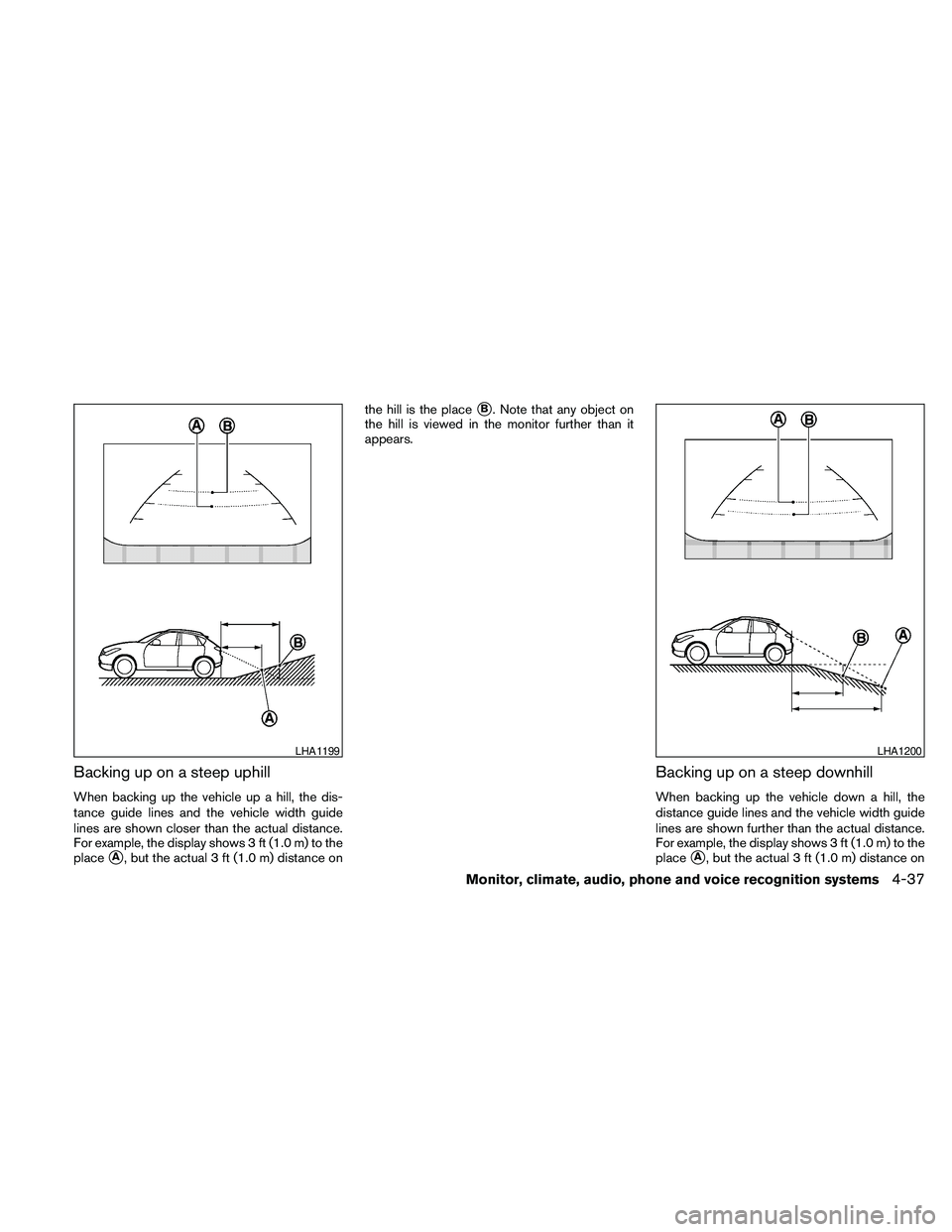
Backing up on a steep uphill
When backing up the vehicle up a hill, the dis-
tance guide lines and the vehicle width guide
lines are shown closer than the actual distance.
For example, the display shows 3 ft (1.0 m) to the
place
sA, but the actual 3 ft (1.0 m) distance onthe hill is the place
sB. Note that any object on
the hill is viewed in the monitor further than it
appears.
Backing up on a steep downhill
When backing up the vehicle down a hill, the
distance guide lines and the vehicle width guide
lines are shown further than the actual distance.
For example, the display shows 3 ft (1.0 m) to the
place
sA, but the actual 3 ft (1.0 m) distance on
LHA1199LHA1200
Monitor, climate, audio, phone and voice recognition systems4-37
Page 198 of 457
the hill is the placesB. Note that any object on
the hill is viewed in the monitor closer than it
appears.
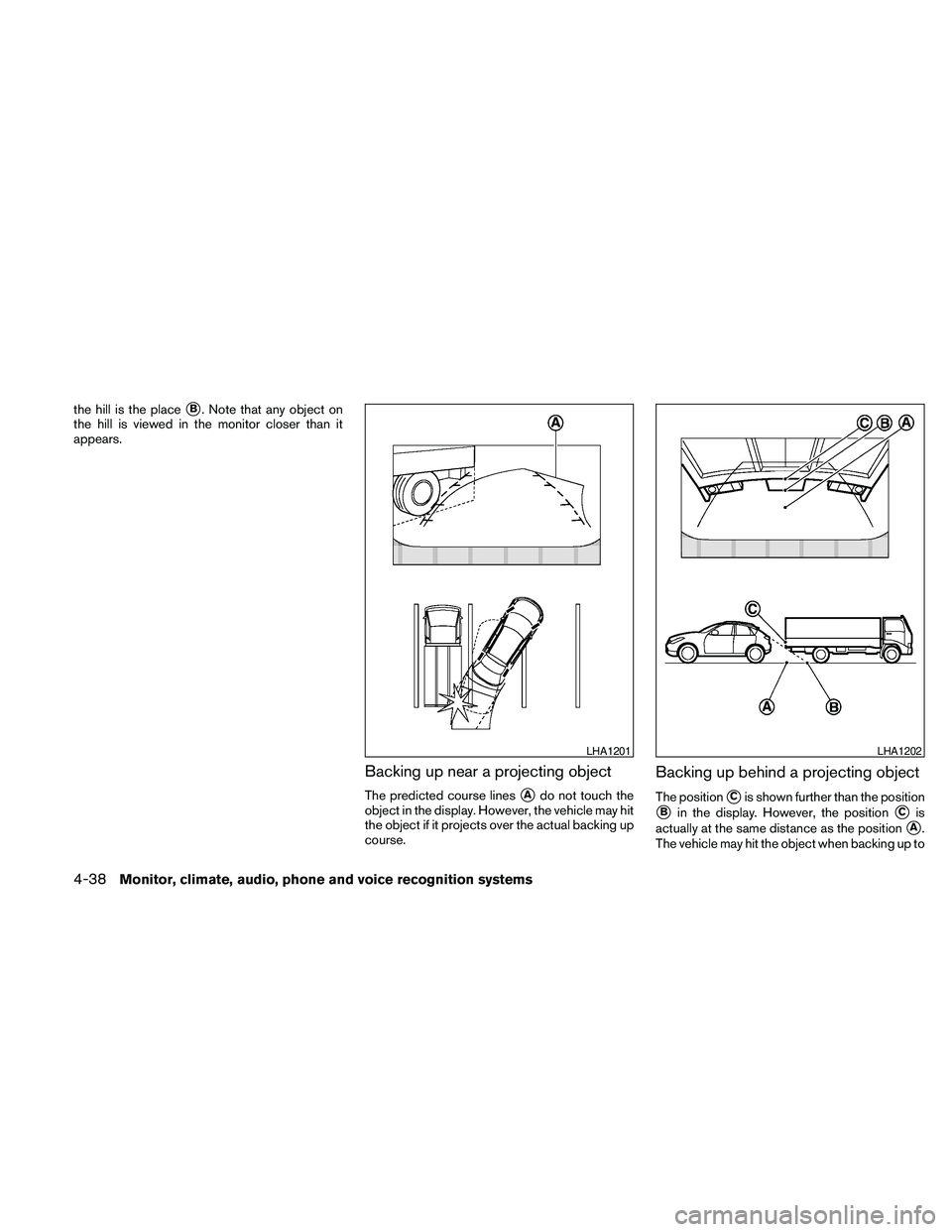
Backing up near a projecting object
The predicted course linessAdo not touch the
object in the display. However, the vehicle may hit
the object if it projects over the actual backing up
course.
Backing up behind a projecting object
The positionsCis shown further than the position
sBin the display. However, the positionsCis
actually at the same distance as the position
sA.
The vehicle may hit the object when backing up to
LHA1201LHA1202
4-38Monitor, climate, audio, phone and voice recognition systems
Page 199 of 457
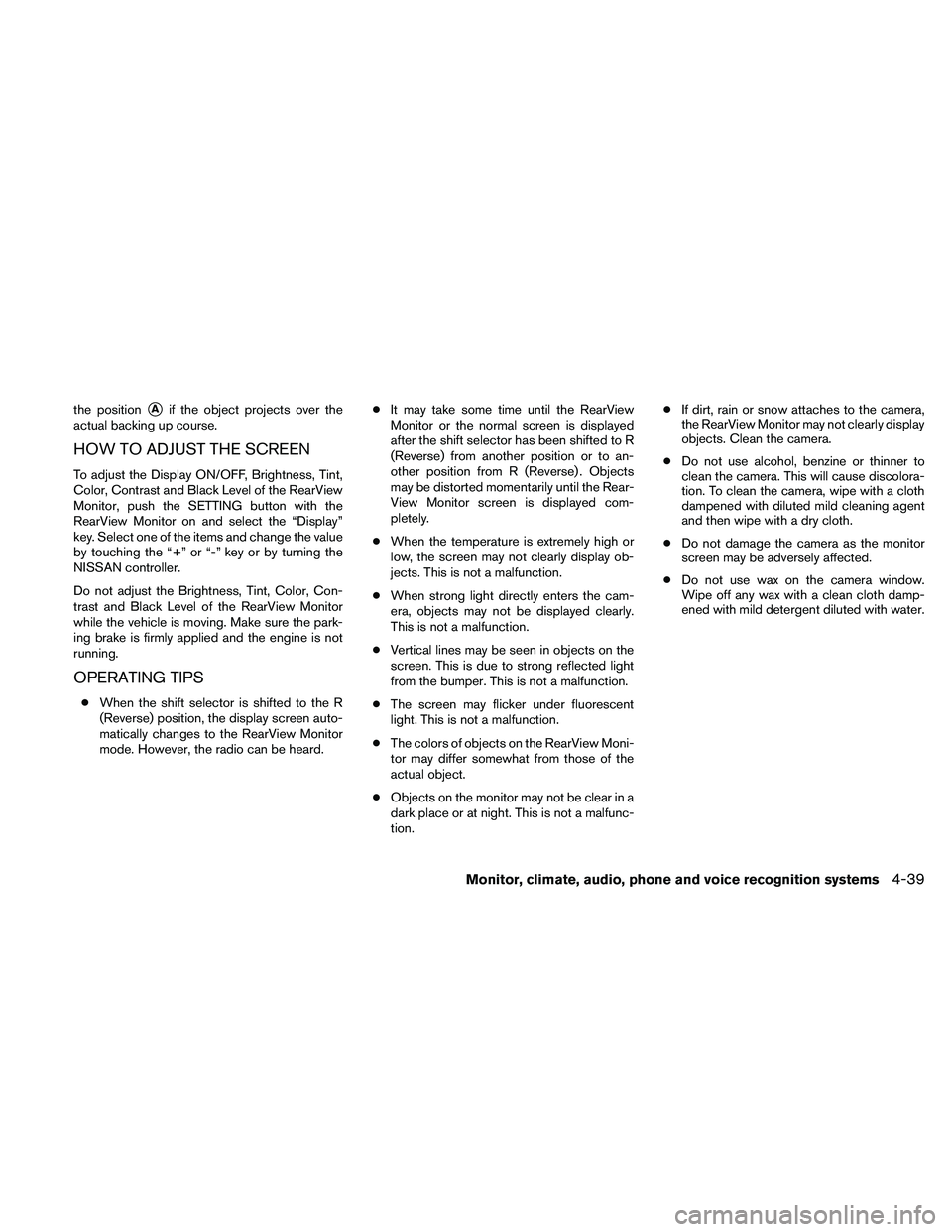
the positionsAif the object projects over the
actual backing up course.
HOW TO ADJUST THE SCREEN
To adjust the Display ON/OFF, Brightness, Tint,
Color, Contrast and Black Level of the RearView
Monitor, push the SETTING button with the
RearView Monitor on and select the “Display”
key. Select one of the items and change the value
by touching the “+” or “-” key or by turning the
NISSAN controller.
Do not adjust the Brightness, Tint, Color, Con-
trast and Black Level of the RearView Monitor
while the vehicle is moving. Make sure the park-
ing brake is firmly applied and the engine is not
running.
OPERATING TIPS
cWhen the shift selector is shifted to the R
(Reverse) position, the display screen auto-
matically changes to the RearView Monitor
mode. However, the radio can be heard.cIt may take some time until the RearView
Monitor or the normal screen is displayed
after the shift selector has been shifted to R
(Reverse) from another position or to an-
other position from R (Reverse) . Objects
may be distorted momentarily until the Rear-
View Monitor screen is displayed com-
pletely.
cWhen the temperature is extremely high or
low, the screen may not clearly display ob-
jects. This is not a malfunction.
cWhen strong light directly enters the cam-
era, objects may not be displayed clearly.
This is not a malfunction.
cVertical lines may be seen in objects on the
screen. This is due to strong reflected light
from the bumper. This is not a malfunction.
cThe screen may flicker under fluorescent
light. This is not a malfunction.
cThe colors of objects on the RearView Moni-
tor may differ somewhat from those of the
actual object.
cObjects on the monitor may not be clear in a
dark place or at night. This is not a malfunc-
tion.cIf dirt, rain or snow attaches to the camera,
the RearView Monitor may not clearly display
objects. Clean the camera.
cDo not use alcohol, benzine or thinner to
clean the camera. This will cause discolora-
tion. To clean the camera, wipe with a cloth
dampened with diluted mild cleaning agent
and then wipe with a dry cloth.
cDo not damage the camera as the monitor
screen may be adversely affected.
cDo not use wax on the camera window.
Wipe off any wax with a clean cloth damp-
ened with mild detergent diluted with water.
Monitor, climate, audio, phone and voice recognition systems4-39
Page 201 of 457
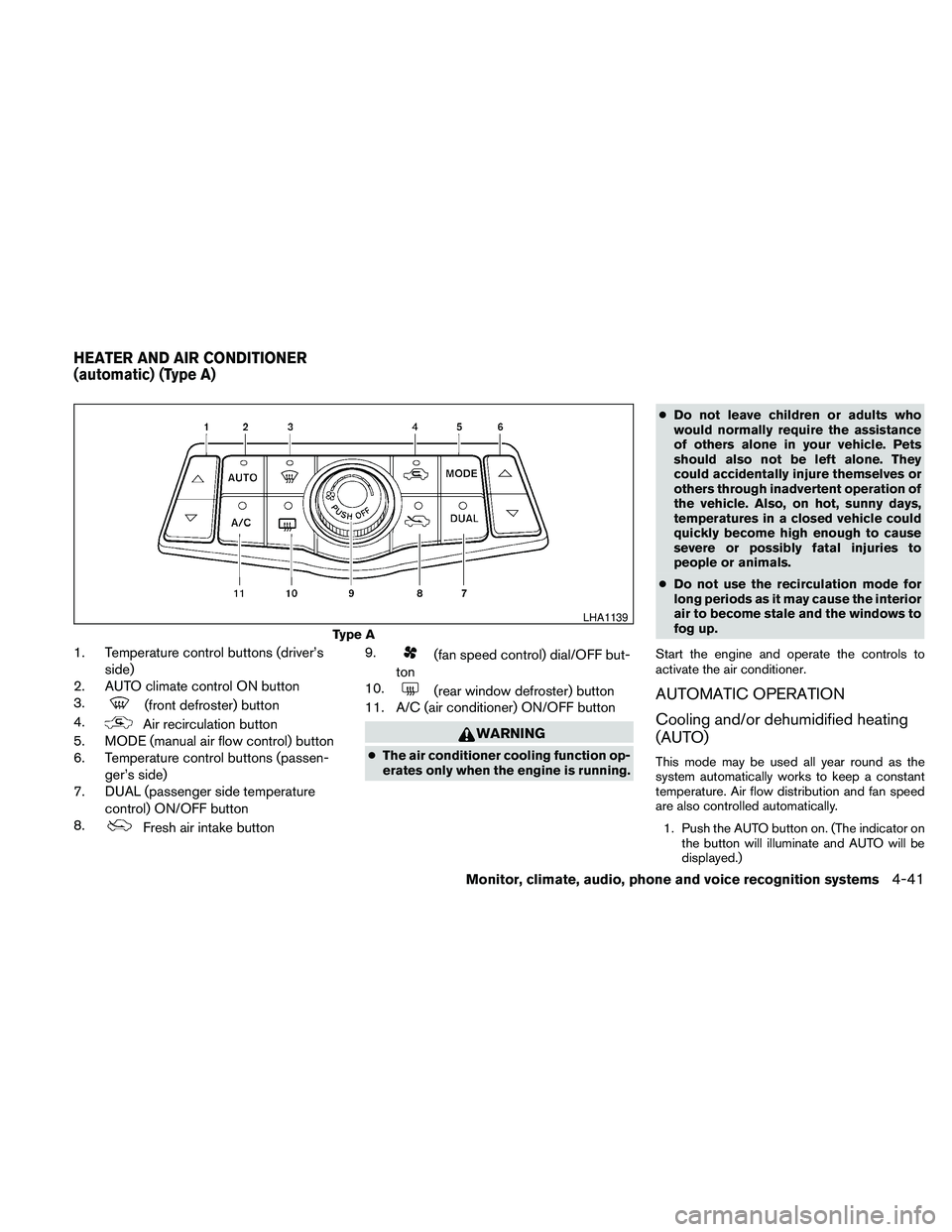
1. Temperature control buttons (driver’s
side)
2. AUTO climate control ON button
3.
(front defroster) button
4.
Air recirculation button
5. MODE (manual air flow control) button
6. Temperature control buttons (passen-
ger’s side)
7. DUAL (passenger side temperature
control) ON/OFF button
8.
Fresh air intake button9.
(fan speed control) dial/OFF but-
ton
10.
(rear window defroster) button
11. A/C (air conditioner) ON/OFF button
WARNING
cThe air conditioner cooling function op-
erates only when the engine is running.cDo not leave children or adults who
would normally require the assistance
of others alone in your vehicle. Pets
should also not be left alone. They
could accidentally injure themselves or
others through inadvertent operation of
the vehicle. Also, on hot, sunny days,
temperatures in a closed vehicle could
quickly become high enough to cause
severe or possibly fatal injuries to
people or animals.
cDo not use the recirculation mode for
long periods as it may cause the interior
air to become stale and the windows to
fog up.
Start the engine and operate the controls to
activate the air conditioner.
AUTOMATIC OPERATION
Cooling and/or dehumidified heating
(AUTO)
This mode may be used all year round as the
system automatically works to keep a constant
temperature. Air flow distribution and fan speed
are also controlled automatically.
1. Push the AUTO button on. (The indicator on
the button will illuminate and AUTO will be
displayed.)
Type A
LHA1139
HEATER AND AIR CONDITIONER
(automatic) (Type A)
Monitor, climate, audio, phone and voice recognition systems4-41
Page 202 of 457
2. Operate the driver’s side temperature con-
trol buttons.
cAdjust the temperature display to about
75°F (24°C) for normal operation.
cThe temperature of the passenger compart-
ment will be maintained automatically. Air
flow distribution and fan speed are also con-
trolled automatically.
cA visible mist may be seen coming from the
ventilators in hot, humid conditions as the air
is cooled rapidly. This does not indicate a
malfunction.
3. You can individually set driver’s and front
passenger’s side temperature using each
temperature control button. When the DUAL
button or passenger’s side temperature but-
ton is pressed, the DUAL indicator will come
on. To turn off the passenger’s side tempera-
ture control, push the DUAL button.
Heating (A/C OFF)
The air conditioner does not activate. When you
need to heat only, use this mode.
1. Push the A/C button. (A/C OFF will be dis-
played and A/C indicator will turn off.)
2. Operate the temperature control buttons to
set the desired temperature.cThe temperature of the passenger compart-
ment will be maintained automatically. Air
flow distribution and fan speed are also con-
trolled automatically.
cDo not set the temperature lower than the
outside air temperature. Otherwise the sys-
tem may not work properly.
cNot recommended if windows fog up.
Dehumidified defrosting or defogging
1. Push thefront defroster button on.
(The indicator light on the button will come
on.)
2. Operate the temperature control buttons to
set the desired temperature.
cTo quickly remove ice from the outside of the
windows, use the fan speed control dial to
set the fan speed to maximum.
cAs soon as possible after the windshield is
clean, push the AUTO button to return to the
automatic mode.cWhen the
front defroster button is
pushed, the air conditioner will automatically
be turned on at outside temperatures above
36°F (2°C) . The air recirculate mode auto-
matically turns off, allowing outside air to be
drawn into the passenger compartment to
further improve the defogging performance.
MANUAL OPERATION
Fan speed control
Turn thefan speed control dial to manually
control the fan speed.
Push the AUTO button to return to automatic
control of the fan speed.
Air recirculation
Push theair recirculation button to recir-
culate interior air inside the vehicle. The
indicator light on the button will come on.
The air recirculation cannot be activated when
the air conditioner is in the
front defrosting
mode or the
front defrosting and foot out-
let mode.
4-42Monitor, climate, audio, phone and voice recognition systems
Page 204 of 457
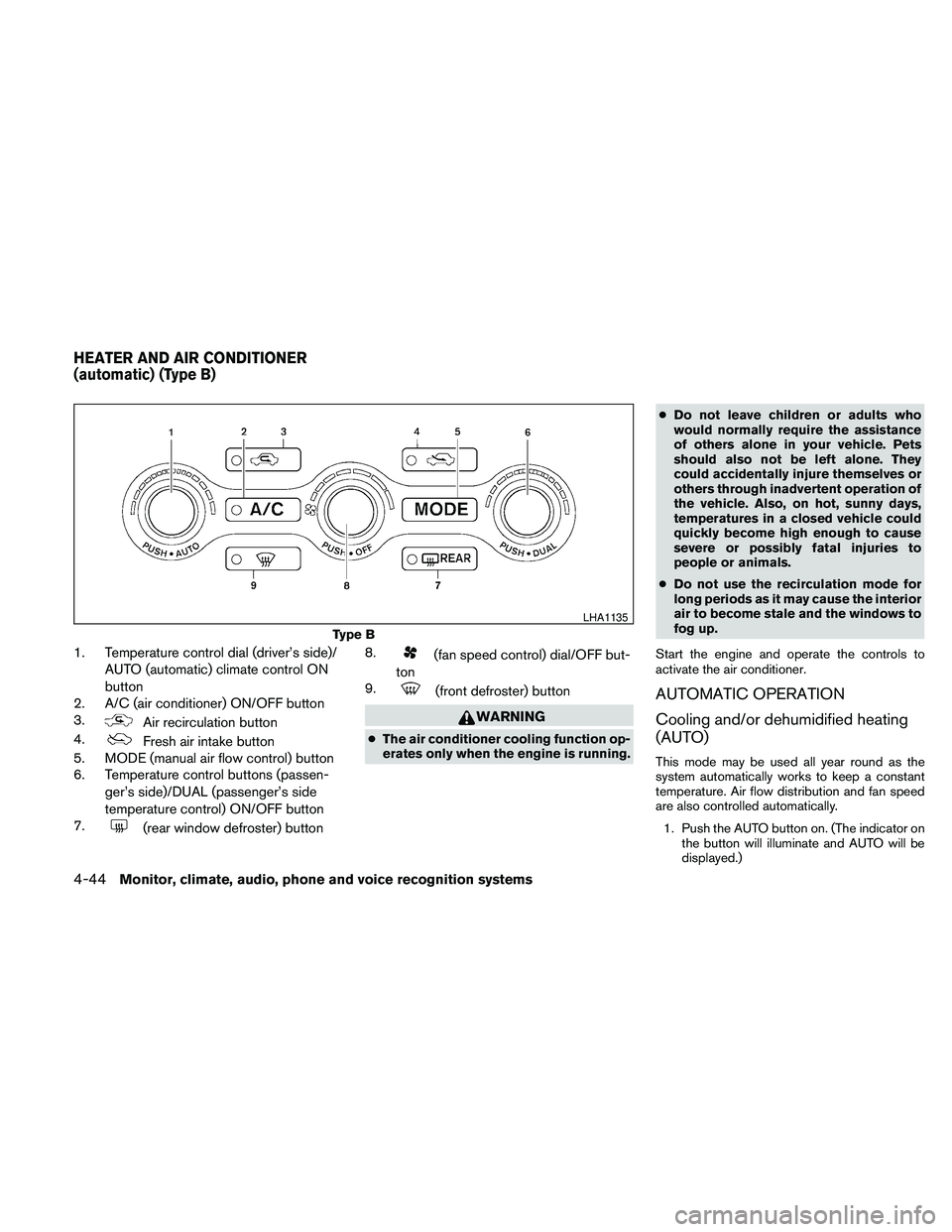
1. Temperature control dial (driver’s side)/
AUTO (automatic) climate control ON
button
2. A/C (air conditioner) ON/OFF button
3.
Air recirculation button
4.
Fresh air intake button
5. MODE (manual air flow control) button
6. Temperature control buttons (passen-
ger’s side)/DUAL (passenger’s side
temperature control) ON/OFF button
7.
(rear window defroster) button8.
(fan speed control) dial/OFF but-
ton
9.
(front defroster) button
WARNING
cThe air conditioner cooling function op-
erates only when the engine is running.cDo not leave children or adults who
would normally require the assistance
of others alone in your vehicle. Pets
should also not be left alone. They
could accidentally injure themselves or
others through inadvertent operation of
the vehicle. Also, on hot, sunny days,
temperatures in a closed vehicle could
quickly become high enough to cause
severe or possibly fatal injuries to
people or animals.
cDo not use the recirculation mode for
long periods as it may cause the interior
air to become stale and the windows to
fog up.
Start the engine and operate the controls to
activate the air conditioner.
AUTOMATIC OPERATION
Cooling and/or dehumidified heating
(AUTO)
This mode may be used all year round as the
system automatically works to keep a constant
temperature. Air flow distribution and fan speed
are also controlled automatically.
1. Push the AUTO button on. (The indicator on
the button will illuminate and AUTO will be
displayed.)
Type B
LHA1135
HEATER AND AIR CONDITIONER
(automatic) (Type B)
4-44Monitor, climate, audio, phone and voice recognition systems
Page 205 of 457
2. Turn the temperature control dial to the left
or right to set the desired temperature.
cAdjust the temperature display to about
75°F (24°C) for normal operation.
cThe temperature of the passenger compart-
ment will be maintained automatically. Air
flow distribution and fan speed are also con-
trolled automatically.
cA visible mist may be seen coming from the
vents in hot, humid conditions as the air is
cooled rapidly. This does not indicate a mal-
function.
3. You can individually set driver’s and front
passenger’s side temperature using each
temperature control dial. When the DUAL
button or passenger’s side temperature dial
is turned, the DUAL indicator will come on.
To turn off the passenger’s side temperature
control, push the DUAL button.
Heating (A/C OFF)
The air conditioner does not activate. When you
need to heat only, use this mode.
1. Push the A/C button. (A/C OFF will be dis-
played and A/C indicator will turn off.)
2. Turn the temperature control dial to set the
desired temperature.cThe temperature of the passenger compart-
ment will be maintained automatically. Air
flow distribution and fan speed are also con-
trolled automatically.
cDo not set the temperature lower than the
outside air temperature. Otherwise the sys-
tem may not work properly.
cNot recommended if windows fog up.
Dehumidified defrosting or defogging
1. Push thefront defroster button on.
(The indicator light on the button will come
on.)
2. Turn the temperature control dial to set the
desired temperature.
cTo quickly remove ice from the outside of the
windows, use the fan speed control dial to
set the fan speed to maximum.
cAs soon as possible after the windshield is
clean, push the AUTO button to return to the
automatic mode.cWhen the
front defroster button is
pushed, the air conditioner will automatically
be turned on at outside temperatures above
36°F (2°C) . The air recirculate mode auto-
matically turns off, allowing outside air to be
drawn into the passenger compartment to
further improve the defogging performance.
MANUAL OPERATION
Fan speed control
Turn thefan speed control dial to manually
control the fan speed.
Push the AUTO button to return to automatic
control of the fan speed.
Air recirculation
Push theair recirculation button to recir-
culate interior air inside the vehicle. The
indicator light on the button will come on.
The air recirculation cannot be activated when
the air conditioner is in the
front defrosting
mode or the
front defrosting and foot out-
let mode.
Monitor, climate, audio, phone and voice recognition systems4-45