ECO mode NISSAN MAXIMA 2010 Owner´s Manual
[x] Cancel search | Manufacturer: NISSAN, Model Year: 2010, Model line: MAXIMA, Model: NISSAN MAXIMA 2010Pages: 457, PDF Size: 4.66 MB
Page 271 of 457
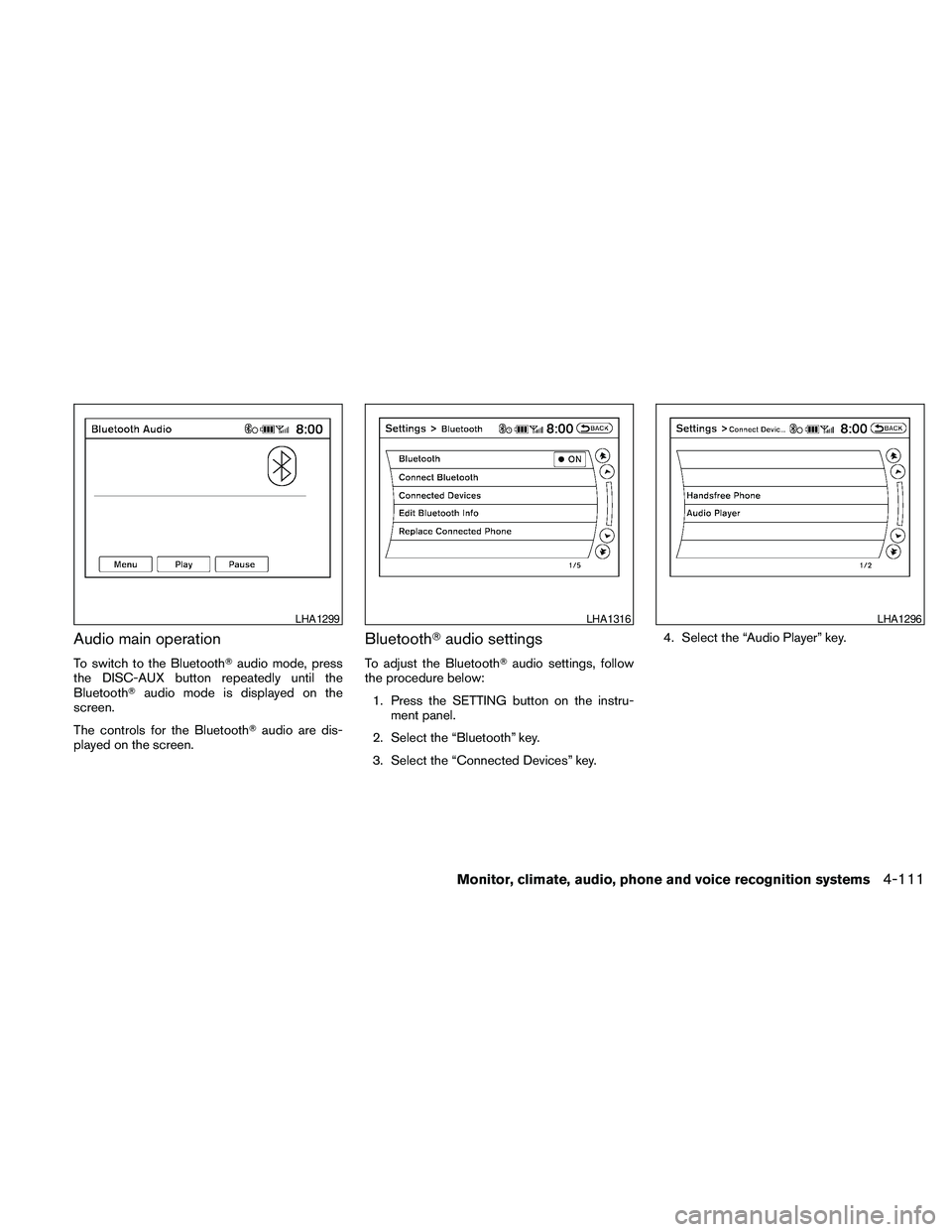
Audio main operation
To switch to the BluetoothTaudio mode, press
the DISC-AUX button repeatedly until the
BluetoothTaudio mode is displayed on the
screen.
The controls for the BluetoothTaudio are dis-
played on the screen.
BluetoothTaudio settings
To adjust the BluetoothTaudio settings, follow
the procedure below:
1. Press the SETTING button on the instru-
ment panel.
2. Select the “Bluetooth” key.
3. Select the “Connected Devices” key.4. Select the “Audio Player” key.
LHA1299LHA1316LHA1296
Monitor, climate, audio, phone and voice recognition systems4-111
Page 274 of 457
SOURCE select switch
Push the source select switch to change the
mode in the following sequence:
Models without Navigation System:
AM!FM1!FM2!XM1!XM2!XM3
(satellite radio, if so equipped)!USB* (if so
equipped)!CD/DVD*!Music Box** (if so
equipped)!AUX*!AM.
Models with Navigation System:
AM!FM1!FM2!XM1!XM2!XM3
(satellite radio, if so equipped)!CD/DVD*!
Music Box**!USB/iPodT*!BluetoothTAu-
dio*!AUX*!AM.
* These modes are only available when compat-
ible media storage is inserted into the device.
** This mode is only available when music has
been downloaded into the Music Box system.
Volume control switch
Push the volume control switch to increase or
decrease the volume.
Menu control
switch/ENTER button
While the display is showing a MAP, STATUS or
Audio screen, tilt the Menu Control switch up-
ward or downward to select a station, track, CDor folder. For most audio sources, tilting the
switch up/down for more than 1.5 seconds pro-
vides a different function than a tilting up/down
for less than 1.5 seconds.
AM and FM:
cTilt up/down for less than 1.5 seconds to
increase or decrease the preset station.
cTilt up/down for more than 1.5 seconds to
seek up or down to the next station.
cPress the ENTER button to show the list of
preset stations.
XM (if so equipped):
cTilt up/down for less than 1.5 seconds to
increase or decrease the preset station.
cTilt up/down for more than 1.5 seconds to
go to the next or previous category.
cPress the ENTER button to show the XM
Menu.
iPodT(if so equipped):
cTilt up/down for less than 1.5 seconds to
increase or decrease the track number.
cPress the ENTER button to show the iPod
Menu.CD:
cTilt up/down for less than 1.5 seconds to
increase or decrease the track number.
cTilt up/down for more than 1.5 seconds to
increase or decrease the folder number (if
playing compressed audio files) .
cPress the ENTER button to show the CD
Menu.
DVD (if so equipped):
cTilt up/down for less than 1.5 seconds to
increase or decrease the track number.
cTilt up/down for more than 1.5 seconds to
increase or decrease the title number.
cPress the ENTER button to select an item
from the DVD display.
cWhen the transparent operation menu ap-
pears, the switch will control the menu.
USB (if so equipped):
cTilt up/down for less than 1.5 seconds to
increase or decrease the track number.
cTilt up/down for more than 1.5 seconds to
increase or decrease the folder number.
cPress the ENTER button to show the USB
Menu.
4-114Monitor, climate, audio, phone and voice recognition systems
Page 275 of 457
Music Box (if so equipped):
cTilt up/down for less than 1.5 seconds to
increase or decrease the track number.
cTilt up/down for more than 1.5 seconds to
increase or decrease the album (folder)
number (if playing compressed audio files) .
cPress the ENTER button to show the Music
Box Menu.
BluetoothTAudio (if so equipped):
cTilt up/down for less than 1.5 seconds to
increase or decrease the track number.
AUX:
cPress the ENTER button to show the AUX
Menu.
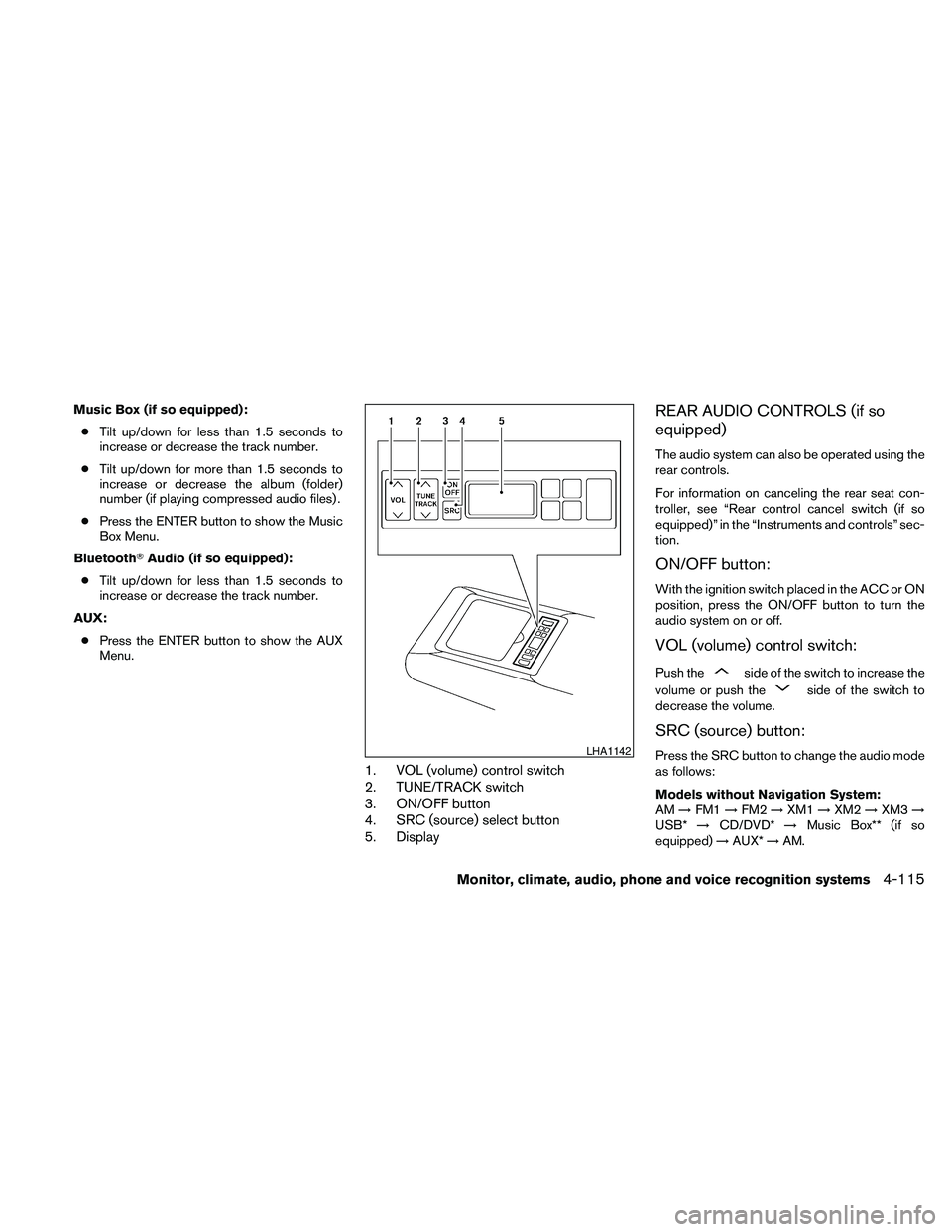
1. VOL (volume) control switch
2. TUNE/TRACK switch
3. ON/OFF button
4. SRC (source) select button
5. Display
REAR AUDIO CONTROLS (if so
equipped)
The audio system can also be operated using the
rear controls.
For information on canceling the rear seat con-
troller, see “Rear control cancel switch (if so
equipped)” in the “Instruments and controls” sec-
tion.
ON/OFF button:
With the ignition switch placed in the ACC or ON
position, press the ON/OFF button to turn the
audio system on or off.
VOL (volume) control switch:
Push theside of the switch to increase the
volume or push the
side of the switch to
decrease the volume.
SRC (source) button:
Press the SRC button to change the audio mode
as follows:
Models without Navigation System:
AM!FM1!FM2!XM1!XM2!XM3!
USB*!CD/DVD*!Music Box** (if so
equipped)!AUX*!AM.LHA1142
Monitor, climate, audio, phone and voice recognition systems4-115
Page 276 of 457
Models with Navigation System:
AM!FM1!FM2!XM1!XM2!XM3!
CD/DVD*!Music Box**!USB/iPodT*!
BluetoothTAudio!AUX*!AM.
* These modes are only available when compat-
ible media storage is inserted into the device.
** This mode is only available when music has
been downloaded into the Music Box system.
TUNE/TRACK control switch:
AM/FM:
cPush the
orside of the switch
to select the next or previous preset station.
cPush and hold the
orside of
the switch to select the next or previous
station.
XM:
cPush the
orside of the switch
to select the next or previous preset station.
cPush and hold the
orside of
the switch to select the next or previous
category.CD:
cPush the
orside of the switch
to select the next track or the beginning of
the current track.
CD/USB (if so equipped) with MP3/WMA:
cPush the
orside of the switch
to select the next track or the beginning of
the current track.
cPush and hold the
orside of
the switch to change folders.
CD/DVD/USB (if so equipped) with com-
pressed audio files:
cPush the
orside of the switch
to select the next track or the beginning of
the current track.
cPush and hold the
orside of
the switch to change folders.
iPodT(if so equipped):
cPush the
orside of the switch
to select the next or previous track.Music Box hard-disk drive audio system (if
so equipped):
cPush the
orside of the switch
to select the next or the beginning of the
current track.
cPush and hold the
orside of
the switch to change the playlist.
BluetoothTAudio (if so equipped):
cPush the
orside of the switch
to select the next track or beginning of the
current track.
ANTENNA
Window antenna
The antenna pattern is printed inside the rear
window.
CAUTION
cDo not place metalized film near the
rear window glass or attach any metal
parts to it. This may cause poor recep-
tion or noise.
cWhen cleaning the inside of the rear
window, be careful not to scratch or
damage the rear window antenna.
Lightly wipe along the antenna with a
dampened soft cloth.
4-116Monitor, climate, audio, phone and voice recognition systems
Page 277 of 457
When installing a CB, ham radio or car phone in
your NISSAN, be sure to observe the following
precautions; otherwise, the new equipment may
adversely affect the engine control system and
other electronic parts.
WARNING
cA cellular telephone should not be used
while driving so full attention may be
given to vehicle operation. Some juris-
dictions prohibit the use of cellular tele-
phones while driving.
cIf you must make a call while your ve-
hicle is in motion, the hands free cellu-
lar phone operational mode (if so
equipped) is highly recommended. Ex-
ercise extreme caution at all times so
full attention may be given to vehicle
operation.
cIf you are unable to devote full attention
to vehicle operation while talking on
the phone, pull off the road to a safe
location and stop your vehicle.
CAUTION
cKeep the antenna as far away as pos-
sible from the electronic control
modules.
cKeep the antenna wire more than 8 in
(20 cm) away from the electronic con-
trol system harnesses. Do not route the
antenna wire next to any harness.
cAdjust the antenna standing-wave ratio
as recommended by the manufacturer.
cConnect the ground wire from the CB
radio chassis to the body.
cFor details, consult a NISSAN dealer.
WARNING
cUse a phone after stopping your vehicle
in a safe location. If you have to use a
phone while driving, exercise extreme
caution at all times so full attention may
be given to vehicle operation.
cIf you are unable to devote full attention
to vehicle operation while talking on
the phone, pull off the road to a safe
location and stop your vehicle.
CAUTION
To avoid discharging the vehicle battery,
use a phone after starting the engine.
CAR PHONE OR CB RADIO BLUETOOTHTHANDS-FREE PHONE
SYSTEM WITHOUT NAVIGATION
SYSTEM (if so equipped)
Monitor, climate, audio, phone and voice recognition systems4-117
Page 282 of 457
You can also use thebutton
to interrupt the system feedback
and give a command at once. See
“List of voice commands” and
“During a call” in this section for
more information.
PHONE/END
While the voice recognition sys-
tem is active, press and hold
the
button for 5 seconds to
quit the voice recognition system
at any time.
TUNING SWITCH
While using the voice recognition
system, tilt the tuning switch up or
down to manually control the
phone system (if so equipped) .
GETTING STARTED
The following procedures will help you get
started using the BluetoothTHands-Free Phone
System with NISSAN Voice Recognition. For ad-
ditional command options, refer to “List of voice
commands” in this section.
Choosing a language
You can interact with the BluetoothTHands-Free
Phone System using English, Spanish or French.
To change the language, perform the following.
1. Press and hold the
button for more
than 5 seconds.
2. The system announces: “Press the
PHONE/SEND (
) button for the
hands-free phone system to enter the
speaker adaptation mode or press the
PHONE/END (
) button to select a dif-
ferent language.”
3. Press the
button.
For information on speaker adaptation, see
“Speaker adaptation (SA) mode” in this sec-
tion.
4. The system announces the current language
and gives you the option to change the lan-
guage to Spanish (in Spanish) or French (in
French) . Use the following chart to select
the language.NOTE:
You must press the
button or
the
button within 5 seconds to
change the language.
Current
languagePress(PHONE/SEND)
to selectPress(PHONE/END) to
select
English Spanish French
Spanish English French
French English Spanish
5. If you decide not to change the language, do
not press either button. After 5 seconds, the
VR session will end, and the language will
not be changed.
For color monitor system language change, see
“Language/Units” in this section.
Pairing procedure
NOTE:
The pairing procedure must be performed
when the vehicle is stationary. If the vehicle
starts moving during the procedure, the
procedure will be cancelled.
4-122Monitor, climate, audio, phone and voice recognition systems
Page 283 of 457
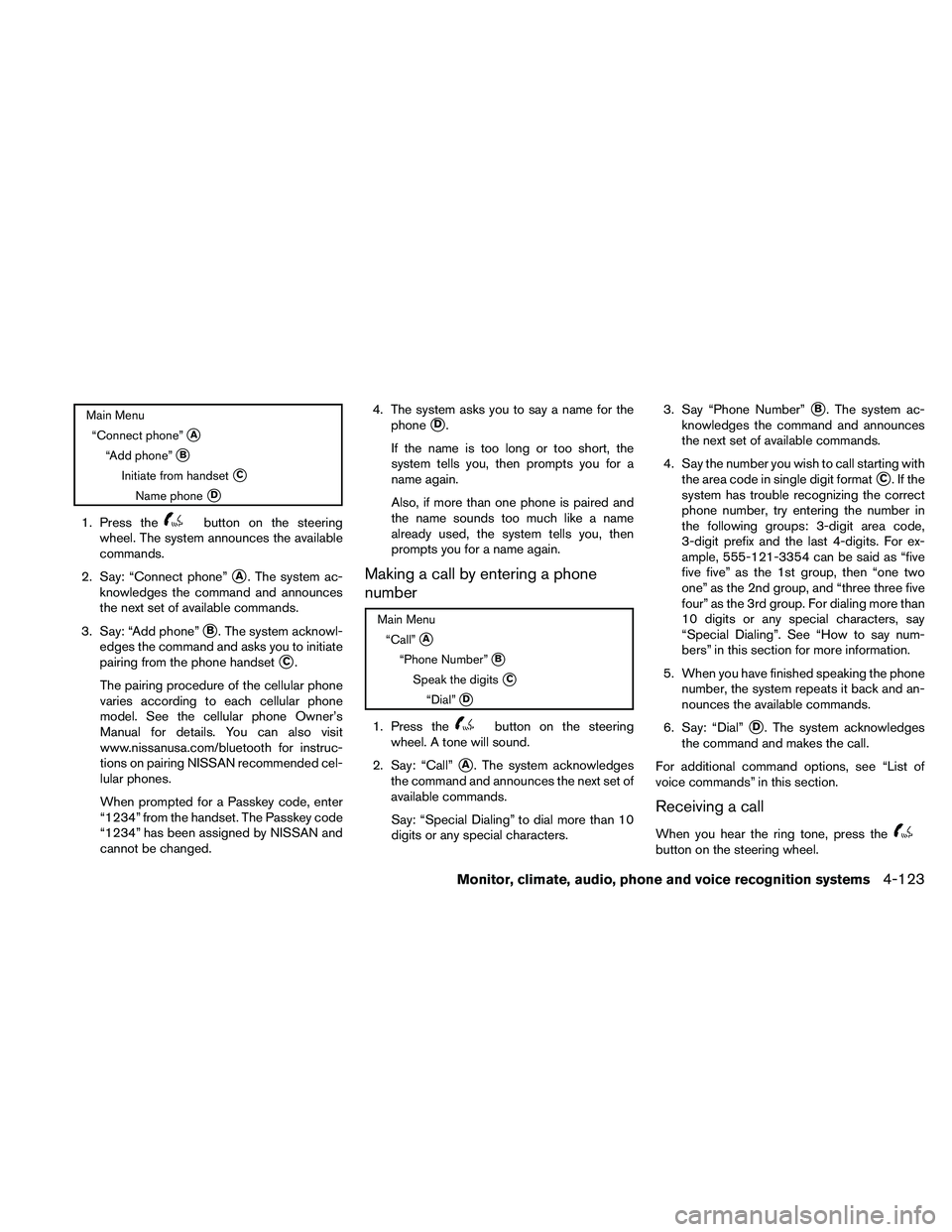
Main Menu
“Connect phone”
sA
“Add phone”sB
Initiate from handsetsC
Name phonesD
1. Press thebutton on the steering
wheel. The system announces the available
commands.
2. Say: “Connect phone”
sA. The system ac-
knowledges the command and announces
the next set of available commands.
3. Say: “Add phone”
sB. The system acknowl-
edges the command and asks you to initiate
pairing from the phone handset
sC.
The pairing procedure of the cellular phone
varies according to each cellular phone
model. See the cellular phone Owner’s
Manual for details. You can also visit
www.nissanusa.com/bluetooth for instruc-
tions on pairing NISSAN recommended cel-
lular phones.
When prompted for a Passkey code, enter
“1234” from the handset. The Passkey code
“1234” has been assigned by NISSAN and
cannot be changed.4. The system asks you to say a name for the
phone
sD.
If the name is too long or too short, the
system tells you, then prompts you for a
name again.
Also, if more than one phone is paired and
the name sounds too much like a name
already used, the system tells you, then
prompts you for a name again.
Making a call by entering a phone
number
Main Menu
“Call”
sA
“Phone Number”sB
Speak the digitssC
“Dial”sD
1. Press thebutton on the steering
wheel. A tone will sound.
2. Say: “Call”
sA. The system acknowledges
the command and announces the next set of
available commands.
Say: “Special Dialing” to dial more than 10
digits or any special characters.3. Say “Phone Number”
sB. The system ac-
knowledges the command and announces
the next set of available commands.
4. Say the number you wish to call starting with
the area code in single digit format
sC.Ifthe
system has trouble recognizing the correct
phone number, try entering the number in
the following groups: 3-digit area code,
3-digit prefix and the last 4-digits. For ex-
ample, 555-121-3354 can be said as “five
five five” as the 1st group, then “one two
one” as the 2nd group, and “three three five
four” as the 3rd group. For dialing more than
10 digits or any special characters, say
“Special Dialing”. See “How to say num-
bers” in this section for more information.
5. When you have finished speaking the phone
number, the system repeats it back and an-
nounces the available commands.
6. Say: “Dial”
sD. The system acknowledges
the command and makes the call.
For additional command options, see “List of
voice commands” in this section.
Receiving a call
When you hear the ring tone, press thebutton on the steering wheel.
Monitor, climate, audio, phone and voice recognition systems4-123
Page 285 of 457
“Call back”sE
Use the Call Back command to dial the number of
the last incoming call within the vehicle.
The system acknowledges the command, re-
peats the number and begins dialing.
If a call back number does not exist, the system
announces, “There is no number to call back” and
ends the VR session.
During a call
During a call there are several command options
available. Press the
button on the steering
wheel to mute the receiving voice and enter com-
mands.
c“Help” — The system announces the avail-
able commands.
c“Go back/Correction” — The system an-
nounces “Go back,” ends the VR session
and returns to the call.
c“Cancel/Quit” — The system announces
“Cancel,” ends the VR session and returns
to the call.
c“Send/Enter/Call/Dial” — Use the Send
command to enter numbers, “*” or “#” during
a call. For example, if you were directed to
dial an extension by an automated system:
Say: “Send one two three four.”The system acknowledges the command
and sends the tones associated with the
numbers. The system then ends the VR ses-
sion and returns to the call. Say “star” for “*”,
Say “pound” for “#”.
c“Transfer call” — Use the Transfer Call com-
mand to transfer the call from the BluetoothT
Hands-Free Phone System to the cellular
phone when privacy is desired.
The system announces, “Transfer call. Call
transferred to privacy mode.” The system
then ends the VR session.
To reconnect the call from the cellular phone
to the Bluetooth Hands-Free System, press
the
button.
c“Mute” — Use the Mute command to mute
your voice so the other party cannot hear it.
Use the mute command again to unmute
your voice.
NOTE:
If a call is ended or the cellular phone
network connection is lost while the Mute
feature is on, the Mute feature will be reset
to “off” for the next call so the other party
can hear your voice.
“Phonebook” (phones without
automatic phonebook download
function)
NOTE:
The “Transfer Entry” command is not avail-
able when the vehicle is moving.
Main Menu
“Phonebook”
“Transfer Entry”
sA
“Delete Entry”sB
“List Names”sC
For phones that do not support automatic down-
load of the phonebook (PBAP BluetoothTpro-
file) , the “Phonebook” command is used to manu-
ally add entries to the vehicle phonebook.
The phonebook stores up to 40 names for each
phone paired with the system.
Monitor, climate, audio, phone and voice recognition systems4-125
Page 288 of 457
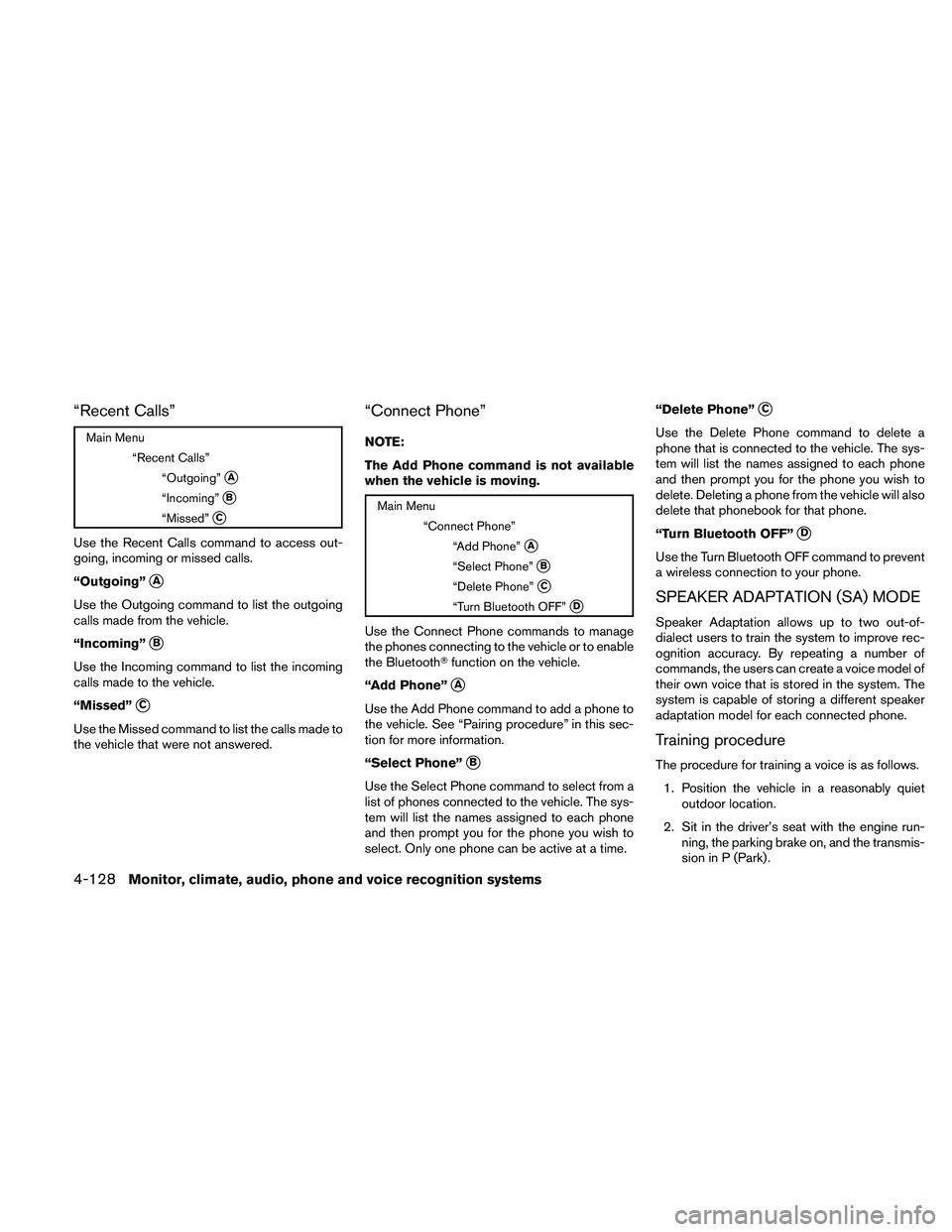
“Recent Calls”
Main Menu
“Recent Calls”
“Outgoing”
sA
“Incoming”sB
“Missed”sC
Use the Recent Calls command to access out-
going, incoming or missed calls.
“Outgoing”
sA
Use the Outgoing command to list the outgoing
calls made from the vehicle.
“Incoming”
sB
Use the Incoming command to list the incoming
calls made to the vehicle.
“Missed”
sC
Use the Missed command to list the calls made to
the vehicle that were not answered.
“Connect Phone”
NOTE:
The Add Phone command is not available
when the vehicle is moving.
Main Menu
“Connect Phone”
“Add Phone”
sA
“Select Phone”sB
“Delete Phone”sC
“Turn Bluetooth OFF”sD
Use the Connect Phone commands to manage
the phones connecting to the vehicle or to enable
the BluetoothTfunction on the vehicle.
“Add Phone”
sA
Use the Add Phone command to add a phone to
the vehicle. See “Pairing procedure” in this sec-
tion for more information.
“Select Phone”
sB
Use the Select Phone command to select from a
list of phones connected to the vehicle. The sys-
tem will list the names assigned to each phone
and then prompt you for the phone you wish to
select. Only one phone can be active at a time.“Delete Phone”
sC
Use the Delete Phone command to delete a
phone that is connected to the vehicle. The sys-
tem will list the names assigned to each phone
and then prompt you for the phone you wish to
delete. Deleting a phone from the vehicle will also
delete that phonebook for that phone.
“Turn Bluetooth OFF”
sD
Use the Turn Bluetooth OFF command to prevent
a wireless connection to your phone.
SPEAKER ADAPTATION (SA) MODE
Speaker Adaptation allows up to two out-of-
dialect users to train the system to improve rec-
ognition accuracy. By repeating a number of
commands, the users can create a voice model of
their own voice that is stored in the system. The
system is capable of storing a different speaker
adaptation model for each connected phone.
Training procedure
The procedure for training a voice is as follows.
1. Position the vehicle in a reasonably quiet
outdoor location.
2. Sit in the driver’s seat with the engine run-
ning, the parking brake on, and the transmis-
sion in P (Park) .
4-128Monitor, climate, audio, phone and voice recognition systems
Page 289 of 457
3. Press and hold thebutton for more
than 5 seconds.
4. The system announces: “Press the
PHONE/SEND (
) button for the
hands-free phone system to enter the
speaker adaptation mode or press the
PHONE/END (
) button to select a dif-
ferent language.”
5. Press the
button.
For information on selecting a different lan-
guage, see “Choosing a language” in this
section.
6. Voice memory A or memory B is selected
automatically. If both memory locations are
already in use, the system will prompt you to
overwrite one. Follow the instructions pro-
vided by the system.
7. When preparation is complete and you are
ready to begin, press the
button.
8. The SA mode will be explained. Follow the
instructions provided by the system.
9. When training is finished, the system will tell
you an adequate number of phrases have
been recorded.10. The system will announce that speaker ad-
aptation has been completed and the sys-
tem is ready.
The SA mode will stop if:
cThe
button is pressed for more than 5
seconds in SA mode.
cThe vehicle begins moving during SA mode.
cThe ignition switch is placed in the OFF or
LOCK position.
Training phrases
During the SA mode, the system instructs the
trainer to say the following phrases. (The system
will prompt you for each phrase.)
cphonebook transfer entry
cdial three oh four two nine
cdelete call back number
cincoming
ctransfer entry
ceight pause nine three two pause seven
cdelete all entries
ccall seven two four zero nine
cphonebook delete entrycnext entry
cdial star two one seven oh
cyes
cno
cselect
cmissed
cdial eight five six nine two
cBluetooth on
coutgoing
ccall three one nine oh two
cnine seven pause pause three oh eight
ccancel
ccall back number
ccall star two zero nine five
cdelete phone
cdial eight three zero five one
crecord name
cfour three pause two nine pause zero
cdelete redial number
cphonebook list names
Monitor, climate, audio, phone and voice recognition systems4-129