wheel NISSAN MAXIMA 2018 Owner´s Manual
[x] Cancel search | Manufacturer: NISSAN, Model Year: 2018, Model line: MAXIMA, Model: NISSAN MAXIMA 2018Pages: 428, PDF Size: 4.85 MB
Page 17 of 428
17. Push-button ignition switch(P. 5-10)
18. Bluetooth® Hands-Free Phone
System*
Cruise control switches
(if so equipped) (P. 5-41)
Intelligent Cruise Control (ICC)
switches (if so equipped) (P. 5-43)
19. Tilt and telescopic steering (P. 3-25)
20. Audio control switches* Vehicle information display control
switches (P. 2-17)
21. Hood release (P. 3-21)
22. Fuse box (P. 8-18)
23. Heated steering wheel switch
(if so equipped) (P. 2-52)
Vehicle Dynamic Control (VDC) OFF
switch (P. 2-53)
Trunk release switch (P. 3-21)
Rear power sunshade switch
(if so equipped) (P. 2-65)
24. Instrument brightness control
(P. 2-45)
Twin trip odometer reset switch
(P. 2-5)
*: Refer to the separate NissanConnect®
Owner’s Manual. Refer to the page number indicated in
parentheses for operating details.
Illustrated table of contents0-7
Page 63 of 428
PRECAUTIONS ON SRS
This SRS section contains important infor-
mation concerning the following systems:∙ Driver and front passenger supplemen- tal front-impact air bag (NISSAN Ad-
vanced Air Bag System)
∙ Front seat-mounted side-impact supplemental air bag
∙ Roof-mounted curtain side-impact and rollover supplemental air bag
∙ Seat belt with pretensioner(s) (front seats)
Supplemental front-impact air bag sys-
tem
The NISSAN Advanced Air Bag System can
help cushion the impact force to the head
and chest of the driver and front passenger
in certain frontal collisions.
Front seat-mounted side-impact
supplemental air bag system
This system can help cushion the impact
force to the chest area of the driver and
front passenger in certain side-impact col-
lisions. The side air bags are designed to
inflate on the side where the vehicle is im-
pacted. Roof-mounted curtain side-impact and
rollover supplemental air bag system
This system can help cushion the impact
force to the head of occupants in front and
rear outboard seating positions in certain
side-impact collisions. The curtain air bags
are designed to inflate on the side where
the vehicle is impacted. In a rollover, the
curtain air bags are designed to inflate and
remain inflated for a short time.
The SRS is designed to
supplementthe
crash protection provided by the driver and
front passenger seat belts and is not a
substitute for them. Seat belts should al-
ways be correctly worn and the occupant
seated a suitable distance away from the
steering wheel, instrument panel and door
finishers. For additional information, refer
to “Seat belts” in this section.
The supplemental air bags operate only
when the ignition switch is placed in the
ON position.
Af ter placing the ignition switch in the
ON position, the supplemental air bag
warning light illuminates. The supple-
mental air bag warning light will turn off
af ter about 7 seconds if the system is
operational.
SUPPLEMENTAL RESTRAINT SYSTEM
(SRS)
Safety—Seats, seat belts and supplemental restraint system1-43
Page 64 of 428
WARNING
∙ The front air bags ordinarily will notinflate in the event of a side impact,
rear impact, rollover, or lower severity
frontal collision. Always wear your
seat belts to help reduce the risk or
severity of injury in various kinds of
accidents
∙ The front passenger air bag will not inflate if the passenger air bag status
light is lit. For additional information,
refer to “Front passenger air bag and
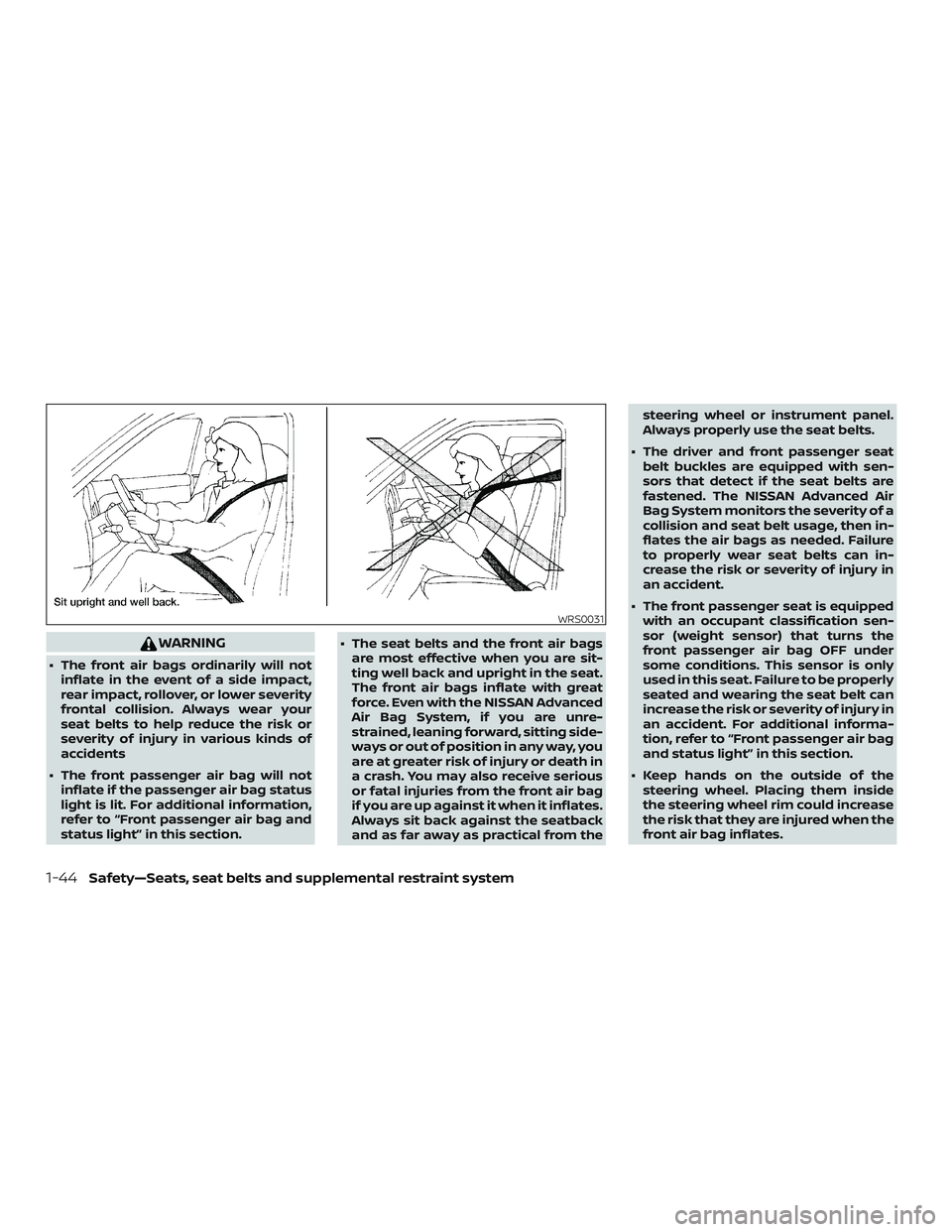
status light” in this section. ∙ The seat belts and the front air bags
are most effective when you are sit-
ting well back and upright in the seat.
The front air bags inflate with great
force. Even with the NISSAN Advanced
Air Bag System, if you are unre-
strained, leaning forward, sitting side-
ways or out of position in any way, you
are at greater risk of injury or death in
a crash. You may also receive serious
or fatal injuries from the front air bag
if you are up against it when it inflates.
Always sit back against the seatback
and as far away as practical from the steering wheel or instrument panel.
Always properly use the seat belts.
∙ The driver and front passenger seat belt buckles are equipped with sen-
sors that detect if the seat belts are
fastened. The NISSAN Advanced Air
Bag System monitors the severity of a
collision and seat belt usage, then in-
flates the air bags as needed. Failure
to properly wear seat belts can in-
crease the risk or severity of injury in
an accident.
∙ The front passenger seat is equipped with an occupant classification sen-
sor (weight sensor) that turns the
front passenger air bag OFF under
some conditions. This sensor is only
used in this seat. Failure to be properly
seated and wearing the seat belt can
increase the risk or severity of injury in
an accident. For additional informa-
tion, refer to “Front passenger air bag
and status light” in this section.
∙ Keep hands on the outside of the steering wheel. Placing them inside
the steering wheel rim could increase
the risk that they are injured when the
front air bag inflates.
WRS0031
1-44Safety—Seats, seat belts and supplemental restraint system
Page 71 of 428
The driver supplemental front-impact air
bag is located in the center of the steering
wheel. The front passenger supplemental
front-impact air bag is mounted in the
dashboard above the glove box. The front
air bags are designed to inflate in higher
severity frontal collisions, although they
may inflate if the forces in another type of
collision are similar to those of a higher
severity frontal impact. They may not in-
flate in certain frontal collisions. Vehicle
damage (or lack of it) is not always an indi-
cation of proper front air bag system op-
eration.
The NISSAN Advanced Air Bag System
monitors information from the crash zone
sensor, the Air bag Control Unit (ACU), seat
belt buckle sensors and occupation classi-
fication sensor (weight sensor). Inflator op-
eration is based on the severity of a colli-
sion and seat belt usage for the driver. For
the front passenger, the occupant classifi-
cation sensor is also monitored. Based on
information from the sensor, only one front
air bag may inflate in a crash, depending on
the crash severity and whether the front
occupants are belted or unbelted. Addi-
tionally, the front passenger air bag may be
automatically turned off under some con-
ditions, depending on the weight detected
on the front passenger seat and how theseat belt is used. If the front passenger air
bag is OFF, the front passenger air bag sta-
tus light will be illuminated. For additional
information, refer to “Front passenger air
bag and status light” in this section. One
front air bag inflating does not indicate im-
proper performance of the system.
If you have any questions about your air
bag system, it is recommended that you
visit a NISSAN dealer to obtain information
about the system. If you are considering
modification of your vehicle due to a dis-
ability, you may also contact NISSAN. Con-
tact information is contained in the front of
this Owner’s Manual.
When a front air bag inflates, a fairly loud
noise may be heard, followed by the re-
lease of smoke. This smoke is not harmful
and does not indicate a fire. Care should be
taken to not inhale it, as it may cause irrita-
tion and choking. Those with a history of a
breathing condition should get fresh air
promptly.
Front air bags, along with the use of seat
belts, help to cushion the impact force on
the face and chest of the front occupants.
They can help save lives and reduce seri-
ous injuries. However, an inflating front air
bag may cause facial abrasions or other
injuries. Front air bags do not provide re-
straint to the lower body.
Even with NISSAN Advanced Air Bags, seat
belts should be correctly worn and the
driver and front passenger seated upright
as far as practical away from the steering
wheel or instrument panel. The front air
bags inflate quickly in order to help protect
the front occupants. Because of this, the
force of the front air bag inflating can in-
crease the risk of injury if the occupant is
too close to, or is against, the front air bag
module during inflation.
The front air bags deflate quickly af ter a
collision.
The front air bags operate only when the
ignition switch is in the ON position.
Af ter placing the ignition switch in the
ON position, the supplemental air bag
warning light illuminates. The supple-
mental air bag warning light will turn off
af ter about 7 seconds if the system is
operational.
Safety—Seats, seat belts and supplemental restraint system1-51
Page 76 of 428
∙ A child restraint or other object pressingagainst the rear of the seatback.
∙ A rear passenger pushing or pulling on the back of the front passenger seat.
∙ Forcing the front seat or seatback against an object on the seat or floor
behind it.
∙ An object placed under the front pas- senger seat.
∙ An object placed between the seat cushion and center console.
If the vehicle is moving, please come to a
stop when it is safe to do so. Check and
correct any of the above conditions. Re-
start the vehicle and wait 1 minute.
NOTE:
A system check will be performed during
which the front passenger air bag status
light will remain lit for about 7 seconds
initially.
If the light is still OFF af ter this, the small
adult, child or child restraint should be re-
positioned in the rear seat and the vehicle
should be checked as soon as possible. It is
recommended that you visit a NISSAN
dealer for this service. 3. If the light is OFF with no front passen-
ger and no objects on the front pas-
senger seat, the vehicle should be
checked. It is recommended that you
visit a NISSAN dealer as soon as pos-
sible.
Other supplemental front-impact air
bag precautions
WARNING
∙ Do not place any objects on the steer- ing wheel pad or on the instrument
panel. Also, do not place any objects
between any occupant and the steer-
ing wheel or instrument panel. Such
objects may become dangerous pro-
jectiles and cause injury if the front air
bags inflate.
∙ Immediately af ter inflation, several front air bag system components will
be hot. Do not touch them; you may
severely burn yourself.
∙ No unauthorized changes should be made to any components or wiring of
the supplemental air bag system. This
is to prevent accidental inflation of
the supplemental air bag or damage
to the supplemental air bag system. ∙ Do not make unauthorized changes
to your vehicle’s electrical system,
suspension system or front end struc-
ture. This could affect proper opera-
tion of the front air bag system.
∙ Tampering with the front air bag sys- tem may result in serious personal in-
jury. Tampering includes changes to
the steering wheel and the instru-
ment panel assembly by placing ma-
terial over the steering wheel pad and
above the instrument panel or by in-
stalling additional trim material
around the air bag system.
∙ Removing or modif ying the front pas- senger seat may affect the function of
the air bag system and result in seri-
ous personal injury.
1-56Safety—Seats, seat belts and supplemental restraint system
Page 84 of 428
2 Instruments and controls
Instrument Panel................................2-2
Meters and gauges ..............................2-4
Speedometer and odometer .................2-4
Tachometer ..................................2-6
Engine coolant temperature gauge ..........2-6
Fuel gauge ................................... 2-7
Warning lights, indicator lights and audible
reminders .......................................2-8
Checking lights ...............................2-8
Warning lights ................................2-9
Indicator lights .............................. 2-14
Audible reminders ........................... 2-16
Vehicle information display .....................2-17
How to use the vehicle information
display ...................................... 2-17
Startup display .............................. 2-18
Drive computer .............................. 2-18
Settings ..................................... 2-19
Vehicle information display warnings
and indicators ............................... 2-27
Control Panel and vehicle information display
Interaction ..................................... 2-32
Audio ........................................ 2-32
Receiving a call .............................. 2-33Text Messaging
.............................. 2-34
Navigation System .......................... 2-36
Navigation Swipe to Meter ...................2-39
Security systems ............................... 2-39
Vehicle security system .....................2-39
NISSAN Vehicle Immobilizer System .........2-41
Wiper and washer switch .......................2-42
Switch operation ............................ 2-42
Rain-sensing auto wiper system
(if so equipped) .............................. 2-44
Rear window and outside mirror
(if so equipped) defroster switch ................2-45
Headlight and turn signal switch ...............2-45
Headlight control switch .....................2-45
LED Daytime Running Lights (DRL)
system ......................................2-47
Instrument brightness control ...............2-48
Turn signal switch ........................... 2-48
F
og light switch ............................. 2-49
Horn ........................................... 2-50
Climate-controlled seat switches
(if so equipped) ................................. 2-50
Heated seat switches (if so equipped) ..........2-51
Heated steering wheel switch (if so equipped) . . 2-52
Page 87 of 428
17. Push-button ignition switch(P. 5-10)
18. Bluetooth® Hands-Free Phone
System*
Cruise control switches
(if so equipped) (P. 5-41)
Intelligent Cruise Control (ICC)
switches (if so equipped) (P. 5-43)
19. Tilt and telescopic steering (P. 3-25)
20. Audio control switches* Vehicle information display control
switches (P. 2-17)
21. Hood release (P. 3-21)
22. Fuse box (P. 8-18)
23. Heated steering wheel switch
(if so equipped) (P. 2-52)
Vehicle Dynamic Control (VDC) OFF
switch (P. 2-53)
Trunk release switch (P. 3-21)
Rear power sunshade switch
(if so equipped) (P. 2-65)
24. Instrument brightness control
(P. 2-45)
Twin trip odometer reset switch
(P. 2-5)
*: Refer to the separate NissanConnect®
Owner’s Manual. Refer to the page number indicated in
parentheses for operating details.
Instruments and controls2-3
Page 96 of 428
∙ If the light illuminates while driving,avoid sudden steering maneuvers or
abrupt braking, reduce vehicle speed,
pull off the road to a safe location and
stop the vehicle as soon as possible.
Driving with under-inflated tires may
permanently damage the tires and in-
crease the likelihood of tire failure. Se-
rious vehicle damage could occur and
may lead to an accident and could re-
sult in serious personal injury or
death. Check the tire pressure for all
four tires. Adjust the tire pressure to
the recommended COLD tire pressure
show on the Tire and Loading Infor-
mation label located in the driver’s
door opening to turn the low tire pres-
sure warning light off. If the light still
illuminates while driving af ter adjust-
ing the tire pressure, a tire may be flat
or the TPMS may be malfunctioning. If
you have a flat tire, replace it with a
spare tire as soon as possible. If no tire
is flat and all tires are properly in-
flated, have the vehicle checked. It is
recommended that you visit a NISSAN
dealer for this service. ∙ When replacing a wheel without the
TPMS such as the spare tire, the TPMS
will not function and the low tire pres-
sure warning light will flash for ap-
proximately 1 minute. The light will re-
main on af ter 1 minute. Have your
tires replaced and/or TPMS system
reset as soon as possible. It is recom-
mended that you visit a NISSAN dealer
for these services.
∙ Replacing tires with those not origi- nally specified by NISSAN could affect
the proper operation of the TPMS.
CAUTION
∙ The TPMS is not a substitute for theregular tire pressure check. Be sure to
check the tire pressure regularly.
∙ If the vehicle is being driven at speeds of less than 16 mph (25 km/h), the
TPMS may not operate correctly.
∙ Be sure to install the specified size of tires to the four wheels correctly.
Master warning light
The master warning light illuminates
whenever there is an active warning that
can be reviewed in the “warnings review” content page in the meter, or if there is a
red-level warning being displayed (which
cannot be dismissed). The master warning
light will illuminate red if a red-level warning
is being displayed, or yellow otherwise.
∙ Push Engine Start Lock Warning
∙ Key Fob Removed from Vehicle Warning
∙ Incorrect Key (RED)
∙ Door/Trunk Open (vehicle stationary)
∙ Trunk Open (vehicle moving)
∙ Door Open (RED with vehicle moving)
∙ Parking Brake ON (RED)
∙ Low Washer Fluid
∙ I-Key System Fault
∙ Low Tire Pressure
∙ CVT Warning
∙ Sonar Parking Sensor Error
∙ LED Headlight Failure (RED if no other red warnings are active)
∙ Chassis Control warning
For additional information, refer to “Vehicle
information display” in this section.
2-12Instruments and controls
Page 97 of 428
Power steering warninglight
WARNING
∙ If the engine is not running or is turned off while driving, the power as-
sist for the steering will not work.
Steering will be harder to operate.
∙ When the power steering warning light illuminates with the engine run-
ning, there will be no power assist for
the steering. You will still have control
of the vehicle, but the steering will be
harder to operate. Have the power
steering system checked. It is recom-
mended that you visit a NISSAN dealer
for this service.
When the ignition switch is placed in the ON
position, the power steering warning light
illuminates. Af ter starting the engine, the
power steering warning light turns off. This
indicates the power steering is operational.
If the power steering warning light illumi-
nates while the engine is running, it may
indicate the power steering is not function-
ing properly and may need servicing. Have
the power steering checked. It is recom-
mended that you visit a NISSAN dealer for
this service. When the power steering warning light illu-
minates with the engine running, there will
be no power assist for the steering, but you
will still have control of the vehicle. At this
time, greater steering effort is required to
operate the steering wheel, especially in
sharp turns and at low speeds.
For additional information, refer to “Power
steering” in the “Starting and driving” sec-
tion of this manual.
Seat belt warning light and
chime
The light and chime remind you to fasten
your seat belts. The light illuminates when-
ever the ignition switch is placed in the ON
or START position and remains illuminated
until the driver’s seat belt is fastened. At the
same time, the chime sounds for about
6 seconds unless the driver’s seat belt is
securely fastened.
The seat belt warning light may also illumi-
nate if the front passenger’s seat belt is not
fastened when the front passenger’s seat
is occupied. For 7 seconds af ter the ignition
switch is placed in the ON position, the sys-
tem does not activate the warning light for
the front passenger. For additional information, refer to “Seat
belts” in the “Safety—Seats, seat belts and
supplemental restraint system” section of
this manual.
Supplemental air bag
warning light
When the ignition switch is placed in the ON
or START position, the supplemental air
bag warning light illuminates for about
7 seconds and then turns off. This means
the system is operational.
If any of the following conditions occur, the
front air bag, side air bag, curtain air bag,
and pretensioner seat belt systems need
servicing:
∙ The supplemental air bag warning light remains on af ter approximately 7 sec-
onds.
∙ The supplemental air bag warning light flashes intermittently.
∙ The supplemental air bag warning light does not come on at all.
It is recommended that you visit a NISSAN
dealer for these services.
Unless checked and repaired, the supple-
mental restraint system (air bag system)
and/or the pretensioner(s) may not func-
Instruments and controls2-13
Page 99 of 428
Operation
The MIL will come on in one of two ways:∙ MIL on steady — An emission control system malfunction has been de-
tected. Check the fuel-filler cap if the
Loose Fuel Cap warning appears in the
vehicle information display. If the fuel-
filler cap is loose or missing, tighten or
install the cap and continue to drive the
vehicle. The
light should turn off
af ter a few driving trips. If the
light
does not turn off af ter a few driving
trips, have the vehicle inspected. It is
recommended that you visit a NISSAN
dealer for this service. You do not need
to have your vehicle towed to the
dealer.
∙ MIL blinking — An engine misfire has been detected which may damage the
emission control system. To reduce or
avoid emission control system dam-
age:
– do not drive at speeds above 45 mph (72 km/h).
– avoid hard acceleration or decelera- tion.
– avoid steep uphill grades. – if possible, reduce the amount of
cargo being hauled or towed.
The MIL may stop blinking and come on
steady. Have the vehicle inspected. It is rec-
ommended that you visit a NISSAN dealer
for this service. You do not need to have
your vehicle towed to the dealer.
CAUTION
Continued vehicle operation without
having the emission control system
checked and repaired as necessary
could lead to poor driveability, reduced
fuel economy, and possible damage to
the emission control system.
Security indicator light
This light blinks when the ignition switch is
placed in the OFF, LOCK or ACC (if so
equipped) position.
The blinking security indicator light indi-
cates that the security systems equipped
on the vehicle are operational.
For additional information, refer to “Security
systems” in this section.
Side light and headlight indicator light (green)
The side light and headlight indicator light
illuminates when the side light or head-
lights are on (not including daytime run-
ning or signature lights). If the headlight
switch is in the AUTO position, the side light
and headlight indicator light will illuminate
when the headlights turn on. For additional
information, refer to “Headlight and turn
signal switch” in this section.
Slip indicator light
This indicator will blink when the VDC sys-
tem is operating, thus alerting the driver to
the fact that the road surface is slippery
and the vehicle is nearing its traction limits.
You may feel or hear the system working;
this is normal.
The light will blink for a few seconds af ter
the VDC system stops limiting wheel spin.
The
indicator light also comes on
when you place the ignition switch in the
ON position. The light will turn off af ter ap-
proximately 2 seconds if the system is op-
erational. If the light does not come on
Instruments and controls2-15