change wheel NISSAN MAXIMA 2019 Owner´s Manual
[x] Cancel search | Manufacturer: NISSAN, Model Year: 2019, Model line: MAXIMA, Model: NISSAN MAXIMA 2019Pages: 492, PDF Size: 5.82 MB
Page 281 of 492
HOW TO ENABLE/DISABLE THE
BSW SYSTEM
Perform the following steps to enable or
disable the BSW system.
Using the “Settings” in the vehicle infor-
mation display:1. Press the
buttons until “Settings”
displays in the vehicle information dis-
play and then press the OK button. Use
the
button to select “Driver Assis-
tance.” Then press the OK button.
2. Select “Blind Spot” and press the OK button.
Using the “Driving Aids” screen in the ve-
hicle information display:
1. Use the
buttons on the steering
wheel to scroll to the Driving Aids
screen.
2. Press the OK button to access the Driver Assistance menu.
3. Select “Blind Spot” and press the OK to change the Driving Aids setting. NOTE:
∙ When enabling/disabling the system,
the system will retain current set-
tings even if the engine is restarted.
∙ The RCTA system (if so equipped) is
integrated into the BSW system.
There is not a separate selection in
the vehicle information display for
the RCTA system. When the BSW is
disabled, the RCTA system is also dis-
abled.
∙ When the BSW system is turned on,
the BSW/RCTA indicator (white) in the
vehicle information display illumi-
nates.BSW SYSTEM LIMITATIONS
WARNING
Listed below are the system limitations
for the BSW system. Failure to operate
the vehicle in accordance with these
system limitations could result in seri-
ous injury or death.
∙ The BSW system cannot detect all ve-
hicles under all conditions. ∙ The radar sensors may not be able to
detect and activate BSW when certain
objects are present such as:
– Pedestrian, bicycles, animals.
– Vehicles such as motorcycles, low height vehicles, or high ground
clearance vehicles.
– Oncoming vehicles.
– Vehicles remaining in the detec- tion zone when you accelerate
from a stop.
– A vehicle merging into an adjacent lane at a speed approximately the
same as your vehicle.
– A vehicle approaching rapidly from behind.
– A vehicle which your vehicle over- takes rapidly.
– A vehicle that passes through the detection zone quickly.
– When overtaking several vehicles in a row, the vehicles af ter the first
vehicle may not be detected if they
are traveling close together.
Starting and driving5-41
Page 291 of 492
HOW TO ENABLE/DISABLE THE
RCTA SYSTEM
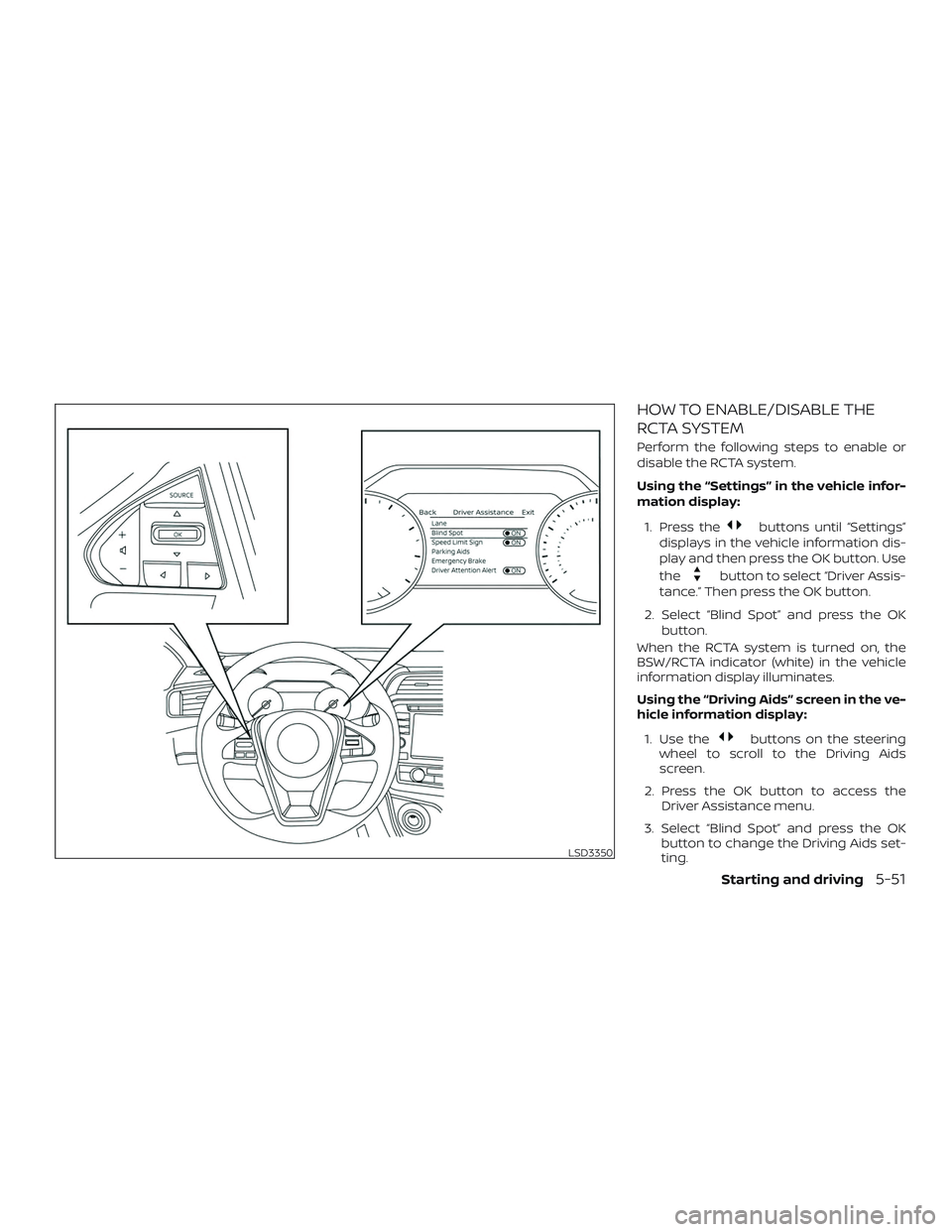
Perform the following steps to enable or
disable the RCTA system.
Using the “Settings” in the vehicle infor-
mation display:1. Press the
buttons until “Settings”
displays in the vehicle information dis-
play and then press the OK button. Use
the
button to select “Driver Assis-
tance.” Then press the OK button.
2. Select “Blind Spot” and press the OK button.
When the RCTA system is turned on, the
BSW/RCTA indicator (white) in the vehicle
information display illuminates.
Using the “Driving Aids” screen in the ve-
hicle information display:
1. Use the
buttons on the steering
wheel to scroll to the Driving Aids
screen.
2. Press the OK button to access the Driver Assistance menu.
3. Select “Blind Spot” and press the OK button to change the Driving Aids set-
ting.
LSD3350
Starting and driving5-51
Page 305 of 492
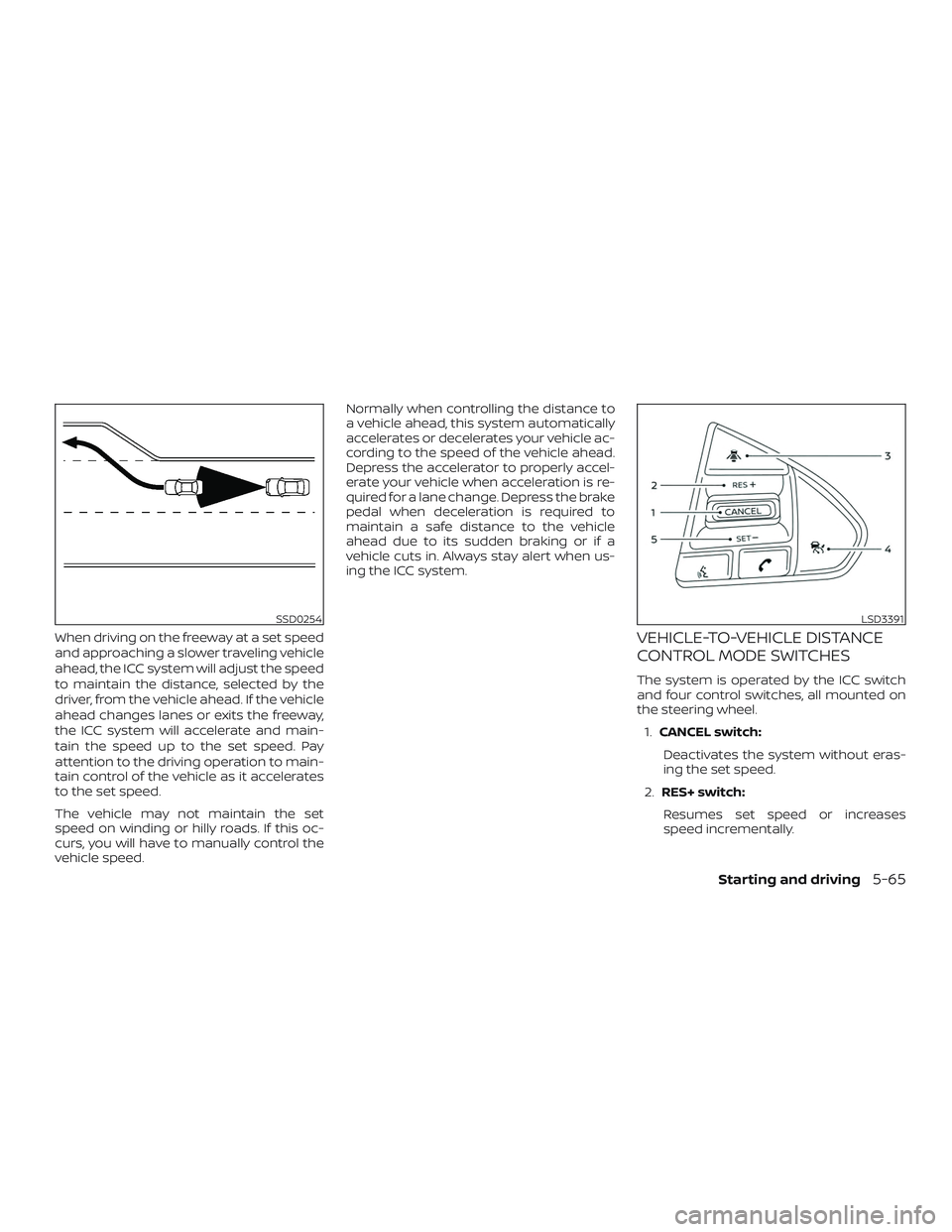
When driving on the freeway at a set speed
and approaching a slower traveling vehicle
ahead, the ICC system will adjust the speed
to maintain the distance, selected by the
driver, from the vehicle ahead. If the vehicle
ahead changes lanes or exits the freeway,
the ICC system will accelerate and main-
tain the speed up to the set speed. Pay
attention to the driving operation to main-
tain control of the vehicle as it accelerates
to the set speed.
The vehicle may not maintain the set
speed on winding or hilly roads. If this oc-
curs, you will have to manually control the
vehicle speed.Normally when controlling the distance to
a vehicle ahead, this system automatically
accelerates or decelerates your vehicle ac-
cording to the speed of the vehicle ahead.
Depress the accelerator to properly accel-
erate your vehicle when acceleration is re-
quired for a lane change. Depress the brake
pedal when deceleration is required to
maintain a safe distance to the vehicle
ahead due to its sudden braking or if a
vehicle cuts in. Always stay alert when us-
ing the ICC system.VEHICLE-TO-VEHICLE DISTANCE
CONTROL MODE SWITCHES
The system is operated by the ICC switch
and four control switches, all mounted on
the steering wheel.
1. CANCEL switch:
Deactivates the system without eras-
ing the set speed.
2. RES+ switch:
Resumes set speed or increases
speed incrementally.
SSD0254LSD3391
Starting and driving5-65
Page 324 of 492
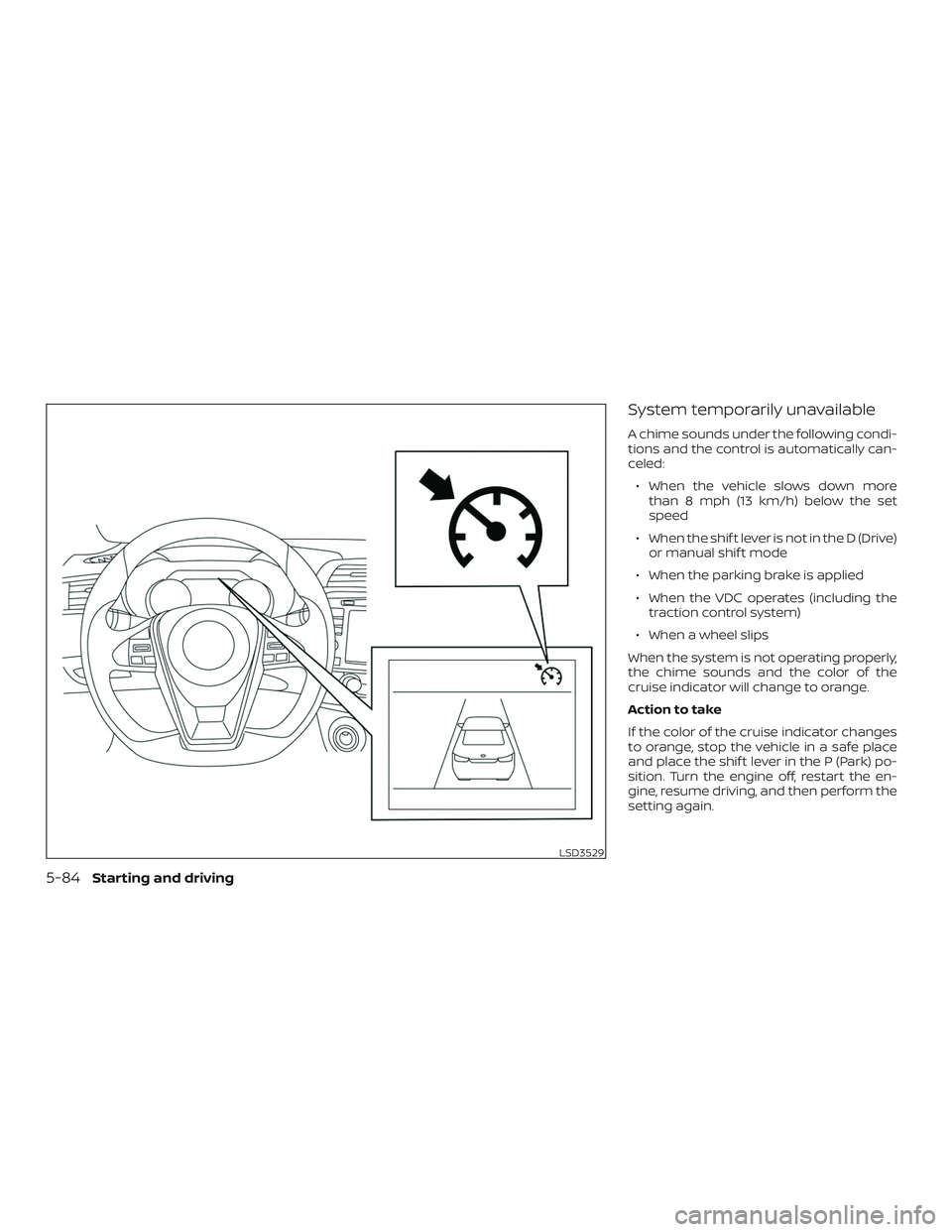
System temporarily unavailable
A chime sounds under the following condi-
tions and the control is automatically can-
celed:∙ When the vehicle slows down more than 8 mph (13 km/h) below the set
speed
∙ When the shif t lever is not in the D (Drive) or manual shif t mode
∙ When the parking brake is applied
∙ When the VDC operates (including the traction control system)
∙ When a wheel slips
When the system is not operating properly,
the chime sounds and the color of the
cruise indicator will change to orange.
Action to take
If the color of the cruise indicator changes
to orange, stop the vehicle in a safe place
and place the shif t lever in the P (Park) po-
sition. Turn the engine off, restart the en-
gine, resume driving, and then perform the
setting again.
LSD3529
5-84Starting and driving
Page 329 of 492
– An ultrasonic wave source, such asanother vehicle’s sonar, is near the
vehicle.
∙ Once the automatic brake control op- erates, it does not operate again if the
vehicle approaches the same
obstacle.
∙ The automatic brake control can only operate for a short period of time.
Therefore, the driver must depress
the brake pedal.
∙ In the following situations, the RAB system may not operate properly or
may not function sufficiently:
– The vehicle is driven in bad weather (rain, fog, snow, etc.).
– The vehicle is driven on a steep hill.
– The vehicle’s posture is changed (e.g., when driving over a bump).
– The vehicle is driven on a slippery road.
– The vehicle is turned sharply by turning the steering wheel fully.
– Snow chains are used. – Wheels or tires other than NISSAN
recommended are used.
– The brakes are cold at low ambient temperatures or immediately af ter
driving has started.
– The braking force becomes poor due to wet brakes af ter driving
through a puddle or washing the
vehicle.
∙ Turn the RAB system off in the follow- ing conditions to prevent the occur-
rence of an unexpected accident re-
sulting from sudden system
operation:
– The vehicle is towed.
– The vehicle is carried on a flatbed truck.
– The vehicle is on the chassis dynamometer.
– The vehicle drives on an uneven road surface. – Suspension parts other than those
designated as Genuine NISSAN
parts are used. (If the vehicle
height or the vehicle body inclina-
tion is changed, the system may
not detect an obstacle correctly.)
∙ Excessive noise (e.g., audio system volume, an open vehicle window) will
interfere with the chime sound, and it
may not be heard.
Starting and driving5-89
Page 375 of 492
∙ The system is not designed to preventcontact with small or moving objects.
Always move slowly. The system will
not detect small objects below the
bumper, and may not detect objects
close to the bumper or on the ground.
∙ The system may not detect the fol- lowing objects: fluff y objects such as
snow, cloth, cotton, glass, wool, etc.,
and thin objects such as rope, wire
and chain, etc., or wedge-shaped
objects.
If your vehicle sustains damage to the
bumper fascia, leaving it misaligned or
bent, the sensing zone may be altered
causing inaccurate measurement of ob-
stacles or false alarms.
CAUTION
∙ Excessive noise (such as audio system volume or an open vehicle window)
will interfere with the tone and it may
not be heard. ∙ Keep the sonar sensors (located on
the bumper fascia) free from snow, ice
and large accumulations of dirt. Do
not clean the sensors with sharp ob-
jects. If the sensors are covered, the
accuracy of the sonar function will be
diminished.
SYSTEM OPERATION
The system informs with a visual and au-
dible alert of front obstacles when the shif t
lever is in the D (Drive) position and both
front and rear obstacles when the shif t le-
ver is in the R (Reverse) position.
Sonar Operation Table
FR Sensor RR Sensor
Range Sound Display Sound Display Px†x †
R ooo o
Nx†x † Doox †
o – Display/Beep when detect
† – Display on camera view
x – No Display and Beep
The system is deactivated at speeds above
6 mph (10 km/h). It is reactivated at lower
speeds.
While the vehicle is moving the audible alert
will stop af ter 3 seconds when an obstacle
is detected by only the corner sensor and
distance does not change. The audible
alert will also stop when the obstacle
moves away from the vehicle. At any time
the lef t side button of the steering wheel
(
buttons) is available to cancel the
audible alert.
When the object is detected, the indicator
(green) appears and blinks and the tone
sounds intermittently. When the vehicle
moves closer to the object, the color of the
indicator turns yellow and the rate of the
blinking increases. When the vehicle is very
close to the object, the indicator stops
blinking and turns red, and the tone
sounds continuously.
Starting and driving5-135
Page 384 of 492
CHANGING A FLAT TIRE
If you have a flat tire, follow the instructions
below:
Stopping the vehicle
1. Safely move the vehicle off the road andaway from traffic.
2. Turn on the hazard warning flashers.
3. Park on a level surface and apply the parking brake. Move the shif t lever to P
(Park).
4. Turn off the engine.
5. Raise the hood to warn other traffic and to signal professional road assis-
tance personnel that you need assis-
tance.
6. Have all passengers get out of the ve- hicle and stand in a safe place, away
from traffic and clear of the vehicle.
WARNING
∙ Make sure the parking brake is se-curely applied and the Continuously
Variable Transmission (CVT) is shif ted
into P (Park).
∙ Never change tires when the vehicle is on a slope, ice or slippery areas. This is
hazardous.
∙ Never change tires if oncoming traffic is close to your vehicle. Wait for pro-
fessional road assistance.
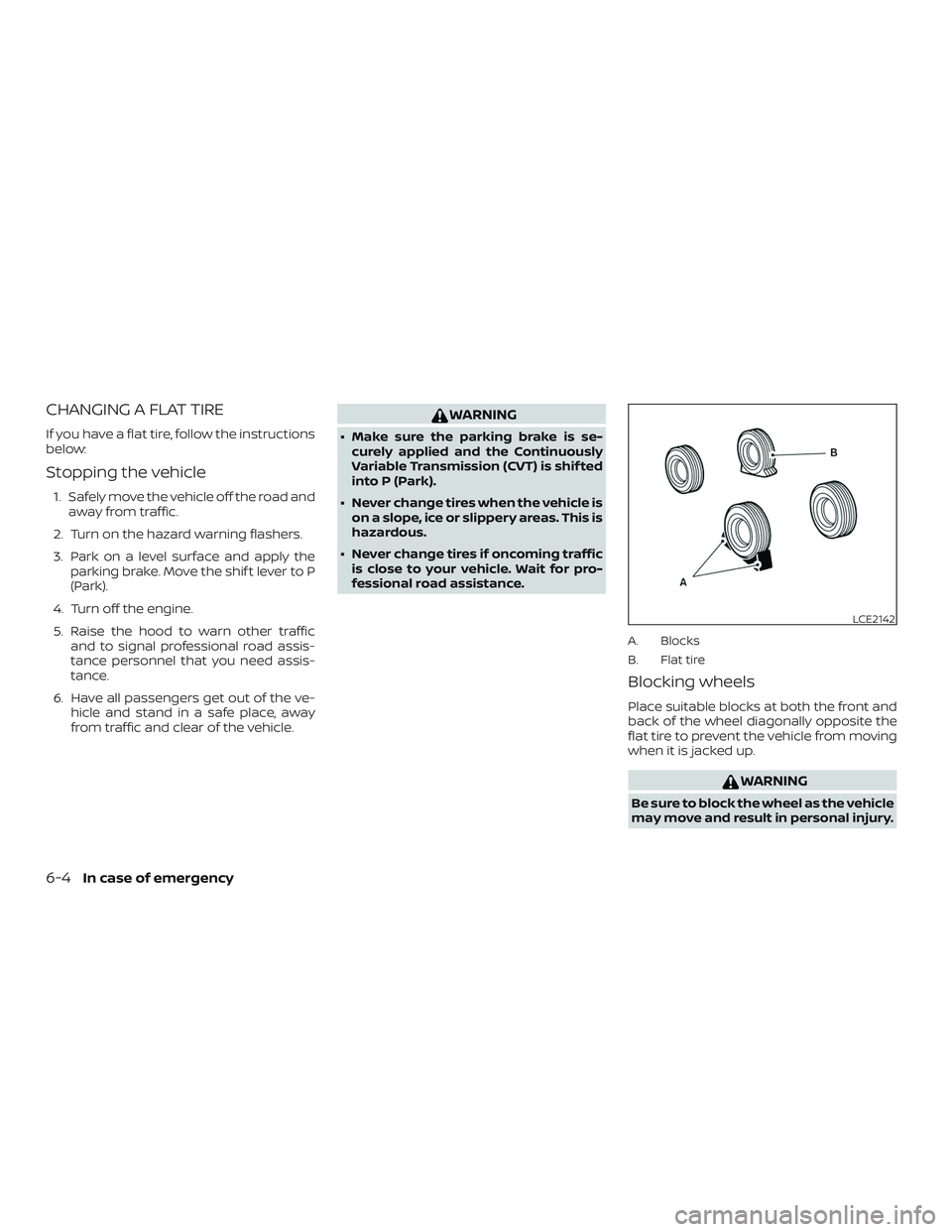
A. Blocks
B. Flat tire
Blocking wheels
Place suitable blocks at both the front and
back of the wheel diagonally opposite the
flat tire to prevent the vehicle from moving
when it is jacked up.
WARNING
Be sure to block the wheel as the vehicle
may move and result in personal injury.
LCE2142
6-4In case of emergency
Page 386 of 492
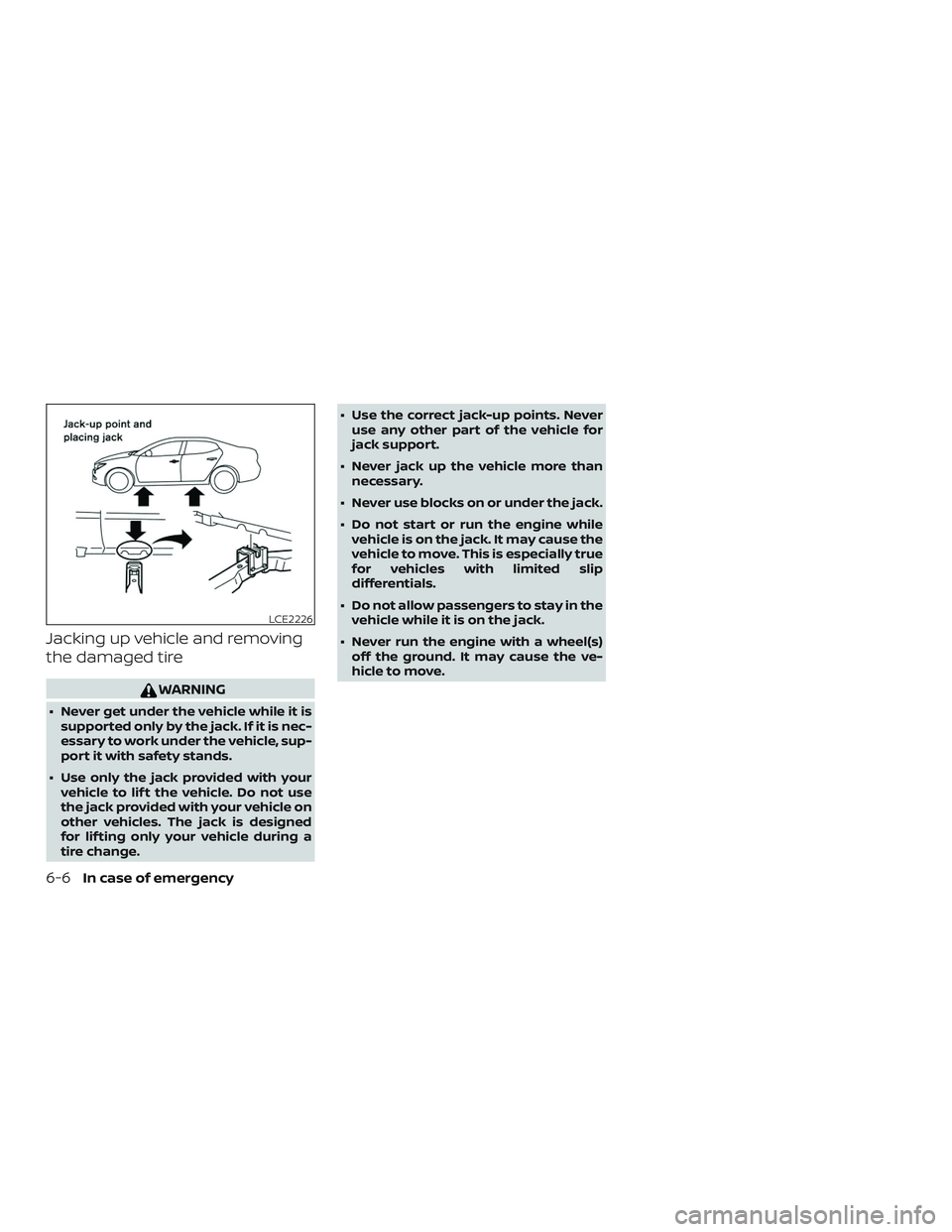
Jacking up vehicle and removing
the damaged tire
WARNING
∙ Never get under the vehicle while it issupported only by the jack. If it is nec-
essary to work under the vehicle, sup-
port it with safety stands.
∙ Use only the jack provided with your vehicle to lif t the vehicle. Do not use
the jack provided with your vehicle on
other vehicles. The jack is designed
for lif ting only your vehicle during a
tire change. ∙ Use the correct jack-up points. Never
use any other part of the vehicle for
jack support.
∙ Never jack up the vehicle more than necessary.
∙ Never use blocks on or under the jack.
∙ Do not start or run the engine while vehicle is on the jack. It may cause the
vehicle to move. This is especially true
for vehicles with limited slip
differentials.
∙ Do not allow passengers to stay in the vehicle while it is on the jack.
∙ Never run the engine with a wheel(s) off the ground. It may cause the ve-
hicle to move.
LCE2226
6-6In case of emergency
Page 440 of 492
Replacing wheels and tires
When replacing a tire, use the same size,
tread design, speed rating and load carry-
ing capacity as originally equipped. Rec-
ommended types and sizes are shown in
“Wheels and tires” in the “Technical and con-
sumer information” section of this manual.
WARNING
∙ The use of tires other than those rec-ommended or the mixed use of tires
of different brands, construction
(bias, bias-belted or radial), or tread
patterns can adversely affect the ride,
braking, handling, Vehicle Dynamic
Control (VDC) system, ground clear-
ance, body-to-tire clearance, tire
chain clearance, speedometer cali-
bration, headlight aim and bumper
height. Some of these effects may
lead to accidents and could result in
serious personal injury. ∙ If your vehicle was originally
equipped with four tires that were the
same size and you are only replacing
two of the four tires, install the new
tires on the rear axle. Placing new tires
on the front axle may cause loss of
vehicle control in some driving condi-
tions and cause an accident and per-
sonal injury.
∙ If the wheels are changed for any rea- son, always replace with wheels
which have the same off-set dimen-
sion. Wheels of a different off-set
could cause premature tire wear, de-
grade vehicle handling characteris-
tics, affect the VDC system and/or in-
terference with the brake discs. Such
interference can lead to decreased
braking efficiency and/or early brake
pad/shoe wear. For additional infor-
mation on wheel-off set dimensions,
refer to “Wheels and tires” in the
“Technical and consumer informa-
tion” section of this manual. ∙ When replacing a wheel without the
TPMS such as the spare tire, the TPMS
will not function and the low tire pres-
sure warning light will flash for ap-
proximately 1 minute. The light will re-
main on af ter 1 minute. Have your
tires replaced and/or TPMS system
reset as soon as possible. It is recom-
mended that you visit a NISSAN dealer
for this service.
∙ Replacing tires with those not origi- nally specified by NISSAN could affect
the proper operation of the TPMS.
∙ The TPMS sensor may be damaged if it is not handled correctly. Be careful
when handling the TPMS sensor.
∙ When replacing the TPMS sensor, the ID registration may be required. It is
recommended that you visit a NISSAN
dealer for ID registration.
∙ Do not use a valve stem cap that is not specified by NISSAN. The valve stem
cap may become stuck.
∙ Be sure that the valve stem caps are correctly fitted. Otherwise the valve
may be clogged up with dirt and
cause a malfunction or loss of
pressure.
8-36Do-it-yourself
Page 441 of 492
∙ Do not install a damaged or deformedwheel or tire even if it has been re-
paired. Such wheels or tires could
have structural damage and could fail
without warning.
∙ The use of retread tires is not recommended.
∙ For additional information regarding tires, refer to “Important Tire Safety
Information” (US) or “Tire Safety Infor-
mation” (Canada) in the Warranty In-
formation Booklet.
Wheel balance
Unbalanced wheels may affect vehicle
handling and tire life. Even with regular use,
wheels can get out of balance. Therefore,
they should be balanced as required.
Wheel balance service should be per-
formed with the wheels off the vehicle.
Spin balancing the wheels on the vehicle
could lead to mechanical damage.
∙ For additional information regarding
tires, refer to “Important Tire Safety
Information” (US) or “Tire Safety In-
formation” (Canada) in the Warranty
Information Booklet.
Care of wheels
∙ Wash the wheels when washing the ve-
hicle to maintain their appearance.
∙ Clean the inner side of the wheels when the wheel is changed or the underside
of the vehicle is washed.
∙ Do not use abrasive cleaners when washing the wheels.
∙ Inspect wheel rims regularly for dents or corrosion. Such damage may cause
loss of pressure or poor seal at the tire
bead.
∙ NISSAN recommends waxing the road wheels to protect against road salt in
areas where it is used during winter.
Spare tire (TEMPORARY USE ONLY
spare tire)
When replacing a wheel without the TPMS
such as the spare tire, the TPMS will not
function.
Observe the following precautions if the
TEMPORARY USE ONLY spare tire must be
used. Otherwise, your vehicle could be
damaged or involved in an accident:
WARNING
∙ The spare tire should be used foremergency use only. It should be re-
placed with the standard tire at the
first opportunity to avoid possible tire
or differential damage.
∙ Drive carefully while the TEMPORARY USE ONLY spare tire is installed. Avoid
sharp turns and abrupt braking while
driving.
∙ Periodically check spare tire inflation pressure. Always keep the pressure of
the TEMPORARY USE ONLY spare tire
at 60 psi (420 kPa, 4.2 bar).
∙ With the TEMPORARY USE ONLY spare tire installed do not drive the vehicle
at speeds faster than 50 mph
(80 km/h).
∙ When driving on roads covered with snow or ice, the TEMPORARY USE
ONLY spare tire should be used on the
rear wheels and the original tire used
on the front wheels (drive wheels).
Do-it-yourself8-37