ad blue NISSAN MAXIMA 2021 Owner´s Manual
[x] Cancel search | Manufacturer: NISSAN, Model Year: 2021, Model line: MAXIMA, Model: NISSAN MAXIMA 2021Pages: 476, PDF Size: 3.32 MB
Page 14 of 476
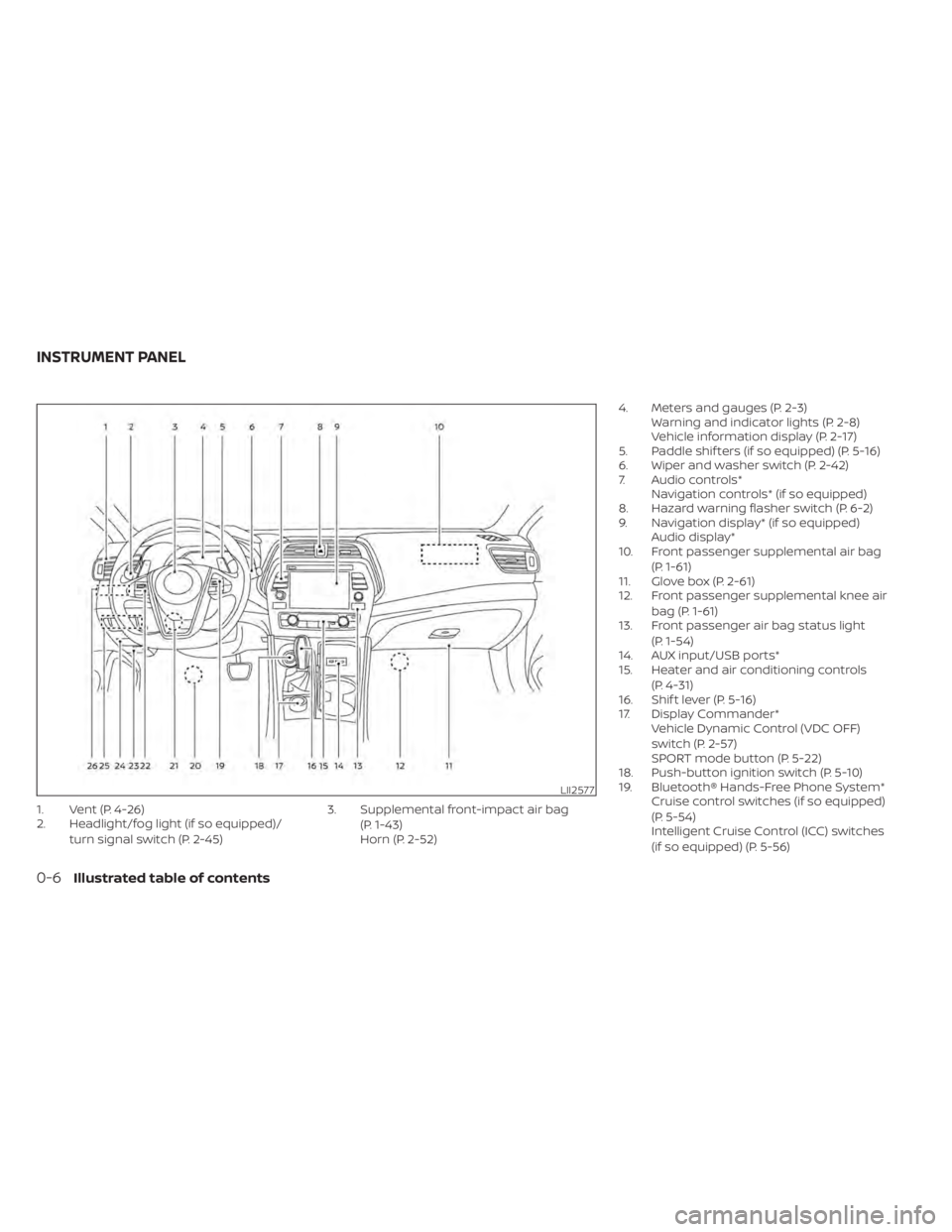
1. Vent (P. 4-26)
2. Headlight/fog light (if so equipped)/turn signal switch (P. 2-45) 3. Supplemental front-impact air bag
(P. 1-43)
Horn (P. 2-52) 4. Meters and gauges (P. 2-3)
Warning and indicator lights (P. 2-8)
Vehicle information display (P. 2-17)
5. Paddle shif ters (if so equipped) (P. 5-16)
6. Wiper and washer switch (P. 2-42)
7. Audio controls* Navigation controls* (if so equipped)
8. Hazard warning flasher switch (P. 6-2)
9. Navigation display* (if so equipped) Audio display*
10. Front passenger supplemental air bag
(P. 1-61)
11. Glove box (P. 2-61)
12. Front passenger supplemental knee air
bag (P. 1-61)
13. Front passenger air bag status light
(P. 1-54)
14. AUX input/USB ports*
15. Heater and air conditioning controls
(P. 4-31)
16. Shif t lever (P. 5-16)
17. Display Commander* Vehicle Dynamic Control (VDC OFF)
switch (P. 2-57)
SPORT mode button (P. 5-22)
18. Push-button ignition switch (P. 5-10)
19. Bluetooth® Hands-Free Phone System* Cruise control switches (if so equipped)
(P. 5-54)
Intelligent Cruise Control (ICC) switches
(if so equipped) (P. 5-56)
LII2577
INSTRUMENT PANEL
0-6Illustrated table of contents
Page 18 of 476
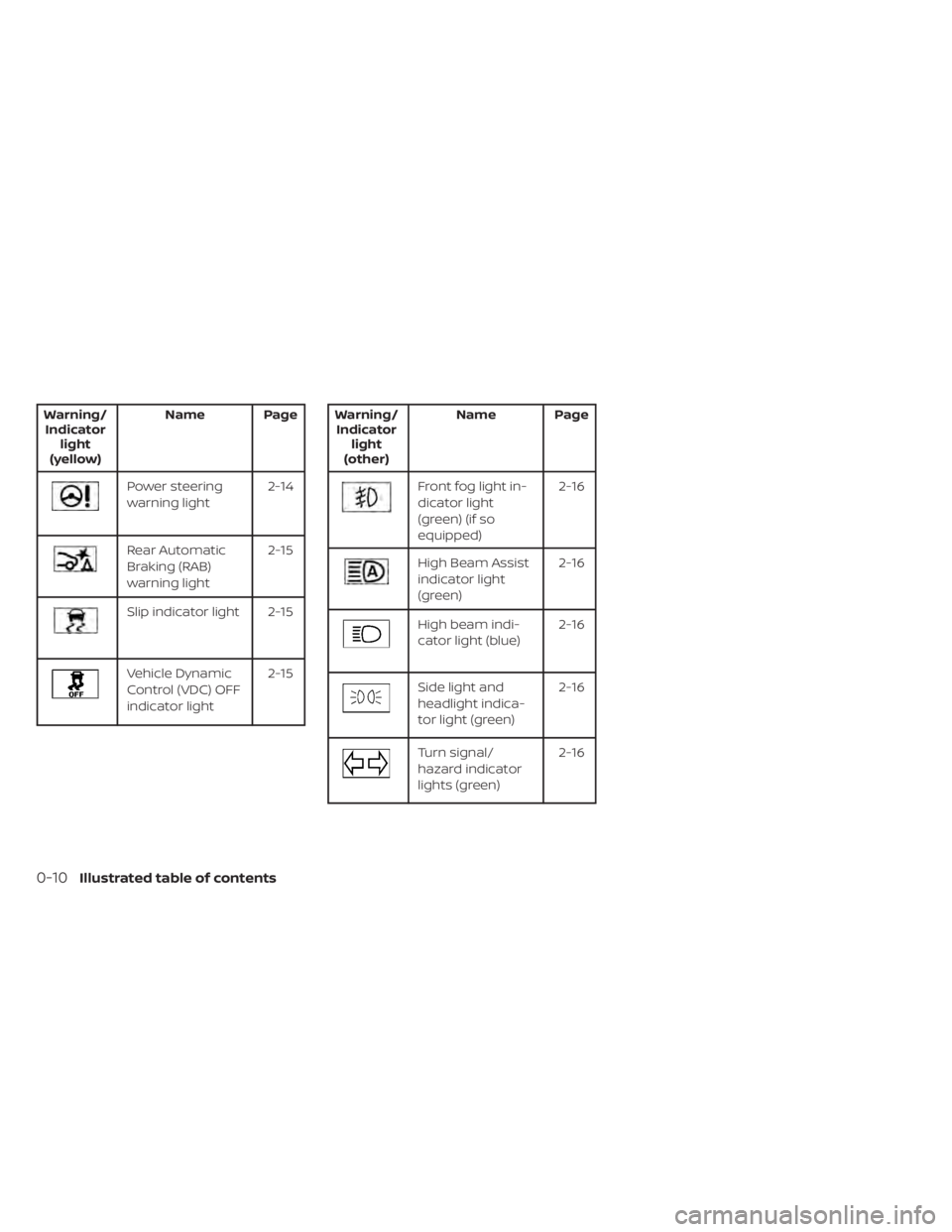
Warning/Indicator light
(yellow) Name Page
Power steering
warning light
2-14
Rear Automatic
Braking (RAB)
warning light 2-15
Slip indicator light 2-15
Vehicle Dynamic
Control (VDC) OFF
indicator light2-15
Warning/
Indicator light
(other) Name Page
Front fog light in-
dicator light
(green) (if so
equipped) 2-16
High Beam Assist
indicator light
(green)
2-16
High beam indi-
cator light (blue)
2-16
Side light and
headlight indica-
tor light (green)2-16
Turn signal/
hazard indicator
lights (green)2-16
0-10Illustrated table of contents
Page 88 of 476
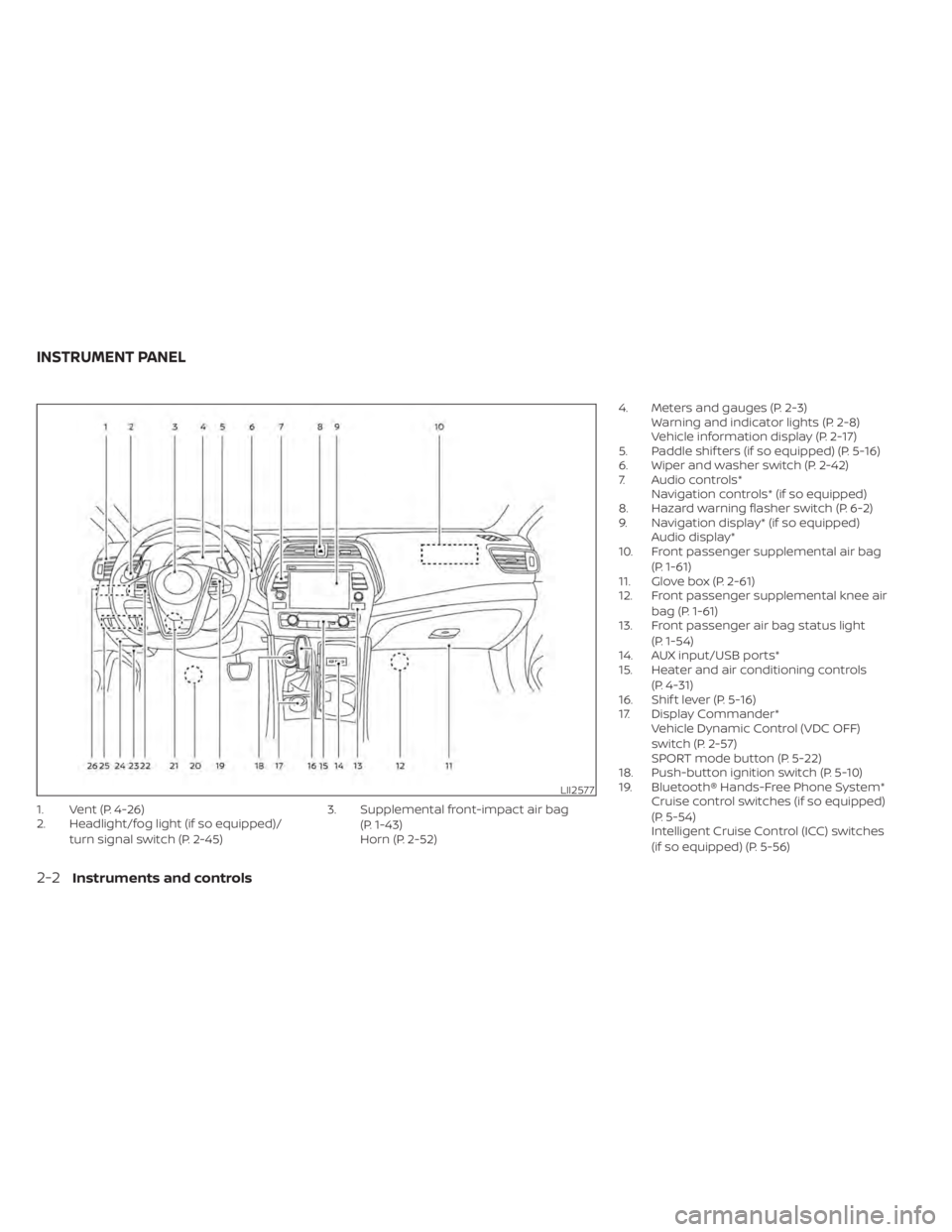
1. Vent (P. 4-26)
2. Headlight/fog light (if so equipped)/turn signal switch (P. 2-45) 3. Supplemental front-impact air bag
(P. 1-43)
Horn (P. 2-52) 4. Meters and gauges (P. 2-3)
Warning and indicator lights (P. 2-8)
Vehicle information display (P. 2-17)
5. Paddle shif ters (if so equipped) (P. 5-16)
6. Wiper and washer switch (P. 2-42)
7. Audio controls* Navigation controls* (if so equipped)
8. Hazard warning flasher switch (P. 6-2)
9. Navigation display* (if so equipped) Audio display*
10. Front passenger supplemental air bag
(P. 1-61)
11. Glove box (P. 2-61)
12. Front passenger supplemental knee air
bag (P. 1-61)
13. Front passenger air bag status light
(P. 1-54)
14. AUX input/USB ports*
15. Heater and air conditioning controls
(P. 4-31)
16. Shif t lever (P. 5-16)
17. Display Commander* Vehicle Dynamic Control (VDC OFF)
switch (P. 2-57)
SPORT mode button (P. 5-22)
18. Push-button ignition switch (P. 5-10)
19. Bluetooth® Hands-Free Phone System* Cruise control switches (if so equipped)
(P. 5-54)
Intelligent Cruise Control (ICC) switches
(if so equipped) (P. 5-56)
LII2577
INSTRUMENT PANEL
2-2Instruments and controls
Page 94 of 476

Warning/Indicator light (red)Warning/Indicator light (yellow) Warning/Indicator light (other)
orBrake warning lightorAnti-lock Braking System (ABS)
warning lightFront fog light indicator light (green)
(if so equipped)
Charge warning lightAutomatic Emergency Braking (AEB) with
Pedestrian Detection system warning lightHigh Beam Assist indicator light (green)
Engine oil pressure warning lightFront passenger air bag status lightHigh beam indicator light (blue)
Master warning lightLow tire pressure warning lightSide light and headlight indicator light
(green)
Seat belt warning light and chimeMalfunction Indicator Light (MIL)Turn signal/hazard indicator lights (green)
Security indicator lightMaster warning light
Supplemental air bag warning lightPower steering warning light
Rear Automatic Braking (RAB) warning light
Slip indicator light
Vehicle Dynamic Control (VDC) OFF
indicator light
WARNING LIGHTS, INDICATOR LIGHTS
AND AUDIBLE REMINDERS
2-8Instruments and controls
Page 102 of 476
Have the VDC system checked. It is recom-
mended that you visit a NISSAN dealer for
this service.
While the VDC system is operating, you
might feel a slight vibration or hear the sys-
tem working when starting the vehicle or
accelerating, but this is normal.
WARNING/INDICATOR LIGHTS
(other)
For additional information, see “Vehicle in-
formation display” (P. 2-17).
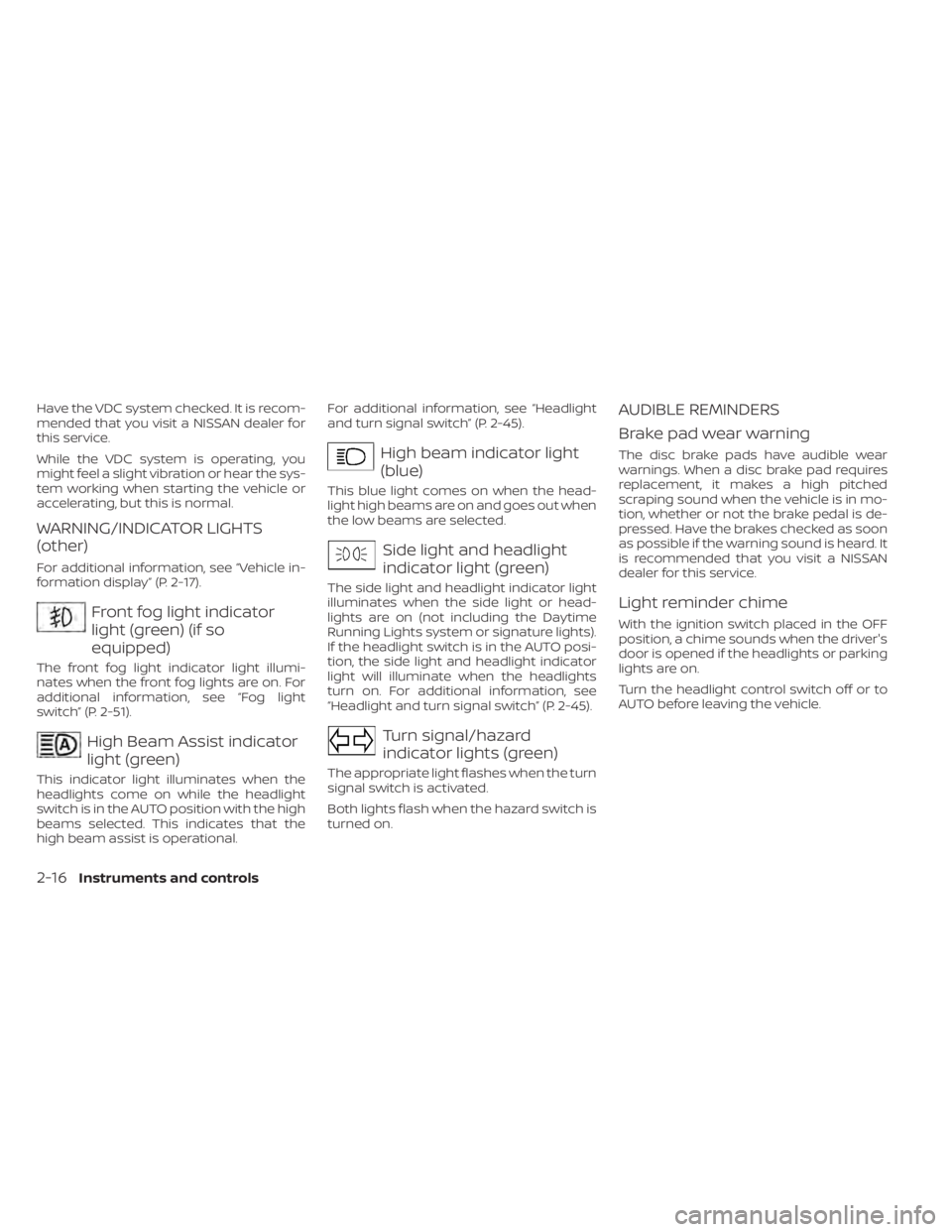
Front fog light indicator
light (green) (if so
equipped)
The front fog light indicator light illumi-
nates when the front fog lights are on. For
additional information, see “Fog light
switch” (P. 2-51).
High Beam Assist indicator
light (green)
This indicator light illuminates when the
headlights come on while the headlight
switch is in the AUTO position with the high
beams selected. This indicates that the
high beam assist is operational.For additional information, see “Headlight
and turn signal switch” (P. 2-45).
High beam indicator light
(blue)
This blue light comes on when the head-
light high beams are on and goes out when
the low beams are selected.
Side light and headlight
indicator light (green)
The side light and headlight indicator light
illuminates when the side light or head-
lights are on (not including the Daytime
Running Lights system or signature lights).
If the headlight switch is in the AUTO posi-
tion, the side light and headlight indicator
light will illuminate when the headlights
turn on. For additional information, see
“Headlight and turn signal switch” (P. 2-45).
Turn signal/hazard
indicator lights (green)
The appropriate light flashes when the turn
signal switch is activated.
Both lights flash when the hazard switch is
turned on.
AUDIBLE REMINDERS
Brake pad wear warning
The disc brake pads have audible wear
warnings. When a disc brake pad requires
replacement, it makes a high pitched
scraping sound when the vehicle is in mo-
tion, whether or not the brake pedal is de-
pressed. Have the brakes checked as soon
as possible if the warning sound is heard. It
is recommended that you visit a NISSAN
dealer for this service.
Light reminder chime
With the ignition switch placed in the OFF
position, a chime sounds when the driver's
door is opened if the headlights or parking
lights are on.
Turn the headlight control switch off or to
AUTO before leaving the vehicle.
2-16Instruments and controls
Page 119 of 476
RECEIVING A CALL
Using the Bluetooth® Hands-Free Phone
System, a received phone call can be oper-
ated on the vehicle information display as
well as on the touch-screen display.
1. When there is an incoming call, the callerinformation and the operation keys are
displayed on the vehicle information
display.
2. Use
orto highlight the pre-
ferred item and press the OK button to
select the item.
Available keys Action
[Answer] Answers the received phone call.
[Decline] Declines the received phone call.
[Hold Call] Holds the initial call when a second call is received.
INFO:
A cellular phone device must be connected and selected among other connected
Bluetooth® devices before hands-free operation. The paired phone must be able to
support the Bluetooth® requests for display. For additional information, refer to the sepa-
rate NissanConnect® Owner’s Manual.
Instruments and controls2-33
Page 120 of 476
TEXT MESSAGING (if so equipped)
Using the Bluetooth® Hands-Free Phone
System, a received text message can be
operated on the vehicle information dis-
play as well as on the touch-screen display.
To read/ignore an incoming text
1. When a new text message is received, apop-up window and operation keys will
appear with the sender’s name or phone
number on the vehicle information
display.
2. Use
orto highlight the pre-
ferred item and push OKto select the
item.
Available keys Action
[Read] View or hear the received message.
[Ignore] Ignore the received message.
2-34Instruments and controls
Page 121 of 476
![NISSAN MAXIMA 2021 Owner´s Manual To reply to/exit from a text
1. When a new text message is receivedand [Read] is selected, operation keys
are displayed on the vehicle information
display.
2. Use
orto highlight the pre-
ferred item a](/img/5/40345/w960_40345-120.png "NISSAN MAXIMA 2021 Owner´s Manual To reply to/exit from a text
1. When a new text message is receivedand [Read] is selected, operation keys
are displayed on the vehicle information
display.
2. Use
orto highlight the pre-
ferred item a")
To reply to/exit from a text
1. When a new text message is receivedand [Read] is selected, operation keys
are displayed on the vehicle information
display.
2. Use
orto highlight the pre-
ferred item and press the OK button to
select the item.
Available keys Action
[Reply] Available pre-determined messages will be displayed
on the vehicle information display if the steering
switch controls are used. Further operations, such as
voice recognition reply operation, is available when
using the touch-screen display.
[Exit] Ends text message operation and the vehicle infor-
mation display will show the previous screen.
INFO
A cellular phone device must be connected and selected from among other connected
Bluetooth® devices before hands-free operation. The paired phone must be able to
support the Bluetooth® requests for display. For additional information, refer to the sepa-
rate NissanConnect® Owner’s Manual.
Instruments and controls2-35
Page 198 of 476

Refer to the NissanConnect® Owner’s
Manual that includes the following infor-
mation.
• NissanConnect® Services (if so equipped)
• Navigation system (if so equipped)
• Audio system
• Apple CarPlay®
• Android Auto
TM
• Bluetooth® Hands-Free Phone system
• Viewing information
• Other settings
• Voice recognition
• General system information
NISSANCONNECT® OWNER’S
MANUAL
4-2Monitor, climate, audio, phone and voice recognition systems
Page 221 of 476
A blue MOD iconO3is displayed in the view
where the MOD system is operative. A gray
MOD icon is displayed in the view where the
MOD system is not operative.
If the MOD system is turned off, the MOD
icon
O3is not displayed.
TURNING MOD ON AND OFF
To turn the MOD system on or off, press and
hold the CAMERA button for more than 2
seconds then release and press again to
change screens. When the screen changes
the MOD system will be turned on or off.
MOD SYSTEM LIMITATIONS
WARNING
Listed below are the system limitations
for MOD. Failure to operate the vehicle
in accordance with these system limi-
tations could result in serious injury or
death.
• Do not use the MOD system when
towing a trailer. The system may not
function properly.
• Excessive noise (for example, audio
system volume or open vehicle win-
dow) will interfere with the chime
sound, and it may not be heard. •
The MOD system performance will be
limited according to environmental
conditions and surrounding objects
such as:
– When there is low contrast be-
tween background and the mov-
ing objects.
– When there is a blinking source of
light.
– When strong light such as another
vehicle’s headlight or sunlight is
present.
– When camera orientation is not in
its usual position, such as when a
mirror is folded.
– When there is dirt, water drops or
snow on the camera lens.
– When the position of the moving
objects in the display is not
changed.
• The MOD system might detect flow-
ing water droplets on the camera
lens, white smoke from the muffler,
moving shadows, etc.
• The MOD system may not function
properly depending on the speed, di-
rection, distance or shape of the
moving objects. •
If your vehicle sustains damage to
the parts where the camera is in-
stalled, leaving it misaligned or bent,
the sensing zone may be altered and
the MOD system may not detect ob-
jects properly.
• When the temperature is extremely
high or low, the screen may not dis-
play objects clearly. This is not a
malfunction.
NOTE:
The blue MOD icon will change to orange
if one of the following has occurred:
• When the system is malfunctioning.
• When the component temperature reaches a high level (icon will blink).
• When the RearView camera has detected a blockage (icon will blink).
If the icon light continues to illuminate
orange, have the MOD system checked. It
is recommended that you visit a NISSAN
dealer for this service.
Monitor, climate, audio, phone and voice recognition systems4-25