em button NISSAN MURANO 2005 1.G Owners Manual
[x] Cancel search | Manufacturer: NISSAN, Model Year: 2005, Model line: MURANO, Model: NISSAN MURANO 2005 1.GPages: 192, PDF Size: 4.45 MB
Page 6 of 192
This manual uses special words and icons, orga-
nized by function. Please refer to the following
items and familiarize yourself with these symbols.
FOR SAFE OPERATION
WARNING
This is used to indicate the presence of
a hazard that could cause death or se-
rious personal injury. To avoid or re-
duce the risk, the procedures must be
followed precisely.
CAUTION
This is used to indicate the presence of
a hazard that could cause minor or
moderate personal injury or damage to
your vehicle. To avoid or reduce the
risk, the procedures must be followed
carefully.
NOTE:
This indicates an item to help you under-
stand the maximum performance of your
vehicle. If ignored, it may lead to a mal-
function or poor performance.
REFERENCE SYMBOLS
INFO:
This indicates information necessary for efficient
use of your vehicle or accessories.
DEST button
This is a button on the control panel.
View key
This is a select key on the screen. By selecting
this key you can proceed to the next function.This system is primarily designed to help you
reach your destination, and also performs other
functions as outlined in this manual. However,
you, the driver, must use the system safely and
properly. Information concerning road
conditions, traffic signs and the availability of
services may not always be up-to-date.The
system is not a substitute for safe, proper,
and legal driving.
Before using the navigation system, please read
the following safety information. Always use the
system as outlined in this manual.
WARNING
cWhen the driver operates the naviga-
tion system or uses the joystick
(screen function) , first park the ve-
hicle in a safe place and set the park-
ing brake. Using the system while
driving can distract the driver and
may result in a serious accident.
Destinations cannot be set while the
vehicle is in motion.
cDo not rely on voice guidance alone.
Always be sure that all driving ma-
neuvers may be made legally and
safely to avoid an accident.
HOW TO USE THIS MANUAL SAFETY NOTE
1-2Introduction
ZREVIEW COPYÐ2005(nav)
Navigation System OMÐUSA_English(nna)
07/10/04Ðdebbie
X
Page 14 of 192

The main feature of the NISSAN Navigation Sys-
tem is Visual and Audio Route Guidance in se-
lected detailed map coverage areas. Utilizing a
network of GPS (Global Positioning System)
satellites, the NISSAN Navigation System tracks
your location on the map and directs you where
you want to go.
Once you program a destination covered by a
detailed map, The NISSAN Navigation System
will determine a route from your current location
to your destination. The moving map display and
turn-by-turn voice commands help the driver de-
termine upcoming turns.
This feature can be especially helpful in finding
unfamiliar locations or businesses. The system
may be unable to set a destination and/or calcu-
late distance when a destination is outside a de-
tailed map coverage area. Additionally, audio
route guidance may not be available if the desti-
nation is outside a detailed map coverage area.
For more information on how to program a
destination, please refer to section 5.The NISSAN Navigation System offers an exten-
sive Point of Interest (POI) directory in detailed
map coverage areas for your convenience. This
directory includes a wide variety of destinations
ranging from gas stations, ATMs, and restau-
rants to casinos, ski resorts, shopping centers
and businesses. By accessing the Point of Inter-
est directory, you can search for addresses and
phone numbers for a destination, and with a
press of a button, the NISSAN Navigation Sys-
tem will calculate a route to the destination.
The Point of Interest directory offers many uses.
For example, the directory can be sorted by the
various types of restaurants near your current
location. If you need an ATM or gas station, the
NISSAN Navigation System can point you to the
closest one or the closest one of your favorite
brand.
For more information on how to use the Point of
Interest directory, please refer to section 6.Using the Address Book feature, you will have
the ability to store up to 50 locations in detailed
map coverage areas into a personal directory.
This is especially useful for frequently visited
locations, such as your clients, relatives, or
friends. The Address Book feature will provide
you with easy access to frequently visited loca-
tions when setting them as your destination.
For more information on how to use your Ad-
dress Book, please refer to section 7.
ROUTE GUIDANCE POINT OF INTEREST (POI) DIREC-
TORYADDRESS BOOK
3-2What features are available on the Nissan navigation system?
ZREVIEW COPYÐ2005(nav)
Navigation System OMÐUSA_English(nna)
07/10/04Ðdebbie
X
Page 17 of 192
![NISSAN MURANO 2005 1.G Owners Manual cTerm [Expert Mode] is used in this manual
when the
Short Menus key indicator is
turned off. When the amber indicator is high-
lighted, the system is set to [Easy Mode].
cWhen the SETTING , DEST or
RO](/img/5/686/w960_686-16.png "NISSAN MURANO 2005 1.G Owners Manual cTerm [Expert Mode] is used in this manual
when the
Short Menus key indicator is
turned off. When the amber indicator is high-
lighted, the system is set to [Easy Mode].
cWhen the SETTING , DEST or
RO")
cTerm [Expert Mode] is used in this manual
when the
Short Menus key indicator is
turned off. When the amber indicator is high-
lighted, the system is set to [Easy Mode].
cWhen the SETTING , DEST or
ROUTE button is pressed in the [Easy
Mode] screen, the
Help key is displayed.
For more information on the Short Menu feature,
please refer to section 4.
What features are available on the Nissan navigation system?3-5
ZREVIEW COPYÐ2005(nav)
Navigation System OMÐUSA_English(nna)
07/10/04Ðdebbie
X
Page 19 of 192
4 How do I operate the Nissan navigation
system?
Control panel button functions......................4-2
Names of the components.......................4-7
How to use the joystick and the ENTER
button.........................................4-7
How to use the PREV button..................4-8
How to use the SETTING button...............4-8
How to use the DEST button.................4-11
How to use the ROUTE button...............4-12
Maxima map DVD-ROM location...................4-14
How to eject/insert the disc........................4-14
Armada, Titan, Pathfinder and Quest map
DVD-ROM locations..............................4-16How to eject/insert the disc........................4-16
Altima map DVD-ROM location....................4-18
How to eject/insert the disc........................4-18
Setting up the start-up screen.....................4-19
Confirmation of destination or waypoint..........4-20
Clearing the memory..............................4-23
Setting the average speed.........................4-25
About route guidance.............................4-26
Notes on route guidance.......................4-26
About the display error.........................4-28
ZREVIEW COPYÐ2005(nav)
Navigation System OMÐUSA_English(nna)
07/10/04Ðdebbie
X
Page 20 of 192

Type A
LHA0377
CONTROL PANEL BUTTON FUNC-
TIONS
4-2How do I operate the Nissan navigation system?
ZREVIEW COPYÐ2005(nav)
Navigation System OMÐUSA_English(nna)
07/10/04Ðdebbie
X
Page 25 of 192
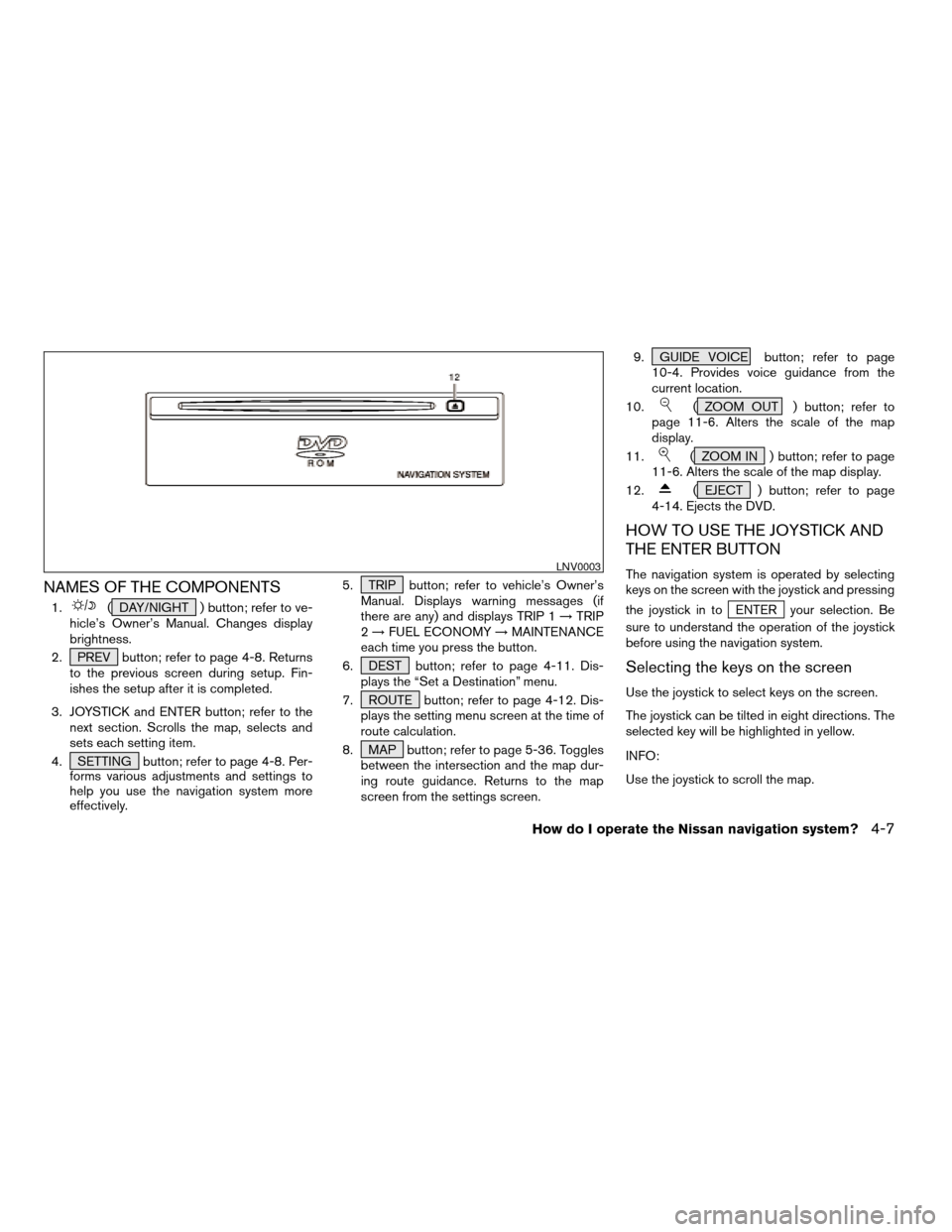
NAMES OF THE COMPONENTS
1.( DAY/NIGHT ) button; refer to ve-
hicle’s Owner’s Manual. Changes display
brightness.
2. PREV button; refer to page 4-8. Returns
to the previous screen during setup. Fin-
ishes the setup after it is completed.
3. JOYSTICK and ENTER button; refer to the
next section. Scrolls the map, selects and
sets each setting item.
4. SETTING button; refer to page 4-8. Per-
forms various adjustments and settings to
help you use the navigation system more
effectively.5. TRIP button; refer to vehicle’s Owner’s
Manual. Displays warning messages (if
there are any) and displays TRIP 1!TRIP
2!FUEL ECONOMY!MAINTENANCE
each time you press the button.
6. DEST button; refer to page 4-11. Dis-
plays the “Set a Destination” menu.
7. ROUTE button; refer to page 4-12. Dis-
plays the setting menu screen at the time of
route calculation.
8. MAP button; refer to page 5-36. Toggles
between the intersection and the map dur-
ing route guidance. Returns to the map
screen from the settings screen.9. GUIDE VOICE button; refer to page
10-4. Provides voice guidance from the
current location.
10.
( ZOOM OUT ) button; refer to
page 11-6. Alters the scale of the map
display.
11.
( ZOOM IN ) button; refer to page
11-6. Alters the scale of the map display.
12.
( EJECT ) button; refer to page
4-14. Ejects the DVD.
HOW TO USE THE JOYSTICK AND
THE ENTER BUTTON
The navigation system is operated by selecting
keys on the screen with the joystick and pressing
the joystick in to
ENTER your selection. Be
sure to understand the operation of the joystick
before using the navigation system.
Selecting the keys on the screen
Use the joystick to select keys on the screen.
The joystick can be tilted in eight directions. The
selected key will be highlighted in yellow.
INFO:
Use the joystick to scroll the map.
LNV0003
How do I operate the Nissan navigation system?4-7
ZREVIEW COPYÐ2005(nav)
Navigation System OMÐUSA_English(nna)
07/10/04Ðdebbie
X
Page 26 of 192
Selecting the function of the high-
lighted key
Press the ENTER button.
The display shows the screen used to carry out
the function of the selected key (highlighted in
yellow) .
HOW TO USE THE PREV BUTTON
This button has two functions.
To return to the previous screen:
When this button is pressed during setup, setup
will be canceled, and the screen will return to the
previous screen.
To finish the set-up:
When this button is pressed after set-up is
completed, the settings will be renewed as
directed, and the screen will return to the map.
INFO:
When the PREV button must be pressed, (for
example, after the set-up is finished) instructions
are given in the operation procedure of each
section in this manual. If the PREV button is
pressed when not finished with the set-up, the
setting will be canceled, and the screen will re-
turn to the previous screen.
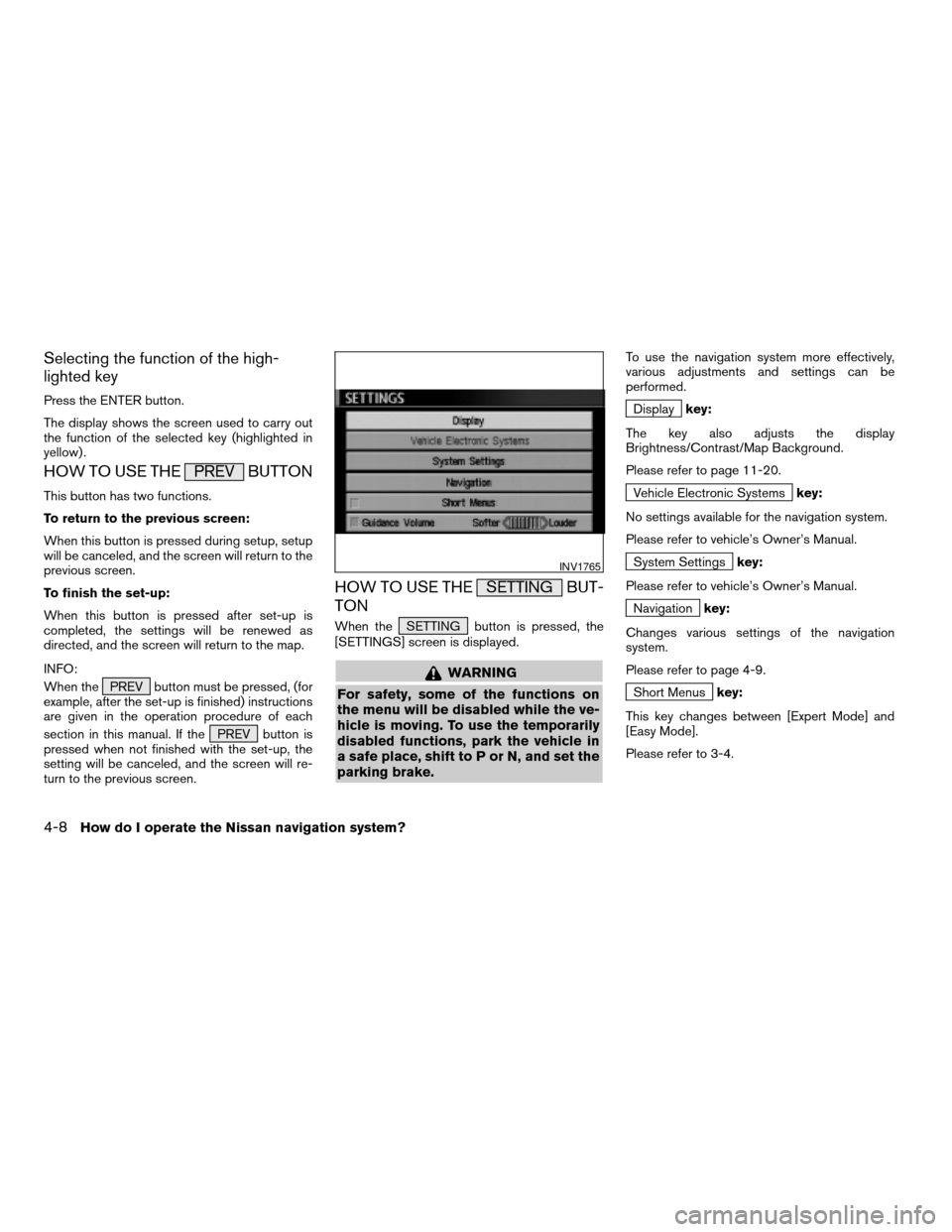
HOW TO USE THE SETTING BUT-
TON
When the SETTING button is pressed, the
[SETTINGS] screen is displayed.
WARNING
For safety, some of the functions on
the menu will be disabled while the ve-
hicle is moving. To use the temporarily
disabled functions, park the vehicle in
a safe place, shift to P or N, and set the
parking brake.
To use the navigation system more effectively,
various adjustments and settings can be
performed.
Displaykey:
The key also adjusts the display
Brightness/Contrast/Map Background.
Please refer to page 11-20.
Vehicle Electronic Systemskey:
No settings available for the navigation system.
Please refer to vehicle’s Owner’s Manual.
System Settingskey:
Please refer to vehicle’s Owner’s Manual.
Navigationkey:
Changes various settings of the navigation
system.
Please refer to page 4-9.
Short Menuskey:
This key changes between [Expert Mode] and
[Easy Mode].
Please refer to 3-4.
INV1765
4-8How do I operate the Nissan navigation system?
ZREVIEW COPYÐ2005(nav)
Navigation System OMÐUSA_English(nna)
07/10/04Ðdebbie
X
Page 27 of 192
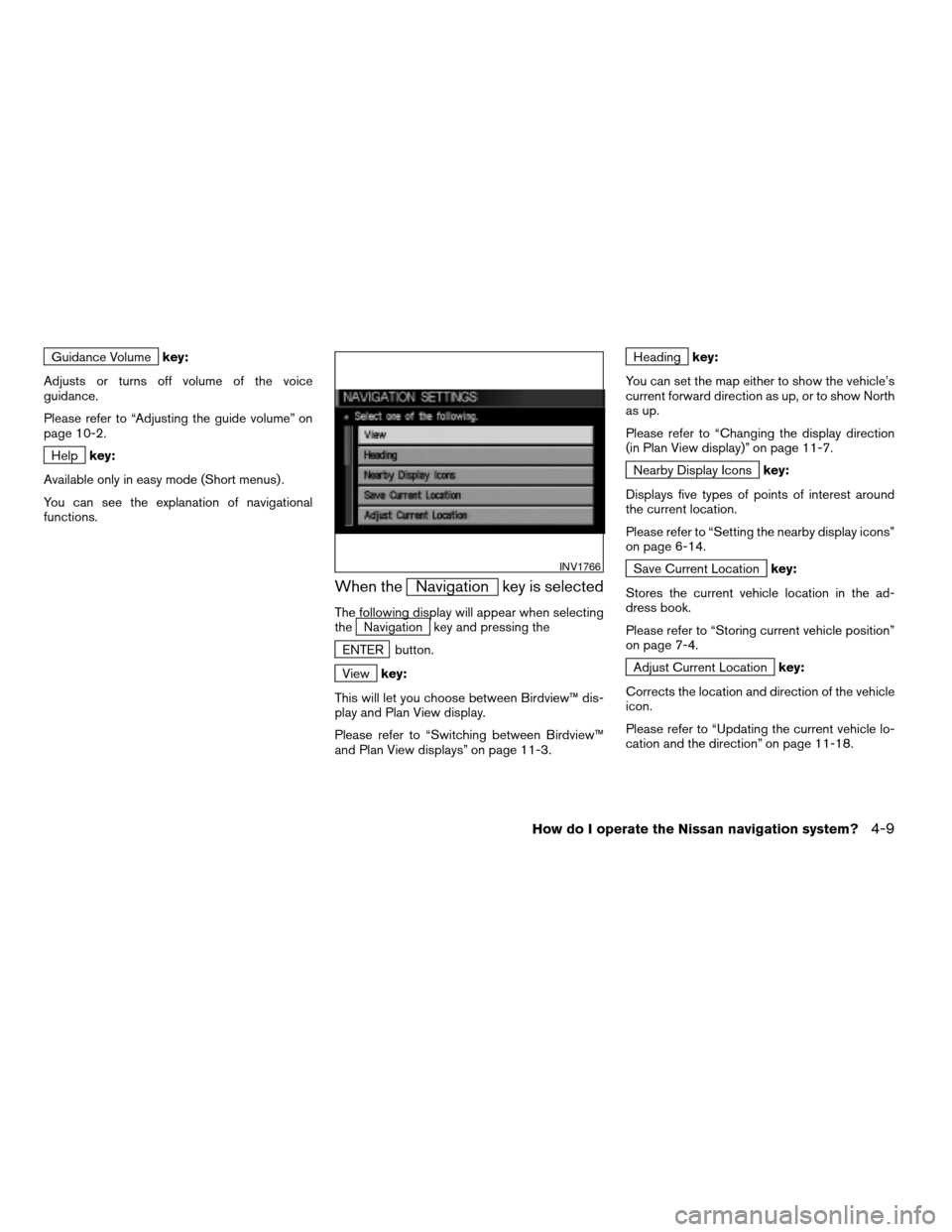
Guidance Volumekey:
Adjusts or turns off volume of the voice
guidance.
Please refer to “Adjusting the guide volume” on
page 10-2.
Helpkey:
Available only in easy mode (Short menus) .
You can see the explanation of navigational
functions.
When theNavigation key is selected
The following display will appear when selecting
theNavigation key and pressing the
ENTER button.
Viewkey:
This will let you choose between Birdview™ dis-
play and Plan View display.
Please refer to “Switching between Birdview™
and Plan View displays” on page 11-3.
Headingkey:
You can set the map either to show the vehicle’s
current forward direction as up, or to show North
as up.
Please refer to “Changing the display direction
(in Plan View display)” on page 11-7.
Nearby Display Iconskey:
Displays five types of points of interest around
the current location.
Please refer to “Setting the nearby display icons”
on page 6-14.
Save Current Locationkey:
Stores the current vehicle location in the ad-
dress book.
Please refer to “Storing current vehicle position”
on page 7-4.
Adjust Current Locationkey:
Corrects the location and direction of the vehicle
icon.
Please refer to “Updating the current vehicle lo-
cation and the direction” on page 11-18.
INV1766
How do I operate the Nissan navigation system?4-9
ZREVIEW COPYÐ2005(nav)
Navigation System OMÐUSA_English(nna)
07/10/04Ðdebbie
X
Page 29 of 192
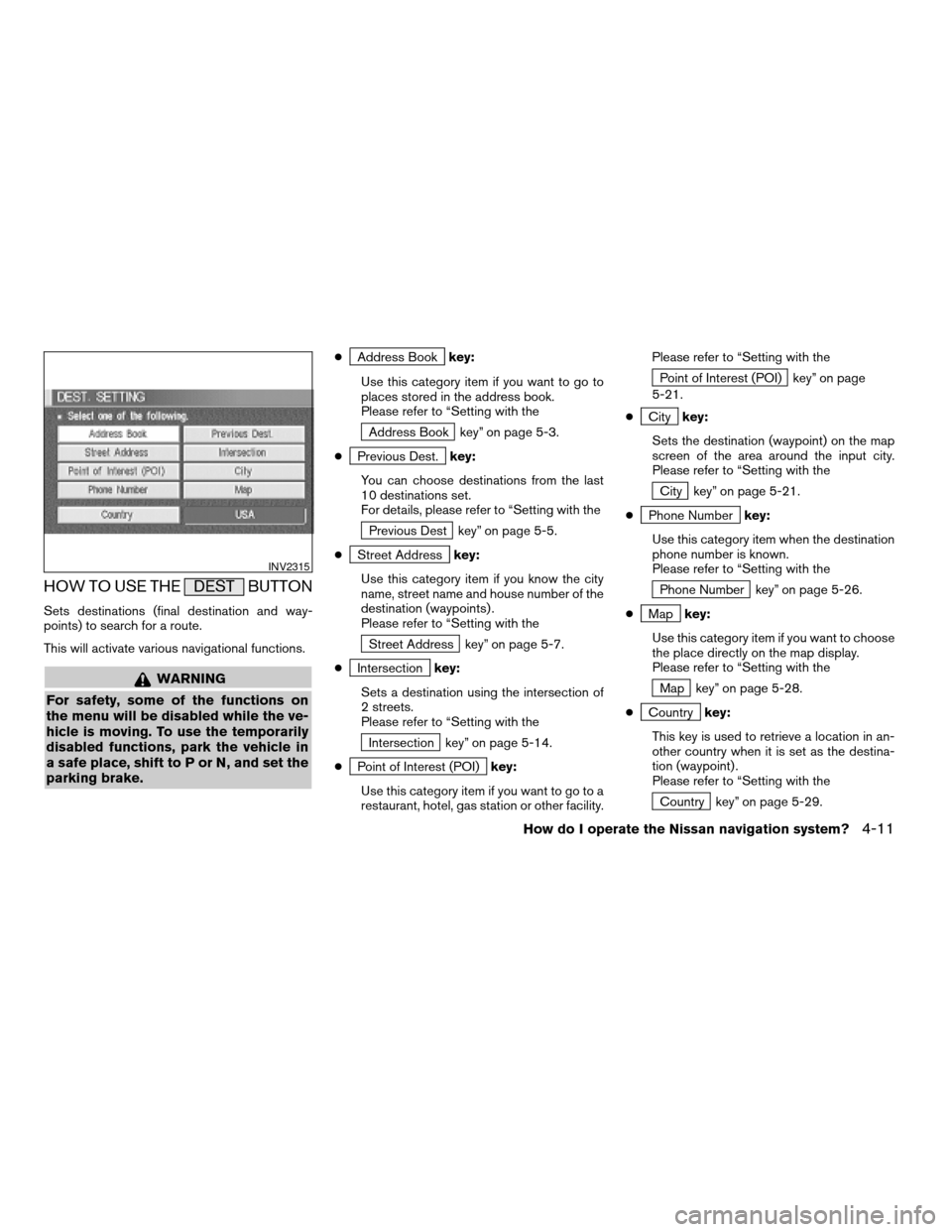
HOW TO USE THE DEST BUTTON
Sets destinations (final destination and way-
points) to search for a route.
This will activate various navigational functions.
WARNING
For safety, some of the functions on
the menu will be disabled while the ve-
hicle is moving. To use the temporarily
disabled functions, park the vehicle in
a safe place, shift to P or N, and set the
parking brake.
cAddress Bookkey:
Use this category item if you want to go to
places stored in the address book.
Please refer to “Setting with the
Address Book key” on page 5-3.
c
Previous Dest.key:
You can choose destinations from the last
10 destinations set.
For details, please refer to “Setting with the
Previous Dest key” on page 5-5.
c
Street Addresskey:
Use this category item if you know the city
name, street name and house number of the
destination (waypoints) .
Please refer to “Setting with the
Street Address key” on page 5-7.
c
Intersectionkey:
Sets a destination using the intersection of
2 streets.
Please refer to “Setting with the
Intersection key” on page 5-14.
c
Point of Interest (POI)key:
Use this category item if you want to go to a
restaurant, hotel, gas station or other facility.Please refer to “Setting with the
Point of Interest (POI) key” on page
5-21.
c
Citykey:
Sets the destination (waypoint) on the map
screen of the area around the input city.
Please refer to “Setting with the
City key” on page 5-21.
c
Phone Numberkey:
Use this category item when the destination
phone number is known.
Please refer to “Setting with the
Phone Number key” on page 5-26.
c
Mapkey:
Use this category item if you want to choose
the place directly on the map display.
Please refer to “Setting with the
Map key” on page 5-28.
c
Countrykey:
This key is used to retrieve a location in an-
other country when it is set as the destina-
tion (waypoint) .
Please refer to “Setting with the
Country key” on page 5-29.
INV2315
How do I operate the Nissan navigation system?4-11
ZREVIEW COPYÐ2005(nav)
Navigation System OMÐUSA_English(nna)
07/10/04Ðdebbie
X
Page 30 of 192
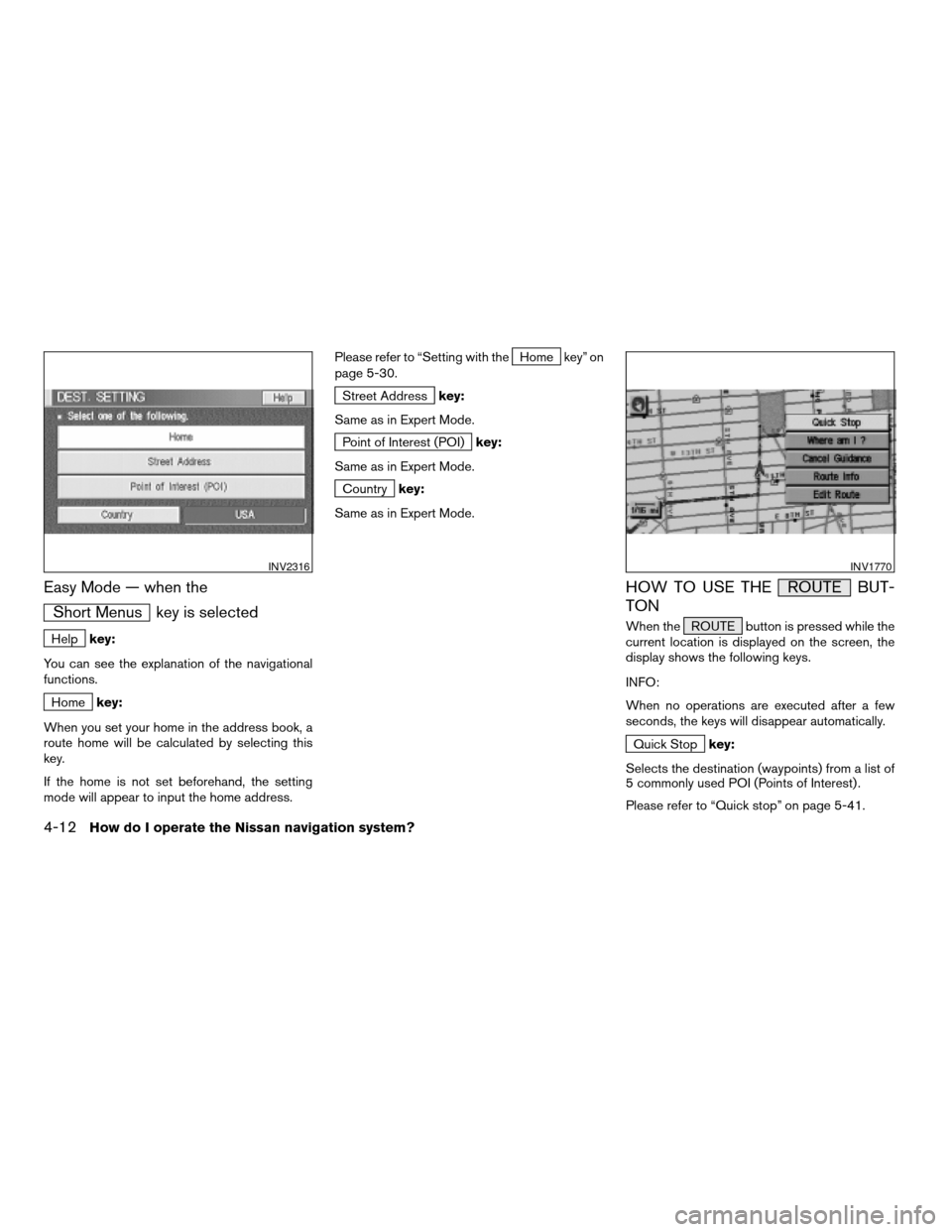
Easy Mode — when the
Short Menus key is selected
Helpkey:
You can see the explanation of the navigational
functions.
Homekey:
When you set your home in the address book, a
route home will be calculated by selecting this
key.
If the home is not set beforehand, the setting
mode will appear to input the home address.Please refer to “Setting with the
Home key” on
page 5-30.
Street Addresskey:
Same as in Expert Mode.
Point of Interest (POI)key:
Same as in Expert Mode.
Countrykey:
Same as in Expert Mode.
HOW TO USE THE ROUTE BUT-
TON
When the ROUTE button is pressed while the
current location is displayed on the screen, the
display shows the following keys.
INFO:
When no operations are executed after a few
seconds, the keys will disappear automatically.
Quick Stopkey:
Selects the destination (waypoints) from a list of
5 commonly used POI (Points of Interest) .
Please refer to “Quick stop” on page 5-41.
INV2316INV1770
4-12How do I operate the Nissan navigation system?
ZREVIEW COPYÐ2005(nav)
Navigation System OMÐUSA_English(nna)
07/10/04Ðdebbie
X