em button NISSAN MURANO 2005 1.G Owner's Guide
[x] Cancel search | Manufacturer: NISSAN, Model Year: 2005, Model line: MURANO, Model: NISSAN MURANO 2005 1.GPages: 192, PDF Size: 4.45 MB
Page 70 of 192
![NISSAN MURANO 2005 1.G Owners Guide 5. If necessary, operate the joystick to adjust
the location of the destination (waypoints) .
Press the ENTER button. Select the
Destination key to confirm.
The [DEST. SETTING (City)] screen will be
d](/img/5/686/w960_686-69.png "NISSAN MURANO 2005 1.G Owners Guide 5. If necessary, operate the joystick to adjust
the location of the destination (waypoints) .
Press the ENTER button. Select the
Destination key to confirm.
The [DEST. SETTING (City)] screen will be
d")
5. If necessary, operate the joystick to adjust
the location of the destination (waypoints) .
Press the ENTER button. Select the
Destination key to confirm.
The [DEST. SETTING (City)] screen will be
displayed.
To set the destination (waypoints) , refer to
“Making the system guide the route with de-
tailed options” on page 5-31.
cList is being displayed by selection of
the
Listkey.
Setting with theState key
TheState key is used when you select a
state/province to set the destination.
1. Select the
State key.2. The display shows the screen to select
states/provinces.
Input a state/province name.
INV1838INV1839INV1840
5-24How do I program a destination?
ZREVIEW COPYÐ2005(nav)
Navigation System OMÐUSA_English(nna)
07/10/04Ðdebbie
X
Page 72 of 192
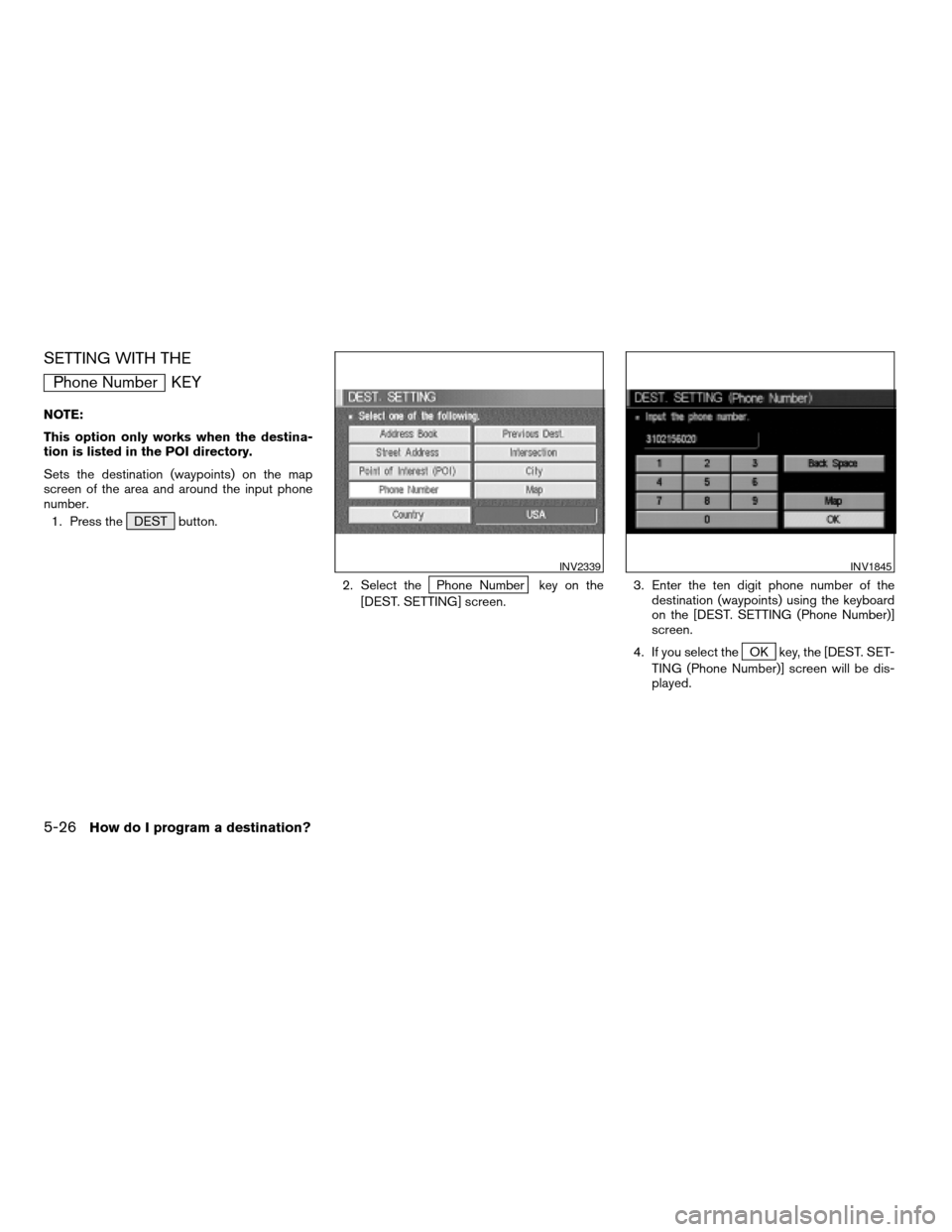
SETTING WITH THE
Phone Number KEY
NOTE:
This option only works when the destina-
tion is listed in the POI directory.
Sets the destination (waypoints) on the map
screen of the area and around the input phone
number.
1. Press the DEST button.
2. Select the
Phone Number key on the
[DEST. SETTING] screen.3. Enter the ten digit phone number of the
destination (waypoints) using the keyboard
on the [DEST. SETTING (Phone Number)]
screen.
4. If you select the
OK key, the [DEST. SET-
TING (Phone Number)] screen will be dis-
played.
INV2339INV1845
5-26How do I program a destination?
ZREVIEW COPYÐ2005(nav)
Navigation System OMÐUSA_English(nna)
07/10/04Ðdebbie
X
Page 73 of 192
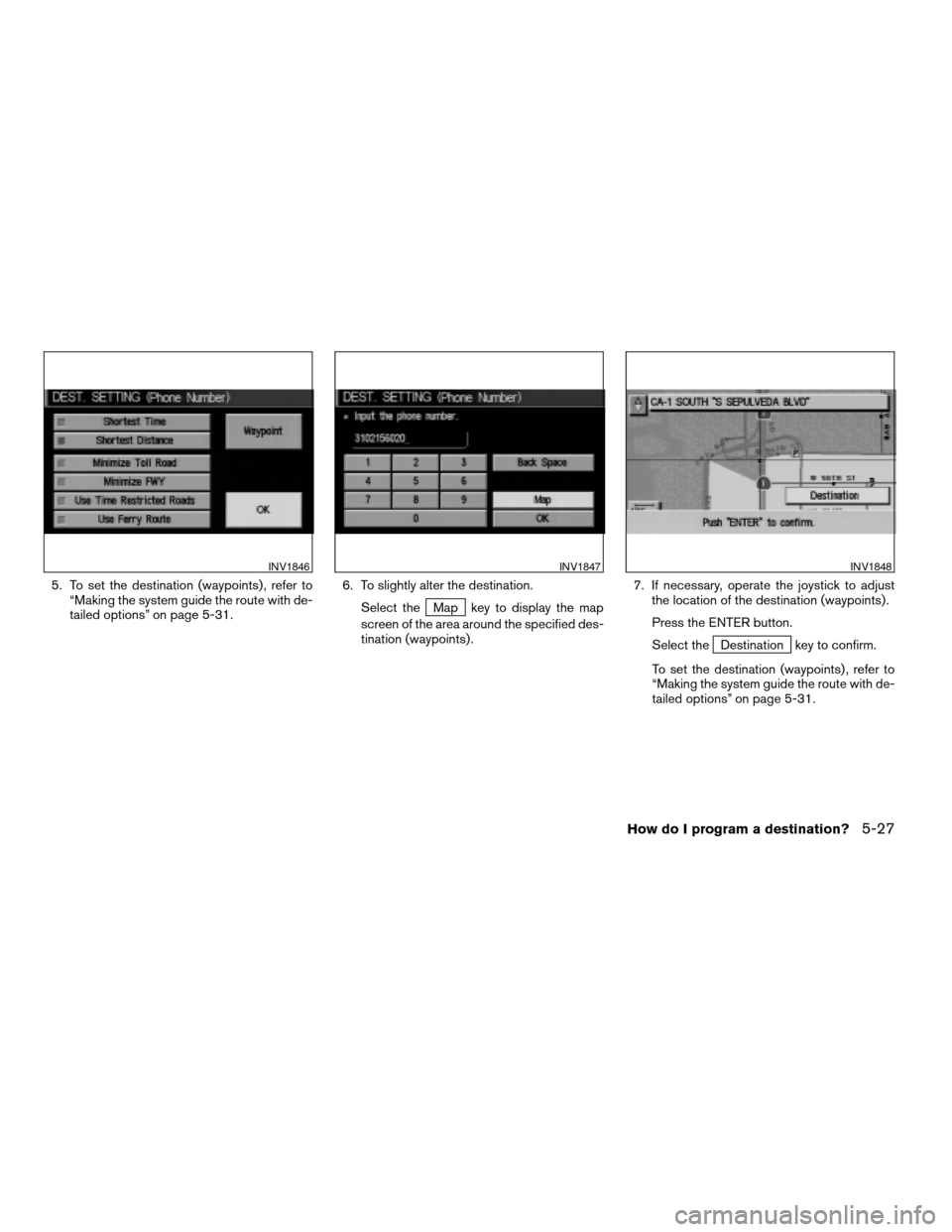
5. To set the destination (waypoints) , refer to
“Making the system guide the route with de-
tailed options” on page 5-31.6. To slightly alter the destination.
Select the
Map key to display the map
screen of the area around the specified des-
tination (waypoints) .7. If necessary, operate the joystick to adjust
the location of the destination (waypoints) .
Press the ENTER button.
Select the
Destination key to confirm.
To set the destination (waypoints) , refer to
“Making the system guide the route with de-
tailed options” on page 5-31.
INV1846INV1847INV1848
How do I program a destination?5-27
ZREVIEW COPYÐ2005(nav)
Navigation System OMÐUSA_English(nna)
07/10/04Ðdebbie
X
Page 74 of 192
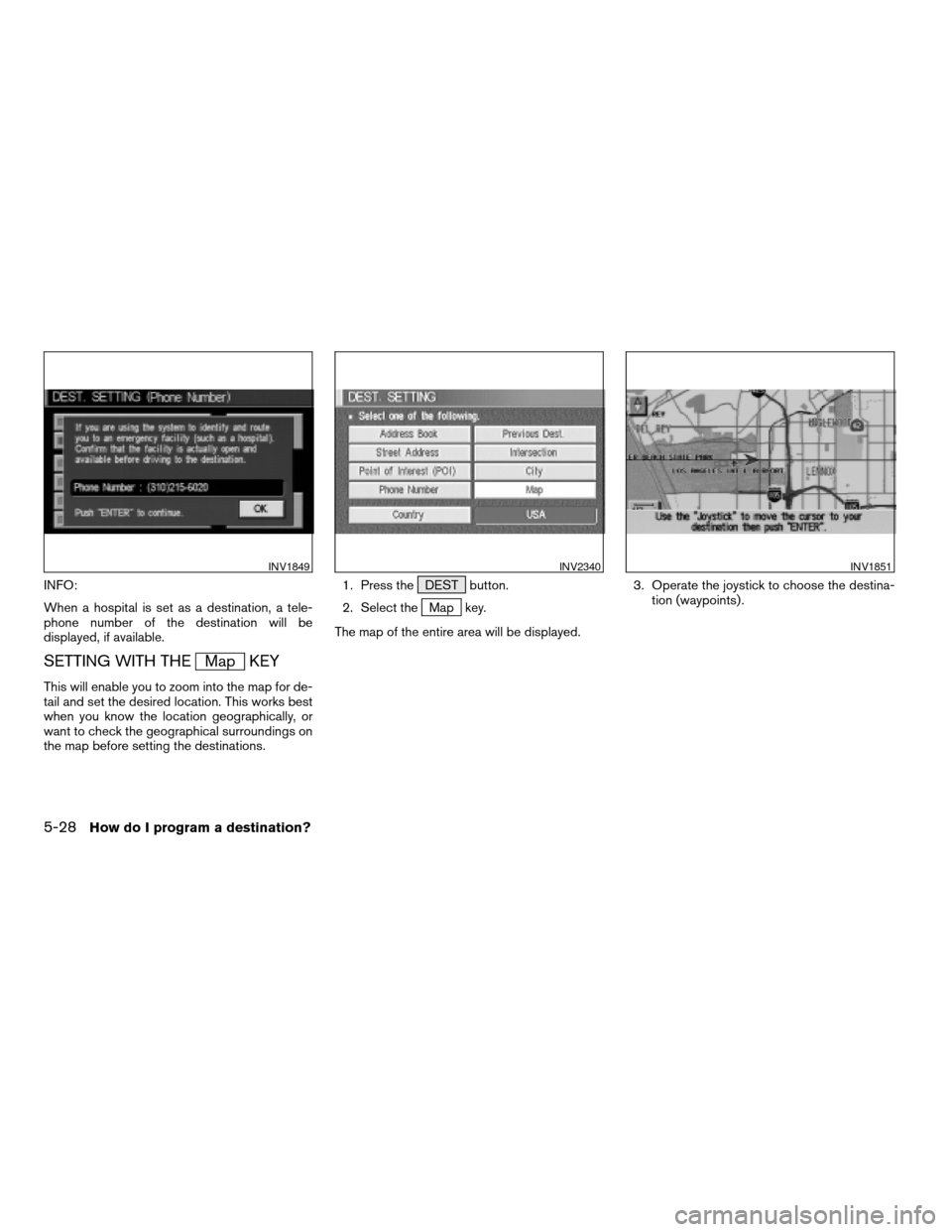
INFO:
When a hospital is set as a destination, a tele-
phone number of the destination will be
displayed, if available.
SETTING WITH THEMap KEY
This will enable you to zoom into the map for de-
tail and set the desired location. This works best
when you know the location geographically, or
want to check the geographical surroundings on
the map before setting the destinations.1. Press the DEST button.
2. Select the
Map key.
The map of the entire area will be displayed.3. Operate the joystick to choose the destina-
tion (waypoints) .
INV1849INV2340INV1851
5-28How do I program a destination?
ZREVIEW COPYÐ2005(nav)
Navigation System OMÐUSA_English(nna)
07/10/04Ðdebbie
X
Page 75 of 192
![NISSAN MURANO 2005 1.G Owners Guide 4. Adjust the location using the joystick, and
press the ENTER button.
5. Select the
Destination key.
The [DEST. SETTING] screen will appear.6. Please refer to “Making the system guide
the route wit](/img/5/686/w960_686-74.png "NISSAN MURANO 2005 1.G Owners Guide 4. Adjust the location using the joystick, and
press the ENTER button.
5. Select the
Destination key.
The [DEST. SETTING] screen will appear.6. Please refer to “Making the system guide
the route wit")
4. Adjust the location using the joystick, and
press the ENTER button.
5. Select the
Destination key.
The [DEST. SETTING] screen will appear.6. Please refer to “Making the system guide
the route with detailed options” on page
5-31.
INFO:
When the
OK key is selected in the [DEST.
SETTING] screen, route calculation starts. If you
want to add waypoints, select the
Waypoint
key.
SETTING WITH THECountry KEY
When theStreet Address ,Intersection ,
City , orPoint of Interest (POI) key is used
to set the destination (waypoints) in other coun-
tries, they are retrieved from the areas in the coun-
try which have been set in the country category.
When setting the destination (waypoints) in other
countries, select a country first.
INV1852INV2004
How do I program a destination?5-29
ZREVIEW COPYÐ2005(nav)
Navigation System OMÐUSA_English(nna)
07/22/04Ðmarlene
X
Page 76 of 192
![NISSAN MURANO 2005 1.G Owners Guide 1. Press the DEST button.
The [DEST. SETTINGS] screen will be
displayed.
Select the
Country key.2. Select the
Country key. Each time the EN-
TER button is pressed, the country selection
toggles betwee](/img/5/686/w960_686-75.png "NISSAN MURANO 2005 1.G Owners Guide 1. Press the DEST button.
The [DEST. SETTINGS] screen will be
displayed.
Select the
Country key.2. Select the
Country key. Each time the EN-
TER button is pressed, the country selection
toggles betwee")
1. Press the DEST button.
The [DEST. SETTINGS] screen will be
displayed.
Select the
Country key.2. Select the
Country key. Each time the EN-
TER button is pressed, the country selection
toggles between USA and Canada.
3. Then, the selected country will be displayed
at the right of the
Country key.
SETTING WITH THEHome KEY (in
easy mode)
Sets the home as a destination.
INFO:
In the Expert Mode, this key will not be displayed.
Turn on the highlighted amber
Short Menus
key in the [SETTING] screen.1. Press the DEST button.
2. Select the
Home key.
INV2341INV2342INV2316
5-30How do I program a destination?
ZREVIEW COPYÐ2005(nav)
Navigation System OMÐUSA_English(nna)
07/10/04Ðdebbie
X
Page 78 of 192
– Previous Destination
– Street Address
– Intersection
– Point of Interest (POI)
– City
– Phone Number
– Map
– Home
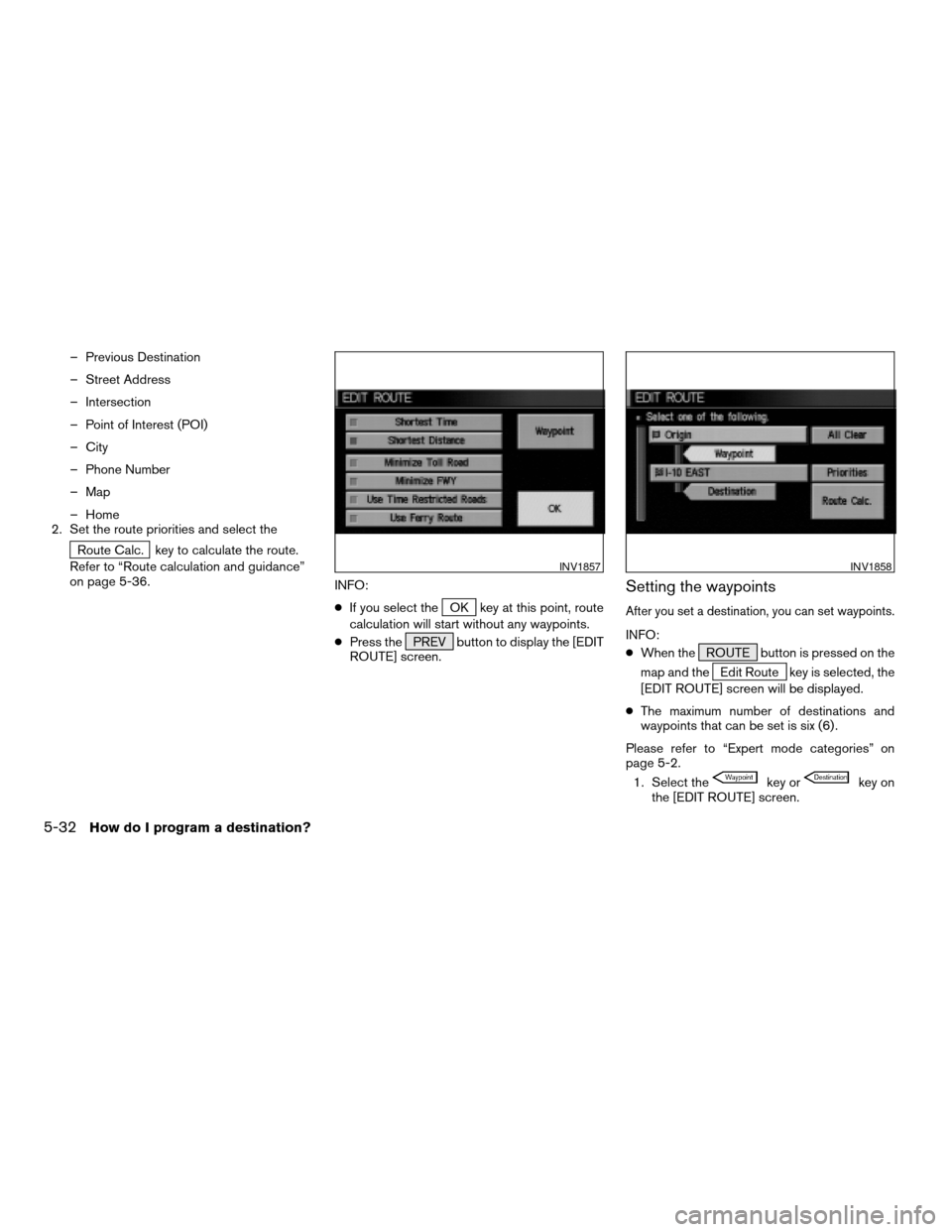
2. Set the route priorities and select the
Route Calc. key to calculate the route.
Refer to “Route calculation and guidance”
on page 5-36.
INFO:
cIf you select the
OK key at this point, route
calculation will start without any waypoints.
cPress the PREV button to display the [EDIT
ROUTE] screen.
Setting the waypoints
After you set a destination, you can set waypoints.
INFO:
cWhen the ROUTE button is pressed on the
map and the
Edit Route key is selected, the
[EDIT ROUTE] screen will be displayed.
cThe maximum number of destinations and
waypoints that can be set is six (6) .
Please refer to “Expert mode categories” on
page 5-2.
1. Select the
key orkey on
the [EDIT ROUTE] screen.
INV1857INV1858
5-32How do I program a destination?
ZREVIEW COPYÐ2005(nav)
Navigation System OMÐUSA_English(nna)
07/10/04Ðdebbie
X
Page 79 of 192
![NISSAN MURANO 2005 1.G Owners Guide The [EDIT ROUTE] screen will be displayed.
2. Select a waypoint destination using one of
the destination selection procedures out-
lined earlier in the chapter.Select the conditions with high prioriti](/img/5/686/w960_686-78.png "NISSAN MURANO 2005 1.G Owners Guide The [EDIT ROUTE] screen will be displayed.
2. Select a waypoint destination using one of
the destination selection procedures out-
lined earlier in the chapter.Select the conditions with high prioriti")
The [EDIT ROUTE] screen will be displayed.
2. Select a waypoint destination using one of
the destination selection procedures out-
lined earlier in the chapter.Select the conditions with high priorities.
If you want to get to your destination in the short-
est time, select the
Shortest Time key.
Selecting the key will turn the indicator light in
the key ON; selecting it again will turn it OFF.
INFO:
cWhen you select the
OK key at this point,
route calculation will start without any addi-
tional waypoints.
cPress the PREV button to display the [EDIT
ROUTE] screen.cIt is also possible to set a waypoint by select-
ing the
Waypoint key in the [DEST. SET-
TING] screen.
Setting the priorities for route calcula-
tion
After the setting of destinations and waypoints is
completed, set the calculation conditions such
as route type with high priorities.
INV2343INV1857
How do I program a destination?5-33
ZREVIEW COPYÐ2005(nav)
Navigation System OMÐUSA_English(nna)
07/10/04Ðdebbie
X
Page 80 of 192

1. Select thePriorities key.
The screen for setting calculation conditions will
appear. The conditions with the indicator light
ON will have high priority.
INFO:
When the ROUTE button is pressed on the
map and the
Edit Route key is selected, the
[EDIT ROUTE] screen will be displayed.2. Select the conditions with high priorities.
Select each key on the screen to turn its re-
spective indicator light ON or OFF.
Shortest Time key:
The route to the destination is calculated so that
you can reach the destination in the shortest
time. In some cases, a freeway or toll road with
detours may be recommended.
NOTE:
It may not be the shortest time in all cases.
Shortest Distance key:
The route to the destination is calculated so that
it is the shortest distance.
NOTE:
It may not be the shortest distance in all
cases.
Minimize Toll Road key:
The route to the destination is calculated with
minimum use of toll roads.
Minimize FWY key:
The route to the destination is calculated with
minimum use of freeways.
Use Time Restricted Roads key:
The route using time restricted roads is
calculated.
INV1860INV1861
5-34How do I program a destination?
ZREVIEW COPYÐ2005(nav)
Navigation System OMÐUSA_English(nna)
07/10/04Ðdebbie
X
Page 82 of 192
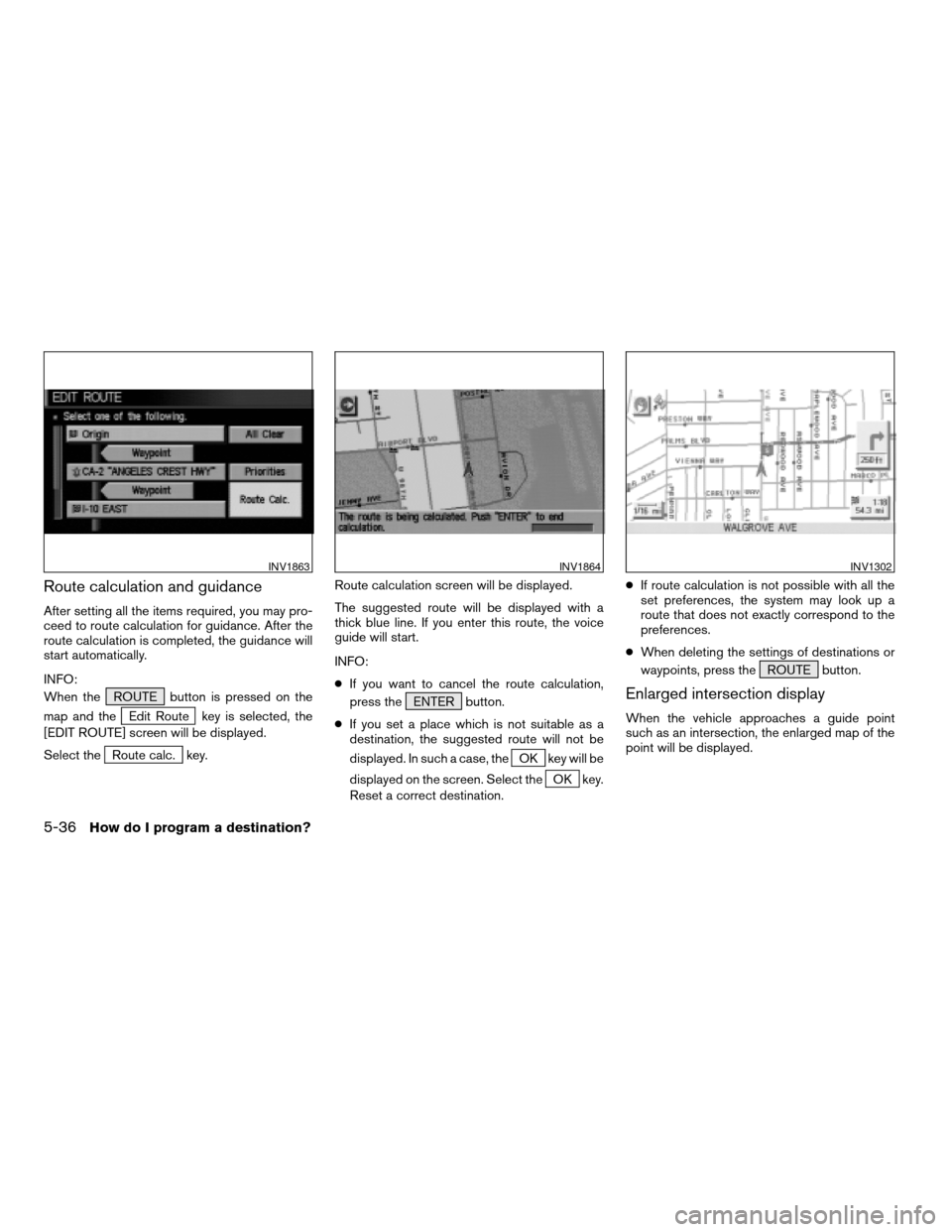
Route calculation and guidance
After setting all the items required, you may pro-
ceed to route calculation for guidance. After the
route calculation is completed, the guidance will
start automatically.
INFO:
When the ROUTE button is pressed on the
map and the
Edit Route key is selected, the
[EDIT ROUTE] screen will be displayed.
Select the
Route calc. key.Route calculation screen will be displayed.
The suggested route will be displayed with a
thick blue line. If you enter this route, the voice
guide will start.
INFO:
cIf you want to cancel the route calculation,
press the ENTER button.
cIf you set a place which is not suitable as a
destination, the suggested route will not be
displayed. In such a case, theOK key will be
displayed on the screen. Select the
OK key.
Reset a correct destination.cIf route calculation is not possible with all the
set preferences, the system may look up a
route that does not exactly correspond to the
preferences.
cWhen deleting the settings of destinations or
waypoints, press the ROUTE button.
Enlarged intersection display
When the vehicle approaches a guide point
such as an intersection, the enlarged map of the
point will be displayed.
INV1863INV1864INV1302
5-36How do I program a destination?
ZREVIEW COPYÐ2005(nav)
Navigation System OMÐUSA_English(nna)
07/10/04Ðdebbie
X