Hand hold phone NISSAN MURANO 2008 Owners Manual
[x] Cancel search | Manufacturer: NISSAN, Model Year: 2008, Model line: MURANO, Model: NISSAN MURANO 2008Pages: 444, PDF Size: 6.09 MB
Page 131 of 444
Black plate (127,1)
Model "Z51-D" EDITED: 2008/ 6/ 26
Push and release the HomeLink
®button up
to three times to complete the training.
8. Your HomeLink
®button should now be
programmed. To program the remaining
HomeLink
®buttons for additional door or
gate openers, follow steps 2 through 8 only.
NOTE:
Do not repeat step 1 unless you want to
“clear” all previously programmed Home-
Link
®buttons.
If you have any questions or are having difficulty
programming your HomeLink
®buttons, please
refer to the HomeLink
®web site at: www.
homelink.com or call 1-800-355-3515.
PROGRAMMING HomeLink
®FOR CA-
NADIAN CUSTOMERS
Prior to 1992, D.O.C. regulations required
hand-held transmitters to stop transmitting after
2 seconds. To program your hand-held trans-
mitter to HomeLink
®, continue to push and hold
the HomeLink
®button (note steps 2 through 4
under “Programming HomeLink
®”) while you
push and re-push (“cycle”) your hand-held
transmitter every 2 seconds until the indicator
light flashes rapidly (indicating successful pro-
gramming) .
NOTE:
If programming a garage door opener, etc.,it is advised to unplug the device during
the “cycling” process to prevent possible
damage to the garage door opener com-
ponents.
OPERATING THE HomeLink
®UNIVER-
SAL TRANSCEIVER
HomeLink
®Universal Transceiver (once pro-
grammed) may now be used to activate the
garage door, etc. To operate, simply push the
appropriate programmed HomeLink
®Universal
Transceiver button. The red indicator light will
illuminate while the signal is being transmitted.
PROGRAMMING TROUBLE-DIAGNO-
SISIf HomeLink
®does not quickly learn the hand-
held transmitter information:
.replace the hand-held transmitter batteries
with new batteries.
.position the hand-held transmitter with its
battery area facing away from the Home-
Link
®surface.
.push and hold both the HomeLink
®and
hand-held transmitter buttons without inter-
ruption.
.position the hand-held transmitter 2 to 5 in
(50 to 127 mm) away from the HomeLink®
surface. Hold the transmitter in that positionfor up to 15 seconds. If HomeLink
®is not
programmed within that time, try holding the
transmitter in another position - keeping the
indicator light in view at all times.
If you continue to have programming difficulties,
please contact the NISSAN Consumer Affairs
Department. The phone numbers are located in
the Foreword of this Owner’s Manual.
CLEARING THE PROGRAMMED IN-
FORMATIONIndividual buttons cannot be cleared, however to
clear all programming, push and hold the two
outside buttons and release when the indicator
light begins to flash (in approximately 20
seconds) .REPROGRAMMING A SINGLE Home-
Link
®BUTTON
To reprogram a HomeLink
®Universal Transcei-
ver button, complete the following.
1. PushandholdthedesiredHomeLink
®
button.Do notrelease the button until step
4 has been completed.
2. When the indicator light begins to flash
slowly (after 20 seconds) , position the
hand-held transmitter 2 to 5 in (50 to 127
mm) away from the HomeLink
®surface.
3. Push and hold the hand-held transmitter
Instruments and controls
2-59
Page 247 of 444
Black plate (243,1)
Model "Z51-D" EDITED: 2008/ 6/ 26
.Answer
Accept an incoming call to talk.
.On Hold
Put an incoming call on hold.
.Reject Call
Reject an incoming call.
To finish the call, perform one of the
following procedures listed below.
a) Select the “Hang up” key on the display and
push theENTERbutton.
b) Push thePHONEbutton on the instrument
panel.
c) Push the
button on the steering wheel.
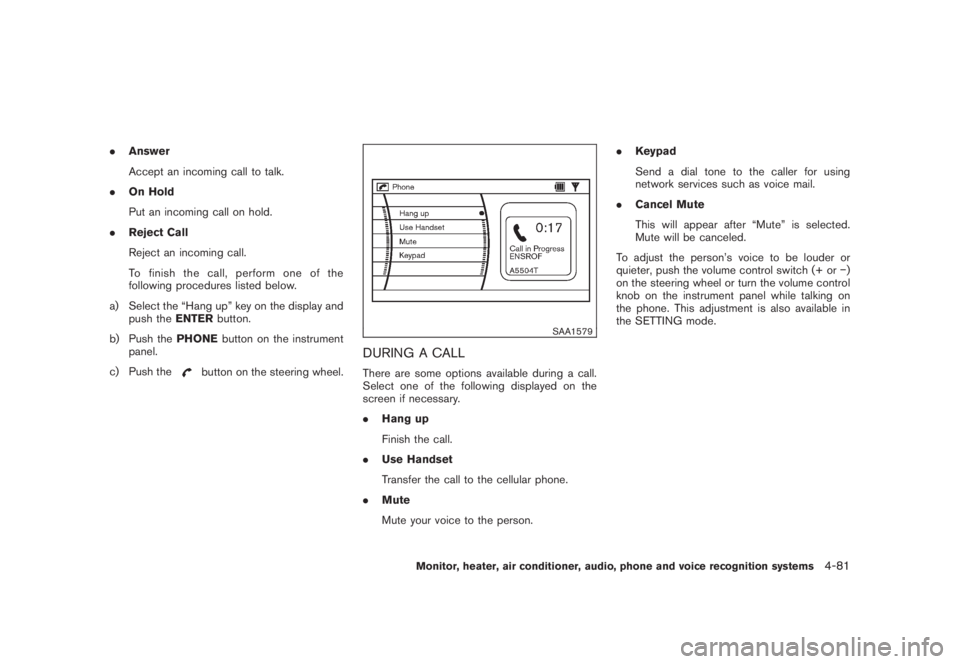
SAA1579
DURING A CALLThere are some options available during a call.
Select one of the following displayed on the
screen if necessary.
.Hang up
Finish the call.
.Use Handset
Transfer the call to the cellular phone.
.Mute
Mute your voice to the person..Keypad
Send a dial tone to the caller for using
network services such as voice mail.
.Cancel Mute
This will appear after “Mute” is selected.
Mute will be canceled.
To adjust the person’s voice to be louder or
quieter, push the volume control switch (+ or)
on the steering wheel or turn the volume control
knob on the instrument panel while talking on
the phone. This adjustment is also available in
the SETTING mode.
Monitor, heater, air conditioner, audio, phone and voice recognition systems
4-81
Page 248 of 444
Black plate (244,1)
Model "Z51-D" EDITED: 2008/ 6/ 26
SAA1580
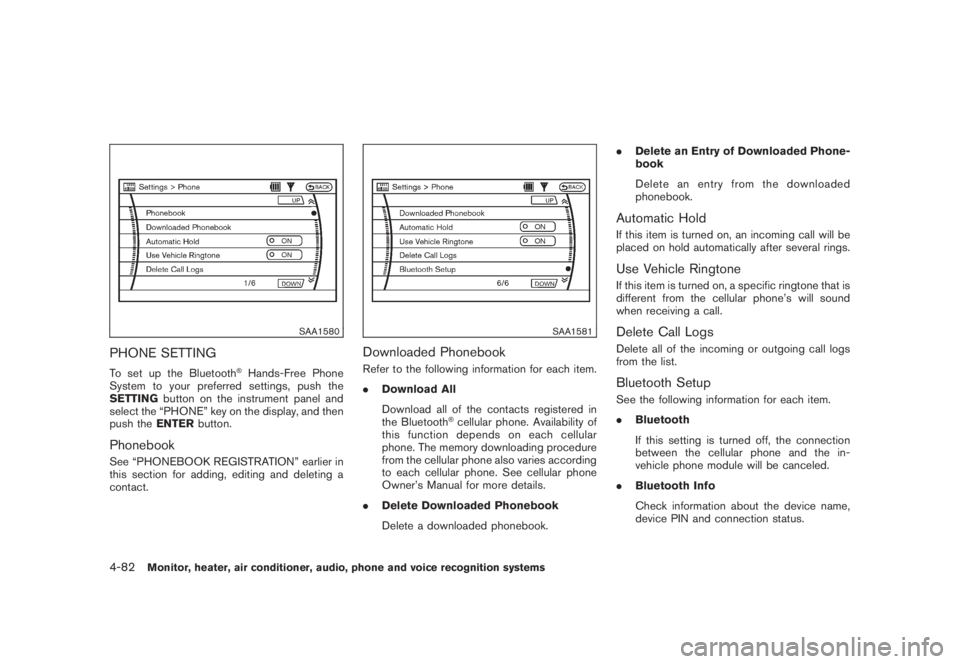
PHONE SETTINGTo set up the Bluetooth
®Hands-Free Phone
System to your preferred settings, push the
SETTINGbutton on the instrument panel and
select the “PHONE” key on the display, and then
push theENTERbutton.
PhonebookSee “PHONEBOOK REGISTRATION” earlier in
this section for adding, editing and deleting a
contact.
SAA1581
Downloaded PhonebookRefer to the following information for each item.
.Download All
Download all of the contacts registered in
the Bluetooth
®cellular phone. Availability of
this function depends on each cellular
phone. The memory downloading procedure
from the cellular phone also varies according
to each cellular phone. See cellular phone
Owner’s Manual for more details.
.Delete Downloaded Phonebook
Delete a downloaded phonebook..Delete an Entry of Downloaded Phone-
book
Delete an entry from the downloaded
phonebook.
Automatic HoldIf this item is turned on, an incoming call will be
placed on hold automatically after several rings.Use Vehicle RingtoneIf this item is turned on, a specific ringtone that is
different from the cellular phone’s will sound
when receiving a call.Delete Call LogsDelete all of the incoming or outgoing call logs
from the list.Bluetooth SetupSee the following information for each item.
.Bluetooth
If this setting is turned off, the connection
between the cellular phone and the in-
vehicle phone module will be canceled.
.Bluetooth Info
Check information about the device name,
device PIN and connection status.
4-82
Monitor, heater, air conditioner, audio, phone and voice recognition systems
Page 257 of 444
Black plate (253,1)
Model "Z51-D" EDITED: 2008/ 6/ 26
SAA1578
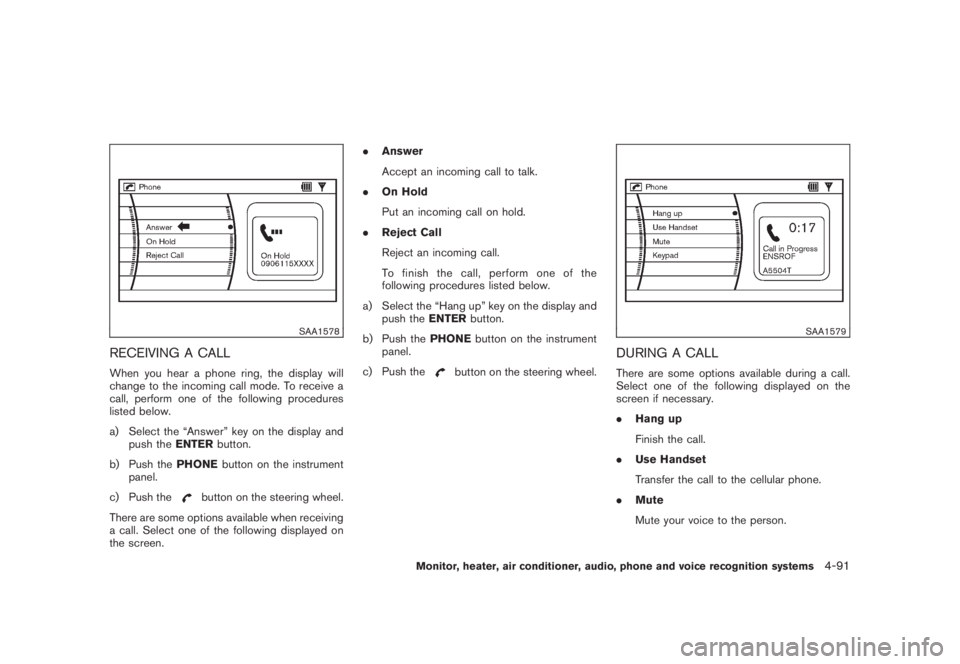
RECEIVING A CALLWhen you hear a phone ring, the display will
change to the incoming call mode. To receive a
call, perform one of the following procedures
listed below.
a) Select the “Answer” key on the display and
push theENTERbutton.
b) Push thePHONEbutton on the instrument
panel.
c) Push the
button on the steering wheel.
There are some options available when receiving
a call. Select one of the following displayed on
the screen..Answer
Accept an incoming call to talk.
.On Hold
Put an incoming call on hold.
.Reject Call
Reject an incoming call.
To finish the call, perform one of the
following procedures listed below.
a) Select the “Hang up” key on the display and
push theENTERbutton.
b) Push thePHONEbutton on the instrument
panel.
c) Push the
button on the steering wheel.
SAA1579
DURING A CALLThere are some options available during a call.
Select one of the following displayed on the
screen if necessary.
.Hang up
Finish the call.
.Use Handset
Transfer the call to the cellular phone.
.Mute
Mute your voice to the person.
Monitor, heater, air conditioner, audio, phone and voice recognition systems
4-91
Page 272 of 444
Black plate (268,1)
Model "Z51-D" EDITED: 2008/ 6/ 26
“Select Ring tone”
Use the Select Ring tone command to select the
tone heard in the vehicle when an incoming call
is received.
The system announces the name of the active
phoneandasksyoutochoosefromthe
following commands:
.“Ringtone” — The system plays a ringtone
and asks if you would like to select that tone.
If you say no, the system plays the next
ringtone available and continues to cycle
through the ringtones until you select one or
quit.
.“Silent” — The system asks you to confirm
your wish to disable the ringtone.SPEAKER ADAPTATION (SA) MODESpeaker Adaptation allows up to two out-of
dialect users to train the system to improve
recognition accuracy. By repeating a number of
commands, the users can create a voice model
of their own voice that is stored in the system.
The system is capable of storing a different
speaker adaptation model for memory A and
memory B.
If memory A is available, the system will use
memory A to store the model. If memory A is in
use and memory B is available, the system will
use memory B to store the model. If both of thememory locations are in use, the system will ask
the user to select which memory location should
be overwritten.
Training procedureThe procedure for training a voice is as follows.
1. Position the vehicle in a reasonably quiet
outdoor location.
2. Sit in the driver’s seat with the engine
running, the parking brake on, and the
transmission in the P (Park) position.
3. Press and hold the
button for more
than 5 seconds.
4. The system announces: “Press the PHONE/
SEND (
) button for the hands-free
phone system to enter the speaker adapta-
tion mode.
5. Press thebutton.
6. Voice memory A or memory B is selected
automatically. If both memory locations are
already in use, the system will prompt you to
overwrite one. Follow the instructions pro-
vided by the system.
7. When preparation is complete and you are
ready to begin, the press the
button.
8. The SA mode will be explained. Follow the
instructions provided by the system.9. When training is finished, the system will tell
you an adequate number of phrases have
been recorded.
10. The system will ask you to say your name.
Follow the instructions to register your
name.
11. The system will announce that speaker
adaptation has been completed and the
system is ready.
The SA mode will stop if:
.The
button is pressed for more than 5
seconds in SA mode.
.The vehicle is driven during SA mode.
.The ignition switch is pushed to the OFF or
LOCK position.
Training phrasesDuring the SA mode, the system instructs you to
say the following phrases.
(The system will prompt you for each phrase.)
.phone book new entry
.dial three oh four two nine
.delete call back number
.setup pair phone
.memo pad play
4-106
Monitor, heater, air conditioner, audio, phone and voice recognition systems
Page 438 of 444
Black plate (2,1)
10-2Cigarette lighter and ashtray...................... 2-41
Circuit breaker, Fusible link....................... 8-20
Cleaning exterior and interior................. 7-2, 7-4
Clock ............................................... 2-38
Coat hooks......................................... 2-49
Cold weather driving.............................. 5-29
Command (See Bluetooth
®Hands-Free
Phone System).................................... 4-100
Command (See NISSAN voice recognition
system)............................ 4-11, 4-114, 4-132
Compact Disc (CD) changer
(See audio system)................................ 4-41
CompactFlash (CF) player
(See audio system)................................ 4-49
Compass ............................................. 2-7
Console box........................................ 2-44
Continuously Variable Transmission (CVT)
fluid................................................. 8-11
Coolant
Capacities and recommended
fuel/ lubricants................................... 9-2
Changing engine coolant........................ 8-8
Checking engine coolant level.................. 8-7
Corrosion protection................................. 7-5
Cover, Cargo cover................................ 2-46
Cruise control...................................... 5-19
Cup holders........................................ 2-41
CVT, Driving with CVT
(Continuously Variable Transmission)............. 5-14
D
Daytime running light system..................... 2-35
Defroster switch, Rear window and outside
mirror defroster switch............................ 2-31
Dimensions and weights............................ 9-8Display cleaning...................................... 4-5
Display controls
(See center multi-function control panel).......... 4-2
Dot matrix liquid crystal display................... 2-17
Drive belts.......................................... 8-15
Drive positioner.................................... 3-30
Driving
All-wheel drive (AWD)......................... 5-22
Cold weather driving.......................... 5-29
Driving with CVT
(Continuously Variable Transmission)......... 5-14
On-pavement and off-road driving............. 5-5
Precautions when starting and driving......... 5-2
Safety precautions............................... 5-7
DVD player, NISSAN mobile entertainment...... 4-62
E
Economy, Fuel ..................................... 5-21
Elapsed time....................................... 2-22
Emission control information label................ 9-10
Emission control system warranty................ 9-25
Engine
Before starting the engine.................... 5-13
Break-in schedule.............................. 5-21
Capacities and recommended
fuel/lubricants.................................... 9-2
Changing engine coolant........................ 8-8
Changing engine oil and filter................... 8-8
Checking engine coolant level.................. 8-7
Checking engine oil level........................ 8-8
Coolant temperature gauge..................... 2-6
Engine block heater........................... 5-30
Engine compartment check locations.......... 8-6
Engine cooling system.......................... 8-7Engine oil......................................... 8-8
Engine oil and oil filter recommendation....... 9-5
Engine oil replacement indicator.............. 2-20
Engine oil viscosity.............................. 9-5
Engine serial number ............................ 9-9
Engine specifications............................ 9-7
If your vehicle overheats....................... 6-11
Starting the engine............................ 5-13
Entry/exit function, Automatic drive positioner . . . 3-30
Event Data Recorders (EDR)..................... 9-26
Exhaust gas (Carbon monoxide).................... 5-2
F
F.M.V.S.S./C.M.V.S.S. certification label............ 9-9
Filter
Air cleaner housing filter...................... 8-16
Changing engine oil and filter................... 8-8
Flashers (See hazard warning flasher switch) . . . 2-36
Flat tire................................................ 6-2
Flat towing.......................................... 9-23
Floor mat cleaning................................... 7-4
Fluid
Brake fluid...................................... 8-12
Capacities and recommended
fuel/lubricants.................................... 9-2
Continuously Variable Transmission (CVT)
fluid............................................. 8-11
Engine coolant ................................... 8-7
Engine oil......................................... 8-8
Power steering fluid........................... 8-11
Window washer fluid .......................... 8-12
FM-AM radio with Compact Disc (CD)
changer............................................. 4-39
Model "Z51-D" EDITED: 2008/ 6/ 23