Outside NISSAN MURANO 2008 Owners Manual
[x] Cancel search | Manufacturer: NISSAN, Model Year: 2008, Model line: MURANO, Model: NISSAN MURANO 2008Pages: 444, PDF Size: 6.09 MB
Page 8 of 444
Black plate (5,1)
Model "Z51-D" EDITED: 2008/ 6/ 26
SSI0373
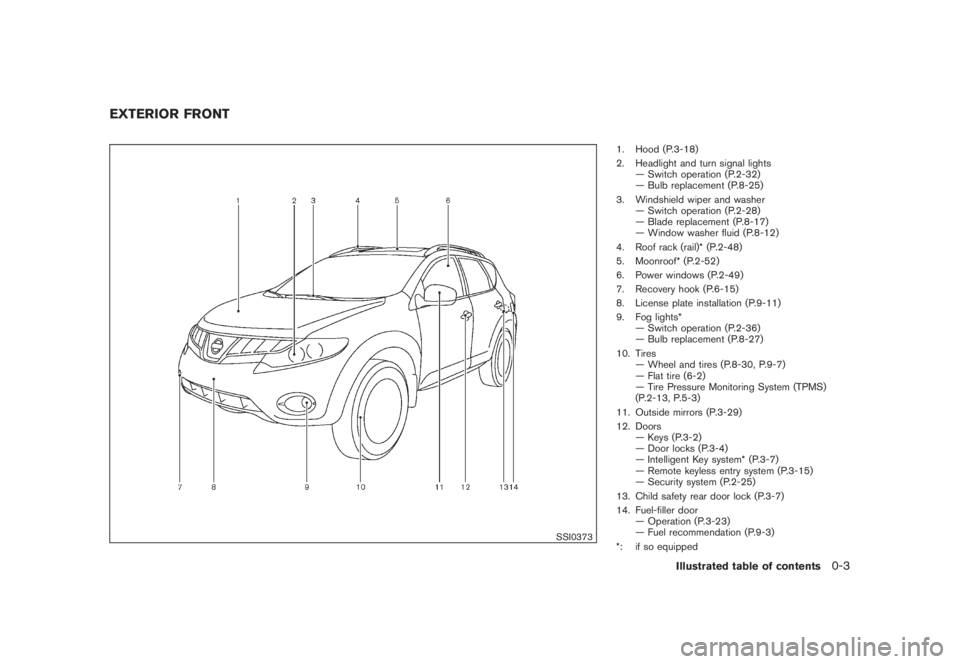
1. Hood (P.3-18)
2. Headlight and turn signal lights
— Switch operation (P.2-32)
— Bulb replacement (P.8-25)
3. Windshield wiper and washer
— Switch operation (P.2-28)
— Blade replacement (P.8-17)
— Window washer fluid (P.8-12)
4. Roof rack (rail)* (P.2-48)
5. Moonroof* (P.2-52)
6. Power windows (P.2-49)
7. Recovery hook (P.6-15)
8. License plate installation (P.9-11)
9. Fog lights*
— Switch operation (P.2-36)
— Bulb replacement (P.8-27)
10. Tires
— Wheel and tires (P.8-30, P.9-7)
— Flat tire (6-2)
— Tire Pressure Monitoring System (TPMS)
(P.2-13, P.5-3)
11. Outside mirrors (P.3-29)
12. Doors
— Keys (P.3-2)
— Door locks (P.3-4)
— Intelligent Key system* (P.3-7)
— Remote keyless entry system (P.3-15)
— Security system (P.2-25)
13. Child safety rear door lock (P.3-7)
14. Fuel-filler door
— Operation (P.3-23)
— Fuel recommendation (P.9-3)
*: if so equipped
EXTERIOR FRONT
Illustrated table of contents
0-3
Page 10 of 444
Black plate (7,1)
Model "Z51-D" EDITED: 2008/ 6/ 26
SSI0375
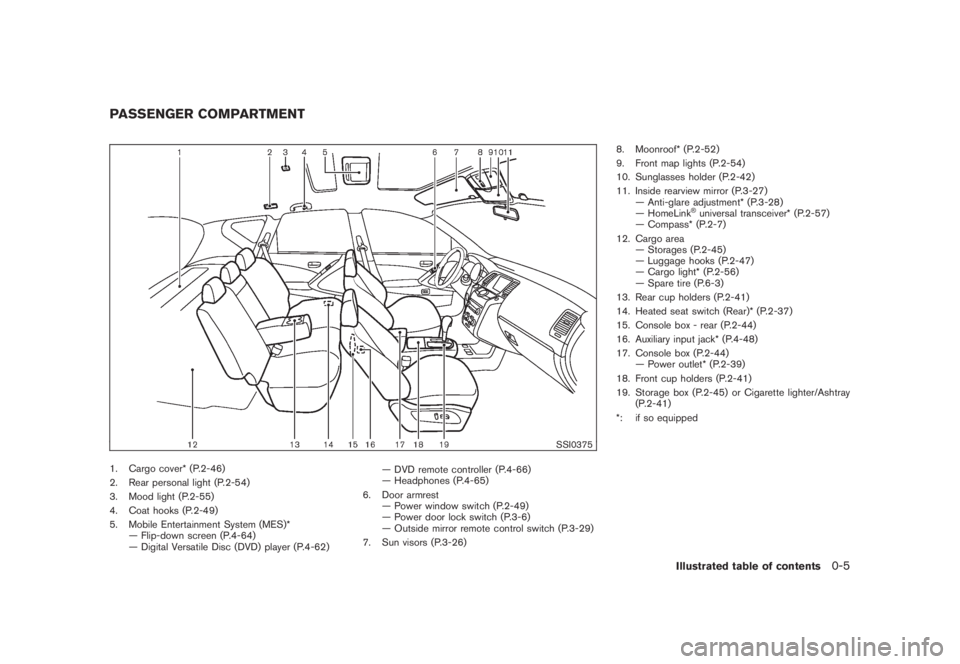
1. Cargo cover* (P.2-46)
2. Rear personal light (P.2-54)
3. Mood light (P.2-55)
4. Coat hooks (P.2-49)
5. Mobile Entertainment System (MES)*
— Flip-down screen (P.4-64)
— Digital Versatile Disc (DVD) player (P.4-62)— DVD remote controller (P.4-66)
— Headphones (P.4-65)
6. Door armrest
— Power window switch (P.2-49)
— Power door lock switch (P.3-6)
— Outside mirror remote control switch (P.3-29)
7. Sun visors (P.3-26)8. Moonroof* (P.2-52)
9. Front map lights (P.2-54)
10. Sunglasses holder (P.2-42)
11. Inside rearview mirror (P.3-27)
— Anti-glare adjustment* (P.3-28)
— HomeLink
®universal transceiver* (P.2-57)
— Compass* (P.2-7)
12. Cargo area
— Storages (P.2-45)
— Luggage hooks (P.2-47)
— Cargo light* (P.2-56)
— Spare tire (P.6-3)
13. Rear cup holders (P.2-41)
14. Heated seat switch (Rear)* (P.2-37)
15. Console box - rear (P.2-44)
16. Auxiliary input jack* (P.4-48)
17. Console box (P.2-44)
— Power outlet* (P.2-39)
18. Front cup holders (P.2-41)
19. Storage box (P.2-45) or Cigarette lighter/Ashtray
(P.2-41)
*: if so equipped
PASSENGER COMPARTMENT
Illustrated table of contents
0-5
Page 12 of 444
Black plate (9,1)
Model "Z51-D" EDITED: 2008/ 6/ 26
27. Selector lever (P.5-14)
28. Front passenger air bag status light (P.1-48)
29. Power outlet (P.2-39)
30. All-Wheel Drive (AWD) LOCK switch* (P.5-22)
31. Rear window and outside mirror* defroster switch
(P.2-31)
32. Heater/air conditioner control (P.4-26) or Audio
system (P.4-39)
33. Glove box (P.2-43)
*: if so equipped
**: Refer to the separate Navigation System Owner’s
Manual (if so equipped) .
Illustrated table of contents
0-7
Page 58 of 444
Black plate (55,1)
Model "Z51-D" EDITED: 2008/ 6/ 26
WARNING
.The front air bags ordinarily will not
inflate in the event of a side impact,
rear impact, rollover, or lower se-
verity frontal collision. Always wear
your seat belts to help reduce the
risk or severity of injury in various
kinds of accidents.
.The front passenger air bag will not
inflate if the passenger air bag
status light is lit or if the front
passenger seat is unoccupied. See
“Front passenger air bag and status
light” later in this section.
.The seat belts and the front air bags
are most effective when you are
sitting well back and upright in the
seat with both feet on the floor. The
front air bags inflate with great
force. Even with the NISSAN Ad-
vanced Air Bag System, if you are
unrestrained, leaning forward, sit-
ting sideways or out of position in
any way, you are at greater risk of
injury or death in a crash. You may
also receive serious or fatal injuries
from the front air bag if you are up
against it when it inflates. Always sitback against the seatback and as
far-away as practical from the steer-
ing wheel or instrument panel. Al-
ways use the seat belts.
.The driver and front passenger seat
belt buckles are equipped with
sensors that detect if the seat belts
are fastened. The Advanced Air Bag
System monitors the severity of a
collision and seat belt usage then
inflates the air bags. Failure to
properly wear seat belts can in-
crease the risk or severity of injury
in an accident.
.The front passenger seat is
equipped with an occupant classifi-
cation sensor (pattern sensor) that
turns the front passenger air bag
OFF under some conditions. This
sensor is only used in this seat.
Failure to be properly seated and
wearing the seat belt can increase
the risk or severity of injury in an
accident. See “Front passenger air
bag and status light” later in this
section.
.Keep hands on the outside of the
steering wheel. Placing them inside
the steering wheel rim could in-crease the risk that they are injured
if the front air bag inflates.
Safety — Seats, seat belts and supplemental restraint system
1-43
Page 66 of 444
Black plate (63,1)
Model "Z51-D" EDITED: 2008/ 6/ 26
placing material over the steering
wheel pad and above the instrument
panel or by installing additional trim
material around the air bag system.
.Modifying or tampering with the
front passenger seat may result in
serious personal injury. For exam-
ple, do not change the front seats by
placing material on the seat cushion
or by installing additional trim ma-
terial, such as seat covers, on the
seat that is not specifically designed
to assure proper air bag operation.
Additionally, do not stow any ob-
jects under the front passenger seat
or the seat cushion and seatback.
Such objects may interfere with the
proper operation of the occupant
classification sensor.
.No unauthorized changes should be
made to any components or wiring
of the seat belt system. This may
affect the front air bag system.
Tampering with the seat belt system
may result in serious personal in-
jury.
.Work on and around the front air
bag system should be done by a
NISSAN dealer. Installation of elec-trical equipment should also be
done by a NISSAN dealer. The
Supplemental Restraint System
(SRS) wiring should not be modified
or disconnected. Unauthorized elec-
trical test equipment and probing
devices should not be used on the
air bag system.
.A cracked windshield should be
replaced immediately by a qualified
repair facility. A cracked windshield
could affect the function of the
supplemental air bag system.
.The SRS wiring harness connectors
are yellow and orange for easy
identification.
When selling your vehicle, we request that you
inform the buyer about the front air bag system
and guide the buyer to the appropriate sections
in this Owner’s Manual.
SSS0848
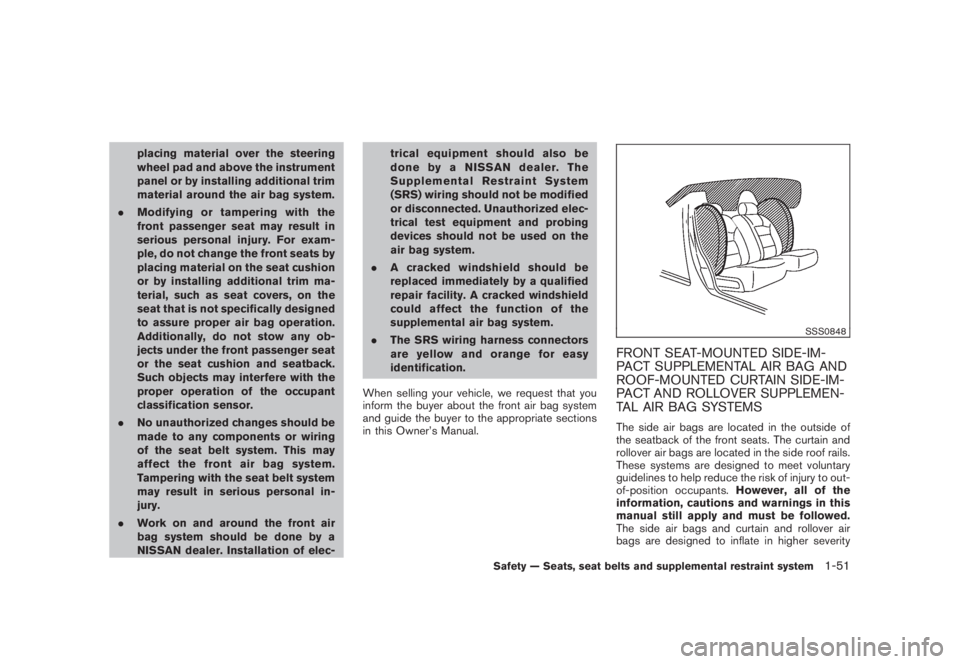
FRONT SEAT-MOUNTED SIDE-IM-
PACT SUPPLEMENTAL AIR BAG AND
ROOF-MOUNTED CURTAIN SIDE-IM-
PACT AND ROLLOVER SUPPLEMEN-
TAL AIR BAG SYSTEMSThe side air bags are located in the outside of
the seatback of the front seats. The curtain and
rollover air bags are located in the side roof rails.
These systems are designed to meet voluntary
guidelines to help reduce the risk of injury to out-
of-position occupants.However, all of the
information, cautions and warnings in this
manual still apply and must be followed.
The side air bags and curtain and rollover air
bags are designed to inflate in higher severity
Safety — Seats, seat belts and supplemental restraint system
1-51
Page 72 of 444
Black plate (7,1)
2 Instruments and controls
Model "Z51-D" EDITED: 2008/ 6/ 23
Instrument panel................................................ 2-2
Meters and gauges............................................. 2-4
Speedometer and odometer............................. 2-5
Tachometer................................................... 2-6
Engine coolant temperature gauge..................... 2-6
Fuel gauge................................................... 2-7
Compass (if so equipped).................................... 2-7
Zone variation change procedure....................... 2-9
Warning/indicator lights and audible reminders....... 2-10
Checking bulbs........................................... 2-10
Warning lights............................................. 2-10
Indicator lights............................................. 2-15
Audible reminders........................................ 2-17
Dot matrix liquid crystal display............................ 2-17
Indicators for operation.................................. 2-18
Indicators for maintenance.............................. 2-20
Trip computer.............................................. 2-21
Security systems.............................................. 2-25
Vehicle security system (if so equipped)............ 2-25
NISSAN Vehicle Immobilizer System................. 2-27
Windshield wiper and washer switch.................... 2-28
Rain-sensing auto wiper system
(if so equipped).......................................... 2-29
Rear window wiper and washer switch.................. 2-30
Rear window and outside mirror defroster switch..... 2-31Headlight and turn signal switch.......................... 2-32
Xenon headlights (if so equipped).................... 2-32
Headlight switch.......................................... 2-32
Turn signal switch........................................ 2-36
Fog light switch (if so equipped)...................... 2-36
Hazard warning flasher switch............................. 2-36
Horn............................................................. 2-37
Heated seats (if so equipped)............................. 2-37
Clock............................................................ 2-38
Models without color display........................... 2-38
Models with color display............................... 2-39
Vehicle Dynamic Control (VDC) OFF switch........... 2-39
Power outlet................................................... 2-39
Cigarette lighter and ashtray (if so equipped).......... 2-41
Storage......................................................... 2-41
Cup holders................................................ 2-41
Sunglasses holder........................................ 2-42
Glove box.................................................. 2-43
Console box............................................... 2-44
Storage box (if so equipped).......................... 2-45
Cargo floor box........................................... 2-45
Luggage side box......................................... 2-46
Cargo cover (if so equipped).......................... 2-46
Luggage hooks (if so equipped)...................... 2-47
Roof rack (if so equipped).............................. 2-48
Page 75 of 444
Black plate (71,1)
Model "Z51-D" EDITED: 2008/ 6/ 26
29. Power outlet
30. All-Wheel Drive (AWD) LOCK switch*
31. Rear window and outside mirror* defroster switch
32. Heater/air conditioner control or Audio system
33. Glove box
*: if so equipped
**: Refer to the separate Navigation System Owner’s
Manual (if so equipped) .
Instruments and controls
2-3
Page 78 of 444
Black plate (74,1)
Model "Z51-D" EDITED: 2008/ 6/ 26
SIC3573
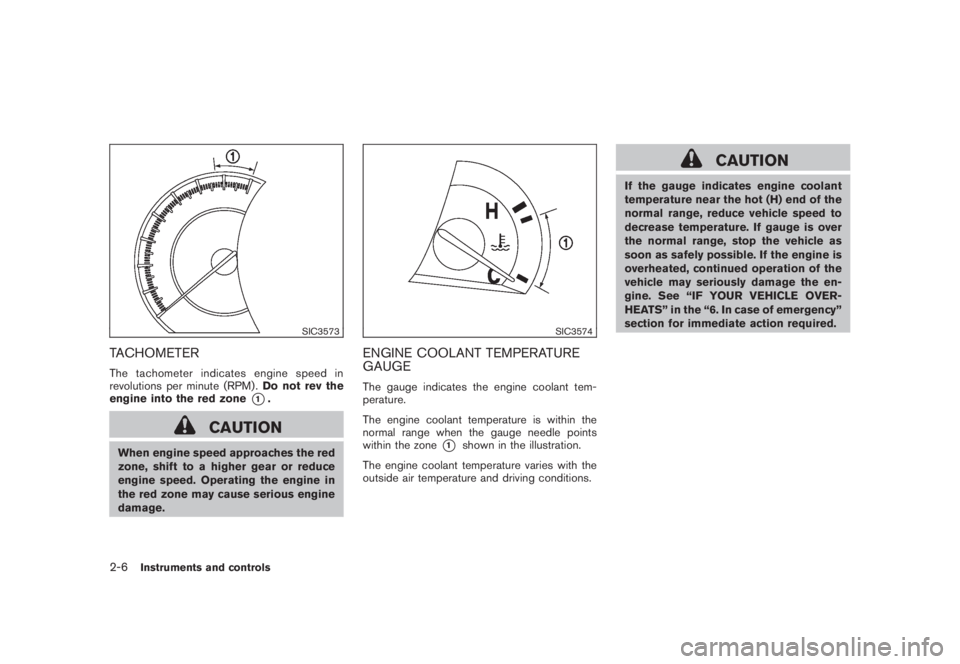
TACHOMETERThe tachometer indicates engine speed in
revolutions per minute (RPM) .Do not rev the
engine into the red zone
*1.
CAUTION
When engine speed approaches the red
zone, shift to a higher gear or reduce
engine speed. Operating the engine in
the red zone may cause serious engine
damage.
SIC3574
ENGINE COOLANT TEMPERATURE
GAUGEThe gauge indicates the engine coolant tem-
perature.
The engine coolant temperature is within the
normal range when the gauge needle points
within the zone
*1
shown in the illustration.
The engine coolant temperature varies with the
outside air temperature and driving conditions.
CAUTION
If the gauge indicates engine coolant
temperature near the hot (H) end of the
normal range, reduce vehicle speed to
decrease temperature. If gauge is over
the normal range, stop the vehicle as
soon as safely possible. If the engine is
overheated, continued operation of the
vehicle may seriously damage the en-
gine. See “IF YOUR VEHICLE OVER-
HEATS” in the “6. In case of emergency”
section for immediate action required.
2-6
Instruments and controls
Page 91 of 444
Black plate (87,1)
Model "Z51-D" EDITED: 2008/ 6/ 26
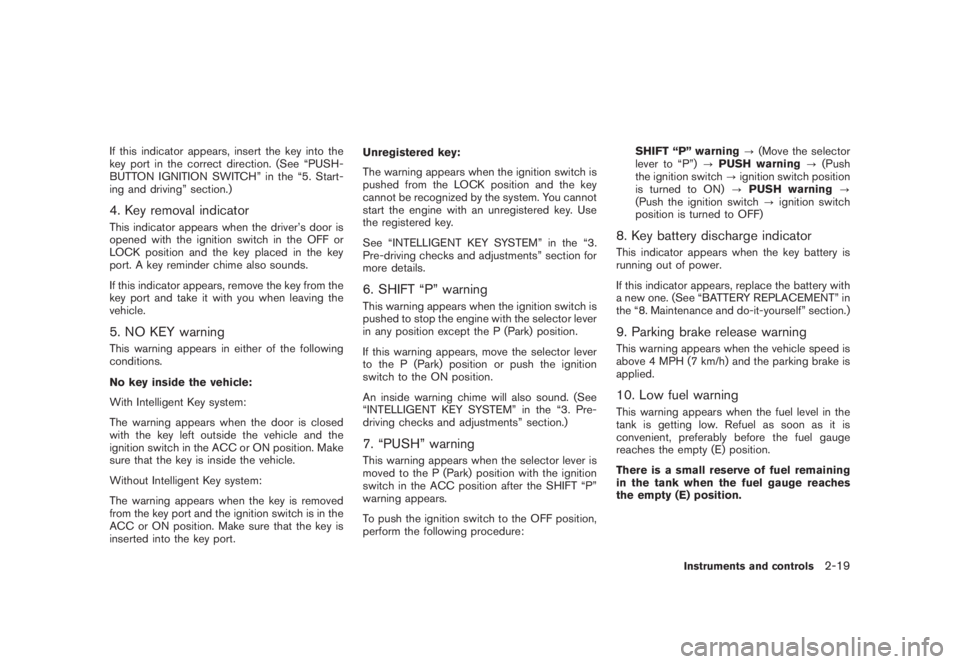
If this indicator appears, insert the key into the
key port in the correct direction. (See “PUSH-
BUTTON IGNITION SWITCH” in the “5. Start-
ing and driving” section.)4. Key removal indicatorThis indicator appears when the driver’s door is
opened with the ignition switch in the OFF or
LOCK position and the key placed in the key
port. A key reminder chime also sounds.
If this indicator appears, remove the key from the
key port and take it with you when leaving the
vehicle.5. NO KEY warningThis warning appears in either of the following
conditions.
No key inside the vehicle:
With Intelligent Key system:
The warning appears when the door is closed
with the key left outside the vehicle and the
ignition switch in the ACC or ON position. Make
sure that the key is inside the vehicle.
Without Intelligent Key system:
The warning appears when the key is removed
from the key port and the ignition switch is in the
ACC or ON position. Make sure that the key is
inserted into the key port.Unregistered key:
The warning appears when the ignition switch is
pushed from the LOCK position and the key
cannot be recognized by the system. You cannot
start the engine with an unregistered key. Use
the registered key.
See “INTELLIGENT KEY SYSTEM” in the “3.
Pre-driving checks and adjustments” section for
more details.
6. SHIFT “P” warningThis warning appears when the ignition switch is
pushed to stop the engine with the selector lever
in any position except the P (Park) position.
If this warning appears, move the selector lever
to the P (Park) position or push the ignition
switch to the ON position.
An inside warning chime will also sound. (See
“INTELLIGENT KEY SYSTEM” in the “3. Pre-
driving checks and adjustments” section.)7. “PUSH” warningThis warning appears when the selector lever is
moved to the P (Park) position with the ignition
switch in the ACC position after the SHIFT “P”
warning appears.
To push the ignition switch to the OFF position,
perform the following procedure:SHIFT “P” warning?(Move the selector
lever to “P”)?PUSH warning?(Push
the ignition switch?ignition switch position
is turned to ON)?PUSH warning?
(Push the ignition switch?ignition switch
position is turned to OFF)
8. Key battery discharge indicatorThis indicator appears when the key battery is
running out of power.
If this indicator appears, replace the battery with
a new one. (See “BATTERY REPLACEMENT” in
the “8. Maintenance and do-it-yourself” section.)9. Parking brake release warningThis warning appears when the vehicle speed is
above 4 MPH (7 km/h) and the parking brake is
applied.10. Low fuel warningThis warning appears when the fuel level in the
tank is getting low. Refuel as soon as it is
convenient, preferably before the fuel gauge
reaches the empty (E) position.
There is a small reserve of fuel remaining
in the tank when the fuel gauge reaches
the empty (E) position.
Instruments and controls
2-19
Page 92 of 444
Black plate (88,1)
Model "Z51-D" EDITED: 2008/ 6/ 26
11. Low washer fluid warningThis warning appears when the washer tank fluid
is at a low level. Add washer fluid as necessary.
(See “WINDOW WASHER FLUID” in the “8.
Maintenance and do-it-yourself” section.)12. Door/lift gate open warning (ignition
switch is in the ON position)This warning appears if any of the doors and/or
the lift gate are open or not closed securely. The
vehicle icon indicates which door is open on the
display.13. “Time to rest” indicatorThis indicator appears when the set “time to
rest” indicator activates. You can set the time for
up to 6 hours. (See “TRIP COMPUTER” later in
this section.)14. Low outside temperature warningThis warning appears if the outside temperature
is below 378F(38C) . The warning can be set not
to be displayed. (See “TRIP COMPUTER” later
in this section.)
SIC3578
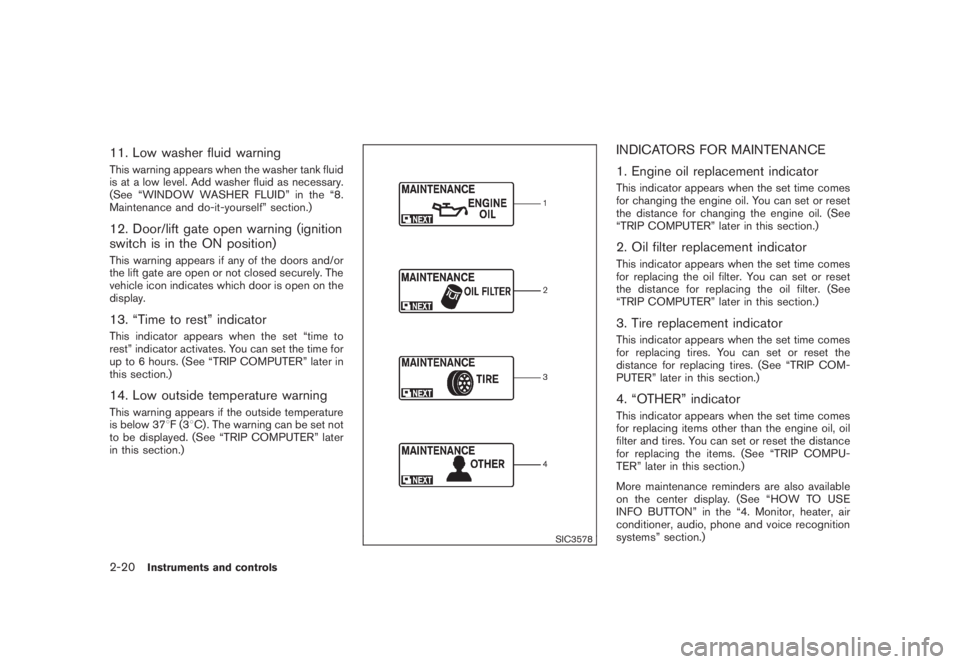
INDICATORS FOR MAINTENANCE
1. Engine oil replacement indicatorThis indicator appears when the set time comes
for changing the engine oil. You can set or reset
the distance for changing the engine oil. (See
“TRIP COMPUTER” later in this section.)2. Oil filter replacement indicatorThis indicator appears when the set time comes
for replacing the oil filter. You can set or reset
the distance for replacing the oil filter. (See
“TRIP COMPUTER” later in this section.)3. Tire replacement indicatorThis indicator appears when the set time comes
for replacing tires. You can set or reset the
distance for replacing tires. (See “TRIP COM-
PUTER” later in this section.)4. “OTHER” indicatorThis indicator appears when the set time comes
for replacing items other than the engine oil, oil
filter and tires. You can set or reset the distance
for replacing the items. (See “TRIP COMPU-
TER” later in this section.)
More maintenance reminders are also available
on the center display. (See “HOW TO USE
INFO BUTTON” in the “4. Monitor, heater, air
conditioner, audio, phone and voice recognition
systems” section.)
2-20
Instruments and controls