warning lights NISSAN MURANO 2009 Owner´s Manual
[x] Cancel search | Manufacturer: NISSAN, Model Year: 2009, Model line: MURANO, Model: NISSAN MURANO 2009Pages: 443, PDF Size: 3.95 MB
Page 157 of 443
Black plate (157,1)
Model "Z51-D" EDITED: 2007/ 10/ 2
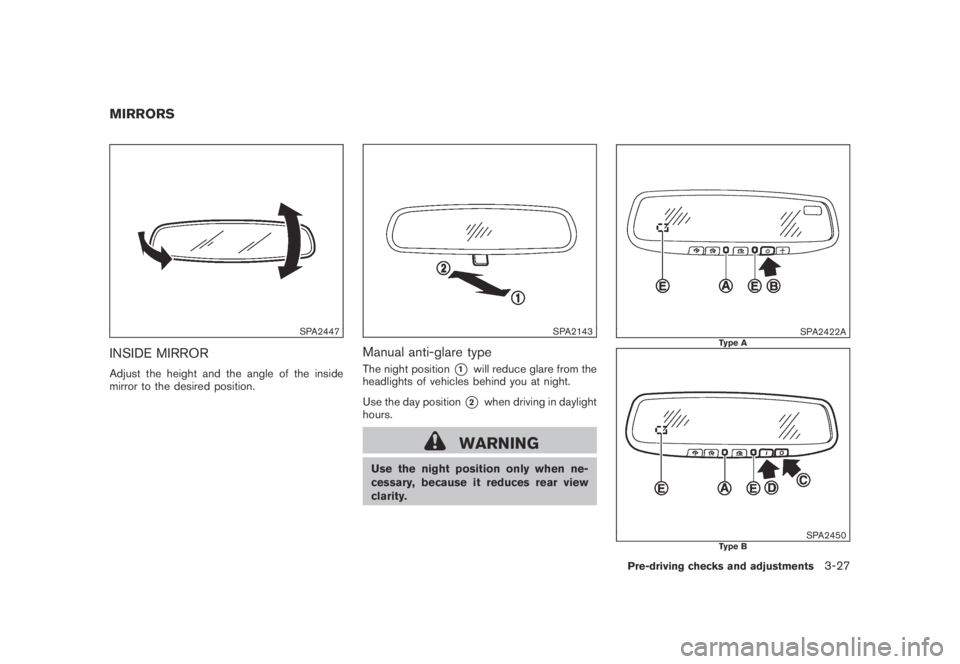
SPA2447
INSIDE MIRROR
Adjust the height and the angle of the inside
mirror to the desired position.
SPA2143
Manual anti-glare type
The night position*1will reduce glare from the
headlights of vehicles behind you at night.
Use the day position
*2when driving in daylight
hours.
WARNING
Use the night position only when ne-
cessary, because it reduces rear view
clarity.
SPA2422AType A
SPA2450Type B
MIRRORS
Pre-driving checks and adjustments3-27
Page 158 of 443
Black plate (158,1)
Model "Z51-D" EDITED: 2007/ 10/ 2
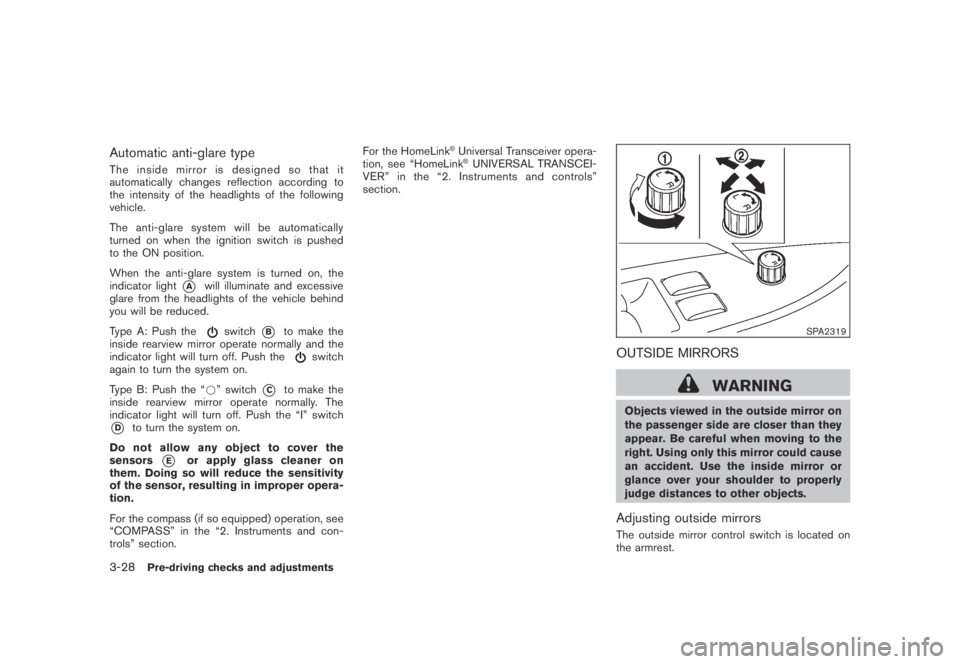
Automatic anti-glare type
The inside mirror is designed so that it
automatically changes reflection according to
the intensity of the headlights of the following
vehicle.
The anti-glare system will be automatically
turned on when the ignition switch is pushed
to the ON position.
When the anti-glare system is turned on, the
indicator light
*Awill illuminate and excessive
glare from the headlights of the vehicle behind
you will be reduced.
Type A: Push the
switch*Bto make the
inside rearview mirror operate normally and the
indicator light will turn off. Push the
switch
again to turn the system on.
Type B: Push the “*” switch
*Cto make the
inside rearview mirror operate normally. The
indicator light will turn off. Push the “I” switch
*Dto turn the system on.
Do not allow any object to cover the
sensors
*Eor apply glass cleaner on
them. Doing so will reduce the sensitivity
of the sensor, resulting in improper opera-
tion.
For the compass (if so equipped) operation, see
“COMPASS” in the “2. Instruments and con-
trols” section.For the HomeLink
®Universal Transceiver opera-
tion, see “HomeLink®UNIVERSAL TRANSCEI-
VER” in the “2. Instruments and controls”
section.
SPA2319
OUTSIDE MIRRORS
WARNING
Objects viewed in the outside mirror on
the passenger side are closer than they
appear. Be careful when moving to the
right. Using only this mirror could cause
an accident. Use the inside mirror or
glance over your shoulder to properly
judge distances to other objects.
Adjusting outside mirrors
The outside mirror control switch is located on
the armrest.
3-28Pre-driving checks and adjustments
Page 324 of 443
Black plate (324,1)
Model "Z51-D" EDITED: 2007/ 10/ 2
NOTE:
The key port does not charge the key
battery. If you see the low battery indicator
in the dot matrix liquid crystal display,
replace the battery as soon as possible.
(See “BATTERY REPLACEMENT” in the “8.
Maintenance and do-it-yourself” section.)
CAUTION
.Never place anything except the key
in the key port. Doing so may cause
damage to the equipment.
.Make sure the key is in the correct
direction when inserting it to the
key port. The engine may not start if
it is in the incorrect direction.
.Remove the key from the key port
after the ignition switch is pushed to
the OFF position..Make sure the area around the vehicle is
clear.
.Check fluid levels such as engine oil, cool-
ant, brake fluid and window washer fluid as
frequently as possible, or at least whenever
you refuel.
.Check that all windows and lights are clean.
.Visually inspect tires for their appearance
and condition. Also check tires for proper
inflation.
.Lock all doors.
.Position seat and adjust head restraints.
.Adjust inside and outside mirrors.
.Fasten seat belts and ask all passengers to
do likewise.
.Check the operation of warning lights when
the ignition switch is pushed to the ON
position. (See “WARNING/INDICATOR
LIGHTS AND AUDIBLE REMINDERS” in
the “2. Instruments and controls” section.)1. Apply the parking brake.
2. Move the selector lever to the P (Park) or N
(Neutral) position. (P is recommended.)
The starter is designed not to operate unless
the selector lever is in either of the above
positions.
3. Insert the key into the key port. (Without the
Intelligent Key System)
Push the ignition switch to the ON position.
Depress the brake pedal and push the
ignition switch to start the engine.
To start the engine immediately, push and
release the ignition switch while depressing
the brake pedal with the ignition switch in
any position.
.If the engine is very hard to start in
extremely cold weather or when restart-
ing, depress the accelerator pedal a little
(approximately 1/3 to the floor) and
while holding, crank the engine. Release
the accelerator pedal when the engine
starts.
.If the engine is very hard to start
because it is flooded, depress the
accelerator pedal all the way to the floor
and hold it. Push the ignition switch to
the ON position to start cranking the
engine. After 5 or 6 seconds, stop
BEFORE STARTING THE ENGINE STARTING THE ENGINE
5-12Starting and driving
Page 329 of 443
Black plate (329,1)
Model "Z51-D" EDITED: 2007/ 10/ 2
suitable tool.
5. Push the selector lever button
*Cand move
the selector lever to the N (Neutral) position
*Dwhile holding down the shift lock
release.
Push the ignition switch to the ON position to
unlock the steering wheel. The vehicle may be
moved to the desired location.
If the battery is discharged completely, the
steering wheel cannot be unlocked. Do not
move the vehicle with the steering wheel locked.
Replace the removed shift lock release cover
after the operation.
If the selector lever cannot be moved out of the
P (Park) position, have a NISSAN dealer check
the CVT system as soon as possible.
WARNING
If the selector lever cannot be moved
from the P (Park) position while the
engine is running and the brake pedal
is depressed, the stop lights may not
work. Malfunctioning stop lights could
cause an accident injuring yourself and
others.
WARNING
.Be sure the parking brake is fully
released before driving. Failure to
do so can cause brake failure and
lead to an accident.
.Do not release the parking brake
from outside the vehicle.
.Do not use the gear shift in place of
the parking brake. When parking, be
sure the parking brake is fully
engaged.
.Do not leave children unattended in
a vehicle. They could release the
parking brake and cause an acci-
dent.
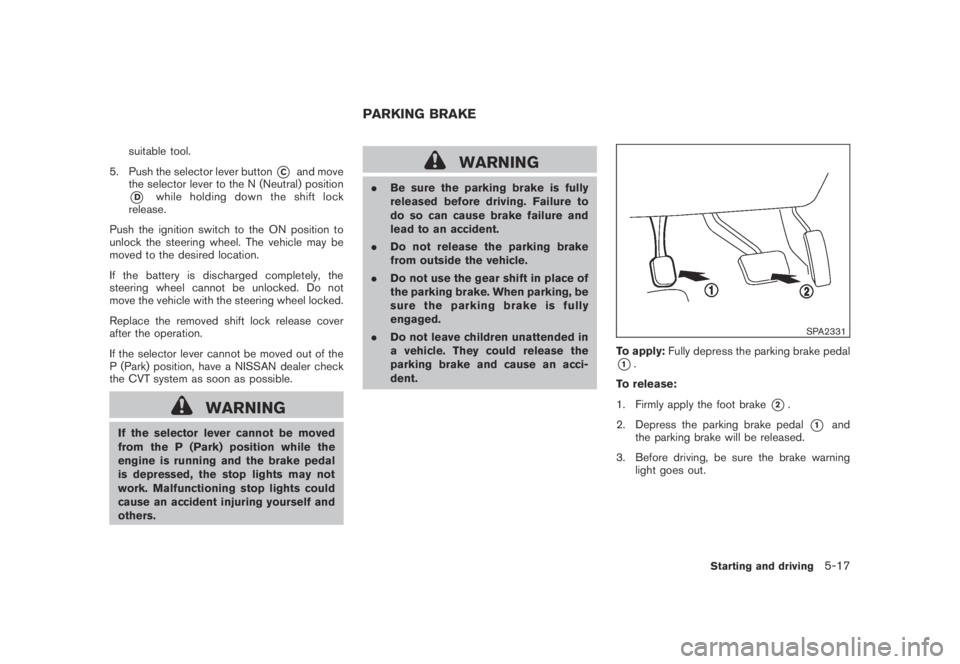
SPA2331
To apply:Fully depress the parking brake pedal
*1.
To release:
1. Firmly apply the foot brake
*2.
2. Depress the parking brake pedal
*1and
the parking brake will be released.
3. Before driving, be sure the brake warning
light goes out.
PARKING BRAKE
Starting and driving5-17
Page 339 of 443
Black plate (339,1)
Model "Z51-D" EDITED: 2007/ 10/ 2
feel a vibration from the actuator when it is
operating. This is normal and indicates that the
ABS is operating properly. However, the pulsa-
tion may indicate that road conditions are
hazardous and extra care is required while
driving.When accelerating or driving on slippery sur-
faces, the tires may spin or slide. With the
Vehicle Dynamic Control (VDC) system, sensors
detect these movements and control the braking
and engine output to help improve vehicle
stability.
.When the VDC system is operating, the
“SLIP” indicator in the instrument panel
blinks.
.If the “SLIP” indicator blinks, the road
conditions are slippery. Be sure to adjust
your speed and driving to these conditions.
Be sure to drive carefully. (See “Slip
indicator light” in the “2. Instruments and
controls” section, and “Vehicle Dynamic
Control (VDC) off indicator light” in the “2.
Instruments and controls” section.)
.Indicator light
If a malfunction occurs in the system, the
“SLIP” and “VDC OFF” indicator lights
illuminate in the instrument panel. As long
as these indicators are illuminated, the VDC
system function is canceled.
The VDC system uses an Active Brake Limited
Slip (ABLS) function to improve vehicle traction.
The ABLS system works when one of the driving
wheels is spinning on a slippery surface. The
ABLS system brakes the spinning wheel, which
distributes the driving power to the other drivewheel. If the vehicle is operated with the VDC
OFF switch pushed and the VDC system turned
off, all VDC systems will be turned off. The
ABLS system and ABS will still operate with the
VDC system off. If the ABLS system is activated,
the “SLIP” indicator will blink and you may hear a
clunk noise and/or feel a pulsation in the brake
pedal. This is normal and is not an indication of a
malfunction.
While the VDC system is operating, you may feel
a pulsation in the brake pedal and hear a noise
or feel a vibration from under the hood. This is
normal and indicates that the VDC system is
working properly.
The VDC system computer has a built-in
diagnostic feature that tests the system each
time you start the engine and move the vehicle at
a low speed forward or backward. When the
self-test occurs, you may hear a “clunk” noise
and/or feel a pulsation in the brake pedal. This is
normal and is not an indication of a malfunction.
WARNING
.The VDC system is designed to help
improve driving stability but does
not prevent accidents due to abrupt
steering operation at high speeds or
due to careless or dangerous driv-
ing techniques. Reduce vehicle
VEHICLE DYNAMIC CONTROL (VDC)
SYSTEM
Starting and driving5-27
Page 344 of 443
Black plate (346,1)
Model "Z51-D" EDITED: 2007/ 10/ 2
TIRE PRESSURE MONITORING SYS-
TEM (TPMS)
This vehicle is equipped with the Tire Pressure
Monitoring System (TPMS) . It monitors tire
pressure of all tires except the spare. When
the low tire pressure warning light is lit, one or
more of your tires is significantly under-inflated.
If the vehicle is being driven with low tire
pressure, the TPMS will activate and warn you
of it by the low tire pressure warning light. This
system will activate only when the vehicle is
driven at speeds above 16 MPH (25 km/h) . For
more details, see “WARNING/INDICATOR
LIGHTS AND AUDIBLE REMINDERS” in the
“2. Instruments and controls” section and “TIRE
PRESSURE MONITORING SYSTEM (TPMS)”
in the “5. Starting and driving” section.
WARNING
.If the low tire pressure warning light
illuminates while driving, avoid sud-
den steering maneuvers or abrupt
braking, reduce vehicle speed, pull
off the road to a safe location and
stop the vehicle as soon as possi-
ble. Driving with under-inflated tires
may permanently damage the tires
and increase the likelihood of tire
failure. Serious vehicle damagecould occur and may lead to an
accident and could result in serious
personal injury. Check the tire pres-
sure for all four tires. Adjust the tire
pressure to the recommended COLD
tire pressure shown on the Tire and
Loading Information label to turn
the low tire pressure warning light
OFF. If you have a flat tire, replace it
with a spare tire as soon as possi-
ble.
.When a spare tire is mounted or a
wheel is replaced, the TPMS will not
function and the low tire pressure
warning light will flash for approxi-
mately 1 minute. The light will
remain on after 1 minute. Contact
your NISSAN dealer as soon as
possible for tire replacement and/
or system resetting.
.Replacing tires with those not ori-
ginally specified by NISSAN could
affect the proper operation of the
TPMS.
.Do not inject any tire liquid or
aerosol tire sealant into the tires,
as this may cause a malfunction of
the tire pressure sensors.
CHANGING A FLAT TIRE
If you have a flat tire, follow the instructions
below.
Stopping the vehicle
1. Safely move the vehicle off the road and
away from traffic.
2. Turn on the hazard warning flashers.
3. Park on a level surface and apply the parking
brake. Move the selector lever to the P
(Park) position.
4. Turn off the engine.
5. Raise the hood to warn other traffic, and to
signal professional road assistance person-
nel that you need assistance.
6. Have all passengers get out of the vehicle
and stand in a safe place, away from traffic
and clear of the vehicle.
WARNING
.Make sure the parking brake is
securely applied and the transmis-
sion is shifted into the P (Park)
position.
.Never change tires when the vehicle
is on a slope, ice or slippery areas.
This is hazardous.
FLAT TIRE
6-2In case of emergency
Page 367 of 443
Black plate (369,1)
Model "Z51-D" EDITED: 2007/ 10/ 2
Lights*:Clean the headlights on a regular basis.
Make sure that the headlights, stop lights, tail
lights, turn signal lights, and other lights are all
operating properly and installed securely. Also
check headlight aim.
Road wheel nuts (lug nuts)*:When checking
the tires, make sure no wheel nuts are missing,
and check for any loose wheel nuts. Tighten if
necessary.
Tire rotation*:Tires should be rotated every
7,500 miles (12,000 km) .
Tires*:Check the pressure with a gauge often
and always prior to long distance trips. If
necessary, adjust the pressure in all tires,
including the spare, to the pressure specified.
Check carefully for damage, cuts or excessive
wear.
Tire Pressure Monitoring System (TPMS)
transmitter components:Replace the TPMS
transmitter grommet seal, valve core and cap
when the tires are replaced due to wear or age.
Wheel alignment and balance:If the vehicle
should pull to either side while driving on a
straight and level road, or if you detect uneven or
abnormal tire wear, there may be a need for
wheel alignment.
If the steering wheel or seat vibrates at normal
highway speeds, wheel balancing may be
needed.For additional information regarding tires, refer
to “Important Tire Safety Information” (US) or
“Tire Safety Information” (Canada) in the War-
ranty Information Booklet.
Windshield:Clean the windshield on a regular
basis. Check the windshield at least every six
months for cracks or other damage. Have a
damaged windshield repaired by a qualified
repair facility.
Windshield wiper blades*:Check for cracks
or wear if they do not wipe properly.
Inside the vehicle
The maintenance items listed here should be
checked on a regular basis, such as when
performing scheduled maintenance, cleaning
the vehicle, etc.
Accelerator pedal:Check the pedal for
smooth operation and make sure the pedal
does not catch or require uneven effort. Keep
the floor mat away from the pedal.
Brake pedal:Check the pedal for smooth
operation. If the brake pedal suddenly goes
down further than normal, the pedal feels
spongy or the vehicle seems to take longer to
stop, see a NISSAN dealer immediately. Keep
the floor mat away from the pedal.
Brakes:Check that the brakes do not pull the
vehicle to one side when applied.Continuously Variable Transmission (CVT)
P (Park) position mechanism:On a fairly
steep hill, check that the vehicle is held securely
with the selector lever in the P (Park) position
without applying any brakes.
Parking brake:Check the parking brake
operation regularly. The vehicle should be
securely held on a fairly steep hill with only the
parking brake applied. If the parking brake needs
adjustment, see a NISSAN dealer.
Seat belts:Check that all parts of the seat belt
system (for example, buckles, anchors, adjusters
and retractors) operate properly and smoothly,
and are installed securely. Check the belt
webbing for cuts, fraying, wear or damage.
Seats:Check seat position controls such as
seat adjusters, seatback recliner, etc. to ensure
they operate smoothly and that all latches lock
securely in every position. Check that the head
restraints move up and down smoothly and that
the locks (if so equipped) hold securely in all
latched positions.
Steering wheel:Check for changes in the
steering conditions, such as excessive free play,
hard steering or strange noises.
Warning lights and chimes:Make sure that
all warning lights and chimes are operating
properly.
Maintenance and do-it-yourself8-3
Page 389 of 443
Black plate (391,1)
Model "Z51-D" EDITED: 2007/ 10/ 2
HEADLIGHTS
Fog may temporarily form inside the lens of the
exterior lights in the rain or in a car wash. A
temperature difference between the inside and
the outside of the lens causes the fog. This is
not a malfunction. If large drops of water collect
inside the lens, contact a NISSAN dealer.
Replacing
Xenon headlight bulb:
WARNING
HIGH VOLTAGE
When xenon headlights are on, they
produce a high voltage. To prevent an
electric shock, never attempt to modify
or disassemble. Always have your xe-
non headlights replaced at a NISSAN
dealer. For additional information, see
“HEADLIGHT AND TURN SIGNAL
SWITCH” in the “2. Instruments and
controls” section.
If replacement is required, see a NISSAN dealer.
CAUTION
Use the same number and wattage as
originally installed:
High/Low beam:
Wattage: 35
Bulb no.: D2S
Halogen headlight bulb:
The headlight is a semi-sealed beam type which
uses a replaceable headlight (halogen) bulb.
CAUTION
.Do not leave the bulb out of the
headlight reflector for a long period
of time. Dust, moisture, smoke, etc.
entering the headlight body may
affect bulb performance.
.High pressure halogen gas is sealed
inside the halogen bulb. The bulb
may break if the glass envelope is
scratched or the bulb is dropped.
.Only touch the plastic base when
handling the bulb. Never touch the
glass envelope.
.Use the same number and wattageas originally installed:
Low beam:
Wattage: 55
Bulb no.: H11
High beam:
Wattage: 65
Bulb no.: HB3
.Aiming is not necessary after repla-
cing the bulb. When aiming adjust-
ment is necessary, contact a
NISSAN dealer.
Maintenance and do-it-yourself8-25
Page 425 of 443
Black plate (427,1)
Model "Z51-D" EDITED: 2007/ 10/ 2
trailer lights while using the vehicle tail
light, stoplight and turn signal circuits
as a signal source. The module/con-
verter must draw no more than 15
milliamps from the stop and tail lamp
circuits. Using a module/converter that
exceeds these power requirements may
damage the vehicle’s electrical system.
See a reputable trailer dealer to obtain
the proper equipment and to have it
installed.
Trailer lights should comply with federal and/or
local regulations. For assistance in hooking up
trailer lights, contact a NISSAN dealer or
reputable trailer dealer.
Trailer brakes
If your trailer is equipped with a braking system,
make sure it conforms to federal and/or local
regulations and that it is properly installed.
WARNING
Never connect a trailer brake system
directly to the vehicle brake system.
Pre-towing tips
.Be certain your vehicle maintains a level
position when a loaded or unloaded trailer is
hitched. Do not drive the vehicle if it has anabnormal nose-up or nose-down condition;
check for improper tongue load, overload,
worn suspension or other possible causes
of either condition.
.Always secure items in the trailer to prevent
load shift while driving.
.Keep the cargo load as low as possible in
the trailer to keep the trailer center of gravity
low.
.Load the trailer so approximately 60% of the
trailer load is in the front half and 40% is in
the back half. Also make sure the load is
balanced side to side.
.Check your hitch, trailer tire pressure,
vehicle tire pressure, trailer light operation,
and trailer wheel lug nuts every time you
attach a trailer to the vehicle.
.Be certain your rearview mirrors conform to
all federal, state or local regulations. If not,
install any mirrors required for towing before
driving the vehicle.
.Determine the overall height of the vehicle
and trailer so the required clearance is
known.
Trailer towing tips
In order to gain skill and an understanding of the
vehicle’s behavior, you should practice turning,
stopping and backing up in an area which is freefrom traffic. Steering stability, and braking
performance will be somewhat different than
under normal driving conditions.
.Always secure items in the trailer to prevent
load shift while driving.
.Lock the trailer hitch coupler with a pin or
lock to prevent the coupler from inadver-
tently becoming unlatched.
.Avoid abrupt starts, acceleration or stops.
.Avoid sharp turns or lane changes.
.Always drive your vehicle at a moderate
speed. Some states or provinces have
specific speed limits for vehicles that are
towing trailers. Obey the local speed limits.
.When backing up, hold the bottom of the
steering wheel with one hand. Move your
hand in the direction in which you want the
trailer to go. Make small corrections and
back up slowly. If possible, have someone
guide you when you are backing up.
Always block the wheels on both vehicle and
trailer when parking. Parking on a slope is not
recommended; however, if you must do so:CAUTION
If you move the shift selector lever to
the P (Park) position before blocking
Technical and consumer information9-21
Page 434 of 443
Black plate (1,1)
10 Index
A
ABS (Anti-lock Braking System).................. 5-26
Advanced air bag system......................... 1-47
Aiming control, Headlights ........................ 2-34
Air bag system
Advanced air bag system..................... 1-47
Front passenger air bag and status light.... 1-48
Front-seat mounted side-impact
supplemental air bag system.................. 1-51
Roof-mounted curtain side-impact and
rollover supplemental air bag system......... 1-51
Air bag warning labels............................. 1-54
Air bag warning light....................... 1-54, 2-14
Air cleaner housing filter.......................... 8-16
Air conditioner
Air conditioner operation...................... 4-26
Air conditioner service......................... 4-30
Air conditioner specification label............ 9-10
Air conditioning system refrigerant and
lubricant recommendations.............. 4-30, 9-6
In-cabin microfilter............................. 4-30
Alarm, How to stop alarm
(see vehicle security system)..................... 2-27
Alcohol, drugs and driving.......................... 5-6
All-wheel drive (AWD)............................. 5-21
All-wheel drive (AWD) warning light............. 2-10
Antenna............................................. 4-61
Anti-lock Braking System (ABS).................. 5-26
Anti-lock braking system (ABS) warning light . . . 2-11
Appearance care
Exterior appearance care........................ 7-2
Interior appearance care........................ 7-4Armrest............................................. 1-10
Ashtray (See cigarette lighter and ashtray)...... 2-41
Audible reminders................................. 2-17
Audio operation precautions...................... 4-31
Audio system....................................... 4-31
Steering wheel audio controls................ 4-60
Autochanger, Compact Disc (CD)............... 4-41
Autolight system................................... 2-33
Automatic
Door unlock mechanism......................... 3-6
Drive positioner................................ 3-30
Seat positioner................................. 3-30
Avoiding collision and rollover...................... 5-5
B
Back door (See lift gate).......................... 3-18
Battery.............................................. 8-13
Battery saver system.......................... 2-34
Keyfob battery replacement................... 8-21
Variable voltage control system............... 8-15
Before starting the engine........................ 5-12
Belts (See drive belts)............................. 8-15
Bluetooth
®Hands-Free Phone System
(with navigation system for Canada)............. 4-85
Bluetooth
®Hands-Free Phone System
(with navigation system for U.S.)................. 4-75
Bluetooth
®hands-free phone system without
navigation system.................................. 4-95
Booster seats...................................... 1-37
Brake
Anti-lock Braking System (ABS).............. 5-26
Brake fluid...................................... 8-12Brake system................................... 5-25
Parking brake operation....................... 5-17
Warning light................................... 2-11
Break-in schedule.................................. 5-20
Brightness control and display ON/OFF
button................................................. 4-8
Brightness control, Instrument panel............. 2-35
Bulb check/instrument panel...................... 2-10
Bulb replacement.................................. 8-24
C
Cabin air filter...................................... 4-30
Capacities and recommended fuel/lubricants..... 9-2
Car phone or CB radio............................ 4-74
Cargo (See vehicle loading information)......... 2-49
Cargo cover........................................ 2-46
Cargo floor box.................................... 2-45
Cargo lights ........................................ 2-56
Cargo net........................................... 2-49
Catalytic converter, Three way catalyst............ 5-2
CD/CF care and cleaning......................... 4-59
Center multi-function control panel................. 4-2
Child restraints..................................... 1-22
Booster seats .................................. 1-37
Installation using LATCH...................... 1-26
Installation using the seat belts............... 1-30
LATCH system................................. 1-23
Precautions on child restraints................ 1-22
Top tether strap................................ 1-25
Child safety......................................... 1-13
Child safety rear door lock.......................... 3-7
Chimes, Audible reminders....................... 2-17
Model "Z51-D" EDITED: 2007/ 10/ 2