lights NISSAN MURANO 2009 Owner´s Manual
[x] Cancel search | Manufacturer: NISSAN, Model Year: 2009, Model line: MURANO, Model: NISSAN MURANO 2009Pages: 443, PDF Size: 3.95 MB
Page 126 of 443
Black plate (124,1)
Model "Z51-D" EDITED: 2007/ 10/ 2
The mood lights*Alocated in the following
positions will illuminate whenever the headlight
switch is in the
orposition.
.next to the map lights
.on the rear ceiling
.under the instrument panel
.under the driver’s power window switch
The mood lights can be adjusted with the
illumination control buttons.
See “Instrument brightness control” earlier in
this section.
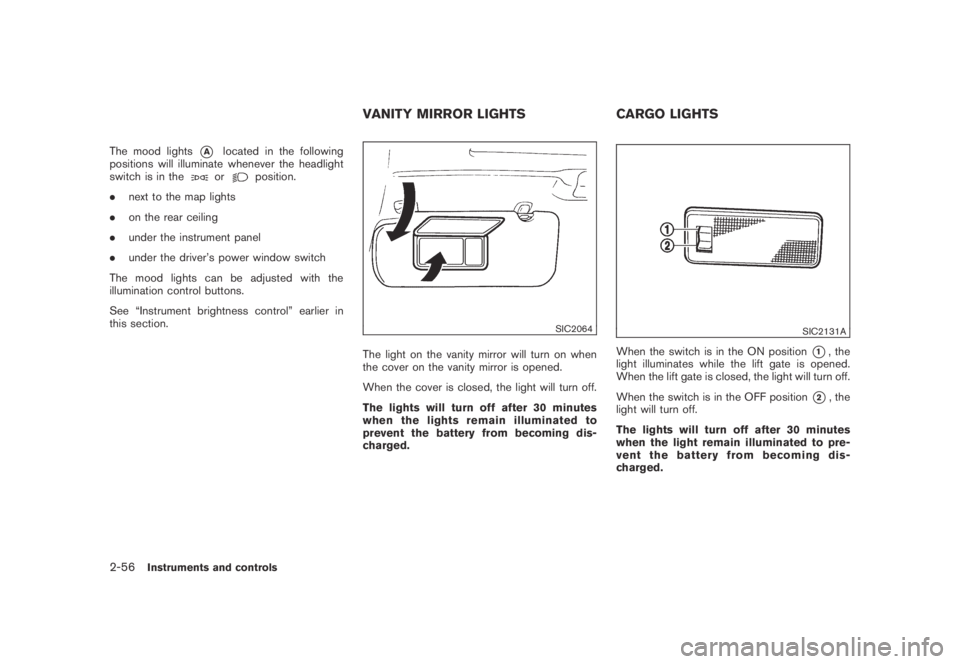
SIC2064
The light on the vanity mirror will turn on when
the cover on the vanity mirror is opened.
When the cover is closed, the light will turn off.
The lights will turn off after 30 minutes
when the lights remain illuminated to
prevent the battery from becoming dis-
charged.
SIC2131A
When the switch is in the ON position*1, the
light illuminates while the lift gate is opened.
When the lift gate is closed, the light will turn off.
When the switch is in the OFF position
*2, the
light will turn off.
The lights will turn off after 30 minutes
when the light remain illuminated to pre-
vent the battery from becoming dis-
charged.
VANITY MIRROR LIGHTS CARGO LIGHTS
2-56Instruments and controls
Page 146 of 443
Black plate (146,1)
Model "Z51-D" EDITED: 2007/ 10/ 2
Unlocking doors
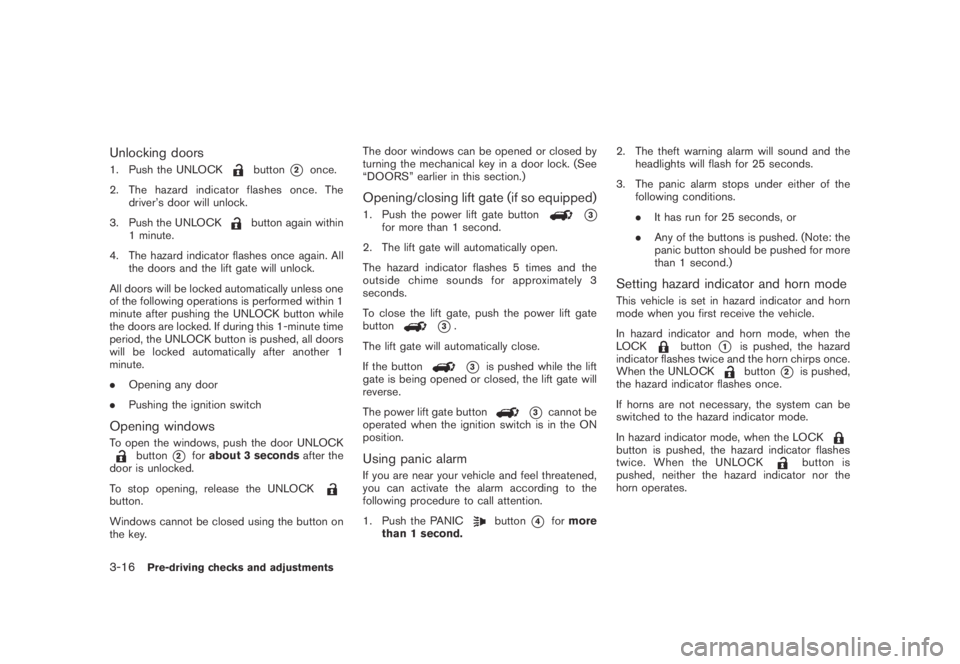
1. Push the UNLOCKbutton*2once.
2. The hazard indicator flashes once. The
driver’s door will unlock.
3. Push the UNLOCK
button again within
1 minute.
4. The hazard indicator flashes once again. All
the doors and the lift gate will unlock.
All doors will be locked automatically unless one
of the following operations is performed within 1
minute after pushing the UNLOCK button while
the doors are locked. If during this 1-minute time
period, the UNLOCK button is pushed, all doors
will be locked automatically after another 1
minute.
.Opening any door
.Pushing the ignition switch
Opening windows
To open the windows, push the door UNLOCKbutton*2forabout 3 secondsafter the
door is unlocked.
To stop opening, release the UNLOCK
button.
Windows cannot be closed using the button on
the key.The door windows can be opened or closed by
turning the mechanical key in a door lock. (See
“DOORS” earlier in this section.)
Opening/closing lift gate (if so equipped)
1. Push the power lift gate button*3for more than 1 second.
2. The lift gate will automatically open.
The hazard indicator flashes 5 times and the
outside chime sounds for approximately 3
seconds.
To close the lift gate, push the power lift gate
button
*3.
The lift gate will automatically close.
If the button
*3is pushed while the lift
gate is being opened or closed, the lift gate will
reverse.
The power lift gate button
*3cannot be
operated when the ignition switch is in the ON
position.
Using panic alarm
If you are near your vehicle and feel threatened,
you can activate the alarm according to the
following procedure to call attention.
1. Push the PANIC
button*4formore
than 1 second.2. The theft warning alarm will sound and the
headlights will flash for 25 seconds.
3. The panic alarm stops under either of the
following conditions.
.It has run for 25 seconds, or
.Any of the buttons is pushed. (Note: the
panic button should be pushed for more
than 1 second.)
Setting hazard indicator and horn mode
This vehicle is set in hazard indicator and horn
mode when you first receive the vehicle.
In hazard indicator and horn mode, when the
LOCK
button*1is pushed, the hazard
indicator flashes twice and the horn chirps once.
When the UNLOCK
button*2is pushed,
the hazard indicator flashes once.
If horns are not necessary, the system can be
switched to the hazard indicator mode.
In hazard indicator mode, when the LOCK
button is pushed, the hazard indicator flashes
twice. When the UNLOCKbutton is
pushed, neither the hazard indicator nor the
horn operates.
3-16Pre-driving checks and adjustments
Page 157 of 443
Black plate (157,1)
Model "Z51-D" EDITED: 2007/ 10/ 2
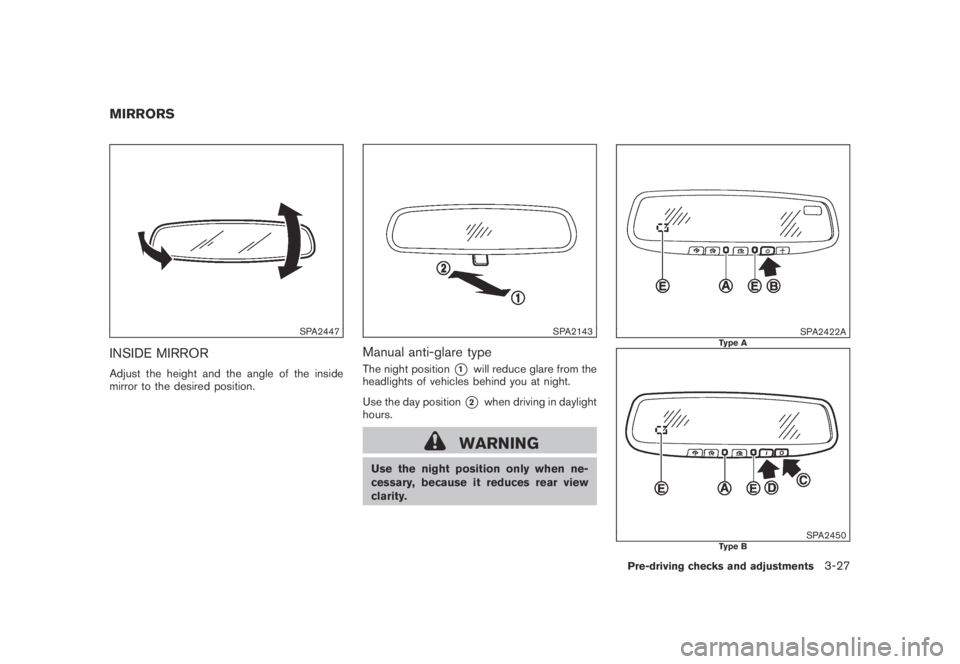
SPA2447
INSIDE MIRROR
Adjust the height and the angle of the inside
mirror to the desired position.
SPA2143
Manual anti-glare type
The night position*1will reduce glare from the
headlights of vehicles behind you at night.
Use the day position
*2when driving in daylight
hours.
WARNING
Use the night position only when ne-
cessary, because it reduces rear view
clarity.
SPA2422AType A
SPA2450Type B
MIRRORS
Pre-driving checks and adjustments3-27
Page 158 of 443
Black plate (158,1)
Model "Z51-D" EDITED: 2007/ 10/ 2
Automatic anti-glare type
The inside mirror is designed so that it
automatically changes reflection according to
the intensity of the headlights of the following
vehicle.
The anti-glare system will be automatically
turned on when the ignition switch is pushed
to the ON position.
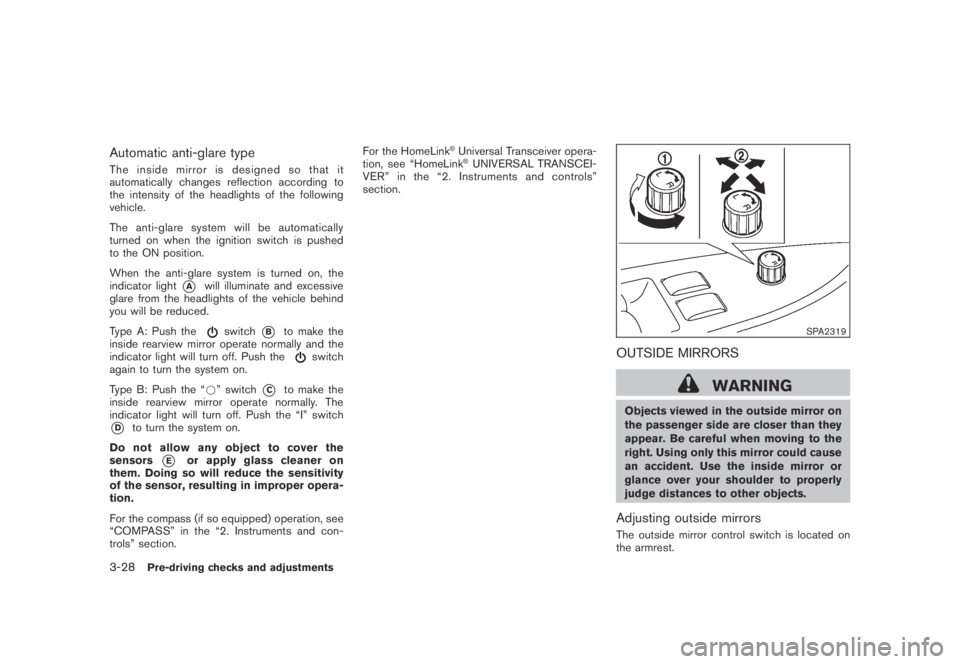
When the anti-glare system is turned on, the
indicator light
*Awill illuminate and excessive
glare from the headlights of the vehicle behind
you will be reduced.
Type A: Push the
switch*Bto make the
inside rearview mirror operate normally and the
indicator light will turn off. Push the
switch
again to turn the system on.
Type B: Push the “*” switch
*Cto make the
inside rearview mirror operate normally. The
indicator light will turn off. Push the “I” switch
*Dto turn the system on.
Do not allow any object to cover the
sensors
*Eor apply glass cleaner on
them. Doing so will reduce the sensitivity
of the sensor, resulting in improper opera-
tion.
For the compass (if so equipped) operation, see
“COMPASS” in the “2. Instruments and con-
trols” section.For the HomeLink
®Universal Transceiver opera-
tion, see “HomeLink®UNIVERSAL TRANSCEI-
VER” in the “2. Instruments and controls”
section.
SPA2319
OUTSIDE MIRRORS
WARNING
Objects viewed in the outside mirror on
the passenger side are closer than they
appear. Be careful when moving to the
right. Using only this mirror could cause
an accident. Use the inside mirror or
glance over your shoulder to properly
judge distances to other objects.
Adjusting outside mirrors
The outside mirror control switch is located on
the armrest.
3-28Pre-driving checks and adjustments
Page 160 of 443
Black plate (160,1)
Model "Z51-D" EDITED: 2007/ 10/ 2
The automatic drive positioner system has two
features:
.Entry/exit function
.Memory storage
ENTRY/EXIT FUNCTION
This system is designed so that the driver’s seat
and steering column will automatically move
when the selector lever is in the P (Park)
position. This allows the driver to get into and
out of the driver’s seat more easily.
The driver’s seat will slide backward and the
steering wheel will move up when the driver’s
door is opened with the ignition switch in the
LOCK position and the key not inserted in the
key port.
The driver’s seat and steering wheel will return
to the previous positions when the ignition
switch is pushed to the ACC position.
The driver’s seat will not return to the previous
positions if the seat or steering adjusting switch
is operated when the seat is at the exit position.
Cancel or activate entry/exit function
The selector lever must be in the P (Park)
position with the ignition switch in the OFF
position after the driver’s door is opened.
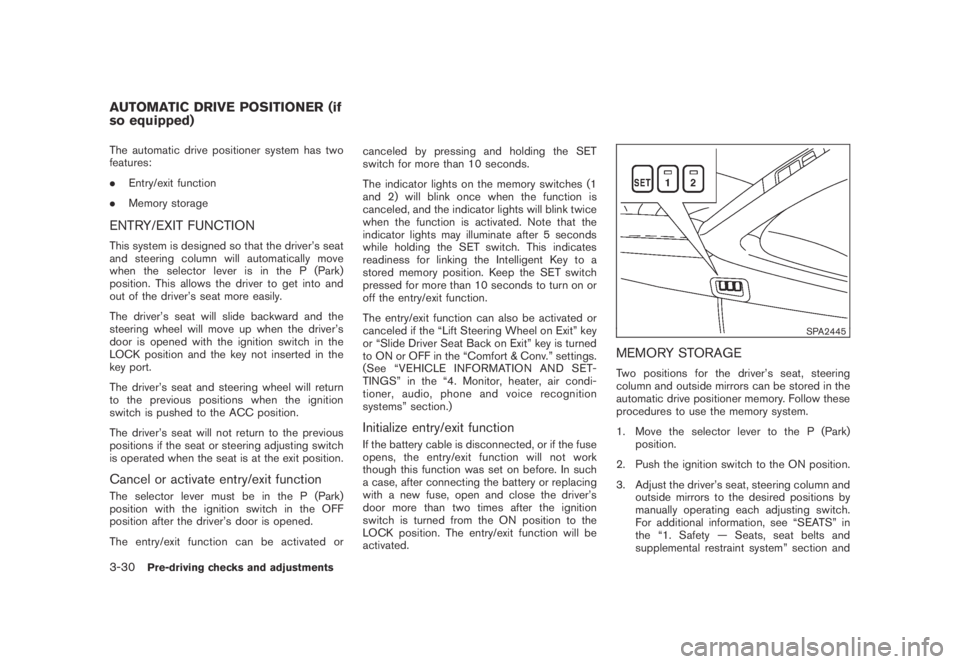
The entry/exit function can be activated orcanceled by pressing and holding the SET
switch for more than 10 seconds.
The indicator lights on the memory switches (1
and 2) will blink once when the function is
canceled, and the indicator lights will blink twice
when the function is activated. Note that the
indicator lights may illuminate after 5 seconds
while holding the SET switch. This indicates
readiness for linking the Intelligent Key to a
stored memory position. Keep the SET switch
pressed for more than 10 seconds to turn on or
off the entry/exit function.
The entry/exit function can also be activated or
canceled if the “Lift Steering Wheel on Exit” key
or “Slide Driver Seat Back on Exit” key is turned
to ON or OFF in the “Comfort & Conv.” settings.
(See “VEHICLE INFORMATION AND SET-
TINGS” in the “4. Monitor, heater, air condi-
tioner, audio, phone and voice recognition
systems” section.)
Initialize entry/exit function
If the battery cable is disconnected, or if the fuse
opens, the entry/exit function will not work
though this function was set on before. In such
a case, after connecting the battery or replacing
with a new fuse, open and close the driver’s
door more than two times after the ignition
switch is turned from the ON position to the
LOCK position. The entry/exit function will be
activated.
SPA2445
MEMORY STORAGE
Two positions for the driver’s seat, steering
column and outside mirrors can be stored in the
automatic drive positioner memory. Follow these
procedures to use the memory system.
1. Move the selector lever to the P (Park)
position.
2. Push the ignition switch to the ON position.
3. Adjust the driver’s seat, steering column and
outside mirrors to the desired positions by
manually operating each adjusting switch.
For additional information, see “SEATS” in
the “1. Safety — Seats, seat belts and
supplemental restraint system” section and
AUTOMATIC DRIVE POSITIONER (if
so equipped)
3-30Pre-driving checks and adjustments
Page 181 of 443
Black plate (179,1)
Model "Z51-D" EDITED: 2007/ 10/ 2
SAA1564
SAA1565
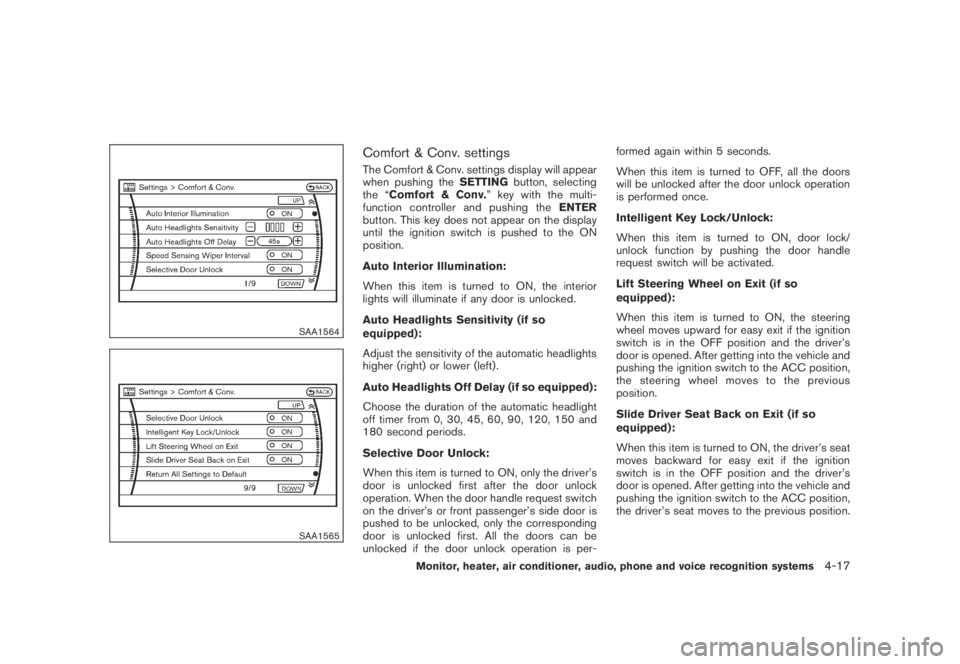
Comfort & Conv. settings
The Comfort & Conv. settings display will appear
when pushing theSETTINGbutton, selecting
the “Comfort & Conv.” key with the multi-
function controller and pushing theENTER
button. This key does not appear on the display
until the ignition switch is pushed to the ON
position.
Auto Interior Illumination:
When this item is turned to ON, the interior
lights will illuminate if any door is unlocked.
Auto Headlights Sensitivity (if so
equipped):
Adjust the sensitivity of the automatic headlights
higher (right) or lower (left) .
Auto Headlights Off Delay (if so equipped):
Choose the duration of the automatic headlight
off timer from 0, 30, 45, 60, 90, 120, 150 and
180 second periods.
Selective Door Unlock:
When this item is turned to ON, only the driver’s
door is unlocked first after the door unlock
operation. When the door handle request switch
on the driver’s or front passenger’s side door is
pushed to be unlocked, only the corresponding
door is unlocked first. All the doors can be
unlocked if the door unlock operation is per-formed again within 5 seconds.
When this item is turned to OFF, all the doors
will be unlocked after the door unlock operation
is performed once.
Intelligent Key Lock/Unlock:
When this item is turned to ON, door lock/
unlock function by pushing the door handle
request switch will be activated.
Lift Steering Wheel on Exit (if so
equipped):
When this item is turned to ON, the steering
wheel moves upward for easy exit if the ignition
switch is in the OFF position and the driver’s
door is opened. After getting into the vehicle and
pushing the ignition switch to the ACC position,
the steering wheel moves to the previous
position.
Slide Driver Seat Back on Exit (if so
equipped):
When this item is turned to ON, the driver’s seat
moves backward for easy exit if the ignition
switch is in the OFF position and the driver’s
door is opened. After getting into the vehicle and
pushing the ignition switch to the ACC position,
the driver’s seat moves to the previous position.
Monitor, heater, air conditioner, audio, phone and voice recognition systems4-17
Page 193 of 443
Black plate (191,1)
Model "Z51-D" EDITED: 2007/ 10/ 2
.The temperature of the passenger compart-
ment will be maintained automatically. Air
flow distribution and fan speed are also
controlled automatically.
.Do not set the temperature lower than the
outside air temperature. Otherwise the
system may not work properly.
.Not recommended if windows fog up.
Dehumidified defrosting or defogging
1. Push the “” front defroster button. (The
indicator light on the button will come on.)
2. Operate the temperature control buttons
(type A) dial (type B) to set the desired
temperature.
.To quickly remove ice from the outside of the
windows, turn the “
” fan speed control
dial and set it to the maximum position.
.As soon as possible after the windshield is
clean, push the “AUTO” button to return to
the auto mode.
.When the “
” front defroster button is
pushed, the air conditioner will automatically
be turned on at outside temperatures above
238F(−58C) to defog the windshield, and
the air recirculate mode will automatically be
turned off.
Outside air is drawn into the passengercompartment to improve the defogging
performance.
MANUAL OPERATION
Fan speed control
Tu r n t h e “” fan speed control dial to
manually control the fan speed.
Push the “AUTO” button to return to automatic
control of the fan speed.
Air recirculation
Push the intake air control button “”to
recirculate interior air inside the vehicle. The
indicator light “
” will come on.
The air recirculation mode cannot be activated
when the air conditioner is in the front defrosting
mode “
”.
Outside air circulation
Push the intake air control button “”to
change the air circulation from the intake air to
the outside air. The indicator light “
” will turn
off.
Automatic air intake control
In the AUTO mode, the intake air will be
controlled automatically. To manually control
the intake air, push the intake air control button
“
”. To return to the automatic control mode,
push the intake air control button “” forabout 2 seconds. The indicator lights will flash
twice, and then the intake air will be controlled
automatically.
Air flow control
Pushing the “MODE” manual air flow control
button selects the air outlet to:
: Air flows from center and side ventila-
tors.
: Air flows from center and side ventila-
tors and foot outlets.
: Air flows mainly from foot outlets.
: Air flows from defroster and foot out-
lets.
Upper vent system
When the “” upper vent button is pushed,
the air flow against the driver’s or passenger’s
upper body becomes gentle. The indicator light
on the button will come on.
In this mode, air from the center ventilators flows
both straight and upward in order to control the
cabin temperature without blowing air directly
on the occupants.
If you want strong air flow against your upper
body, push the “
” button to turn the
indicator light off.
Monitor, heater, air conditioner, audio, phone and voice recognition systems4-29
Page 196 of 443
Black plate (194,1)
Model "Z51-D" EDITED: 2007/ 10/ 2
Static and flutter: During signal interference from
buildings, large hills or due to antenna position,
usually in conjunction with increased distance
from the station transmitter, static or flutter can
be heard. This can be reduced by lowering the
treble setting to reduce the treble response.
Multipath reception: Because of the reflective
characteristics of FM signals, direct and re-
flected signals reach the receiver at the same
time. The signals may cancel each other,
resulting in momentary flutter or loss of sound.
AM radio reception:
AM signals, because of their low frequency, can
bend around objects and skip along the ground.
In addition, the signals can be bounced off the
ionosphere and bent back to earth. Because of
these characteristics. AM signals are also
subject to interference as they travel from
transmitter to receiver.
Fading: Occurs while the vehicle is passing
through freeway underpasses or in areas with
many tall buildings. It can also occur for several
seconds during ionospheric turbulence even in
areas where no obstacles exist.
Static: Caused by thunderstorms, electrical
power lines, electric signs and even traffic lights.Satellite radio reception:
When the satellite radio is first installed or the
battery has been replaced, the satellite radio
may not work properly. This is not a malfunction.
Wait more than 10 minutes with satellite radio
ON for satellite radio to receive all of the
necessary data.
The satellite radio mode requires an active XM
®
satellite radio service subscription. Satellite
radio is not available in Alaska, Hawaii and
Guam.
Satellite radio performance may be affected if
cargo carried on the roof blocks the satellite
radio signal.
If possible, do not put cargo near the satellite
antenna.
A build up of ice on the satellite radio antenna
can affect satellite radio performance. Remove
the ice to restore satellite radio reception.
SAA0480
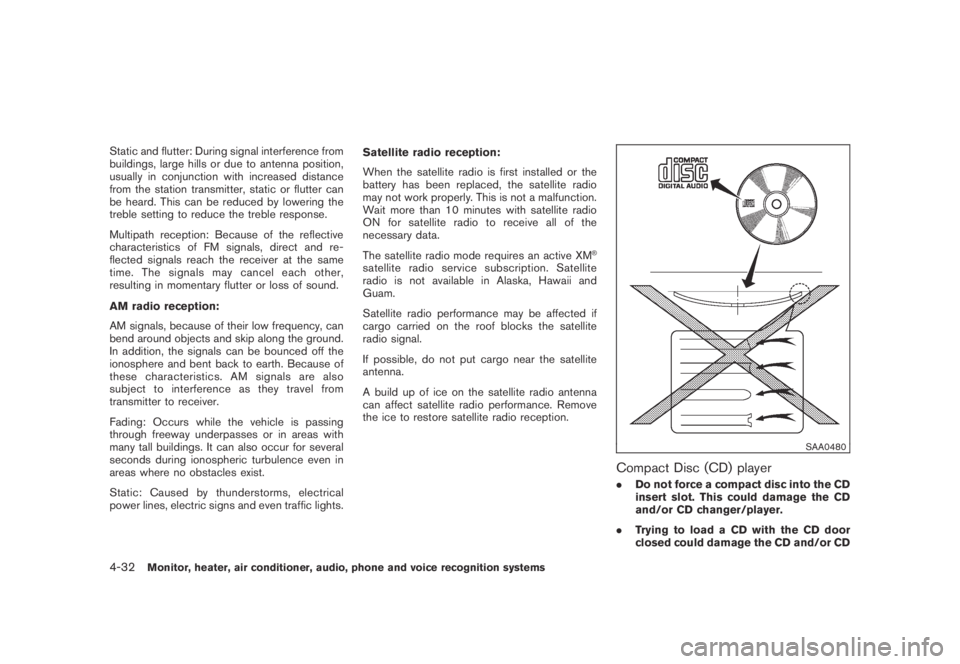
Compact Disc (CD) player
.Do not force a compact disc into the CD
insert slot. This could damage the CD
and/or CD changer/player.
.Trying to load a CD with the CD door
closed could damage the CD and/or CD
4-32Monitor, heater, air conditioner, audio, phone and voice recognition systems
Page 324 of 443
Black plate (324,1)
Model "Z51-D" EDITED: 2007/ 10/ 2
NOTE:
The key port does not charge the key
battery. If you see the low battery indicator
in the dot matrix liquid crystal display,
replace the battery as soon as possible.
(See “BATTERY REPLACEMENT” in the “8.
Maintenance and do-it-yourself” section.)
CAUTION
.Never place anything except the key
in the key port. Doing so may cause
damage to the equipment.
.Make sure the key is in the correct
direction when inserting it to the
key port. The engine may not start if
it is in the incorrect direction.
.Remove the key from the key port
after the ignition switch is pushed to
the OFF position..Make sure the area around the vehicle is
clear.
.Check fluid levels such as engine oil, cool-
ant, brake fluid and window washer fluid as
frequently as possible, or at least whenever
you refuel.
.Check that all windows and lights are clean.
.Visually inspect tires for their appearance
and condition. Also check tires for proper
inflation.
.Lock all doors.
.Position seat and adjust head restraints.
.Adjust inside and outside mirrors.
.Fasten seat belts and ask all passengers to
do likewise.
.Check the operation of warning lights when
the ignition switch is pushed to the ON
position. (See “WARNING/INDICATOR
LIGHTS AND AUDIBLE REMINDERS” in
the “2. Instruments and controls” section.)1. Apply the parking brake.
2. Move the selector lever to the P (Park) or N
(Neutral) position. (P is recommended.)
The starter is designed not to operate unless
the selector lever is in either of the above
positions.
3. Insert the key into the key port. (Without the
Intelligent Key System)
Push the ignition switch to the ON position.
Depress the brake pedal and push the
ignition switch to start the engine.
To start the engine immediately, push and
release the ignition switch while depressing
the brake pedal with the ignition switch in
any position.
.If the engine is very hard to start in
extremely cold weather or when restart-
ing, depress the accelerator pedal a little
(approximately 1/3 to the floor) and
while holding, crank the engine. Release
the accelerator pedal when the engine
starts.
.If the engine is very hard to start
because it is flooded, depress the
accelerator pedal all the way to the floor
and hold it. Push the ignition switch to
the ON position to start cranking the
engine. After 5 or 6 seconds, stop
BEFORE STARTING THE ENGINE STARTING THE ENGINE
5-12Starting and driving
Page 329 of 443
Black plate (329,1)
Model "Z51-D" EDITED: 2007/ 10/ 2
suitable tool.
5. Push the selector lever button
*Cand move
the selector lever to the N (Neutral) position
*Dwhile holding down the shift lock
release.
Push the ignition switch to the ON position to
unlock the steering wheel. The vehicle may be
moved to the desired location.
If the battery is discharged completely, the
steering wheel cannot be unlocked. Do not
move the vehicle with the steering wheel locked.
Replace the removed shift lock release cover
after the operation.
If the selector lever cannot be moved out of the
P (Park) position, have a NISSAN dealer check
the CVT system as soon as possible.
WARNING
If the selector lever cannot be moved
from the P (Park) position while the
engine is running and the brake pedal
is depressed, the stop lights may not
work. Malfunctioning stop lights could
cause an accident injuring yourself and
others.
WARNING
.Be sure the parking brake is fully
released before driving. Failure to
do so can cause brake failure and
lead to an accident.
.Do not release the parking brake
from outside the vehicle.
.Do not use the gear shift in place of
the parking brake. When parking, be
sure the parking brake is fully
engaged.
.Do not leave children unattended in
a vehicle. They could release the
parking brake and cause an acci-
dent.
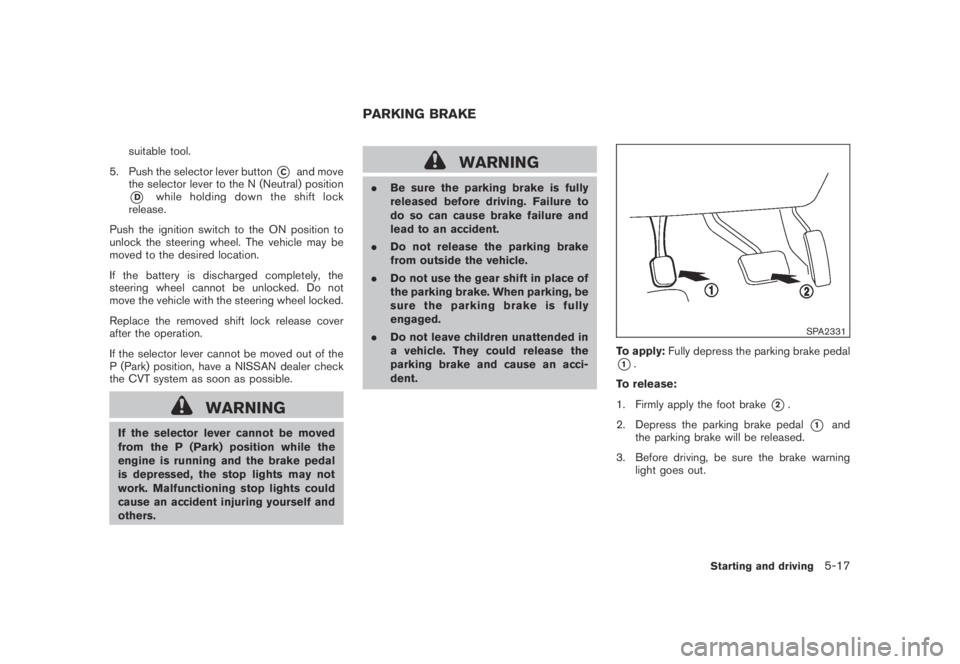
SPA2331
To apply:Fully depress the parking brake pedal
*1.
To release:
1. Firmly apply the foot brake
*2.
2. Depress the parking brake pedal
*1and
the parking brake will be released.
3. Before driving, be sure the brake warning
light goes out.
PARKING BRAKE
Starting and driving5-17