navigation system NISSAN MURANO 2009 Owner´s Manual
[x] Cancel search | Manufacturer: NISSAN, Model Year: 2009, Model line: MURANO, Model: NISSAN MURANO 2009Pages: 443, PDF Size: 3.95 MB
Page 295 of 443
Black plate (293,1)
Model "Z51-D" EDITED: 2007/ 10/ 2
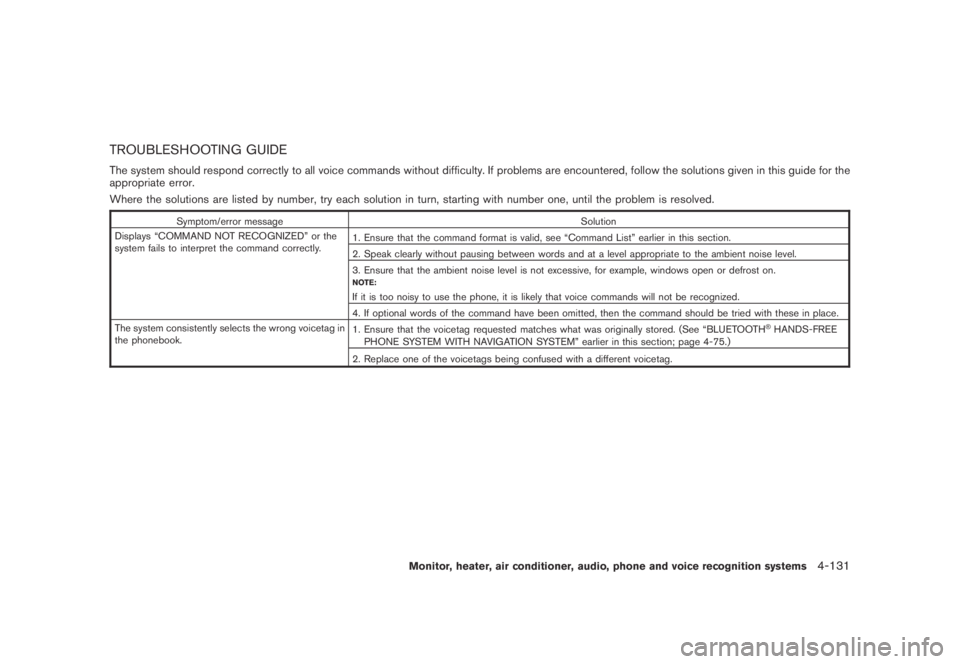
TROUBLESHOOTING GUIDE
The system should respond correctly to all voice commands without difficulty. If problems are encountered, follow the solutions given in this guide for the
appropriate error.
Where the solutions are listed by number, try each solution in turn, starting with number one, until the problem is resolved.
Symptom/error message Solution
Displays “COMMAND NOT RECOGNIZED” or the
system fails to interpret the command correctly.1. Ensure that the command format is valid, see “Command List” earlier in this section.
2. Speak clearly without pausing between words and at a level appropriate to the ambient noise level.
3. Ensure that the ambient noise level is not excessive, for example, windows open or defrost on.
NOTE:
If it is too noisy to use the phone, it is likely that voice commands will not be recognized.
4. If optional words of the command have been omitted, then the command should be tried with these in place.
The system consistently selects the wrong voicetag in
the phonebook.1. Ensure that the voicetag requested matches what was originally stored. (See “BLUETOOTH
®HANDS-FREE
PHONE SYSTEM WITH NAVIGATION SYSTEM” earlier in this section; page 4-75.)
2. Replace one of the voicetags being confused with a different voicetag.
Monitor, heater, air conditioner, audio, phone and voice recognition systems4-131
Page 296 of 443
Black plate (294,1)
Model "Z51-D" EDITED: 2007/ 10/ 2
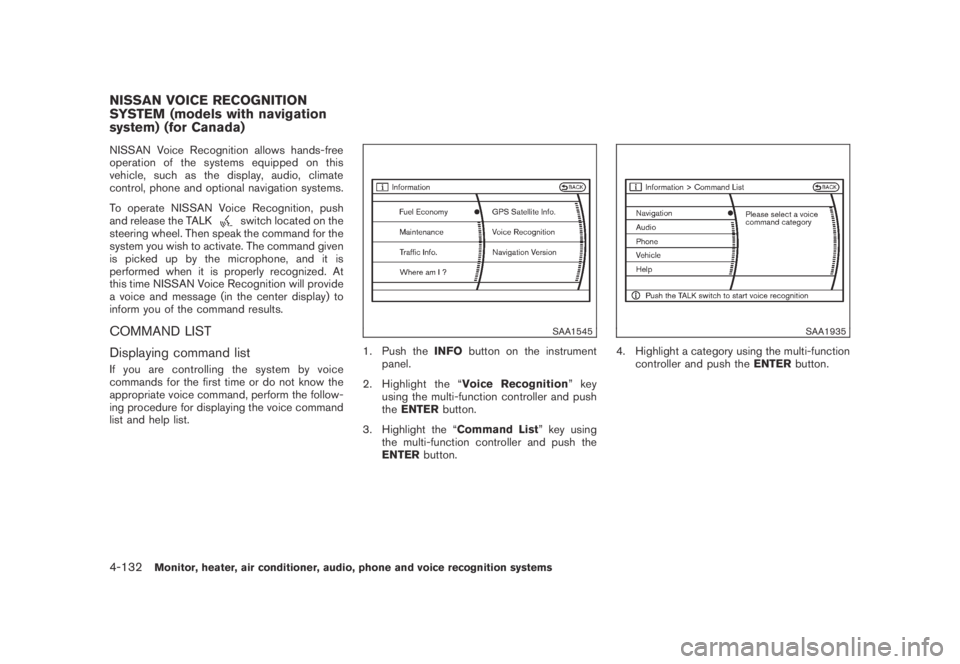
NISSAN Voice Recognition allows hands-free
operation of the systems equipped on this
vehicle, such as the display, audio, climate
control, phone and optional navigation systems.
To operate NISSAN Voice Recognition, push
and release the TALK
switch located on the
steering wheel. Then speak the command for the
system you wish to activate. The command given
is picked up by the microphone, and it is
performed when it is properly recognized. At
this time NISSAN Voice Recognition will provide
a voice and message (in the center display) to
inform you of the command results.
COMMAND LIST
Displaying command list
If you are controlling the system by voice
commands for the first time or do not know the
appropriate voice command, perform the follow-
ing procedure for displaying the voice command
list and help list.
SAA1545
1. Push theINFObutton on the instrument
panel.
2. Highlight the “Voice Recognition”key
using the multi-function controller and push
theENTERbutton.
3. Highlight the “Command List” key using
the multi-function controller and push the
ENTERbutton.
SAA1935
4. Highlight a category using the multi-function
controller and push theENTERbutton.
NISSAN VOICE RECOGNITION
SYSTEM (models with navigation
system) (for Canada)
4-132Monitor, heater, air conditioner, audio, phone and voice recognition systems
Page 298 of 443
Black plate (296,1)
Model "Z51-D" EDITED: 2007/ 10/ 2
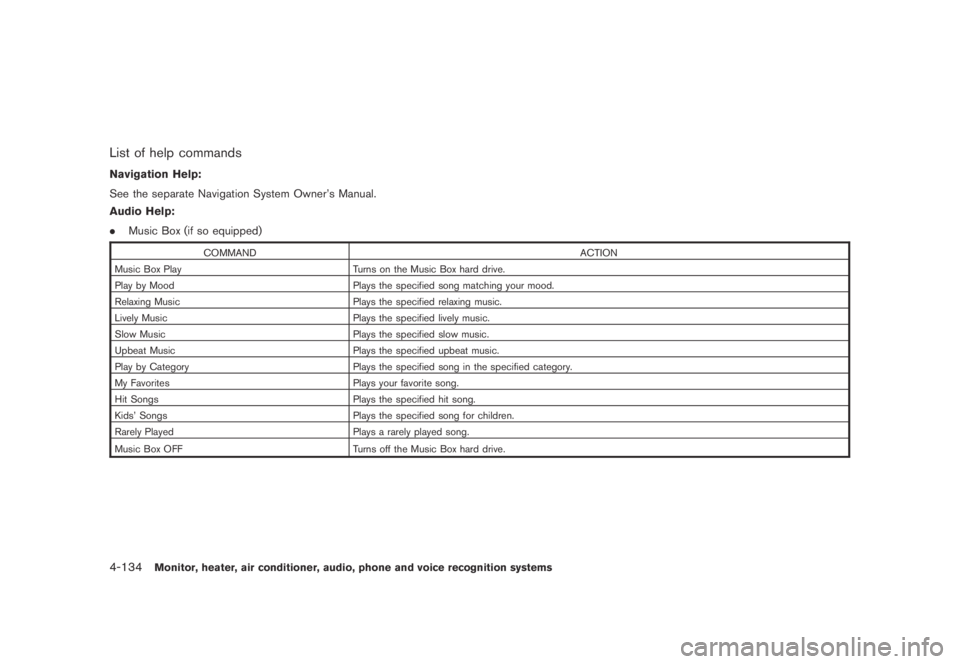
List of help commands
Navigation Help:
See the separate Navigation System Owner’s Manual.
Audio Help:
.Music Box (if so equipped)
COMMAND ACTION
Music Box Play Turns on the Music Box hard drive.
Play by Mood Plays the specified song matching your mood.
Relaxing Music Plays the specified relaxing music.
Lively Music Plays the specified lively music.
Slow Music Plays the specified slow music.
Upbeat Music Plays the specified upbeat music.
Play by Category Plays the specified song in the specified category.
My Favorites Plays your favorite song.
Hit Songs Plays the specified hit song.
Kids’ Songs Plays the specified song for children.
Rarely Played Plays a rarely played song.
Music Box OFF
Turns off the Music Box hard drive.
4-134Monitor, heater, air conditioner, audio, phone and voice recognition systems
Page 305 of 443
Black plate (303,1)
Model "Z51-D" EDITED: 2007/ 10/ 2
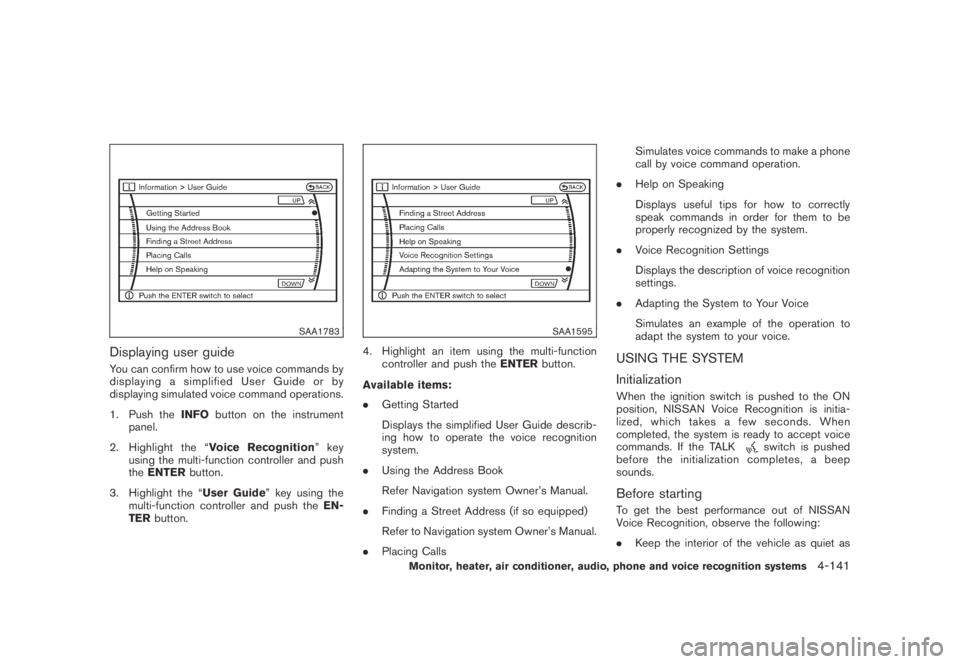
SAA1783
Displaying user guide
You can confirm how to use voice commands by
displaying a simplified User Guide or by
displaying simulated voice command operations.
1. Push theINFObutton on the instrument
panel.
2. Highlight the “Voice Recognition”key
using the multi-function controller and push
theENTERbutton.
3. Highlight the “User Guide” key using the
multi-function controller and push theEN-
TERbutton.
SAA1595
4. Highlight an item using the multi-function
controller and push theENTERbutton.
Available items:
.Getting Started
Displays the simplified User Guide describ-
ing how to operate the voice recognition
system.
.Using the Address Book
Refer Navigation system Owner’s Manual.
.Finding a Street Address (if so equipped)
Refer to Navigation system Owner’s Manual.
.Placing CallsSimulates voice commands to make a phone
call by voice command operation.
.Help on Speaking
Displays useful tips for how to correctly
speak commands in order for them to be
properly recognized by the system.
.Voice Recognition Settings
Displays the description of voice recognition
settings.
.Adapting the System to Your Voice
Simulates an example of the operation to
adapt the system to your voice.USING THE SYSTEM
Initialization
When the ignition switch is pushed to the ON
position, NISSAN Voice Recognition is initia-
lized, which takes a few seconds. When
completed, the system is ready to accept voice
commands. If the TALK
switch is pushed
before the initialization completes, a beep
sounds.
Before starting
To get the best performance out of NISSAN
Voice Recognition, observe the following:
.Keep the interior of the vehicle as quiet as
Monitor, heater, air conditioner, audio, phone and voice recognition systems4-141
Page 308 of 443
Black plate (306,1)
Model "Z51-D" EDITED: 2007/ 10/ 2
— “Temperature twenty one and a half.”
.19.08C
— “Temperature nineteen point zero.”
— “Temperature nineteen point oh.”
— “Temperature nineteen.”
Phone numbers:
Speak phone numbers according to the follow-
ing examples:
.1-800-662-6200
— “Dial one eight oh oh six six two six two oh
oh.”
— “Dial one eight hundred six six two six two
oh oh.”
— “Dial one eight zero zero six six two oh
oh.”
Note 1: For the best voice recognition phone
dialing results, say phone numbers as single
digits.
Note 2: You cannot say 555-6000 as “five five
five six thousands”.
Personal vocabulary (voicetags)
NISSAN Voice Recognition provides the func-
tion called “voicetags,” which can be associated
with the phone and the navigation system (if soequipped) . Using your own voice, 40 voicetags
can be registered in the “Phonebook” (phone)
and 10 locations can be registered in the
“Address Book” (navigation system) .
See “BLUETOOTH
®HANDS-FREE PHONE
SYSTEM WITH NAVIGATION SYSTEM” earlier
in this section and/or the separate Navigation
System Owner’s Manual (if so equipped) for the
method of “voicetag” registration.
SAA1601
VOICE COMMAND LEARNING FUNC-
TION
The voice recognition system has a function to
learn the user’s voice for better voice recognition
performance. The system can memorize the
voices of up to three persons.
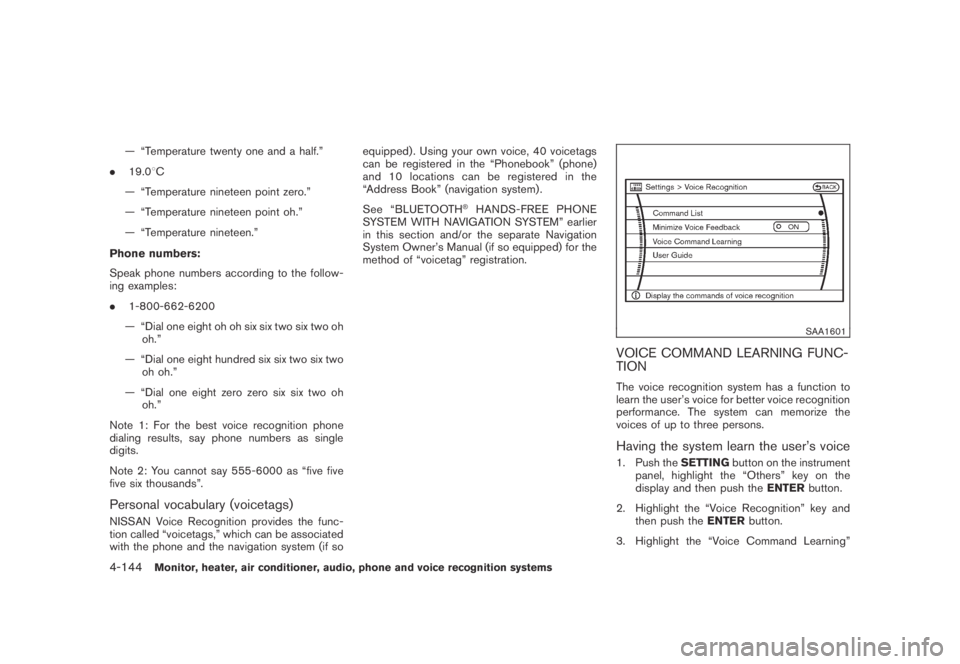
Having the system learn the user’s voice
1. Push theSETTINGbutton on the instrument
panel, highlight the “Others” key on the
display and then push theENTERbutton.
2. Highlight the “Voice Recognition” key and
then push theENTERbutton.
3. Highlight the “Voice Command Learning”
4-144Monitor, heater, air conditioner, audio, phone and voice recognition systems
Page 309 of 443
Black plate (307,1)
Model "Z51-D" EDITED: 2007/ 10/ 2
key and then push theENTERbutton.
SAA1606
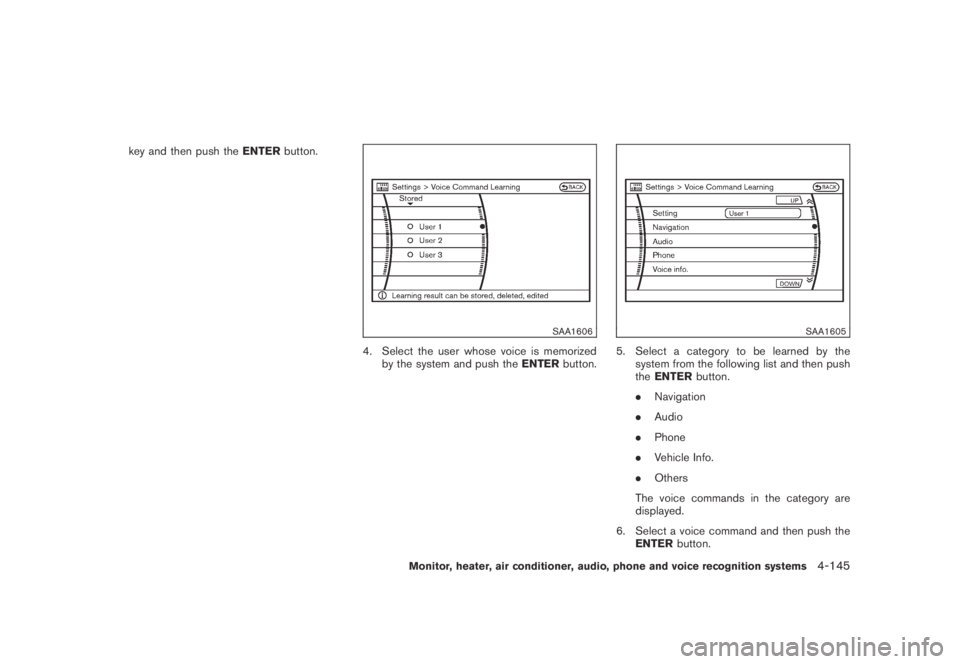
4. Select the user whose voice is memorized
by the system and push theENTERbutton.
SAA1605
5. Select a category to be learned by the
system from the following list and then push
theENTERbutton.
.Navigation
.Audio
.Phone
.Vehicle Info.
.Others
The voice commands in the category are
displayed.
6. Select a voice command and then push the
ENTERbutton.
Monitor, heater, air conditioner, audio, phone and voice recognition systems4-145
Page 312 of 443
Black plate (310,1)
Model "Z51-D" EDITED: 2007/ 10/ 2
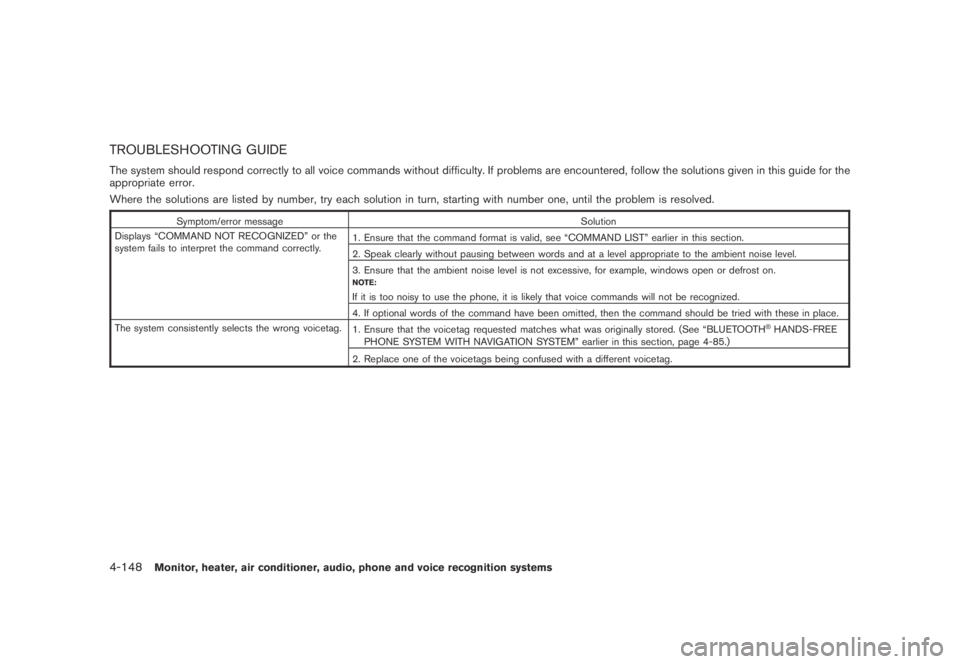
TROUBLESHOOTING GUIDE
The system should respond correctly to all voice commands without difficulty. If problems are encountered, follow the solutions given in this guide for the
appropriate error.
Where the solutions are listed by number, try each solution in turn, starting with number one, until the problem is resolved.
Symptom/error message Solution
Displays “COMMAND NOT RECOGNIZED” or the
system fails to interpret the command correctly.1. Ensure that the command format is valid, see “COMMAND LIST” earlier in this section.
2. Speak clearly without pausing between words and at a level appropriate to the ambient noise level.
3. Ensure that the ambient noise level is not excessive, for example, windows open or defrost on.
NOTE:
If it is too noisy to use the phone, it is likely that voice commands will not be recognized.
4. If optional words of the command have been omitted, then the command should be tried with these in place.
The system consistently selects the wrong voicetag.
1. Ensure that the voicetag requested matches what was originally stored. (See “BLUETOOTH
®HANDS-FREE
PHONE SYSTEM WITH NAVIGATION SYSTEM” earlier in this section, page 4-85.)
2. Replace one of the voicetags being confused with a different voicetag.
4-148Monitor, heater, air conditioner, audio, phone and voice recognition systems
Page 434 of 443
Black plate (1,1)
10 Index
A
ABS (Anti-lock Braking System).................. 5-26
Advanced air bag system......................... 1-47
Aiming control, Headlights ........................ 2-34
Air bag system
Advanced air bag system..................... 1-47
Front passenger air bag and status light.... 1-48
Front-seat mounted side-impact
supplemental air bag system.................. 1-51
Roof-mounted curtain side-impact and
rollover supplemental air bag system......... 1-51
Air bag warning labels............................. 1-54
Air bag warning light....................... 1-54, 2-14
Air cleaner housing filter.......................... 8-16
Air conditioner
Air conditioner operation...................... 4-26
Air conditioner service......................... 4-30
Air conditioner specification label............ 9-10
Air conditioning system refrigerant and
lubricant recommendations.............. 4-30, 9-6
In-cabin microfilter............................. 4-30
Alarm, How to stop alarm
(see vehicle security system)..................... 2-27
Alcohol, drugs and driving.......................... 5-6
All-wheel drive (AWD)............................. 5-21
All-wheel drive (AWD) warning light............. 2-10
Antenna............................................. 4-61
Anti-lock Braking System (ABS).................. 5-26
Anti-lock braking system (ABS) warning light . . . 2-11
Appearance care
Exterior appearance care........................ 7-2
Interior appearance care........................ 7-4Armrest............................................. 1-10
Ashtray (See cigarette lighter and ashtray)...... 2-41
Audible reminders................................. 2-17
Audio operation precautions...................... 4-31
Audio system....................................... 4-31
Steering wheel audio controls................ 4-60
Autochanger, Compact Disc (CD)............... 4-41
Autolight system................................... 2-33
Automatic
Door unlock mechanism......................... 3-6
Drive positioner................................ 3-30
Seat positioner................................. 3-30
Avoiding collision and rollover...................... 5-5
B
Back door (See lift gate).......................... 3-18
Battery.............................................. 8-13
Battery saver system.......................... 2-34
Keyfob battery replacement................... 8-21
Variable voltage control system............... 8-15
Before starting the engine........................ 5-12
Belts (See drive belts)............................. 8-15
Bluetooth
®Hands-Free Phone System
(with navigation system for Canada)............. 4-85
Bluetooth
®Hands-Free Phone System
(with navigation system for U.S.)................. 4-75
Bluetooth
®hands-free phone system without
navigation system.................................. 4-95
Booster seats...................................... 1-37
Brake
Anti-lock Braking System (ABS).............. 5-26
Brake fluid...................................... 8-12Brake system................................... 5-25
Parking brake operation....................... 5-17
Warning light................................... 2-11
Break-in schedule.................................. 5-20
Brightness control and display ON/OFF
button................................................. 4-8
Brightness control, Instrument panel............. 2-35
Bulb check/instrument panel...................... 2-10
Bulb replacement.................................. 8-24
C
Cabin air filter...................................... 4-30
Capacities and recommended fuel/lubricants..... 9-2
Car phone or CB radio............................ 4-74
Cargo (See vehicle loading information)......... 2-49
Cargo cover........................................ 2-46
Cargo floor box.................................... 2-45
Cargo lights ........................................ 2-56
Cargo net........................................... 2-49
Catalytic converter, Three way catalyst............ 5-2
CD/CF care and cleaning......................... 4-59
Center multi-function control panel................. 4-2
Child restraints..................................... 1-22
Booster seats .................................. 1-37
Installation using LATCH...................... 1-26
Installation using the seat belts............... 1-30
LATCH system................................. 1-23
Precautions on child restraints................ 1-22
Top tether strap................................ 1-25
Child safety......................................... 1-13
Child safety rear door lock.......................... 3-7
Chimes, Audible reminders....................... 2-17
Model "Z51-D" EDITED: 2007/ 10/ 2
Page 436 of 443
Black plate (3,1)
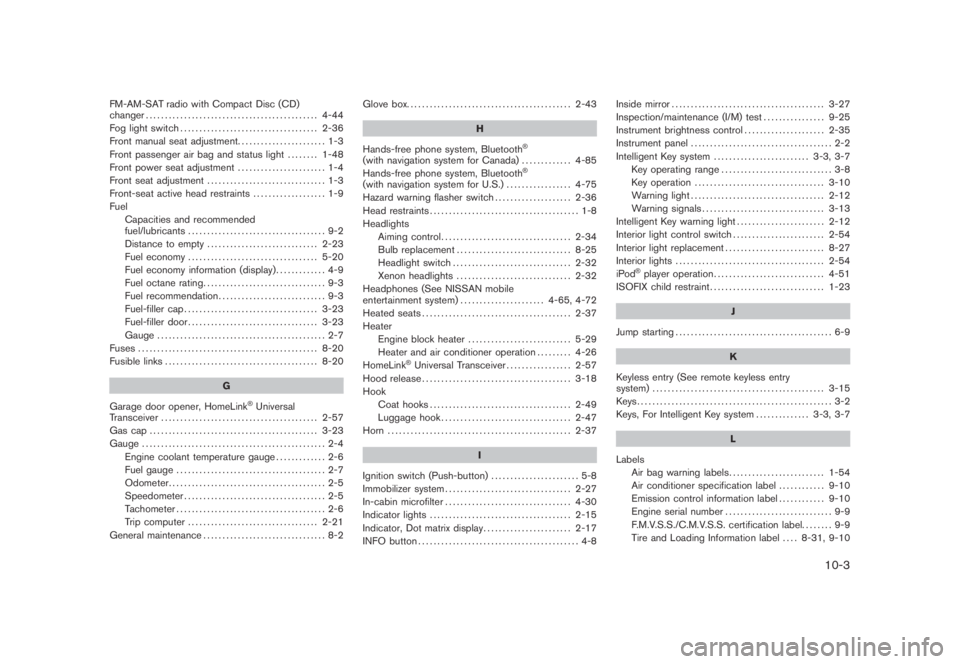
FM-AM-SAT radio with Compact Disc (CD)
changer............................................. 4-44
Fog light switch.................................... 2-36
Front manual seat adjustment....................... 1-3
Front passenger air bag and status light........ 1-48
Front power seat adjustment....................... 1-4
Front seat adjustment ............................... 1-3
Front-seat active head restraints................... 1-9
Fuel
Capacities and recommended
fuel/lubricants.................................... 9-2
Distance to empty............................. 2-23
Fuel economy.................................. 5-20
Fuel economy information (display)............. 4-9
Fuel octane rating................................ 9-3
Fuel recommendation............................ 9-3
Fuel-filler cap................................... 3-23
Fuel-filler door.................................. 3-23
Gauge ............................................ 2-7
Fuses ............................................... 8-20
Fusible links........................................ 8-20
G
Garage door opener, HomeLink
®Universal
Transceiver......................................... 2-57
Gas cap ............................................ 3-23
Gauge ................................................ 2-4
Engine coolant temperature gauge............. 2-6
Fuel gauge....................................... 2-7
Odometer......................................... 2-5
Speedometer..................................... 2-5
Tachometer....................................... 2-6
Trip computer .................................. 2-21
General maintenance................................ 8-2Glove box........................................... 2-43
H
Hands-free phone system, Bluetooth
®
(with navigation system for Canada)............. 4-85
Hands-free phone system, Bluetooth®
(with navigation system for U.S.)................. 4-75
Hazard warning flasher switch.................... 2-36
Head restraints....................................... 1-8
Headlights
Aiming control.................................. 2-34
Bulb replacement.............................. 8-25
Headlight switch ............................... 2-32
Xenon headlights .............................. 2-32
Headphones (See NISSAN mobile
entertainment system)...................... 4-65, 4-72
Heated seats....................................... 2-37
Heater
Engine block heater........................... 5-29
Heater and air conditioner operation......... 4-26
HomeLink
®Universal Transceiver................. 2-57
Hood release....................................... 3-18
Hook
Coat hooks..................................... 2-49
Luggage hook.................................. 2-47
Horn ................................................ 2-37
I
Ignition switch (Push-button)....................... 5-8
Immobilizer system................................. 2-27
In-cabin microfilter................................. 4-30
Indicator lights..................................... 2-15
Indicator, Dot matrix display....................... 2-17
INFO button.......................................... 4-8Inside mirror........................................ 3-27
Inspection/maintenance (I/M) test................ 9-25
Instrument brightness control..................... 2-35
Instrument panel..................................... 2-2
Intelligent Key system......................... 3-3, 3-7
Key operating range............................. 3-8
Key operation.................................. 3-10
Warning light................................... 2-12
Warning signals................................ 3-13
Intelligent Key warning light....................... 2-12
Interior light control switch........................ 2-54
Interior light replacement.......................... 8-27
Interior lights....................................... 2-54
iPod
®player operation............................. 4-51
ISOFIX child restraint.............................. 1-23
J
Jump starting......................................... 6-9
K
Keyless entry (See remote keyless entry
system)............................................. 3-15
Keys................................................... 3-2
Keys, For Intelligent Key system.............. 3-3, 3-7
L
Labels
Air bag warning labels......................... 1-54
Air conditioner specification label............ 9-10
Emission control information label............ 9-10
Engine serial number ............................ 9-9
F.M.V.S.S./C.M.V.S.S. certification label........ 9-9
Tire and Loading Information label.... 8-31, 9-10
10-3
Model "Z51-D" EDITED: 2007/ 10/ 2
Page 437 of 443
Black plate (4,1)
10-4
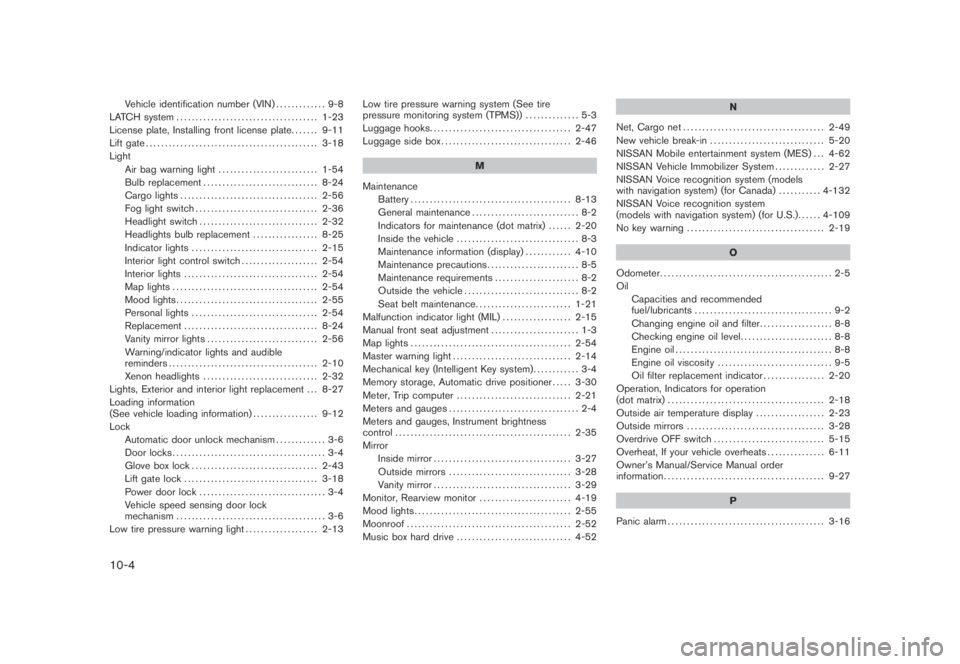
Vehicle identification number (VIN)............. 9-8
LATCH system..................................... 1-23
License plate, Installing front license plate....... 9-11
Lift gate............................................. 3-18
Light
Air bag warning light.......................... 1-54
Bulb replacement.............................. 8-24
Cargo lights .................................... 2-56
Fog light switch................................ 2-36
Headlight switch............................... 2-32
Headlights bulb replacement ................. 8-25
Indicator lights ................................. 2-15
Interior light control switch.................... 2-54
Interior lights ................................... 2-54
Map lights ...................................... 2-54
Mood lights..................................... 2-55
Personal lights ................................. 2-54
Replacement ................................... 8-24
Vanity mirror lights............................. 2-56
Warning/indicator lights and audible
reminders....................................... 2-10
Xenon headlights .............................. 2-32
Lights, Exterior and interior light replacement . . . 8-27
Loading information
(See vehicle loading information)................. 9-12
Lock
Automatic door unlock mechanism............. 3-6
Door locks........................................ 3-4
Glove box lock ................................. 2-43
Lift gate lock ................................... 3-18
Power door lock................................. 3-4
Vehicle speed sensing door lock
mechanism....................................... 3-6
Low tire pressure warning light................... 2-13Low tire pressure warning system (See tire
pressure monitoring system (TPMS)).............. 5-3
Luggage hooks..................................... 2-47
Luggage side box.................................. 2-46
M
Maintenance
Battery.......................................... 8-13
General maintenance............................ 8-2
Indicators for maintenance (dot matrix)...... 2-20
Inside the vehicle................................ 8-3
Maintenance information (display)............ 4-10
Maintenance precautions........................ 8-5
Maintenance requirements...................... 8-2
Outside the vehicle.............................. 8-2
Seat belt maintenance......................... 1-21
Malfunction indicator light (MIL).................. 2-15
Manual front seat adjustment....................... 1-3
Map lights .......................................... 2-54
Master warning light............................... 2-14
Mechanical key (Intelligent Key system)............ 3-4
Memory storage, Automatic drive positioner..... 3-30
Meter, Trip computer.............................. 2-21
Meters and gauges.................................. 2-4
Meters and gauges, Instrument brightness
control.............................................. 2-35
Mirror
Inside mirror.................................... 3-27
Outside mirrors................................ 3-28
Vanity mirror.................................... 3-29
Monitor, Rearview monitor........................ 4-19
Mood lights......................................... 2-55
Moonroof........................................... 2-52
Music box hard drive.............................. 4-52N
Net, Cargo net ..................................... 2-49
New vehicle break-in .............................. 5-20
NISSAN Mobile entertainment system (MES) . . . 4-62
NISSAN Vehicle Immobilizer System............. 2-27
NISSAN Voice recognition system (models
with navigation system) (for Canada) ........... 4-132
NISSAN Voice recognition system
(models with navigation system) (for U.S.)...... 4-109
No key warning .................................... 2-19
O
Odometer............................................. 2-5
Oil
Capacities and recommended
fuel/lubricants.................................... 9-2
Changing engine oil and filter................... 8-8
Checking engine oil level........................ 8-8
Engine oil......................................... 8-8
Engine oil viscosity .............................. 9-5
Oil filter replacement indicator................ 2-20
Operation, Indicators for operation
(dot matrix)......................................... 2-18
Outside air temperature display.................. 2-23
Outside mirrors.................................... 3-28
Overdrive OFF switch............................. 5-15
Overheat, If your vehicle overheats............... 6-11
Owner’s Manual/Service Manual order
information.......................................... 9-27
P
Panic alarm......................................... 3-16
Model "Z51-D" EDITED: 2007/ 10/ 2