brake NISSAN MURANO 2010 Owner´s Manual
[x] Cancel search | Manufacturer: NISSAN, Model Year: 2010, Model line: MURANO, Model: NISSAN MURANO 2010Pages: 425, PDF Size: 3.62 MB
Page 97 of 425
Black plate (93,1)
Model "Z51-D" EDITED: 2009/ 8/ 3
wheel right and left.3. Key insertion indicatorThis indicator appears when the key needs to be
inserted into the key port.
If this indicator appears, insert the key into the
key port in the correct direction. (See “PUSH-
BUTTON IGNITION SWITCH” in the “5. Start-
ing and driving” section.)4. Key removal indicatorThis indicator appears when the driver’s door is
opened with the ignition switch in the OFF or
LOCK position and the key placed in the key
port. A key reminder chime also sounds.
If this indicator appears, remove the key from the
key port and take it with you when leaving the
vehicle.5. NO KEY warningThis warning appears in either of the following
conditions.
No key inside the vehicle:
The warning appears when the door is closed
with the Intelligent Key left outside the vehicle
and the ignition switch in the ACC or ON
position. Make sure that the Intelligent Key is
inside the vehicle.Unregistered key:
The warning appears when the ignition switch is
pushed from the LOCK position and the key
cannot be recognized by the system. You cannot
start the engine with an unregistered key. Use
the registered key.
See “INTELLIGENT KEY SYSTEM” in the “3.
Pre-driving checks and adjustments” section for
more details.
6. SHIFT “P” warningThis warning appears when the ignition switch is
pushed to stop the engine with the selector lever
in any position except the P (Park) position.
If this warning appears, move the selector lever
to the P (Park) position or push the ignition
switch to the ON position.
An inside warning chime will also sound. (See
“INTELLIGENT KEY SYSTEM” in the “3. Pre-
driving checks and adjustments” section.)7. “PUSH” warningThis warning appears when the selector lever is
moved to the P (Park) position with the ignition
switch in the ACC position after the SHIFT “P”
warning appears.
To push the ignition switch to the OFF position,
perform the following procedure: SHIFT “P” warning
?(Move the selector
lever to “P”) ?PUSH warning ?(Push
the ignition switch ?ignition switch position
is turned to ON) ?PUSH warning ?
(Push the ignition switch ?ignition switch
position is turned to OFF)
8. Key battery discharge indicatorThis indicator appears when the key battery is
running out of power.
If this indicator appears, replace the battery with
a new one. (See “BATTERY REPLACEMENT” in
the “8. Maintenance and do-it-yourself” section.)9. Parking brake release warningThis warning appears when the vehicle speed is
above 4 MPH (7 km/h) and the parking brake is
applied.10. Low fuel warningThis warning appears when the fuel level in the
tank is getting low. Refuel as soon as it is
convenient, preferably before the fuel gauge
reaches the empty (E) position.
There is a small reserve of fuel remaining
in the tank when the fuel gauge reaches
the empty (E) position.
Instruments and controls
2-19
Page 103 of 425
Black plate (99,1)
Model "Z51-D" EDITED: 2009/ 8/ 3
SIC3679
Warning checkTo see if there are any of the following warnings
and corresponding details, select this menu.
.No key warning
. Low fuel warning
. Low washer fluid warning
. Parking brake release warning
. Door/lift gate open warning SKIP:
Push the
switch
*A
to move to the
warning check mode.
Push the
switch
*B
to select other menus.
DETAIL:
This item is available only when a warning is
displayed.
Select this menu to see the details of warnings.
SIC2133
Your vehicle has two types of security systems,
as follows:
. Vehicle security system (if so equipped)
. NISSAN Vehicle Immobilizer System
The security condition will be shown by the
security indicator light.VEHICLE SECURITY SYSTEM (if so
equipped)The vehicle security system provides visual and
audio alarm signals if someone opens the doors
or lift gate when the system is armed. It is not,
however, a motion detection type system that
activates when a vehicle is moved or when aSECURITY SYSTEMS
Instruments and controls
2-25
Page 112 of 425
Black plate (108,1)
Model "Z51-D" EDITED: 2009/ 8/ 3
SIC3670
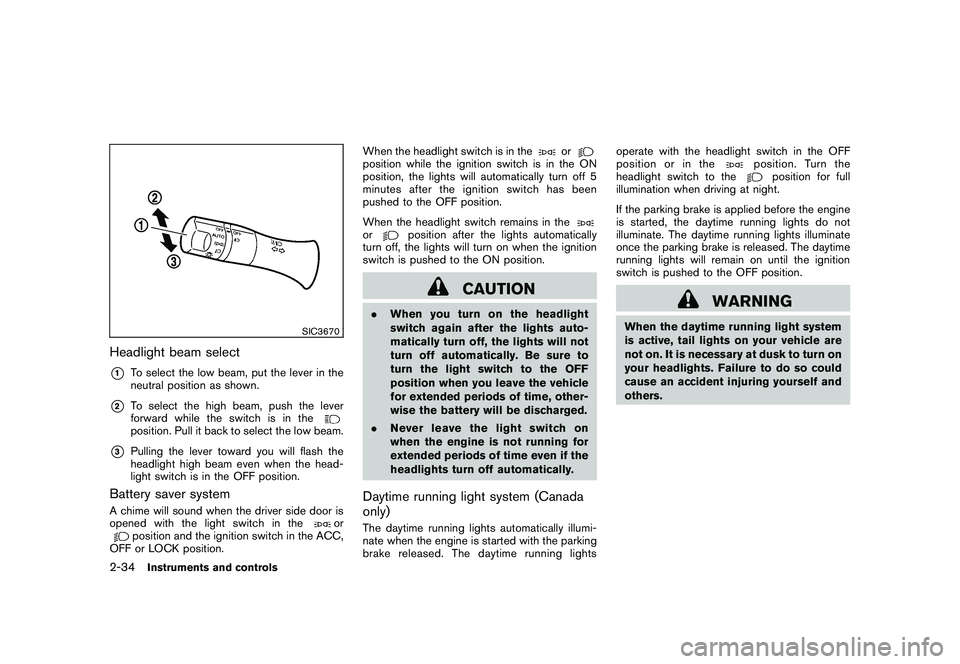
Headlight beam select*1
To select the low beam, put the lever in the
neutral position as shown.
*2
To select the high beam, push the lever
forward while the switch is in theposition. Pull it back to select the low beam.
*3
Pulling the lever toward you will flash the
headlight high beam even when the head-
light switch is in the OFF position.
Battery saver systemA chime will sound when the driver side door is
opened with the light switch in the
or
position and the ignition switch in the ACC,
OFF or LOCK position. When the headlight switch is in the
or
position while the ignition switch is in the ON
position, the lights will automatically turn off 5
minutesaftertheignitionswitchhasbeen
pushed to the OFF position.
When the headlight switch remains in theor
position after the lights automatically
turn off, the lights will turn on when the ignition
switch is pushed to the ON position.
CAUTION
. When you turn on the headlight
switch again after the lights auto-
matically turn off, the lights will not
turn off automatically. Be sure to
turn the light switch to the OFF
position when you leave the vehicle
for extended periods of time, other-
wise the battery will be discharged.
. Never leave the light switch on
when the engine is not running for
extended periods of time even if the
headlights turn off automatically.Daytime running light system (Canada
only)The daytime running lights automatically illumi-
nate when the engine is started with the parking
brake released. The daytime running lights operate with the headlight switch in the OFF
position or in the
position. Turn the
headlight switch to the
position for full
illumination when driving at night.
If the parking brake is applied before the engine
is started, the daytime running lights do not
illuminate. The daytime running lights illuminate
once the parking brake is released. The daytime
running lights will remain on until the ignition
switch is pushed to the OFF position.
WARNING
When the daytime running light system
is active, tail lights on your vehicle are
not on. It is necessary at dusk to turn on
your headlights. Failure to do so could
cause an accident injuring yourself and
others.
2-34
Instruments and controls
Page 174 of 425
Black plate (170,1)
Model "Z51-D" EDITED: 2009/ 8/ 3
WARNING
.Do not disassemble or modify this
system. If you do, it may result in
accidents, fire, or electric shock.
. Do not use this system if you notice
any abnormality, such as a frozen
screen or lack of sound. Continued
use of the system may result in
accident, fire or electric shock.
. In case you notice any foreign
object in the system hardware, spill
liquid on it, or notice smoke or smell
coming from it, stop using the
system immediately and contact
your nearest NISSAN dealer. Ignor-
ing such conditions may lead to
accidents, fire, or electric shock.
. Park the vehicle in a safe location
and apply the parking brake to view
the images on the front center dis-
play screen using devices connected
to the auxiliary input jacks.
Do not attempt to operate the system in
extreme temperature conditions [below
48F( 208 C) and above 158 8F(70 8C)].
Operating this system under these condi-
tions may result in system malfunctions.
SAA1845
With navigation system
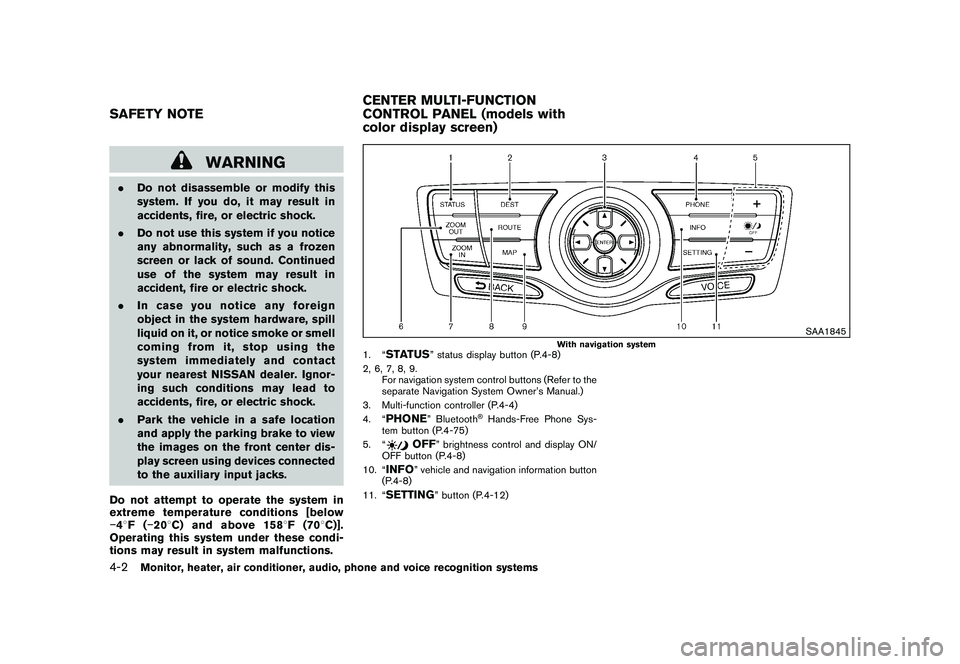
1. “
STATUS
” status display button (P.4-8)
2, 6, 7, 8, 9. For navigation system control buttons (Refer to the
separate Navigation System Owner’s Manual.)
3. Multi-function controller (P.4-4)
4. “
PHONE
” Bluetooth
®Hands-Free Phone Sys-
tem button (P.4-75)
5. “
OFF
” brightness control and display ON/
OFF button (P.4-8)
10. “
INFO
” vehicle and navigation information button
(P.4-8)
11. “
SETTING
” button (P.4-12)
SAFETY NOTE CENTER MULTI-FUNCTION
CONTROL PANEL (models with
color display screen)4-2
Monitor, heater, air conditioner, audio, phone and voice recognition systems
Page 194 of 425
Black plate (190,1)
Model "Z51-D" EDITED: 2009/ 8/ 3
SAA1898
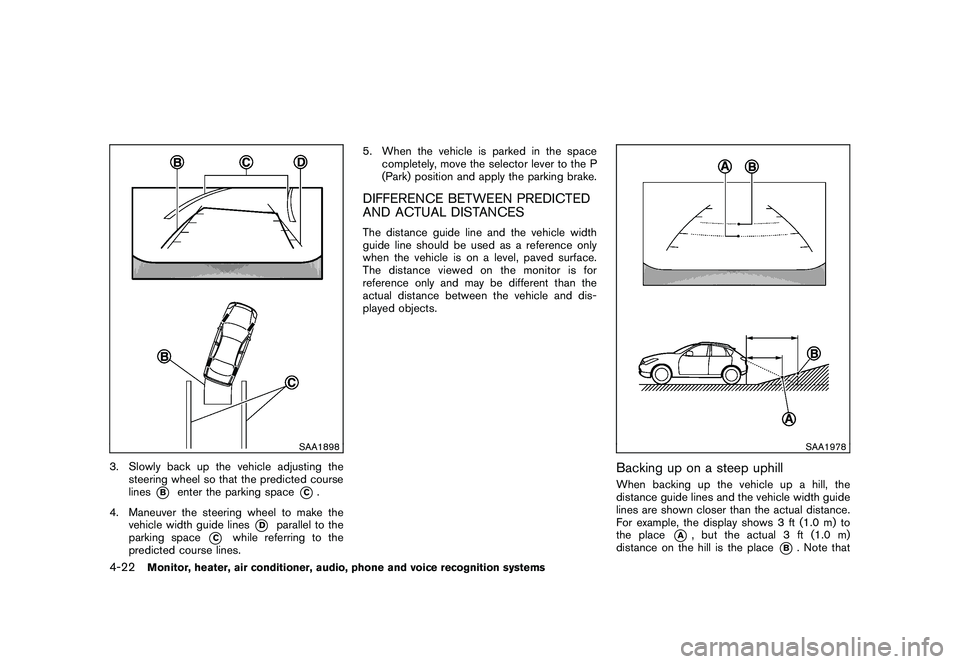
3. Slowly back up the vehicle adjusting thesteering wheel so that the predicted course
lines
*B
enter the parking space
*C.
4. Maneuver the steering wheel to make the vehicle width guide lines
*D
parallel to the
parking space
*C
while referring to the
predicted course lines. 5. When the vehicle is parked in the space
completely, move the selector lever to the P
(Park) position and apply the parking brake.
DIFFERENCE BETWEEN PREDICTED
AND ACTUAL DISTANCESThe distance guide line and the vehicle width
guide line should be used as a reference only
when the vehicle is on a level, paved surface.
The distance viewed on the monitor is for
reference only and may be different than the
actual distance between the vehicle and dis-
played objects.
SAA1978
Backing up on a steep uphillWhen backing up the vehicle up a hill, the
distance guide lines and the vehicle width guide
lines are shown closer than the actual distance.
For example, the display shows 3 ft (1.0 m) to
the place
*A
, but the actual 3 ft (1.0 m)
distance on the hill is the place
*B. Note that
4-22
Monitor, heater, air conditioner, audio, phone and voice recognition systems
Page 196 of 425
Black plate (192,1)
Model "Z51-D" EDITED: 2009/ 8/ 3
SAA1923
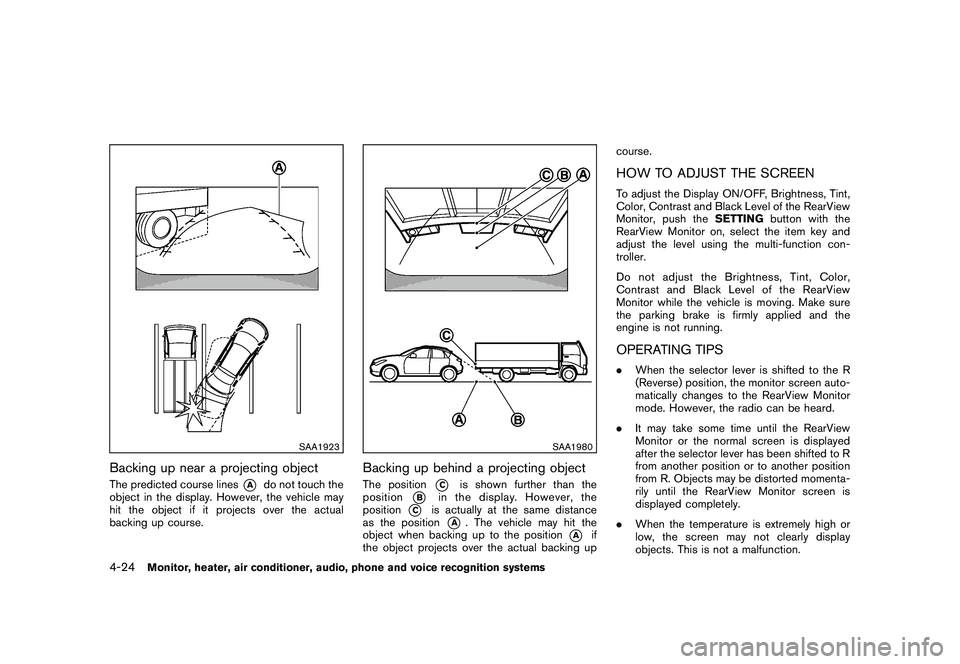
Backing up near a projecting objectThe predicted course lines
*A
do not touch the
object in the display. However, the vehicle may
hit the object if it projects over the actual
backing up course.
SAA1980
Backing up behind a projecting objectThe position
*C
is shown further than the
position
*B
in the display. However, the
position
*C
is actually at the same distance
as the position
*A
. The vehicle may hit the
object when backing up to the position
*A
if
the object projects over the actual backing up course.
HOW TO ADJUST THE SCREENTo adjust the Display ON/OFF, Brightness, Tint,
Color, Contrast and Black Level of the RearView
Monitor, push the
SETTINGbutton with the
RearView Monitor on, select the item key and
adjust the level using the multi-function con-
troller.
Do not adjust the Brightness, Tint, Color,
Contrast and Black Level of the RearView
Monitor while the vehicle is moving. Make sure
the parking brake is firmly applied and the
engine is not running.OPERATING TIPS. When the selector lever is shifted to the R
(Reverse) position, the monitor screen auto-
matically changes to the RearView Monitor
mode. However, the radio can be heard.
. It may take some time until the RearView
Monitor or the normal screen is displayed
after the selector lever has been shifted to R
from another position or to another position
from R. Objects may be distorted momenta-
rily until the RearView Monitor screen is
displayed completely.
. When the temperature is extremely high or
low, the screen may not clearly display
objects. This is not a malfunction.
4-24
Monitor, heater, air conditioner, audio, phone and voice recognition systems
Page 235 of 425
Black plate (231,1)
Model "Z51-D" EDITED: 2009/ 8/ 3
This vehicle is equipped with the mobile
entertainment system, which enables you to
play a Digital Versatile Disc (DVD) , providing the
images and sounds both in the front and rear
display screens.
WARNING
.The driver must not attempt to
operate or view the Mobile Enter-
tainment System (MES) while the
vehicle is in motion so that full
attention may be given to vehicle
operation.
. Do not attempt to modify the system
to display a movie on the front
screen while the vehicle is being
driven. Doing so may distract the
driver and may cause a collision and
serious personal injury or death.
CAUTION
.The glass screen on the liquid
crystal display may break if hit with
a hard or sharp object. If the glass
breaks, do not touch the liquid
crystalline material, which contains
a small amount of mercury. In case of contact with skin, wash immedi-
ately with soap and water.
. Use a damp, soft cloth when clean-
ing the Mobile Entertainment Sys-
tem components. Do not use
solvents or cleaning solutions.
. Do not attempt to use the system in extreme
temperature conditions [below 48F
( 20 8C) or above 158 8F (70 8C)].
. To avoid discharging the vehicle battery, do
not operate the system more than 15
minutes without starting the engine.
Movies will not be shown on the front display
while the vehicle is in any drive position to
reduce driver distraction. Audio is available
when a movie is played. To view movies in the
front display, stop the vehicle in a safe location,
move the selector lever to the P (Park) position
and apply the parking brake.
LHA0484
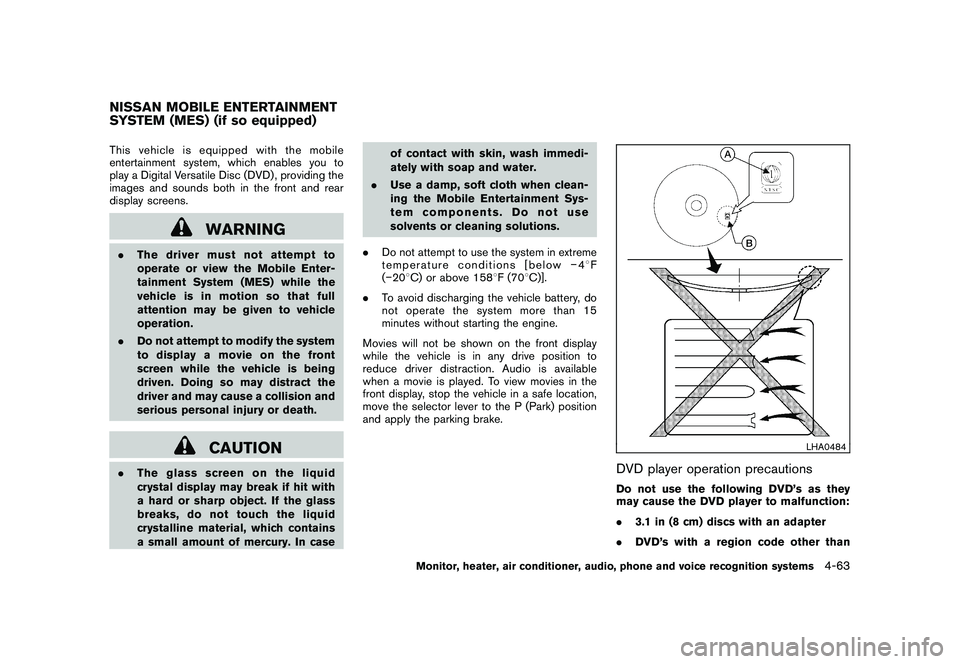
DVD player operation precautionsDo not use the following DVD’s as they
may cause the DVD player to malfunction:
. 3.1 in (8 cm) discs with an adapter
. DVD’s with a region code other than
NISSAN MOBILE ENTERTAINMENT
SYSTEM (MES) (if so equipped)
Monitor, heater, air conditioner, audio, phone and voice recognition systems
4-63
Page 236 of 425
Black plate (232,1)
Model "Z51-D" EDITED: 2009/ 8/ 3
“1”. The region code
*A
is displayed in
a small symbol printed on the top of
the DVD
*B
.
. DVD’s that are not round
. DVD’s with a paper label
. DVD’s that are warped, scratched, or
have unequal edges
. Recordable digital video discs (DVD-R)
. Rewritable digital video discs (DVD-
RW)
SAA1863
DIGITAL VERSATILE DISC (DVD) SYS-
TEM COMPONENTS
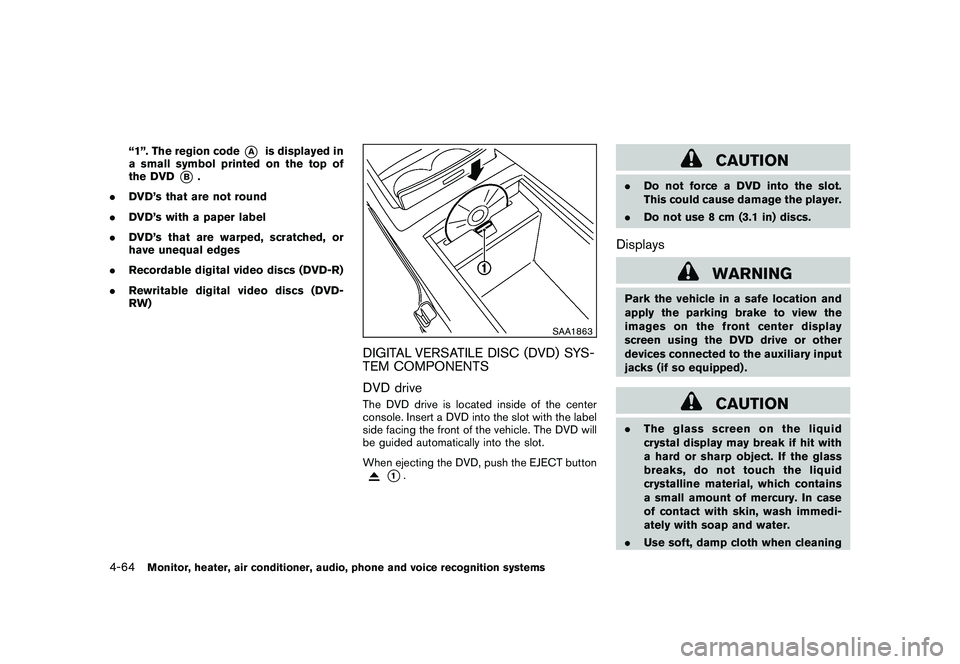
DVD driveThe DVD drive is located inside of the center
console. Insert a DVD into the slot with the label
side facing the front of the vehicle. The DVD will
be guided automatically into the slot.
When ejecting the DVD, push the EJECT button
*1.
CAUTION
.Do not force a DVD into the slot.
This could cause damage the player.
. Do not use 8 cm (3.1 in) discs.Displays
WARNING
Park the vehicle in a safe location and
apply the parking brake to view the
images on the front center display
screen using the DVD drive or other
devices connected to the auxiliary input
jacks (if so equipped) .
CAUTION
.The glass screen on the liquid
crystal display may break if hit with
a hard or sharp object. If the glass
breaks, do not touch the liquid
crystalline material, which contains
a small amount of mercury. In case
of contact with skin, wash immedi-
ately with soap and water.
. Use soft, damp cloth when cleaning
4-64
Monitor, heater, air conditioner, audio, phone and voice recognition systems
Page 268 of 425
Black plate (264,1)
Model "Z51-D" EDITED: 2009/ 8/ 3
“Select Ring tone”
Use the Select Ring tone command to select the
tone heard in the vehicle when an incoming call
is received.
The system announces the name of the active
phoneandasksyoutochoosefromthe
following commands:
.“Ringtone” — The system plays a ringtone
and asks if you would like to select that tone.
If you say no, the system plays the next
ringtone available and continues to cycle
through the ringtones until you select one or
quit.
. “Silent” — The system asks you to confirm
your wish to disable the ringtone.SPEAKER ADAPTATION (SA) MODESpeaker Adaptation allows up to two out-of
dialect users to train the system to improve
recognition accuracy. By repeating a number of
commands, the users can create a voice model
of their own voice that is stored in the system.
The system is capable of storing a different
speaker adaptation model for memory A and
memory B.
If memory A is available, the system will use
memory A to store the model. If memory A is in
use and memory B is available, the system will
use memory B to store the model. If both of the memory locations are in use, the system will ask
the user to select which memory location should
be overwritten.
Training procedureThe procedure for training a voice is as follows.
1. Position the vehicle in a reasonably quiet
outdoor location.
2. Sit in the driver’s seat with the engine running, the parking brake on, and the
transmission in the P (Park) position.
3. Press and hold the
button for more
than 5 seconds.
4. The system announces: “Press the PHONE/ SEND (
) button for the hands-free
phone system to enter the speaker adapta-
tion mode”.
5. Press thebutton.
6. Voice memory A or memory B is selected automatically. If both memory locations are
already in use, the system will prompt you to
overwrite one. Follow the instructions pro-
vided by the system.
7. When preparation is complete and you are ready to begin, the press the
button.
8. The SA mode will be explained. Follow the instructions provided by the system. 9. When training is finished, the system will tell
you an adequate number of phrases have
been recorded.
10. The system will ask you to say your name. Follow the instructions to register your
name.
11. The system will announce that speaker adaptation has been completed and the
system is ready.
The SA mode will stop if:
. The
button is pressed for more than 5
seconds in SA mode.
. The vehicle is driven during SA mode.
. The ignition switch is pushed to the OFF or
LOCK position.
Training phrasesDuring the SA mode, the system instructs you to
say the following phrases.
(The system will prompt you for each phrase.)
.phone book new entry
. dial three oh four two nine
. delete call back number
. setup pair phone
. memo pad play
4-96
Monitor, heater, air conditioner, audio, phone and voice recognition systems
Page 295 of 425
Black plate (16,1)
5 Starting and driving
Model "Z51-D" EDITED: 2009/ 8/ 3
Precautions when starting and driving..................... 5-2
Exhaust gas (carbon monoxide) ......................... 5-2
Three-way catalyst .......................................... 5-2
Tire Pressure Monitoring System (TPMS) ............. 5-3
Avoiding collision and rollover ........................... 5-5
On-pavement and off-road driving precautions ...... 5-5
Off-road recovery ........................................... 5-6
Rapid air pressure loss .................................... 5-6
Drinking alcohol/drugs and driving ...................... 5-7
Driving safety precautions ................................ 5-7
Push-button ignition switch .................................. 5-9
Intelligent Key system ...................................... 5-9
Push-button ignition switch operation. ............... 5-10
Steering lock (if so equipped) ......................... 5-10
Push-button ignition switch positions ................ 5-11
Key port ..................................................... 5-11
Intelligent Key battery discharge ...................... 5-12
Before starting the engine .................................. 5-12
Starting the engine ........................................... 5-13
Driving the vehicle ............................................ 5-13
Continuously Variable Transmission (CVT) .......... 5-13
Parking brake .................................................. 5-17 Cruise control
................................................. 5-18
Precautions on cruise control .......................... 5-18
Cruise control operations ............................... 5-18
Break-in schedule ............................................ 5-20
Increasing fuel economy .................................... 5-20
All-Wheel Drive (AWD) (if so equipped) ................ 5-21
All-Wheel Drive (AWD) lock switch operations .... 5-21
AWD warning light ....................................... 5-22
Parking/parking on hills ...................................... 5-24
Power steering ................................................ 5-25
Brake system .................................................. 5-25
Braking precautions ...................................... 5-25
Parking brake break-in ................................... 5-25
Anti-lock Braking System (ABS) ...................... 5-26
Vehicle Dynamic Control (VDC) system ................. 5-27
Cold weather driving ......................................... 5-29
Freeing a frozen door lock .............................. 5-29
Anti-freeze .................................................. 5-29
Battery ...................................................... 5-29
Draining of coolant water ............................... 5-29
Tire equipment ............................................ 5-29
Special winter equipment ............................... 5-30
Driving on snow or ice .................................. 5-30
Engine block heater (if so equipped) ................. 5-30