buttons NISSAN MURANO 2011 Owner´s Manual
[x] Cancel search | Manufacturer: NISSAN, Model Year: 2011, Model line: MURANO, Model: NISSAN MURANO 2011Pages: 433, PDF Size: 3.7 MB
Page 220 of 433
Black plate (218,1)
Model "Z51-D" EDITED: 2010/ 7/ 23
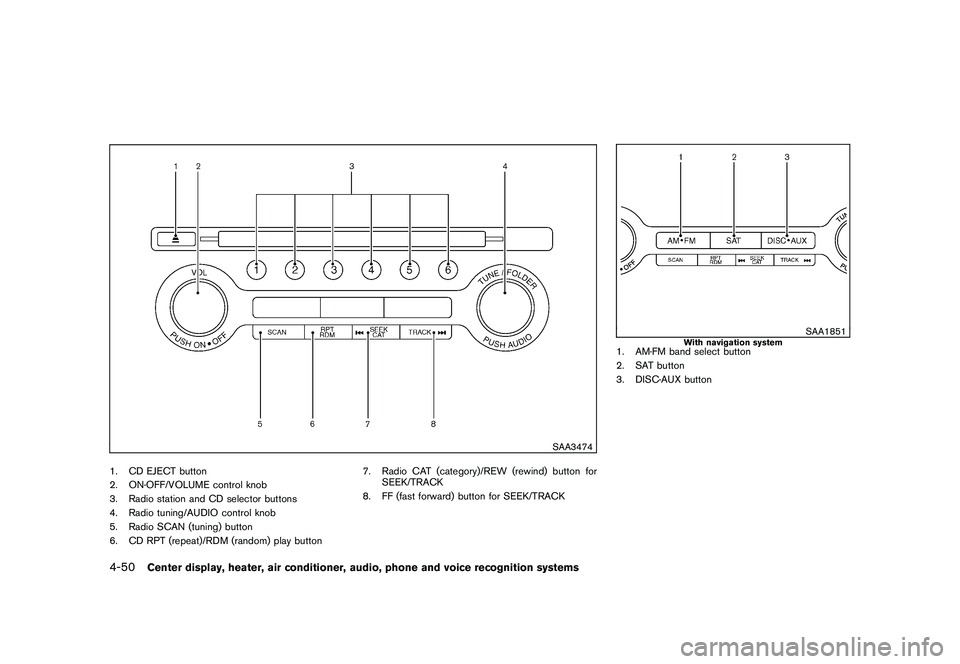
SAA3474
1. CD EJECT button
2. ON·OFF/VOLUME control knob
3. Radio station and CD selector buttons
4. Radio tuning/AUDIO control knob
5. Radio SCAN (tuning) button
6. CD RPT (repeat)/RDM (random) play button7. Radio CAT (category)/REW (rewind) button for
SEEK/TRACK
8. FF (fast forward) button for SEEK/TRACK
SAA1851
With navigation system
1. AM·FM band select button
2. SAT button
3. DISC·AUX button
4-50
Center display, heater, air conditioner, audio, phone and voice recognition systems
Page 223 of 433
Black plate (221,1)
Model "Z51-D" EDITED: 2010/ 7/ 23
.CHECK ANTENNA (Antenna connection
error)
. LOADING (When the initial setting is
performed)
. UPDATING (When the satellite radio sub-
scription is not active)
SCAN tuning:
Push the SCAN tuning button to tune from low
to high frequencies and stop at each broad-
casting station/channel for 5 seconds. Pushing
the button again during this 5 seconds period
will stop SCAN tuning and the radio will remain
tuned to that station/channel.
If the SCAN tuning button is not pushed within 5
seconds, SCAN tuning moves to the next
station/channel.
*1
to
*6
Station memory operations:
12 stations/channels can be set for the FM band
(6 each for FM1 and FM2) , 18 for XM radio (6
each for XM1, XM2 and XM3) and 6 stations
can be set for the AM band.
1. Choose the radio band using the radio band select button.
2. Tune to the desired station/channel using the SEEK/TRACK, SCAN button or the
radio TUNE knob. 3. Push and hold the desired station preset
button
*1
to*6
until the radio mutes.
4. The station indicator will then come on and the sound will resume. Memorizing is now
complete.
5. Other buttons can be set in the same manner.
If the battery cable is disconnected, or if the fuse
opens, the radio memory will be erased. In that
case, reset the desired stations/channels.
List (AM and FM radio) (models with
navigation system):
When the “List” key on the display is selected
while the FM or AM radio is being played, the
preset station list will be displayed.
If 1 of the 6 preset stations listed is touched and
held, the current station will be stored as the
new preset.
Menu (XM Satellite Radio) (models with
navigation system):
When the “Menu” key on the display is selected
while the XM Satellite Radio is being played, the
menu list will be displayed.
The following items are available.
. Preset List Displays the preset channel list. If 1 of the 6
preset stations listed is touched and held,
the current station will be stored as the new
preset.
. Customize Channel List
Selects specific channels to skip while using
the TUNE, SEEK/CATEGORY or Menu-
Categories feature.
. Favorite Artists & Songs
Stores the current artist or song that is being
played. Touch the “Alert” key to be reminded
when the stored artist or song is playing on a
station while listening to XM.
. Categories
Selecting a category will go to the first
channel in that category as defined by XM
Radio.
. Direct Tune
Inputs the channel number by using a
keypad.
Text (models without navigation system):
When the “Text” key is selected with the multi-
function controller on the display and then the
ENTER button is pushed while the satellite radio
is being played, the text information listed below
will be displayed on the screen.
Center display, heater, air conditioner, audio, phone and voice recognition systems
4-53
Page 239 of 433
Black plate (237,1)
Model "Z51-D" EDITED: 2010/ 7/ 23
The following touch-panel buttons shown on the
screen are also available:
.
: returns to the previous screen.
.: plays/pauses the music selected.
Next/Previous Track and Fast
Forward/Rewind:
When the
or
button is pushed for
more than 1.5 seconds while the iPod
®is
playing, the iPod
®will play while fast forwarding
or rewinding. When the button is released, the
iPod
®will return to the normal play speed.
When the
or
button is pushed for less
than 1.5 seconds while the iPod
®is playing, the
next track or the beginning of the current track
on the iPod
®will be played.
The multi-function controller can also be used to
select tracks when the iPod
®is playing.
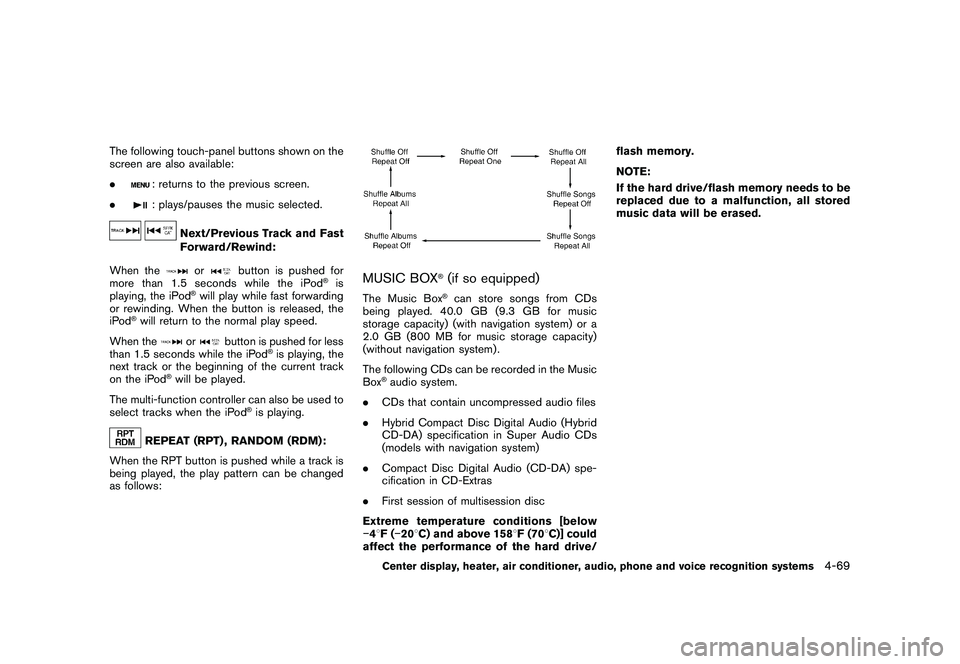
REPEAT (RPT) , RANDOM (RDM):
When the RPT button is pushed while a track is
being played, the play pattern can be changed
as follows:
MUSIC BOX
®(if so equipped)
The Music Box
®can store songs from CDs
being played. 40.0 GB (9.3 GB for music
storage capacity) (with navigation system) or a
2.0 GB (800 MB for music storage capacity)
(without navigation system) .
The following CDs can be recorded in the Music
Box
®audio system.
. CDs that contain uncompressed audio files
. Hybrid Compact Disc Digital Audio (Hybrid
CD-DA) specification in Super Audio CDs
(models with navigation system)
. Compact Disc Digital Audio (CD-DA) spe-
cification in CD-Extras
. First session of multisession disc
Extreme temperature conditions [below
48 F( 20 8C) and above 158 8F (70 8C)] could
affect the performance of the hard drive/ flash memory.
NOTE:
If the hard drive/flash memory needs to be
replaced due to a malfunction, all stored
music data will be erased.Center display, heater, air conditioner, audio, phone and voice recognition systems
4-69
Page 254 of 433
Black plate (252,1)
Model "Z51-D" EDITED: 2010/ 7/ 23
— Operation is subject to the following twoconditions:
1) this device may not cause interference and
2) this device must accept any interference, including interference that may cause un-
desired operation of the deviceIC Regulatory information— Operation is subject to the following twoconditions: (1) this device may not cause
interference, and (2) this device must accept
any interference, including interference that
may cause undesired operation of the
device.
— This Class B digital apparatus meets all requirements of the Canadian Interference-
Causing Equipment Regulations.
Bluetooth trademark:
Bluetooth
®is a trademark owned
by Bluetooth SIG, Inc., U.S.A.
and licensed to Clarion Co., Ltd.
VOICE COMMANDSYou can use voice commands to operate various
Bluetooth
®Hands-Free Phone System features
using the NISSAN Voice Recognition system.
For more details, see “NISSAN VOICE RE-
COGNITION SYSTEM (models with navigation system)” later in this section; page 4-106.
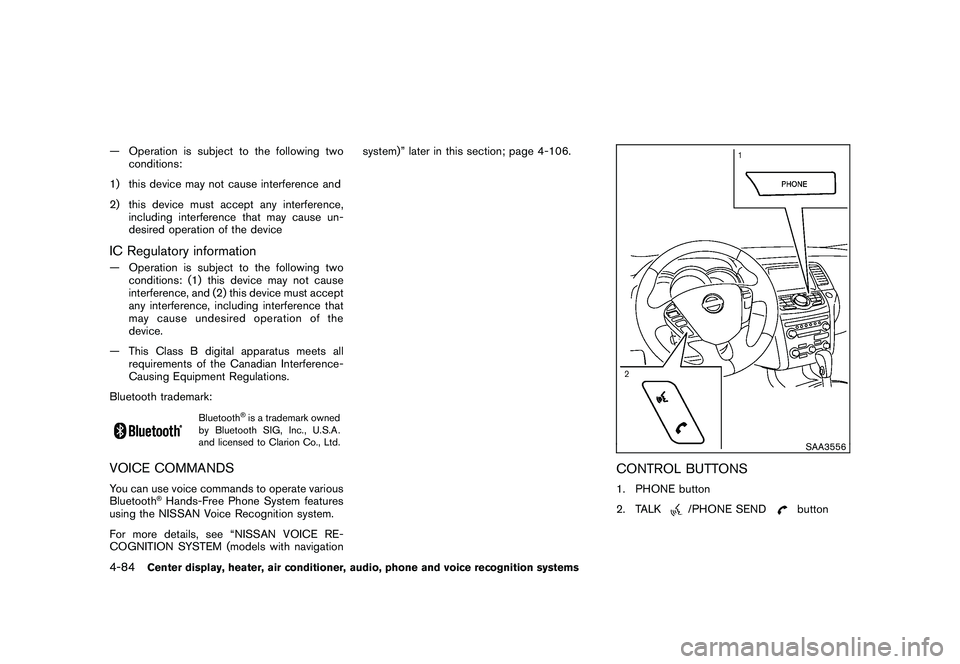
SAA3556
CONTROL BUTTONS1. PHONE button
2. TALK
/PHONE SEND
button
4-84
Center display, heater, air conditioner, audio, phone and voice recognition systems
Page 264 of 433
Black plate (262,1)
Model "Z51-D" EDITED: 2010/ 7/ 23
.If the Bluetooth
®Hands-Free Phone System
seems to be malfunctioning, please contact
a NISSAN dealer.
. Some cellular phones or other devices may
cause interference or a buzzing noise to
come from the audio system speakers.
Storing the device in a different location
may reduce or eliminate the noise.
. Refer to the cellular phone Owner’s Manual
regarding the telephone pairing procedure
specific to your phone, battery charging,
cellular phone antenna, etc.
. The antenna display on the monitor will not
coincide with the antenna display of some
cellular phones.
. Keep the interior of the vehicle as quiet as
possible to hear the caller’s voice clearly as
well as to minimize its echoes.
. If reception between callers is unclear,
adjusting the incoming or outgoing call
volume may improve the clarity.
. This wireless hands free car kit is based on
Bluetooth
®technology,
— Frequency: 2402 MHz - 2480 MHz
— Output Power: 4.14 dBm E.I.R.P
— Modulation: FHSS GFSK 8DPSK, p/
4DQPSK — Number of Channel: 79
— This wireless equipment can’t be used for
any services related to safety because
there is the possibility of radio interfer-
ence.
REGULATORY INFORMATION
Bluetooth
®is a trademark owned
by Bluetooth SIG, Inc., U.S.A.
and licensed to Visteon Corpora-
tion.
SAA1858
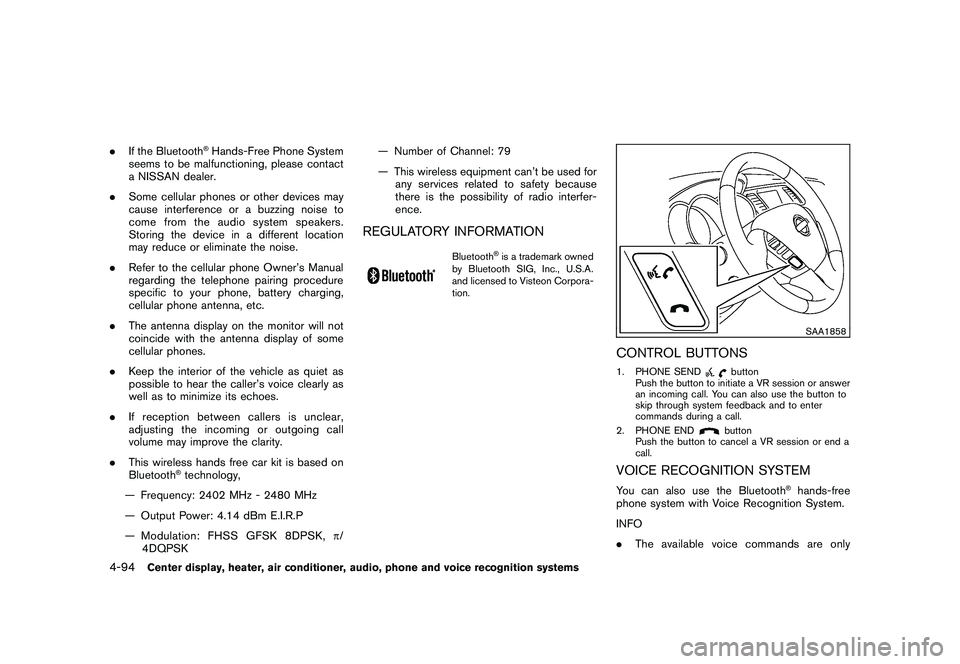
CONTROL BUTTONS1. PHONE SEND
button
Push the button to initiate a VR session or answer
an incoming call. You can also use the button to
skip through system feedback and to enter
commands during a call.
2. PHONE ENDbutton
Push the button to cancel a VR session or end a
call.
VOICE RECOGNITION SYSTEMYou can also use the Bluetooth
®hands-free
phone system with Voice Recognition System.
INFO
. The available voice commands are only
4-94
Center display, heater, air conditioner, audio, phone and voice recognition systems
Page 266 of 433
Black plate (264,1)
Model "Z51-D" EDITED: 2010/ 7/ 23
SAA2574
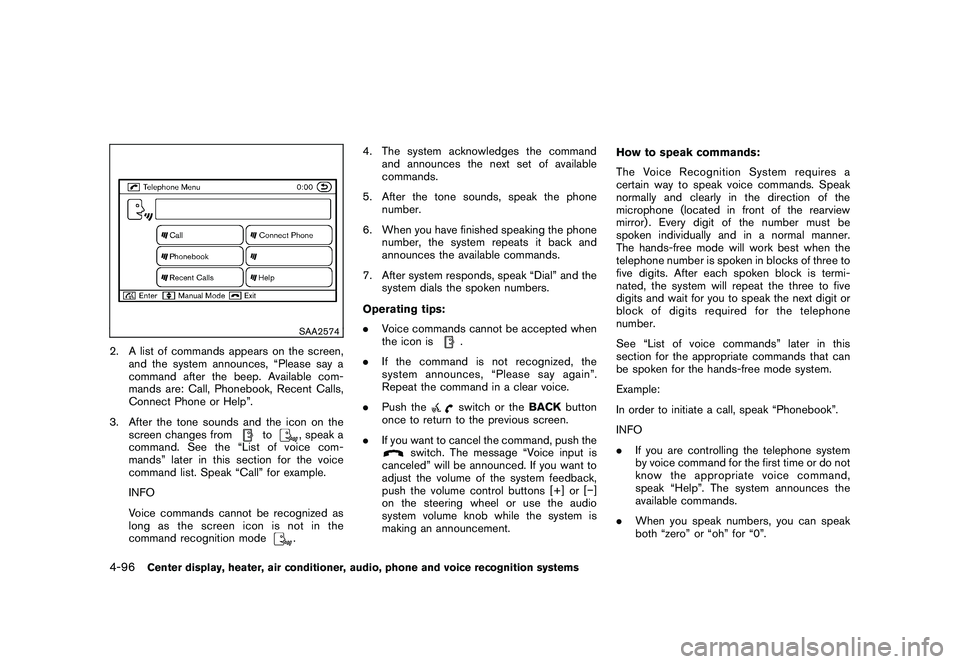
2. A list of commands appears on the screen,and the system announces, “Please say a
command after the beep. Available com-
mands are: Call, Phonebook, Recent Calls,
Connect Phone or Help”.
3. After the tone sounds and the icon on the screen changes from
to
, speak a
command. See the “List of voice com-
mands” later in this section for the voice
command list. Speak “Call” for example.
INFO
Voice commands cannot be recognized as
long as the screen icon is not in the
command recognition mode. 4. The system acknowledges the command
and announces the next set of available
commands.
5. After the tone sounds, speak the phone number.
6. When you have finished speaking the phone number, the system repeats it back and
announces the available commands.
7. After system responds, speak “Dial” and the system dials the spoken numbers.
Operating tips:
. Voice commands cannot be accepted when
the icon is
.
. If the command is not recognized, the
system announces, “Please say again”.
Repeat the command in a clear voice.
. Push theswitch or the BACKbutton
once to return to the previous screen.
. If you want to cancel the command, push the
switch. The message “Voice input is
canceled” will be announced. If you want to
adjust the volume of the system feedback,
push the volume control buttons [+] or [ ]
on the steering wheel or use the audio
system volume knob while the system is
making an announcement. How to speak commands:
The Voice Recognition System requires a
certain way to speak voice commands. Speak
normally and clearly in the direction of the
microphone (located in front of the rearview
mirror) . Every digit of the number must be
spoken individually and in a normal manner.
The hands-free mode will work best when the
telephone number is spoken in blocks of three to
five digits. After each spoken block is termi-
nated, the system will repeat the three to five
digits and wait for you to speak the next digit or
block of digits required for the telephone
number.
See “List of voice commands” later in this
section for the appropriate commands that can
be spoken for the hands-free mode system.
Example:
In order to initiate a call, speak “Phonebook”.
INFO
.
If you are controlling the telephone system
by voice command for the first time or do not
know the appropriate voice command,
speak “Help”. The system announces the
available commands.
. When you speak numbers, you can speak
both “zero” or “oh” for “0”.
4-96
Center display, heater, air conditioner, audio, phone and voice recognition systems
Page 280 of 433
Black plate (278,1)
Model "Z51-D" EDITED: 2010/ 7/ 23
SAA2535
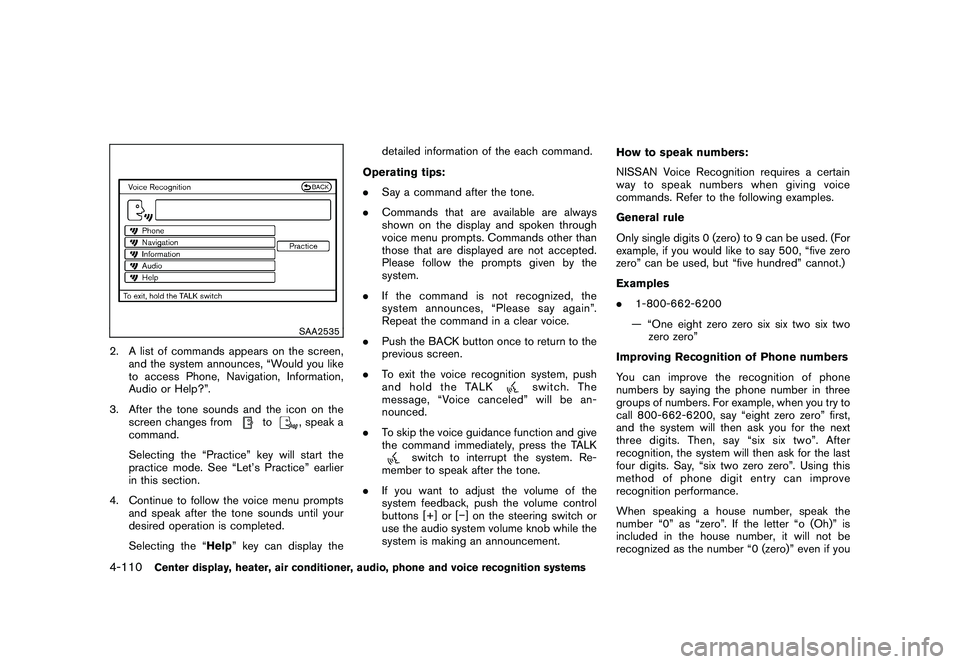
2. A list of commands appears on the screen,and the system announces, “Would you like
to access Phone, Navigation, Information,
Audio or Help?”.
3. After the tone sounds and the icon on the screen changes from
to
, speak a
command.
Selecting the “Practice” key will start the
practice mode. See “Let’s Practice” earlier
in this section.
4. Continue to follow the voice menu prompts and speak after the tone sounds until your
desired operation is completed.
Selecting the “Help ” key can display the detailed information of the each command.
Operating tips:
. Say a command after the tone.
. Commands that are available are always
shown on the display and spoken through
voice menu prompts. Commands other than
those that are displayed are not accepted.
Please follow the prompts given by the
system.
. If the command is not recognized, the
system announces, “Please say again”.
Repeat the command in a clear voice.
. Push the BACK button once to return to the
previous screen.
. To exit the voice recognition system, push
and hold the TALK
switch. The
message, “Voice canceled” will be an-
nounced.
. To skip the voice guidance function and give
the command immediately, press the TALK
switch to interrupt the system. Re-
member to speak after the tone.
. If you want to adjust the volume of the
system feedback, push the volume control
buttons [+] or [ ] on the steering switch or
use the audio system volume knob while the
system is making an announcement. How to speak numbers:
NISSAN Voice Recognition requires a certain
way to speak numbers when giving voice
commands. Refer to the following examples.
General rule
Only single digits 0 (zero) to 9 can be used. (For
example, if you would like to say 500, “five zero
zero” can be used, but “five hundred” cannot.)
Examples
.
1-800-662-6200
— “One eight zero zero six six two six two zero zero”
Improving Recognition of Phone numbers
You can improve the recognition of phone
numbers by saying the phone number in three
groups of numbers. For example, when you try to
call 800-662-6200, say “eight zero zero” first,
and the system will then ask you for the next
three digits. Then, say “six six two”. After
recognition, the system will then ask for the last
four digits. Say, “six two zero zero”. Using this
method of phone digit entry can improve
recognition performance.
When speaking a house number, speak the
number “0” as “zero”. If the letter “o (Oh)” is
included in the house number, it will not be
recognized as the number “0 (zero)” even if you
4-110
Center display, heater, air conditioner, audio, phone and voice recognition systems
Page 379 of 433
Black plate (381,1)
Model "Z51-D" EDITED: 2010/ 7/ 23
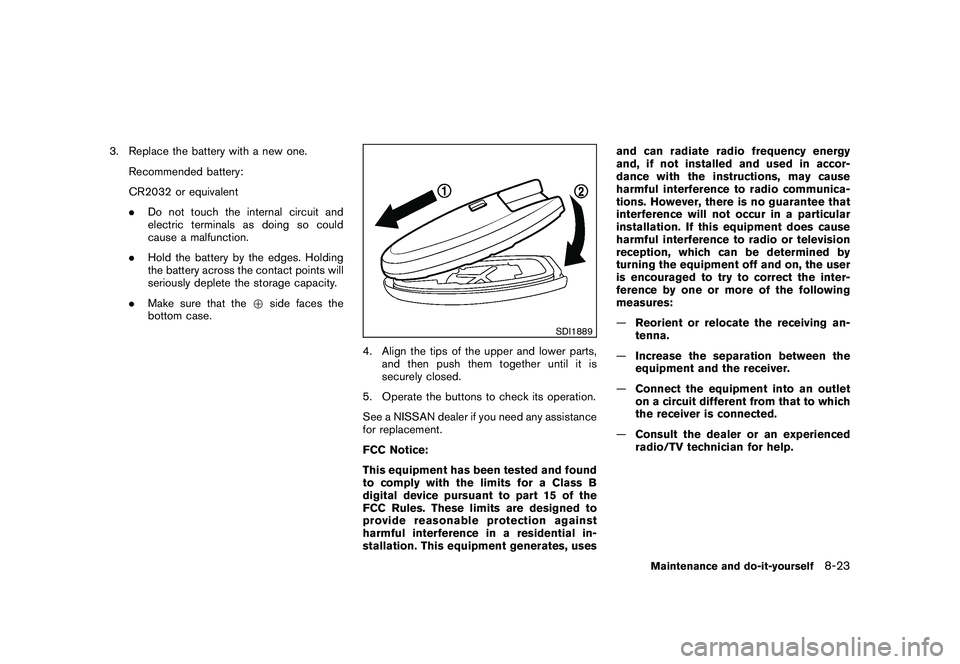
3. Replace the battery with a new one.Recommended battery:
CR2032 or equivalent
.Do not touch the internal circuit and
electric terminals as doing so could
cause a malfunction.
. Hold the battery by the edges. Holding
the battery across the contact points will
seriously deplete the storage capacity.
. Make sure that the +side faces the
bottom case.
SDI1889
4. Align the tips of the upper and lower parts, and then push them together until it is
securely closed.
5. Operate the buttons to check its operation.
See a NISSAN dealer if you need any assistance
for replacement.
FCC Notice:
This equipment has been tested and found
to comply with the limits for a Class B
digital device pursuant to part 15 of the
FCC Rules. These limits are designed to
provide reasonable protection against
harmful interference in a residential in-
stallation. This equipment generates, uses and can radiate radio frequency energy
and, if not installed and used in accor-
dance with the instructions, may cause
harmful interference to radio communica-
tions. However, there is no guarantee that
interference will not occur in a particular
installation. If this equipment does cause
harmful interference to radio or television
reception, which can be determined by
turning the equipment off and on, the user
is encouraged to try to correct the inter-
ference by one or more of the following
measures:
—
Reorient or relocate the receiving an-
tenna.
— Increase the separation between the
equipment and the receiver.
— Connect the equipment into an outlet
on a circuit different from that to which
the receiver is connected.
— Consult the dealer or an experienced
radio/TV technician for help.
Maintenance and do-it-yourself
8-23