buttons NISSAN MURANO 2011 Owner´s Manual
[x] Cancel search | Manufacturer: NISSAN, Model Year: 2011, Model line: MURANO, Model: NISSAN MURANO 2011Pages: 433, PDF Size: 3.7 MB
Page 153 of 433
Black plate (151,1)
Model "Z51-D" EDITED: 2010/ 7/ 23
operated when the ignition switch is in the ON
position.Using panic alarmIf you are near your vehicle and feel threatened,
you can activate the alarm according to the
following procedure to call attention.
1. Push the PANIC
button
*4
formore
than 1 second.
2. The theft warning alarm will sound and the headlights will flash for 25 seconds.
3. The panic alarm stops under either of the following conditions.
.It has run for 25 seconds, or
. Any of the buttons is pushed. (Note: the
PANIC
button
*4
should be
pushed for more than 1 second.)
Setting hazard indicator and horn modeThis vehicle is set in hazard indicator and horn
mode when you first receive the vehicle.
In hazard indicator and horn mode, when the
LOCK
button
*1
is pushed, the hazard
indicator flashes twice and the horn chirps once.
When the UNLOCKbutton
*2
is pushed,
the hazard indicator flashes once.
If horns are not necessary, the system can be
switched to the hazard indicator mode. In hazard indicator mode, when the LOCK
button
*1
is pushed, the hazard indicator
flashes twice. When the UNLOCK
button
*2
is pushed, neither the hazard indicator nor
the horn operates.
Pre-driving checks and adjustments
3-17
Page 154 of 433
Black plate (152,1)
Model "Z51-D" EDITED: 2010/ 7/ 23
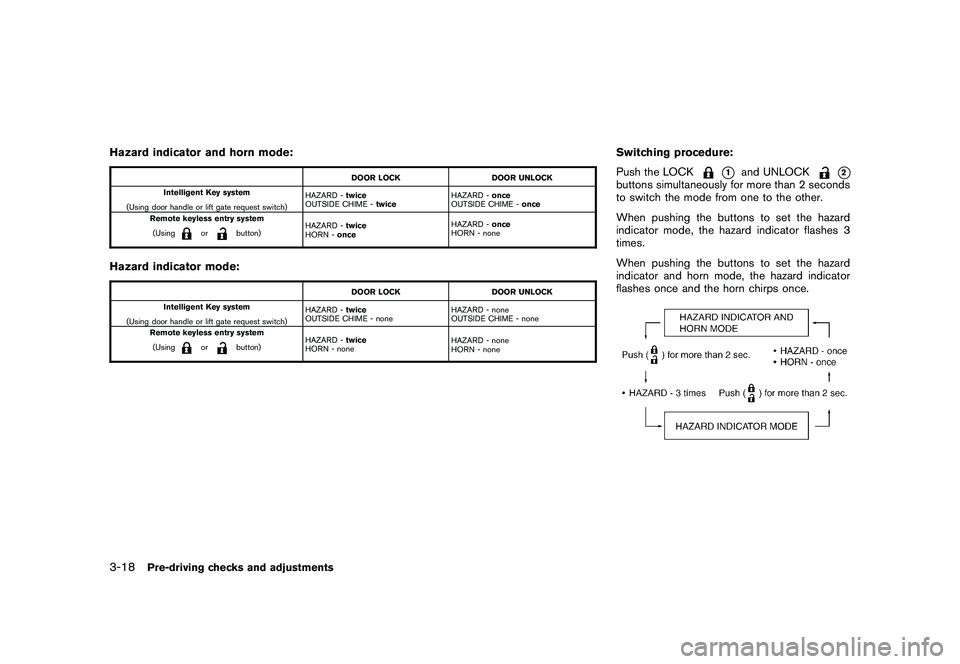
Hazard indicator and horn mode:
DOOR LOCKDOOR UNLOCK
Intelligent Key system
(Using door handle or lift gate request switch) HAZARD -
twice
OUTSIDE CHIME - twice HAZARD -
once
OUTSIDE CHIME - once
Remote keyless entry system
(Using
or
button) HAZARD -
twice
HORN - once HAZARD -
once
HORN - none
Hazard indicator mode:
DOOR LOCK DOOR UNLOCK
Intelligent Key system
(Using door handle or lift gate request switch) HAZARD -
twice
OUTSIDE CHIME - none HAZARD - none
OUTSIDE CHIME - none
Remote keyless entry system
(Using
or
button) HAZARD -
twice
HORN - none HAZARD - none
HORN - none
Switching procedure:
Push the LOCK
*1
and UNLOCK
*2
buttons simultaneously for more than 2 seconds
to switch the mode from one to the other.
When pushing the buttons to set the hazard
indicator mode, the hazard indicator flashes 3
times.
When pushing the buttons to set the hazard
indicator and horn mode, the hazard indicator
flashes once and the horn chirps once.
3-18
Pre-driving checks and adjustments
Page 170 of 433
Black plate (13,1)
4
Center display, heater, air conditioner,
audio, phone and voice recognition systems
Model "Z51-D" EDITED: 2010/ 7/ 23
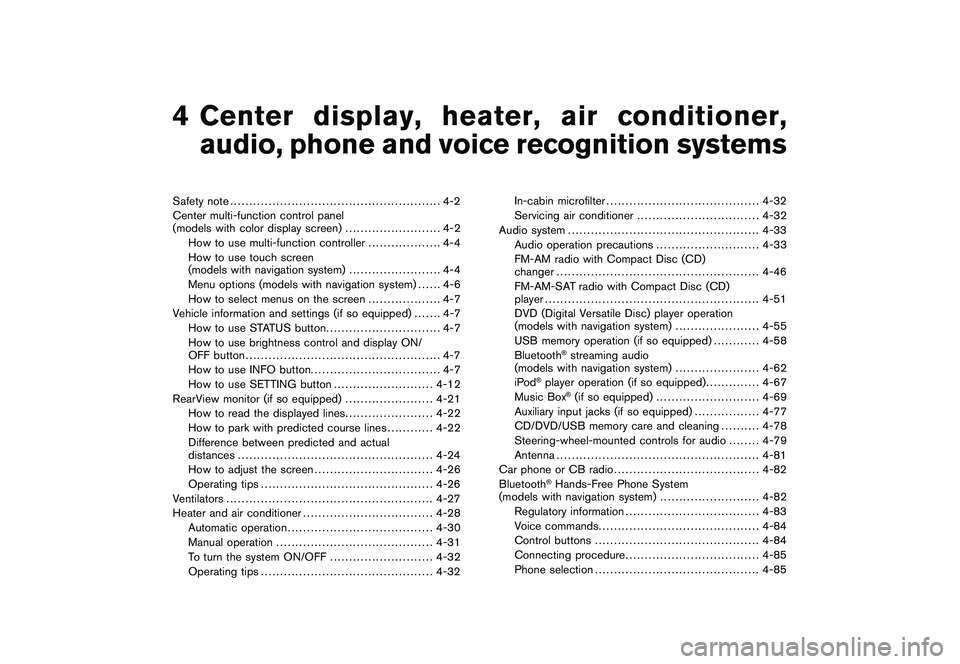
Safety note....................................................... 4-2
Center multi-function control panel
(models with color display screen) ......................... 4-2
How to use multi-function controller ................... 4-4
How to use touch screen
(models with navigation system) ........................ 4-4
Menu options (models with navigation system) ...... 4-6
How to select menus on the screen ................... 4-7
Vehicle information and settings (if so equipped) ....... 4-7
How to use STATUS button .............................. 4-7
How to use brightness control and display ON/
OFF button ................................................... 4-7
How to use INFO button. ................................. 4-7
How to use SETTING button .......................... 4-12
RearView monitor (if so equipped) ....................... 4-21
How to read the displayed lines ....................... 4-22
How to park with predicted course lines ............ 4-22
Difference between predicted and actual
distances ................................................... 4-24
How to adjust the screen ............................... 4-26
Operating tips ............................................. 4-26
Ventilators ...................................................... 4-27
Heater and air conditioner .................................. 4-28
Automatic operation ...................................... 4-30
Manual operation ......................................... 4-31
To turn the system ON/OFF ........................... 4-32
Operating tips ............................................. 4-32 In-cabin microfilter
........................................ 4-32
Servicing air conditioner ................................ 4-32
Audio system .................................................. 4-33
Audio operation precautions ........................... 4-33
FM-AM radio with Compact Disc (CD)
changer ..................................................... 4-46
FM-AM-SAT radio with Compact Disc (CD)
player ........................................................ 4-51
DVD (Digital Versatile Disc) player operation
(models with navigation system) ...................... 4-55
USB memory operation (if so equipped) ............ 4-58
Bluetooth
®streaming audio
(models with navigation system) ...................... 4-62
iPod
®player operation (if so equipped) .............. 4-67
Music Box
®(if so equipped) ........................... 4-69
Auxiliary input jacks (if so equipped) ................. 4-77
CD/DVD/USB memory care and cleaning .......... 4-78
Steering-wheel-mounted controls for audio ........ 4-79
Antenna ..................................................... 4-81
Car phone or CB radio ...................................... 4-82
Bluetooth
®Hands-Free Phone System
(models with navigation system) .......................... 4-82
Regulatory information ................................... 4-83
Voice commands. ......................................... 4-84
Control buttons ........................................... 4-84
Connecting procedure ................................... 4-85
Phone selection ........................................... 4-85
Page 171 of 433
Black plate (14,1)
Model "Z51-D" EDITED: 2010/ 7/ 23
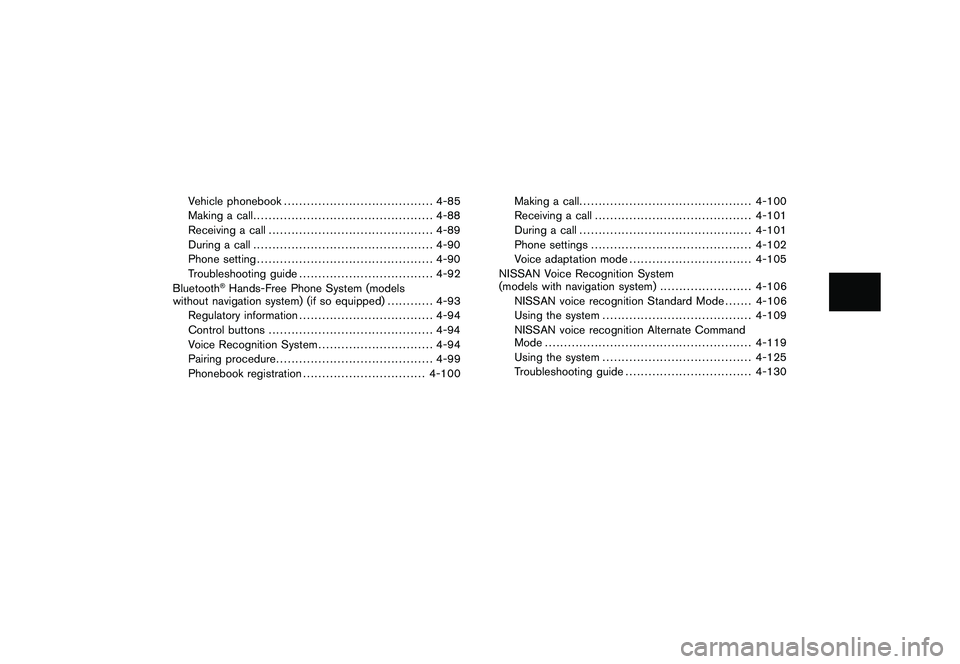
Vehicle phonebook....................................... 4-85
Making a call ............................................... 4-88
Receiving a call ........................................... 4-89
During a call ............................................... 4-90
Phone setting .............................................. 4-90
Troubleshooting guide ................................... 4-92
Bluetooth
®Hands-Free Phone System (models
without navigation system) (if so equipped) ............ 4-93
Regulatory information ................................... 4-94
Control buttons ........................................... 4-94
Voice Recognition System .............................. 4-94
Pairing procedure ......................................... 4-99
Phonebook registration ................................ 4-100 Making a call
............................................. 4-100
Receiving a call ......................................... 4-101
During a call ............................................. 4-101
Phone settings .......................................... 4-102
Voice adaptation mode ................................ 4-105
NISSAN Voice Recognition System
(models with navigation system) ........................ 4-106
NISSAN voice recognition Standard Mode ....... 4-106
Using the system ....................................... 4-109
NISSAN voice recognition Alternate Command
Mode ...................................................... 4-119
Using the system ....................................... 4-125
Troubleshooting guide ................................. 4-130
Page 172 of 433
Black plate (170,1)
Model "Z51-D" EDITED: 2010/ 7/ 23
WARNING
.Do not disassemble or modify this
system. If you do, it may result in
accidents, fire, or electric shock.
. Do not use this system if you notice
any abnormality, such as a frozen
screen or lack of sound. Continued
use of the system may result in
accident, fire or electric shock.
. In case you notice any foreign
object in the system hardware, spill
liquid on it, or notice smoke or smell
coming from it, stop using the
system immediately and contact
your nearest NISSAN dealer. Ignor-
ing such conditions may lead to
accidents, fire, or electric shock.
. Park the vehicle in a safe location
and apply the parking brake to view
the images on the front center dis-
play screen using devices connected
to the auxiliary input jacks.
Do not attempt to operate the system in
extreme temperature conditions [below
48F( 208 C) and above 158 8F(70 8C)].
Operating this system under these condi-
tions may result in system malfunctions.
SAA1845
With navigation system
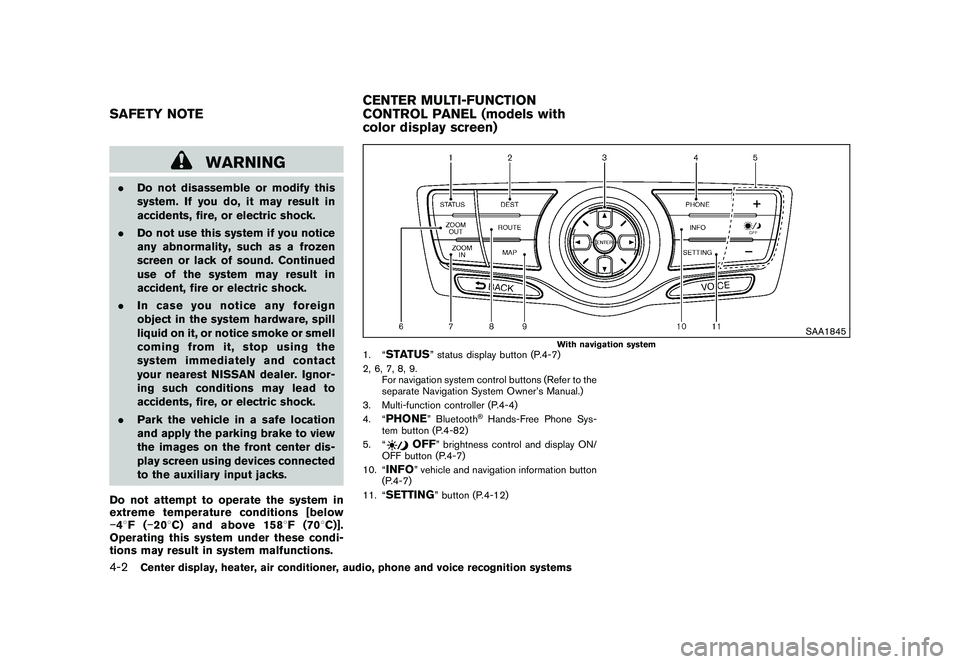
1. “
STATUS
” status display button (P.4-7)
2, 6, 7, 8, 9. For navigation system control buttons (Refer to the
separate Navigation System Owner’s Manual.)
3. Multi-function controller (P.4-4)
4. “
PHONE
” Bluetooth
®Hands-Free Phone Sys-
tem button (P.4-82)
5. “
OFF
” brightness control and display ON/
OFF button (P.4-7)
10. “
INFO
” vehicle and navigation information button
(P.4-7)
11. “
SETTING
” button (P.4-12)
SAFETY NOTE CENTER MULTI-FUNCTION
CONTROL PANEL (models with
color display screen)4-2
Center display, heater, air conditioner, audio, phone and voice recognition systems
Page 174 of 433
Black plate (172,1)
Model "Z51-D" EDITED: 2010/ 7/ 23
HOW TO USE MULTI-FUNCTION
CONTROLLERChoose an item on the display using the main
directional buttons
*2
(or additional directional
buttons
*6
with navigation system) or center
dial
*3, and push the ENTERbutton
*1
for
operation.
If you push the BACKbutton
*4
before the
setup is completed, the setup will be canceled
and/or the display will return to the previous
screen. This button can also be used to delete
characters that have been input.
After the setup is completed, push the BACK
button
*4
and return to the previous screen.
For the VOICE button
*5
functions, refer to the
separate Navigation System Owner’s Manual.
HOW TO USE TOUCH SCREEN
(models with navigation system)
CAUTION
. The glass screen on the liquid
crystal display may break if it is hit
with a hard or sharp object. If the
glass screen breaks, do not touch it.
Doing so could result in an injury.
. To clean the display, use a soft, dry
cloth. If additional cleaning is ne- cessary, use a small amount of
neutral detergent with a soft cloth.
Never use a rough cloth, alcohol,
benzine, thinner or any kind of
solvent or paper towel with a che-
mical cleaning agent. They will
scratch or deteriorate the panel.
. Do not splash any liquid such as
water or car fragrance on the dis-
play. Contact with liquid will cause
the system to malfunction.
To ensure safe driving, some functions cannot
be operated while driving.
The on-screen functions that are not available
while driving will be “grayed out” or muted.
Park the vehicle in a safe location and then
operate the navigation system.
WARNING
. ALWAYS give your full attention to
driving.
. Avoid using vehicle features that
coulddistractyou.Ifdistracted,
you could lose control of your
vehicle and cause an accident.
SAA2473
Touch screen operationWith this system, the same operations as those
for the multi-function controller are possible
using the touch screen operation.
Selecting the item:
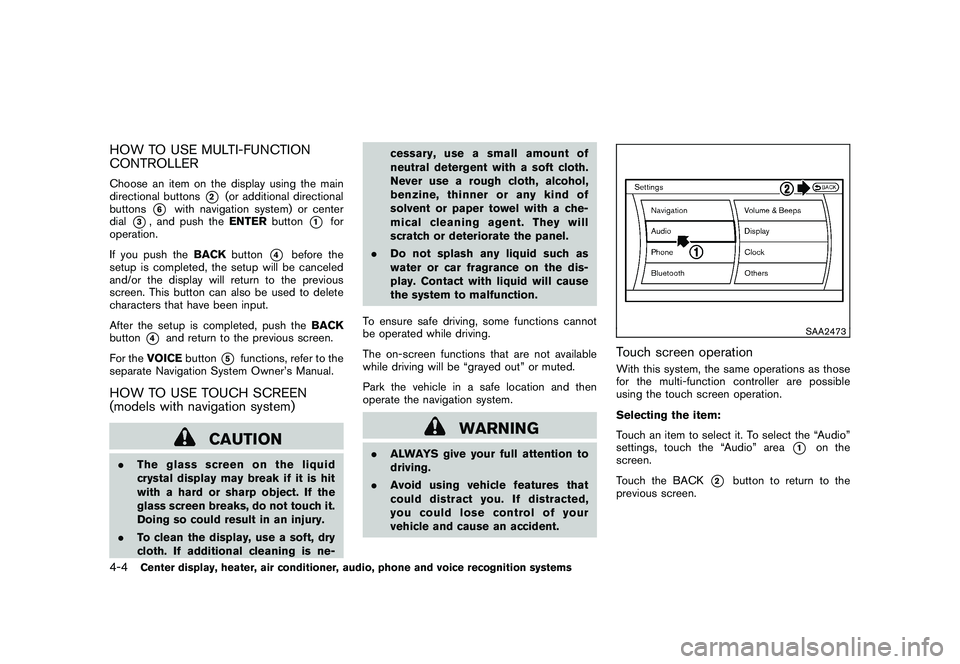
Touch an item to select it. To select the “Audio”
settings, touch the “Audio” area
*1
on the
screen.
Touch the BACK
*2
button to return to the
previous screen.
4-4
Center display, heater, air conditioner, audio, phone and voice recognition systems
Page 200 of 433
Black plate (198,1)
Model "Z51-D" EDITED: 2010/ 7/ 23
SAA2834
Type B
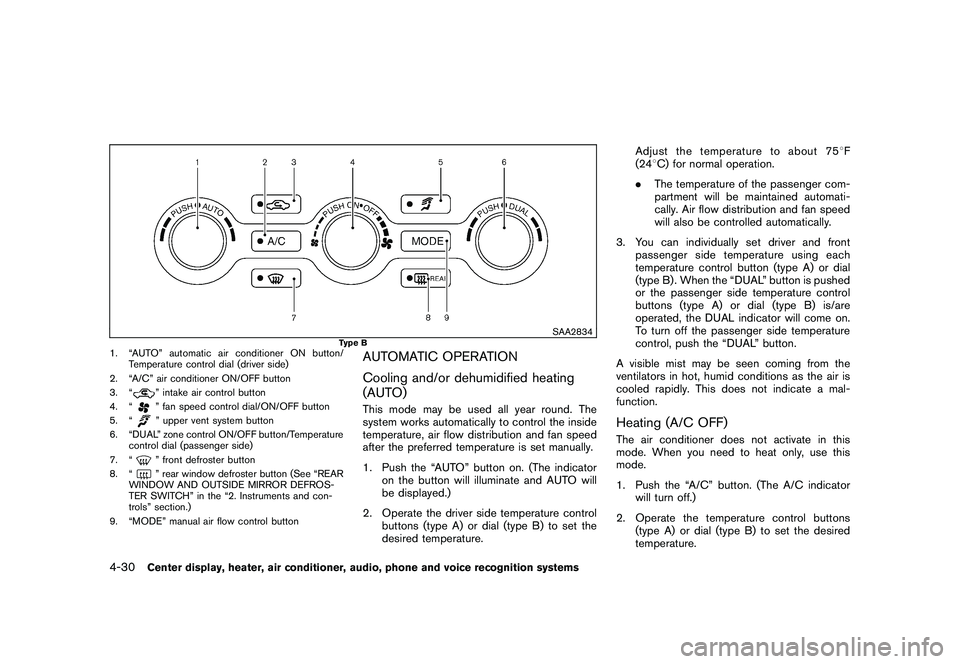
1. “AUTO” automatic air conditioner ON button/Temperature control dial (driver side)
2. “A/C” air conditioner ON/OFF button
3. “
” intake air control button
4. “” fan speed control dial/ON/OFF button
5. “” upper vent system button
6. “DUAL” zone control ON/OFF button/Temperature control dial (passenger side)
7. “” front defroster button
8. “” rear window defroster button (See “REAR
WINDOW AND OUTSIDE MIRROR DEFROS-
TER SWITCH” in the “2. Instruments and con-
trols” section.)
9. “MODE” manual air flow control button
AUTOMATIC OPERATION
Cooling and/or dehumidified heating
(AUTO)This mode may be used all year round. The
system works automatically to control the inside
temperature, air flow distribution and fan speed
after the preferred temperature is set manually.
1. Push the “AUTO” button on. (The indicator on the button will illuminate and AUTO will
be displayed.)
2. Operate the driver side temperature control buttons (type A) or dial (type B) to set the
desired temperature. Adjust the temperature to about 75
8F
(24 8C) for normal operation.
. The temperature of the passenger com-
partment will be maintained automati-
cally. Air flow distribution and fan speed
will also be controlled automatically.
3. You can individually set driver and front passenger side temperature using each
temperature control button (type A) or dial
(type B) . When the “DUAL” button is pushed
or the passenger side temperature control
buttons (type A) or dial (type B) is/are
operated, the DUAL indicator will come on.
To turn off the passenger side temperature
control, push the “DUAL” button.
A visible mist may be seen coming from the
ventilators in hot, humid conditions as the air is
cooled rapidly. This does not indicate a mal-
function.
Heating (A/C OFF)The air conditioner does not activate in this
mode. When you need to heat only, use this
mode.
1. Push the “A/C” button. (The A/C indicator will turn off.)
2. Operate the temperature control buttons (type A) or dial (type B) to set the desired
temperature.
4-30
Center display, heater, air conditioner, audio, phone and voice recognition systems
Page 201 of 433
Black plate (199,1)
Model "Z51-D" EDITED: 2010/ 7/ 23
.The temperature of the passenger compart-
ment will be maintained automatically. Air
flow distribution and fan speed are also
controlled automatically.
. Do not set the temperature lower than the
outside air temperature. Otherwise the
system may not work properly.
. Not recommended if windows fog up.Dehumidified defrosting or defogging1. Push the “
” front defroster button. (The
indicator light on the button will come on.)
2. Operate the temperature control buttons (type A) or dial (type B) to set the desired
temperature.
. To quickly remove ice from the outside of the
windows, turn the “
” fan speed control
dial and set it to the maximum position.
. As soon as possible after the windshield is
clean, push the “AUTO” button to return to
the auto mode.
. When the “
” front defroster button is
pushed, the air conditioner will automatically
be turned on at outside temperatures above
23 8F( 58C) to defog the windshield, and
the air recirculate mode will automatically be
turned off.
Outside air is drawn into the passenger compartment to improve the defogging
performance.
MANUAL OPERATION
Fan speed controlTu r n t h e “
” fan speed control dial to
manually control the fan speed.
Push the “AUTO” button to return to automatic
control of the fan speed.
Air recirculationPush the intake air control button “
”to
recirculate interior air inside the vehicle. The
indicator light “
” will come on.
The air recirculation mode cannot be activated
when the air conditioner is in the front defrosting
mode “
”.
Outside air circulationPush the intake air control button “
”to
change the air circulation from the intake air to
the outside air. The indicator light “
” will turn
off.
Automatic air intake controlIn the AUTO mode, the intake air will be
controlled automatically. To manually control
the intake air, push the intake air control button
“
”. To return to the automatic control mode,
push the intake air control button “
” for about 2 seconds. The indicator lights will flash
twice, and then the intake air will be controlled
automatically.
Air flow controlPushing the “MODE” manual air flow control
button selects the air outlet to:
: Air flows from center and side ventila-
tors.: Air flows from center and side ventila-tors and foot outlets.: Air flows mainly from foot outlets.: Air flows from defroster and foot out-lets.
Upper vent systemWhen the “
” upper vent button is pushed,
the air flow against the driver’s or passenger’s
upper body becomes gentle. The indicator light
on the button will come on.
In this mode, air from the center ventilators flows
both straight and upward in order to control the
cabin temperature without blowing air directly
on the occupants.
If you want strong air flow against your upper
body, push the “
” button to turn the
indicator light off.
Center display, heater, air conditioner, audio, phone and voice recognition systems
4-31
Page 216 of 433
Black plate (214,1)
Model "Z51-D" EDITED: 2010/ 7/ 23
SAA3473
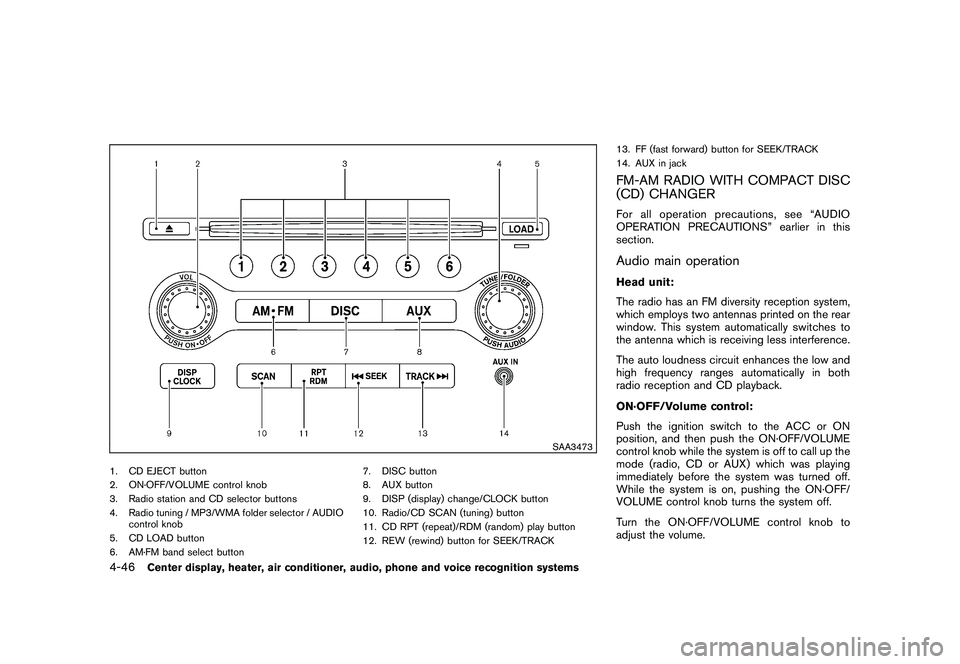
1. CD EJECT button
2. ON·OFF/VOLUME control knob
3. Radio station and CD selector buttons
4. Radio tuning / MP3/WMA folder selector / AUDIOcontrol knob
5. CD LOAD button
6. AM·FM band select button 7. DISC button
8. AUX button
9. DISP (display) change/CLOCK button
10. Radio/CD SCAN (tuning) button
11. CD RPT (repeat)/RDM (random) play button
12. REW (rewind) button for SEEK/TRACK13. FF (fast forward) button for SEEK/TRACK
14. AUX in jack
FM-AM RADIO WITH COMPACT DISC
(CD) CHANGERFor all operation precautions, see “AUDIO
OPERATION PRECAUTIONS” earlier in this
section.Audio main operationHead unit:
The radio has an FM diversity reception system,
which employs two antennas printed on the rear
window. This system automatically switches to
the antenna which is receiving less interference.
The auto loudness circuit enhances the low and
high frequency ranges automatically in both
radio reception and CD playback.
ON·OFF/Volume control:
Push the ignition switch to the ACC or ON
position, and then push the ON·OFF/VOLUME
control knob while the system is off to call up the
mode (radio, CD or AUX) which was playing
immediately before the system was turned off.
While the system is on, pushing the ON·OFF/
VOLUME control knob turns the system off.
Turn the ON·OFF/VOLUME control knob to
adjust the volume.
4-46
Center display, heater, air conditioner, audio, phone and voice recognition systems
Page 218 of 433
Black plate (216,1)
Model "Z51-D" EDITED: 2010/ 7/ 23
3. Select the desired station/channel and keeppushing any of the desired station preset
buttons
*1
to
*6
until a beep sound is
heard. (The radio mutes when the select
button is pushed.)
4. The channel indicator will then come on and the sound will resume. Memorizing is now
complete.
5. Other buttons can be set in the same manner.
If the battery cable is disconnected, or if the fuse
blows, the radio memory will be erased. In that
case, reset the desired stations.
Compact Disc (CD) changer operationPush the ignition switch to the ACC or ON
position, push the LOAD button and insert the
compact disc into the slot with the label side
facing up. The compact disc will be guided
automatically into the slot and start playing.
After loading the disc, the number of tracks on
the disc and the play time will appear on the
display.
If the radio is already operating, it will auto-
matically turn off and the compact disc will play.
If the system has been turned off while the
compact disc was playing, pushing the
ON·OFF/VOL control knob will start the com-
pact disc.
CD LOAD:
To insert a CD in the CD changer, push the
LOAD button for less than 1.5 seconds. Select
the loading position by pushing the CD insert
select button
*1
to*6, then insert the CD.
To insert 6 CDs to the CD changer in
succession, push the LOAD button for more
than 1.5 seconds.
The inserted slot numbers will illuminate on the
display.
PLAY:
When the DISC (CD play) button is pushed with
the system off and the compact disc loaded, the
system will turn on and the compact disc will
start to play.
When the DISC button is pushed with the
compact disc loaded and the radio playing, the
radio will automatically be turned off and the
compact disc will start to play.CD PLAY INFORMATION:
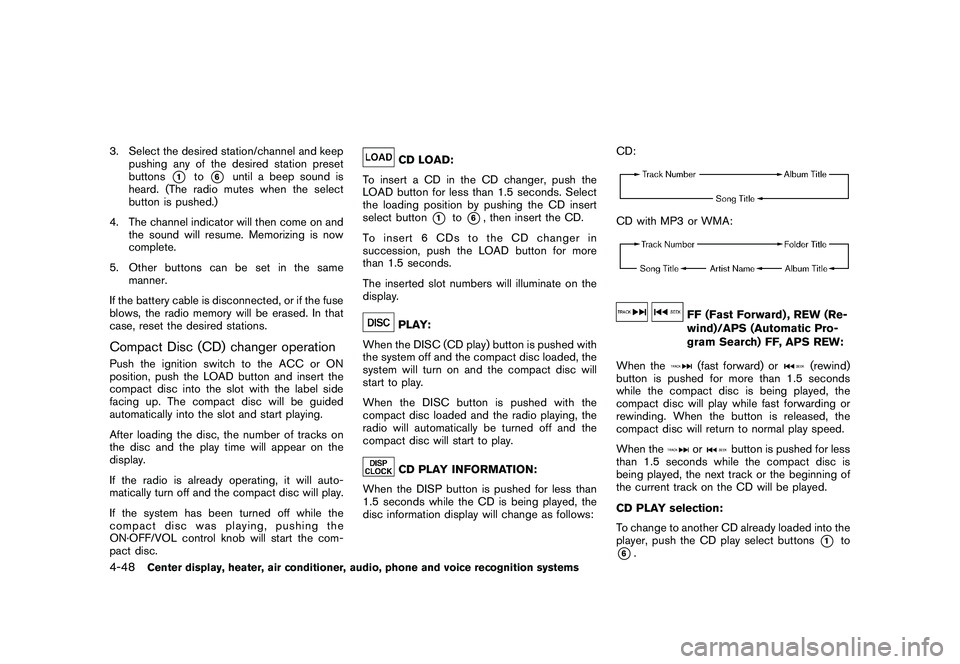
When the DISP button is pushed for less than
1.5 seconds while the CD is being played, the
disc information display will change as follows: CD:
CD with MP3 or WMA:
FF (Fast Forward) , REW (Re-
wind)/APS (Automatic Pro-
gram Search) FF, APS REW:
When the(fast forward) or
(rewind)
button is pushed for more than 1.5 seconds
while the compact disc is being played, the
compact disc will play while fast forwarding or
rewinding. When the button is released, the
compact disc will return to normal play speed.
When the
or
button is pushed for less
than 1.5 seconds while the compact disc is
being played, the next track or the beginning of
the current track on the CD will be played.
CD PLAY selection:
To change to another CD already loaded into the
player, push the CD play select buttons
*1
to
*6.
4-48
Center display, heater, air conditioner, audio, phone and voice recognition systems