warning lights NISSAN MURANO 2019 Owner´s Manual
[x] Cancel search | Manufacturer: NISSAN, Model Year: 2019, Model line: MURANO, Model: NISSAN MURANO 2019Pages: 507, PDF Size: 6.1 MB
Page 121 of 507
VEHICLE INFORMATION DISPLAY
WARNINGS AND INDICATORS
1. Push brake and start switch to drive
2. No Key Detected
3. Shif t to Park
4. Key Battery Low
5. Engine start operation for IntelligentKey system (if I-Key battery level is low)
6. Key ID Incorrect
7. Release Parking Brake
8. Low Fuel
9. Low Washer Fluid
10. Door/lif tgate Open
11. Key System Fault See Owner’s Manual
12. Loose Fuel Cap
13. Tire Pressure Low – Add Air
14. AWD Error: See Owner’s Manual (if so equipped)
15. AWD High Temp. Stop Vehicle (if so equipped)
16. AWD Tire Size Incorrect: See Owner’s Manual (if so equipped) 17. CVT Error: See Owner’s Manual
18. Shipping Mode On Push Storage Fuse
19. Power will turn off to save the battery
20. Power turned off to save the battery
21. Reminder: Turn OFF headlights
22. Driver Attention Alert Take a Break?
23. Driver Attention Alert Malfunction
24. Cruise control indicator (if so equipped)
25. Intelligent Cruise Control (ICC) indica-
tors (if so equipped)
26. Transmission Shif t Position indicator
27. Blind Spot Warning (BSW) and Rear Cross Traffic Alert (RCTA) indicator (if so
equipped)
28. Headlight System Error: See Owner’s Manual (if so equipped)
29. Unavailable: Front Radar Obstruction (if so equipped)
30. Unavailable: Side Radar Obstruction (if so equipped)
31. Push Ignition to OFF
32. Rear Door Alert is activated
33. Check Rear Seat for All Articles 34. Speed Limit Sign indicator (if so
equipped)
35. Lane Departure Warning (LDW)/ Intelli- gent Lane Intervention (I-LI) indicator (if
so equipped)
36. Unavailable High Cabin Temperature (if so equipped)
37. Currently Unavailable (if so equipped)
38. Unavailable Road is Slippery (if so equipped)
39. Rear Automatic Braking (RAB) indicator (if so equipped)
40. Vehicle ahead detection indicator
41. Automatic Emergency Braking (AEB) emergency warning indicator
42. Cruise ON (if so equipped)
43. Cruise Target Speed SET (if so equipped)
44. Intelligent Cruise ON (if so equipped)
45. Target Speed SET with Intelligent Dis- tance Control (if so equipped)
Push brake and start switch to drive
This indicator appears when the shif t lever
is in the P (Park) position.
Instruments and controls2-27
Page 124 of 507
additional information, refer to “Push-
button ignition switch positions” in the
“Starting and driving” section of this
manual.
Power turned off to save the battery
This message appears af ter the ignition
switch is automatically turned to off. For
additional information, refer to “Push-
button ignition switch positions” in the
“Starting and driving” section of this
manual.
Reminder: Turn OFF headlights
This warning appears when the headlights
are lef t in the ON position when exiting the
vehicle. Place the headlight switch in the
OFF or AUTO position. For additional infor-
mation, refer to “Headlight and turn signal
switch” in this section.
Driver Attention Alert - Take a Break?
This alert appears when the system has
detected that the driver may be displaying
fatigue or a lack of attention.
Driver Attention Alert Malfunction
This warning appears when the Intelligent
Driver Alertness (I-DA) system is not func-
tioning properly. For additional information,refer to “Intelligent Driver Alertness (I-DA)” in
the “Starting and driving” section of this
manual.
Cruise control indicator (if so equipped)
These indicators show the cruise control
system status.
For additional information, refer to “Cruise
control” in the “Starting and driving” section
of this manual.
Intelligent Cruise Control (ICC) indica-
tors (if so equipped)
These indicators show the Intelligent
Cruise Control (ICC) system status. For ad-
ditional information, refer to “Intelligent
Cruise Control (ICC)” in the “Starting and
driving” section of this manual.
Transmission Shif t Position indicator
This indicator shows the transmission shif t
position.
Blind Spot Warning (BSW) and Rear
Cross Traffic Alert (RCTA) indicator (if so
equipped)
This indicator shows when the BSW and
RCTA systems are engaged.
For additional information, refer to “Blind
Spot Warning (BSW)” and “Rear Cross TrafficAlert (RCTA)” in the “Starting and driving”
section of this manual.
Headlight System Error: See Owner’s
Manual (if so equipped)
This warning appears when the LED head-
lights are not functioning properly.
If this warning appears, have your system
checked. It is recommended that you visit a
NISSAN dealer for this service.
Unavailable: Front Radar Obstruction (if
so equipped)
This warning appears when one of the fol-
lowing systems (if so equipped) becomes
unavailable because the front radar is ob-
structed.
∙ Automatic Emergency Braking (AEB)
∙ Automatic Emergency Braking (AEB) with Pedestrian Detection
∙ Intelligent Cruise Control (ICC)
∙ Intelligent Forward Collision Warning (I- FCW)
For additional information, refer to the
“Starting and driving” section of this
manual.
2-30Instruments and controls
Page 135 of 507
High Beam Assist (if so equipped)
The High Beam Assist system will operate
when the vehicle is driven at speeds of ap-
proximately 25 mph (40 km/h) and above. If
an oncoming vehicle or leading vehicle ap-
pears in front of your vehicle when the
headlight high beam is on, the headlight
will be switched to the low beam automati-
cally.
WARNING
∙ The High Beam Assist system is a con-venience but it is not a substitute for
safe driving operation. The driver
should remain alert at all times, en-
sure safe driving practices and switch
the high beams and low beam manu-
ally when necessary.
∙ The high beam or low beam may not switch automatically under the fol-
lowing conditions. Switch the high
beam and low beam manually.
– During bad weather (rain, fog, snow, wind, etc.).
– When a light source similar to a headlight or tail light is in the vicin-
ity of the vehicle. – When the headlights of the on-
coming vehicle or the leading ve-
hicle are turned off, when the color
of the light is affected due to for-
eign materials on the lights, or
when the light beam is out of
position.
– When there is a sudden, continu- ous change in brightness.
– When driving on a road that passes over rolling hills, or a road that has
level differences.
– When driving on a road with many curves.
– When a sign or mirror-like surface is reflecting intense light towards
the front of the vehicle.
– When the container, etc. being towed by a leading vehicle is re-
flecting intense light.
– When a headlight on your vehicle is damaged or dirty.
– When the vehicle is leaning at an angle due to a punctured tire, be-
ing towed, etc. ∙ The timing of switching the low beam
and high beam may change under the
following situations.
– The brightness of the headlights of the oncoming vehicle or leading
vehicle.
– The movement and direction of the oncoming vehicle and the lead-
ing vehicle.
– When only one light on the oncom- ing vehicle or the leading vehicle is
illuminated.
– When the oncoming vehicle or the leading vehicle is a two-wheeled
vehicle.
– Road conditions (incline, curve, the road surface, etc.).
– The number of passengers and the amount of luggage.
Instruments and controls2-41
Page 137 of 507
∙ Do not strike or damage the areasaround the ambient image sensor. Do
not touch the sensor lens that is lo-
cated on the ambient image sensor.
If the ambient image sensor is damaged
due to an accident, it is recommended that
you visit a NISSAN dealer.
Battery saver system
The battery saver system automatically
turns off the following lights af ter a period
of time when the ignition switch is placed in
the OFF position and the doors are closed:
∙ Headlights, when the headlight switch is in the
orposition
∙ Interior lights, when lef t in the ON posi- tion
Af ter the headlights automatically turn off
with the headlight switch in the
orposition, the headlights will illumi-
nate again if the headlight switch is moved
to the OFF position and then turned to
the
orposition.
CAUTION
Even though the battery saver feature
automatically turns off the headlights
af ter a period of time, you should turn
the headlight switch to the OFF position
when the engine is not running to avoid
discharging the vehicle battery.
LED DAYTIME RUNNING LIGHTS
(DRL) SYSTEM
The LED portion of the headlights auto-
matically illuminate at 100% intensity when
the engine is started with the parking
brake released. The LED DRL operate with
the headlight switch in the OFF position or
in the
position. Turn the headlight
switch to the
position for full illumina-
tion when driving at night.
If the parking brake is applied before the
engine is started, the LED DRL do not illumi-
nate. The LED DRL illuminate when the
parking brake is released. The LED DRL will
remain on until the ignition switch is placed
in the OFF position.
WARNING
When the LED DRL system is active, tail
lights on your vehicle are not on. It is
necessary at dusk to turn on your head-
lights. Failure to do so could cause an
accident injuring yourself and others.
Instruments and controls2-43
Page 139 of 507
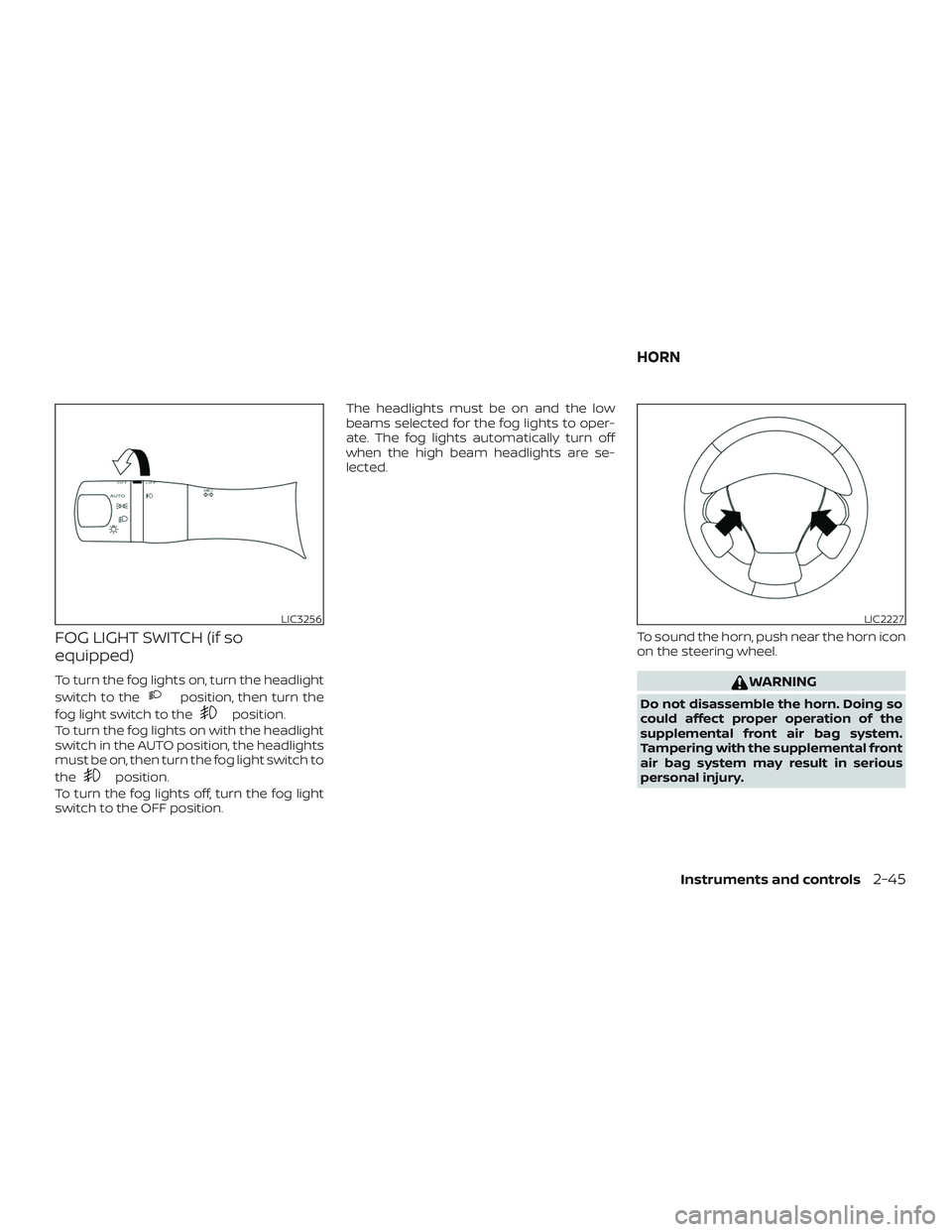
FOG LIGHT SWITCH (if so
equipped)
To turn the fog lights on, turn the headlight
switch to the
position, then turn the
fog light switch to the
position.
To turn the fog lights on with the headlight
switch in the AUTO position, the headlights
must be on, then turn the fog light switch to
the
position.
To turn the fog lights off, turn the fog light
switch to the OFF position. The headlights must be on and the low
beams selected for the fog lights to oper-
ate. The fog lights automatically turn off
when the high beam headlights are se-
lected.
To sound the horn, push near the horn icon
on the steering wheel.
WARNING
Do not disassemble the horn. Doing so
could affect proper operation of the
supplemental front air bag system.
Tampering with the supplemental front
air bag system may result in serious
personal injury.
LIC3256LIC2227
HORN
Instruments and controls2-45
Page 180 of 507
∙ To prevent the Intelligent Key from be-ing lef t inside the vehicle, make sure you
carry the Intelligent Key with you and
then lock the doors.
∙ Do not pull the door handle before pushing the door handle request
switch. The door will be unlocked but
will not open. Release the door handle
once and pull it again to open the door.
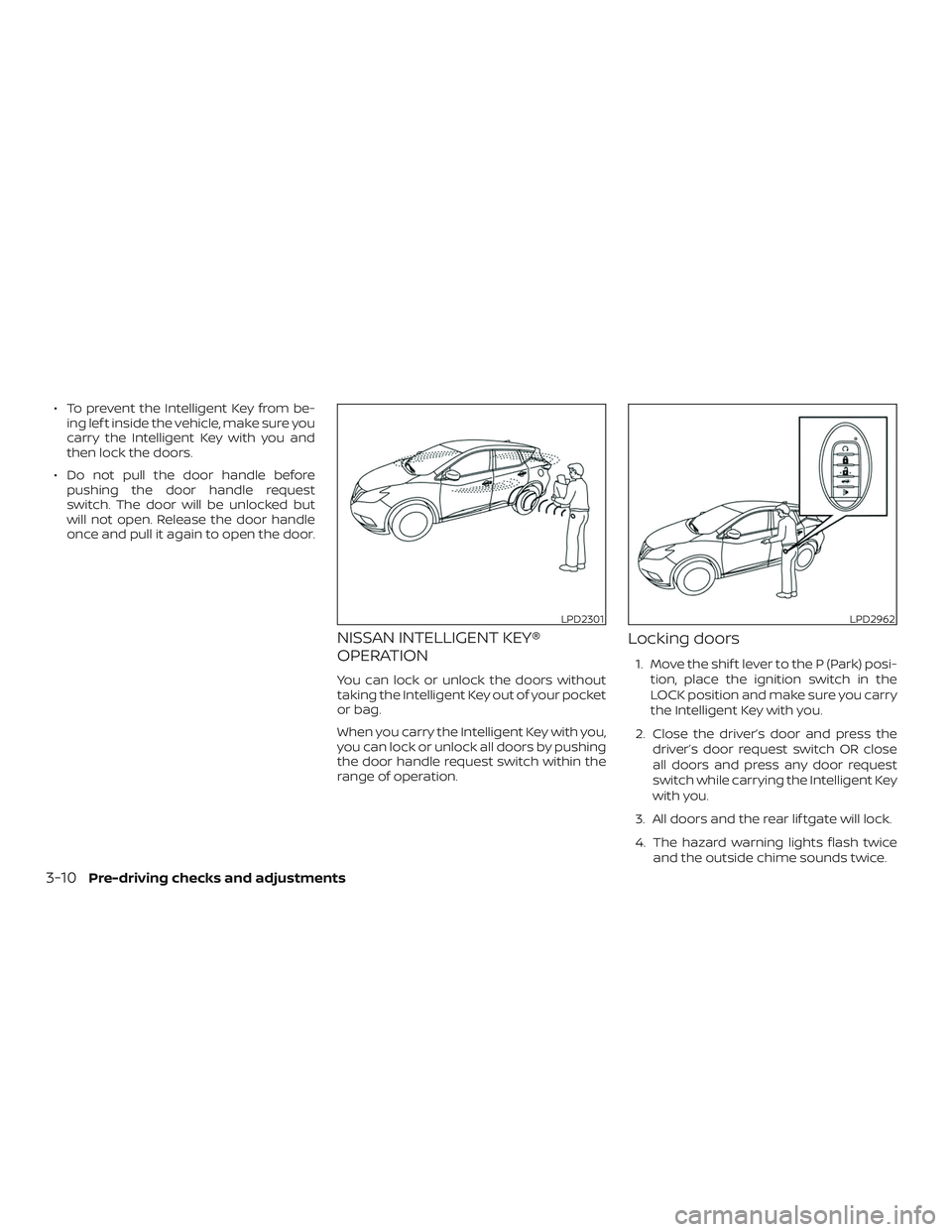
NISSAN INTELLIGENT KEY®
OPERATION
You can lock or unlock the doors without
taking the Intelligent Key out of your pocket
or bag.
When you carry the Intelligent Key with you,
you can lock or unlock all doors by pushing
the door handle request switch within the
range of operation.
Locking doors
1. Move the shif t lever to the P (Park) posi-
tion, place the ignition switch in the
LOCK position and make sure you carry
the Intelligent Key with you.
2. Close the driver’s door and press the driver’s door request switch OR close
all doors and press any door request
switch while carrying the Intelligent Key
with you.
3. All doors and the rear lif tgate will lock.
4. The hazard warning lights flash twice and the outside chime sounds twice.
LPD2301LPD2962
3-10Pre-driving checks and adjustments
Page 183 of 507
handle, push the door handle request
switch to unlock the door.
All doors will be locked automatically un-
less one of the following operations is per-
formed within 1 minute af ter pushing the
request switch.∙ Opening any door.
∙ Pushing the ignition switch.
The interior light timer illuminates for a pe-
riod of time when a door is unlocked and
the room light switch is in the DOOR posi-
tion.
The interior light can be turned off without
waiting by performing one of the following
operations: ∙ Placing the ignition switch in the ON po- sition.
∙ Locking the doors with the remote con- trol.
∙ Switching the room light switch to the OFF position. ∙ Switching the Auto Room Lamp to the
OFF position in “Vehicle Settings” of the
vehicle information display. For addi-
tional information, refer to “Vehicle in-
formation display” in the “Instruments
and controls” section of this manual.
HOW TO USE THE REMOTE
KEYLESS ENTRY FUNCTION
The remote keyless entry function can op-
erate all door locks using the remote key-
less function of the Intelligent Key. The re-
mote keyless function can operate at a
distance of 33 f t (10 m) away from the ve-
hicle. The operating distance depends
upon the conditions around the vehicle.
The remote keyless entry function will not
function under the following conditions:
∙ When the Intelligent Key is not within the operational range.
∙ When the Intelligent Key battery is dis- charged.
CAUTION
When locking the doors using the Intel-
ligent Key, be sure not to leave the key in
the vehicle.
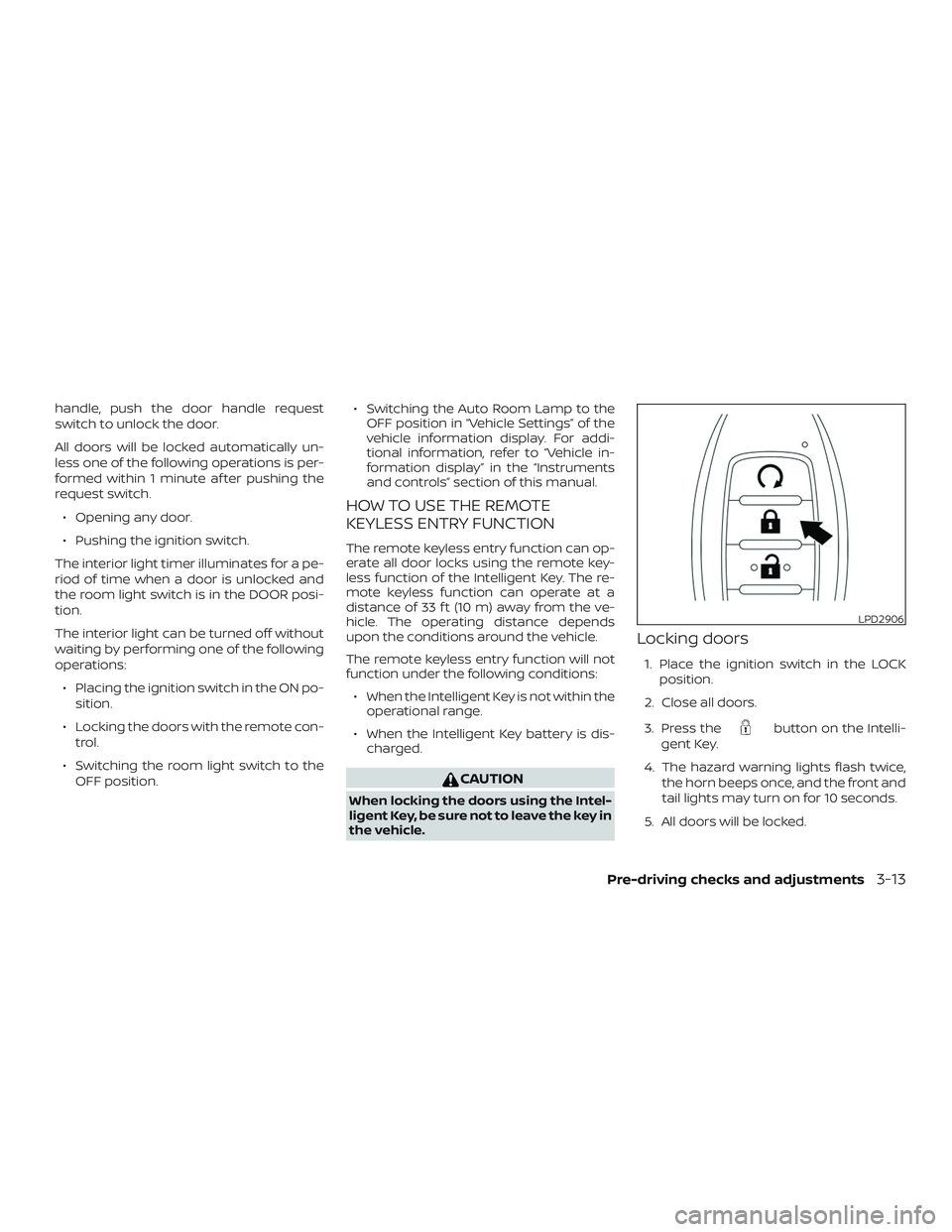
Locking doors
1. Place the ignition switch in the LOCK
position.
2. Close all doors.
3. Press the
button on the Intelli-
gent Key.
4. The hazard warning lights flash twice, the horn beeps once, and the front and
tail lights may turn on for 10 seconds.
5. All doors will be locked.
LPD2906
Pre-driving checks and adjustments3-13
Page 184 of 507
CAUTION
Af ter locking the doors using the Intel-
ligent Key, be sure that the doors have
been securely locked by operating the
door handles.
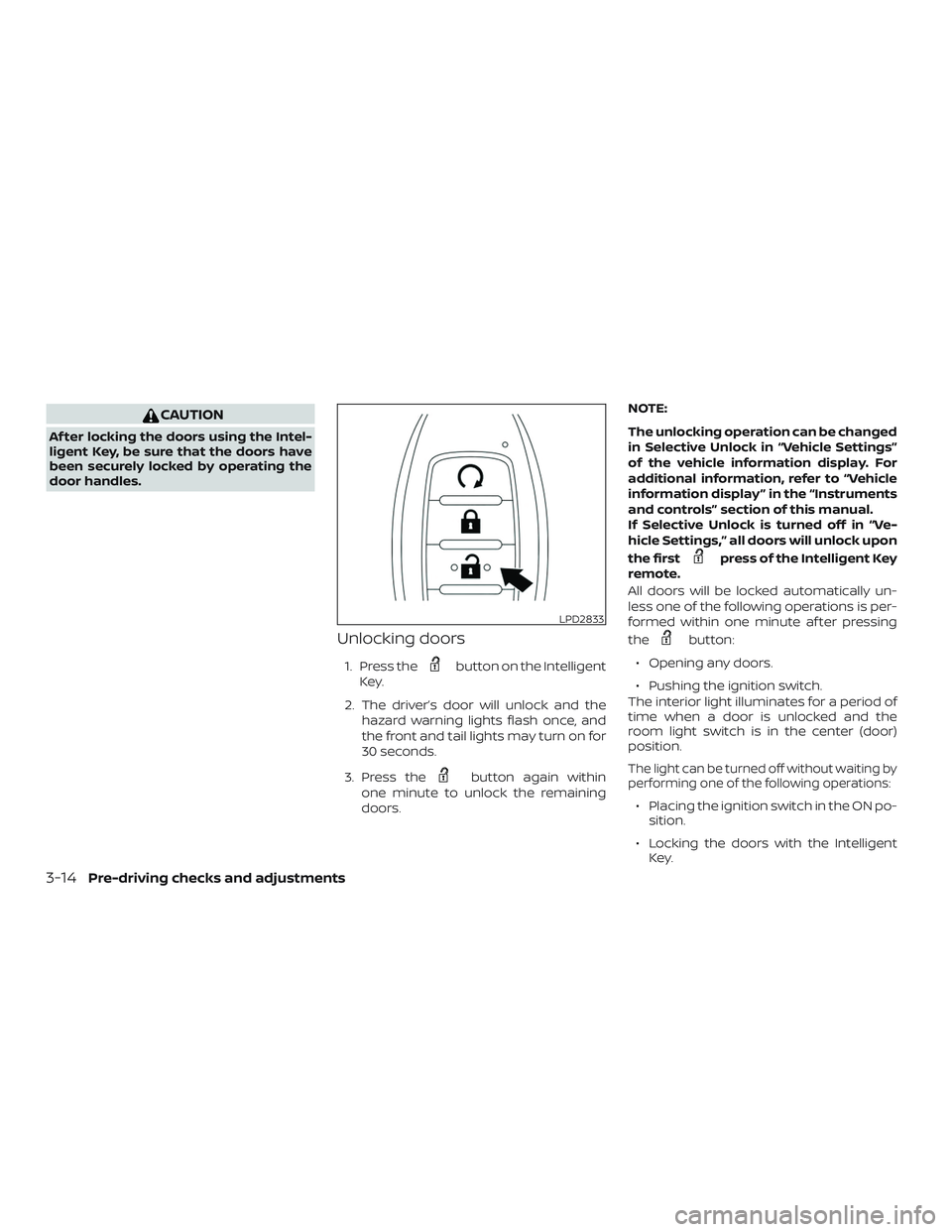
Unlocking doors
1. Press thebutton on the Intelligent
Key.
2. The driver’s door will unlock and the hazard warning lights flash once, and
the front and tail lights may turn on for
30 seconds.
3. Press the
button again within
one minute to unlock the remaining
doors. NOTE:
The unlocking operation can be changed
in Selective Unlock in “Vehicle Settings”
of the vehicle information display. For
additional information, refer to “Vehicle
information display ” in the “Instruments
and controls” section of this manual.
If Selective Unlock is turned off in “Ve-
hicle Settings,” all doors will unlock upon
the first
press of the Intelligent Key
remote.
All doors will be locked automatically un-
less one of the following operations is per-
formed within one minute af ter pressing
the
button:
∙ Opening any doors.
∙ Pushing the ignition switch.
The interior light illuminates for a period of
time when a door is unlocked and the
room light switch is in the center (door)
position.
The light can be turned off without waiting by
performing one of the following operations:
∙ Placing the ignition switch in the ON po- sition.
∙ Locking the doors with the Intelligent Key.
LPD2833
3-14Pre-driving checks and adjustments
Page 191 of 507
CAUTION
When the Intelligent Key battery is dis-
charged or other strong radio wave
sources are present near the operating
location, the Intelligent Key operating
range becomes narrower, and the Intel-
ligent Key may not function properly.
The Remote Engine Start function can only
be used when the Intelligent Key is within
the specified operating range from the ve-
hicle.
The Remote Engine Start operating range
is approximately 197 f t (60 m) from the ve-
hicle.
REMOTE STARTING THE VEHICLE
To use the Remote Engine Start feature
perform the following: 1. Aim the Intelligent Key at the vehicle.
2. Press the
button to lock all
doors.
3. Within 5 seconds press and hold the
button until the turn signal
lights flash and the tail lamps turn on. If
the vehicle is not within view press and
hold the
button for at least 2 sec-
onds. The following events will occur when the
engine starts:
∙ The parking lights will turn on and re- main on as long as the engine is run-
ning.
∙ The doors will be locked and the climate control system may come on.
∙ The engine will continue to run for 10 minutes. Repeat the steps to extend
the time for an additional 10 minutes.
For additional information, refer to “Ex-
tending engine run time” in this section.
Press and hold the brake pedal while
switching the ignition to the ON position
before driving. For additional information,
refer to “Driving the vehicle” in the “Starting
and driving” section of this manual.
EXTENDING ENGINE RUN TIME
The Remote Engine Start feature can be
extended one time by performing the
steps listed in “Remote starting the vehicle”
in this section. Run time will be calculated
as follows: ∙ The first 10 minute run time will start when the Remote Engine Start function
is performed. ∙ The second 10 minutes will start imme-
diately when the Remote Engine Start
function is performed again. For ex-
ample, if the engine has been running
for 5 minutes, and 10 minutes are
added, the engine will run for a total of
15 minutes.
∙ Extending engine run time will bring you to the two Remote Engine Start limit.
A maximum of two Remote Engine Starts,
or a single Remote Engine Start with an
extension, are allowed between ignition
cycles. The ignition switch must be cycled
to the ON position and then back to the
OFF position before the Remote Engine
Start procedure can be used again.
CANCELING A REMOTE ENGINE
START
To cancel a Remote Engine Start, perform
one of the following: ∙ Aim the Intelligent Key at the vehicle and press
until the parking lights
turn off.
∙ Turn on the hazard warning flashers.
∙ Cycle the ignition switch on and then off.
Pre-driving checks and adjustments3-21
Page 192 of 507
∙ The extended engine run time has ex-pired.
∙ The first 10 minute timer has expired.
∙ Opening the engine hood.
∙ Shif ting the vehicle out of P (Park).
∙ The alarm sounds due to illegal entry into the vehicle.
∙ Pushing the ignition switch without the Intelligent Key in the vehicle.
∙ Not pressing the brake pedal while pressing the ignition switch with the In-
telligent Key in the vehicle.
CONDITIONS THE REMOTE ENGINE
START WILL NOT WORK
The Remote Engine Start will not operate if
any of the following conditions are present:
∙ The ignition switch is placed in the ON position.
∙ The hood is not securely closed.
∙ The hazard indicator lights are on. ∙ The engine is still running. The engine
must be completely stopped. Wait at
least 6 seconds if the engine goes from
running to off. This is not applicable
when extending engine run time.
∙ The
button is not pressed and
held for at least 2 seconds.
∙ The
button is not pressed and
held within 5 seconds of pressing the
lock button.
∙ The brake is pressed.
∙ The doors are not closed and locked.
∙ The lif tgate is open.
∙ The I–Key Indicator Light remains solid is in the vehicle information display.
∙ The alarm sounds due to illegal entry into the vehicle.
∙ Two Remote Engine Starts, or a single Remote Engine Start with an extension,
have already been used.
∙ The vehicle is not in P (Park).
∙ There is a detected registered key al- ready inside of the vehicle. ∙ The Remote Engine Start function has
been switched to the OFF position in
Vehicle Settings of the vehicle informa-
tion display. For additional information,
refer to “Vehicle information display” in
the “Instruments and controls” section
of this manual.
The Remote Engine Start may display a
warning or indicator in the vehicle informa-
tion display. For additional information, re-
fer to “Vehicle information display” in the
“Instruments and controls” section of this
manual.
3-22Pre-driving checks and adjustments