cruise control NISSAN MURANO 2020 Owner´s Manual
[x] Cancel search | Manufacturer: NISSAN, Model Year: 2020, Model line: MURANO, Model: NISSAN MURANO 2020Pages: 518, PDF Size: 3.52 MB
Page 139 of 518
Check Rear Seat For All Articles
When the system is enabled, this message
appears when the vehicle comes to a com-
plete stop, the vehicle is transitioned from
the D (Drive) position to P (Park) position,
and the driver exits the vehicle. This mes-
sage alerts the driver, af ter a period of time,
to check for items in the rear seat af ter the
audible alert has been provided.
NOTE:
This system is disabled until a driver en-
ables it using the vehicle information
display. For additional information, refer
to “How to use the vehicle information
display ” in this section.
For additional information, refer to “Rear
Door Alert” in this section.
Speed Limit Sign indicator (if so
equipped)
This message may appear when the Traffic
Sign Recognition system is engaged.
For additional information, refer to “Traffic
Sign Recognition (TSR)” in the “Starting and
driving” section of this manual.
Lane Departure Warning (LDW)/
Intelligent Lane Intervention (I-LI)
indicator (if so equipped)
This indicator shows when the LDW and/or
Intelligent Lane Intervention (I-LI) systems
are engaged.
For additional information, refer to “Lane
Departure Warning (LDW) system” and “In-
telligent Lane Intervention (I-LI)” in the
“Starting and driving” section of this
manual.
Unavailable: High Cabin Temperature
(if so equipped)
This message appears when the camera
detects an interior temperature of more
than 104°F (40°C). For additional informa-
tion, refer to “Automatic Emergency Brak-
ing (AEB)” , “Automatic Emergency Braking
(AEB) with Pedestrian Detection” , “Intelli-
gent Cruise Control (ICC)” , “Intelligent Lane
Intervention (I-LI)” , “Lane Departure Warn-
ing (LDW)” or “Traffic Sign Recognition (TSR)”
in the “Starting and driving” section of this
manual.
Currently Unavailable (if so equipped)
This message appears when the Vehicle
Dynamic Control (VDC) system is turned
off. The Intelligent Lane Intervention (I-LI)
system will be turned off automatically. For
additional information, refer to “Vehicle Dy-
namic Control (VDC)” and “Intelligent Lane
Intervention (I-LI)” in the “Starting and driv-
ing” section of this manual.
Unavailable: Road is Slippery (if so
equipped)
This message appears when the Intelligent
Cruise Control (ICC) or the Intelligent Lane
Intervention (I-LI) systems become un-
available because the road is slippery. For
additional information, refer to “Intelligent
Cruise Control (ICC)” or “Intelligent Lane In-
tervention (I-LI)” in the “Starting and driving”
section of this manual.
Rear Automatic Braking (RAB)
indicator (if so equipped)
This indicator illuminates to indicate the
status of the Rear Automatic Braking (RAB)
system. For additional information, refer to
“Rear Automatic Braking (RAB) system” in
the “Starting and driving” section of this
manual.
Instruments and controls2-31
Page 140 of 518
Vehicle ahead detection indicator
This indicator shows when the Automatic
Emergency Braking (AEB) system is en-
gaged and has detected a vehicle.
For additional information, refer to “Auto-
matic Emergency Braking (AEB)” and “Auto-
matic Emergency Braking (AEB) with Pe-
destrian Detection” in the “Starting and
driving” section of this manual.
Automatic Emergency Braking (AEB)
emergency warning indicator
This indicator illuminates along, with an au-
dible warning, when the system detects
the possibility of a forward collision.
For additional information, refer to “Auto-
matic Emergency Braking (AEB)” and “Auto-
matic Emergency Braking (AEB) with Pe-
destrian Detection” in the “Starting and
driving” section of this manual.
Cruise ON (if so equipped)
This message appears if thecruise
control switch on the steering wheel is
pressed and Cruise Control Alerts are en-
abled in the vehicle information display.
For additional information, refer to “Cruise
control” in the “Starting and driving” section
of this manual.
Cruise Target Speed SET (if so
equipped)
This message will appear if the Cruise Con-
trol system is on when the SET switch is
pushed and the Cruise Control Alerts are
enabled.
For additional information, refer to “Cruise
control” in the “Starting and driving” section
of this manual.
Intelligent Cruise ON (if so equipped)
This message appears if theIntelli-
gent Cruise Control (ICC) switch on the
steering wheel is pressed and Cruise Con-
trol Alerts are enabled in the vehicle infor-
mation display.
For additional information, refer to “Intelli-
gent Cruise Control (ICC)” in the “Starting
and driving” section of this manual.
Target Speed SET with Intelligent
Distance Control (if so equipped)
This message will appear if the Intelligent
Cruise Control system is on when the SET
switch is pushed and the Cruise Control
Alerts are enabled.
For additional information, refer to “Intelli-
gent Cruise Control (ICC)” in the “Starting
and driving” section of this manual.
Parking Sensor (if so equipped)
This indicator illuminates when the sensor
is activated. Pressing thebutton while
the sonar screen is displayed will dismiss
this message until the next time the sen-
sors are activated. The Parking Sensor sys-
tem will remain on, unless it is disabled in
the vehicle information display. For addi-
tional information, refer to “Front and rear
sonar system” in the “Starting and driving”
section of this manual.
Alarm-Timeforabreak?
This indicator appears when the driver en-
ables the timer alert function within the
driver assistance settings and the selected
set time is expired. The time is based on
ignition on time and can be set up to six
hours.
2-32Instruments and controls
Page 258 of 518
BSW system limitations.....................5-42
BSW driving situations .......................5-43
System temporarily unavailable .............5-46
System maintenance .......................5-47
Rear Cross Traffic Alert (RCTA) (if so equipped) . . 5-48 RCTA system operation .....................5-49
How to enable/disable the RCTA
system ...................................... 5-51
RCTA system limitations .....................5-52
System temporarily unavailable .............5-54
System maintenance .......................5-55
Cruise control (if so equipped) ..................5-57
Precautions on cruise control ...............5-57
Cruise control operations ...................5-57
Intelligent Cruise Control (ICC) (if so equipped) . . 5-59 How to select the cruise control mode ......5-61
Vehicle-to-vehicle distance control
mode ....................................... 5-61
Vehicle-to-vehicle distance control
mode operation ............................. 5-62
Vehicle-to-vehicle distance control
mode switches ............................. 5-64
Vehicle-to-vehicle distance control
mode limitations ............................ 5-71
System temporarily unavailable .............5-75 System maintenance
....................... 5-77
Conventional (fixed speed) cruise
control mode ............................... 5-79
Rear Automatic Braking (RAB) (if so equipped) . . 5-83 RAB system operation .......................5-84
Turning the RAB system on/off ..............5-86
RAB system limitations ......................5-87
System malfunction ......................... 5-88
System maintenance .......................5-88
Automatic Emergency Braking (AEB)
(if so equipped) ................................. 5-89
AEB system operation .......................5-90
Turning the AEB system on/off ..............5-91
AEB system limitations ......................5-92
System temporarily unavailable .............5-93
System malfunction ......................... 5-94
System maintenance .......................5-95
Automatic Emergency Braking (AEB) with
Pedestrian Detection (if so equipped) ...........5-96
AEB
with Pedestrian Detection system
operation ................................... 5-98
Turning the AEB with Pedestrian
Detection system on/off ...................5-100
AEB with Pedestrian Detection system
limitations ................................. 5-101
Page 293 of 518
• When the Intelligent Cruise Control (ICC)approach warning occurs.
• When the hazard warning flashers are operated.
• When driving on a curve at high speed.
Af ter the above conditions have finished
and the necessary operating conditions
are satisfied, the I-LI system application of
the brakes will resume.
Condition C:
If the following messages appear in the
vehicle information display, the I-LI system
will be turned off automatically.
• “Unavailable Road is Slippery”: When the VDC system (except Traction
Control System [TCS] function) or ABS op-
erates.
• “Currently Unavailable”: When the VDC system is turned off.
Action to take:
When the above conditions no longer exist,
turn off the I-LI system. Push the dynamic
driver assistance switch again to turn the
I-LI system back on. Temporary disabled status at high tem-
perature:
If the vehicle is parked in direct sunlight
under high temperature conditions (over
approximately 104°F [40°C]) and then the
I-LI system is turned on, the I-LI system
may be deactivated automatically and the
following message will appear on the ve-
hicle information display: “Unavailable: High
Cabin Temperature.” When the interior
temperature is reduced, the system will re-
sume operating automatically.
SYSTEM MALFUNCTION
If the I-LI system malfunctions, it will cancel
automatically. The LDW indicator (orange)
will illuminate in the display. If the LDW indi-
cator (orange) illuminates in the display,
pull off the road to a safe location and stop
the vehicle. Turn the engine/motor off and
restart the engine/motor. If the LDW indica-
tor (orange) continues to illuminate, have
the I-LI system checked. It is recom-
mended that you visit a NISSAN dealer for
this service.
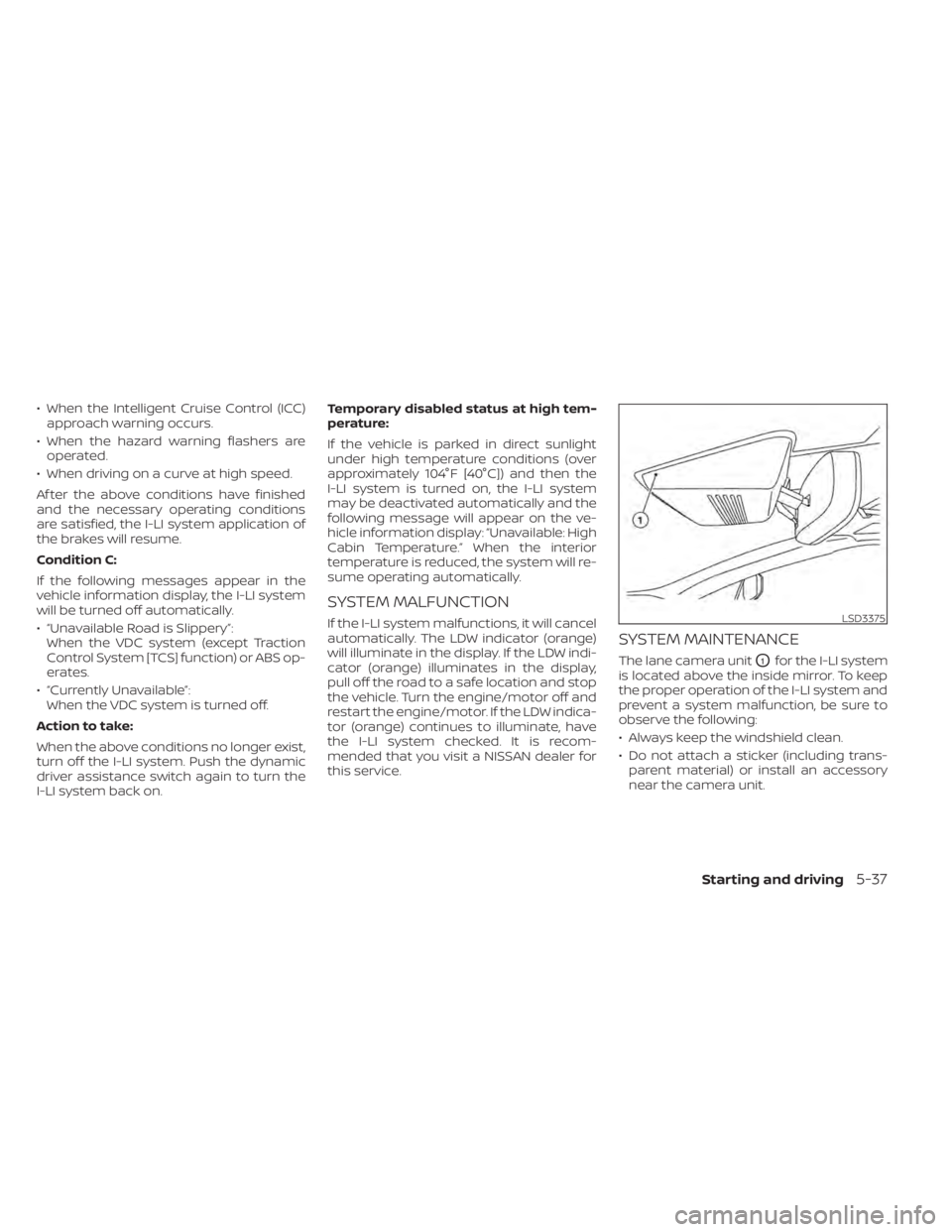
SYSTEM MAINTENANCE
The lane camera unitO1for the I-LI system
is located above the inside mirror. To keep
the proper operation of the I-LI system and
prevent a system malfunction, be sure to
observe the following:
• Always keep the windshield clean.
• Do not attach a sticker (including trans- parent material) or install an accessory
near the camera unit.
LSD3375
Starting and driving5-37
Page 313 of 518
PRECAUTIONS ON CRUISE
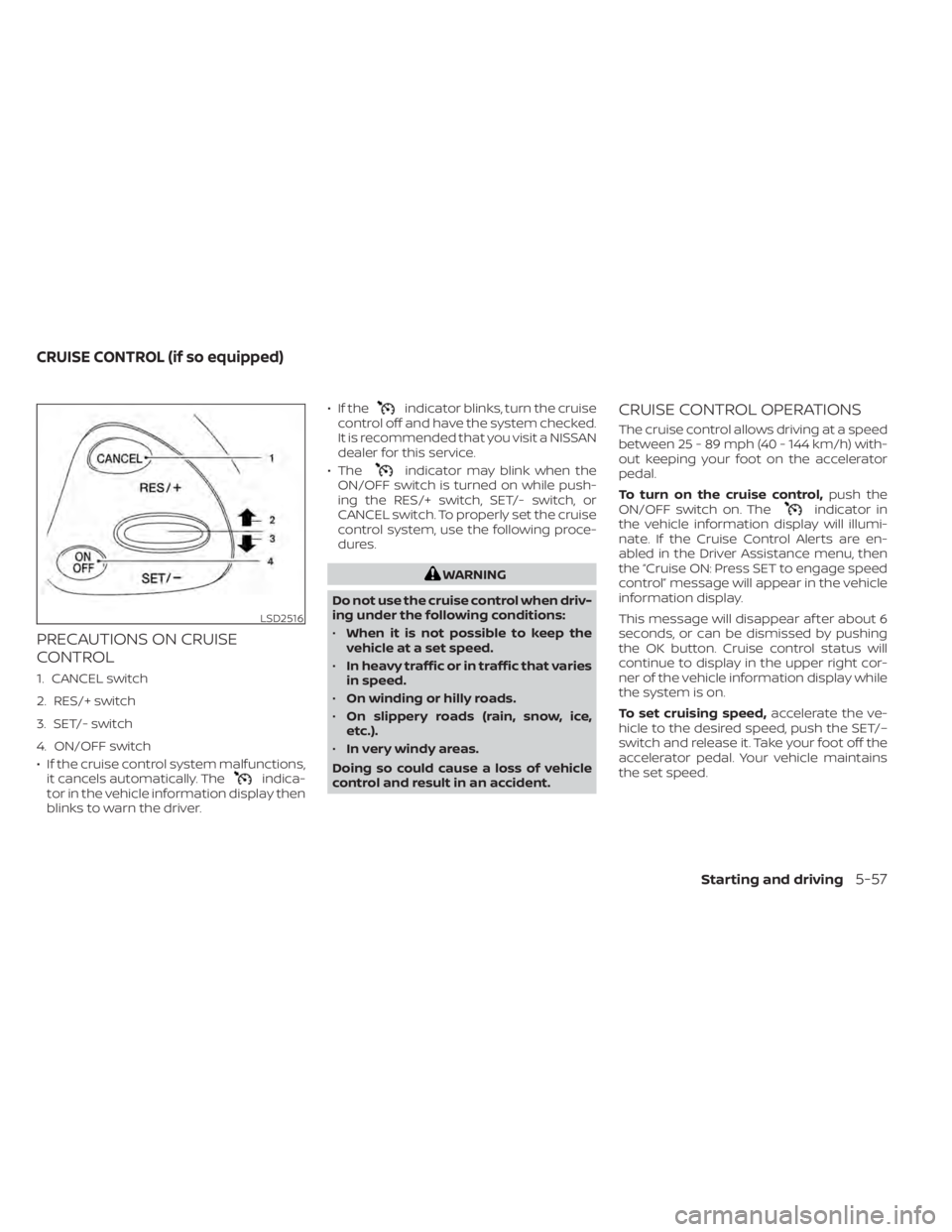
CONTROL
1. CANCEL switch
2. RES/+ switch
3. SET/- switch
4. ON/OFF switch
• If the cruise control system malfunctions,it cancels automatically. The
indica-
tor in the vehicle information display then
blinks to warn the driver. • If the
indicator blinks, turn the cruise
control off and have the system checked.
It is recommended that you visit a NISSAN
dealer for this service.
• The
indicator may blink when the
ON/OFF switch is turned on while push-
ing the RES/+ switch, SET/- switch, or
CANCEL switch. To properly set the cruise
control system, use the following proce-
dures.
WARNING
Do not use the cruise control when driv-
ing under the following conditions:
• When it is not possible to keep the
vehicle at a set speed.
• In heavy traffic or in traffic that varies
in speed.
• On winding or hilly roads.
• On slippery roads (rain, snow, ice,
etc.).
• In very windy areas.
Doing so could cause a loss of vehicle
control and result in an accident.
CRUISE CONTROL OPERATIONS
The cruise control allows driving at a speed
between 25 - 89 mph (40 - 144 km/h) with-
out keeping your foot on the accelerator
pedal.
To turn on the cruise control, push the
ON/OFF switch on. The
indicator in
the vehicle information display will illumi-
nate. If the Cruise Control Alerts are en-
abled in the Driver Assistance menu, then
the “Cruise ON: Press SET to engage speed
control” message will appear in the vehicle
information display.
This message will disappear af ter about 6
seconds, or can be dismissed by pushing
the OK button. Cruise control status will
continue to display in the upper right cor-
ner of the vehicle information display while
the system is on.
To set cruising speed, accelerate the ve-
hicle to the desired speed, push the SET/–
switch and release it. Take your foot off the
accelerator pedal. Your vehicle maintains
the set speed.
LSD2516
CRUISE CONTROL (if so equipped)
Starting and driving5-57
Page 314 of 518
If the Cruise Control Alerts are enabled in
the Driver Assistance menu, then the “Tar-
get Speed SET. Press + or – to adjust” mes-
sage will appear in the vehicle information
display when the SET/– switch is pushed.
This message will disappear af ter about 6
seconds, or can be dismissed by pushing
the OK button. Cruise control status will
continue to display in the upper right cor-
ner of the vehicle information display while
the system is on.
•To pass another vehicle, depress the ac-
celerator pedal. When you release the
pedal, the vehicle returns to the previ-
ously set speed.
• The vehicle may not maintain the set speed when going up or down steep hills.
If this happens, drive without the cruise
control.
To cancel the preset speed, use one of the
following three methods:
• Push the CANCEL switch.
• Tap the brake pedal.
• Push the ON/OFF switch off. The
indicator in the vehicle information dis-
play goes out. The cruise control is automatically can-
celed if:
• You depress the brake pedal while push-
ing the RES/+ or SET/– switch. The preset
speed is deleted from memory.
• The vehicle slows down more than 8 mph (13 km/h) below the set speed.
• You move the shif t lever to N (Neutral).
If the Cruise Control Alerts are enabled in
the Driver Assistance menu, the “Cruise ON:
Press SET to engage speed control” mes-
sage will reappear in the vehicle informa-
tion display to let you know the cruise con-
trol system is still on if you set the target
speed again.
To reset at a faster cruising speed, use
one of the following three methods:
• Depress the accelerator pedal. When the vehicle attains the desired speed, push
and release the SET/– switch.
• Push and hold the RES/+ switch. When the vehicle attains the speed you desire,
release the switch.
• Push and release the RES/+ switch. Each time you do this, the set speed increases
by about 1 mph (1.6 km/h). To reset at a slower cruising speed,
use
one of the following three methods:
• Lightly tap the brake pedal. When the ve- hicle attains the desired speed, push the
SET/– switch and release it.
• Push and hold the SET/– switch. Release the switch when the vehicle slows to the
desired speed.
• Push and release the SET/– switch. Each time you do this, the set speed decreases
by about 1 mph (1.6 km/h).
To resume the preset speed, push and
release the RES/+ switch. The vehicle re-
turns to the last set cruising speed when
the vehicle speed is over 25 mph (40 km/h).
To turn off the cruise control, use one of
the following three methods:
• Push the CANCEL switch.
• Tap the brake pedal.
• Push the ON/OFF switch off. The
indicator in the vehicle information dis-
play goes out.
5-58Starting and driving
Page 315 of 518
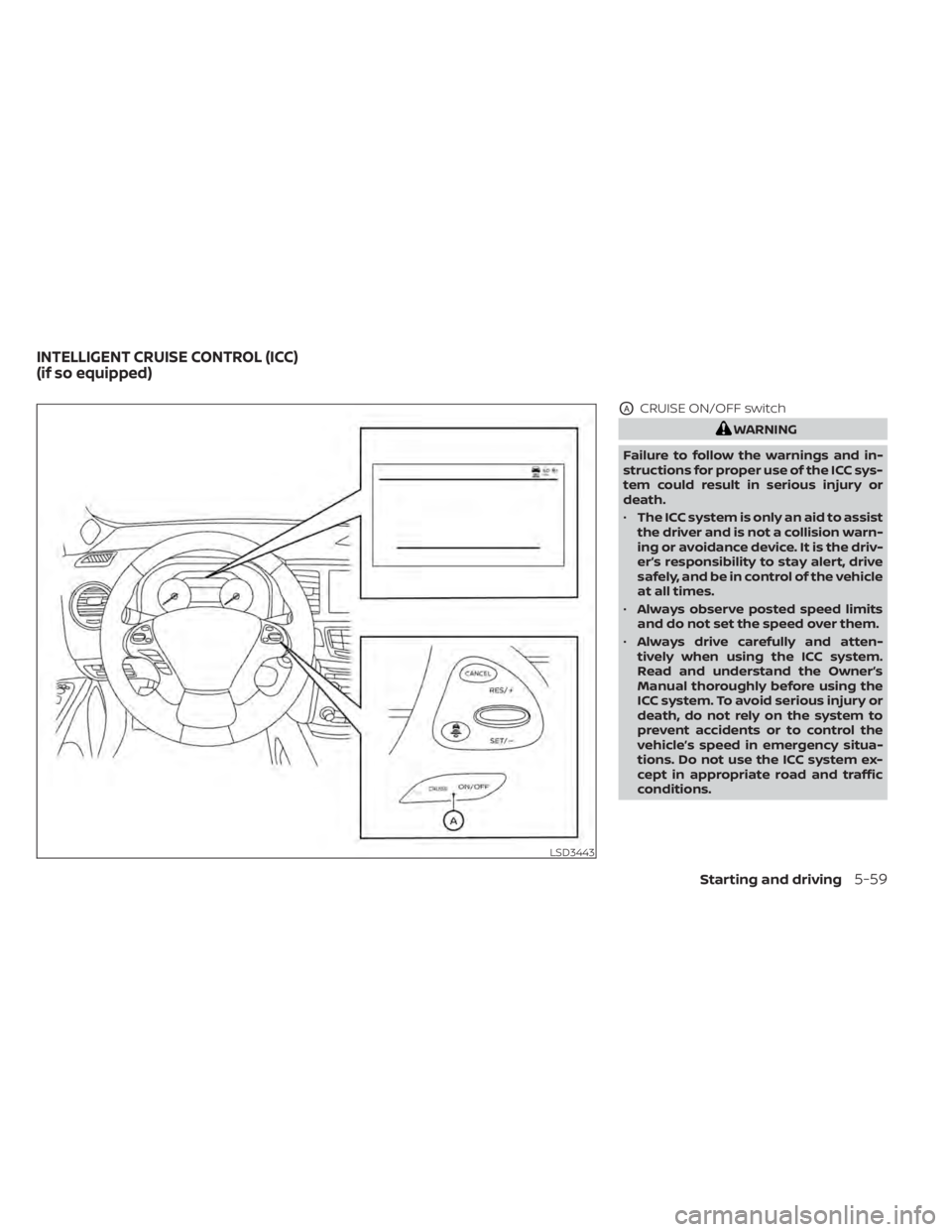
OACRUISE ON/OFF switch
WARNING
Failure to follow the warnings and in-
structions for proper use of the ICC sys-
tem could result in serious injury or
death.
• The ICC system is only an aid to assist
the driver and is not a collision warn-
ing or avoidance device. It is the driv-
er’s responsibility to stay alert, drive
safely, and be in control of the vehicle
at all times.
• Always observe posted speed limits
and do not set the speed over them.
• Always drive carefully and atten-
tively when using the ICC system.
Read and understand the Owner’s
Manual thoroughly before using the
ICC system. To avoid serious injury or
death, do not rely on the system to
prevent accidents or to control the
vehicle’s speed in emergency situa-
tions. Do not use the ICC system ex-
cept in appropriate road and traffic
conditions.
LSD3443
INTELLIGENT CRUISE CONTROL (ICC)
(if so equipped)
Starting and driving5-59
Page 316 of 518
•In the conventional (fixed speed)
cruise control mode, a warning
chime will not sound to warn you if
you are too close to the vehicle
ahead. Pay special attention to the
distance between your vehicle and
the vehicle ahead of you or a collision
could occur.
The ICC system maintains a selected dis-
tance from the vehicle in front of you within
the speed range of 0 to 90 mph (0 to 144
km/h) up to the set speed. The set speed
can be selected by the driver between 20 to
90 mph (32 to 144 km/h).
The vehicle travels at a set speed when the
road ahead is clear.
The ICC system can be set to one of two
cruise control modes:
• Vehicle-to-vehicle distance control
mode: For maintaining a selected dis-
tance between your vehicle and the ve-
hicle in front of you up to the preset speed
• Conventional (fixed speed) cruise con-
trol mode: For cruising at a preset speed Push the CRUISE ON/OFF switchOAto
choose the cruise control mode between
the vehicle-to-vehicle distance control
mode and the conventional (fixed speed)
cruise control mode.
Once a control mode is activated, it cannot
be changed to the other cruise control
mode. To change the mode, push the
CRUISE ON/OFF switch
OAonce to turn the
system off. Then push the CRUISE ON/OFF
switch
OAagain to turn the system back on
and select the desired cruise control mode.
Always confirm the setting in the ICC sys-
tem display.
For the vehicle-to-vehicle distance control
mode, refer to “Vehicle-to-vehicle distance
control mode” in this section.
For the conventional (fixed speed) cruise
control mode, refer to “Conventional (fixed
speed) cruise control mode” in this section.
5-60Starting and driving
Page 317 of 518
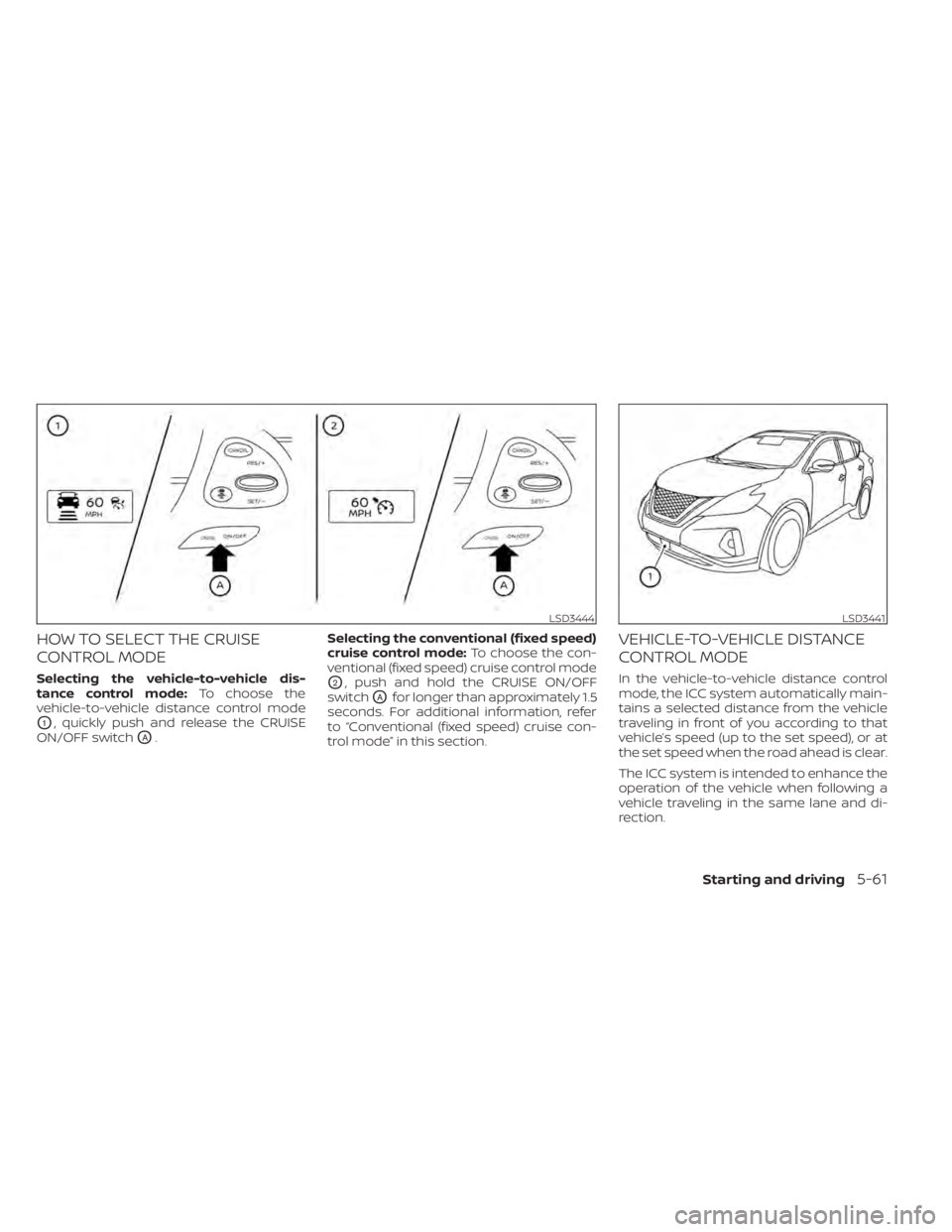
HOW TO SELECT THE CRUISE
CONTROL MODE
Selecting the vehicle-to-vehicle dis-
tance control mode:To choose the
vehicle-to-vehicle distance control mode
O1, quickly push and release the CRUISE
ON/OFF switch
OA. Selecting the conventional (fixed speed)
cruise control mode:
To choose the con-
ventional (fixed speed) cruise control mode
O2, push and hold the CRUISE ON/OFF
switch
OAfor longer than approximately 1.5
seconds. For additional information, refer
to “Conventional (fixed speed) cruise con-
trol mode” in this section.
VEHICLE-TO-VEHICLE DISTANCE
CONTROL MODE
In the vehicle-to-vehicle distance control
mode, the ICC system automatically main-
tains a selected distance from the vehicle
traveling in front of you according to that
vehicle’s speed (up to the set speed), or at
the set speed when the road ahead is clear.
The ICC system is intended to enhance the
operation of the vehicle when following a
vehicle traveling in the same lane and di-
rection.
LSD3444LSD3441
Starting and driving5-61
Page 320 of 518
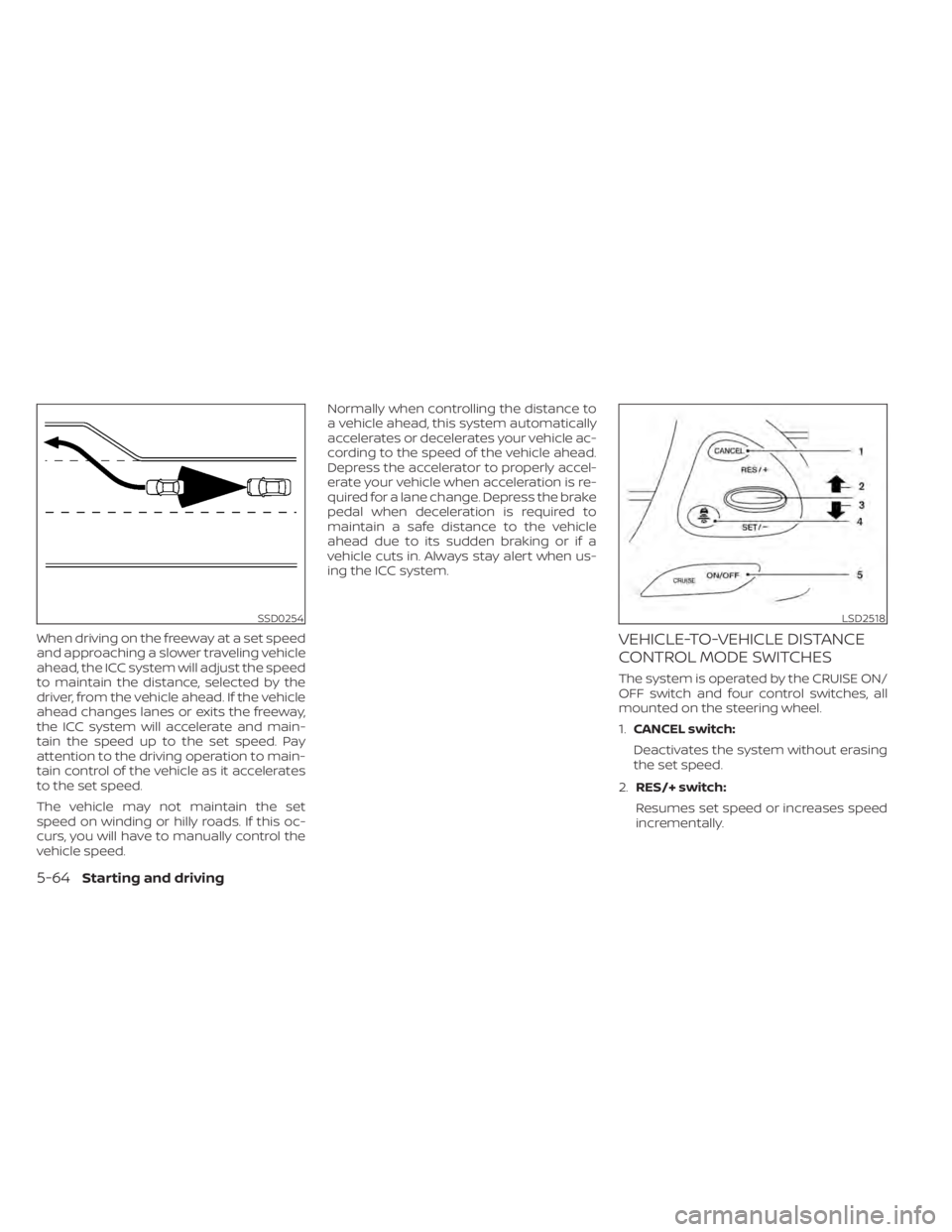
When driving on the freeway at a set speed
and approaching a slower traveling vehicle
ahead, the ICC system will adjust the speed
to maintain the distance, selected by the
driver, from the vehicle ahead. If the vehicle
ahead changes lanes or exits the freeway,
the ICC system will accelerate and main-
tain the speed up to the set speed. Pay
attention to the driving operation to main-
tain control of the vehicle as it accelerates
to the set speed.
The vehicle may not maintain the set
speed on winding or hilly roads. If this oc-
curs, you will have to manually control the
vehicle speed.Normally when controlling the distance to
a vehicle ahead, this system automatically
accelerates or decelerates your vehicle ac-
cording to the speed of the vehicle ahead.
Depress the accelerator to properly accel-
erate your vehicle when acceleration is re-
quired for a lane change. Depress the brake
pedal when deceleration is required to
maintain a safe distance to the vehicle
ahead due to its sudden braking or if a
vehicle cuts in. Always stay alert when us-
ing the ICC system.VEHICLE-TO-VEHICLE DISTANCE
CONTROL MODE SWITCHES
The system is operated by the CRUISE ON/
OFF switch and four control switches, all
mounted on the steering wheel.
1.
CANCEL switch:
Deactivates the system without erasing
the set speed.
2. RES/+ switch:
Resumes set speed or increases speed
incrementally.
SSD0254LSD2518
5-64Starting and driving