Seat adjust NISSAN MURANO 2023 Owner's Manual
[x] Cancel search | Manufacturer: NISSAN, Model Year: 2023, Model line: MURANO, Model: NISSAN MURANO 2023Pages: 518, PDF Size: 5.46 MB
Page 65 of 518
Precautions on booster seats
WARNING
If a booster seat and seat belt are not
used properly, the risk of a child being
injured or killed in a sudden stop or col-
lision greatly increases:
– Make sure the shoulder portion of
the belt is away from the child's face
and neck and the lap portion of the
belt does not cross the stomach.
– Make sure the shoulder belt is not
behind the child or under the child's
arm.
– A booster seat must only be installed
in a seating position that has a lap/
shoulder belt.
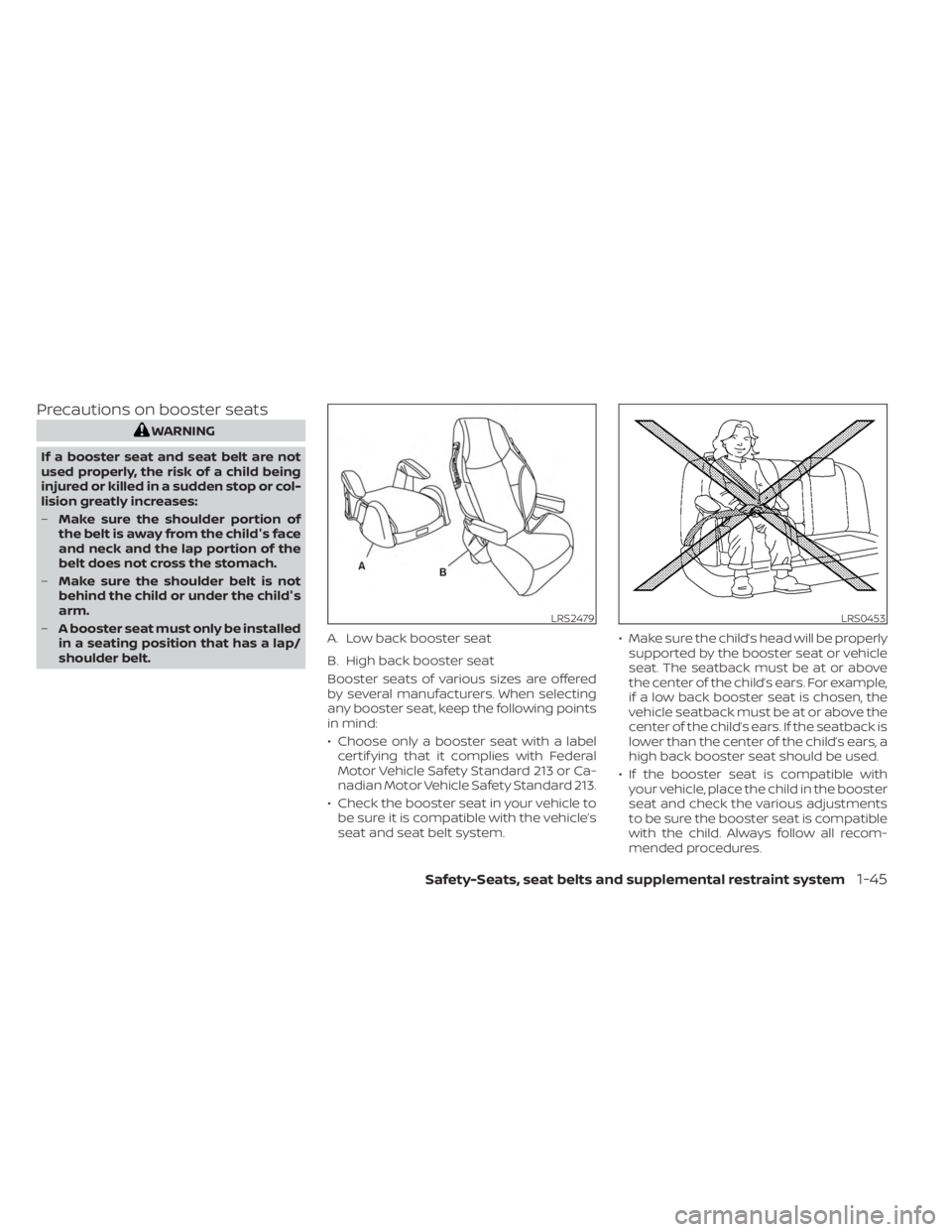
Booster seats of various sizes are offered
by several manufacturers. When selecting
any booster seat, keep the following points
in mind:
• Choose only a booster seat with a labelcertif ying that it complies with Federal
Motor Vehicle Safety Standard 213 or Ca-
nadian Motor Vehicle Safety Standard 213.
• Check the booster seat in your vehicle to be sure it is compatible with the vehicle’s
seat and seat belt system. • Make sure the child’s head will be properly
supported by the booster seat or vehicle
seat. The seatback must be at or above
the center of the child’s ears. For example,
if a low back booster seat is chosen, the
vehicle seatback must be at or above the
center of the child’s ears. If the seatback is
lower than the center of the child’s ears, a
high back booster seat should be used.
• If the booster seat is compatible with your vehicle, place the child in the booster
seat and check the various adjustments
to be sure the booster seat is compatible
with the child. Always follow all recom-
mended procedures.
LRS2479
A. Low back booster seat
B. High back booster seat
LRS0453
Safety-Seats, seat belts and supplemental restraint system1-45
Page 67 of 518
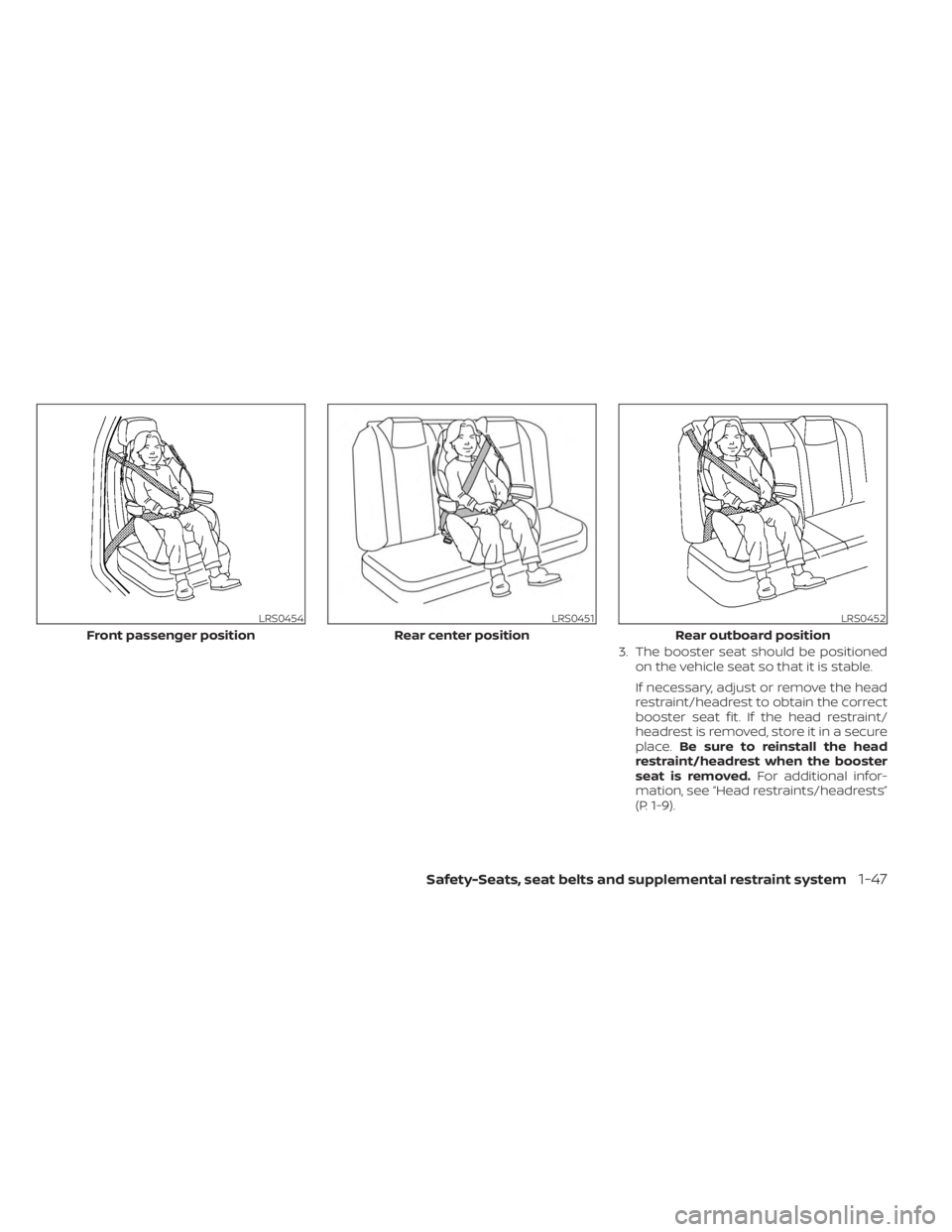
3. The booster seat should be positionedon the vehicle seat so that it is stable.
If necessary, adjust or remove the head
restraint/headrest to obtain the correct
booster seat fit. If the head restraint/
headrest is removed, store it in a secure
place. Be sure to reinstall the head
restraint/headrest when the booster
seat is removed. For additional infor-
mation, see “Head restraints/headrests”
(P. 1-9).
LRS0454
Front passenger position
LRS0451
Rear center position
LRS0452
Rear outboard position
Safety-Seats, seat belts and supplemental restraint system1-47
Page 68 of 518
If the seating position does not have an
adjustable head restraint/headrest and
it is interfering with the proper booster
seat fit, try another seating position or a
different booster seat.
4. Position the lap portion of the seat belt low and snug on the child’s hips. Be sure
to follow the booster seat manufactur-
er’s instructions for adjusting the seat
belt routing.
5. Pull the shoulder belt portion of the seat belt toward the retractor to take up ex-
tra slack. Be sure the shoulder belt is
positioned across the top, middle por-
tion of the child’s shoulder. Be sure to
follow the booster seat manufacturer’s
instructions for adjusting the seat belt
routing.
6. Follow the warnings, cautions and in- structions for properly fastening a seat
belt shown in “Three-point type seat belt
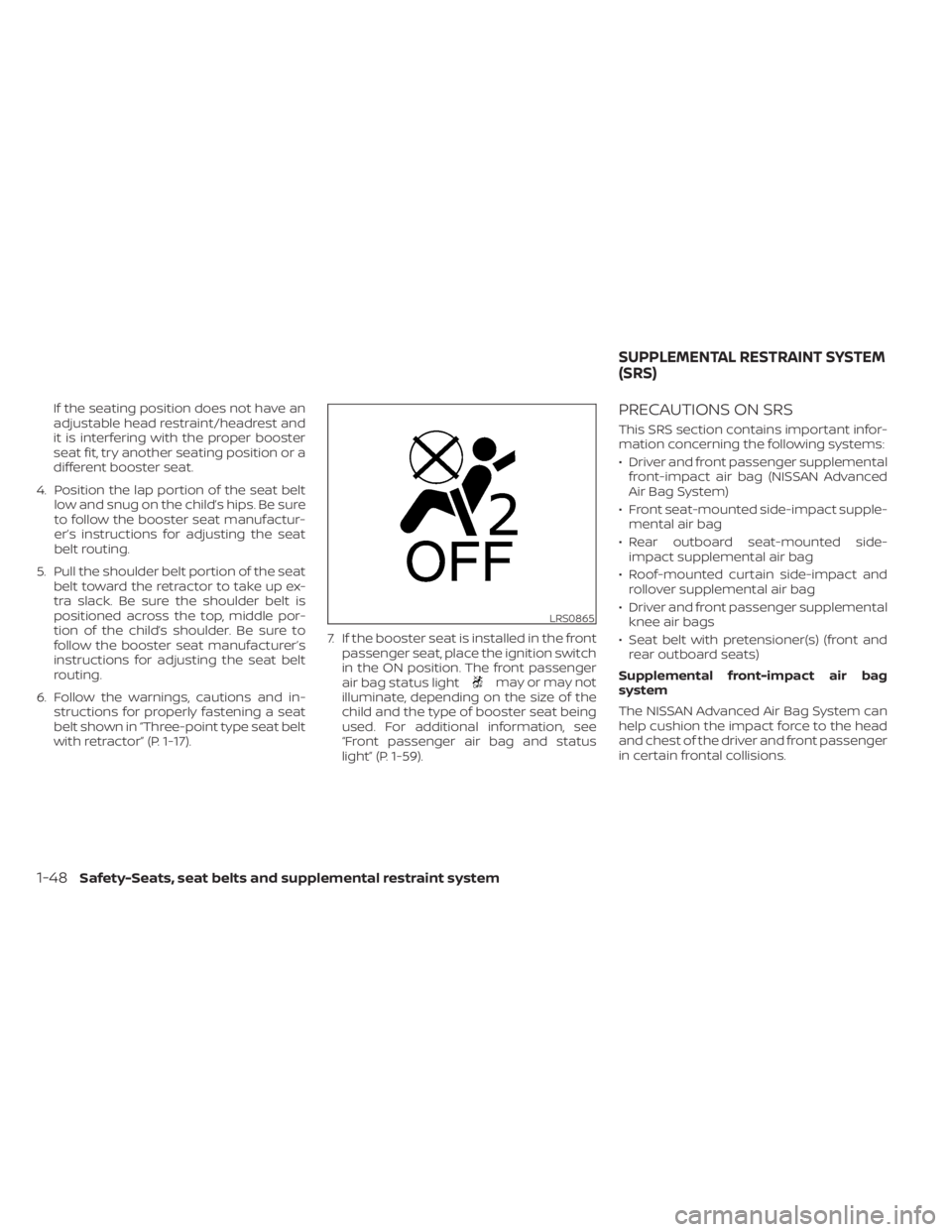
with retractor” (P. 1-17). 7. If the booster seat is installed in the front
passenger seat, place the ignition switch
in the ON position. The front passenger
air bag status light
may or may not
illuminate, depending on the size of the
child and the type of booster seat being
used. For additional information, see
“Front passenger air bag and status
light” (P. 1-59).
PRECAUTIONS ON SRS
This SRS section contains important infor-
mation concerning the following systems:
• Driver and front passenger supplemental front-impact air bag (NISSAN Advanced
Air Bag System)
• Front seat-mounted side-impact supple- mental air bag
• Rear outboard seat-mounted side- impact supplemental air bag
• Roof-mounted curtain side-impact and rollover supplemental air bag
• Driver and front passenger supplemental knee air bags
• Seat belt with pretensioner(s) (front and rear outboard seats)
Supplemental front-impact air bag
system
The NISSAN Advanced Air Bag System can
help cushion the impact force to the head
and chest of the driver and front passenger
in certain frontal collisions.
LRS0865
SUPPLEMENTAL RESTRAINT SYSTEM
(SRS)
1-48Safety-Seats, seat belts and supplemental restraint system
Page 81 of 518
that the person is a small adult, or is not
sitting on the seat properly or not using the
seat belt properly.
If a child restraint must be used in the front
seat, the front passenger air bag status
light may or may not be illuminated, de-
pending on the size of the child and the
type of child restraint being used. If the air
bag status light is not illuminated (indicat-
ing that the front passenger air bag and
front passenger supplemental knee air
bag might inflate in a crash), it could be that
the child restraint or seat belt is not being
used properly. Make sure that the child re-
straint is installed properly, the seat belt is
used properly and the occupant is posi-
tioned properly. If the air bag status light is
still not illuminated, reposition the occu-
pant or child restraint in a rear seat.
If the front passenger air bag status light
will not illuminate even though you believe
that the child restraint, the seat belts and
the occupant are properly positioned, it is
recommended that you take your vehicle
to a NISSAN dealer. A NISSAN dealer can
check system status by using a special
tool. However, until you have confirmed
with a dealer that your air bag is working
properly, reposition the occupant or child
restraint in a rear seat.The NISSAN Advanced Air Bag System and
front passenger air bag status light will
take a few seconds to register a change in
the front passenger seat status. This is nor-
mal system operation and does not indi-
cate a malfunction.
If a malfunction occurs in the front passen-
ger air bag system, the supplemental air
bag warning light
, located in the me-
ter and gauges area of the instrument
panel, will be illuminated (blinking or
steadily lit). Have the system checked. It is
recommended that you visit a NISSAN
dealer for this service.
Normal operation
In order for the occupant classification
sensor system to classif y the front passen-
ger based on weight, please follow the pre-
cautions and steps outlined below:
Precautions
• Make sure that there are no objects weighing over 9.1 lbs. (4 kg) hanging on
the seat or placed in the seatback pocket.
• Make sure that a child restraint or other object is not pressing against the rear of
the seatback.
• Make sure that a rear passenger is not pushing or pulling on the back of the front
passenger seat. • Make sure that the front passenger seat
or seatback is not forced back against an
object on the seat or floor behind it.
• Make sure that there is no object placed under the front passenger seat.
Steps
1. Adjust the seat as outlined in the “Seats” (P. 1-2) section of this manual. Sit upright,
leaning against the seatback, and cen-
tered on the seat cushion with your feet
comfortably extended to the floor.
2. Make sure there are no objects on your lap.
3.Fasten the seat belt as outlined in the
“Seat belts” (P. 1-13) section of this manual.
Front passenger seat belt buckle status is
monitored by the occupant classification
system, and is used as an input to deter-
mine occupancy status. So, it is highly
recommended that the front passenger
fasten their seat belt.
4. Remain in this position for 30 seconds allowing the system to classif y the front
passenger before the vehicle is put into
motion.
5. Ensure proper classification by checking the front passenger air bag status light.
Safety-Seats, seat belts and supplemental restraint system1-61
Page 105 of 518
Front passenger air bag
status light
The front passenger air bag status light will
be lit and the passenger front air bag and
passenger knee air bag will be off depend-
ing on how the front passenger seat is be-
ing used.
For additional information, see “Front pas-
senger air bag and status light” (P. 1-59).
Low tire pressure warning
light
Your vehicle is equipped with a Tire Pres-
sure Monitoring System (TPMS) that moni-
tors the tire pressure of all tires except the
spare.
The low tire pressure warning light warns
of low tire pressure or indicates that the
TPMS is not functioning properly.
Af ter the ignition switch is placed in the ON
position, this light illuminates for about 1
second and turns off.
Low tire pressure warning
If the vehicle is being driven with low tire
pressure, the warning light will illumi-
nate. A “Tire Pressure Low - Add Air”
warning also appears in the vehicle in-
formation display.When the low tire pressure warning light
illuminates, you should stop and adjust
the tire pressure of all four tires to the
recommended COLD tire pressure shown
on the Tire and Loading Information la-
bel located in the driver's door opening.
The low tire pressure warning light does
not automatically turn off when the tire
pressure is adjusted. Af ter the tire is in-
flated to the recommended pressure,
the vehicle must be driven at speeds
above 16 mph (25 km/h) to activate the
TPMS and turn off the low tire pressure
warning light. Use a tire pressure gauge
to check the tire pressure.
The “Tire Pressure Low - Add Air” warning
appears each time the ignition switch is
placed in the ON position as long as the low
tire pressure warning light remains
illuminated.
For additional information, see “Vehicle in-
formation display” (P. 2-18) and “Tire Pres-
sure Monitoring System (TPMS)” (P. 5-5).
TPMS malfunction
If the TPMS is not functioning properly, the
low tire pressure warning light will flash for
approximately 1 minute when the ignition
switch is placed in the ON position. The
light will remain on af ter 1 minute. Have the
system checked. It is recommended that
you visit a NISSAN dealer for this service.
The "Tire Pressure Low — Add Air" warning
does not appear if the low tire pressure
warning light illuminates to indicate a
TPMS malfunction.
For additional information, see “Tire Pres-
sure Monitoring System (TPMS)” (P. 5-5) and
“Tire pressure” (P. 8-28).
WARNING
• Radio waves could adversely affect
electric medical equipment. Those
who use a pacemaker should contact
the electric medical equipment
manufacturer for the possible influ-
ences before use.
• If the light does not illuminate with
the ignition switch placed in the ON
position, have the vehicle checked as
soon as possible. It is recommended
that you visit a NISSAN dealer for this
service.
Instruments and controls2-13
Page 138 of 518
3. Adjust the desired amount of air usingthe control knob. The climate controlled
seat blower remains on low speed for
approximately 60 seconds af ter turning
the switch on or selecting the desired
temperature.
4. When the vehicle's interior is warmed or cooled, or before you leave the vehicle,
be sure to turn the control knob to the
off (center) position. The indicator light
OBon the control knob goes off with the
switch in the off (center) position.
To check the air filter for the climate con-
trolled seat, it is recommended that you
visit a NISSAN dealer.
WARNING
Do not use or allow occupants to use
the climate controlled seats if you or
the occupants cannot monitor seat
temperatures or have an inability to
feel pain in those body parts in contact
with the seat. Use of the climate con-
trolled seats by such people could re-
sult in serious injury.
CAUTION
• The battery could run down if the cli-
mate control seat is operated while
the engine is not running.
• Do not use the climate control seat
for extended periods or when no one
is using the seat.
•
Do not put anything on the seat which
insulates heat, such as a blanket,
cushion, seat cover, etc. Otherwise, the
seat may become overheated.
•Do not place anything hard or heavy
on the seat or pierce it with a pin or
similar objects. This may result in
damage to the climate controlled seat.
• Any liquid spilled on the seat should
be removed immediately with a dry
cloth.
• The climate controlled seat has an air
filter. Do not operate the climate con-
trolled seat without an air filter. This
may result in damage to the system.
• When cleaning the seat, never use
gasoline, benzine, thinner, or any
similar materials. •
If any malfunctions are found or the
climate controlled seat does not op-
erate, turn the switch off and have
the system checked. It is recom-
mended that you visit a NISSAN
dealer for this service.
2-46Instruments and controls
Page 173 of 518
When the doors are locked using one of the
following methods, the doors cannot be
opened using the inside or outside door
handles. The doors must be unlocked to
open the doors.
WARNING
• Always have the doors locked while
driving. Along with the use of seat
belts, this provides greater safety in
the event of an accident by helping to
prevent persons from being thrown
from the vehicle. This also helps keep
children and others from uninten-
tionally opening the doors, and will
help keep out intruders.
• Before opening any door, always look
for and avoid oncoming traffic. •
To help avoid risk of injury or death
through unintended operation of the
vehicle and/or its systems, including
entrapment in windows or inadver-
tent door lock activation, do not
leave children, people who require
the assistance of others or pets unat-
tended in your vehicle. Additionally,
the temperature inside a closed ve-
hicle on a warm day can quickly be-
come high enough to cause a signifi-
cant risk of injury or death to people
and pets.
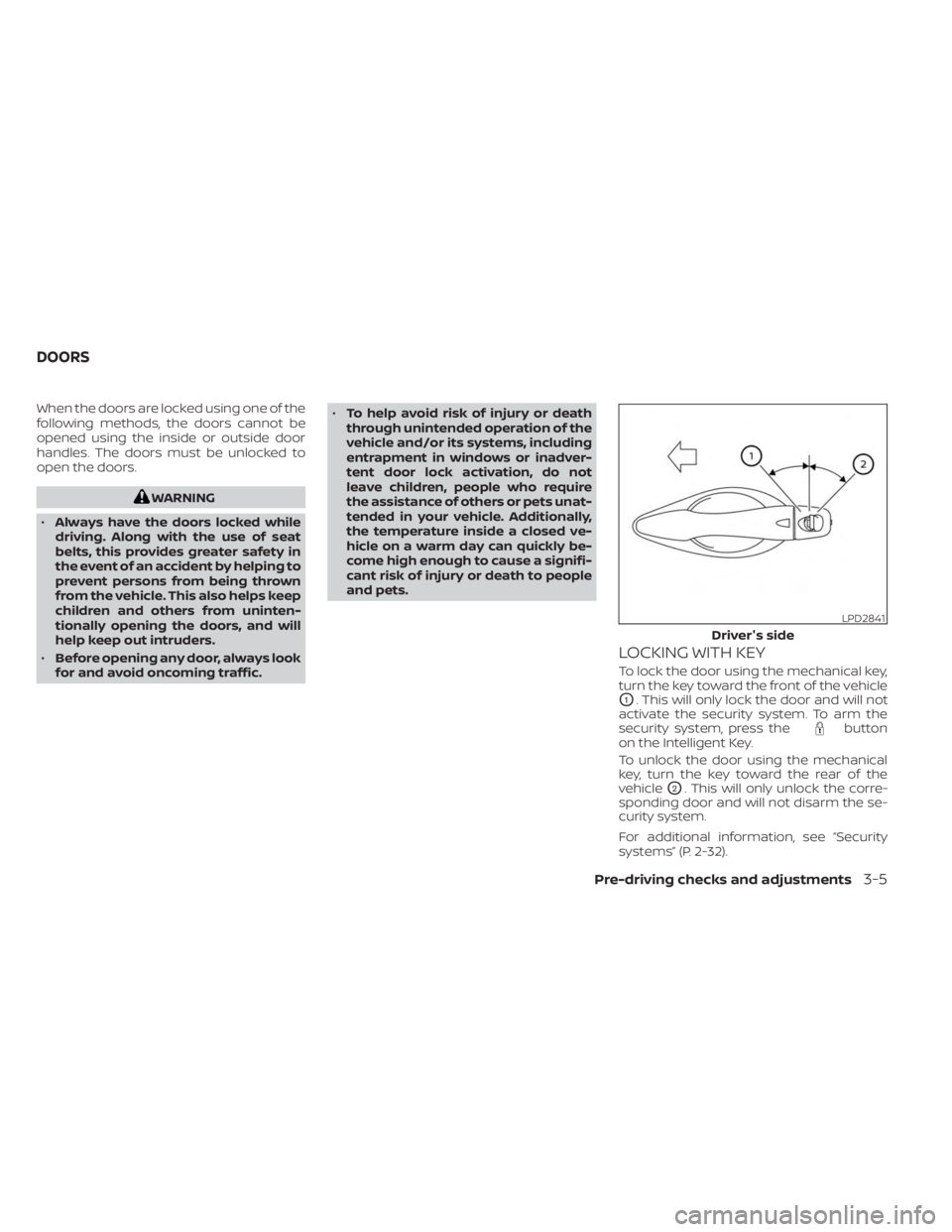
LOCKING WITH KEY
To lock the door using the mechanical key,
turn the key toward the front of the vehicle
O1. This will only lock the door and will not
activate the security system. To arm the
security system, press the
button
on the Intelligent Key.
To unlock the door using the mechanical
key, turn the key toward the rear of the
vehicle
O2. This will only unlock the corre-
sponding door and will not disarm the se-
curity system.
For additional information, see “Security
systems” (P. 2-32).
LPD2841
Driver's side
DOORS
Pre-driving checks and adjustments3-5
Page 185 of 518
SymptomPossible CauseRemedy
When stopping the engine The Shif t to Park warning appears on
the display and the inside warning
chime sounds continuously. The shif t lever is not in the P (Park) po-
sition.
Move the shif t lever to the P (Park) po-
sition.
When opening the driver's door to get
out of the vehicle The Door/lif tgate open warning ap-
pears on the display and the inside
warning chime sounds continuously. The ignition switch is in the ACC posi-
tion.
Place the ignition switch in the ON po-
sition or close the driver’s door.
When closing the door af ter getting
out of the vehicle The No Key Detected warning appears
on the display, the outside chime
sounds three times and the inside
warning chime sounds for approxi-
mately three seconds.
The ignition switch is in the ACC or ON
position.
Place the ignition switch in the OFF
position.
The Rear Door Alert warning message
appears on the display, the horn
sounds three times twice, or a Check
Rear Seat for All Articles warning ap-
pears on the display. The Rear Door Alert is activated.
Check the back seat for all articles,
press the OK button to clear the Rear
Door Alert warning message.
When closing the door with the inside
lock knob turned to LOCK The outside chime sounds for approxi-
mately three seconds and all the doors
unlock.
The Intelligent Key is inside the vehicle. Carry the Intelligent Key with you.
When pushing the door handle re-
quest switch or the
button on
the Intelligent Key to lock the door The outside chime sounds for approxi-
mately two seconds.
The Intelligent Key is inside the vehicle. Carry the Intelligent Key with you.
When pushing the ignition switch to
start the engine The Key Battery Low warning appears
on the display.
The battery charge is low.Replace the battery with a new one.
For additional information, see “Battery
replacement” (P. 8-23).
The No Key Detected warning appears
on the display, the inside chime sounds
three times. The Intelligent Key is not in the vehicle. Carry the Intelligent Key with you.
When pushing the ignition switch The Key System Fault message ap-
pears. It warns of a malfunction with the Intel-
ligent Key system.It is recommended that you visit a
NISSAN dealer.
Pre-driving checks and adjustments3-17
Page 195 of 518
CAUTION
• If the power lif tgate does not stay
open or if the lif tgate unexpectedly
closes at any time while a continuous
warning chime sounds, do not oper-
ate the lif tgate. There may be a pres-
sure loss in one or both of the lif tgate
struts. It is recommended that you
have the lif tgate inspected. It is rec-
ommended that you visit a NISSAN
dealer for this service.
•
Do not activate the power lif tgate if
one or both of the lif tgate struts are
removed. Damage to the lif tgate or
power lif tgate mechanisms may
occur.
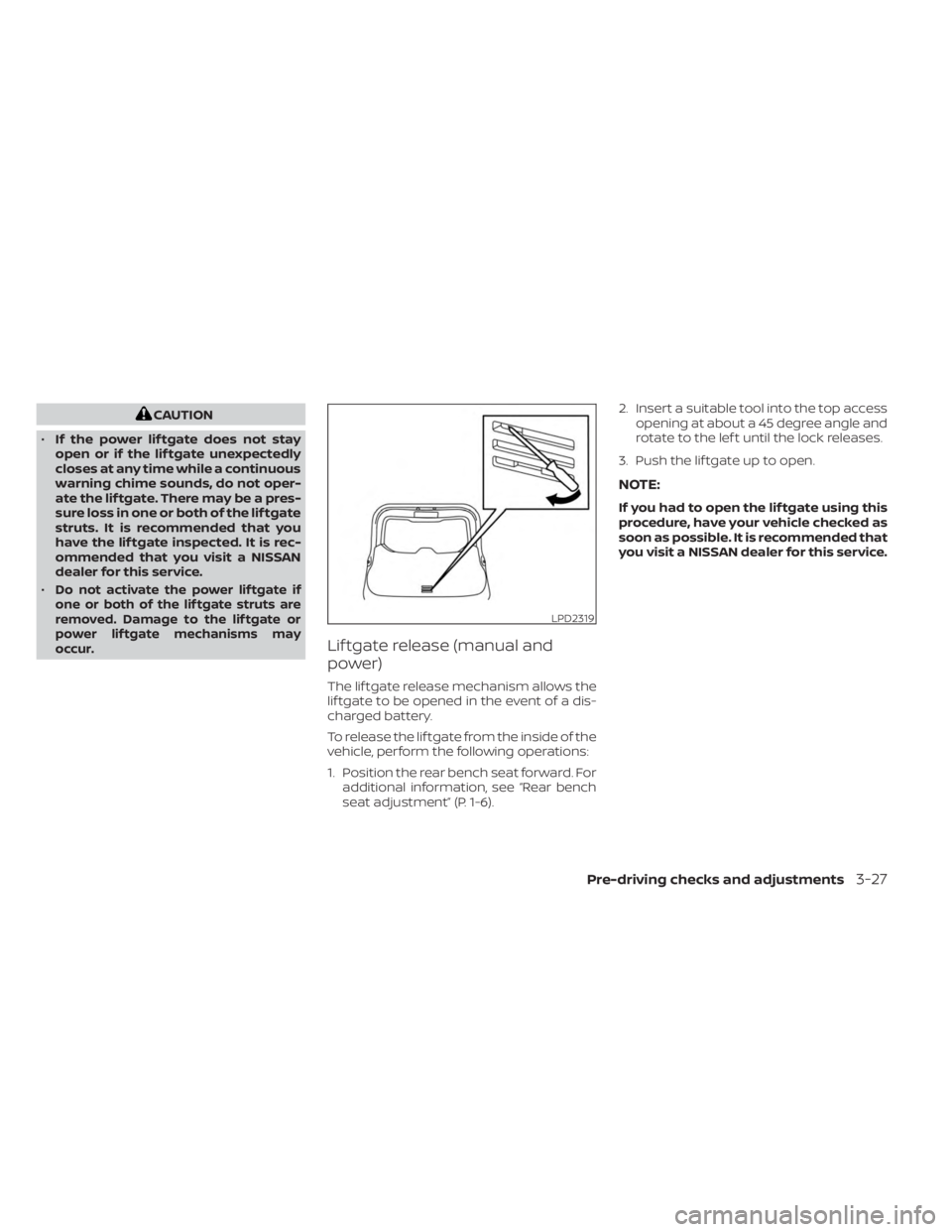
Lif tgate release (manual and
power)
The lif tgate release mechanism allows the
lif tgate to be opened in the event of a dis-
charged battery.
To release the lif tgate from the inside of the
vehicle, perform the following operations:
1. Position the rear bench seat forward. For additional information, see “Rear bench
seat adjustment” (P. 1-6). 2. Insert a suitable tool into the top access
opening at about a 45 degree angle and
rotate to the lef t until the lock releases.
3. Push the lif tgate up to open.
NOTE:
If you had to open the lif tgate using this
procedure, have your vehicle checked as
soon as possible. It is recommended that
you visit a NISSAN dealer for this service.
LPD2319
Pre-driving checks and adjustments3-27
Page 199 of 518
WARNING
• Do not adjust the steering wheel
while driving. You could lose control
of your vehicle and cause an
accident.
• Do not adjust the steering wheel any
closer to you than is necessary for
proper steering operation and com-
fort. The driver's air bag inflates with
great force. If you are unrestrained,
leaning forward, sitting sideways or
out of position in any way, you are at
greater risk of injury or death in a
crash. You may also receive serious
or fatal injuries from the air bag if you
are up against it when it inflates. Al-
ways sit back against the seatback
and as far away as practical from the
steering wheel. Always use the seat
belts.
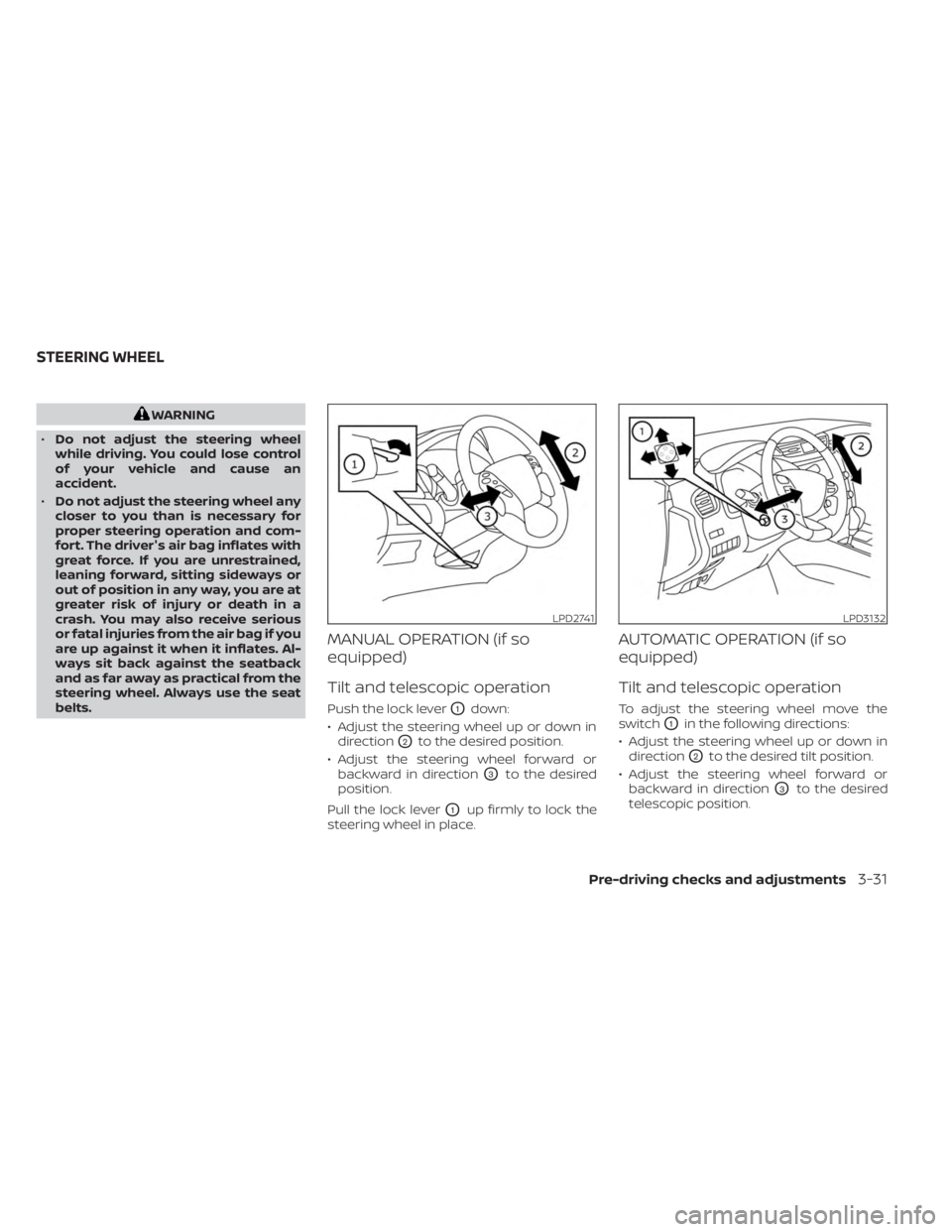
MANUAL OPERATION (if so
equipped)
Tilt and telescopic operation
Push the lock leverO1down:
• Adjust the steering wheel up or down in direction
O2to the desired position.
• Adjust the steering wheel forward or backward in direction
O3to the desired
position.
Pull the lock lever
O1up firmly to lock the
steering wheel in place.
AUTOMATIC OPERATION (if so
equipped)
Tilt and telescopic operation
To adjust the steering wheel move the
switch
O1in the following directions:
• Adjust the steering wheel up or down in direction
O2to the desired tilt position.
• Adjust the steering wheel forward or backward in direction
O3to the desired
telescopic position.
LPD2741LPD3132
STEERING WHEEL
Pre-driving checks and adjustments3-31