phone NISSAN MURANO HYBRID 2016 3.G Quick Reference Guide
[x] Cancel search | Manufacturer: NISSAN, Model Year: 2016, Model line: MURANO HYBRID, Model: NISSAN MURANO HYBRID 2016 3.GPages: 36, PDF Size: 3.39 MB
Page 3 of 36

Please see your Owner’s Manual for important safety information and system operation limitations.• A cellular telephone should not be used for any purpose while driving so\
full attention may be given to vehicle operation.
• Always wear your seat belt.
• Supplemental air bags do not replace proper seat belt usage.
• Children 12 and under should always ride in the rear seat properly secur\
ed in c hild restraints or seat belts according to their age and weight.
• Do not drink and drive.
For more information, refer to the “Safety — Seats, seat belts and supplemental restraint system (sectio\
n 1) ”,
the “Monitor, climate, audio, phone and voice recognition systems (section 4) ” and the “Starting and driving
(section 5)” of your Owner’s Manual.
Additional information about your vehicle is also available in your Owne\
r’s Manual, Navigation System Owner’s Manual and at www.NissanUSA.com.
NEW SYSTEM FEATURESHow to Use Your Murano’s Touch-screen Display.......................................2
Approaching Vehicle Sound for Pedestrians (VSP) .....................................3
Heated Steering Wheel (if so equipped) ..............................................3
Around View® Monitor (AVM) with Moving Object Detection (MOD) (if so equipped).........3
Blind Spot Warning (BSW) (if so equipped)...........................................5
Predictive Forward Collision Warning (PFCW) (if so equipped)...........................5
Vehicle Dynamic Control (VDC) .....................................................5
Hill Start Assist (HSA).............................................................5
Forward Emergency Braking (FEB) (if so equipped) ....................................6
SiriusXM Travel Link and SiriusXM Traffic (if so equipped) ...............................6
ESSENTIAL INFORMATIONTire Pressure Monitoring System (TPMS) with Easy Fill Tire Alert..........................7
Loose Fuel Cap...................................................................8
Fuel-filler Door....................................................................8
PureDrive™ Hybrid System Warning Light and Hybrid Awareness . . . . . . . . . . . . . . . . . . . . . . . . . 8
Towing Your Vehicle (if so equipped)
.................................................9
Clock Set/Adjustment .............................................................9
FIRST DRIVE FEATURESNissan Intelligent Key® System.....................................................10
Power Liftgate Release (if so equipped) .............................................12
Front Seat Adjustments...........................................................12
Automatic Drive Positioner (if so equipped)...........................................13
Assist Charge Gauge.............................................................13
Rear Seat Adjustments ...........................................................14
Starting/Stopping the Hybrid System................................................14
Outside Mirror Control Switch .....................................................15
Headlight Control Switch .........................................................15
Wiper and Washer Switch.........................................................16
Heater and Air Conditioner (automatic) ..............................................17
FM/AM/SiriusXM® Satellite Radio with CD Player and Navigation........................18
USB (Universal Serial Bus) Connection Port/iPod® Interface and AUX Jack................20
Front Armrest/Center Console Storage Box ..........................................20
Cruise Control...................................................................20
Intelligent Cruise Control (ICC) (if so equipped).......................................21
SYSTEM GUIDETrip Computer...................................................................22
Hand-free Text Messaging Assistant ................................................23
NissanConnectsm Mobile Apps .....................................................24
Bluetooth® Hands-free Phone System...............................................25
System Operating Tips............................................................25
Bluetooth® Streaming Audio .......................................................28
Navigation System ...............................................................29
HomeLink® Universal Transceiver (if so equipped) .....................................30
TAB LE OF CONTE NTS
Page 6 of 36

4
NEW SYSTEM FEATURES
The colored guide lines on the display screen indicate vehicle width and \
approximate
distances to objects with reference to the vehicle body line.
• Red 1.5 ft (0.5 m); Yellow 3 ft (1 m); Green 7 ft (2 m) and 10 ft (3 m)
For information regarding how to access additional viewing cycles, please\
see your
Owner’s Manual.
There are some areas where the system will not detect objects.
• When in the front or the rear view display, an object
below the bumper or on the ground may not be
detected
2.
• When in the bird’s-eye view, a tall object near the seams of the
camera detecting areas
3 will not appear in the monitor.
• The distance between objects viewed on the Around
View Monitor differs from the actual distance.
Objects in the bird’ s-eye view will appear further
than the actual distance.
MOVING OBJECT DETECTION (MOD)
The MOD system helps inform the driver of
moving objects in the Around View Monitor.
The system will operate when the shift lever is in the P (PARK), N (NEUTRAL), or
R (REVERSE) position and the vehicle is driven at speeds of approximately 5 mph
(8 km/h) or less.
If the MOD system detects moving objects, a yellow frame will be displayed
on the camera image and a chime will sound.
When the following is displayed:
• Blue MOD icon 4; the system is active.
• Gray MOD icon; the system is not active.
• No MOD icon; the system is off. The indicator
will also be off if all of the warning systems are
deactivated using the Settings menu.
The MOD system will not operate if the liftgate is open.
For more information, refer to the “Display screen, heater, air conditioner, audio and phone systems (section 4)”
of your Owner’s Manual.
3
2
Rear view & bird’s-eye view
Press
PressRear view & front-side view
When the shift lever is in the R (REVERSE) position and the CAMERA button 1 is
pressed, the following views will display in order:
4
To view detailed instructional videos regarding these and other features, please go to www.nissanownersinfo.mobi.
Page 11 of 36

ALL-WHEEL DRIVE (AWD) VEHICLE
An all-wheel drive vehicle must be towed with all wheels off the ground.\
For proper towing and to avoid accidental damage to y")
9
TOWING YOUR VEHICLE (if so equipped)
ALL-WHEEL DRIVE (AWD) VEHICLE
An all-wheel drive vehicle must be towed with all wheels off the ground.\
For proper towing and to avoid accidental damage to your vehicle, NISSAN
recommends that a service operator tow your vehicle after carefully read\
ing the
Owner’s Manual precautions.
For more information, refer to the “In case of emergency (section 6)” and the “Technical and consumer
information (section 9)” of your Owner’s Manual.
CLOCK SET/ADJUSTMENT
SYSTEM WITH NAVIGATION
To adjust the time and the appearance of the clock on the display:
1. Press the MENU button on the control panel.
2. Touch the “Settings” key on the Launch Bar.
3. Touch the “Clock” key.
The following settings can be adjusted:
• On-screen Clock: The clock in the upper right
corner of the display can be turned on or off.
• Clock Format (24h): The clock can be set to
12 hours or 24 hours.
• Offset (hour): The time can be adjusted by
increasing or decreasing per hour.
• Offset (min): The time can be adjusted by
increasing or decreasing per minute.
• Daylight Savings Time: The application of Daylight Savings Time can be turned
on or off.
• Time Zone: Adjust the time zone. Choose a time zone from the available list.
Touch the key or press the BACK button to return to the previous screen.
For more information, refer to the “Display screen, heater, air conditioner, audio and phone systems (section 4)”
of your Owner’s Manual or the “Getting started (section 2)” of your Navigation System Owner’s Manual.
To view detailed instructional videos regarding these and other features, please go to www.nissanownersinfo.mobi.
Page 20 of 36
18
FIRST DRIVE FEATURES
4
6789
10
2
3
1
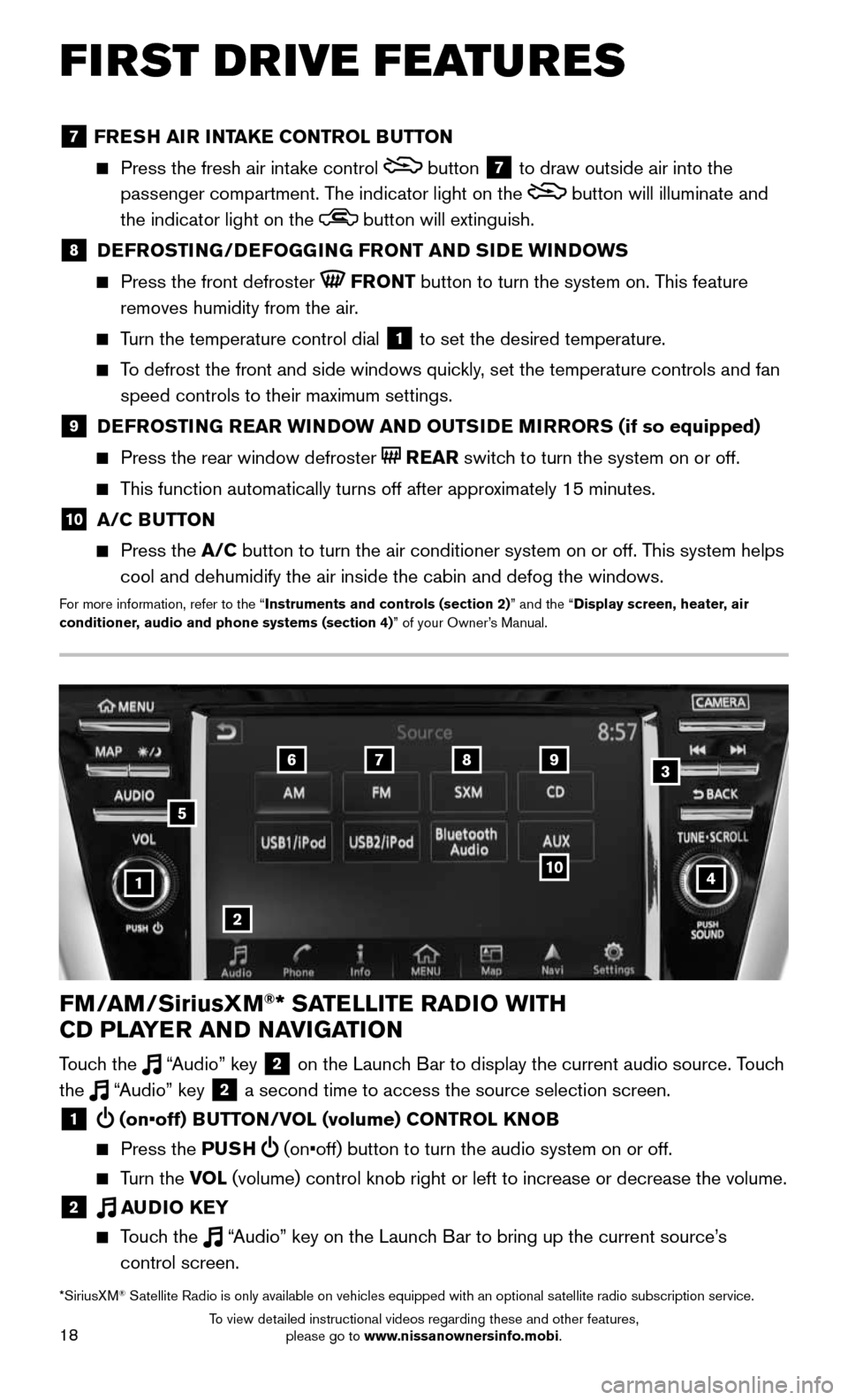
FM/AM/SiriusXM®* SATELLITE RADIO WITH
CD PLAYER AND NAVIGATION
Touch the “Audio” key 2 on the Launch Bar to display the current audio source. Touch
the “Audio” key 2 a second time to access the source selection screen.
1 (on•off) BUTTON/VOL (volume) CONTROL KNOB
Press the PUSH (on•off) button to turn the audio system on or off.
Turn the VOL (volume) control knob right or left to increase or decrease the volum\
e.
2 AUDIO KEY
Touch the “Audio” key on the Launch Bar to bring up the current source’s
control screen.
5
*SiriusXM® Satellite Radio is only available on vehicles equipped with an optional s\
atellite radio subscription service.
7 FRESH AIR INTAKE CONTROL BUTTON
Press the fresh air int ake control button 7 to draw outside air into the
passenger compartment. The indicator light on the
button will illuminate and
the indicator light on the
button will extinguish.
8 DEFROSTING/DEFOGGING FRONT AND SIDE WINDOWS
Press the front defroster FRONT button to turn the system on. This feature
removes humidity from the air.
Turn the temperature control dial 1 to set the desired temperature.
To defrost the front and side windows quickly, set the temperature controls and fan
speed controls to their maximum settings.
9 DEFROSTING REAR WINDOW AND OUTSIDE MIRRORS (if so equipped)
Press the rear window defroster REAR switch to turn the system on or off.
This function automatically turns off after approximately 15 minutes.
10 A/C BUTTON
Press the A/C button to turn the air conditioner system on or off. This system helps
cool and dehumidify the air inside the cabin and defog the windows.
For more information, refer to the “Instruments and controls (section 2)” and the “Display screen, heater, air
conditioner, audio and phone systems (section 4)” of your Owner’s Manual.
To view detailed instructional videos regarding these and other features, please go to www.nissanownersinfo.mobi.
Page 22 of 36
20
FIRST DRIVE FEATURES
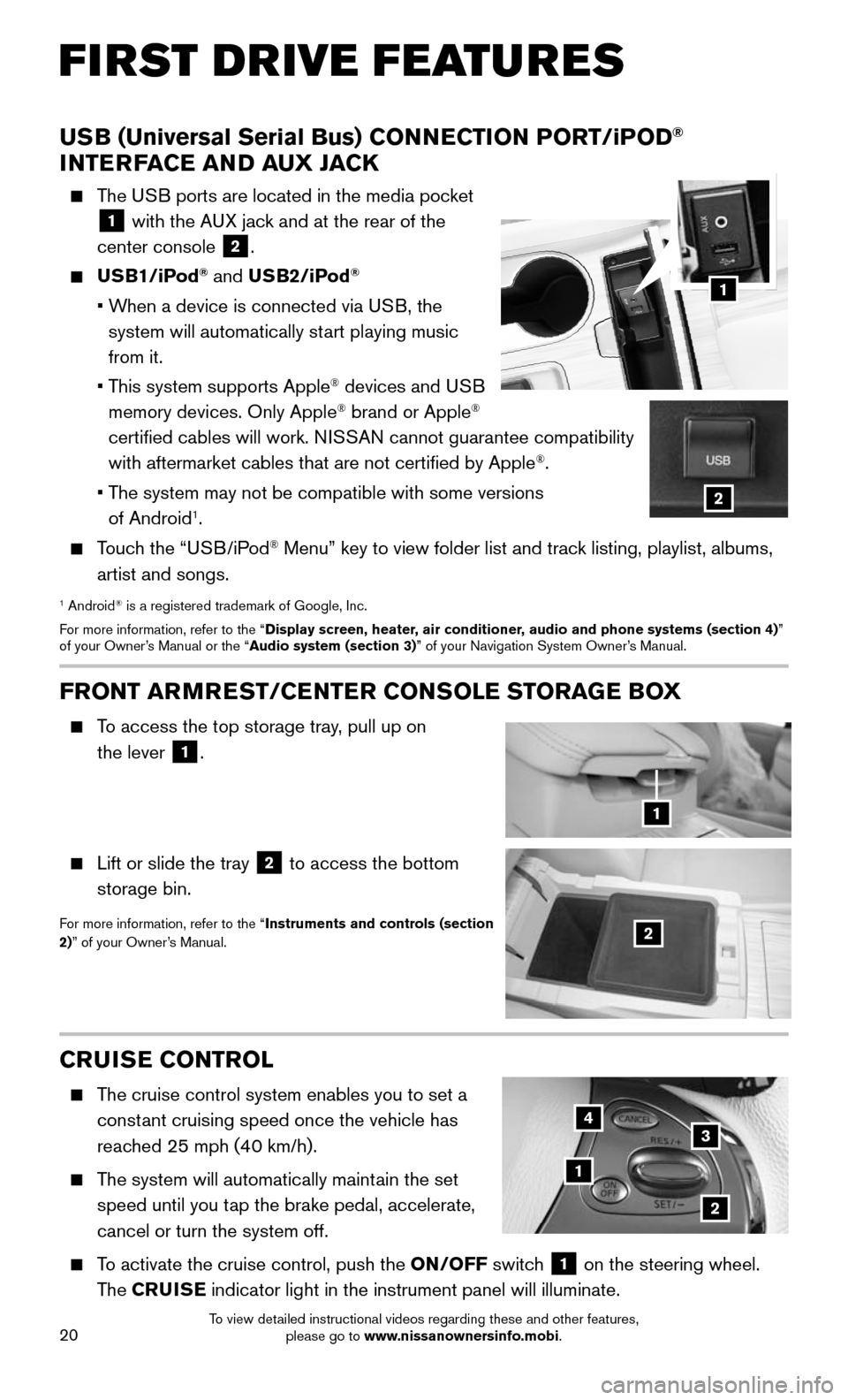
CRUISE CONTROL
The cruise control system enables you to set a
constant cruising speed once the vehicle has
reached 25 mph (40 km/h).
The system will automatically maintain the set
speed until you tap the brake pedal, accelerate,
cancel or turn the system off.
To activate the cruise control, push the ON/OFF switch 1 on the steering wheel.
The CRUISE indicator light in the instrument panel will illuminate.
1
2
34
FRONT ARMREST /CENTER CONSOLE STORAGE BOX
To access the top storage tray, pull up on
the lever
1.
Lift or slide the tray 2 to access the bottom
storage bin.
For more information, refer to the “Instruments and controls (section
2)” of your Owner’s Manual.2
1
USB (Universal Serial Bus) CONNECTION PORT/iPOD®
INTERFACE AND AUX JACK
The USB ports are located in the media pocket
1 with the AUX jack and at the rear of the
center console
2.
USB1/iPod® and USB2/iPod®
• When a device is connected via USB, the
system will automatically start playing music
from it.
• This system supports Apple® devices and USB
memory devices. Only Apple® brand or Apple®
certified cables will work. NISSAN cannot guarantee compatibility
with aftermarket cables that are not certified by Apple
®.
• The system may not be compatible with some versions
of Android1.
Touch the “USB/iPod® Menu” key to view folder list and track listing, playlist, albums,
artist and songs.
1 Android® is a registered trademark of Google, Inc.
For more information, refer to the “Display screen, heater, air conditioner, audio and phone systems (section 4)”
of your Owner’s Manual or the “Audio system (section 3)” of your Navigation System Owner’s Manual.
1
2
To view detailed instructional videos regarding these and other features, please go to www.nissanownersinfo.mobi.
Page 25 of 36
23
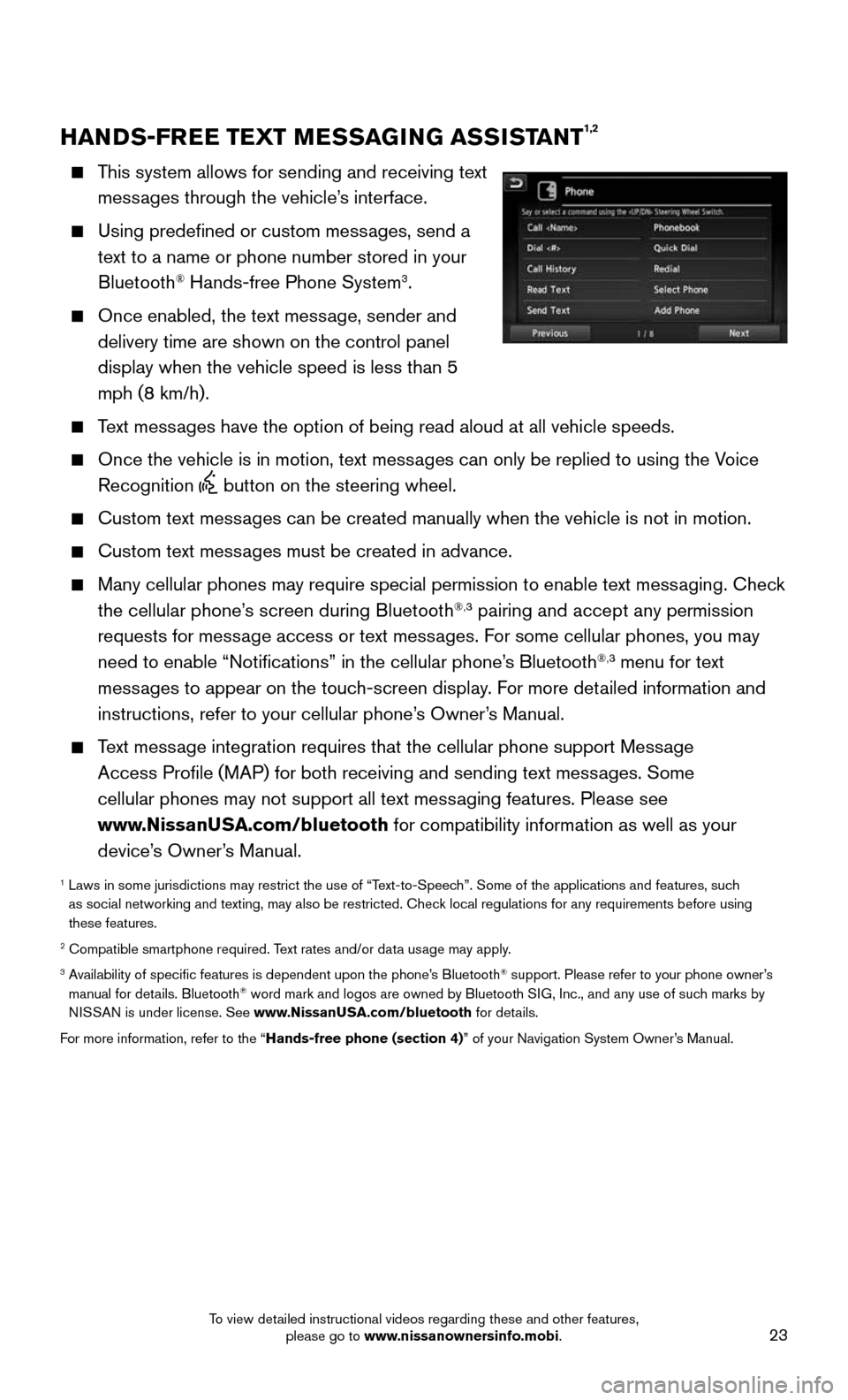
HANDS-FREE TEXT MESSAGING ASSISTANT1,2
This system allows for sending and receiving text
messages through the vehicle’s interface.
Using predefined or custom messages, send a
text to a name or phone number stored in your
Bluetooth® Hands-free Phone System3.
Once enabled, the text message, sender and
delivery time are shown on the control panel
display when the vehicle speed is less than 5
mph (8 km/h).
Text messages have the option of being read aloud at all vehicle speeds.
Once the vehicle is in motion, text mess ages can only be replied to using the Voice
Recognition button on the steering wheel.
Custom text messages can be created manually when the vehicle is not in motion.
Custom text messages must be created in advance.
Many cellular phones may require special permission to enable text mess aging. Check
the cellular phone’s screen during Bluetooth®,3 pairing and accept any permission
requests for message access or text messages. For some cellular phones, you may
need to enable “Notifications” in the cellular phone’s Bluetooth
®,3 menu for text
messages to appear on the touch-screen display. For more detailed information and
instructions, refer to your cellular phone’s Owner’s Manual.
Text message integration requires that the cellular phone support Message
Access Profile (MAP) for both receiving and sending text messages. Some
cellular phones may not support all text messaging features. Please see
www.NissanUSA.com/bluetooth for compatibility information as well as your
device’s Owner’s Manual.
1 Laws in some jurisdictions may restrict the use of “T ext-to-Speech”. Some of the applications and features, such
as social networking and texting, may also be restricted. Check local regulations for any requirements before using
these features.
2 Compatible smartphone required. Text rates and/or data usage may apply.3 Availability of specific features is dependent upon the phone’s Bluetooth® support. Please refer to your phone owner’s
manual for details. Bluetooth® word mark and logos are owned by Bluetooth SIG, Inc., and any use of such marks by
NISSAN is under license. See www.NissanUSA.com/bluetooth for details.
For more information, refer to the “Hands-free phone (section 4)” of your Navigation System Owner’s Manual.
To view detailed instructional videos regarding these and other features, please go to www.nissanownersinfo.mobi.
Page 26 of 36
24
SYSTEM GUIDE
NISSANCONNECTSM MOBILE APPS1
Press the MENU button on the control panel, touch the “Info” key on the Launch Bar
and then touch the “NissanConnect Mobile Apps” key.
Integrates popular smartphone apps and services into your vehicle.
The NissanConnect Mobile Apps companion app must be downloaded to your
smartphone, and you must be enrolled in a NissanConnect account.
• iPhone®,2: Please connect via USB when using an iPhone® with NissanConnect
Mobile Apps.
• Android®,3: Please connect via Bluetooth®,4 when using an Android® device with
NissanConnect Mobile Apps.
For more information on how to pair your cellular phone and set up NissanConnect
Mobile Apps, visit: www.NissanUSA.com/connect/support.
1 Only use features when s afe to do so. App availability is dependent upon vehicle model, trim lev\
el, packaging,
and/or options. See www.NissanUSA.com/Connect for complete app availability details. Compatible smartphone
required. Cellular network and GPS signals not available in all areas and/or at all times. NISSAN is not responsible for
associated costs, if any, for continued operation due to cellular network or other third party t\
ermination/changes. Cellular
or other third party provider may terminate/restrict respective service \
without notice. Subscription Agreement required.
See www.NissanUSA.com/connect for details. Text rates and/or data usage may apply.
2 iPhone is a registered trademark of Apple, Inc. All rights reserved. iPh\
one not included.3 Android® is a registered trademark of Google, Inc.4 Availability of specific features is dependent upon the phone’s Bluetooth® support. Please refer to your phone owner’s
manual for details. Bluetooth® word mark and logos are owned by Bluetooth SIG, Inc., and any use of such marks by
NISSAN is under license. See www.NissanUSA.com/bluetooth for details.
For more information, refer to the “Display screen, heater, air conditioner, audio and phone systems (section 4)”
of your Owner’s Manual or the “Information (section 5)” of your Navigation System Owner’s Manual.
To view detailed instructional videos regarding these and other features, please go to www.nissanownersinfo.mobi.
Page 27 of 36
25
BLUETOOTH® HANDS-FREE PHONE SYSTEM1
A cellular telephone should not be used
while driving so full attention may be given to
vehicle operation.
2
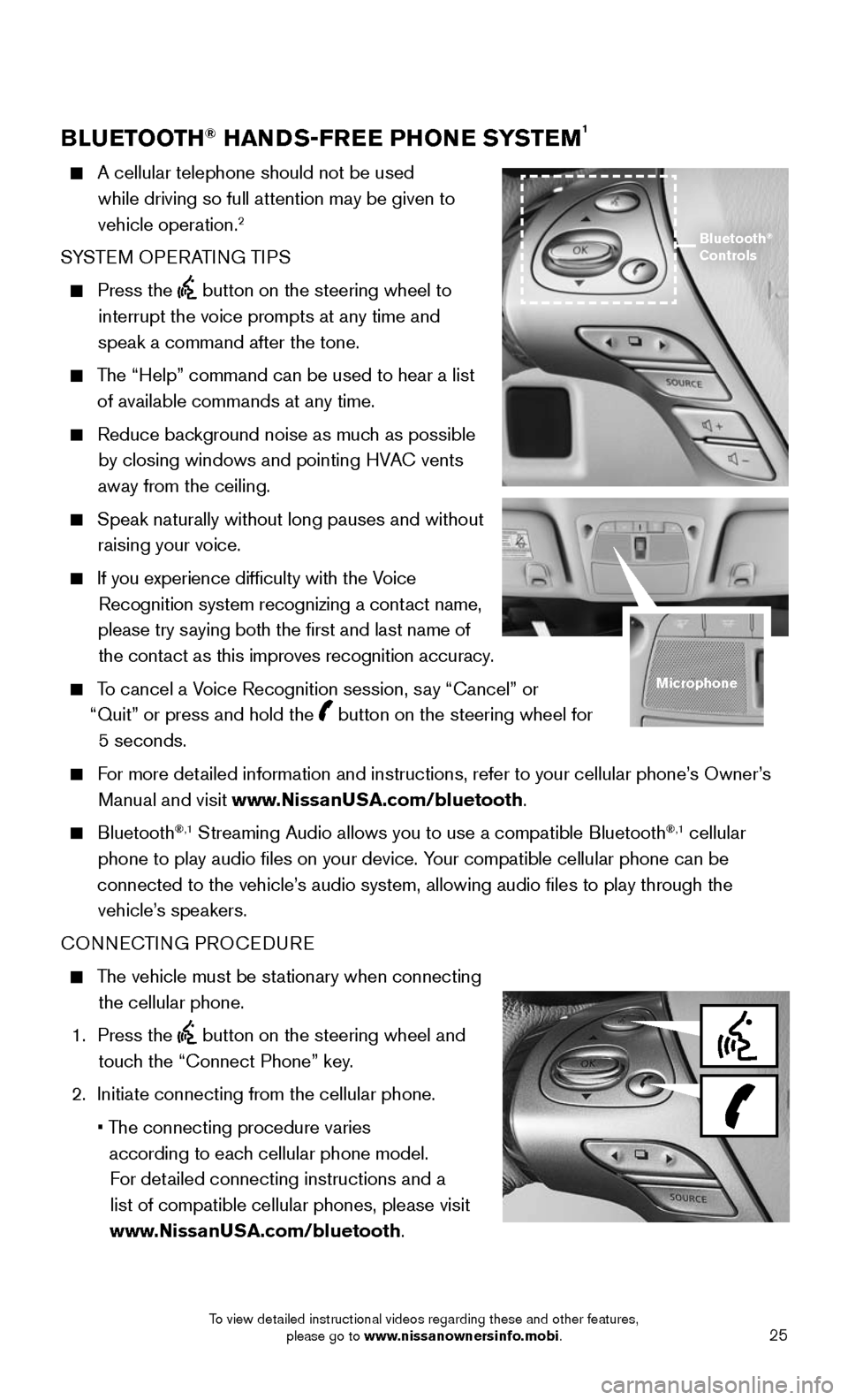
SYSTEM OPERATING TIPS
Press the button on the steering wheel to
interrupt the voice prompts at any time and
speak a command after the tone.
The “Help” command can be used to hear a list
of available commands at any time.
Reduce bac kground noise as much as possible
by closing windows and pointing HVAC vents
away from the ceiling.
Speak naturally without long pauses and without
raising your voice.
If you experience difficulty with the V oice
Recognition system recognizing a contact name,
please try saying both the first and last name of the contact as this improves recognition accuracy.
To cancel a Voice Recognition session, say “Cancel” or
“Quit” or press and hold the
button on the steering wheel for
5 seconds.
For more detailed information and instructions, refer to your cellular phone’s Owner’s
Manual and visit www.NissanUSA.com/bluetooth.
Bluetooth®,1 Streaming Audio allows you to use a compatible Bluetooth®,1 cellular
phone to play audio files on your device. Your compatible cellular phone can be
connected to the vehicle’s audio system, allowing audio files to play through the vehicle’s speakers.
CONNECTING PROCEDURE
The vehicle must be stationary when connecting
the cellular phone.
1. Press the button on the steering wheel and
touch the “Connect Phone” key.
2. Initiate connecting from the cellular phone.
• The connecting procedure varies
according to each cellular phone model. For detailed connecting instructions and a list of compatible cellular phones, please visit
www.NissanUSA.com/bluetooth.
Bluetooth®
Controls
Microphone
To view detailed instructional videos regarding these and other features, please go to www.nissanownersinfo.mobi.
Page 28 of 36
26
SYSTEM GUIDE
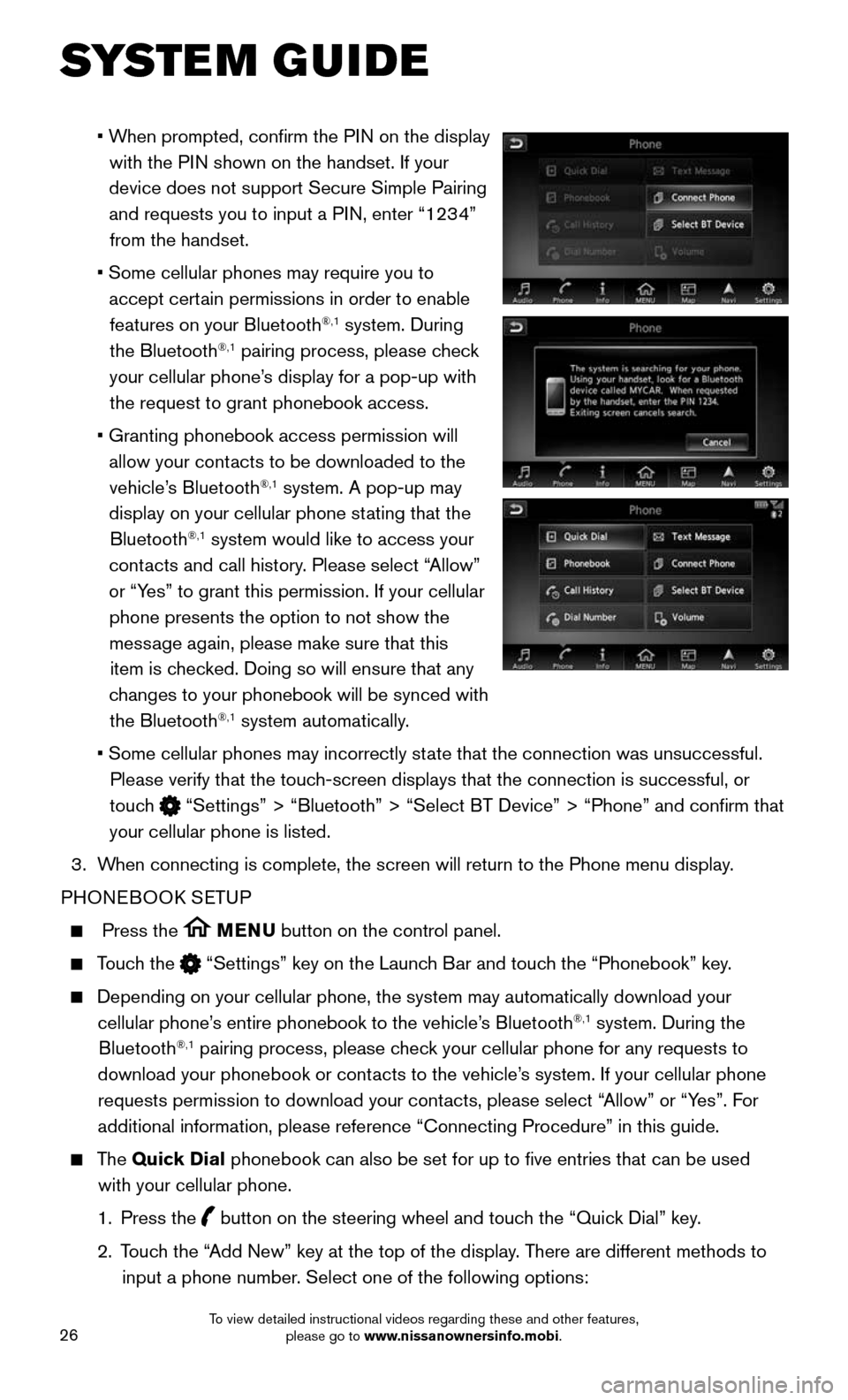
• When prompted, confirm the PIN on the display
with the PIN shown on the handset. If your
device does not support Secure Simple Pairing and requests you to input a PIN, enter “1234” from the handset.
• Some cellular phones may require you to
accept certain permissions in order to enable
features on your Bluetooth®,1 system. During
the Bluetooth®,1 pairing process, please check
your cellular phone’s display for a pop-up with the request to grant phonebook access.
• Granting phonebook access permission will
allow your contacts to be downloaded to the
vehicle’s Bluetooth®,1 system. A pop-up may
display on your cellular phone stating that the Bluetooth
®,1 system would like to access your
contacts and call history. Please select “Allow”
or “Yes” to grant this permission. If your cellular phone presents the option to not show the message again, please make sure that this item is checked. Doing so will ensure that any
changes to your phonebook will be synced with the Bluetooth
®,1 system automatically.
• Some cellular phones may incorrectly st ate that the connection was unsuccessful.
Please verify that the touch-screen displays that the connection is successful, or
touch
“Settings” > “Bluetooth” > “Select BT Device” > “P\
hone” and confirm that
your cellular phone is listed.
3. When connecting is complete, the screen will return to the Phone menu dis\
play.
PHONEBOOK SETUP
Press the MENU button on the control panel.
Touch the “Settings” key on the Launch Bar and touch the “Phonebook” key.
Depending on your cellular phone, the system may automatically download \
your
cellular phone’s entire phonebook to the vehicle’s Bluetooth®,1 system. During the
Bluetooth®,1 pairing process, please check your cellular phone for any requests to
download your phonebook or contacts to the vehicle’s system. If your cellular phone requests permission to download your contacts, please select “Allow” or “Yes”. For
additional information, please reference “Connecting Procedure” in\
this guide.
The Quick Dial phonebook can also be set for up to five entries that can be used
with your cellular phone.
1. Press the button on the steering wheel and touch the “Quick Dial” key.
2. Touch the “Add New” key at the top of the display. There are different methods to
input a phone number. Select one of the following options:
To view detailed instructional videos regarding these and other features, please go to www.nissanownersinfo.mobi.
Page 29 of 36
27
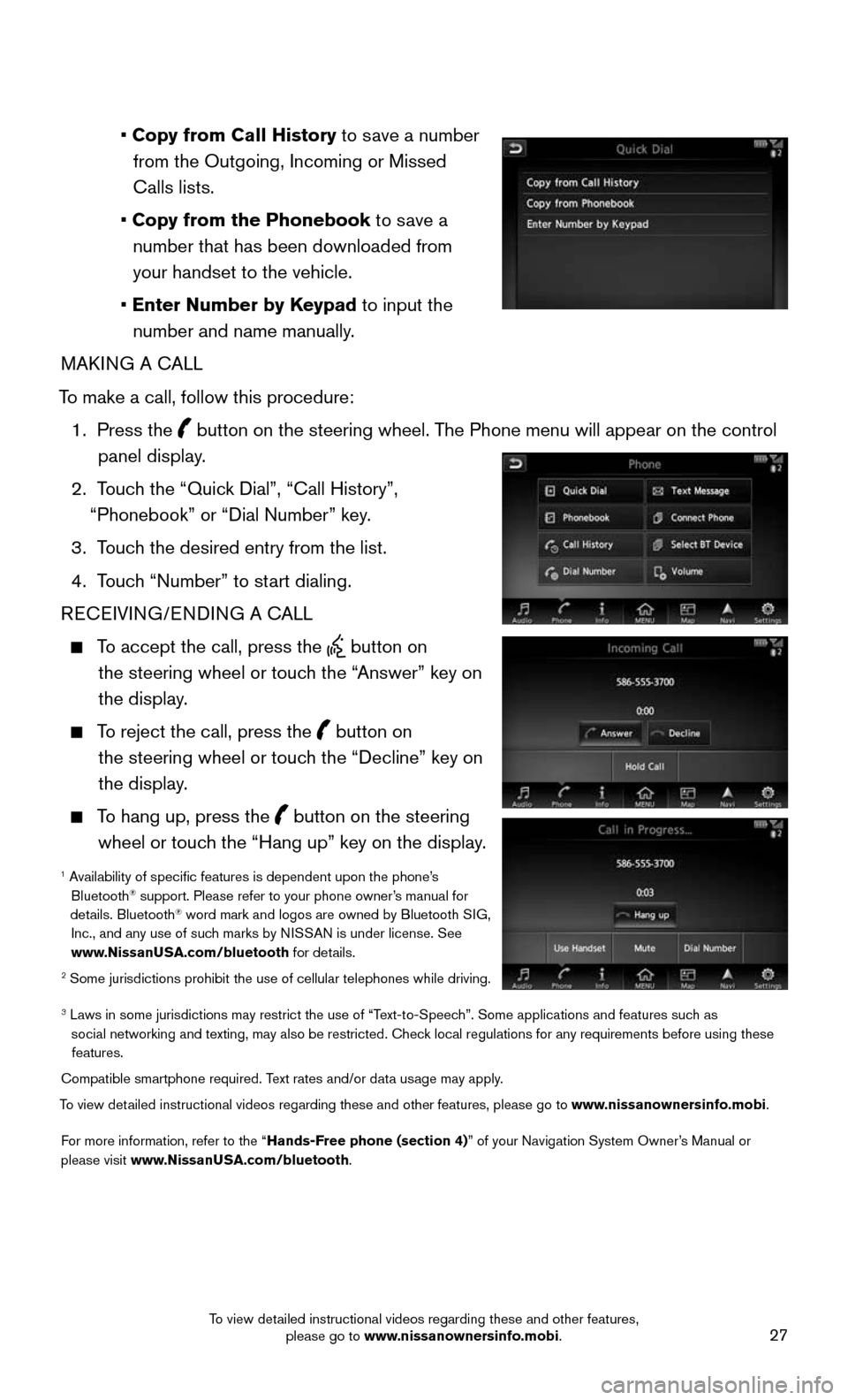
• Copy from Call History to save a number from the Outgoing, Incoming or Missed
Calls lists.
• Copy from the Phonebook to save a number that has been downloaded from your handset to the vehicle.
• Enter Number by Keypad to input the number and name manually.
MAKING A CALL
To make a call, follow this procedure:
1. Press the button on the steering wheel. The Phone menu will appear on the control
panel display.
2. Touch the “Quick Dial”, “Call History”,
“Phonebook” or “Dial Number” key.
3. Touch the desired entry from the list.
4. Touch “Number” to start dialing.
RECEIVING/ENDING A CALL
To accept the call, press the button on
the steering wheel or touch the “Answer” key on
the display.
To reject the call, press the button on
the steering wheel or touch the “Decline” key on
the display.
To hang up, press the button on the steering
wheel or touch the “Hang up” key on the display.
1 Availability of specific features is dependent upon the phone’s Bluetooth® support. Please refer to your phone owner’s manual for
details. Bluetooth® word mark and logos are owned by Bluetooth SIG,
Inc., and any use of such marks by NISSAN is under license. See
www.NissanUSA.com/bluetooth for details.
2 Some jurisdictions prohibit the use of cellular telephones while drivin\
g.
3 Laws in some jurisdictions may restrict the use of “T ext-to-Speech”. Some applications and features such as
social networking and texting, may also be restricted. Check local regulations for any requirements before using these features.
Compatible smartphone required. Text rates and/or data usage may apply.
To view detailed instructional videos regarding these and other features, please go\
to www.nissanownersinfo.mobi.
For more information, refer to the “Hands-Free phone (section 4)” of your Navigation System Owner’s Manual or
please visit www.NissanUSA.com/bluetooth.
To view detailed instructional videos regarding these and other features, please go to www.nissanownersinfo.mobi.