ECU NISSAN NAVARA 2005 Repair Workshop Manual
[x] Cancel search | Manufacturer: NISSAN, Model Year: 2005, Model line: NAVARA, Model: NISSAN NAVARA 2005Pages: 3171, PDF Size: 49.59 MB
Page 1544 of 3171
FAX-12
DRIVE SHAFT
13. Install circlip and dust cover to housing.
NOTE:
Do not reuse circlip and dust cover.
Wheel Side
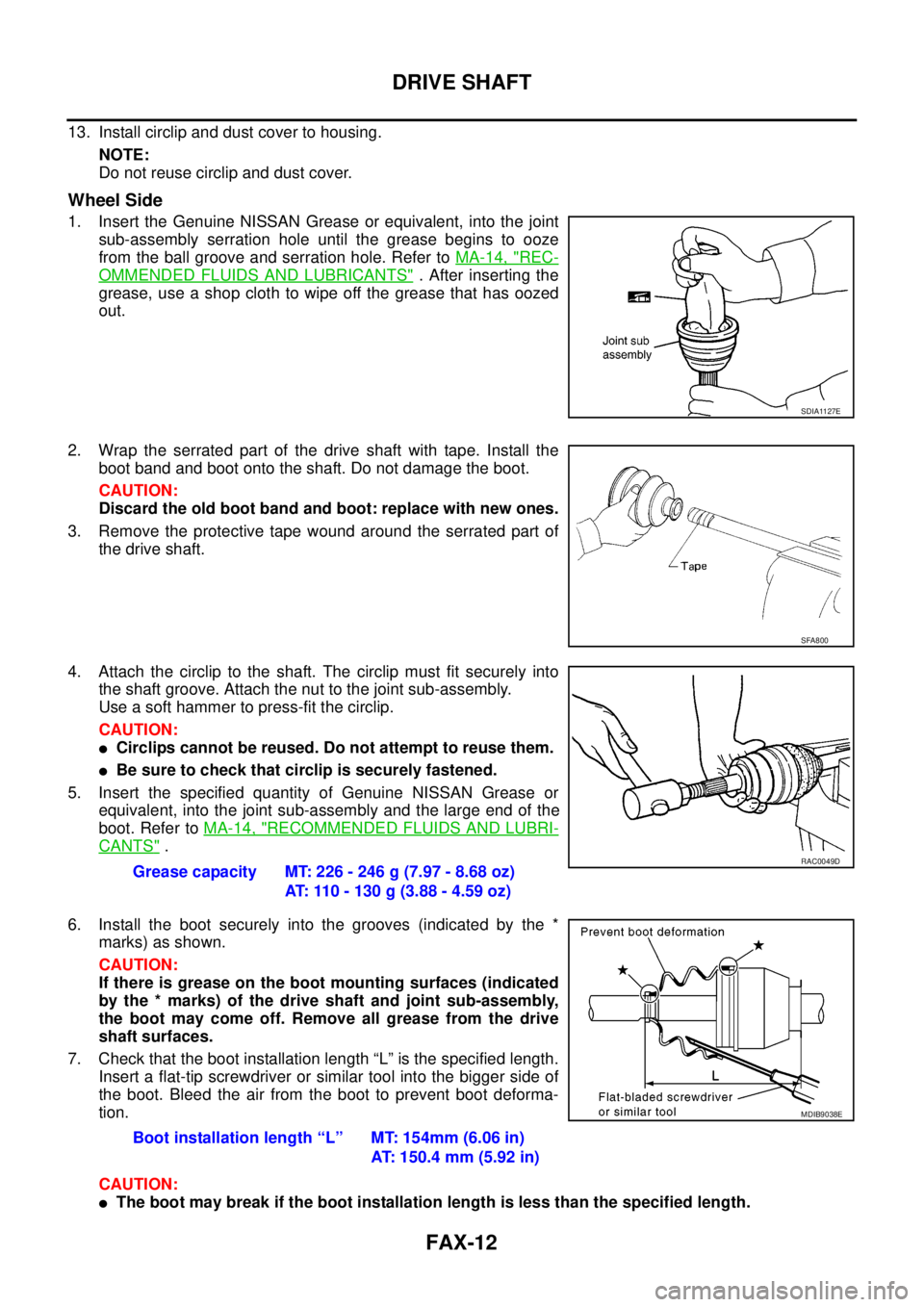
1. Insert the Genuine NISSAN Grease or equivalent, into the joint
sub-assembly serration hole until the grease begins to ooze
from the ball groove and serration hole. Refer toMA-14, "
REC-
OMMENDED FLUIDS AND LUBRICANTS". After inserting the
grease, use a shop cloth to wipe off the grease that has oozed
out.
2. Wrap the serrated part of the drive shaft with tape. Install the
boot band and boot onto the shaft. Do not damage the boot.
CAUTION:
Discard the old boot band and boot: replace with new ones.
3. Remove the protective tape wound around the serrated part of
the drive shaft.
4. Attach the circlip to the shaft. The circlip must fit securely into
the shaft groove. Attach the nut to the joint sub-assembly.
Useasofthammertopress-fitthecirclip.
CAUTION:
lCirclips cannot be reused. Do not attempt to reuse them.
lBe sure to check that circlip is securely fastened.
5. Insert the specified quantity of Genuine NISSAN Grease or
equivalent, into the joint sub-assembly and the large end of the
boot. Refer toMA-14, "
RECOMMENDED FLUIDS AND LUBRI-
CANTS".
6. Install the boot securely into the grooves (indicated by the *
marks) as shown.
CAUTION:
If there is grease on the boot mounting surfaces (indicated
by the * marks) of the drive shaft and joint sub-assembly,
the boot may come off. Remove all grease from the drive
shaft surfaces.
7. Check that the boot installation length “L” is the specified length.
Insert a flat-tip screwdriver or similar tool into the bigger side of
the boot. Bleed the air from the boot to prevent boot deforma-
tion.
CAUTION:
lThe boot may break if the boot installation length is less than the specified length.
SDIA1127E
SFA800
Grease capacity MT: 226 - 246 g (7.97 - 8.68 oz)
AT: 110 - 130 g (3.88 - 4.59 oz)RAC0049D
Boot installation length “L” MT: 154mm (6.06 in)
AT: 150.4 mm (5.92 in)
MDIB9038E
Page 1545 of 3171
DRIVE SHAFT
FAX-13
C
E
F
G
H
I
J
K
L
MA
B
FA X
lDo not contact inside surface of boot with the tip of the screwdriver.
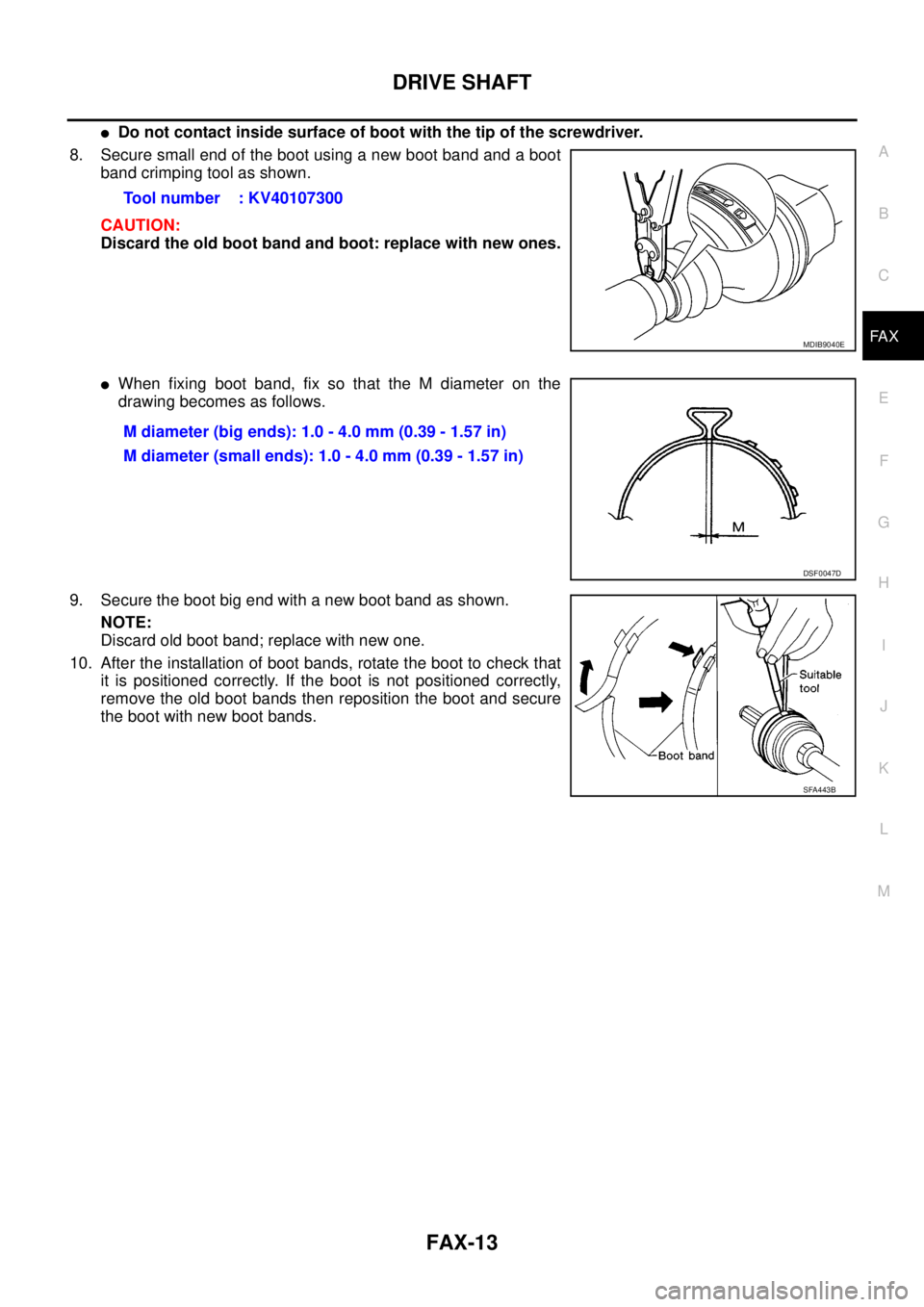
8. Secure small end of the boot using a new boot band and a boot
band crimping tool as shown.
CAUTION:
Discard the old boot band and boot: replace with new ones.
lWhen fixing boot band, fix so that the M diameter on the
drawing becomes as follows.
9. Secure the boot big end with a new boot band as shown.
NOTE:
Discard old boot band; replace with new one.
10. After the installation of boot bands, rotate the boot to check that
it is positioned correctly. If the boot is not positioned correctly,
remove the old boot bands then reposition the boot and secure
the boot with new boot bands.Tool number : KV40107300
MDIB9040E
M diameter (big ends): 1.0 - 4.0 mm (0.39 - 1.57 in)
M diameter (small ends): 1.0 - 4.0 mm (0.39 - 1.57 in)
DSF0047D
SFA443B
Page 1562 of 3171
FFD-16
FRONT FINAL DRIVE ASSEMBLY
CAUTION:
Do not pull on the ABS sensor harness.
4. Support the lower link using a suitable jack.
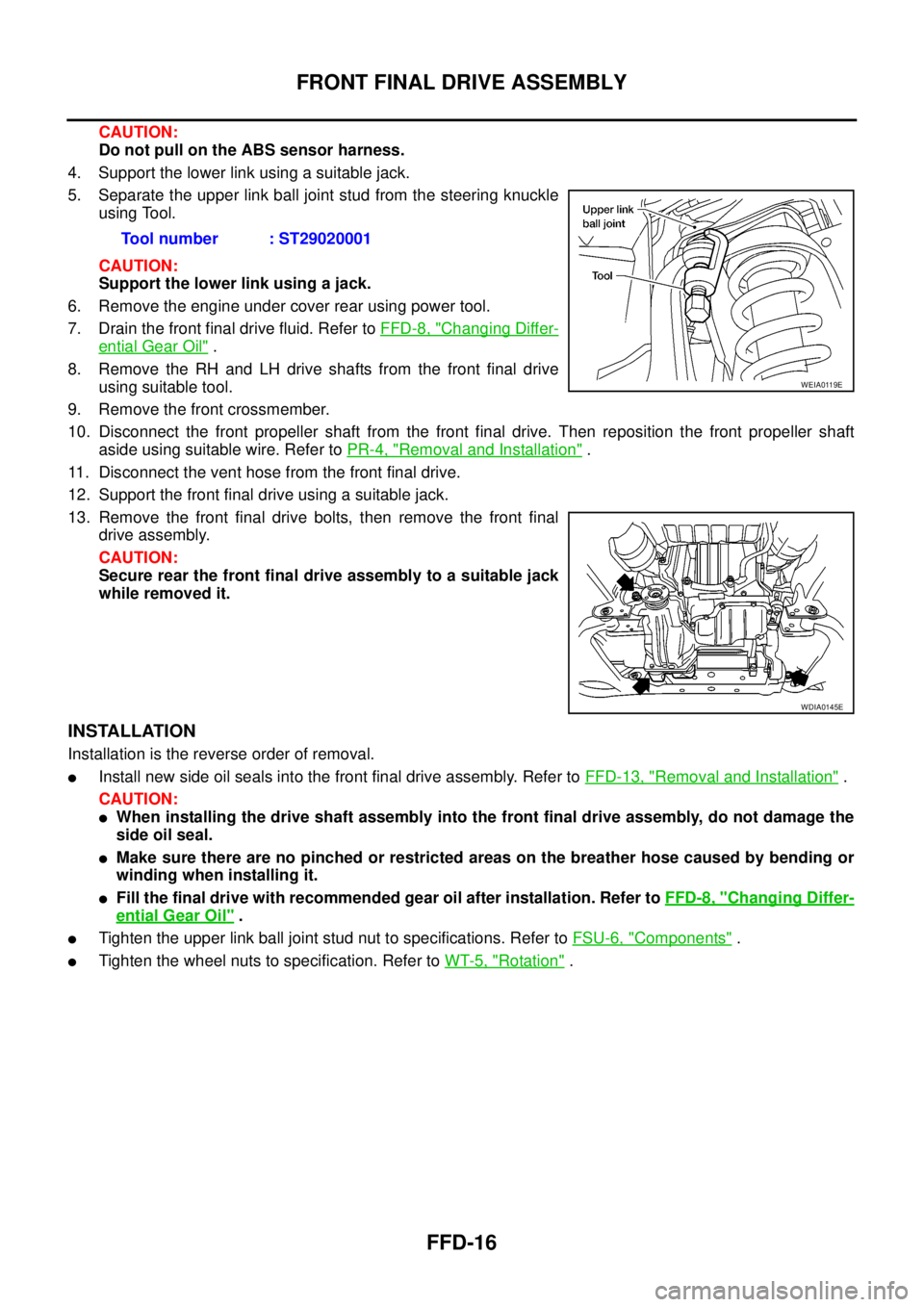
5. Separate the upper link ball joint stud from the steering knuckle
using Tool.
CAUTION:
Support the lower link using a jack.
6. Remove the engine under cover rear using power tool.
7. Drain the front final drive fluid. Refer toFFD-8, "
Changing Differ-
ential Gear Oil".
8. Remove the RH and LH drive shafts from the front final drive
using suitable tool.
9. Remove the front crossmember.
10. Disconnect the front propeller shaft from the front final drive. Then reposition the front propeller shaft
aside using suitable wire. Refer toPR-4, "
Removal and Installation".
11. Disconnect the vent hose from the front final drive.
12. Support the front final drive using a suitable jack.
13. Remove the front final drive bolts, then remove the front final
drive assembly.
CAUTION:
Secure rear the front final drive assembly to a suitable jack
while removed it.
INSTALLATION
Installation is the reverse order of removal.
lInstall new side oil seals into the front final drive assembly. Refer toFFD-13, "Removal and Installation".
CAUTION:
lWhen installing the drive shaft assembly into the front final drive assembly, do not damage the
side oil seal.
lMake sure there are no pinched or restricted areas on the breather hose caused by bending or
winding when installing it.
lFill the final drive with recommended gear oil after installation. Refer toFFD-8, "Changing Differ-
ential Gear Oil".
lTighten the upper link ball joint stud nut to specifications. Refer toFSU-6, "Components".
lTighten the wheel nuts to specification. Refer toWT-5, "Rotation". Tool number : ST29020001
WEIA0119E
WDIA0145E
Page 1587 of 3171
FUEL SYSTEM
FL-3
C
D
E
F
G
H
I
J
K
L
MA
FL
FUEL SYSTEMPFP:17503
Checking Fuel LinesEBS01E71
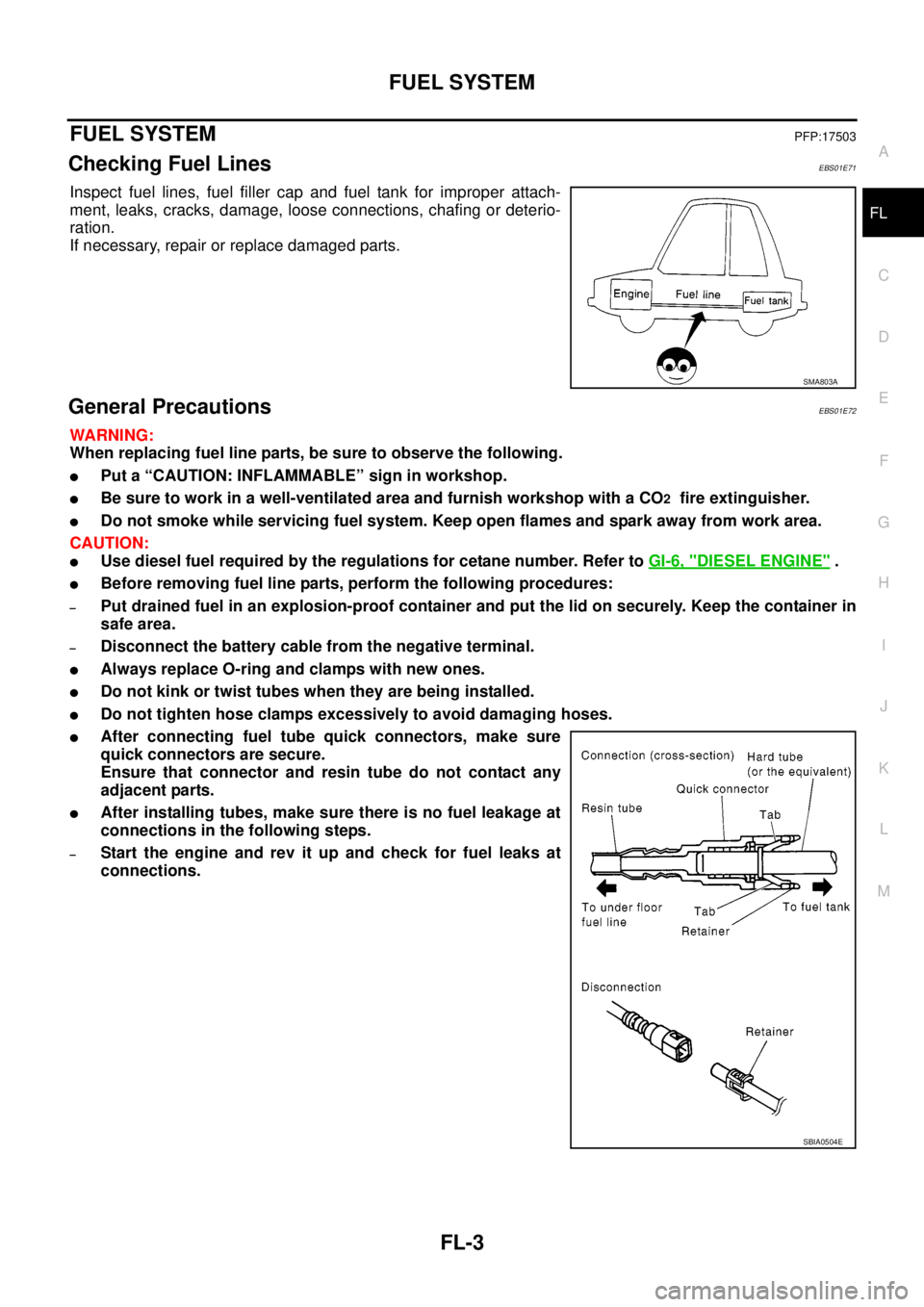
Inspect fuel lines, fuel filler cap and fuel tank for improper attach-
ment, leaks, cracks, damage, loose connections, chafing or deterio-
ration.
If necessary, repair or replace damaged parts.
General PrecautionsEBS01E72
WARNING:
When replacing fuel line parts, be sure to observe the following.
lPut a “CAUTION: INFLAMMABLE” sign in workshop.
lBe sure to work in a well-ventilated area and furnish workshop with a CO2fire extinguisher.
lDo not smoke while servicing fuel system. Keep open flames and spark away from work area.
CAUTION:
lUse diesel fuel required by the regulations for cetane number. Refer toGI-6, "DIESEL ENGINE".
lBefore removing fuel line parts, perform the following procedures:
–Put drained fuel in an explosion-proof container and put the lid on securely. Keep the container in
safe area.
–Disconnect the battery cable from the negative terminal.
lAlways replace O-ring and clamps with new ones.
lDo not kink or twist tubes when they are being installed.
lDo not tighten hose clamps excessively to avoid damaging hoses.
lAfter connecting fuel tube quick connectors, make sure
quick connectors are secure.
Ensure that connector and resin tube do not contact any
adjacent parts.
lAfter installing tubes, make sure there is no fuel leakage at
connections in the following steps.
–Start the engine and rev it up and check for fuel leaks at
connections.
SMA803A
SBIA0504E
Page 1596 of 3171
FL-12
FUEL TANK
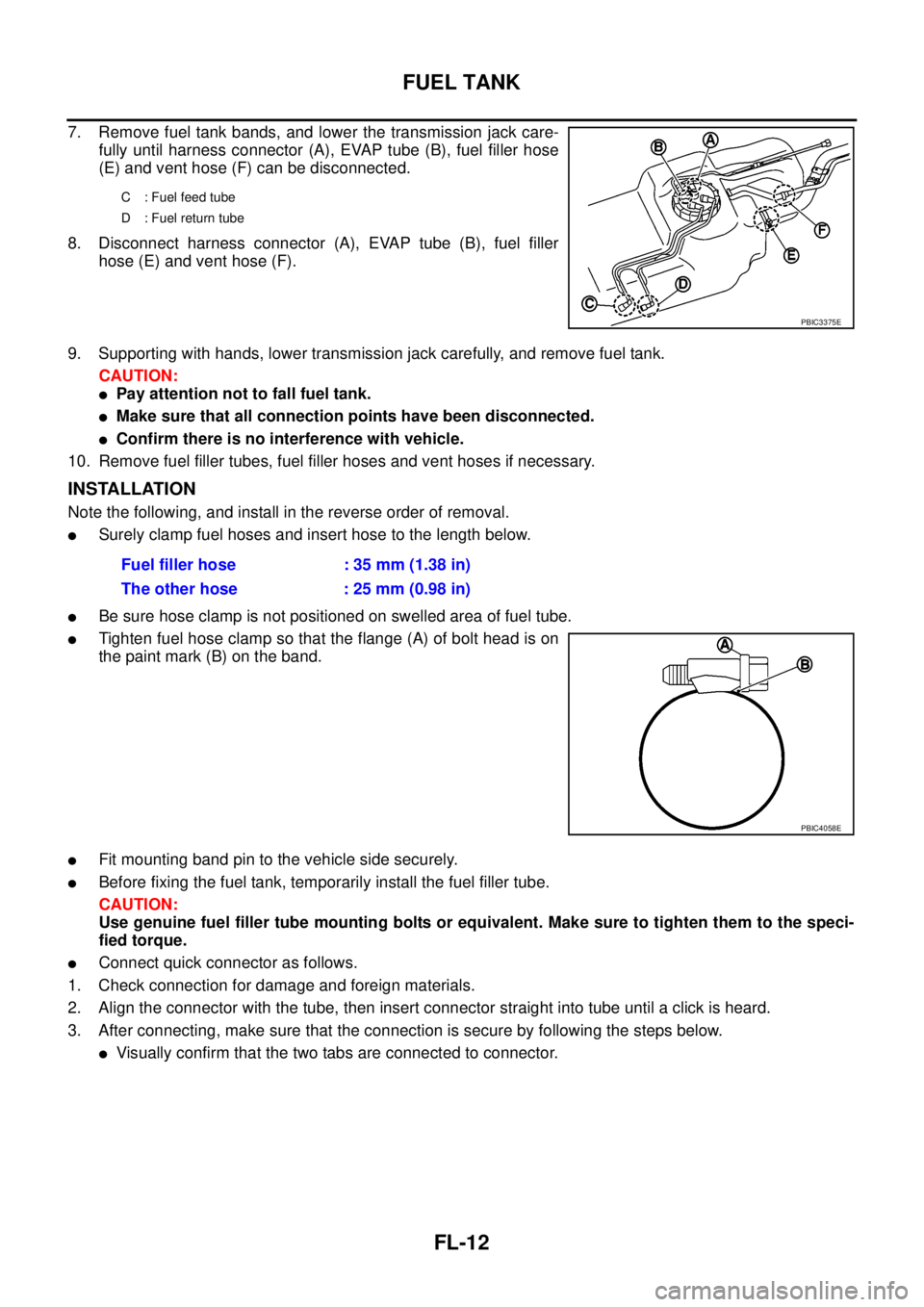
7. Remove fuel tank bands, and lower the transmission jack care-
fully until harness connector (A), EVAP tube (B), fuel filler hose
(E) and vent hose (F) can be disconnected.
8. Disconnect harness connector (A), EVAP tube (B), fuel filler
hose (E) and vent hose (F).
9. Supporting with hands, lower transmission jack carefully, and remove fuel tank.
CAUTION:
lPay attention not to fall fuel tank.
lMake sure that all connection points have been disconnected.
lConfirm there is no interference with vehicle.
10. Remove fuel filler tubes, fuel filler hoses and vent hoses if necessary.
INSTALLATION
Note the following, and install in the reverse order of removal.
lSurely clamp fuel hoses and insert hose to the length below.
lBe sure hose clamp is not positioned on swelled area of fuel tube.
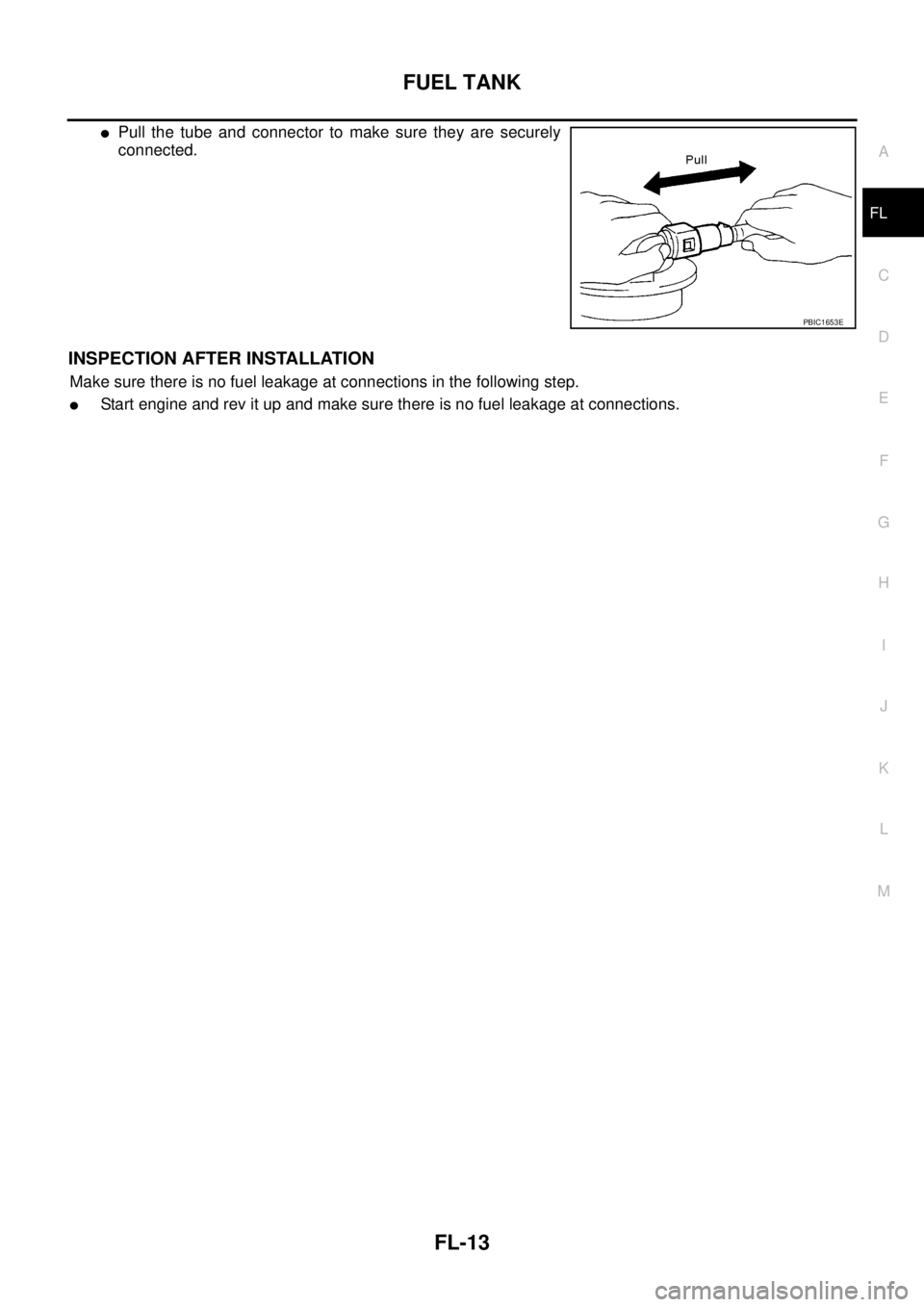
lTighten fuel hose clamp so that the flange (A) of bolt head is on
the paint mark (B) on the band.
lFit mounting band pin to the vehicle side securely.
lBefore fixing the fuel tank, temporarily install the fuel filler tube.
CAUTION:
Use genuine fuel filler tube mounting bolts or equivalent. Make sure to tighten them to the speci-
fied torque.
lConnect quick connector as follows.
1. Check connection for damage and foreign materials.
2. Align the connector with the tube, then insert connector straight into tube until a click is heard.
3. After connecting, make sure that the connection is secure by following the steps below.
lVisually confirm that the two tabs are connected to connector.
C : Fuel feed tube
D : Fuel return tube
PBIC3375E
Fuel filler hose : 35 mm (1.38 in)
The other hose : 25 mm (0.98 in)
PBIC4058E
Page 1597 of 3171
FUEL TANK
FL-13
C
D
E
F
G
H
I
J
K
L
MA
FL
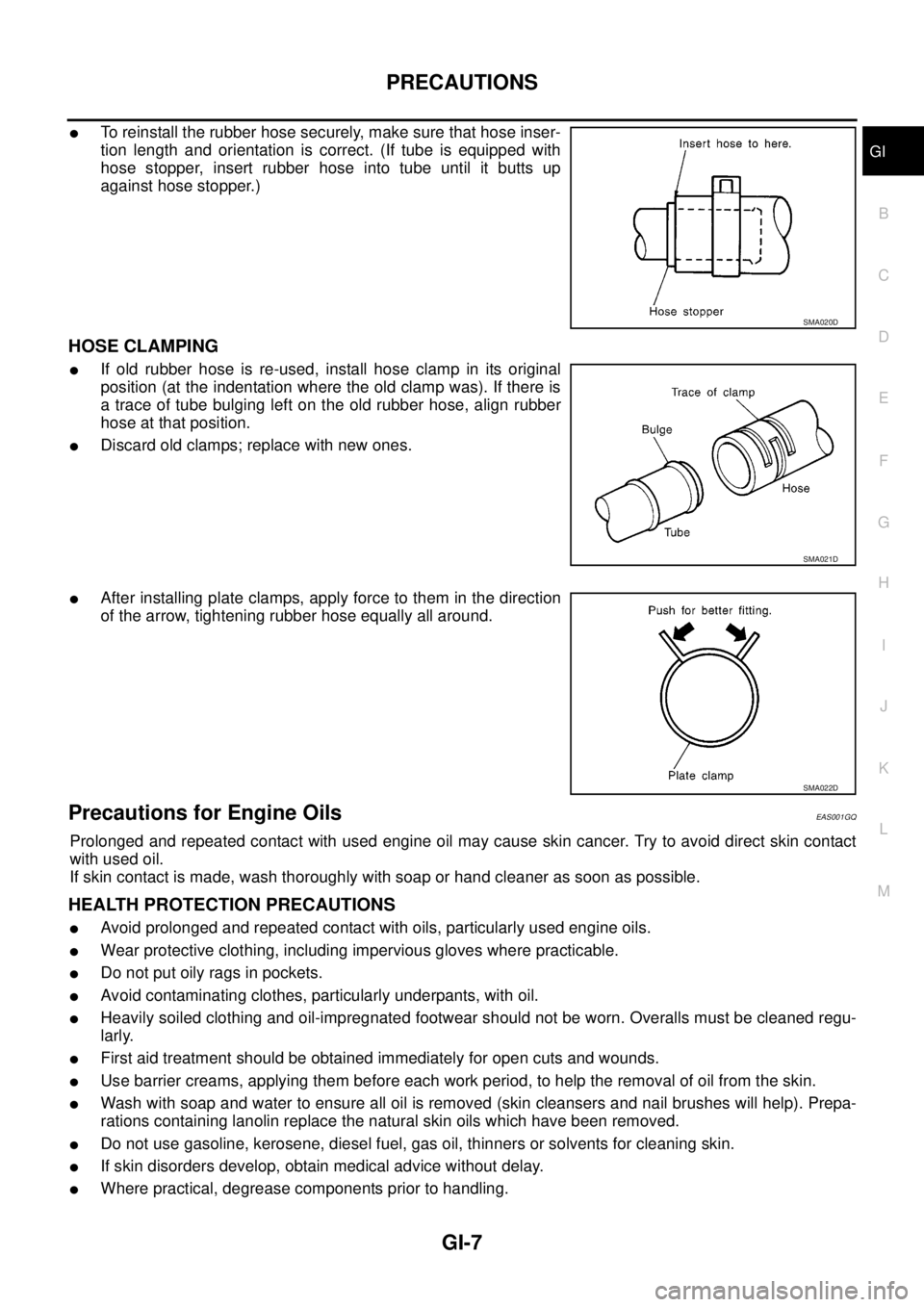
lPull the tube and connector to make sure they are securely
connected.
INSPECTION AFTER INSTALLATION
Make sure there is no fuel leakage at connections in the following step.
lStart engine and rev it up and make sure there is no fuel leakage at connections.
PBIC1653E
Page 1625 of 3171

PRECAUTIONS
GI-3
C
D
E
F
G
H
I
J
K
L
MB
GI
PRECAUTIONSPFP:00001
DescriptionEAS001GG
Observe the following precautions to ensure safe and proper servicing. These precautions are not
described in each individual section.
Precautions for Supplemental Restraint System (SRS) “AIR BAG” and “SEAT
BELT PRE-TENSIONER”
EAS001GH
The Supplemental Restraint System such as “AIR BAG” and “SEAT BELT PRE-TENSIONER”, used along
with a front seat belt, helps to reduce the risk or severity of injury to the driver and front passenger for certain
types of collision. Information necessary to service the system safely is included in the SRS and SB section of
this Service Manual.
WARNING:
lTo avoid rendering the SRS inoperative, which could increase the risk of personal injury or death
in the event of a collision which would result in air bag inflation, all maintenance must be per-
formed by an authorized NISSAN/INFINITI dealer.
lImproper maintenance, including incorrect removal and installation of the SRS, can lead to per-
sonal injury caused by unintentional activation of the system. For removal of Spiral Cable and Air
Bag Module, see the SRS section.
lDo not use electrical test equipment on any circuit related to the SRS unless instructed to in this
Service Manual. SRS wiring harnesses can be identified by yellow and/or orange harnesses or
harness connectors.
Precautions for NATS (NISSAN ANTI-THEFT SYSTEM)EAS001GI
NATS will immobilize the engine if someone tries to start it without the registered key of NATS.
Both of the originally supplied ignition key IDs have been NATS registered.
The security indicator is located on the instrument panel. The indicator blinks when the immobilizer system is
functioning.
Therefore, NATS warns outsiders that the vehicle is equipped with the anti-theft system.
lWhen NATS detects trouble, the security indicator lamp lights up while ignition switch is in "ON" position.
This lighting up indicates that the anti-theft is not functioning, so prompt service is required.
lWhen servicing NATS (trouble diagnoses, system initialization and additional registration of other NATS
ignition key IDs), CONSULT-II hardware and CONSULT-II NATS software is necessary.
Regarding the procedures of NATS initialization and NATS ignition key ID registration, refer to CONSULT-
II operation manual, NATS.
Therefore, CONSULT-II NATS software (program card and operation manual) must be kept strictly con-
fidential to maintain the integrity of the anti-theft function.
lWhen servicing NATS (trouble diagnoses, system initialization and additional registration of other NATS
ignition key IDs), it may be necessary to re-register original key identification. Therefore, be sure to
receive all keys from vehicle owner. A maximum of four or five key IDs can be registered into NATS.
lWhen failing to start the engine first time using the key of NATS, start as follows.
1. Leave the ignition key in "ON" position for approximately 5 seconds.
2. Turn ignition key to "OFF" or "LOCK" position and wait approximately 5 seconds.
3. Repeat step 1 and 2 again.
4. Restart the engine while keeping the key separate from any others on key-chain.
Precautions Necessary for Steering Wheel Rotation After Battery DisconnectEAS001HY
NOTE:
lThis Procedure is applied only to models with Intelligent Key system and NATS (NISSAN ANTI-THEFT
SYSTEM).
lRemove and install all control units after disconnecting both battery cables with the ignition knob in the
²LOCK²position.
lAlways use CONSULT-II to perform self-diagnosis as a part of each function inspection after finishing
work. If DTC is detected, perform trouble diagnosis according to self-diagnostic results.
For models equipped with the Intelligent Key system and NATS, an electrically controlled steering lock mech-
anism is adopted on the key cylinder.
Page 1629 of 3171
PRECAUTIONS
GI-7
C
D
E
F
G
H
I
J
K
L
MB
GI
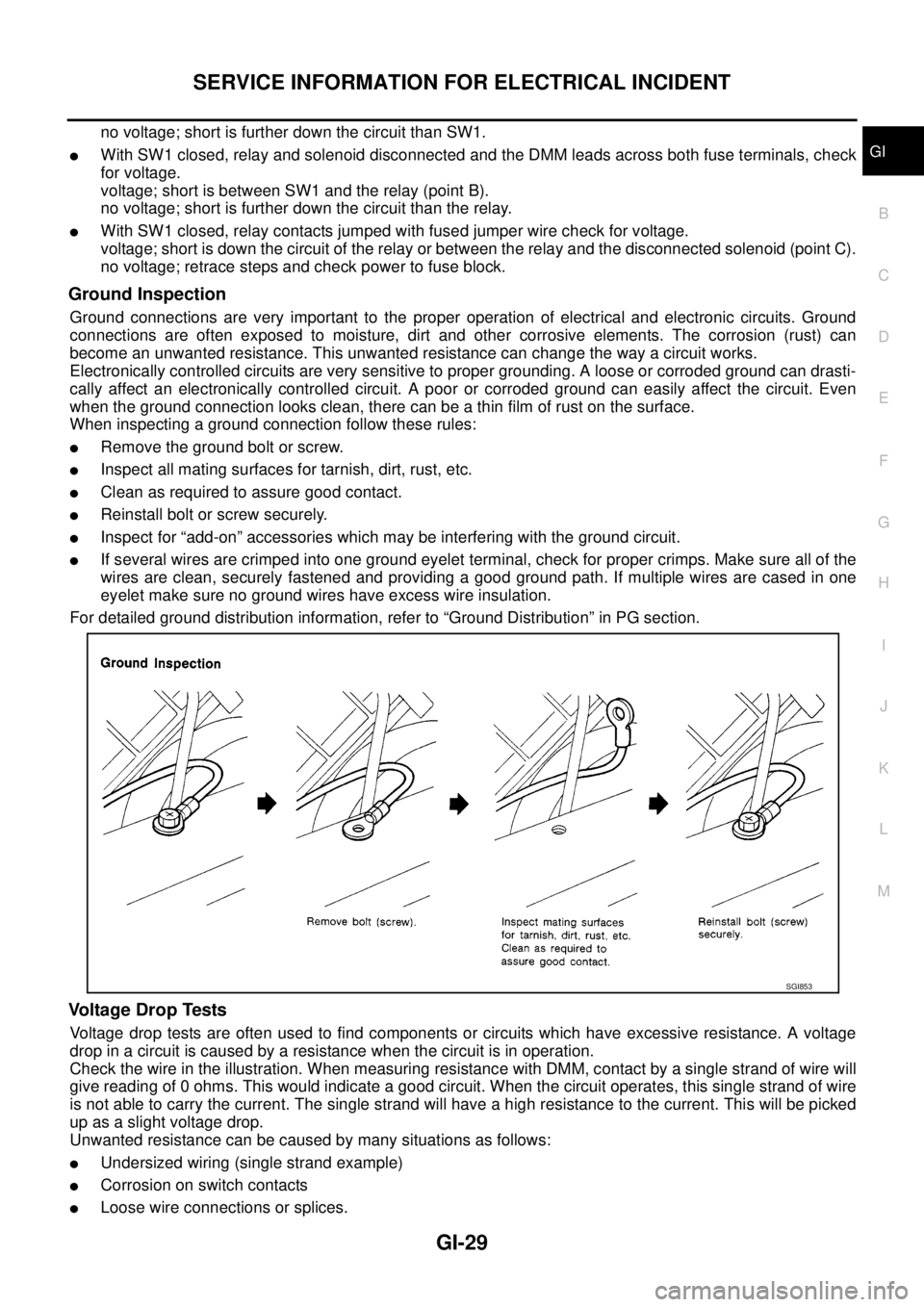
lTo reinstall the rubber hose securely, make sure that hose inser-
tion length and orientation is correct. (If tube is equipped with
hose stopper, insert rubber hose into tube until it butts up
against hose stopper.)
HOSE CLAMPING
lIf old rubber hose is re-used, install hose clamp in its original
position (at the indentation where the old clamp was). If there is
a trace of tube bulging left on the old rubber hose, align rubber
hose at that position.
lDiscard old clamps; replace with new ones.
lAfter installing plate clamps, apply force to them in the direction
of the arrow, tightening rubber hose equally all around.
Precautions for Engine OilsEAS001GQ
Prolonged and repeated contact with used engine oil may cause skin cancer. Try to avoid direct skin contact
with used oil.
If skin contact is made, wash thoroughly with soap or hand cleaner as soon as possible.
HEALTH PROTECTION PRECAUTIONS
lAvoid prolonged and repeated contact with oils, particularly used engine oils.
lWear protective clothing, including impervious gloves where practicable.
lDo not put oily rags in pockets.
lAvoid contaminating clothes, particularly underpants, with oil.
lHeavily soiled clothing and oil-impregnated footwear should not be worn. Overalls must be cleaned regu-
larly.
lFirst aid treatment should be obtained immediately for open cuts and wounds.
lUse barrier creams, applying them before each work period, to help the removal of oil from the skin.
lWash with soap and water to ensure all oil is removed (skin cleansers and nail brushes will help). Prepa-
rations containing lanolin replace the natural skin oils which have been removed.
lDo not use gasoline, kerosene, diesel fuel, gas oil, thinners or solvents for cleaning skin.
lIf skin disorders develop, obtain medical advice without delay.
lWhere practical, degrease components prior to handling.
SMA020D
SMA021D
SMA022D
Page 1651 of 3171
SERVICE INFORMATION FOR ELECTRICAL INCIDENT
GI-29
C
D
E
F
G
H
I
J
K
L
MB
GI
no voltage; short is further down the circuit than SW1.
lWith SW1 closed, relay and solenoid disconnected and the DMM leads across both fuse terminals, check
for voltage.
voltage; short is between SW1 and the relay (point B).
no voltage; short is further down the circuit than the relay.
lWith SW1 closed, relay contacts jumped with fused jumper wire check for voltage.
voltage; short is down the circuit of the relay or between the relay and the disconnected solenoid (point C).
no voltage; retrace steps and check power to fuse block.
Ground Inspection
Ground connections are very important to the proper operation of electrical and electronic circuits. Ground
connections are often exposed to moisture, dirt and other corrosive elements. The corrosion (rust) can
become an unwanted resistance. This unwanted resistance can change the way a circuit works.
Electronically controlled circuits are very sensitive to proper grounding. A loose or corroded ground can drasti-
cally affect an electronically controlled circuit. A poor or corroded ground can easily affect the circuit. Even
when the ground connection looks clean, there can be a thin film of rust on the surface.
When inspecting a ground connection follow these rules:
lRemove the ground bolt or screw.
lInspect all mating surfaces for tarnish, dirt, rust, etc.
lClean as required to assure good contact.
lReinstall bolt or screw securely.
lInspect for “add-on” accessories which may be interfering with the ground circuit.
lIf several wires are crimped into one ground eyelet terminal, check for proper crimps. Make sure all of the
wires are clean, securely fastened and providing a good ground path. If multiple wires are cased in one
eyelet make sure no ground wires have excess wire insulation.
For detailed ground distribution information, refer to “Ground Distribution” in PG section.
Voltage Drop Tests
Voltage drop tests are often used to find components or circuits which have excessive resistance. A voltage
drop in a circuit is caused by a resistance when the circuit is in operation.
Check the wire in the illustration. When measuring resistance with DMM, contact by a single strand of wire will
give reading of 0 ohms. This would indicate a good circuit. When the circuit operates, this single strand of wire
is not able to carry the current. The single strand will have a high resistance to the current. This will be picked
up as a slight voltage drop.
Unwanted resistance can be caused by many situations as follows:
lUndersized wiring (single strand example)
lCorrosion on switch contacts
lLoose wire connections or splices.
SGI853
Page 1666 of 3171
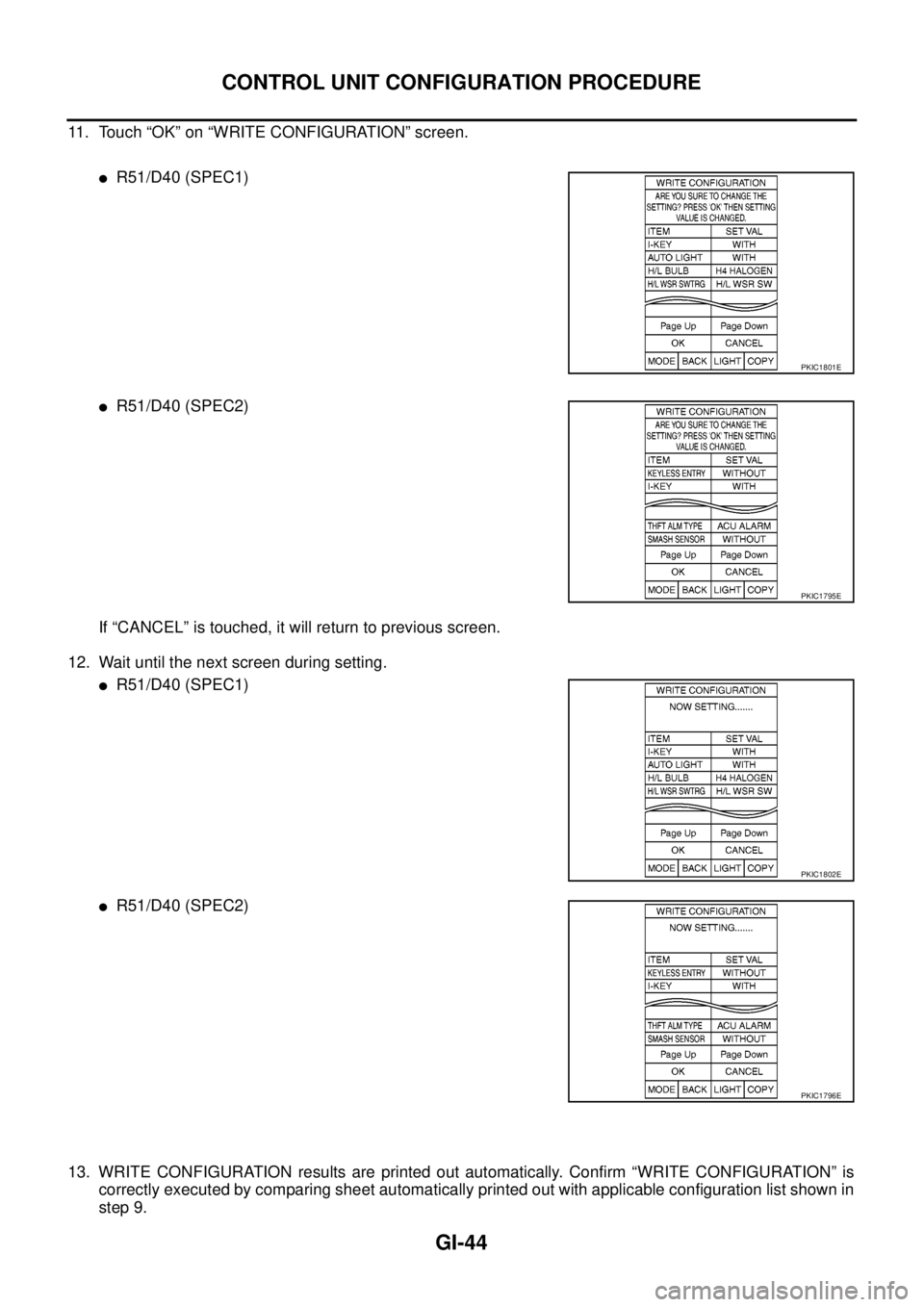
GI-44
CONTROL UNIT CONFIGURATION PROCEDURE
11. Touch “OK” on “WRITE CONFIGURATION” screen.
lR51/D40 (SPEC1)
lR51/D40 (SPEC2)
If “CANCEL” is touched, it will return to previous screen.
12. Wait until the next screen during setting.
lR51/D40 (SPEC1)
lR51/D40 (SPEC2)
13. WRITE CONFIGURATION results are printed out automatically. Confirm “WRITE CONFIGURATION” is
correctly executed by comparing sheet automatically printed out with applicable configuration list shown in
step 9.
PKIC1801E
PKIC1795E
PKIC1802E
PKIC1796E