ECU NISSAN NAVARA 2005 Repair Workshop Manual
[x] Cancel search | Manufacturer: NISSAN, Model Year: 2005, Model line: NAVARA, Model: NISSAN NAVARA 2005Pages: 3171, PDF Size: 49.59 MB
Page 2641 of 3171
PS-14
POWER STEERING GEAR AND LINKAGE
POWER STEERING GEAR AND LINKAGE
PFP:49001
Removal and InstallationEGS001LJ
COMPONENT
CAUTION:
Spiral cable may be cut if steering wheel turns while separating steering column assembly and steer-
ing gear assembly. Be sure to secure steering wheel using string to avoid turning.
REMOVAL
1. Set vehicle to the straight-ahead position.
2. Remove tyres from vehicle with a power tool.
3. Remove undercover from vehicle with a power tool.
4. Remove lower side fixing bolt of lower shaft.
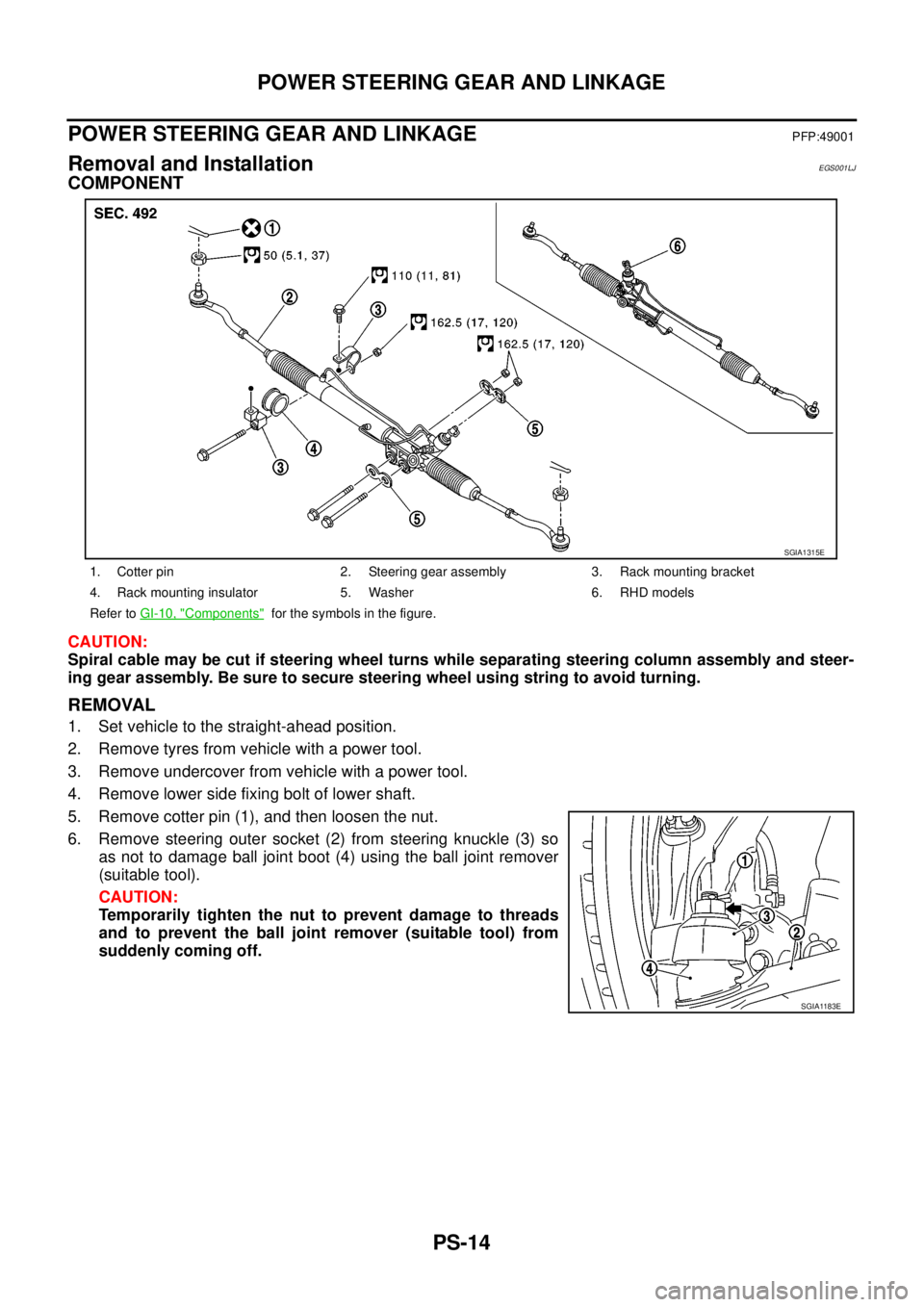
5. Remove cotter pin (1), and then loosen the nut.
6. Remove steering outer socket (2) from steering knuckle (3) so
as not to damage ball joint boot (4) using the ball joint remover
(suitable tool).
CAUTION:
Temporarily tighten the nut to prevent damage to threads
and to prevent the ball joint remover (suitable tool) from
suddenly coming off.
1. Cotter pin 2. Steering gear assembly 3. Rack mounting bracket
4. Rack mounting insulator 5. Washer 6. RHD models
Refer toGI-10, "
Components"for the symbols in the figure.
SGIA1315E
SGIA1183E
Page 2643 of 3171
PS-16
POWER STEERING GEAR AND LINKAGE
Disassembly and Assembly
EGS001LK
COMPONENT
CAUTION:
lDisassemble and assemble steering gear assembly by securing the mounting area in a vise using
copper plates.
lClean steering gear assembly with kerosene before disassembling. Be careful to avoid splashing
or applying any kerosene over connector of discharge port or return port.
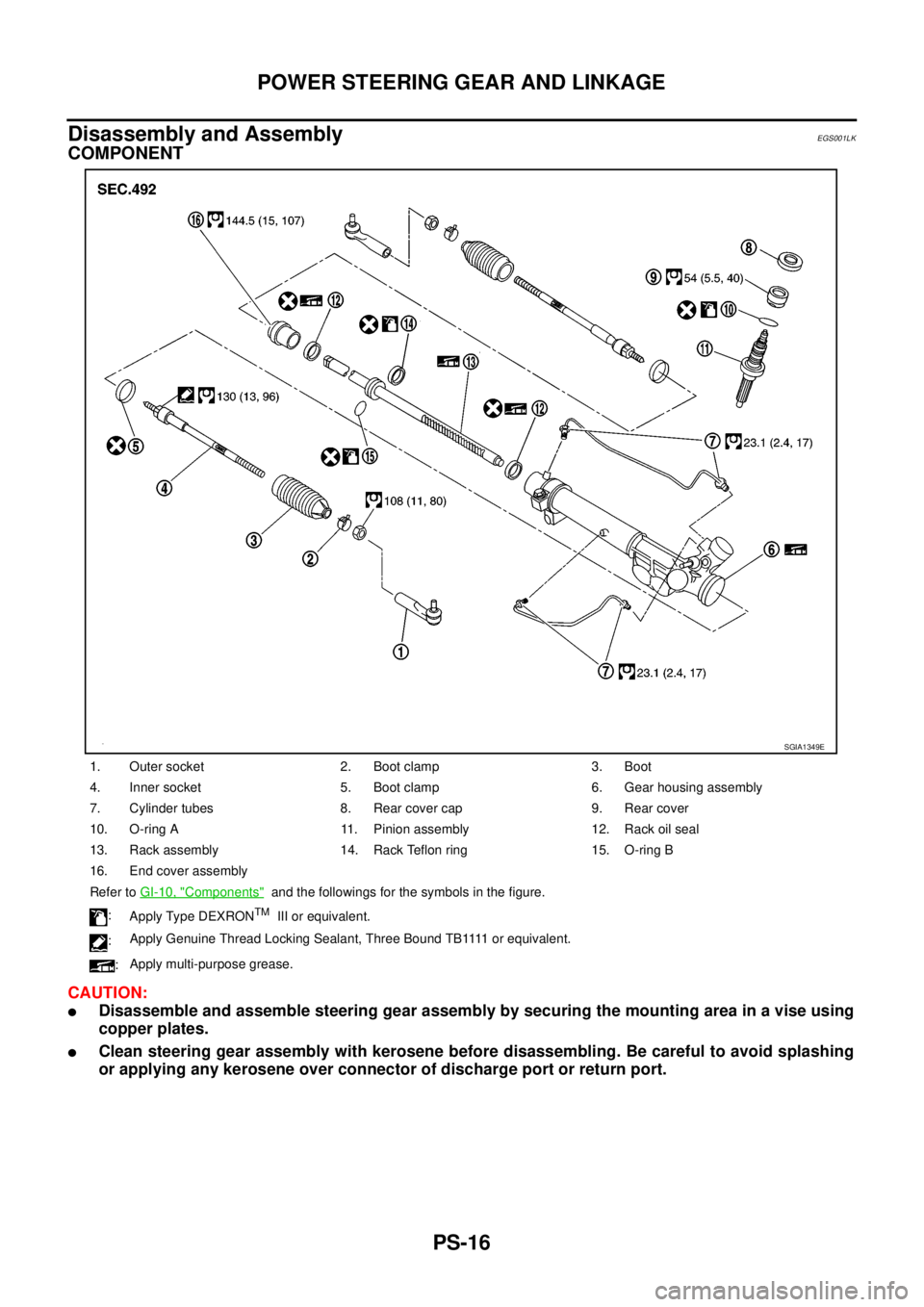
1. Outer socket 2. Boot clamp 3. Boot
4. Inner socket 5. Boot clamp 6. Gear housing assembly
7. Cylinder tubes 8. Rear cover cap 9. Rear cover
10. O-ring A 11. Pinion assembly 12. Rack oil seal
13. Rack assembly 14. Rack Teflon ring 15. O-ring B
16. End cover assembly
Refer toGI-10, "
Components"and the followings for the symbols in the figure.
:
Apply Type DEXRON
TMIII or equivalent.
:A p p l y G e n u i n e T h r e a d L o c k i n g S e a l a n t , T h r e e B o u n d T B 1111 o r e q u i v a l e n t .
:Apply multi-purpose grease.
SGIA1349E
Page 2654 of 3171
POWER STEERING OIL PUMP
PS-27
C
D
E
F
H
I
J
K
L
MA
B
PS
DISASSEMBLY
NOTE:
Secure oil pump in a vise if necessary.
CAUTION:
Use copper plates when securing in a vise.
1. Remove rear bracket mounting bolts, and then remove rear bracket from rear cover.
2. Remove rear cover mounting bolts, and then remove rear cover from body assembly.
3. Remove gasket from body assembly.
4. Remove dowel pin, cartridge and side plate from body assembly.
5. Remove pulley mounting nut and washer, then remove pulley from drive shaft.
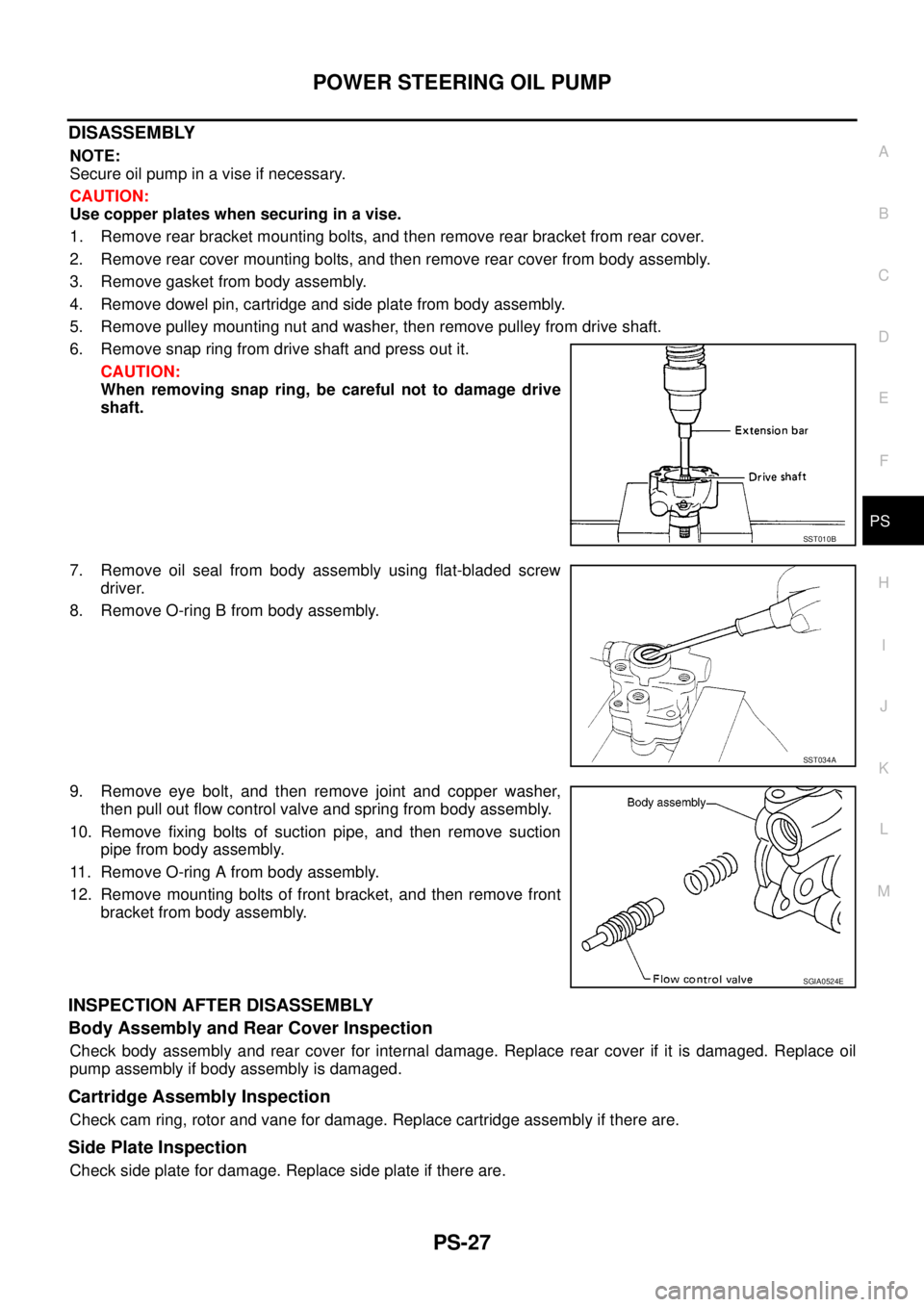
6. Remove snap ring from drive shaft and press out it.
CAUTION:
When removing snap ring, be careful not to damage drive
shaft.
7. Remove oil seal from body assembly using flat-bladed screw
driver.
8. Remove O-ring B from body assembly.
9. Remove eye bolt, and then remove joint and copper washer,
then pull out flow control valve and spring from body assembly.
10. Remove fixing bolts of suction pipe, and then remove suction
pipe from body assembly.
11. Remove O-ring A from body assembly.
12. Remove mounting bolts of front bracket, and then remove front
bracket from body assembly.
INSPECTION AFTER DISASSEMBLY
Body Assembly and Rear Cover Inspection
Check body assembly and rear cover for internal damage. Replace rear cover if it is damaged. Replace oil
pump assembly if body assembly is damaged.
Cartridge Assembly Inspection
Check cam ring, rotor and vane for damage. Replace cartridge assembly if there are.
Side Plate Inspection
Check side plate for damage. Replace side plate if there are.
SST010B
SST034A
SGIA0524E
Page 2655 of 3171
PS-28
POWER STEERING OIL PUMP
Flow Control Valve Inspection
Check flow control valve and spring for damage. Replace if there are.
ASSEMBLY
NOTE:
Secureoilpumpinaviseifnecessary.
CAUTION:
Use copper plates when securing in a vise.
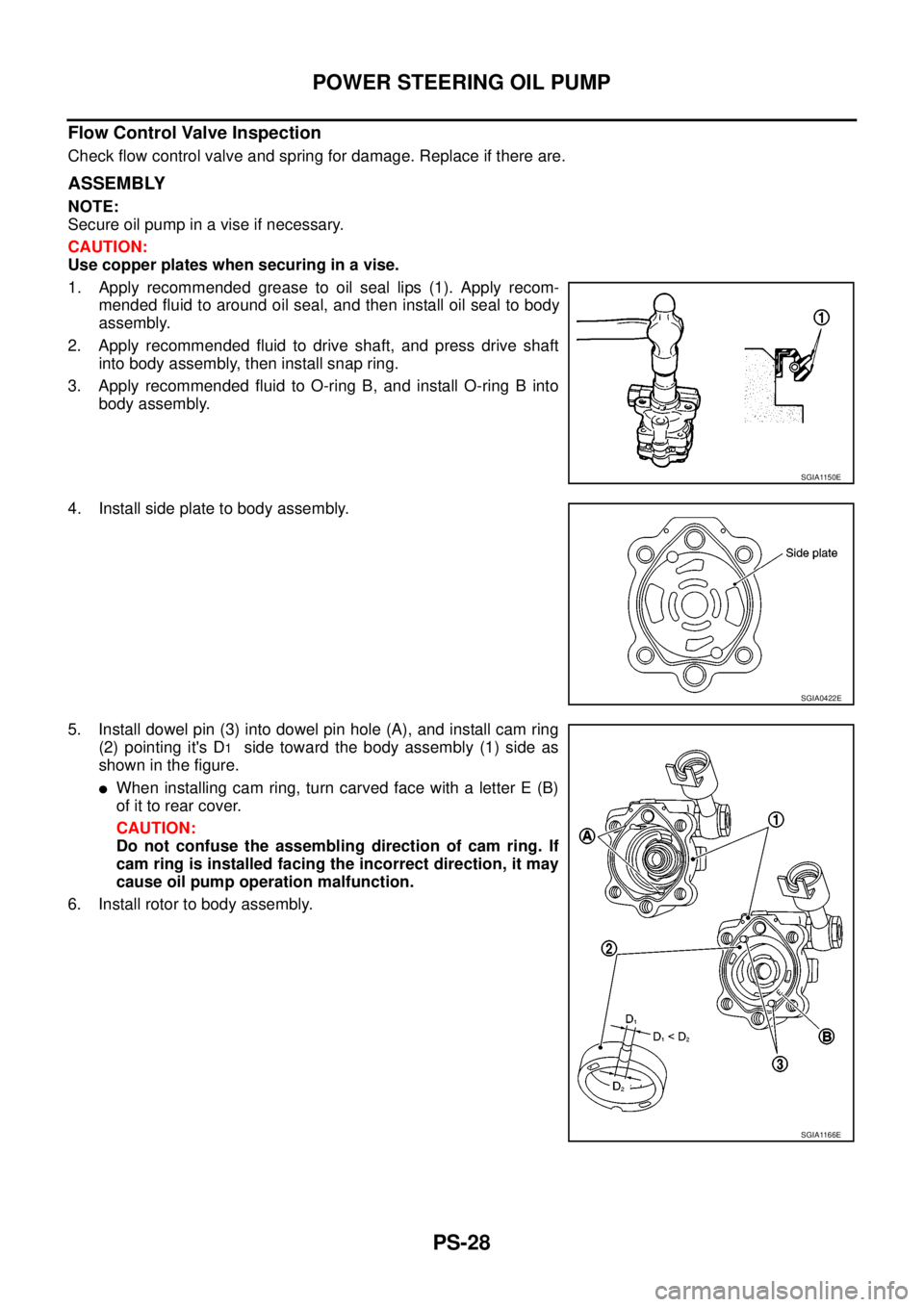
1. Apply recommended grease to oil seal lips (1). Apply recom-
mended fluid to around oil seal, and then install oil seal to body
assembly.
2. Apply recommended fluid to drive shaft, and press drive shaft
into body assembly, then install snap ring.
3. Apply recommended fluid to O-ring B, and install O-ring B into
body assembly.
4. Install side plate to body assembly.
5. Install dowel pin (3) into dowel pin hole (A), and install cam ring
(2) pointing it's D
1side toward the body assembly (1) side as
showninthefigure.
lWhen installing cam ring, turn carved face with a letter E (B)
of it to rear cover.
CAUTION:
Do not confuse the assembling direction of cam ring. If
cam ring is installed facing the incorrect direction, it may
cause oil pump operation malfunction.
6. Install rotor to body assembly.
SGIA1150E
SGIA0422E
SGIA1166E
Page 2657 of 3171
PS-30
HYDRAULIC LINE
HYDRAULIC LINE
PFP:49721
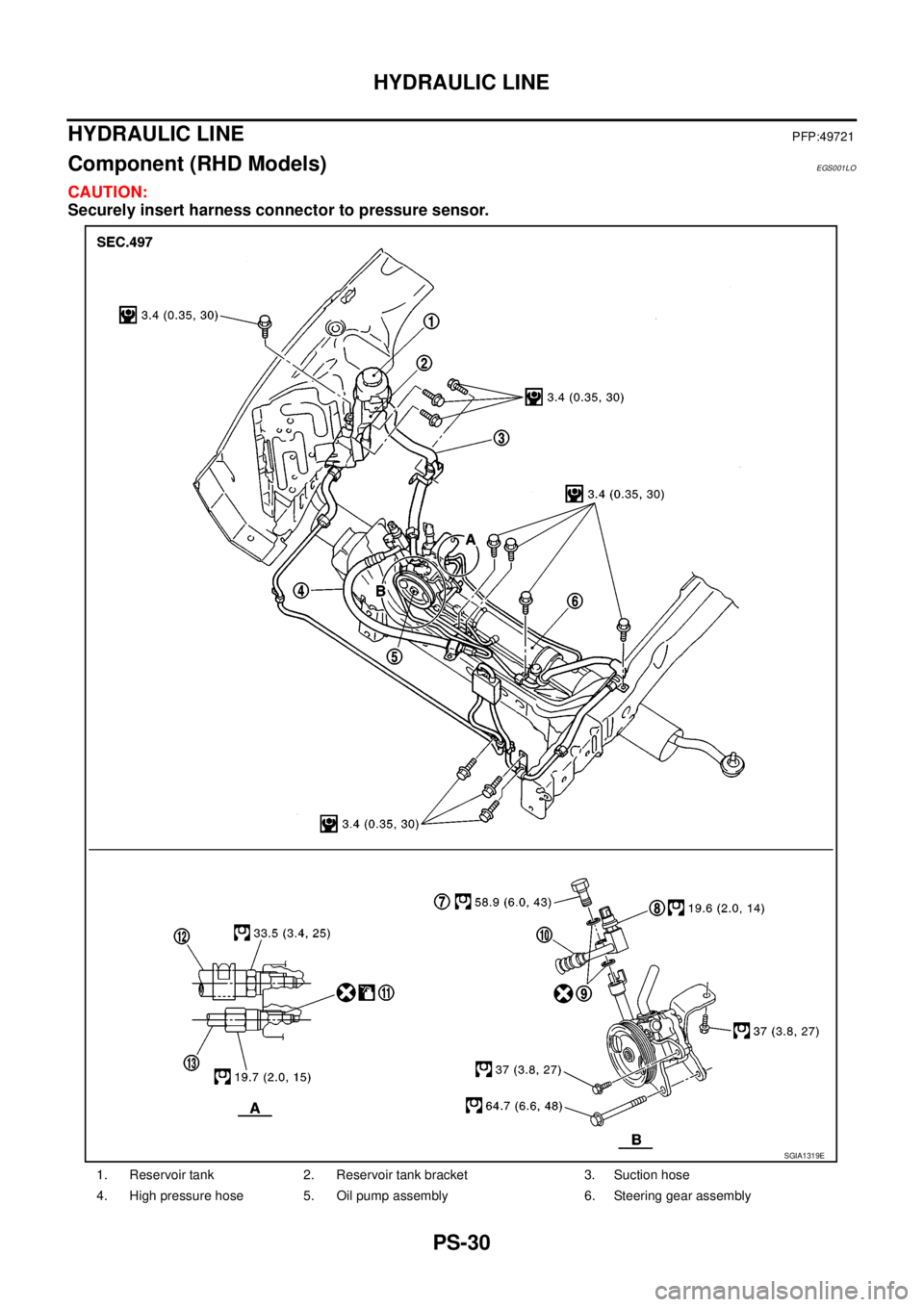
Component (RHD Models)EGS001LO
CAUTION:
Securely insert harness connector to pressure sensor.
1. Reservoir tank 2. Reservoir tank bracket 3. Suction hose
4. High pressure hose 5. Oil pump assembly 6. Steering gear assembly
SGIA1319E
Page 2659 of 3171
PS-32
HYDRAULIC LINE
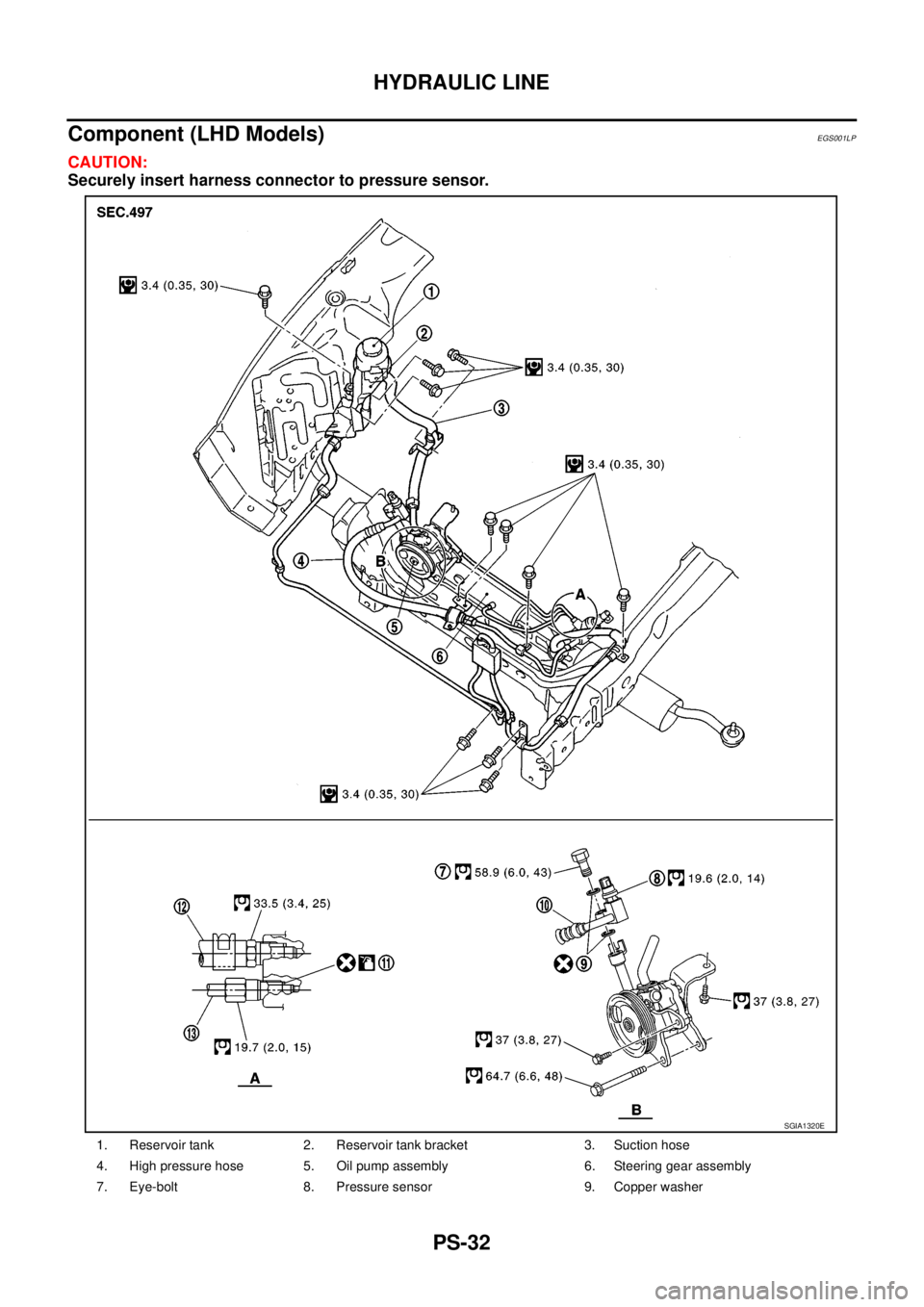
Component (LHD Models)
EGS001LP
CAUTION:
Securely insert harness connector to pressure sensor.
1. Reservoir tank 2. Reservoir tank bracket 3. Suction hose
4. High pressure hose 5. Oil pump assembly 6. Steering gear assembly
7. Eye-bolt 8. Pressure sensor 9. Copper washer
SGIA1320E
Page 2660 of 3171
HYDRAULIC LINE
PS-33
C
D
E
F
H
I
J
K
L
MA
B
PS
Removal and InstallationEGS001LQ
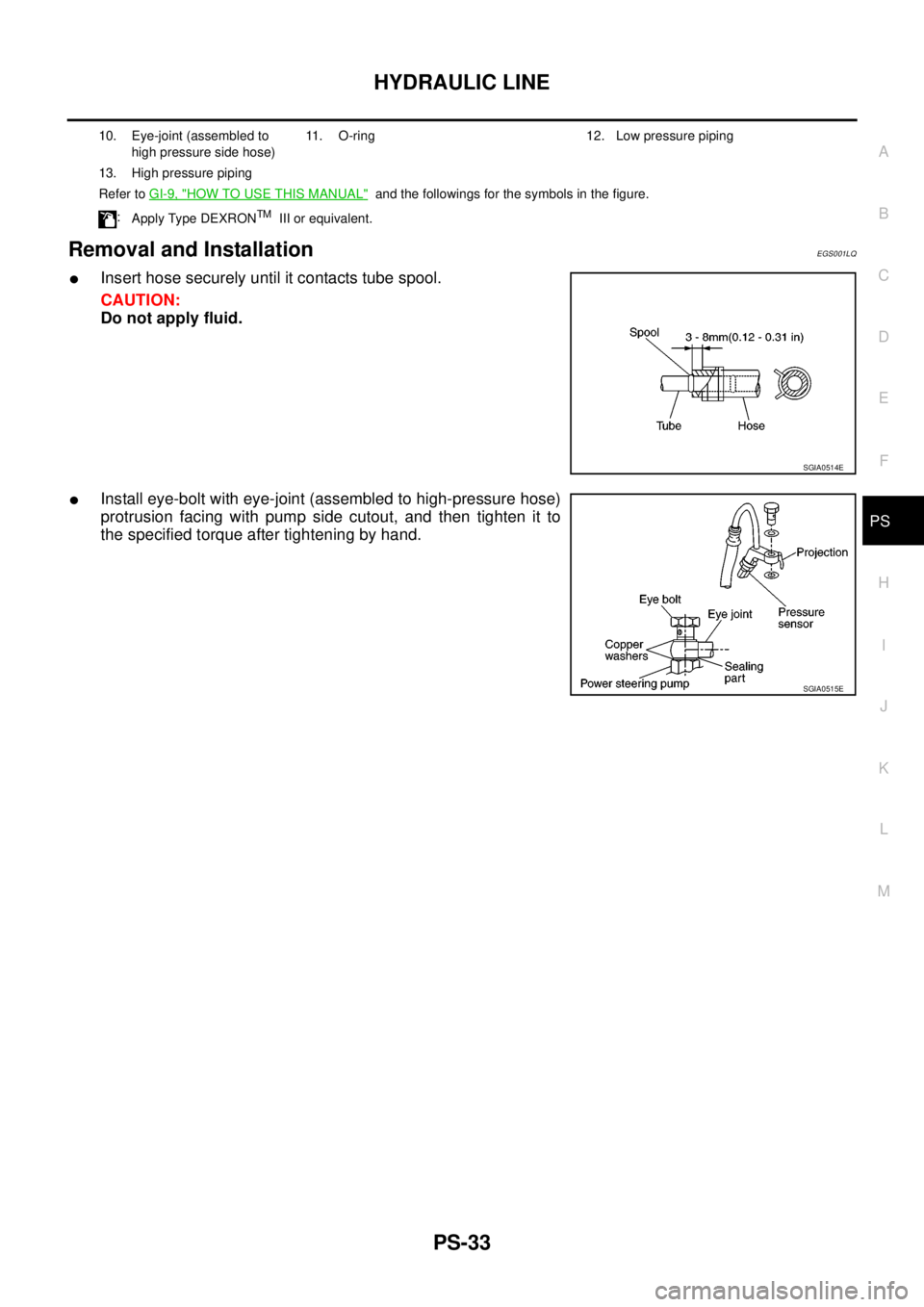
lInsert hose securely until it contacts tube spool.
CAUTION:
Do not apply fluid.
lInstall eye-bolt with eye-joint (assembled to high-pressure hose)
protrusion facing with pump side cutout, and then tighten it to
the specified torque after tightening by hand.
10. Eye-joint (assembled to
high pressure side hose)11. O-ring 12. Low pressure piping
13. High pressure piping
Refer toGI-9, "
HOW TO USE THIS MANUAL"and the followings for the symbols in the figure.
:
Apply Type DEXRON
TMIII or equivalent.
SGIA0514E
SGIA0515E
Page 2671 of 3171
![NISSAN NAVARA 2005 Repair Workshop Manual RAX-8
[M226]
AXLE SHAFT
REMOVAL
1. Remove the wheel.
2. Remove the rear brake drum. Refer toBR-31, "
Removal and Installation of Drum Brake Assembly".
3. Remove four lock nuts and spring washers secur](/img/5/57362/w960_57362-2670.png "NISSAN NAVARA 2005 Repair Workshop Manual RAX-8
[M226]
AXLE SHAFT
REMOVAL
1. Remove the wheel.
2. Remove the rear brake drum. Refer toBR-31, \"
Removal and Installation of Drum Brake Assembly\".
3. Remove four lock nuts and spring washers secur")
RAX-8
[M226]
AXLE SHAFT
REMOVAL
1. Remove the wheel.
2. Remove the rear brake drum. Refer toBR-31, "
Removal and Installation of Drum Brake Assembly".
3. Remove four lock nuts and spring washers securing the axle
shaft retainer to the rear axle case.
4. Using a wire, suspend the baffle plate to the sub frame.
NOTE:
Brake hose and brake cable do not need to be disconnected from the baffle plate and wheel cylinder.
CAUTION:
lBe careful not to deform brake tube.
lDo not bend the parking brake cable.
lWhile removing drum, never depress brake pedal because the piston will pop out.
5. Remove the axle shaft assembly from the rear axle case as
shown.
6. Using a puller remove the bearing cup from the rear axle case.
CAUTION:
lThe axle shaft bearing cup may stay in place in the axle
shaft housing. Remove the cup carefully so as not to
damage the inner surface of the axle shaft housing.
7. Usingapuller,removetheaxleshaftguideandoilsealfromthe
rear axle case.
NOTE:
Rear final drive oil will spill while removing the oil seal. Use a drain pan under the rear axle case to drain
oil.
10. Baffle plate 11. Bearing cup 12. Axle shaft guide
13. Oil seal 14. Breather 15. Rear axle case
LDIA0112E
WDIA0182E
Tool number : ST33290001
Tool number : ST33290001
MDIB9050E
Page 2672 of 3171
![NISSAN NAVARA 2005 Repair Workshop Manual AXLE SHAFT
RAX-9
[M226]
C
E
F
G
H
I
J
K
L
MA
B
RAX
INSPECTION AFTER REMOVAL
Axle Shaft Bearing and Cup
lCheck that the axle shaft bearing and cup roll freely and are free from noise, cracks, pitting a](/img/5/57362/w960_57362-2671.png "NISSAN NAVARA 2005 Repair Workshop Manual AXLE SHAFT
RAX-9
[M226]
C
E
F
G
H
I
J
K
L
MA
B
RAX
INSPECTION AFTER REMOVAL
Axle Shaft Bearing and Cup
lCheck that the axle shaft bearing and cup roll freely and are free from noise, cracks, pitting a")
AXLE SHAFT
RAX-9
[M226]
C
E
F
G
H
I
J
K
L
MA
B
RAX
INSPECTION AFTER REMOVAL
Axle Shaft Bearing and Cup
lCheck that the axle shaft bearing and cup roll freely and are free from noise, cracks, pitting and wear.
Replace if necessary.
Axle Shaft Retainer
lCheck for deformation and cracks. Replace if necessary.
Rear Axle Case
lCheck the exterior and inner machined surfaces for deformation and cracks. Replace if necessary.
INSTALLATION
Installation is in the reverse order of removal.
When installing pay attention to following points:
lInstall a new shaft guide and a new oil seal into the rear axle case.
CAUTION:
lDo not reuse the axle oil seal. The axle oil seal must be replaced every time the axle shaft assem-
bly is removed from the axle shaft housing.
lWhen installing oil seals, apply multi-purpsose grease to oil seal lips.
lInstall four new lock nuts to secure the axle shaft assembly to the rear axle case, and tighten lock nuts to
the specified torque. Refer toRAX-7, "
Removal and Installation".
lReinstall the rear brake drum. Refer toBR-31, "Removal and Installation of Drum Brake Assembly".
lAdjust the differential gear oil level.
Refer toRFD-9, "
DIFFERENTIAL GEAR OIL", for M226 without LD.
Refer toRFD-9, "
DIFFERENTIAL GEAR OIL", for M226 with LD.
lReinstall the wheel. Refer toWT-5, "Rotation".
DISASSEMBLY
1. Remove the ABS sensor rotor. Refer toBRC-39, "SENSOR ROTOR".
2. Remove the snap ring from the axle shaft using a suitable snap ring pliers.
3. Secure the axle shaft in a suitable vise as shown, and use a
brass hammer to remove studs (4) from the axle shaft retainer.
CAUTION:
lMount the axle shaft using a soft jaw vise to avoid dam-
aging the axle shaft retainer.
MDIB9051E
Page 2682 of 3171
SQUEAK AND RATTLE TROUBLE DIAGNOSES
RF-5
C
D
E
F
G
H
J
K
L
MA
B
RF
DUPLICATE THE NOISE AND TEST DRIVE
If possible, drive the vehicle with the customer until the noise is duplicated. Note any additional information on
the Diagnostic Worksheet regarding the conditions or location of the noise. This information can be used to
duplicate the same conditions when you confirm the repair.
If the noise can be duplicated easily during the test drive, to help identify the source of the noise, try to dupli-
cate the noise with the vehicle stopped by doing one or all of the following:
1) Close a door.
2) Tap or push/pull around the area where the noise appears to be coming from.
3) Rev the engine.
4) Use a floor jack to recreate vehicle “twist”.
5) At idle, apply engine load (electrical load, half-clutch on M/T models, drive position on A/T models).
6) Raisethevehicleonahoistandhitatirewitharubberhammer.
lDrive the vehicle and attempt to duplicate the conditions the customer states exist when the noise occurs.
lIf it is difficult to duplicate the noise, drive the vehicle slowly on an undulating or rough road to stress the
vehicle body.
CHECK RELATED SERVICE BULLETINS
After verifying the customer concern or symptom, check ASIST for Technical Service Bulletins (TSBs) related
to that concern or symptom.
If a TSB relates to the symptom, follow the procedure to repair the noise.
LOCATE THE NOISE AND IDENTIFY THE ROOT CAUSE
1. Narrow down the noise to a general area. To help pinpoint the source of the noise, use a listening tool
(Engine Ear or mechanics stethoscope).
2. Narrow down the noise to a more specific area and identify the cause of the noise by:
lremoving the components in the area that you suspect the noise is coming from.
Do not use too much force when removing clips and fasteners, otherwise clips and fastener can be broken
or lost during the repair, resulting in the creation of new noise.
ltapping or pushing/pulling the component that you suspect is causing the noise.
Do not tap or push/pull the component with excessive force, otherwise the noise will be eliminated only
temporarily.
lfeeling for a vibration with your hand by touching the component(s) that you suspect is (are) causing the
noise.
lplacing a piece of paper between components that you suspect are causing the noise.
llooking for loose components and contact marks.
Refer toRF-6, "
Generic Squeak and Rattle Troubleshooting".
REPAIR THE CAUSE
lIf the cause is a loose component, tighten the component securely.
lIf the cause is insufficient clearance between components:
–separate components by repositioning or loosening and retightening the component, if possible.
–insulate components with a suitable insulator such as urethane pads, foam blocks, felt cloth tape or ure-
thane tape are available through your authorized Nissan Parts Department.
CAUTION:
Do not use excessive force as many components are constructed of plastic and may be damaged.
NOTE:
Always check with the Parts Department for the latest parts information.
Each item can be ordered separately as needed.
URETHANE PADS [1.5 mm (0.059 in) thick]
Insulates connectors, harness, etc.
76268-9E005: 100´135 mm (3.94´5.31 in)/76884-71L01: 60´85 mm (2.36´3.35 in)/76884-71L02: 15´
25 mm (0.59´0.98 in)
INSULATOR (Foam blocks)
Insulates components from contact. Can be used to fill space behind a panel.
73982-9E000: 45 mm (1.77 in) thick, 50´50 mm (1.97´1.97 in)/73982-50Y00: 10 mm (0.39 in) thick, 50
´50 mm (1.97´1.97 in)
INSULATOR (Light foam block)
80845-71L00: 30 mm (1.18 in) thick, 30´50 mm (1.18´1.97 in)