wheel NISSAN NAVARA 2005 Repair Workshop Manual
[x] Cancel search | Manufacturer: NISSAN, Model Year: 2005, Model line: NAVARA, Model: NISSAN NAVARA 2005Pages: 3171, PDF Size: 49.59 MB
Page 2985 of 3171
TF-18
4WD SYSTEM
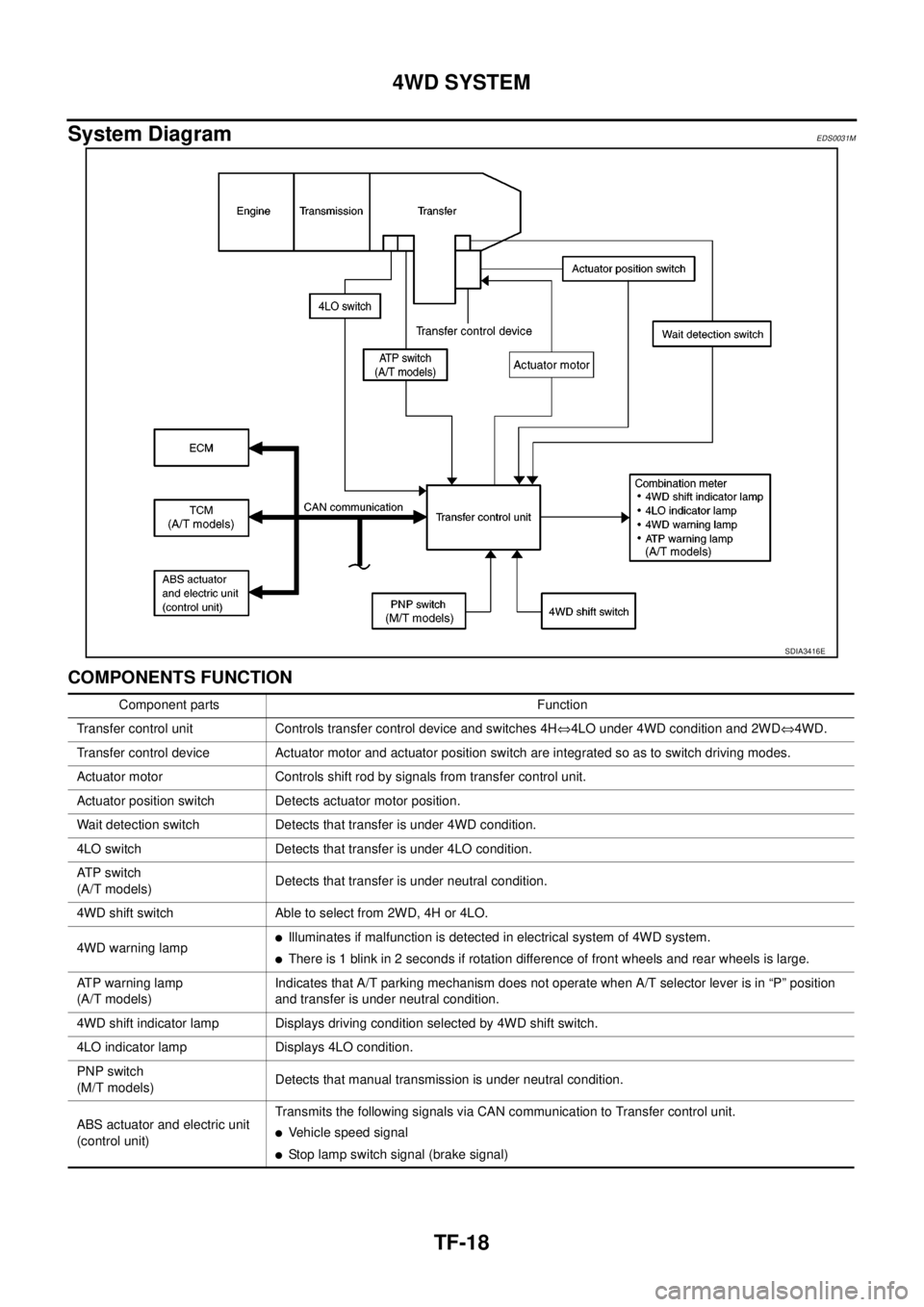
System Diagram
EDS0031M
COMPONENTS FUNCTION
SDIA3416E
Component parts Function
Transfer control unit Controls transfer control device and switches 4HÛ4LO under 4WD condition and 2WDÛ4WD.
Transfer control device Actuator motor and actuator position switch are integrated so as to switch driving modes.
Actuator motor Controls shift rod by signals from transfer control unit.
Actuator position switch Detects actuator motor position.
Wait detection switch Detects that transfer is under 4WD condition.
4LO switch Detects that transfer is under 4LO condition.
AT P s w i t c h
(A/T models)Detects that transfer is under neutral condition.
4WD shift switch Able to select from 2WD, 4H or 4LO.
4WD warning lamp
lIlluminates if malfunction is detected in electrical system of 4WD system.
lThere is 1 blink in 2 seconds if rotation difference of front wheels and rear wheels is large.
ATP warning lamp
(A/T models)Indicates that A/T parking mechanism does not operate when A/T selector lever is in “P” position
and transfer is under neutral condition.
4WD shift indicator lamp Displays driving condition selected by 4WD shift switch.
4LO indicator lamp Displays 4LO condition.
PNP switch
(M/T models)Detects that manual transmission is under neutral condition.
ABS actuator and electric unit
(control unit)Transmits the following signals via CAN communication to Transfer control unit.
lVehicle speed signal
lStop lamp switch signal (brake signal)
Page 3005 of 3171
TF-38
TROUBLE DIAGNOSIS
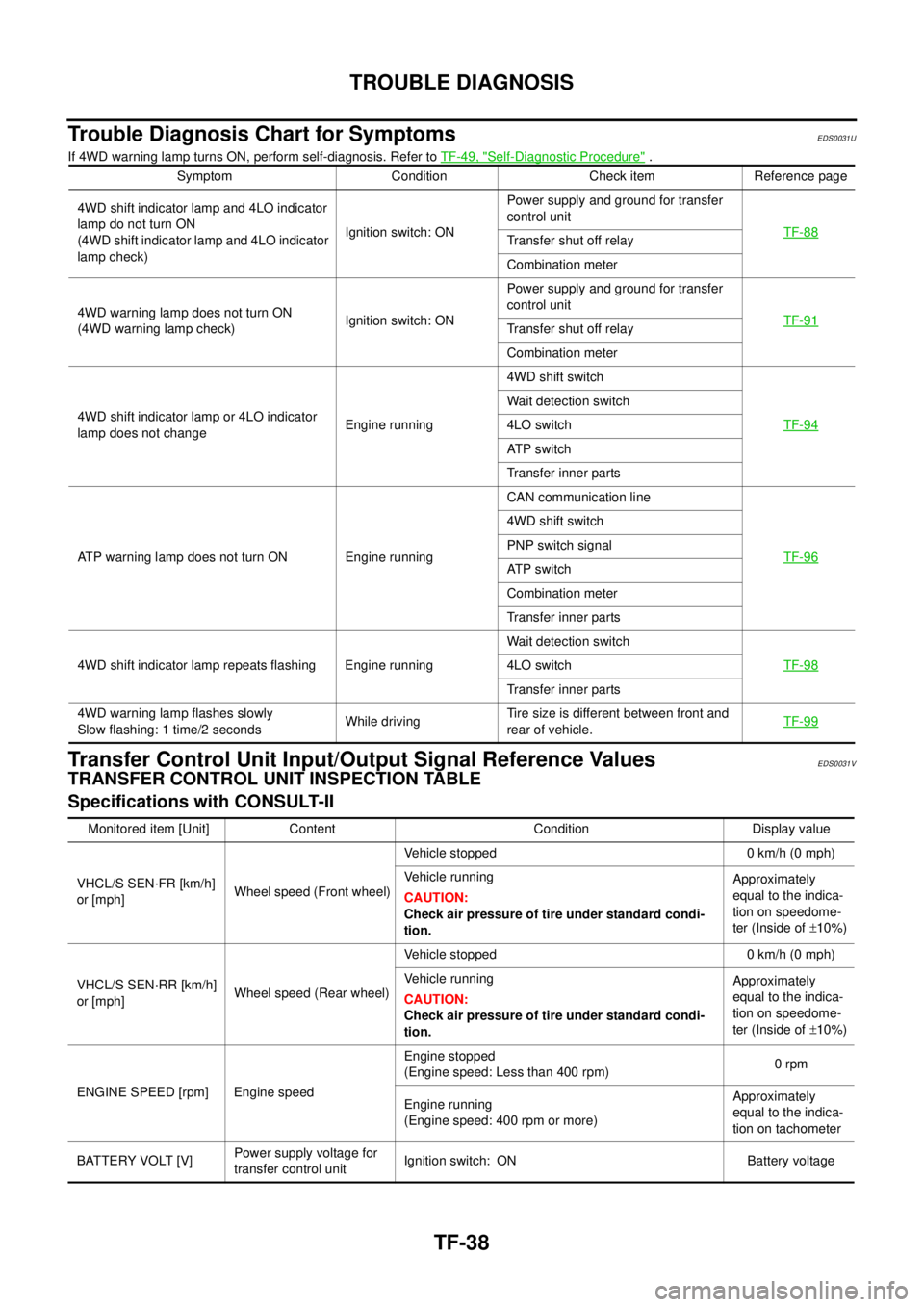
Trouble Diagnosis Chart for Symptoms
EDS0031U
If 4WD warning lamp turns ON, perform self-diagnosis. Refer toTF-49, "Self-Diagnostic Procedure".
Transfer Control Unit Input/Output Signal Reference ValuesEDS0031V
TRANSFER CONTROL UNIT INSPECTION TABLE
Specifications with CONSULT-II
Symptom Condition Check item Reference page
4WD shift indicator lamp and 4LO indicator
lamp do not turn ON
(4WD shift indicator lamp and 4LO indicator
lamp check)Ignition switch: ONPower supply and ground for transfer
control unit
TF-88
Transfer shut off relay
Combination meter
4WD warning lamp does not turn ON
(4WD warning lamp check)Ignition switch: ONPower supply and ground for transfer
control unit
TF-91
Transfer shut off relay
Combination meter
4WD shift indicator lamp or 4LO indicator
lamp does not changeEngine running4WD shift switch
TF-94
Wait detection switch
4LO switch
AT P s w i t c h
Transfer inner parts
ATP warning lamp does not turn ON Engine runningCAN communication line
TF-96
4WD shift switch
PNP switch signal
AT P s w i t c h
Combination meter
Transfer inner parts
4WD shift indicator lamp repeats flashing Engine runningWait detection switch
TF-98
4LO switch
Transfer inner parts
4WD warning lamp flashes slowly
Slow flashing: 1 time/2 secondsWhile drivingTire size is different between front and
rear of vehicle.TF-99
Monitored item [Unit] Content Condition Display value
VHCL/S SEN·FR [km/h]
or [mph]Wheel speed (Front wheel)Vehicle stopped 0 km/h (0 mph)
Vehicle running
CAUTION:
Check air pressure of tire under standard condi-
tion.Approximately
equal to the indica-
tion on speedome-
ter (Inside of±10%)
VHCL/S SEN·RR [km/h]
or [mph]Wheel speed (Rear wheel)Vehicle stopped 0 km/h (0 mph)
Vehicle running
CAUTION:
Check air pressure of tire under standard condi-
tion.Approximately
equal to the indica-
tion on speedome-
ter (Inside of±10%)
ENGINE SPEED [rpm] Engine speedEngine stopped
(Engine speed: Less than 400 rpm)0rpm
Engine running
(Engine speed: 400 rpm or more)Approximately
equal to the indica-
tion on tachometer
BATTERY VOLT [V]Power supply voltage for
transfer control unitIgnition switch: ON Battery voltage
Page 3014 of 3171

TROUBLE DIAGNOSIS
TF-47
C
E
F
G
H
I
J
K
L
MA
B
TF
DATA MONITOR MODE
Operation Procedure
1. Perform “CONSULT-II SETTING PROCEDURE”. Refer toTF-44, "CONSULT-II SETTING PROCEDURE"
.
2. Touch “DATA MONITOR”.
3. Select from “SELECT MONITOR ITEM”, screen of data monitor mode is displayed.
NOTE:
When malfunction is detected, CONSULT-II performs REAL-TIME DIAGNOSIS.
Also, any malfunction detected while in this mode will be displayed in real time.
Display Item List
´: Standard –: Not applicable
Monitored item (Unit)Monitor item selection
Remarks
ECU INPUT
SIGNALSMAIN
SIGNALSSELECTION
FROM MENU
VHCL/S SEN·FR [km/h] or [mph]´–´For ABS models, wheel speed calculated
by ABS actuator and electric unit (control
unit). Signal input with CAN communica-
tion line.
VHCL/S SEN·RR [km/h] or [mph]´–´For ABS models, wheel speed calculated
by TCM. Signal input with CAN communi-
cation line.
ENGINE SPEED [rpm]´–´Engine speed is displayed.
Signal input with CAN communication line.
BATTERY VOLT [V]´–´Power supply voltage for transfer control
unit.
2WD SWITCH [ON/OFF]´–´
4WD shift switch signal status is dis-
played.
(4L means 4LO of 4WD shift switch.) 4H SWITCH [ON/OFF]´–´
4L SWITCH [ON/OFF]´–´
4L POSI SW [ON/OFF]´–´This means 4LO switch.
4LO switch signal status is displayed.
ATP SWITCH [ON/OFF]´–´ATP switch signal status is displayed.
WAIT DETCT SW [ON/OFF]´–´Wait detection switch signal status is dis-
played.
4WD MODE [2H/4H/4L] –´´Control status of 4WD recognized by
transfer control unit. (2WD, 4H or 4LO)
VHCL/S COMP [km/h] or [mph] –´´Vehicle speed recognized by transfer con-
trol unit.
SHIFT ACT 1 [ON/OFF] –´´Output condition to actuator motor (clock-
wise)
SHIFT AC MON 1 [ON/OFF] – –´Check signal for transfer control unit sig-
nal output
SHIFT ACT 2 [ON/OFF] –´´Output condition to actuator motor (coun-
terclockwise)
SHIFT AC MON 2 [ON/OFF] – –´Check signal for transfer control unit sig-
nal output
SFT ACT/R MON [ON/OFF] – –´Operating condition of actuator motor
relay (integrated in transfer control unit)
SHIFT POS SW 1 [ON/OFF]´–´Condition of actuator position switch 1
SHIFT POS SW 2 [ON/OFF]´–´Condition of actuator position switch 2
SHIFT POS SW 3 [ON/OFF]´–´Condition of actuator position switch 3
SHIFT POS SW 4 [ON/OFF]´–´Condition of actuator position switch 4
Page 3106 of 3171

WT-1
ROAD WHEELS & TIRES
E SUSPENSION
CONTENTS
C
D
F
G
H
I
J
K
L
M
SECTIONWT
A
B
WT
ROAD WHEELS & TIRES
NOISE, VIBRATION, AND HARSHNESS (NVH)
TROUBLESHOOTING ................................................ 2
NVH Troubleshooting Chart ..................................... 2
WHEEL ....................................................................... 3
Inspection ................................................................. 3
STEEL WHEEL ..................................................... 3
WHEEL AND TIRE ASSEMBLY ................................. 4Balancing Wheels ..................................................... 4
REMOVAL ............................................................. 4
WHEEL BALANCE ADJUSTMENT ....................... 4
Rotation .................................................................... 5
SERVICE DATA AND SPECIFICATIONS (SDS) ........ 6
Road Wheel .............................................................. 6
Tire ........................................................................... 6
Page 3107 of 3171
WT-2
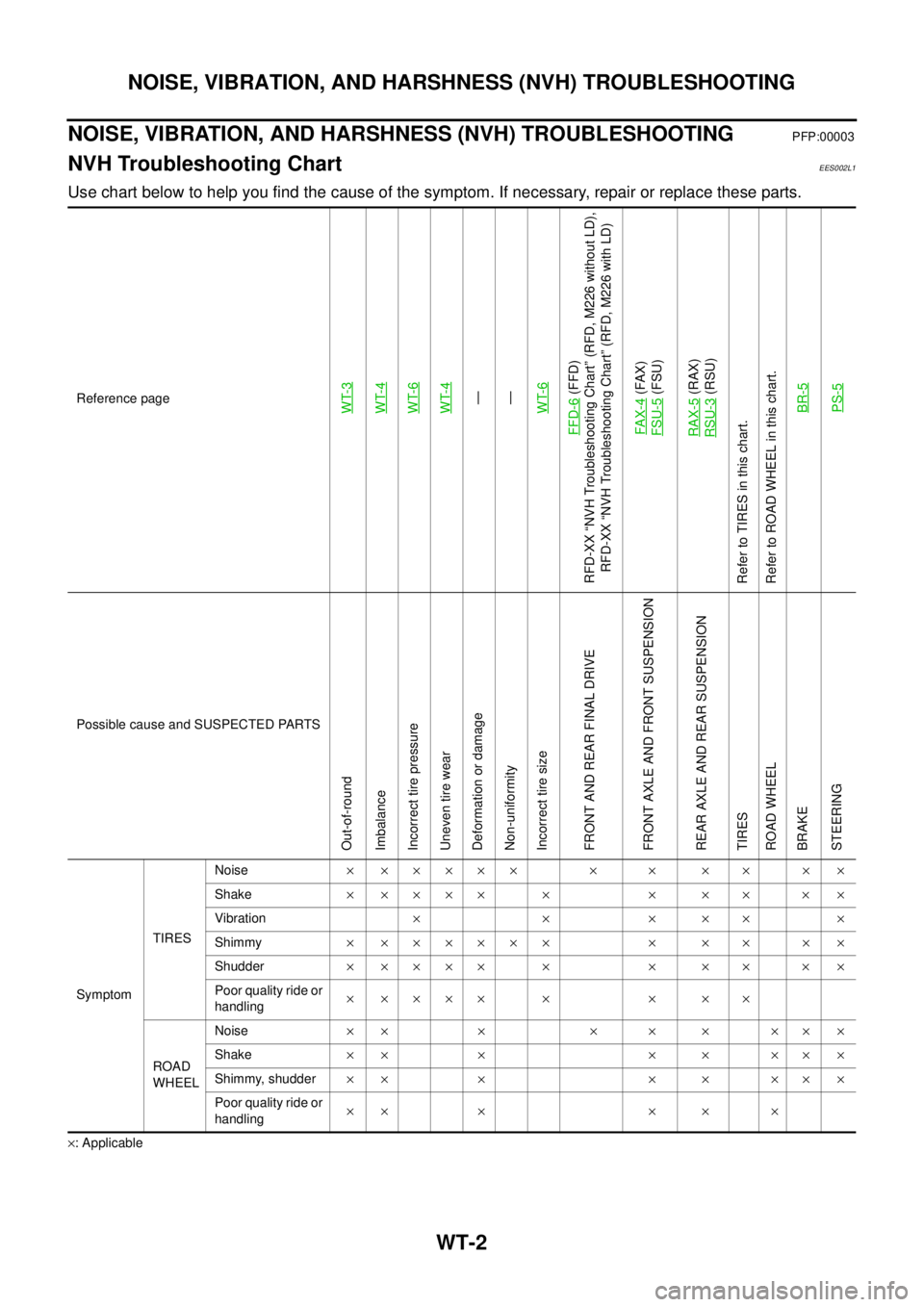
NOISE, VIBRATION, AND HARSHNESS (NVH) TROUBLESHOOTING
NOISE, VIBRATION, AND HARSHNESS (NVH) TROUBLESHOOTING
PFP:00003
NVH Troubleshooting ChartEES002L1
Use chart below to help you find the cause of the symptom. If necessary, repair or replace these parts.
´: ApplicableReference page
WT-3WT-4WT-6WT-4—
—
WT-6
FFD-6
(FFD)
RFD-XX “NVH Troubleshooting Chart” (RFD, M226 without LD),
RFD-XX “NVH Troubleshooting Chart” (RFD, M226 with LD)
FAX-4(FAX)
FSU-5(FSU)
RAX-5(RAX)
RSU-3(RSU)
Refer to TIRES in this chart.
Refer to ROAD WHEEL in this chart.
BR-5
PS-5
Possible cause and SUSPECTED PARTS
Out-of-round
Imbalance
Incorrect tire pressure
Uneven tire wear
Deformation or damage
Non-uniformity
Incorrect tire size
FRONT AND REAR FINAL DRIVE
FRONT AXLE AND FRONT SUSPENSION
REAR AXLE AND REAR SUSPENSION
TIRES
ROAD WHEEL
BRAKE
STEERING
SymptomTIRESNoise´ ´´´´´ ´ ´ ´ ´ ´ ´
Shake´´´´´ ´ ´ ´ ´ ´´
Vibration´´´´´´
Shimmy´ ´´´´´´ ´ ´ ´ ´ ´
Shudder´´´´´ ´ ´ ´ ´ ´´
Poor quality ride or
handling´´´´´ ´ ´ ´ ´
ROAD
WHEELNoise´´ ´ ´ ´ ´ ´´´
Shake´´ ´ ´ ´ ´´´
Shimmy, shudder´´ ´ ´ ´ ´´´
Poor quality ride or
handling´´ ´ ´ ´ ´
Page 3108 of 3171
WHEEL
WT-3
C
D
F
G
H
I
J
K
L
MA
B
WT
WHEELPFP:40300
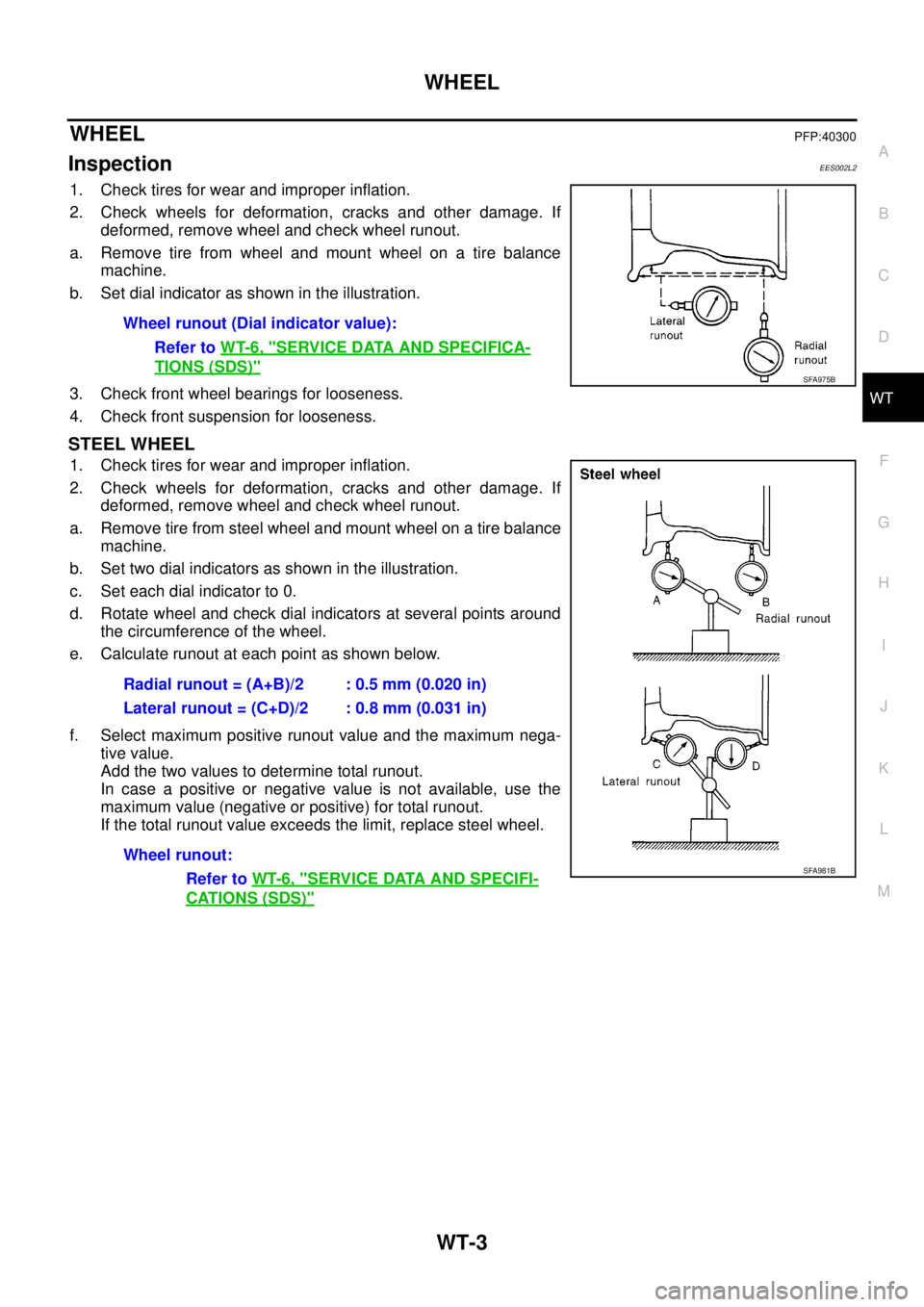
InspectionEES002L2
1. Check tires for wear and improper inflation.
2. Check wheels for deformation, cracks and other damage. If
deformed, remove wheel and check wheel runout.
a. Remove tire from wheel and mount wheel on a tire balance
machine.
b. Set dial indicator as shown in the illustration.
3. Check front wheel bearings for looseness.
4. Check front suspension for looseness.
STEEL WHEEL
1. Check tires for wear and improper inflation.
2. Check wheels for deformation, cracks and other damage. If
deformed, remove wheel and check wheel runout.
a. Remove tire from steel wheel and mount wheel on a tire balance
machine.
b. Set two dial indicators as shown in the illustration.
c. Set each dial indicator to 0.
d. Rotate wheel and check dial indicators at several points around
the circumference of the wheel.
e. Calculate runout at each point as shown below.
f. Select maximum positive runout value and the maximum nega-
tive value.
Add the two values to determine total runout.
In case a positive or negative value is not available, use the
maximum value (negative or positive) for total runout.
If the total runout value exceeds the limit, replace steel wheel.Wheel runout (Dial indicator value):
Refer toWT-6, "
SERVICE DATA AND SPECIFICA-
TIONS (SDS)"SFA975B
Radial runout = (A+B)/2 : 0.5 mm (0.020 in)
Lateral runout = (C+D)/2 : 0.8 mm (0.031 in)
Wheel runout:
Refer toWT-6, "
SERVICE DATA AND SPECIFI-
CATIONS (SDS)"
SFA981B
Page 3109 of 3171
WT-4
WHEEL AND TIRE ASSEMBLY
WHEEL AND TIRE ASSEMBLY
PFP:40300
Balancing WheelsEES002L3
REMOVAL
1. Using releasing agent, remove double-faced adhesive tape from the wheel.
CAUTION:
lBe careful not to scratch the wheel during removal.
lAfter removing double-faced adhesive tape, wipe clean traces of releasing agent from the
wheel.
WHEEL BALANCE ADJUSTMENT
lIf a tire balance machine has adhesion balance weight mode settings and drive-in weight mode setting,
select and adjust a drive-in weight mode suitable for wheels.
1. Set wheel on wheel balancer using the center hole as a guide. Start the tire balance machine.
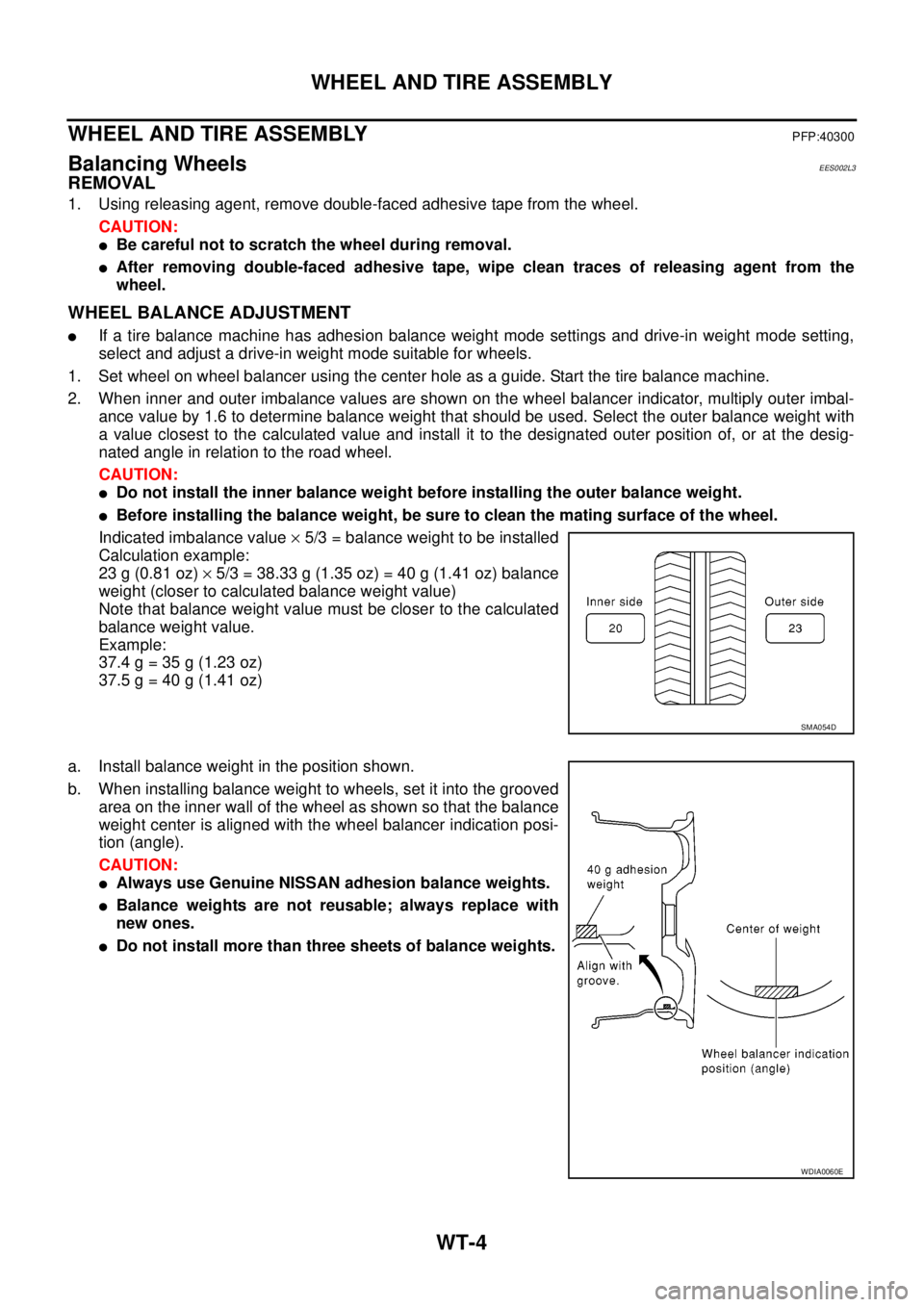
2. When inner and outer imbalance values are shown on the wheel balancer indicator, multiply outer imbal-
ance value by 1.6 to determine balance weight that should be used. Select the outer balance weight with
a value closest to the calculated value and install it to the designated outer position of, or at the desig-
nated angle in relation to the road wheel.
CAUTION:
lDo not install the inner balance weight before installing the outer balance weight.
lBefore installing the balance weight, be sure to clean the mating surface of the wheel.
Indicated imbalance value´5/3 = balance weight to be installed
Calculation example:
23 g (0.81 oz)´5/3 = 38.33 g (1.35 oz) = 40 g (1.41 oz) balance
weight (closer to calculated balance weight value)
Note that balance weight value must be closer to the calculated
balance weight value.
Example:
37.4 g = 35 g (1.23 oz)
37.5 g = 40 g (1.41 oz)
a. Install balance weight in the position shown.
b. When installing balance weight to wheels, set it into the grooved
area on the inner wall of the wheel as shown so that the balance
weight center is aligned with the wheel balancer indication posi-
tion (angle).
CAUTION:
lAlways use Genuine NISSAN adhesion balance weights.
lBalance weights are not reusable; always replace with
new ones.
lDo not install more than three sheets of balance weights.
SMA054D
WDIA0060E
Page 3110 of 3171
WHEEL AND TIRE ASSEMBLY
WT-5
C
D
F
G
H
I
J
K
L
MA
B
WT
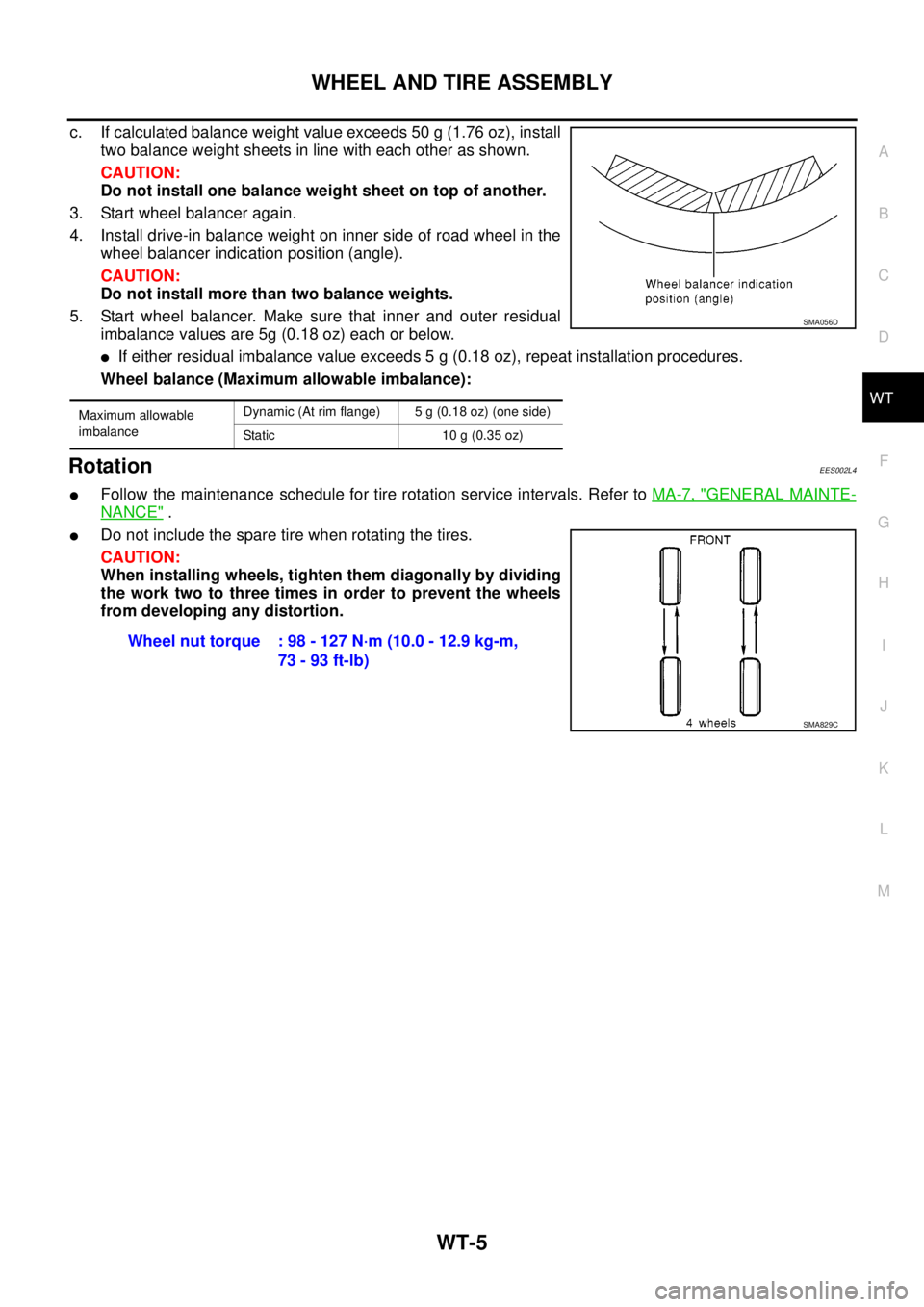
c. If calculated balance weight value exceeds 50 g (1.76 oz), install
two balance weight sheets in line with each other as shown.
CAUTION:
Do not install one balance weight sheet on top of another.
3. Start wheel balancer again.
4. Install drive-in balance weight on inner side of road wheel in the
wheel balancer indication position (angle).
CAUTION:
Do not install more than two balance weights.
5. Start wheel balancer. Make sure that inner and outer residual
imbalance values are 5g (0.18 oz) each or below.
lIf either residual imbalance value exceeds 5 g (0.18 oz), repeat installation procedures.
Wheel balance (Maximum allowable imbalance):
RotationEES002L4
lFollow the maintenance schedule for tire rotation service intervals. Refer toMA-7, "GENERAL MAINTE-
NANCE".
lDo not include the spare tire when rotating the tires.
CAUTION:
When installing wheels, tighten them diagonally by dividing
the work two to three times in order to prevent the wheels
from developing any distortion.
Maximum allowable
imbalanceDynamic (At rim flange) 5 g (0.18 oz) (one side)
Static 10 g (0.35 oz)
SMA056D
Wheel nut torque : 98 - 127 N·m (10.0 - 12.9 kg-m,
73 - 93 ft-lb)
SMA829C
Page 3111 of 3171

WT-6
SERVICE DATA AND SPECIFICATIONS (SDS)
SERVICE DATA AND SPECIFICATIONS (SDS)
PFP:00030
Road WheelEES002L5
TireEES002L6
Unit: kPa (kg/cm2, psi) Wheel type AluminumSteel
Inside Outside
Maximum radial
runout limitLateral mm (in) 0.3 (0.012) or less 1.0 (0.039) or less 0.9 (0.035) or less
Radial mm (in) 0.3 (0.012) or less 0.8 (0.031) or less 0.4 (0.016) or less
Maximum residual
imbalanceDynamic
(at rim flange)Less than 5 g (0.18 oz) (per side)
Static (at rim flange) Less than 10 g (0.35 oz)
Tire sizeAir pressure
Conventional tire Spare tire
Full size spare tire — 240 (2.4, 35)
235/70R16 240 (2.4, 35) —
255/70R16 240 (2.4, 35) —
265/70R16 240 (2.4, 35) —
255/65R17 240 (2.4, 35) —