battery replacement NISSAN NAVARA 2005 Repair User Guide
[x] Cancel search | Manufacturer: NISSAN, Model Year: 2005, Model line: NAVARA, Model: NISSAN NAVARA 2005Pages: 3171, PDF Size: 49.59 MB
Page 2086 of 3171

LT-3
C
D
E
F
G
H
I
J
L
MA
B
LT Combination Switch Reading Function ................. 115
CONSULT-II Function (BCM) ................................ 115
CONSULT-II OPERATION ................................. 115
DATA MONITOR ................................................ 116
Combination Switch Inspection ............................. 118
Removal and Installation ...................................... 120
Switch Circuit Inspection ...................................... 120
STOP LAMP ........................................................... 121
Wiring Diagram — STOP/L — .............................. 121
Bulb Replacement ................................................ 122
Removal and Installation ...................................... 122
BACK-UP LAMP .................................................... 123
Wiring Diagram — BACK/L — ............................. 123
Bulb Replacement ................................................ 124
Removal and Installation ...................................... 124
PARKING, LICENSE PLATE AND TAIL LAMPS ... 125
Component Parts and Harness Connector Location. 125
System Description .............................................. 125
OUTLINE ........................................................... 125
OPERATION BY LIGHTING SWITCH .............. 126
COMBINATION SWITCH READING FUNCTION. 126
CAN Communication System Description ............ 126
Schematic ............................................................ 127
WITHOUT DAYTIME LIGHT SYSTEM ............. 127
Wiring Diagram — TAIL/L — ................................ 128
WITHOUT DAYTIME LIGHT SYSTEM ............. 128
Schematic ............................................................ 131
WITH DAYTIME LIGHT SYSTEM ..................... 131
Wiring Diagram — TAIL/L — ................................ 132
WITH DAYTIME LIGHT SYSTEM ..................... 132
Terminals and Reference Values for BCM ........... 135
Terminals and Reference Values for IPDM E/R ... 135
How to Proceed With Trouble Diagnosis .............. 136
Preliminary Check ................................................ 136
CHECK POWER SUPPLY AND GROUND CIR-
CUIT .................................................................. 136
CONSULT-II Functions (BCM) ............................. 137
CONSULT-II Functions (IPDM E/R) ..................... 137
Clarence, License Plate and Tail Lamps Do Not Illu-
minate .................................................................. 138
Clearance, License Plate and Tail Lamps Do Not
Turn OFF (After Approx. 10 Minutes) ................... 141
Front Clearance Lamp ......................................... 142BULB REPLACEMENT .....................................142
Tail Lamp ..............................................................142
BULB REPLACEMENT .....................................142
REAR COMBINATION LAMP .................................143
Bulb Replacement ................................................143
REMOVAL .........................................................143
INSTALLATION .................................................143
Removal and Installation ......................................144
REMOVAL .........................................................144
INSTALLATION .................................................144
INTERIOR ROOM LAMP ........................................145
Component Parts and Harness Connector Location.145
System Description ...............................................145
POWER SUPPLY AND GROUND ....................145
SWITCH OPERATION ......................................147
ROOM LAMP TIMER OPERATION ..................147
INTERIOR LAMP BATTERY SAVER CONTROL.147
Schematic .............................................................148
Wiring Diagram — INT/L — ..................................149
Terminals and Reference Values for BCM ............154
How to Proceed With Trouble Diagnosis ..............155
Preliminary Check ................................................155
INSPECTION FOR POWER SUPPLY AND
GROUND CIRCUIT ...........................................155
CONSULT-II Function ...........................................157
CONSULT-II OPERATION .................................157
WORK SUPPORT .............................................158
DATA MONITOR ...............................................158
ACTIVE TEST ...................................................159
Map Lamp Control Does Not Operate ..................160
All Interior Room Lamps Do Not Operate .............161
ILLUMINATION .......................................................162
System Description ...............................................162
ILLUMINATION OPERATION BY LIGHTING
SWITCH ............................................................162
CAN Communication System Description ............163
CAN Communication Unit .....................................163
Schematic .............................................................164
Wiring Diagram — ILL — ......................................166
BULB SPECIFICATIONS ........................................173
Headlamp .............................................................173
Exterior Lamp .......................................................173
Interior Lamp/Illumination .....................................173
Page 2779 of 3171
![NISSAN NAVARA 2005 Repair User Guide RFD-76
[WITH ELECTRONIC LOCKING DIFFERENTIAL]
DIFFERENTIAL LOCK CONTROL UNIT
DIFFERENTIAL LOCK CONTROL UNIT
PFP:28496
Removal and InstallationEDS003BC
REMOVAL
1. Turn the ignition switch OFF and disco](/img/5/57362/w960_57362-2778.png "NISSAN NAVARA 2005 Repair User Guide RFD-76
[WITH ELECTRONIC LOCKING DIFFERENTIAL]
DIFFERENTIAL LOCK CONTROL UNIT
DIFFERENTIAL LOCK CONTROL UNIT
PFP:28496
Removal and InstallationEDS003BC
REMOVAL
1. Turn the ignition switch OFF and disco")
RFD-76
[WITH ELECTRONIC LOCKING DIFFERENTIAL]
DIFFERENTIAL LOCK CONTROL UNIT
DIFFERENTIAL LOCK CONTROL UNIT
PFP:28496
Removal and InstallationEDS003BC
REMOVAL
1. Turn the ignition switch OFF and disconnect the battery cables.
2. Remove the lower instrument panel LH (LHD models) or lower instrument panel RH (RHD models). Refer
toIP-13, "
LOWER INSTRUMENT PANEL LH"(LHD models) orIP-13, "LOWER INSTRUMENT PANEL
LH"(RHD models).
3. Disconnect the differential lock control unit connector.
4. Remove the two bolts and remove the differential lock control
unit.
INSTALLATION
Installation is in the reverse order of removal.
lWhen installing differential lock control unit, tighten bolts to the specified torque.
lAfter the installation, check DIFF LOCK indicator lamp. Refer toRFD-33, "Precautions for Differential
Case Assembly and Differential Lock Control Unit Replacement".
WDIA0254E
Differential lock control unit bolts : 5.1 N·m (0.52 kg-m, 45 in-lb)
Page 2930 of 3171
![NISSAN NAVARA 2005 Repair User Guide TROUBLE DIAGNOSIS
SRS-21
C
D
E
F
G
I
J
K
L
MA
B
SRS
7. Diagnostic code is displayed on "SELF-DIAG [CURRENT]".
If no malfunction is detected on "SELF-DIAG [CURRENT]" even
though malfunction is detected](/img/5/57362/w960_57362-2929.png "NISSAN NAVARA 2005 Repair User Guide TROUBLE DIAGNOSIS
SRS-21
C
D
E
F
G
I
J
K
L
MA
B
SRS
7. Diagnostic code is displayed on \"SELF-DIAG [CURRENT]\".
If no malfunction is detected on \"SELF-DIAG [CURRENT]\" even
though malfunction is detected")
TROUBLE DIAGNOSIS
SRS-21
C
D
E
F
G
I
J
K
L
MA
B
SRS
7. Diagnostic code is displayed on "SELF-DIAG [CURRENT]".
If no malfunction is detected on "SELF-DIAG [CURRENT]" even
though malfunction is detected in "SRS Operation Check", refer to
SRS-26, "
DIAGNOSTIC PROCEDURE 4 (CONTINUED FROM
DIAGNOSTIC PROCEDURE 2)", to diagnose the following cases:
lSelf-diagnostic result "SELF-DIAG [PAST]" (previously stored in
the memory) might not be erased after repair.
lThe SRS system malfunctions intermittently.
CONSULT-II Diagnostic Code Chart ("SELF-DIAG [CURRENT]")
WHIA0151E
SRS701
Diagnostic item ExplanationRepair order
Recheck SRS at each replacement
NO DTC IS DETECTEDWhen malfunction is
indicated by the “AIR
BAG” warning lamp in
User mode.
lLow battery voltage (Less than
9V)lGo toSRS-24, "DIAGNOSTIC PRO-
CEDURE 3".
lSelf-diagnostic result “SELF-DIAG
[PAST]” (previously stored in the
memory) might not be erased
after repair.
lIntermittent malfunction has been
detected in the past.
lGo toSRS-26, "DIAGNOSTIC PRO-
CEDURE 4 (CONTINUED FROM
DIAGNOSTIC PROCEDURE 2)".
lGo toSRS-26, "DIAGNOSTIC PRO-
CEDURE 5".
lNo malfunction is detected. —
DRIVER AIRBAG MODULE
[OPEN]
[B1049] or [B1054]
lDriver air bag module circuit is open (including the spiral
cable).1. Visually check the wiring harness
connection.
2. Replace the harness if it has visible
damage.
3. Replace driver air bag module.
(Before disposal, it must be
deployed.)
4. Replace the spiral cable.
5. Replace the air bag diagnosis sen-
sor unit.
6. Replace the related harness. DRIVER AIRBAG MODULE
[VB-SHORT]
[B1050] or [B1055]
lDriver air bag module circuit is shorted to some power sup-
ply circuit (including the spiral cable).
DRIVER AIRBAG MODULE
[GND-SHORT]
[B1051] or [B1056]
lDriver air bag module circuit is shorted to ground (including
the spiral cable).
DRIVER AIRBAG MODULE
[SHORT]
[B1052] or [B1057]
lDriver air bag module circuits are shorted to each other.
Page 2937 of 3171
SRS-28
TROUBLE DIAGNOSIS
14. Repair the system as outlined by the “Repair order” in “Intermittent Malfunction Diagnostic Code Chart”,
that corresponds to the self-diagnostic result. For replacement procedure of component parts, refer to the
Removal and Installation procedure for the appropriate component.
15. Go toSRS-24, "
DIAGNOSTIC PROCEDURE 3", for final checking.
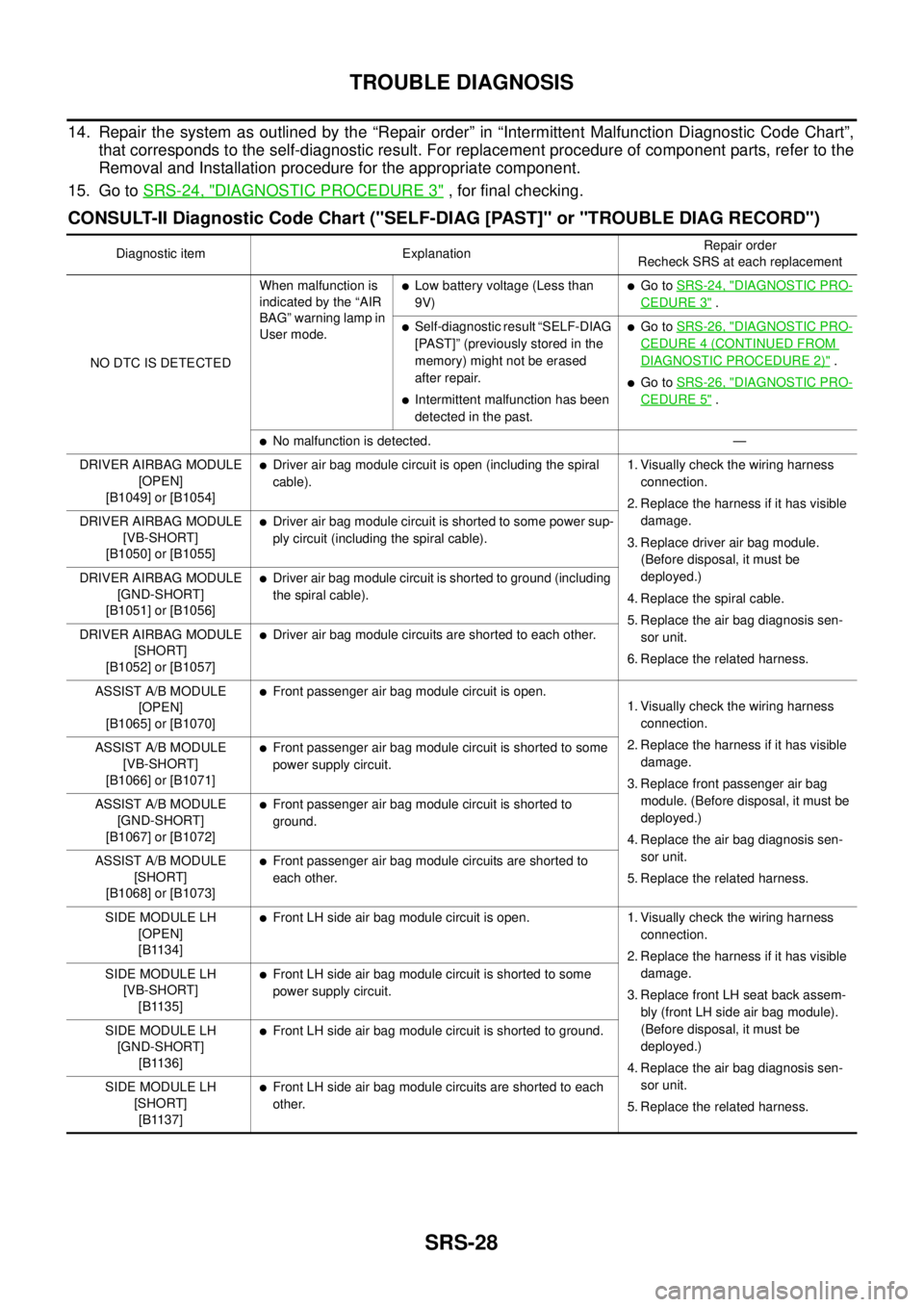
CONSULT-II Diagnostic Code Chart ("SELF-DIAG [PAST]" or "TROUBLE DIAG RECORD")
Diagnostic item ExplanationRepair order
Recheck SRS at each replacement
NO DTC IS DETECTEDWhen malfunction is
indicated by the “AIR
BAG” warning lamp in
User mode.
lLow battery voltage (Less than
9V)lGo toSRS-24, "DIAGNOSTIC PRO-
CEDURE 3".
lSelf-diagnostic result “SELF-DIAG
[PAST]” (previously stored in the
memory) might not be erased
after repair.
lIntermittent malfunction has been
detected in the past.
lGo toSRS-26, "DIAGNOSTIC PRO-
CEDURE 4 (CONTINUED FROM
DIAGNOSTIC PROCEDURE 2)".
lGo toSRS-26, "DIAGNOSTIC PRO-
CEDURE 5".
lNo malfunction is detected. —
DRIVER AIRBAG MODULE
[OPEN]
[B1049] or [B1054]
lDriver air bag module circuit is open (including the spiral
cable).1. Visually check the wiring harness
connection.
2. Replace the harness if it has visible
damage.
3. Replace driver air bag module.
(Before disposal, it must be
deployed.)
4. Replace the spiral cable.
5. Replace the air bag diagnosis sen-
sor unit.
6. Replace the related harness. DRIVER AIRBAG MODULE
[VB-SHORT]
[B1050] or [B1055]
lDriver air bag module circuit is shorted to some power sup-
ply circuit (including the spiral cable).
DRIVER AIRBAG MODULE
[GND-SHORT]
[B1051] or [B1056]
lDriver air bag module circuit is shorted to ground (including
the spiral cable).
DRIVER AIRBAG MODULE
[SHORT]
[B1052] or [B1057]
lDriver air bag module circuits are shorted to each other.
ASSIST A/B MODULE
[OPEN]
[B1065] or [B1070]
lFront passenger air bag module circuit is open.
1. Visually check the wiring harness
connection.
2. Replace the harness if it has visible
damage.
3. Replace front passenger air bag
module. (Before disposal, it must be
deployed.)
4. Replace the air bag diagnosis sen-
sor unit.
5. Replace the related harness. ASSIST A/B MODULE
[VB-SHORT]
[B1066] or [B1071]
lFront passenger air bag module circuit is shorted to some
power supply circuit.
ASSIST A/B MODULE
[GND-SHORT]
[B1067] or [B1072]
lFront passenger air bag module circuit is shorted to
ground.
ASSIST A/B MODULE
[SHORT]
[B1068] or [B1073]
lFront passenger air bag module circuits are shorted to
each other.
SIDE MODULE LH
[OPEN]
[B1134]
lFront LH side air bag module circuit is open. 1. Visually check the wiring harness
connection.
2. Replace the harness if it has visible
damage.
3. Replace front LH seat back assem-
bly (front LH side air bag module).
(Before disposal, it must be
deployed.)
4. Replace the air bag diagnosis sen-
sor unit.
5. Replace the related harness. SIDE MODULE LH
[VB-SHORT]
[B1135]
lFront LH side air bag module circuit is shorted to some
power supply circuit.
SIDE MODULE LH
[GND-SHORT]
[B1136]
lFront LH side air bag module circuit is shorted to ground.
SIDE MODULE LH
[SHORT]
[B1137]
lFront LH side air bag module circuits are shorted to each
other.
Page 2949 of 3171
SRS-40
FRONT PASSENGER AIR BAG MODULE
FRONT PASSENGER AIR BAG MODULE
PFP:K8515
Removal and InstallationEHS001XU
The passenger air bag module originally installed in the vehicle uses direct-connect style harness connectors.
Service replacement passenger air bag modules use tab-locking style harness connectors. If the passenger
air bag module is replaced or if the direct-connect harness connectors are damaged, the vehicle wiring har-
ness must be modified to allow connection of the service replacement passenger air bag module. Refer to
SRS-41, "
WIRING HARNESS MODIFICATION"for wiring harness modification procedure.
REMOVAL
CAUTION:
lDo not attempt to repair or replace damaged direct-connect front passenger air bag module con-
nectors. If a direct-connect harness connector is damaged, the front passenger air bag must be
replaced and the wiring harness modified.
lBefore servicing SRS, turn the ignition switch off, disconnect both battery cables and wait at least
3 minutes.
lAlways work from the side of or under front passenger air bag module.
1. Remove the glove box, then remove instrument panel. Refer toIP-10, "
INSTRUMENT PANEL ASSEM-
BLY".
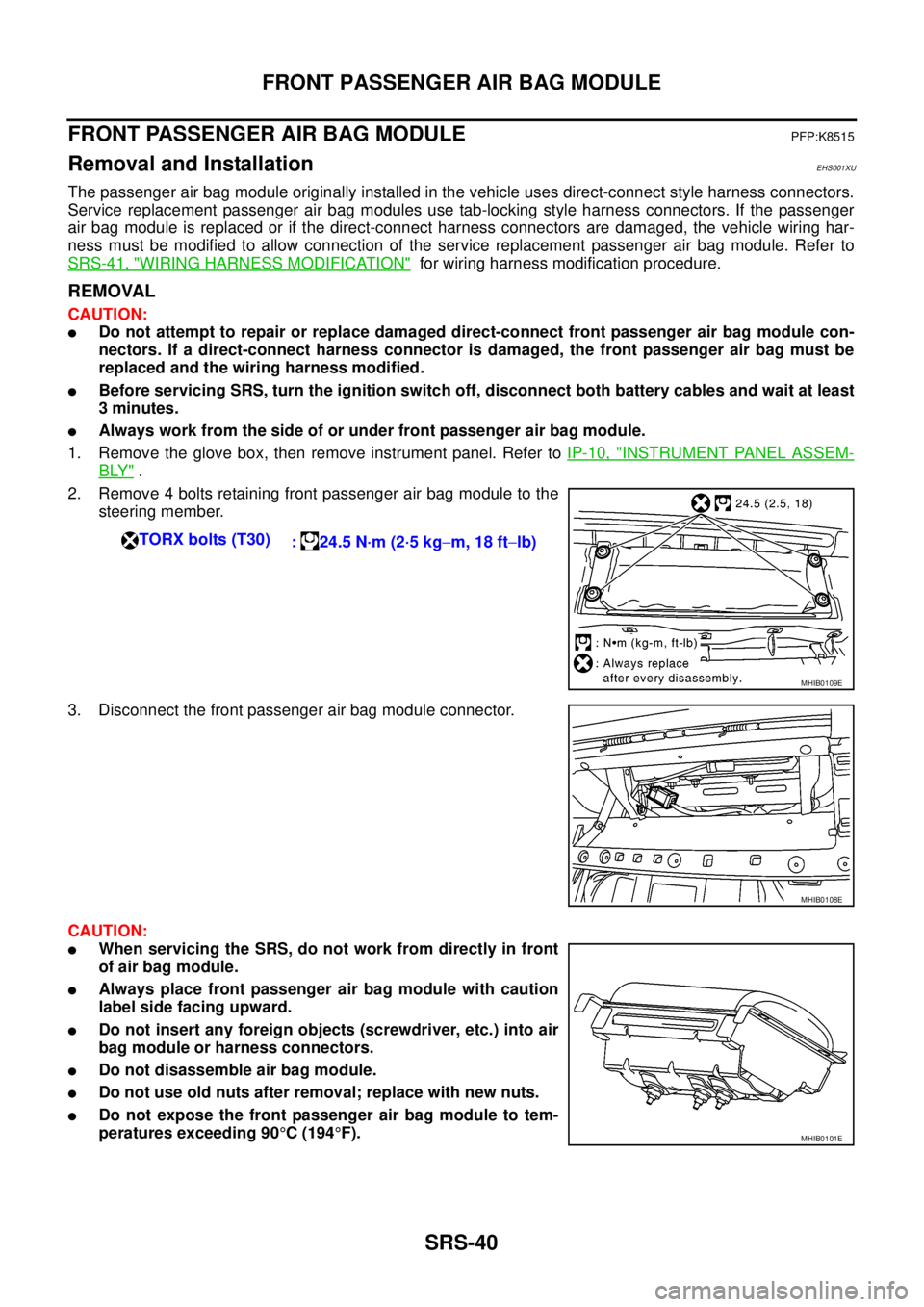
2. Remove 4 bolts retaining front passenger air bag module to the
steering member.
3. Disconnect the front passenger air bag module connector.
CAUTION:
lWhen servicing the SRS, do not work from directly in front
of air bag module.
lAlways place front passenger air bag module with caution
label side facing upward.
lDo not insert any foreign objects (screwdriver, etc.) into air
bag module or harness connectors.
lDo not disassemble air bag module.
lDo not use old nuts after removal; replace with new nuts.
lDo not expose the front passenger air bag module to tem-
peratures exceeding 90°C(194°F). TORX bolts (T30)
: 24.5 N·m (2·5 kg-m, 18 ft-lb)
MHIB0109E
MHIB0108E
MHIB0101E
Page 2951 of 3171

SRS-42
FRONT PASSENGER AIR BAG MODULE
lBefore servicing SRS, turn the ignition switch off, disconnect both battery cables and wait at least
3 minutes.
lAlways work from the side of or under front passenger air bag module.
lAfter the work is completed, perform self-diagnosis to check that no malfunction is detected.
Refer toSRS-18, "
SRS Operation Check".
1. Locate the yellow and orange direct-connect passenger air bag module harness connectors.
2. Use wire cutters to cut back both previously used direct-connect passenger air bag module harness con-
nectors from the vehicle wiring harness approximately 50 mm (1.9 in) from the connectors.
3. Remove approximately 150 mm (5.9 in) of the vehicle harness covering from the cut end.
4. Slide a piece of dual-wall heat shrink tubing (provided in the pas-
senger air bag service kit) onto each wire of the previously used
vehicle wiring harness.
5. Fold each wire back and insert into the end of the heat shrink
tubing so that the end of the wire is approximately centered in
the heat shrink tubing.
6. Use a heat gun to shrink the heat shrink tubing and seal the wire.
7. Use electrical tape to secure the modified circuits to the outside of the wiring harness.
8. Locate the front passenger air bag service replacement connec-
tor that is taped back to the main harness. Unwrap the tape to
access the yellow service replacement connector and remove
the dust cover from the connector.
LHIA0017E
WHIA0062E
MHIB0108E
Page 3067 of 3171
TF-100
TRANSFER CONTROL UNIT
TRANSFER CONTROL UNIT
PFP:33084
Removal and InstallationEDS0032J
REMOVAL
1. Switch 4WD shift switch to 2WD and set transfer assembly to 2WD.
CAUTION:
When removal transfer control unit, transfer state must be at 2WD or AUTO.
2. Turn the ignition switch OFF and disconnect the battery cables.
3. Remove the lower instrument panel LH (LHD models) or lower instrument panel RH (RHD models). Refer
toIP-13, "
LOWER INSTRUMENT PANEL LH"(LHD models) orIP-13, "LOWER INSTRUMENT PANEL
LH"(RHD models).
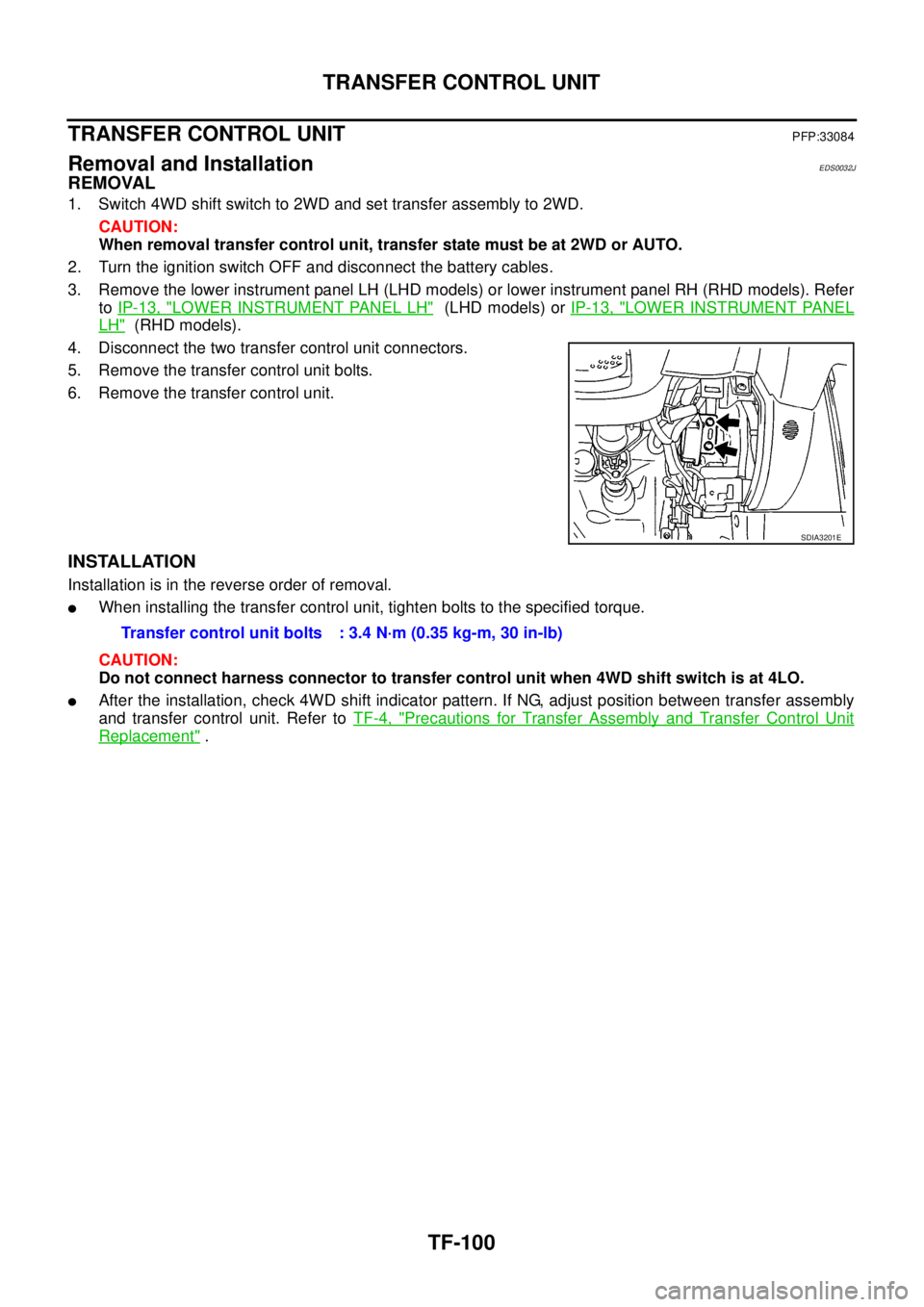
4. Disconnect the two transfer control unit connectors.
5. Remove the transfer control unit bolts.
6. Remove the transfer control unit.
INSTALLATION
Installation is in the reverse order of removal.
lWhen installing the transfer control unit, tighten bolts to the specified torque.
CAUTION:
Do not connect harness connector to transfer control unit when 4WD shift switch is at 4LO.
lAfter the installation, check 4WD shift indicator pattern. If NG, adjust position between transfer assembly
and transfer control unit. Refer toTF-4, "
Precautions for Transfer Assembly and Transfer Control Unit
Replacement".
SDIA3201E
Transfer control unit bolts : 3.4 N·m (0.35 kg-m, 30 in-lb)