warning NISSAN NAVARA 2005 Repair Workshop Manual
[x] Cancel search | Manufacturer: NISSAN, Model Year: 2005, Model line: NAVARA, Model: NISSAN NAVARA 2005Pages: 3171, PDF Size: 49.59 MB
Page 2851 of 3171
SC-18
CHARGING SYSTEM
3.CONTINUITY INSPECTION
1. Disconnect combination meter connector.
2. Check continuity between combination meter connector terminal 2 and alternator connector terminal 3.
OK or NG
OK >> Replace combination meter. (Do not replace alternator, since it is normal.)
NG >> Repair the harnesses or connectors. (Do not replace alternator, since it is normal.)
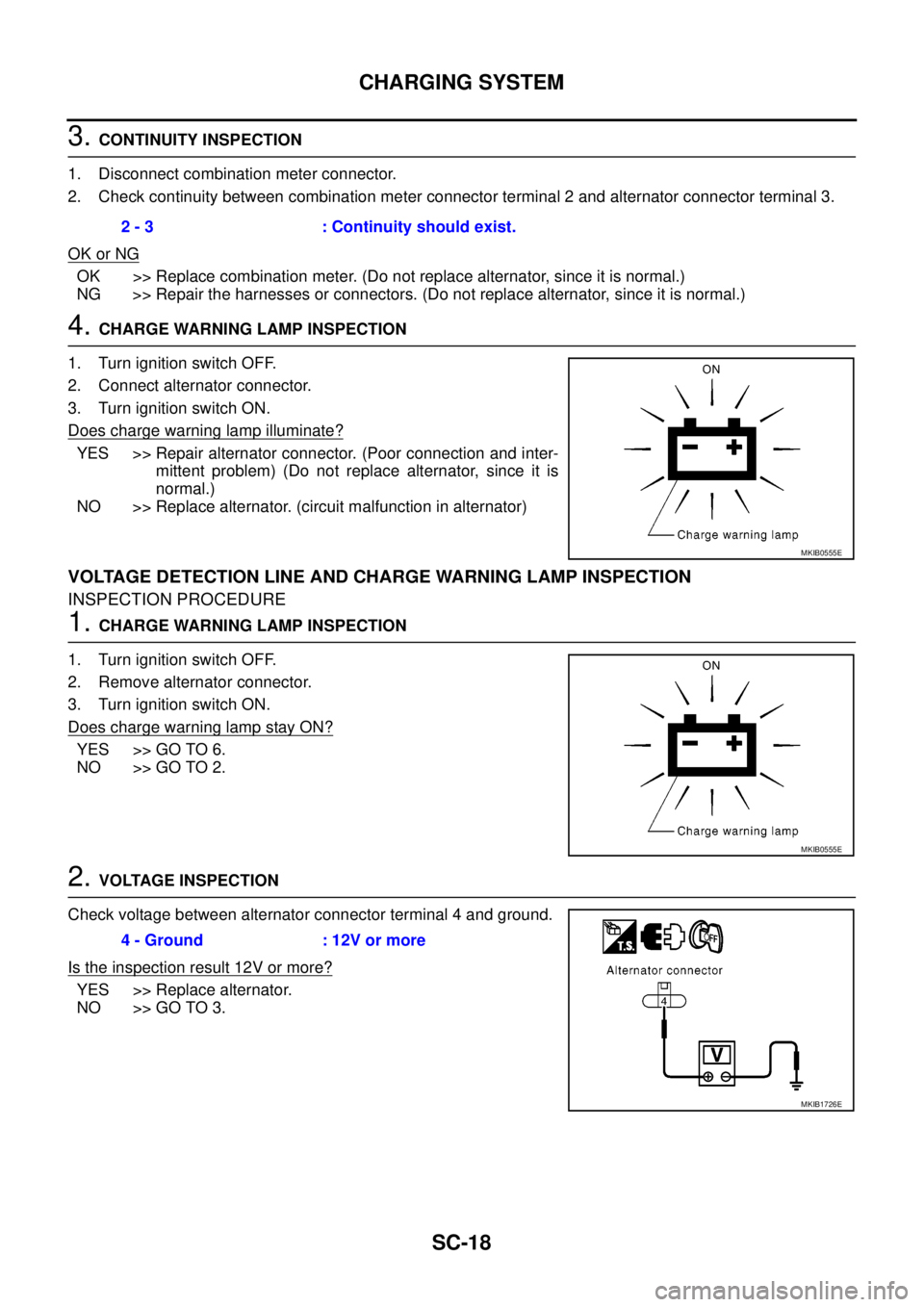
4.CHARGE WARNING LAMP INSPECTION
1. Turn ignition switch OFF.
2. Connect alternator connector.
3. Turn ignition switch ON.
Does charge warning lamp illuminate?
YES >> Repair alternator connector. (Poor connection and inter-
mittent problem) (Do not replace alternator, since it is
normal.)
NO >> Replace alternator. (circuit malfunction in alternator)
VOLTAGE DETECTION LINE AND CHARGE WARNING LAMP INSPECTION
INSPECTION PROCEDURE
1.CHARGE WARNING LAMP INSPECTION
1. Turn ignition switch OFF.
2. Remove alternator connector.
3. Turn ignition switch ON.
Does charge warning lamp stay ON?
YES >> GO TO 6.
NO >> GO TO 2.
2.VOLTAGE INSPECTION
Check voltage between alternator connector terminal 4 and ground.
Is the inspection result 12V or more?
YES >> Replace alternator.
NO >> GO TO 3.2 - 3 : Continuity should exist.
MKIB0555E
MKIB0555E
4 - Ground : 12V or more
MKIB1726E
Page 2873 of 3171

SE-2
PRECAUTIONS
PRECAUTIONS
PFP:00001
Precautions for Supplemental Restraint System (SRS) “AIR BAG” and “SEAT
BELT PRE-TENSIONER”
EIS00CEB
The Supplemental Restraint System such as “AIR BAG” and “SEAT BELT PRE-TENSIONER”, used along
with a front seat belt, helps to reduce the risk or severity of injury to the driver and front passenger for certain
types of collision. Information necessary to service the system safely is included in the SRS and SB section of
this Service Manual.
WARNING:
lTo avoid rendering the SRS inoperative, which could increase the risk of personal injury or death
in the event of a collision which would result in air bag inflation, all maintenance must be per-
formed by an authorized NISSAN/INFINITI dealer.
lImproper maintenance, including incorrect removal and installation of the SRS, can lead to per-
sonal injury caused by unintentional activation of the system. For removal of Spiral Cable and Air
Bag Module, see the SRS section.
lDo not use electrical test equipment on any circuit related to the SRS unless instructed to in this
Service Manual. SRS wiring harnesses can be identified by yellow and/or orange harnesses or
harness connectors.
Precautions for WorkEIS00BAR
lWhen removing or disassembling each component, be careful not to damage or deform it. If a component
may be subject to interference, be sure to protect it with a shop cloth.
lWhen removing (disengaging) components with a screwdriver or similar tool, be sure to wrap the compo-
nent with a shop cloth or vinyl tape to protect it.
lProtect the removed parts with a shop cloth and keep them.
lReplace a deformed or damaged clip.
lIf a part is specified as a non-reusable part, always replace it with new one.
lBe sure to tighten bolts and nuts securely to the specified torque.
lAfter re-installation is completed, be sure to check that each part works normally.
lFollow the steps below to clean components.
–Water soluble foul: Dip a soft cloth into lukewarm water, and wring the water out of the cloth to wipe the
fouled area.
Then rub with a soft and dry cloth.
–Oily foul: Dip a soft cloth into lukewarm water with mild detergent (concentration: within 2 to 3%), and wipe
the fouled area.
Then dip a cloth into fresh water, and wring the water out of the cloth to wipe the detergent off. Then rub
with a soft and dry cloth.
lDo not use organic solvent such as thinner, benzene, alcohol, or gasoline.
lFor genuine leather seats, use a genuine leather seat cleaner.
Page 2897 of 3171
SE-26
FRONT SEAT
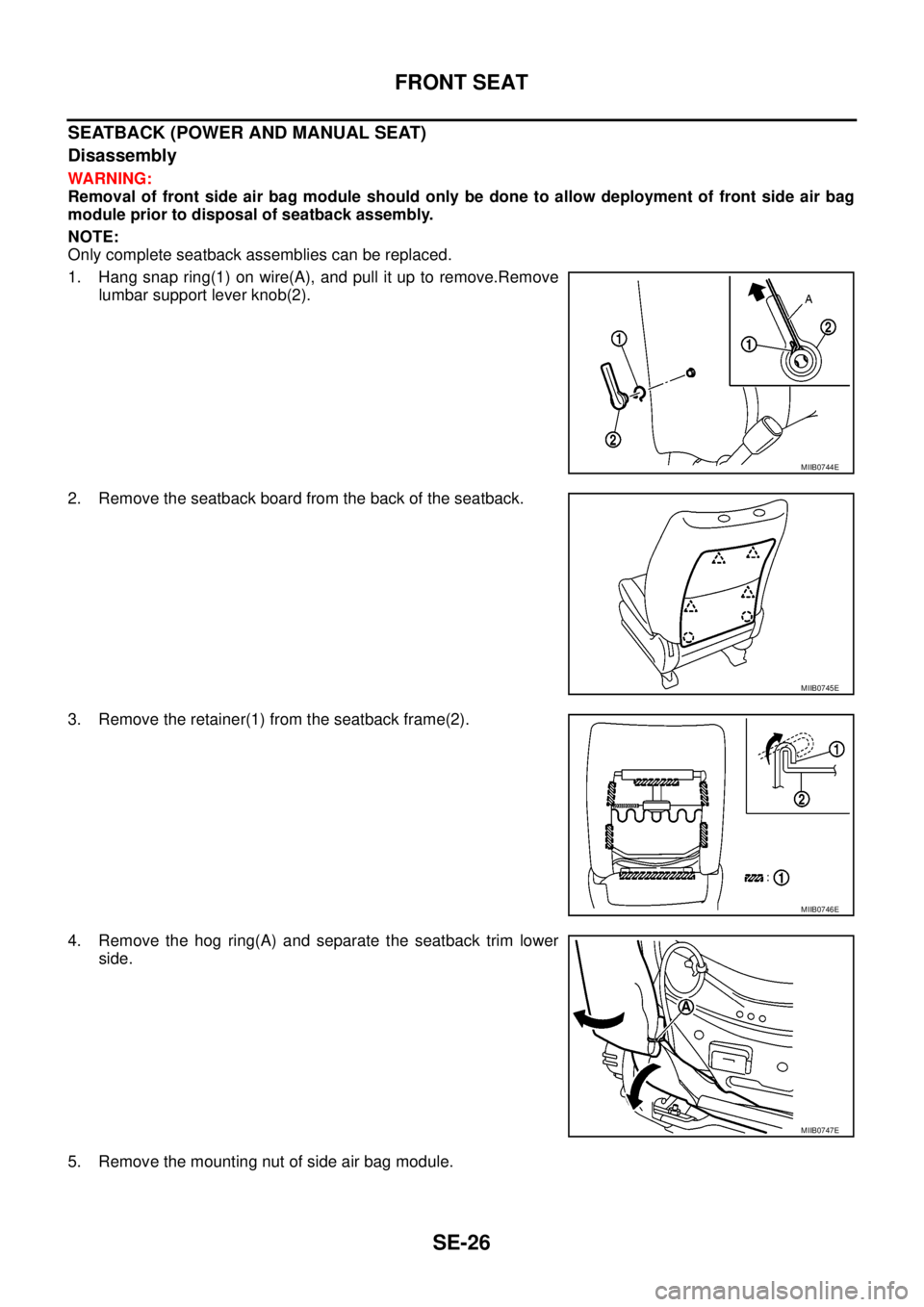
SEATBACK (POWER AND MANUAL SEAT)
Disassembly
WARNING:
Removal of front side air bag module should only be done to allow deployment of front side air bag
module prior to disposal of seatback assembly.
NOTE:
Only complete seatback assemblies can be replaced.
1. Hang snap ring(1) on wire(A), and pull it up to remove.Remove
lumbar support lever knob(2).
2. Remove the seatback board from the back of the seatback.
3. Remove the retainer(1) from the seatback frame(2).
4. Remove the hog ring(A) and separate the seatback trim lower
side.
5. Remove the mounting nut of side air bag module.
MIIB0744E
MIIB0745E
MIIB0746E
MIIB0747E
Page 2898 of 3171
FRONT SEAT
SE-27
C
D
E
F
G
H
J
K
L
MA
B
SE
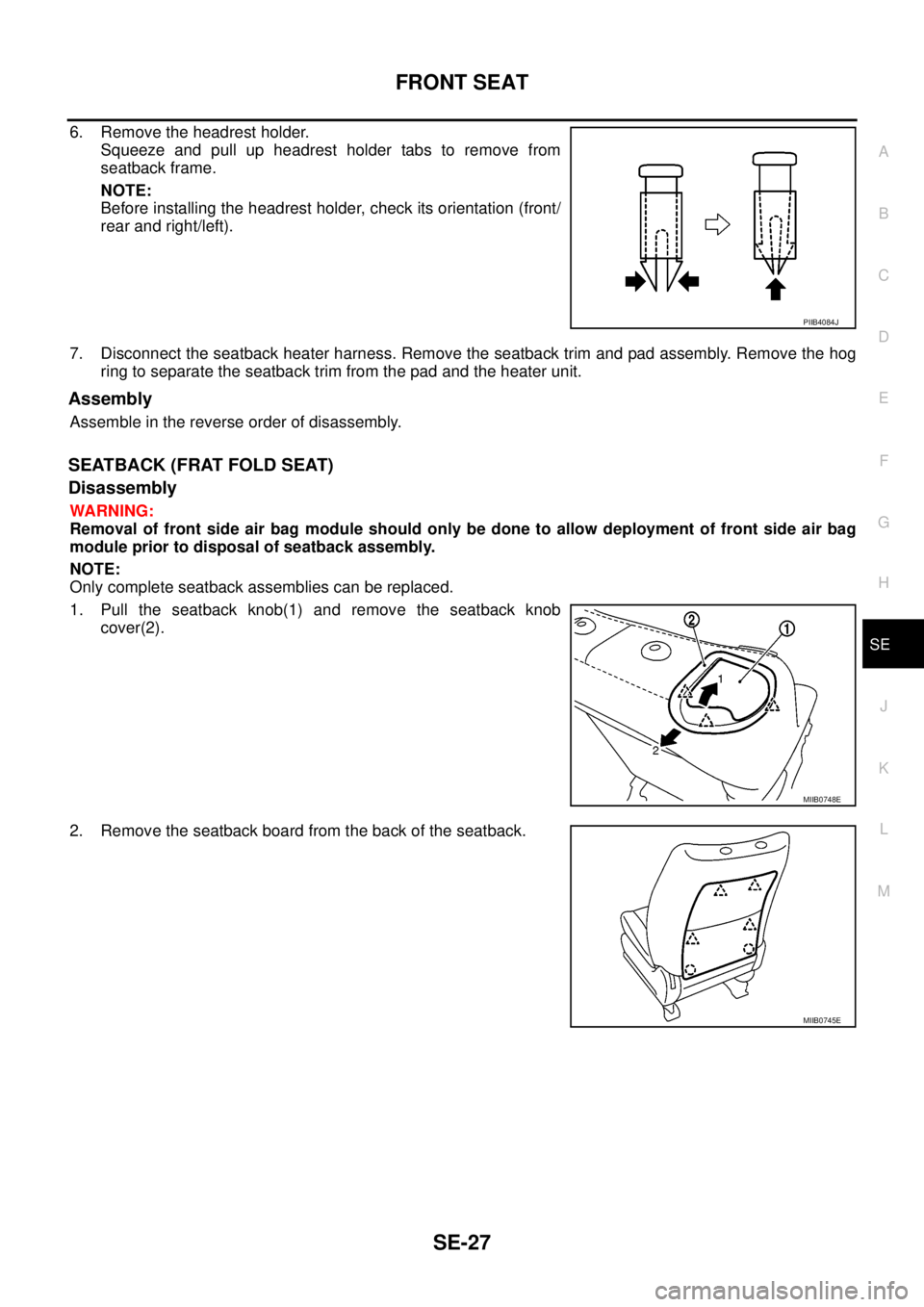
6. Remove the headrest holder.
Squeeze and pull up headrest holder tabs to remove from
seatback frame.
NOTE:
Before installing the headrest holder, check its orientation (front/
rear and right/left).
7. Disconnect the seatback heater harness. Remove the seatback trim and pad assembly. Remove the hog
ring to separate the seatback trim from the pad and the heater unit.
Assembly
Assemble in the reverse order of disassembly.
SEATBACK (FRAT FOLD SEAT)
Disassembly
WARNING:
Removal of front side air bag module should only be done to allow deployment of front side air bag
module prior to disposal of seatback assembly.
NOTE:
Only complete seatback assemblies can be replaced.
1. Pull the seatback knob(1) and remove the seatback knob
cover(2).
2. Remove the seatback board from the back of the seatback.
PIIB4084J
MIIB0748E
MIIB0745E
Page 2910 of 3171

SRS-1
SUPPLEMENTAL RESTRAINT SYSTEM (SRS)
H RESTRAINTS
CONTENTS
C
D
E
F
G
I
J
K
L
M
SECTIONSRS
A
B
SRS
SUPPLEMENTAL RESTRAINT SYSTEM (SRS)
PRECAUTIONS .......................................................... 3
Precautions for Supplemental Restraint System
(SRS)“AIRBAG”and“SEATBELTPRE-TEN-
SIONER” .................................................................. 3
Precautions for SRS “AIR BAG” and “SEAT BELT
PRE-TENSIONER” Service ..................................... 3
Precautions for Trouble Diagnosis ........................... 3
PREPARATION ........................................................... 4
Special Service Tools ............................................... 4
Commercial Service Tools ........................................ 5
SUPPLEMENTAL RESTRAINT SYSTEM (SRS) ....... 6
SRS Configuration ................................................... 6
Front Seat Belt Pre-Tensioner with Load Limiter ...... 7
Front Side Air Bag .................................................... 7
Side Curtain Air Bag ................................................. 7
Direct-Connect SRS Component Connectors .......... 8
TROUBLE DIAGNOSIS .............................................. 9
Trouble Diagnosis Introduction ................................. 9
DIAGNOSIS FUNCTION ....................................... 9
HOW TO PERFORM TROUBLE DIAGNOSES
FOR QUICK AND ACCURATE REPAIR ............... 9
WORK FLOW ...................................................... 10
SRS Components Parts Location ............................ 11
Schematic .............................................................. 12
Wiring Diagram–SRS– ........................................... 13
CONSULT-II Function (AIR BAG) ........................... 16
CONSULT-II Function ............................................ 16
HOW TO CHANGE SELF-DIAGNOSIS MODE
WITH CONSULT-II .............................................. 16
HOW TO ERASE SELF-DIAGNOSIS RESULTS... 17
Self-Diagnosis Function (Without CONSULT-II) ..... 17
HOW TO CHANGE SELF-DIAGNOSIS MODE... 17
HOW TO ERASE SELF-DIAGNOSIS RESULTS... 18
SRS Operation Check ............................................ 18
DIAGNOSTIC PROCEDURE 1 ........................... 18
Trouble Diagnosis With CONSULT-II ..................... 20
DIAGNOSTIC PROCEDURE 2 ........................... 20
DIAGNOSTIC PROCEDURE 3 ........................... 24
DIAGNOSTIC PROCEDURE 4 (CONTINUEDFROM DIAGNOSTIC PROCEDURE 2) .............. 26
DIAGNOSTIC PROCEDURE 5 ........................... 26
Trouble Diagnosis Without CONSULT-II ................. 30
DIAGNOSTIC PROCEDURE 6 ........................... 30
WARNING LAMP FLASH CODE CHART ........... 31
Trouble Diagnosis: “AIR BAG” Warning Lamp Does
Not Turn OFF ......................................................... 34
DIAGNOSTIC PROCEDURE 7 ........................... 34
Trouble Diagnosis: “AIR BAG” Warning Lamp Does
Not Turn ON ........................................................... 35
DIAGNOSTIC PROCEDURE 8 ........................... 35
DRIVER AIR BAG MODULE .................................... 36
Removal and Installation ........................................ 36
REMOVAL ........................................................... 36
INSTALLATION ................................................... 37
SPIRAL CABLE ........................................................ 38
Removal and Installation ........................................ 38
REMOVAL ........................................................... 38
INSTALLATION ................................................... 39
FRONT PASSENGER AIR BAG MODULE .............. 40
Removal and Installation ........................................ 40
REMOVAL ........................................................... 40
INSTALLATION ................................................... 41
WIRING HARNESS MODIFICATION .................. 41
FRONT SIDE AIR BAG MODULE ............................ 43
Removal and Installation ........................................ 43
REMOVAL ........................................................... 43
INSTALLATION ................................................... 43
SIDE CURTAIN AIR BAG MODULE ........................ 44
Removal and Installation ........................................ 44
REMOVAL ........................................................... 44
INSTALLATION ................................................... 44
SIDE AIR BAG (SATELLITE) SENSOR ................... 46
Removal and Installation ........................................ 46
REMOVAL ........................................................... 46
INSTALLATION ................................................... 46
FRONT SEAT BELT PRE-TENSIONER ................... 47
Removal and Installation ........................................ 47
Page 2912 of 3171
PRECAUTIONS
SRS-3
C
D
E
F
G
I
J
K
L
MA
B
SRS
PRECAUTIONSPFP:00001
Precautions for Supplemental Restraint System (SRS) “AIR BAG” and “SEAT
BELT PRE-TENSIONER”
EHS001Y8
The Supplemental Restraint System such as “AIR BAG” and “SEAT BELT PRE-TENSIONER”, used along
with a front seat belt, helps to reduce the risk or severity of injury to the driver and front passenger for certain
types of collision. Information necessary to service the system safely is included in the SRS and SB section of
this Service Manual.
WARNING:
lTo avoid rendering the SRS inoperative, which could increase the risk of personal injury or death
in the event of a collision which would result in air bag inflation, all maintenance must be per-
formed by an authorized NISSAN/INFINITI dealer.
lImproper maintenance, including incorrect removal and installation of the SRS, can lead to per-
sonal injury caused by unintentional activation of the system. For removal of Spiral Cable and Air
Bag Module, see the SRS section.
lDo not use electrical test equipment on any circuit related to the SRS unless instructed to in this
Service Manual. SRS wiring harnesses can be identified by yellow and/or orange harnesses or
harness connectors.
Precautions for SRS “AIR BAG” and “SEAT BELT PRE-TENSIONER” ServiceEHS001Y9
lDo not use electrical test equipment to check SRS circuits unless instructed to in this Service Manual.
lBefore servicing the SRS, turn ignition switch OFF, disconnect both battery cables and wait at least 3 min-
utes.
For approximately 3 minutes after the cables are removed, it is still possible for the air bag and seat belt
pre-tensioner to deploy. Therefore, do not work on any SRS connectors or wires until at least 3 minutes
have passed.
lDiagnosis sensor unit must always be installed with their arrow marks “Ü” pointing towards the front of the
vehicle for proper operation. Also check diagnosis sensor unit for cracks, deformities or rust before instal-
lation and replace as required.
lThe spiral cable must be aligned with the neutral position since its rotations are limited. Do not attempt to
turn steering wheel or column after removal of steering gear.
lHandle air bag module carefully. Always place driver and front passenger air bag modules with the pad
side facing upward and place front side air bag module standing with stud bolt side setting bottom.
lConduct self-diagnosis to check entire SRS for proper function after replacing any components.
lAfter air bag inflates, the front instrument panel assembly should be replaced if damaged.
lAlways replace instrument panel pad following front passenger air bag deployment.
Precautions for Trouble DiagnosisEHS001YA
When you read wiring diagrams, refer to the following:
lGI-15, "How to Read Wiring Diagrams"in GI section
lPG-4, "POWER SUPPLY ROUTING CIRCUIT"in PG section
When you perform trouble diagnosis, refer to the following:
lGI-11, "How to Follow Trouble Diagnoses"in GI section
lGI-24, "How to Perform Efficient Diagnosis for an Electrical Incident"in GI section
Check for any service bulletins before servicing the vehicle.
Page 2918 of 3171
TROUBLE DIAGNOSIS
SRS-9
C
D
E
F
G
I
J
K
L
MA
B
SRS
TROUBLE DIAGNOSISPFP:00004
Trouble Diagnosis IntroductionEHS001XG
CAUTION:
lDo not use electrical test equipment on any circuit related to the SRS unless instructed to do so in
this Service Manual. SRS wiring harnesses can be identified by yellow and/or orange harness con-
nectors.
lDo not attempt to repair, splice or modify SRS wiring harnesses. If a harness is damaged, replace
it with a new one.
lKeep ground connections clean.
DIAGNOSIS FUNCTION
The SRS self-diagnosis results can be read by using “AIR BAG” warning lamp and/or CONSULT-II.
The User mode is exclusively prepared for the customer (driver). This mode warns the driver of a system mal-
function through the operation of the “AIR BAG” warning lamp.
The Diagnosis mode allows the technician to locate and inspect the malfunctioning part.
The mode applications for the “AIR BAG” warning lamp and CONSULT-II are as follows:
HOW TO PERFORM TROUBLE DIAGNOSES FOR QUICK AND ACCURATE REPAIR
A good understanding of the malfunction conditions can make troubleshooting faster and more accurate.
In general, each customer feels differently about a malfunction. It is important to fully understand the symp-
toms or conditions for a customer complaint.
Information From Customer
WHAT - Vehicle model
WHEN - Date, Frequencies
WHERE - Road conditions
HOW - Operating conditions, Symptoms
Preliminary Check
Check that the following parts are in good order.
lBattery (Refer toSC-5, "How to Handle Battery".)
lFuse (Refer toSRS-13, "Wiring Diagram–SRS–".)
lSystem component-to-harness connections
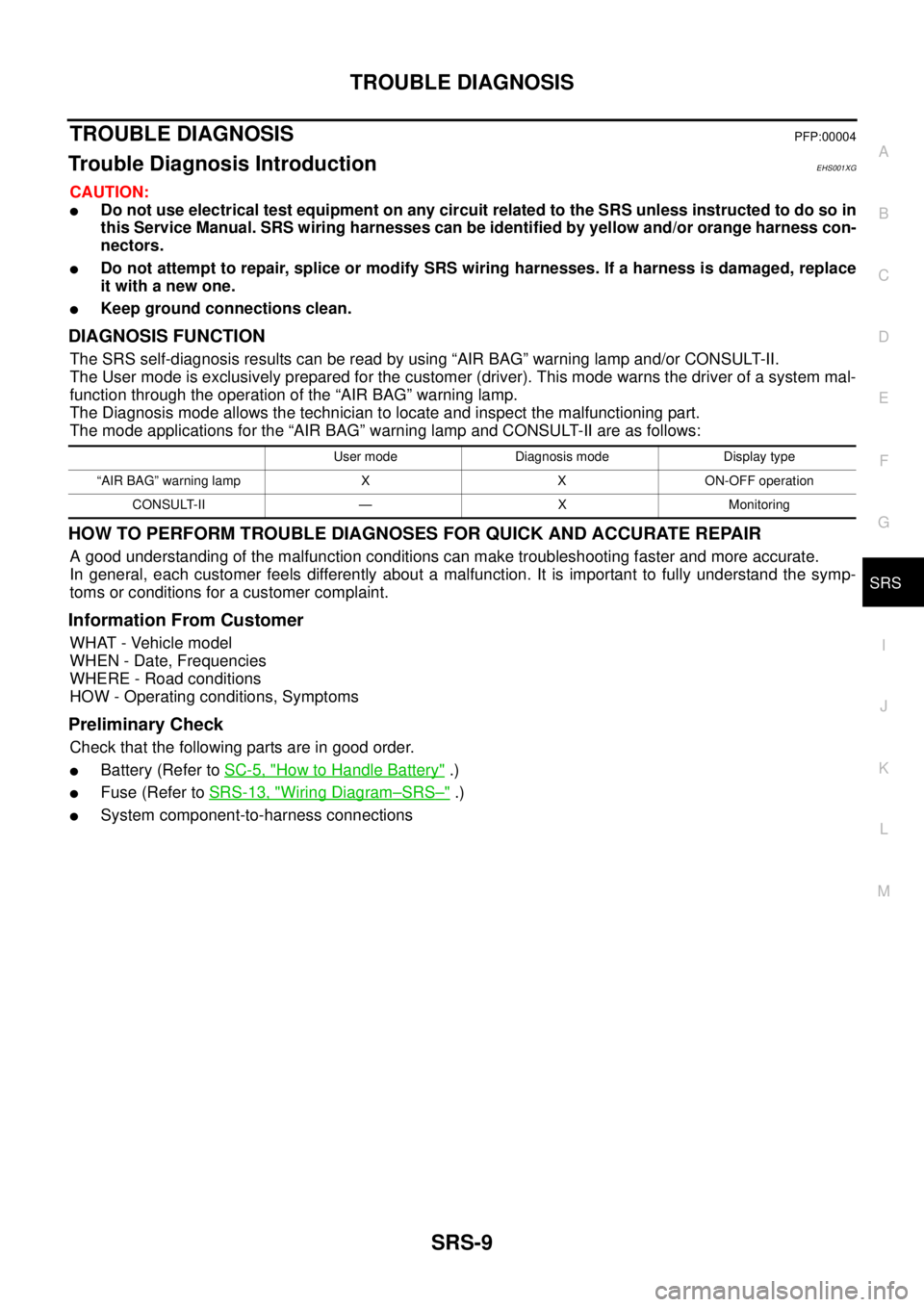
User mode Diagnosis mode Display type
“AIR BAG” warning lamp X X ON-OFF operation
CONSULT-II — X Monitoring
Page 2920 of 3171
TROUBLE DIAGNOSIS
SRS-11
C
D
E
F
G
I
J
K
L
MA
B
SRS
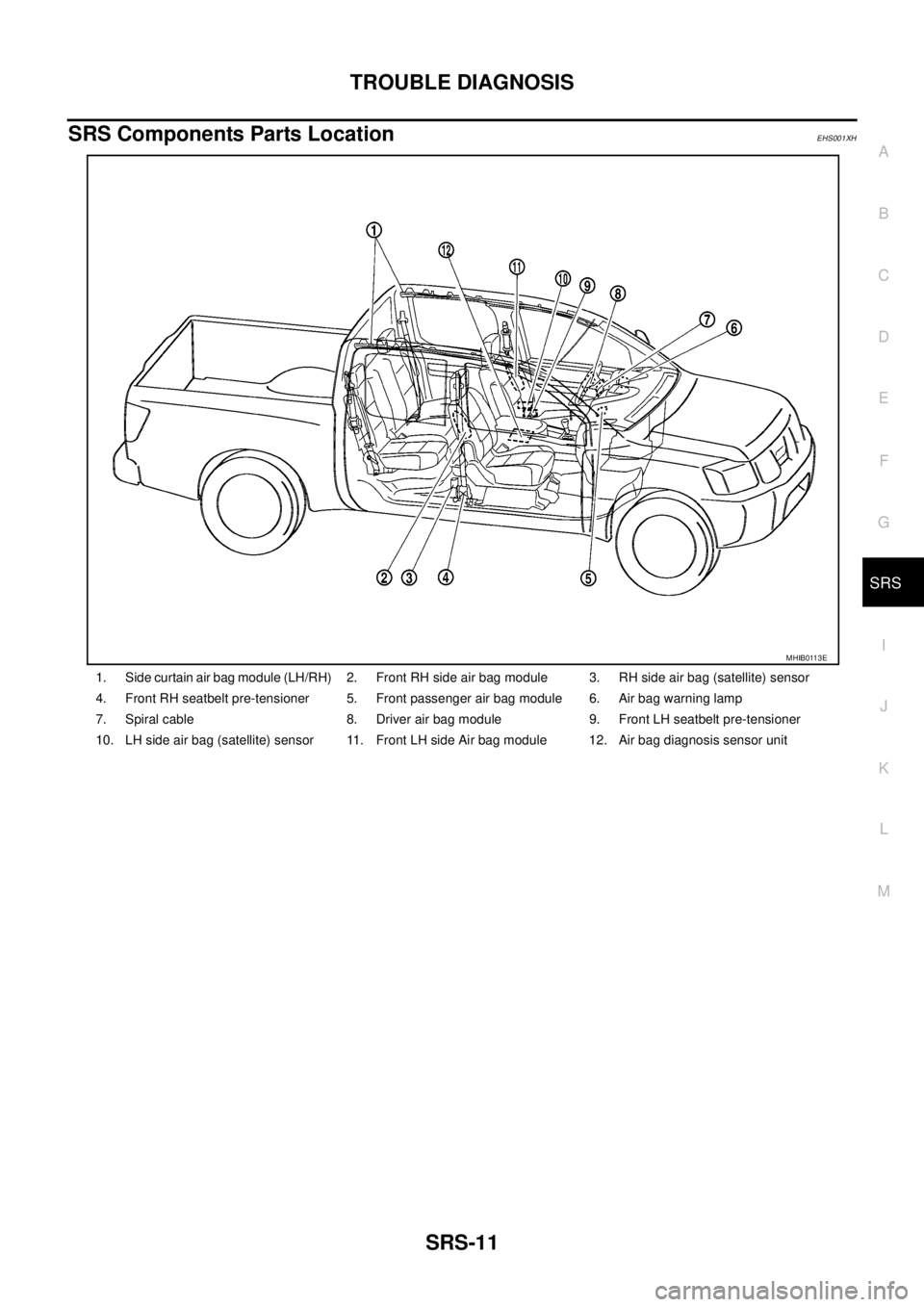
SRS Components Parts LocationEHS001XH
1. Side curtain air bag module (LH/RH) 2. Front RH side air bag module 3. RH side air bag (satellite) sensor
4. Front RH seatbelt pre-tensioner 5. Front passenger air bag module 6. Air bag warning lamp
7. Spiral cable 8. Driver air bag module 9. Front LH seatbelt pre-tensioner
10. LH side air bag (satellite) sensor 11. Front LH side Air bag module 12. Air bag diagnosis sensor unit
MHIB0113E
Page 2925 of 3171
SRS-16
TROUBLE DIAGNOSIS
CONSULT-II Function (AIR BAG)
EHS001XK
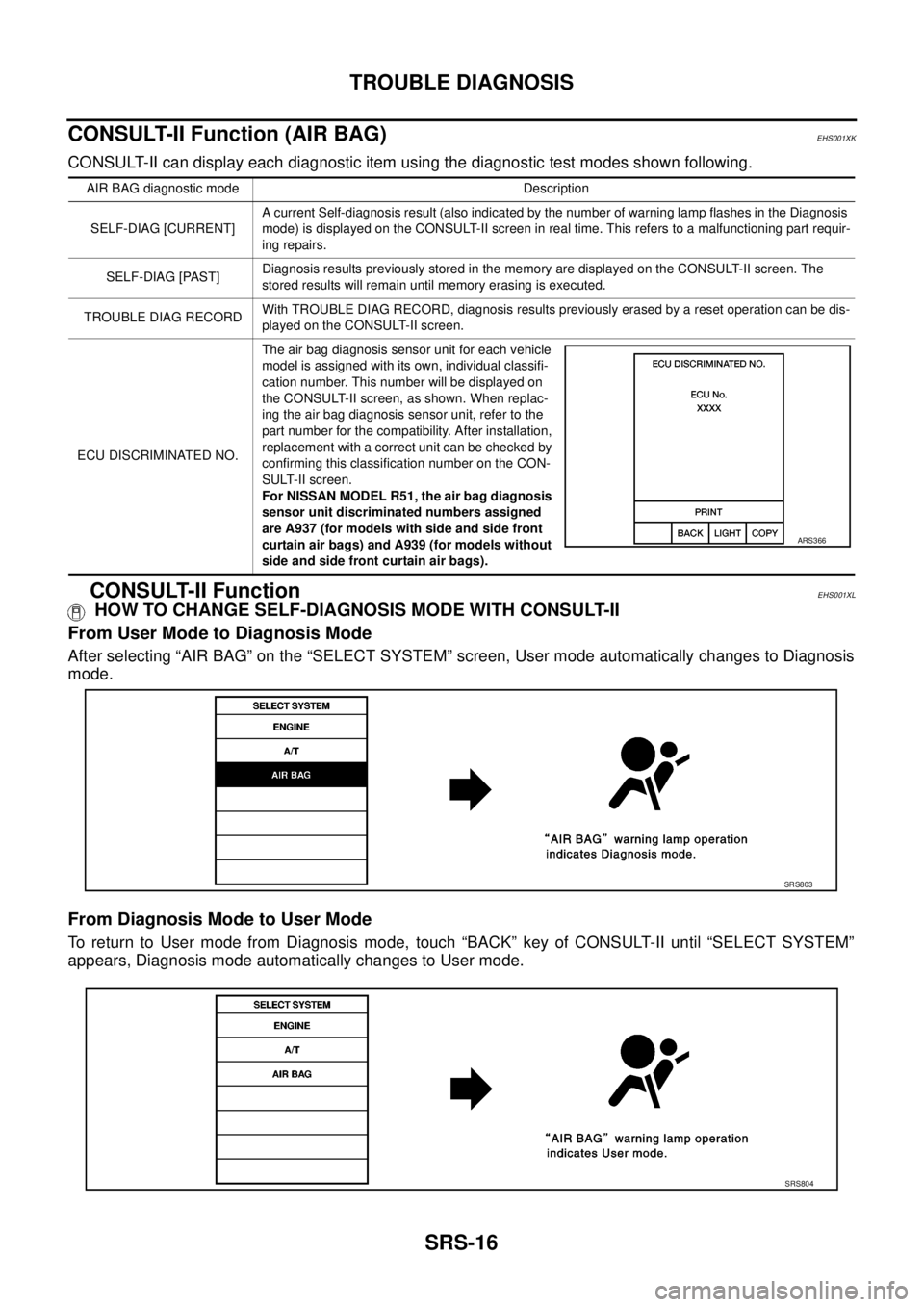
CONSULT-II can display each diagnostic item using the diagnostic test modes shown following.
CONSULT-II FunctionEHS001XL
HOW TO CHANGE SELF-DIAGNOSIS MODE WITH CONSULT-II
From User Mode to Diagnosis Mode
After selecting “AIR BAG” on the “SELECT SYSTEM” screen, User mode automatically changes to Diagnosis
mode.
From Diagnosis Mode to User Mode
To return to User mode from Diagnosis mode, touch “BACK” key of CONSULT-II until “SELECT SYSTEM”
appears, Diagnosis mode automatically changes to User mode.
AIR BAG diagnostic mode Description
SELF-DIAG [CURRENT]A current Self-diagnosis result (also indicated by the number of warning lamp flashes in the Diagnosis
mode) is displayed on the CONSULT-II screen in real time. This refers to a malfunctioning part requir-
ing repairs.
SELF-DIAG [PAST]Diagnosis results previously stored in the memory are displayed on the CONSULT-II screen. The
stored results will remain until memory erasing is executed.
TROUBLE DIAG RECORDWith TROUBLE DIAG RECORD, diagnosis results previously erased by a reset operation can be dis-
played on the CONSULT-II screen.
ECU DISCRIMINATED NO.The air bag diagnosis sensor unit for each vehicle
model is assigned with its own, individual classifi-
cation number. This number will be displayed on
the CONSULT-II screen, as shown. When replac-
ing the air bag diagnosis sensor unit, refer to the
part number for the compatibility. After installation,
replacement with a correct unit can be checked by
confirming this classification number on the CON-
SULT-II screen.
For NISSAN MODEL R51, the air bag diagnosis
sensor unit discriminated numbers assigned
are A937 (for models with side and side front
curtain air bags) and A939 (for models without
side and side front curtain air bags).
ARS366
SRS803
SRS804
Page 2926 of 3171
![NISSAN NAVARA 2005 Repair Workshop Manual TROUBLE DIAGNOSIS
SRS-17
C
D
E
F
G
I
J
K
L
MA
B
SRS
HOW TO ERASE SELF-DIAGNOSIS RESULTS
l“SELF-DIAG [CURRENT]”
A current self-diagnosis result is displayed on the CONSULT-II
screen in real time.
A](/img/5/57362/w960_57362-2925.png "NISSAN NAVARA 2005 Repair Workshop Manual TROUBLE DIAGNOSIS
SRS-17
C
D
E
F
G
I
J
K
L
MA
B
SRS
HOW TO ERASE SELF-DIAGNOSIS RESULTS
l“SELF-DIAG [CURRENT]”
A current self-diagnosis result is displayed on the CONSULT-II
screen in real time.
A")
TROUBLE DIAGNOSIS
SRS-17
C
D
E
F
G
I
J
K
L
MA
B
SRS
HOW TO ERASE SELF-DIAGNOSIS RESULTS
l“SELF-DIAG [CURRENT]”
A current self-diagnosis result is displayed on the CONSULT-II
screen in real time.
After the malfunction is repaired completely, no malfunction is
detected on “SELF-DIAG [CURRENT]”.
l“SELF-DIAG [PAST]”
Return to the “SELF-DIAG [CURRENT]” CONSULT-II screen by
touching “BACK” key of CONSULT-II and select “SELF-DIAG
[PAST]” in SELECT DIAG MODE. Touch “ERASE” in “SELF-
DIAG [PAST]” mode.
NOTE:
If the memory of the malfunction in “SELF-DIAG [PAST]” is
not erased, the User mode will continue to show the system
malfunction by the operation of the warning lamp even if
the malfunction is repaired completely.
l“TROUBLE DIAG RECORD”
The memory of “TROUBLE DIAG RECORD” cannot be erased.
Self-Diagnosis Function (Without CONSULT-II)EHS001XM
lThe reading of these results is accomplished using one of two modes — “User mode” and “Diagnosis
mode”.
lAfter a malfunction is repaired, turn the ignition switch OFF for at least one second, then back ON. Diag-
nosis mode returns to the User mode. At that time, the self-diagnostic result is cleared.
HOW TO CHANGE SELF-DIAGNOSIS MODE
SRS701
SRS702
SHIA0183E