display NISSAN NAVARA 2005 Repair Workshop Manual
[x] Cancel search | Manufacturer: NISSAN, Model Year: 2005, Model line: NAVARA, Model: NISSAN NAVARA 2005Pages: 3171, PDF Size: 49.59 MB
Page 1793 of 3171
![NISSAN NAVARA 2005 Repair Workshop Manual LAN-16
[CAN]
TROUBLE DIAGNOSES WORK FLOW
DESCRIPTION OF “CAN DIAG SUPPORT MNTR” SCREEN
FOR TCM
Display Results (Present)
lOK: Normal
lNG: Malfunction
lUNKWN: The diagnosed unit does not transmit o](/img/5/57362/w960_57362-1792.png "NISSAN NAVARA 2005 Repair Workshop Manual LAN-16
[CAN]
TROUBLE DIAGNOSES WORK FLOW
DESCRIPTION OF “CAN DIAG SUPPORT MNTR” SCREEN
FOR TCM
Display Results (Present)
lOK: Normal
lNG: Malfunction
lUNKWN: The diagnosed unit does not transmit o")
LAN-16
[CAN]
TROUBLE DIAGNOSES WORK FLOW
DESCRIPTION OF “CAN DIAG SUPPORT MNTR” SCREEN
FOR TCM
Display Results (Present)
lOK: Normal
lNG: Malfunction
lUNKWN: The diagnosed unit does not transmit or receive the applicable data normally.
SKIB2335E
“SELECT SYSTEM”
screen“CAN DIAG SUPPORT
MNTR” screenDescription Present
A/TINITIAL DIAG Make sure that microcomputer in ECU works normally. OK/NG
TRANSMIT DIAG Make sure of normal transmission. OK/UNKWN
ECM Make sure of normal reception from ECM. OK/UNKWN
VDC/TCS/ABS VDC/TCS/ABS is not diagnosed. OK
METER/M&A Make sure of normal reception from combination meter. OK/UNKWN
ICC/e4WD ICC/e4WD is not diagnosed. UNKWN
AWD/4WD Make sure of normal reception from transfer control unit. OK/UNKWN
Page 1794 of 3171
![NISSAN NAVARA 2005 Repair Workshop Manual TROUBLE DIAGNOSES WORK FLOW
LAN-17
[CAN]
C
D
E
F
G
H
I
J
L
MA
B
LAN
DESCRIPTION OF “CAN DIAG SUPPORT MNTR” SCREEN
FOR NAVI CONTROL UNIT
Display Results (Present)
lOK: Normal
lUNKWN: The diagnosed](/img/5/57362/w960_57362-1793.png "NISSAN NAVARA 2005 Repair Workshop Manual TROUBLE DIAGNOSES WORK FLOW
LAN-17
[CAN]
C
D
E
F
G
H
I
J
L
MA
B
LAN
DESCRIPTION OF “CAN DIAG SUPPORT MNTR” SCREEN
FOR NAVI CONTROL UNIT
Display Results (Present)
lOK: Normal
lUNKWN: The diagnosed")
TROUBLE DIAGNOSES WORK FLOW
LAN-17
[CAN]
C
D
E
F
G
H
I
J
L
MA
B
LAN
DESCRIPTION OF “CAN DIAG SUPPORT MNTR” SCREEN
FOR NAVI CONTROL UNIT
Display Results (Present)
lOK: Normal
lUNKWN: The diagnosed unit does not transmit or receive the applicable data normally.
l–: There is no received unit or the unit is not in the condition that reception diagnosis is performed.
Display Results (Past)
lOK: Normal
l0: There is malfunction now.
l1 ~ 39: Displays when it is normal at present and finds malfunction in the past. It increases like 0®1®2...38®39 after returning to the
normal condition whenever IGN OFF®ON. If it is over 39, it is fixed to 39 until the self-diagnostic results are erased. It returns to 0
when malfunction is detected again in the process.
l–: Undiagnosed
SKIB4715E
“SELECT SYSTEM”
screen“CAN DIAG SUP-
PORT MNTR”
screenDescription Present Past
MULTI AVTRANSMIT DIAG TRANSMIT DIAG is not diagnosed. –
OK/0/1~39/– ECM Make sure of normal reception from ECM. OK/UNKWN/–
METER/M&A Make sure of normal reception from combination meter. OK/UNKWN/–
BCM/SEC BCM/SEC is not diagnosed. –
HVAC HVAC is not diagnosed. –
IPDM E/R IPDM E/R is not diagnosed. –
TIRE-P TIRE-P is not diagnosed. –
Page 1795 of 3171
![NISSAN NAVARA 2005 Repair Workshop Manual LAN-18
[CAN]
TROUBLE DIAGNOSES WORK FLOW
DESCRIPTION OF “CAN DIAG SUPPORT MNTR” SCREEN
FOR DIFFERENTIAL LOCK CONTROL UNIT
Display Results (Present)
lOK: Normal
lNG: Malfunction
lUNKWN: The diagnos](/img/5/57362/w960_57362-1794.png "NISSAN NAVARA 2005 Repair Workshop Manual LAN-18
[CAN]
TROUBLE DIAGNOSES WORK FLOW
DESCRIPTION OF “CAN DIAG SUPPORT MNTR” SCREEN
FOR DIFFERENTIAL LOCK CONTROL UNIT
Display Results (Present)
lOK: Normal
lNG: Malfunction
lUNKWN: The diagnos")
LAN-18
[CAN]
TROUBLE DIAGNOSES WORK FLOW
DESCRIPTION OF “CAN DIAG SUPPORT MNTR” SCREEN
FOR DIFFERENTIAL LOCK CONTROL UNIT
Display Results (Present)
lOK: Normal
lNG: Malfunction
lUNKWN: The diagnosed unit does not transmit or receive the applicable data normally.
PKIB7196E
“SELECT SYSTEM”
screen“CAN DIAG SUPPORT
MNTR” screenDescription Present
DIFF LOCKINITIAL DIAG Make sure that microcomputer in ECU works normally. OK/NG
TRANSMIT DIAG Make sure of normal transmission. OK/UNKWN
ECM Make sure of normal reception from ECM. OK/UNKWN
VDC/TCS/ABSMake sure of normal reception from ABS actuator and electric unit
(control unit).OK/UNKWN
AWD/4WD Make sure of normal reception from transfer control unit. OK/UNKWN
Page 1796 of 3171
![NISSAN NAVARA 2005 Repair Workshop Manual TROUBLE DIAGNOSES WORK FLOW
LAN-19
[CAN]
C
D
E
F
G
H
I
J
L
MA
B
LAN
DESCRIPTION OF “CAN DIAG SUPPORT MNTR” SCREEN FOR FRONT AIR CONTROL
Display Results (Present)
lOK: Normal
lUNKWN: The diagnosed](/img/5/57362/w960_57362-1795.png "NISSAN NAVARA 2005 Repair Workshop Manual TROUBLE DIAGNOSES WORK FLOW
LAN-19
[CAN]
C
D
E
F
G
H
I
J
L
MA
B
LAN
DESCRIPTION OF “CAN DIAG SUPPORT MNTR” SCREEN FOR FRONT AIR CONTROL
Display Results (Present)
lOK: Normal
lUNKWN: The diagnosed")
TROUBLE DIAGNOSES WORK FLOW
LAN-19
[CAN]
C
D
E
F
G
H
I
J
L
MA
B
LAN
DESCRIPTION OF “CAN DIAG SUPPORT MNTR” SCREEN FOR FRONT AIR CONTROL
Display Results (Present)
lOK: Normal
lUNKWN: The diagnosed unit does not transmit or receive the applicable data normally.
l–: There is no received unit or the unit is not in the condition that reception diagnosis is performed.
Display Results (Past)
lOK: Normal
l0: There is malfunction now.
l1 ~ 39: Displays when it is normal at present and finds malfunction in the past. It increases like 0®1®2...38®39 after returning to the
normal condition whenever IGN OFF®ON. If it is over 39, it is fixed to 39 until the self-diagnostic results are erased. It returns to 0
when malfunction is detected again in the process.
l–: Undiagnosed
PKIC2531E
“SELECT SYSTEM”
screen“CAN DIAG SUPPORT
MNTR” screenDescription Present Past
HVACTRANSMIT DIAG Make sure of normal transmission. OK/UNKWN/–
OK/0/1~39/– ECM Make sure of normal reception from ECM. OK/UNKWN/–
TCM TCM is not diagnosed. –
BCM/SEC Make sure of normal reception from BCM. OK/UNKWN/–
VDC/TCS/ABSMake sure of normal reception from ABS actua-
tor and electric unit (control unit).OK/UNKWN/–
IPDM E/R Make sure of normal reception from IPDM E/R. OK/UNKWN/–
DISPLAY DISPLAY is not diagnosed. –
I-KEY I-KEY is not diagnosed. –
EPS EPS is not diagnosed. –
AWD/4WD AWD/4WD is not diagnosed. –
e4WD e4WD is not diagnosed. –
ICC ICC is not diagnosed. –
LANE KEEP LANE KEEP is not diagnosed. –
TIRE-P TIRE-P is not diagnosed. –
Page 1797 of 3171
![NISSAN NAVARA 2005 Repair Workshop Manual LAN-20
[CAN]
TROUBLE DIAGNOSES WORK FLOW
DESCRIPTION OF “CAN DIAG SUPPORT MNTR” SCREEN
FOR BCM
Display Results (Present)
lOK: Normal
lNG: Malfunction
lUNKWN: The diagnosed unit does not transmit o](/img/5/57362/w960_57362-1796.png "NISSAN NAVARA 2005 Repair Workshop Manual LAN-20
[CAN]
TROUBLE DIAGNOSES WORK FLOW
DESCRIPTION OF “CAN DIAG SUPPORT MNTR” SCREEN
FOR BCM
Display Results (Present)
lOK: Normal
lNG: Malfunction
lUNKWN: The diagnosed unit does not transmit o")
LAN-20
[CAN]
TROUBLE DIAGNOSES WORK FLOW
DESCRIPTION OF “CAN DIAG SUPPORT MNTR” SCREEN
FOR BCM
Display Results (Present)
lOK: Normal
lNG: Malfunction
lUNKWN: The diagnosed unit does not transmit or receive the applicable data normally.
PKIC2532E
“SELECT SYSTEM”
screen“CAN DIAG SUPPORT
MNTR” screenDescription Present
BCMINITIAL DIAG Make sure that microcomputer in ECU works normally. OK/NG
TRANSMIT DIAG Make sure of normal transmission. OK/UNKWN
ECM Make sure of normal reception from ECM. OK/UNKWN
IPDM E/R Make sure of normal reception from IPDM E/R. OK/UNKWN
METER/M&A Make sure of normal reception from combination meter. OK/UNKWN
I-KEY I-KEY is not diagnosed. UNKWN
Page 1798 of 3171
![NISSAN NAVARA 2005 Repair Workshop Manual TROUBLE DIAGNOSES WORK FLOW
LAN-21
[CAN]
C
D
E
F
G
H
I
J
L
MA
B
LAN
DESCRIPTION OF “CAN DIAG SUPPORT MNTR” SCREEN
FOR TRANSFER CONTROL UNIT
Display Results (Present)
lOK: Normal
lNG: Malfunction
l](/img/5/57362/w960_57362-1797.png "NISSAN NAVARA 2005 Repair Workshop Manual TROUBLE DIAGNOSES WORK FLOW
LAN-21
[CAN]
C
D
E
F
G
H
I
J
L
MA
B
LAN
DESCRIPTION OF “CAN DIAG SUPPORT MNTR” SCREEN
FOR TRANSFER CONTROL UNIT
Display Results (Present)
lOK: Normal
lNG: Malfunction
l")
TROUBLE DIAGNOSES WORK FLOW
LAN-21
[CAN]
C
D
E
F
G
H
I
J
L
MA
B
LAN
DESCRIPTION OF “CAN DIAG SUPPORT MNTR” SCREEN
FOR TRANSFER CONTROL UNIT
Display Results (Present)
lOK: Normal
lNG: Malfunction
lUNKWN: The diagnosed unit does not transmit or receive the applicable data normally.
DESCRIPTION OF “CAN DIAG SUPPORT MNTR” SCREEN
FOR ABS ACTUATOR AND ELECTRIC UNIT (CONTROL
UNIT)
Display Results (Present)
lOK: Normal
lNG: Malfunction
lUNKWN: The diagnosed unit does not transmit or receive the applicable data normally.
PKIC2594E
“SELECT SYSTEM”
screen“CAN DIAG SUPPORT
MNTR” screenDescription Present
ALL MODE AWD/
4WDINITIAL DIAG Make sure that microcomputer in ECU works normally. OK/NG
TRANSMIT DIAG Make sure of normal transmission. OK/UNKWN
ECM Make sure of normal reception from ECM. OK/UNKWN
VDC/TCS/ABSMake sure of normal reception from ABS actuator and electric unit
(control unit).OK/UNKWN
TCM Make sure of normal reception from TCM. OK/UNKWN
METER/M&A Make sure of normal reception from combination meter. OK/UNKWN
PKIC2533E
“SELECT SYSTEM”
screen“CAN DIAG SUPPORT
MNTR” screenDescription Present
ABSINITIAL DIAG Make sure that microcomputer in ECU works normally. OK/NG
TRANSMIT DIAG Make sure of normal transmission. OK/UNKWN
ECM Make sure of normal reception from ECM. OK/UNKWN
DIFF LOCK DIFF LOCK is not diagnosed. OK
Page 1799 of 3171
![NISSAN NAVARA 2005 Repair Workshop Manual LAN-22
[CAN]
TROUBLE DIAGNOSES WORK FLOW
DESCRIPTION OF “CAN DIAG SUPPORT MNTR” SCREEN
FOR IPDM E/R
Display Results (Present)
lOK: Normal
lUNKWN: The diagnosed unit does not transmit or receive th](/img/5/57362/w960_57362-1798.png "NISSAN NAVARA 2005 Repair Workshop Manual LAN-22
[CAN]
TROUBLE DIAGNOSES WORK FLOW
DESCRIPTION OF “CAN DIAG SUPPORT MNTR” SCREEN
FOR IPDM E/R
Display Results (Present)
lOK: Normal
lUNKWN: The diagnosed unit does not transmit or receive th")
LAN-22
[CAN]
TROUBLE DIAGNOSES WORK FLOW
DESCRIPTION OF “CAN DIAG SUPPORT MNTR” SCREEN
FOR IPDM E/R
Display Results (Present)
lOK: Normal
lUNKWN: The diagnosed unit does not transmit or receive the applicable data normally.
l–: There is no received unit or the unit is not in the condition that reception diagnosis is performed.
Display Results (Past)
lOK: Normal
l0: There is malfunction now.
l1 ~ 39: Displays when it is normal at present and finds malfunction in the past. It increases like 0®1®2...38®39 after returning to the
normal condition whenever IGN OFF®ON. If it is over 39, it is fixed to 39 until the self-diagnostic results are erased. It returns to 0
when malfunction is detected again in the process.
l–: Undiagnosed
SKIB0595E
“SELECT SYSTEM”
screen“CAN DIAG SUPPORT
MNTR” screenDescription Present Past
IPDM E/RTRANSMIT DIAG Make sure of normal transmission. OK/UNKWN/–
OK/0/1~39/– ECM Make sure of normal reception from ECM. OK/UNKWN/–
BCM/SEC Make sure of normal reception from BCM. OK/UNKWN/–
Page 2098 of 3171
HEADLAMP -CONVENTIONAL TYPE-
LT-15
C
D
E
F
G
H
I
J
L
MA
B
LT
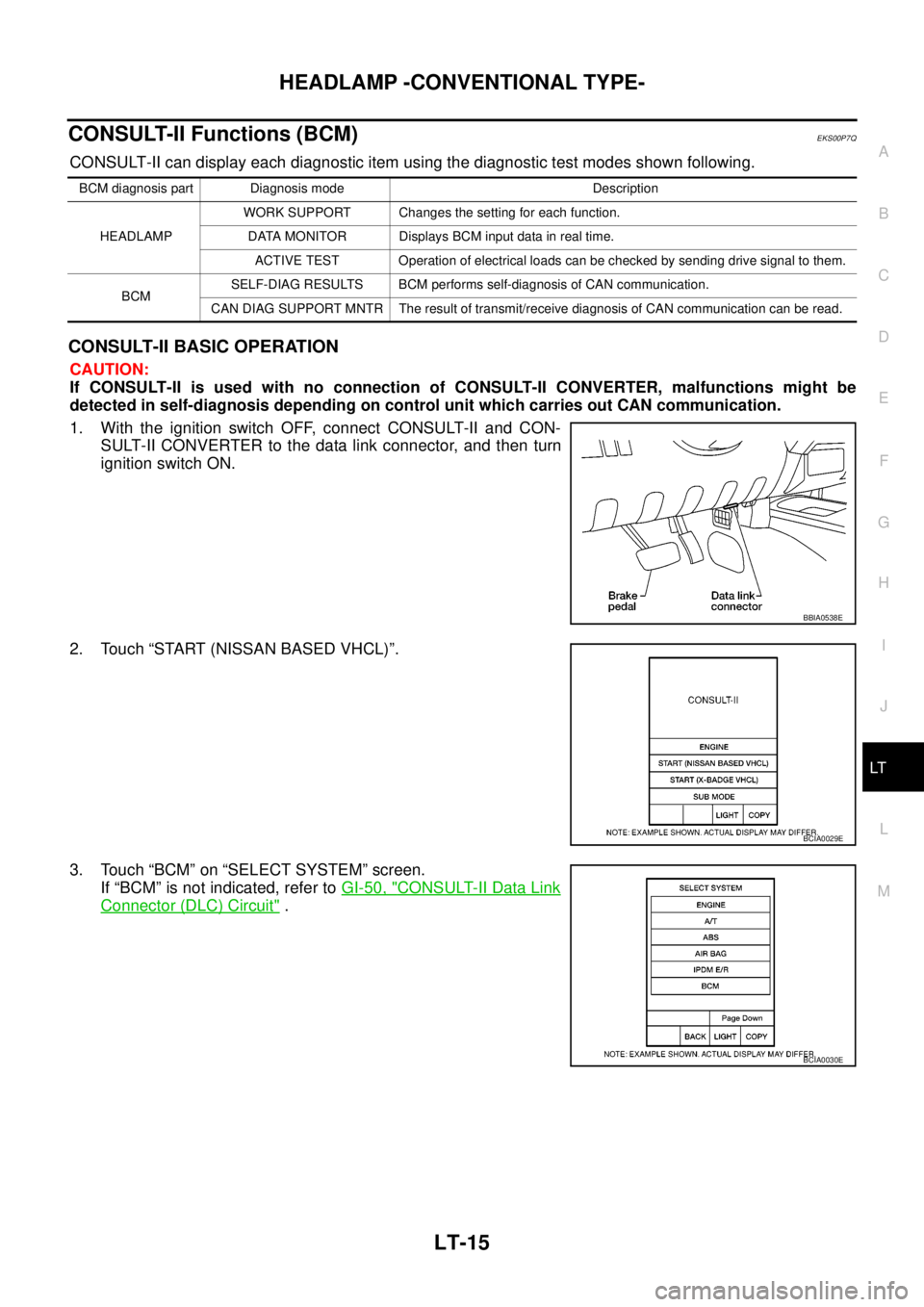
CONSULT-II Functions (BCM)EKS00P7Q
CONSULT-II can display each diagnostic item using the diagnostic test modes shown following.
CONSULT-II BASIC OPERATION
CAUTION:
If CONSULT-II is used with no connection of CONSULT-II CONVERTER, malfunctions might be
detected in self-diagnosis depending on control unit which carries out CAN communication.
1. With the ignition switch OFF, connect CONSULT-II and CON-
SULT-II CONVERTER to the data link connector, and then turn
ignition switch ON.
2. Touch “START (NISSAN BASED VHCL)”.
3. Touch “BCM” on “SELECT SYSTEM” screen.
If “BCM” is not indicated, refer toGI-50, "
CONSULT-II Data Link
Connector (DLC) Circuit".
BCM diagnosis part Diagnosis mode Description
HEADLAMPWORK SUPPORT Changes the setting for each function.
DATA MONITOR Displays BCM input data in real time.
ACTIVE TEST Operation of electrical loads can be checked by sending drive signal to them.
BCMSELF-DIAG RESULTS BCM performs self-diagnosis of CAN communication.
CAN DIAG SUPPORT MNTR The result of transmit/receive diagnosis of CAN communication can be read.
BBIA0538E
BCIA0029E
BCIA0030E
Page 2099 of 3171
LT-16
HEADLAMP -CONVENTIONAL TYPE-
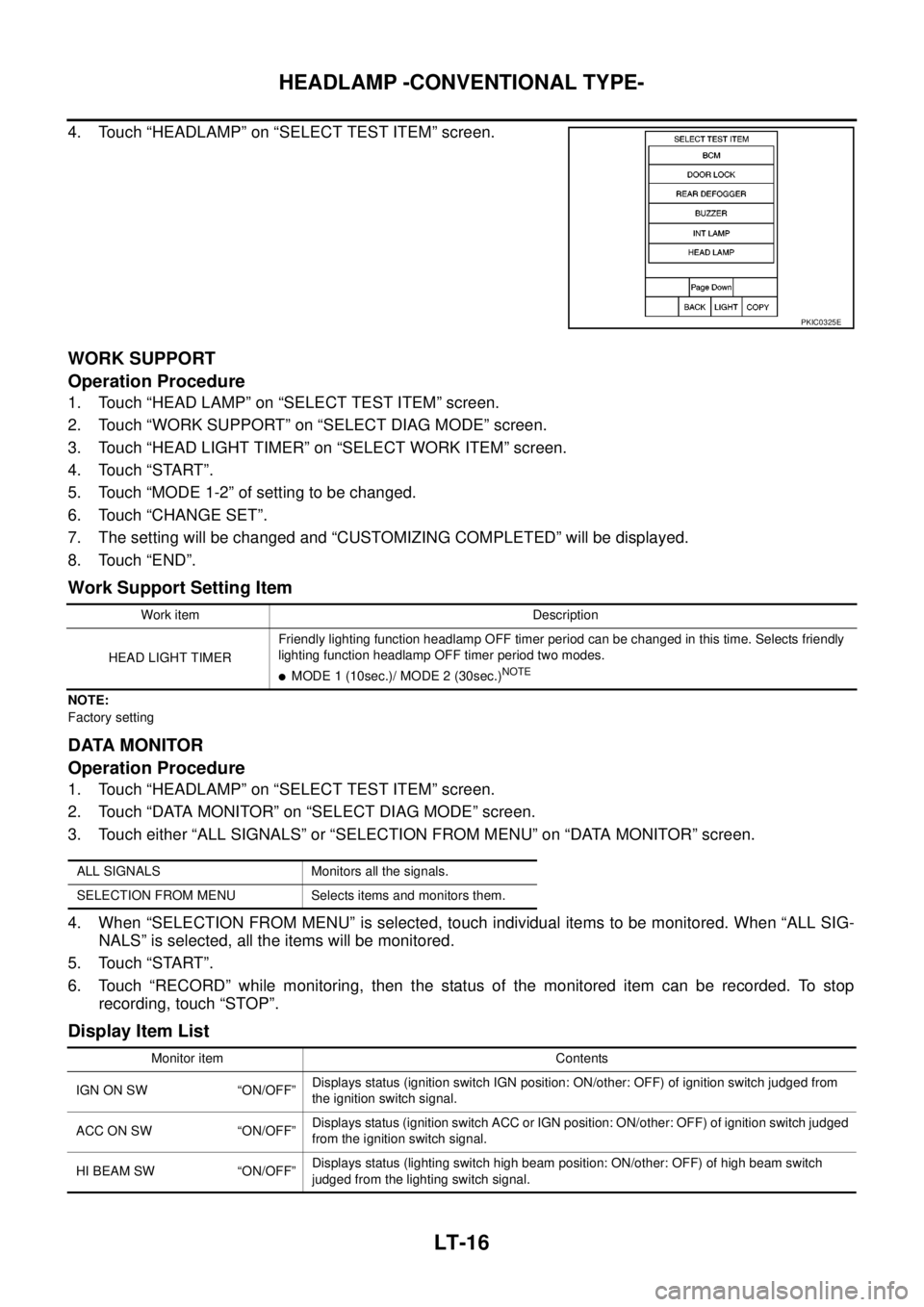
4. Touch “HEADLAMP” on “SELECT TEST ITEM” screen.
WORK SUPPORT
Operation Procedure
1. Touch “HEAD LAMP” on “SELECT TEST ITEM” screen.
2. Touch “WORK SUPPORT” on “SELECT DIAG MODE” screen.
3. Touch “HEAD LIGHT TIMER” on “SELECT WORK ITEM” screen.
4. Touch “START”.
5. Touch “MODE 1-2” of setting to be changed.
6. Touch “CHANGE SET”.
7. The setting will be changed and “CUSTOMIZING COMPLETED” will be displayed.
8. Touch “END”.
Work Support Setting Item
NOTE:
Factory setting
DATA MONITOR
Operation Procedure
1. Touch “HEADLAMP” on “SELECT TEST ITEM” screen.
2. Touch “DATA MONITOR” on “SELECT DIAG MODE” screen.
3. Touch either “ALL SIGNALS” or “SELECTION FROM MENU” on “DATA MONITOR” screen.
4. When “SELECTION FROM MENU” is selected, touch individual items to be monitored. When “ALL SIG-
NALS” is selected, all the items will be monitored.
5. Touch “START”.
6. Touch “RECORD” while monitoring, then the status of the monitored item can be recorded. To stop
recording, touch “STOP”.
Display Item List
PKIC0325E
Work item Description
HEAD LIGHT TIMERFriendly lighting function headlamp OFF timer period can be changed in this time. Selects friendly
lighting function headlamp OFF timer period two modes.
lMODE 1 (10sec.)/ MODE 2 (30sec.)NOTE
ALL SIGNALS Monitors all the signals.
SELECTION FROM MENU Selects items and monitors them.
Monitor item Contents
IGN ON SW “ON/OFF”Displays status (ignition switch IGN position: ON/other: OFF) of ignition switch judged from
the ignition switch signal.
ACCONSW “ON/OFF”Displays status (ignition switch ACC or IGN position: ON/other: OFF) of ignition switch judged
from the ignition switch signal.
HI BEAM SW “ON/OFF”Displays status (lighting switch high beam position: ON/other: OFF) of high beam switch
judged from the lighting switch signal.
Page 2100 of 3171
HEADLAMP -CONVENTIONAL TYPE-
LT-17
C
D
E
F
G
H
I
J
L
MA
B
LT
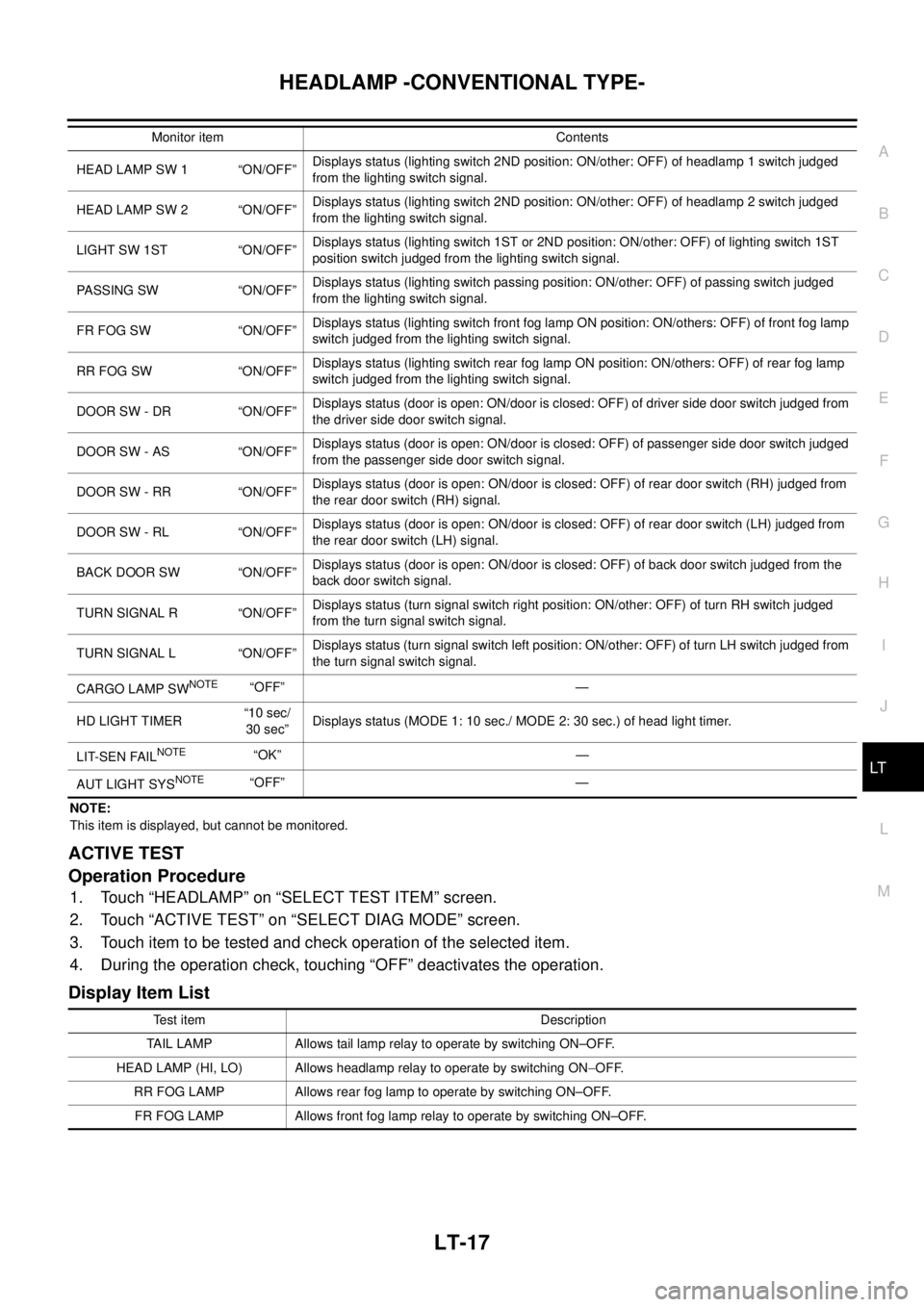
NOTE:
This item is displayed, but cannot be monitored.
ACTIVE TEST
Operation Procedure
1. Touch “HEADLAMP” on “SELECT TEST ITEM” screen.
2. Touch “ACTIVE TEST” on “SELECT DIAG MODE” screen.
3. Touch item to be tested and check operation of the selected item.
4. During the operation check, touching “OFF” deactivates the operation.
Display Item List
HEAD LAMP SW 1 “ON/OFF”Displays status (lighting switch 2ND position: ON/other: OFF) of headlamp 1 switch judged
from the lighting switch signal.
HEAD LAMP SW 2 “ON/OFF”Displays status (lighting switch 2ND position: ON/other: OFF) of headlamp 2 switch judged
from the lighting switch signal.
LIGHT SW 1ST “ON/OFF”Displays status (lighting switch 1ST or 2ND position: ON/other: OFF) of lighting switch 1ST
position switch judged from the lighting switch signal.
PASSING SW “ON/OFF”Displays status (lighting switch passing position: ON/other: OFF) of passing switch judged
from the lighting switch signal.
FR FOG SW “ON/OFF”Displays status (lighting switch front fog lamp ON position: ON/others: OFF) of front fog lamp
switch judged from the lighting switch signal.
RR FOG SW “ON/OFF”Displays status (lighting switch rear fog lamp ON position: ON/others: OFF) of rear fog lamp
switch judged from the lighting switch signal.
DOOR SW - DR “ON/OFF”Displays status (door is open: ON/door is closed: OFF) of driver side door switch judged from
the driver side door switch signal.
DOOR SW - AS “ON/OFF”Displays status (door is open: ON/door is closed: OFF) of passenger side door switch judged
from the passenger side door switch signal.
DOOR SW - RR “ON/OFF”Displays status (door is open: ON/door is closed: OFF) of rear door switch (RH) judged from
the rear door switch (RH) signal.
DOOR SW - RL “ON/OFF”Displays status (door is open: ON/door is closed: OFF) of rear door switch (LH) judged from
the rear door switch (LH) signal.
BACK DOOR SW “ON/OFF”Displays status (door is open: ON/door is closed: OFF) of back door switch judged from the
back door switch signal.
TURN SIGNAL R “ON/OFF”Displays status (turn signal switch right position: ON/other: OFF) of turn RH switch judged
from the turn signal switch signal.
TURN SIGNAL L “ON/OFF”Displays status (turn signal switch left position: ON/other: OFF) of turn LH switch judged from
the turn signal switch signal.
CARGO LAMP SW
NOTE“OFF” —
HD LIGHT TIMER“10 sec/
30 sec”Displays status (MODE 1: 10 sec./ MODE 2: 30 sec.) of head light timer.
LIT-SEN FAIL
NOTE“OK” —
AUT LIGHT SYS
NOTE“OFF” — Monitor item Contents
Test item Description
TAIL LAMP Allows tail lamp relay to operate by switching ON–OFF.
HEAD LAMP (HI, LO) Allows headlamp relay to operate by switching ON-OFF.
RR FOG LAMP Allows rear fog lamp to operate by switching ON–OFF.
FR FOG LAMP Allows front fog lamp relay to operate by switching ON–OFF.