display NISSAN NAVARA 2005 Repair Workshop Manual
[x] Cancel search | Manufacturer: NISSAN, Model Year: 2005, Model line: NAVARA, Model: NISSAN NAVARA 2005Pages: 3171, PDF Size: 49.59 MB
Page 1256 of 3171
EC-276
DTC P2135 APP SENSOR
On Board Diagnosis Logic
EBS01KKW
The MI will not light up for this self-diagnosis.
NOTE:
lIf DTC P2135 is displayed with DTC P0642 or P0643, first perform the trouble diagnosis for DTC
P0642 or P0643. Refer toEC-222, "
DTC P0642, P0643 SENSOR POWER SUPPLY".
lIf DTC P2135 is displayed with DTC P0652 or P0653, first perform the trouble diagnosis for DTC
P0652 or P0653. Refer toEC-227, "
DTC P0652, P0653 SENSOR POWER SUPPLY".
DTC Confirmation ProcedureEBS01KKX
NOTE:
If DTC Confirmation Procedure has been previously conducted, always turn ignition switch OFF and wait at
least 10 seconds before conducting the next test.
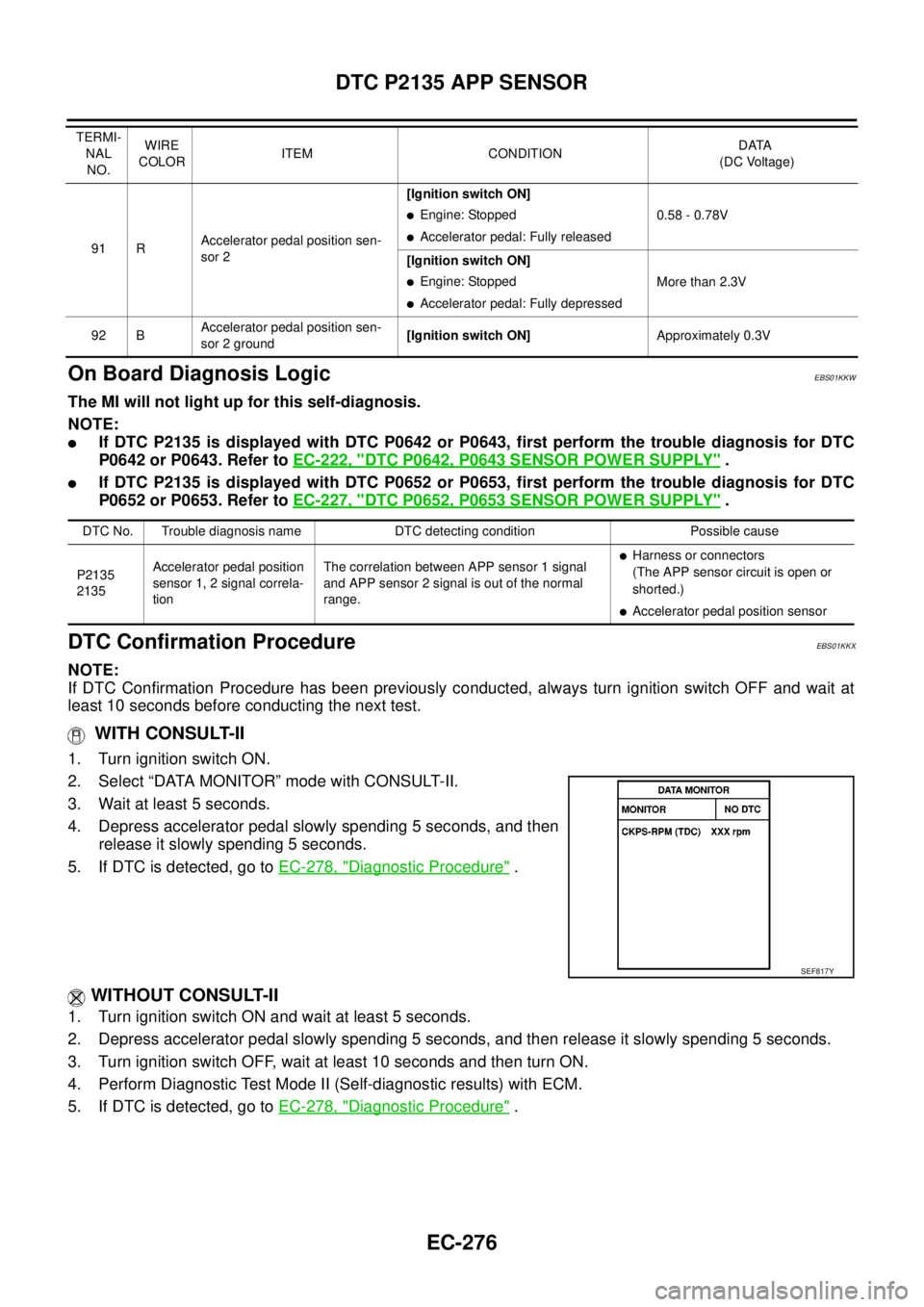
WITH CONSULT-II
1. Turn ignition switch ON.
2. Select “DATA MONITOR” mode with CONSULT-II.
3. Wait at least 5 seconds.
4. Depress accelerator pedal slowly spending 5 seconds, and then
release it slowly spending 5 seconds.
5. If DTC is detected, go toEC-278, "
Diagnostic Procedure".
WITHOUT CONSULT-II
1. Turn ignition switch ON and wait at least 5 seconds.
2. Depress accelerator pedal slowly spending 5 seconds, and then release it slowly spending 5 seconds.
3. Turn ignition switch OFF, wait at least 10 seconds and then turn ON.
4. Perform Diagnostic Test Mode II (Self-diagnostic results) with ECM.
5. If DTC is detected, go toEC-278, "
Diagnostic Procedure".
91 RAccelerator pedal position sen-
sor 2[Ignition switch ON]
lEngine: Stopped
lAccelerator pedal: Fully released0.58 - 0.78V
[Ignition switch ON]
lEngine: Stopped
lAccelerator pedal: Fully depressedMore than 2.3V
92 BAccelerator pedal position sen-
sor 2 ground[Ignition switch ON]Approximately 0.3V TERMI-
NAL
NO.WIRE
COLORITEM CONDITIONDATA
(DC Voltage)
DTC No. Trouble diagnosis name DTC detecting condition Possible cause
P2135
2135Accelerator pedal position
sensor 1, 2 signal correla-
tionThe correlation between APP sensor 1 signal
and APP sensor 2 signal is out of the normal
range.
lHarness or connectors
(The APP sensor circuit is open or
shorted.)
lAccelerator pedal position sensor
SEF817Y
Page 1274 of 3171
EC-294
DTC P2228, P2229 BARO SENSOR
Diagnostic Procedure
EBS01KLL
1.INSPECTION START
With CONSULT-II
1. Turn ignition switch ON.
2. Select “SELF DIAG RESULTS” mode with CONSULT-II.
3. Touch “ERASE”.
4. PerformEC-293, "
DTC Confirmation Procedure",again.
5. Is DTC P2228 or P2229 displayed again?
Without CONSULT-II
1. Turn ignition switch ON.
2. Erase the Diagnostic Test Mode II (Self-diagnostic results) memory. Refer toEC-27
.
3. PerformEC-293, "
DTC Confirmation Procedure",again.
4. Is DTC 2228 or 2229 displayed again?
Ye s o r N o
Yes >>GOTO2.
No >>INSPECTION END
2.REPLACE ECM
1. Replace ECM.
2. Perform initialization of NATS system and registration of all NATS ignition key IDs. Refer toBL-172, "
ECM
Re-communicating Function".
3. Perform Fuel Pump Learning Valve Clearing. Refer toEC-24, "
Fuel Pump Learning Value Clearing".
4. Perform Injector Adjustment Value Registration. Refer toEC-25, "
Injector Adjustment Value Registration".
>>INSPECTION END
Page 1279 of 3171
GLOW CONTROL SYSTEM
EC-299
C
D
E
F
G
H
I
J
K
L
MA
EC
5.CHECK DTC
Check that DTC U1000 is not displayed.
Ye s o r N o
Yes >> Perform trouble diagnoses for DTC U1000, refer toEC-79, "DTC U1000 CAN COMMUNICATION
LINE".
No >> GO TO 6.
6.CHECK COMBINATON METER OPERATION
Does combination meter operate normally?
Ye s o r N o
Ye s > > G O T O 1 4 .
No >> Check combination meter circuit. Refer toDI-4, "
COMBINATION METERS".
7.CHECK GLOW RELAY POWER SUPPLY CIRCUIT
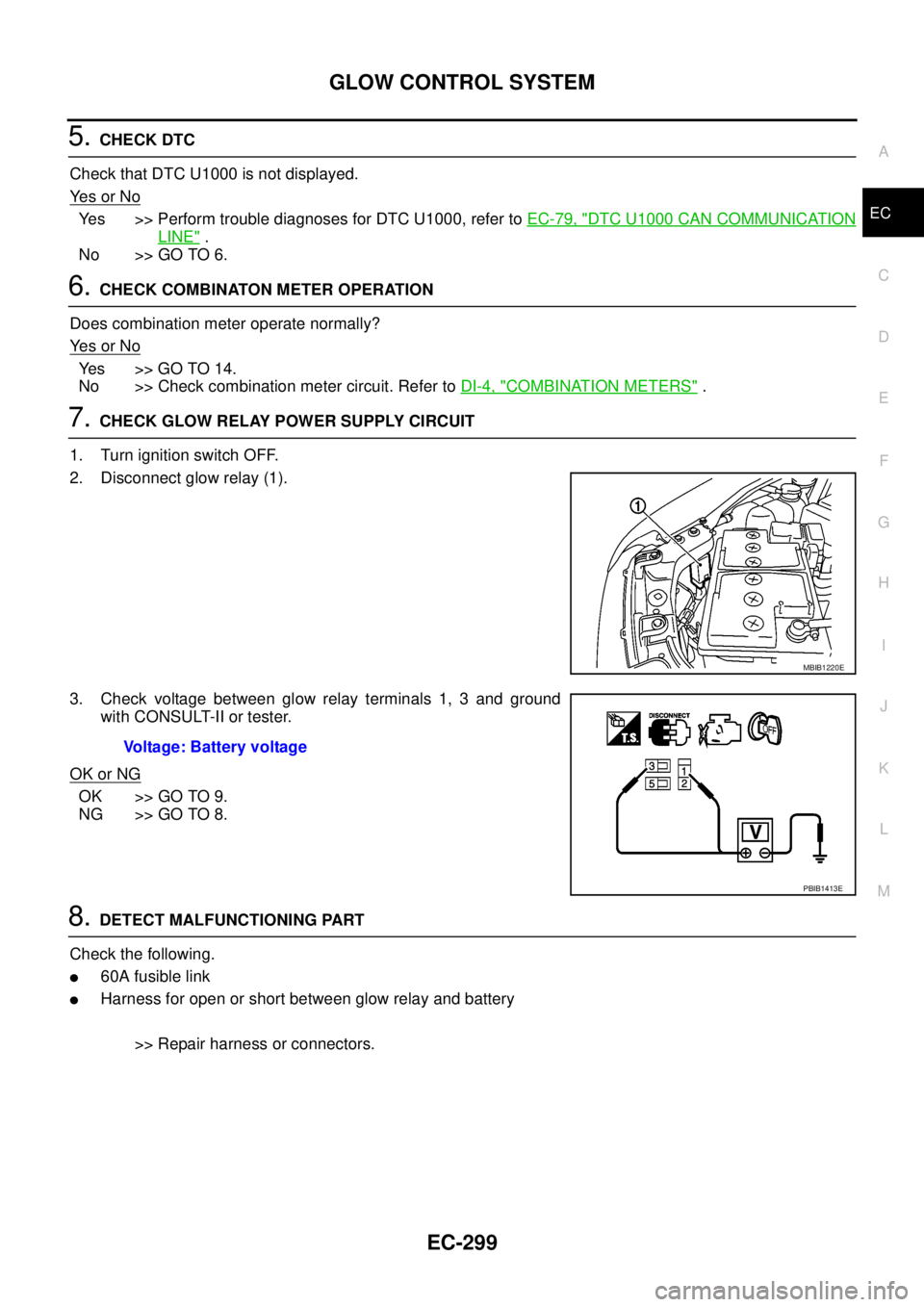
1. Turn ignition switch OFF.
2. Disconnect glow relay (1).
3. Check voltage between glow relay terminals 1, 3 and ground
with CONSULT-II or tester.
OK or NG
OK >> GO TO 9.
NG >> GO TO 8.
8.DETECT MALFUNCTIONING PART
Check the following.
l60A fusible link
lHarness for open or short between glow relay and battery
>> Repair harness or connectors.
MBIB1220E
Voltage: Battery voltage
PBIB1413E
Page 1333 of 3171
ASCD INDICATOR
EC-353
C
D
E
F
G
H
I
J
K
L
MA
EC
Diagnostic ProcedureEBS01KN0
1.CHECK OVERALL FUNCTION
Check ASCD indicator under the following conditions.
OK or NG
OK >>INSPECTION END
NG >> GO TO 2.
2.CHECK DTC
Check that DTC U1000 is not displayed.
OK or NG
OK >> Perform trouble diagnoses for DTC U1000. Refer toEC-79, "DTC U1000 CAN COMMUNICA-
TION LINE".
NG >> GO TO 3.
3.CHECK COMBINATION METER OPERATION
Does combination meter operate normally?
Ye s o r N o
Ye s > > G O T O 4 .
No >> Check combination meter circuit. Refer toDI-4, "
COMBINATION METERS".
4.CHECK INTERMITTENT INCIDENT
Refer toEC-70, "
TROUBLE DIAGNOSIS FOR INTERMITTENT INCIDENT".
>>INSPECTION END
ASCD INDICATOR CONDITION SPECIFICATION
CRUISE LAMP
lIgnition switch: ONlMAIN switch: Pressed at the
first time®at the 2nd timeON®OFF
SET LAMP
lMAIN switch: ON
lWhen vehicle speed is
between 40 km/h (25 MPH)
and185km/h(115MPH)
lASCD: Operating ON
lASCD: Not operating OFF
Page 1660 of 3171
GI-38
CONTROL UNIT CONFIGURATION PROCEDURE
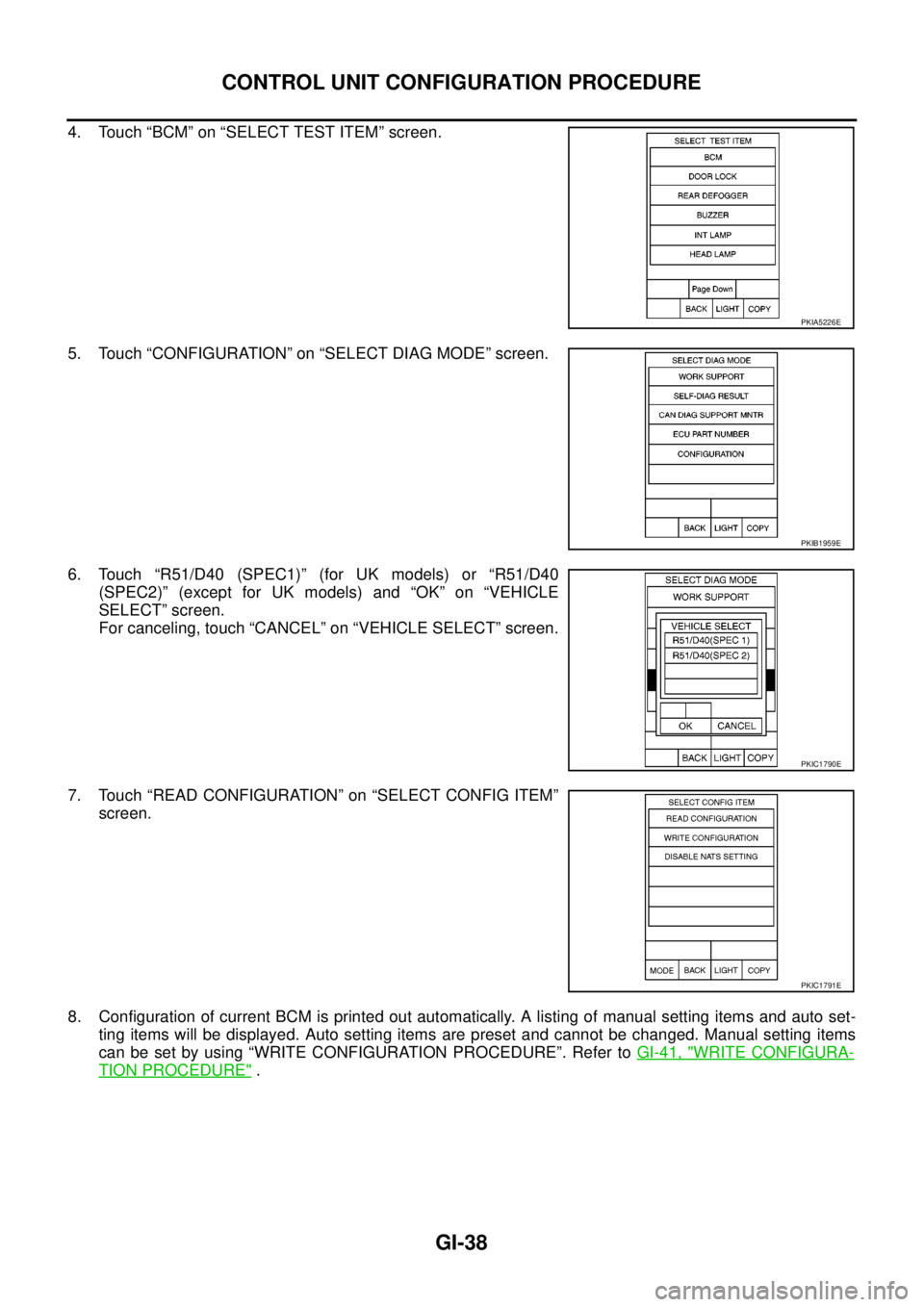
4. Touch “BCM” on “SELECT TEST ITEM” screen.
5. Touch “CONFIGURATION” on “SELECT DIAG MODE” screen.
6. Touch “R51/D40 (SPEC1)” (for UK models) or “R51/D40
(SPEC2)” (except for UK models) and “OK” on “VEHICLE
SELECT” screen.
For canceling, touch “CANCEL” on “VEHICLE SELECT” screen.
7. Touch “READ CONFIGURATION” on “SELECT CONFIG ITEM”
screen.
8. Configuration of current BCM is printed out automatically. A listing of manual setting items and auto set-
ting items will be displayed. Auto setting items are preset and cannot be changed. Manual setting items
can be set by using “WRITE CONFIGURATION PROCEDURE”. Refer toGI-41, "
WRITE CONFIGURA-
TION PROCEDURE".
PKIA5226E
PKIB1959E
PKIC1790E
PKIC1791E
Page 1734 of 3171
GW-48
REAR WINDOW DEFOGGER
Ground is supplied
lto BCM terminal 55
lto front air control terminal 20
lthrough body grounds M21, M80 and M83
lto IPDM E/R terminals 38 and 59
lthrough body grounds E21, E41 and E61.
When front air control (rear window defogger switch) is turned to ON,
Ground is supplied
lto BCM terminal 20
lthrough front air control terminal 11
lthrough front air control terminal 20
lthrough body grounds M21, M80 and M83.
Then rear window defogger switch is illuminated.
Then BCM recognizes that rear window defogger switch is turned to ON.
Then it sends rear window defogger switch signals to IPDM E/R via DATA LINE (CAN H, CAN L).
When display panel receives rear window defogger switch signals it illuminates on the screen.
When IPDM E/R receives rear window defogger switch signals,
Ground is supplied
lto rear window defogger relay (located in the IPDM E/R)
lthrough IPDM E/R terminals 38 and 59
lthrough body grounds E21, E41 and E61
and then rear window defogger relay and heated mirror is energized.
Power is supplied
lthrough IPDM E/R terminal 60
lto rear window defogger terminal 1.
Ground is supplied
lto rear window window defogger terminal 2
lthrough body ground D152.
With power and ground supplied, rear window defogger filaments heat and defog the rear window.
CAN Communication System DescriptionEIS00B8G
Refer toLAN-23, "CAN COMMUNICATION".
Page 1740 of 3171
GW-54
REAR WINDOW DEFOGGER
CONSULT-II Function (BCM)
EIS00B8M
CONSULT-II can display each diagnostic item using the diagnostic test modes shown following.
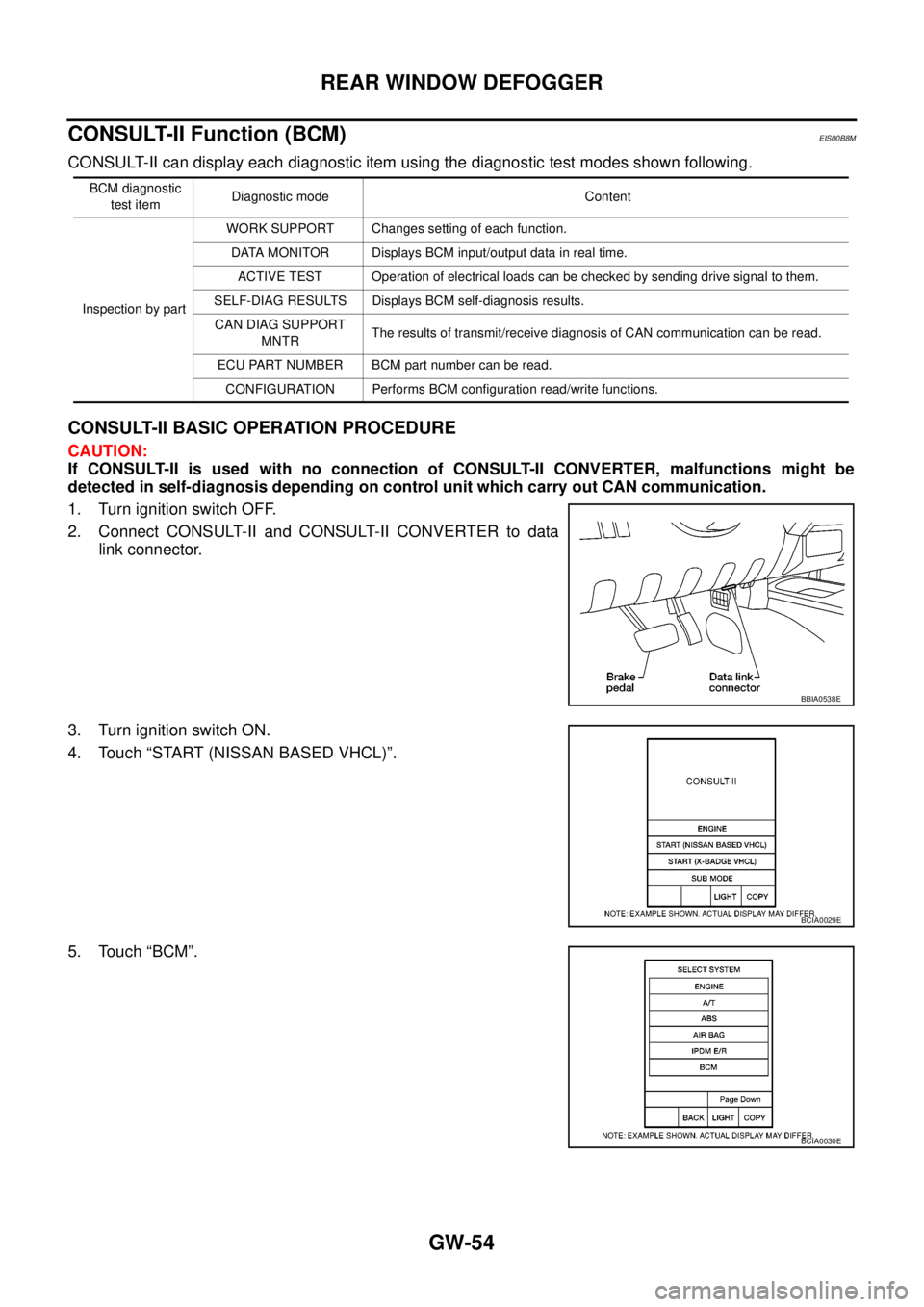
CONSULT-II BASIC OPERATION PROCEDURE
CAUTION:
If CONSULT-II is used with no connection of CONSULT-II CONVERTER, malfunctions might be
detected in self-diagnosis depending on control unit which carry out CAN communication.
1. Turn ignition switch OFF.
2. Connect CONSULT-II and CONSULT-II CONVERTER to data
link connector.
3. Turn ignition switch ON.
4. Touch “START (NISSAN BASED VHCL)”.
5. Touch “BCM”.
BCM diagnostic
test itemDiagnostic mode Content
Inspection by partWORK SUPPORT Changes setting of each function.
DATA MONITOR Displays BCM input/output data in real time.
ACTIVE TEST Operation of electrical loads can be checked by sending drive signal to them.
SELF-DIAG RESULTS Displays BCM self-diagnosis results.
CAN DIAG SUPPORT
MNTRThe results of transmit/receive diagnosis of CAN communication can be read.
ECU PART NUMBER BCM part number can be read.
CONFIGURATION Performs BCM configuration read/write functions.
BBIA0538E
BCIA0029E
BCIA0030E
Page 1741 of 3171
REAR WINDOW DEFOGGER
GW-55
C
D
E
F
G
H
J
K
L
MA
B
GW
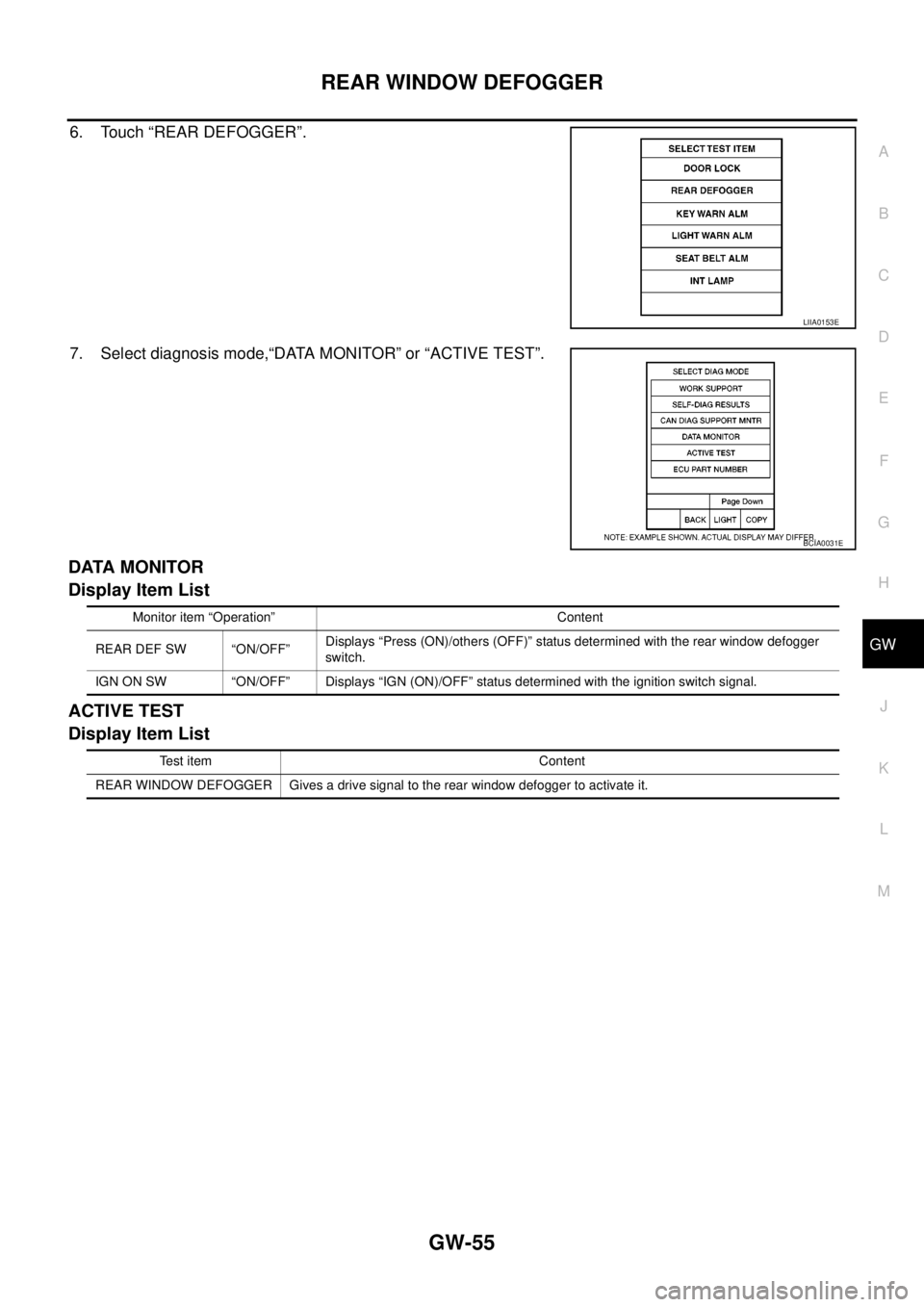
6. Touch “REAR DEFOGGER”.
7. Select diagnosis mode,“DATA MONITOR” or “ACTIVE TEST”.
DATA MONITOR
Display Item List
ACTIVE TEST
Display Item List
LIIA0153E
BCIA0031E
Monitor item “Operation” Content
REAR DEF SW “ON/OFF”Displays “Press (ON)/others (OFF)” status determined with the rear window defogger
switch.
IGN ON SW “ON/OFF” Displays “IGN (ON)/OFF” status determined with the ignition switch signal.
Test item Content
REAR WINDOW DEFOGGER Gives a drive signal to the rear window defogger to activate it.
Page 1742 of 3171
GW-56
REAR WINDOW DEFOGGER
Trouble Diagnoses Symptom Chart
EIS00B8N
lMake sure other systems using the signal of the following systems operate normally.
BCM Power Supply and Ground Circuit CheckEIS00B8O
First perform the “SELF-DIAG RESULTS” in “BCM” with CONSULT-II, when perform the each trouble
diagnosis. Refer toBCS-16, "
CAN Communication Inspection Using CONSULT-II (Self-Diagnosis)".
1.CHECK FUSE
lCheck 10A fuse [No. 1, located in the fuse block (J/B)]
lCheck 50A fusible link (letterGlocated in the fuse and fusible link box)
NOTE:
Refer toGW-47, "
Component Parts and Harness Connector Location".
OK or NG
OK >> GO TO 2.
NG >> If fuse is blown, be sure to eliminate cause of malfunction before installing new fuse. Refer toPG-
4, "POWER SUPPLY ROUTING CIRCUIT".
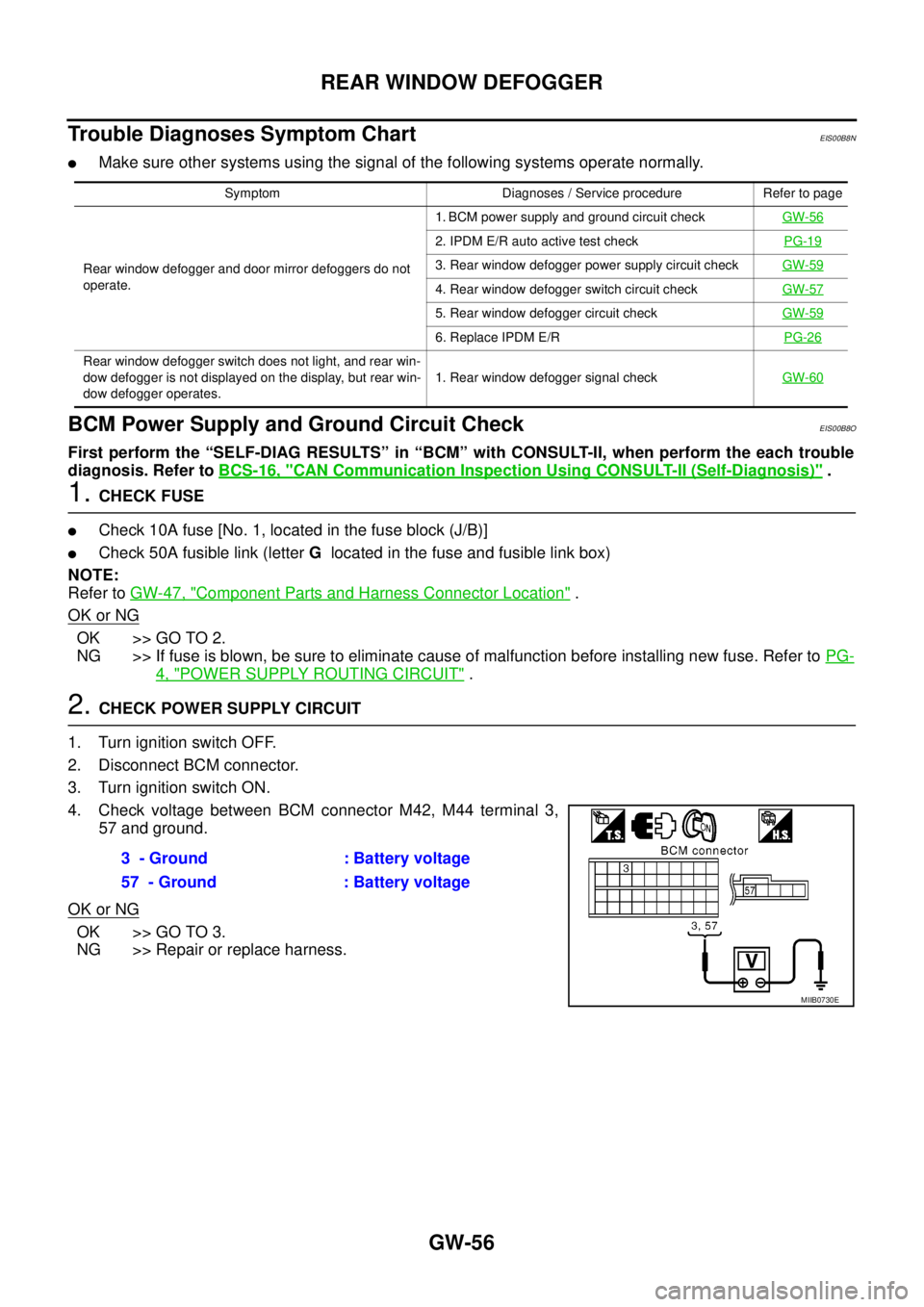
2.CHECK POWER SUPPLY CIRCUIT
1. Turn ignition switch OFF.
2. Disconnect BCM connector.
3. Turn ignition switch ON.
4. Check voltage between BCM connector M42, M44 terminal 3,
57 and ground.
OK or NG
OK >> GO TO 3.
NG >> Repair or replace harness.
Symptom Diagnoses / Service procedure Refer to page
Rear window defogger and door mirror defoggers do not
operate.1. BCM power supply and ground circuit checkGW-56
2. IPDM E/R auto active test checkPG-19
3. Rear window defogger power supply circuit checkGW-59
4. Rear window defogger switch circuit checkGW-57
5. Rear window defogger circuit checkGW-59
6. Replace IPDM E/RPG-26
Rear window defogger switch does not light, and rear win-
dow defogger is not displayed on the display, but rear win-
dow defogger operates.1. Rear window defogger signal checkGW-60
3 - Ground : Battery voltage
57 - Ground : Battery voltage
MIIB0730E
Page 1746 of 3171
GW-60
REAR WINDOW DEFOGGER
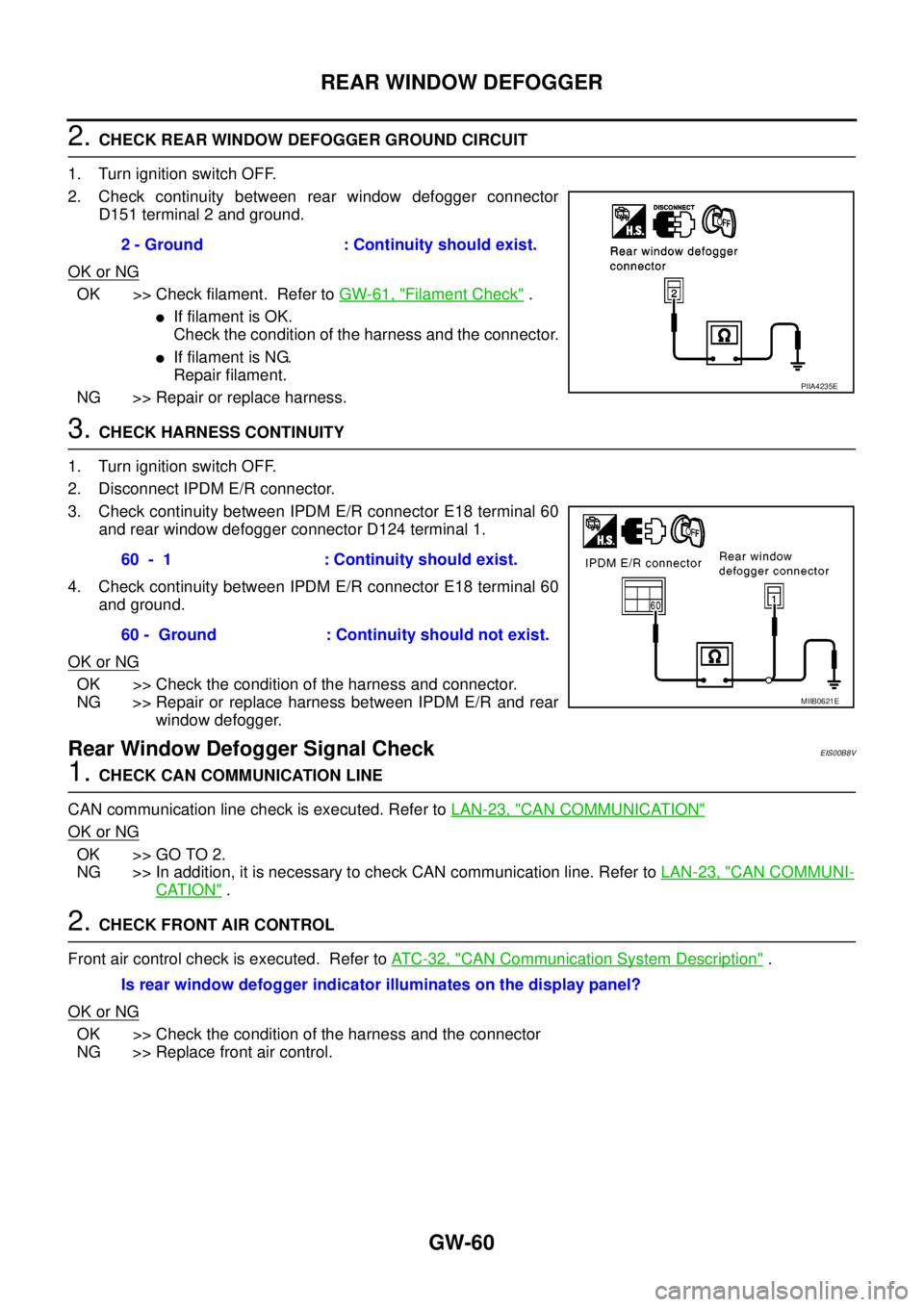
2.CHECK REAR WINDOW DEFOGGER GROUND CIRCUIT
1. Turn ignition switch OFF.
2. Check continuity between rear window defogger connector
D151 terminal 2 and ground.
OK or NG
OK >> Check filament. Refer toGW-61, "Filament Check".
lIf filament is OK.
Check the condition of the harness and the connector.
lIf filament is NG.
Repair filament.
NG >> Repair or replace harness.
3.CHECK HARNESS CONTINUITY
1. Turn ignition switch OFF.
2. Disconnect IPDM E/R connector.
3. Check continuity between IPDM E/R connector E18 terminal 60
and rear window defogger connector D124 terminal 1.
4. Check continuity between IPDM E/R connector E18 terminal 60
and ground.
OK or NG
OK >> Check the condition of the harness and connector.
NG >> Repair or replace harness between IPDM E/R and rear
window defogger.
Rear Window Defogger Signal CheckEIS00B8V
1.CHECK CAN COMMUNICATION LINE
CAN communication line check is executed. Refer toLAN-23, "
CAN COMMUNICATION"
OK or NG
OK >> GO TO 2.
NG >> In addition, it is necessary to check CAN communication line. Refer toLAN-23, "
CAN COMMUNI-
CATION".
2.CHECK FRONT AIR CONTROL
Front air control check is executed. Refer toAT C - 3 2 , "
CAN Communication System Description".
OK or NG
OK >> Check the condition of the harness and the connector
NG >> Replace front air control.2 - Ground : Continuity should exist.
PIIA4235E
60 - 1 : Continuity should exist.
60 - Ground : Continuity should not exist.
MIIB0621E
Is rear window defogger indicator illuminates on the display panel?