key NISSAN NAVARA 2005 Repair Owner's Manual
[x] Cancel search | Manufacturer: NISSAN, Model Year: 2005, Model line: NAVARA, Model: NISSAN NAVARA 2005Pages: 3171, PDF Size: 49.59 MB
Page 608 of 3171

BL-24
POWER DOOR LOCK SYSTEM
lto BCM terminal 34
lthrough door lock /unlock switch terminals 1 and 3
lthrough body grounds M21, M80 and M83.
then all doors are locked.
When door lock/unlock switch is locked, ground is supplied
lthrough BCM terminal 56
lthrough all door actuators terminal 3
lthrough all door lock actuators terminal 2
lthrough back door lock actuator terminals 1 and 3
lto BCM terminals 54 and 60.
then all doors actuators are locked
Power door unlock operation with door lock/unlock switch
When doors are unlock by door lock/unlock switch, ground is supplied
lto BCM terminal 32
lthrough door lock/unlock switch terminals 2 and 3
lthrough body grounds M21, M80 and M83.
then all doors are locked.
When door lock/unlock switch is unlocked, ground is supplied
lthrough BCM terminals 54 and 60
lthrough all door lock actuators terminal 2
lthrough all door lock actuators terminal 3
lthen all door actuators are unlock
lto BCM terminal 56.
Door lock/unlock switch indicator operation
When door lock/unlock switch is locked, all doors are locked, door lock/unlock switch indicator is on, and
ground is supplied
lto BCM terminal 17
lthrough door lock/unlock switch terminals 5 and 3
lthrough body grounds M21, M80 and M83.
OUTLINE
Function Available by Operating the Door Lock/Unlock Switch
lOperating the door lock/unlock switch to “LOCK” will lock all doors.
lOperating the door lock/unlock switch to “UNLOCK” will unlock all doors.
NOTE:
Unlock via the interior door handles and door lock/unlock switch is always possible.
Door Lock Warning Function
Under following conditions lock actuators will not respond and buzzer warning will beeps while pressing door
lock/unlock switch in LOCK direction.
lIgnition switch is turned OFF
lMechanical key is out of ignition key cylinder
lDoor is opened (except driver side door)
Key Reminder Function
Under following conditions lock actuators will lock the door once, but then immediately unlock all doors and
buzzer warning will beeps while pressing door lock/unlock switch in LOCK direction.
lIgnition switch is turned OFF
lMechanical key is inserted in ignition key cylinder
lDriver side door is opened
Door Lock/Unlock Switch Indicator
The Door lock/unlock switch indicates door lock status. The indicator will illuminates when a lock operation is
accomplish, during this state, if any door is open, the indicator will turn OFF.
Page 609 of 3171
POWERDOORLOCKSYSTEM
BL-25
C
D
E
F
G
H
J
K
L
MA
B
BL
Door lock indicator timer
Door lock indicator timer is designed to reacts and shut down the indicator. The default timer values are 1
minute and 30 minutes.
lWhen the lock operation is activated by keyfob or auto door lock (for further details, refer toBL-92, "Auto
Re-lock Function"), then the illuminate time is set to 1 minute.
lWhen the lock operation is activated by door lock/unlock switch, then the timer is set to 30 minutes.
NOTE:
When the 30 minutes timer is active and ignition switch is turned ON, the indicator illuminate for perma-
nently, unless ignition switch is turned OFF then timer will be reset back to 30 minutes.
CAN Communication System DescriptionEIS00D7T
CAN (Controller Area Network) is a serial communication line for real time application. It is an on-vehicle mul-
tiplex communication line with high data communication speed and excellent error detection ability. Many elec-
tronic control units are equipped onto a vehicle, and each control unit shares information and links with other
control units during operation (not independent). In CAN communication, control units are connected with 2
communication lines (CAN H line, CAN L line) allowing a high rate of information transmission with less wiring.
Each control unit transmits/receives data but selectively reads required data only.
CAN Communication UnitEIS00D7U
Refer toLAN-23, "CAN COMMUNICATION".
Page 618 of 3171
![NISSAN NAVARA 2005 Repair Owners Manual BL-34
POWER DOOR LOCK SYSTEM
Terminals and Reference Value for BCM
EIS00D7Z
*: Double cab modelTERMI-
NALWIRE
COLORITEM CONDITIONVOLTAGE [V]
(Approx.)
3 Y Ignition switch Ignition switch ON Battery vo](/img/5/57362/w960_57362-617.png "NISSAN NAVARA 2005 Repair Owners Manual BL-34
POWER DOOR LOCK SYSTEM
Terminals and Reference Value for BCM
EIS00D7Z
*: Double cab modelTERMI-
NALWIRE
COLORITEM CONDITIONVOLTAGE [V]
(Approx.)
3 Y Ignition switch Ignition switch ON Battery vo")
BL-34
POWER DOOR LOCK SYSTEM
Terminals and Reference Value for BCM
EIS00D7Z
*: Double cab modelTERMI-
NALWIRE
COLORITEM CONDITIONVOLTAGE [V]
(Approx.)
3 Y Ignition switch Ignition switch ON Battery voltage
5RKeyswitchKey switch ON Battery voltage
Key switch OFF 0
12 L Rear door switch RH* ON (Door is opened)®OFF (Door is closed) 0®Battery voltage
14 LGFront door switch
(Passenger side)ON (Door is opened)®OFF (Door is closed) 0®Battery voltage
15 SBFront door switch
(Driver side)ON (Door is opened)®OFF (Door is closed) 0®Battery voltage
16 P Rear door switch LH* ON (Door is opened)®OFF (Door is closed) 0®Battery voltage
17 WDoor lock/unlock switch indi-
catorAll door closedLock operation
(Illuminates)Battery voltage
Other than above 0
21 P CAN-L — —
22 L CAN-H — —
32 GR Door lock/unlock switch All door closedUnlock 0
Other than above 5
34 O Door lock/unlock switch All door closedLock 0
Other than above 5
41 YPower switch
(Fuse)— Battery voltage
54 GPassenger and rear door lock
actuators*1 (unlock)Door lock/unlock switch (Free®Lock) 0®Battery voltage®0
55 B Ground — 0
56 V All door lock actuators (lock) Door lock/unlock switch (Free®Lock) 0®Battery voltage®0
57 WPower source
(Fusible link)— Battery voltage
60 GDriver door lock actuator
(unlock)Door lock/unlock switch (Free®Lock) 0®Battery voltage®0
Page 620 of 3171
BL-36
POWER DOOR LOCK SYSTEM
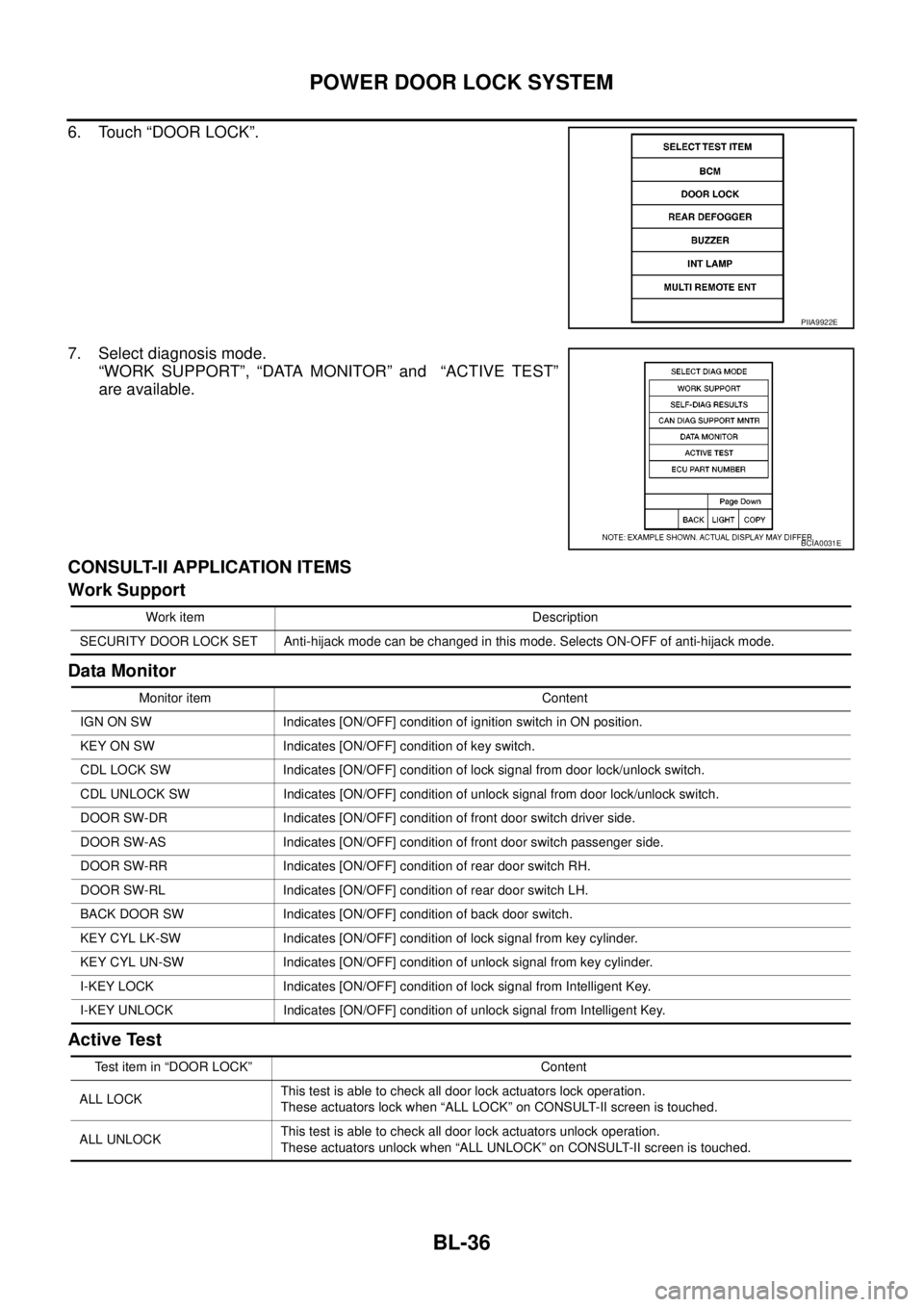
6. Touch “DOOR LOCK”.
7. Select diagnosis mode.
“WORK SUPPORT”, “DATA MONITOR” and “ACTIVE TEST”
are available.
CONSULT-II APPLICATION ITEMS
Work Support
Data Monitor
Active Test
PIIA9922E
BCIA0031E
Work item Description
SECURITY DOOR LOCK SET Anti-hijack mode can be changed in this mode. Selects ON-OFF of anti-hijack mode.
Monitor item Content
IGN ON SW Indicates [ON/OFF] condition of ignition switch in ON position.
KEY ON SW Indicates [ON/OFF] condition of key switch.
CDL LOCK SW Indicates [ON/OFF] condition of lock signal from door lock/unlock switch.
CDL UNLOCK SW Indicates [ON/OFF] condition of unlock signal from door lock/unlock switch.
DOOR SW-DR Indicates [ON/OFF] condition of front door switch driver side.
DOOR SW-AS Indicates [ON/OFF] condition of front door switch passenger side.
DOOR SW-RR Indicates [ON/OFF] condition of rear door switch RH.
DOOR SW-RL Indicates [ON/OFF] condition of rear door switch LH.
BACK DOOR SW Indicates [ON/OFF] condition of back door switch.
KEY CYL LK-SW Indicates [ON/OFF] condition of lock signal from key cylinder.
KEY CYL UN-SW Indicates [ON/OFF] condition of unlock signal from key cylinder.
I-KEY LOCK Indicates [ON/OFF] condition of lock signal from Intelligent Key.
I-KEY UNLOCK Indicates [ON/OFF] condition of unlock signal from Intelligent Key.
Test item in “DOOR LOCK” Content
ALL LOCKThis test is able to check all door lock actuators lock operation.
These actuators lock when “ALL LOCK” on CONSULT-II screen is touched.
ALL UNLOCKThis test is able to check all door lock actuators unlock operation.
These actuators unlock when “ALL UNLOCK” on CONSULT-II screen is touched.
Page 621 of 3171
POWERDOORLOCKSYSTEM
BL-37
C
D
E
F
G
H
J
K
L
MA
B
BL
Work FlowEIS00D81
1. Check the symptom and customer's requests.
2. Understand the outline of system. Refer toBL-23, "
System Description".
3. According to the trouble diagnosis, repair or replace the cause of the malfunction. Refer toBL-37, "
Trou-
ble Diagnoses Chart by Symptom".
4. Does power door lock system operate normally?
YES: GO TO 5.
NO:GOTO2.
5. INSPECTION END.
Trouble Diagnoses Chart by SymptomEIS00D82
NOTE:
Always check the “Work Flow” before troubleshooting. Refer toBL-37, "
Work Flow".
Check Power Supply and Ground CircuitEIS00D84
1.FUSE INSPECTION
Check the following.
l50A fusible link (letterG, located in the fuse and fusible link box)
l10A fuse [No. 1, located in the fuse block (J/B)]
l10A fuse [No.21, located in the fuse block (J/B)]
NOTE:
Refer toBL-21, "
Component Parts and Harness Connector Location".
OK or NG
OK >> GO TO 2.
NG >> If fuse is blown, be sure to eliminate cause of malfunction before installing new fuse, refer toPG-
4, "POWER SUPPLY ROUTING CIRCUIT".
DR UNLOCKThis test is able to check door lock actuator (driver side) lock/unlock operation.
This actuator unlock when “DR UNLOCK” on CONSULT-II screen is touched.
OTHER UNLOCKThis test is able to check all door lock actuators (except driver side) unlock operation.
These actuators unlock when “OTHER UNLOCK” on CONSULT-II screen is touched. Test item in “DOOR LOCK” Content
Symptom Diagnosis service procedure Refer to page
Power door lock does not operate at all.1. Check power supply and ground circuit.BL-37
2. Replace BCMBCS-17
Key reminder system does not operate.1. Check key switch.BL-432. Check door switch (except back door switch).BL-39
3. Replace BCM.BCS-17
Power door does not operate with door lock/unlock
switch, when lock is pressed.1. Check all door switch (except driver side)BL-39
Power door lock does not operate with door lock/
unlock switch.1. Check door lock/unlock switch.BL-52
Specific door does not operate.1.Check front door lock actuator (driver side).BL-482.Check front door lock actuator (passenger side).BL-49
3.Check rear door lock actuator (LH).BL-50
3.Check rear door lock actuator (RH).BL-51
Door lock/unlock switch indicator does not illumi-
nate.1. Check door lock/unlock switch indicator.BL-53
2. Replace BCM.BCS-17
Power door lock does not operate with key cylinder
switch (Without multi-remote control system)1. Check door key cylinder switch.BL-45
2. Replace BCMBCS-17
Page 627 of 3171
POWERDOORLOCKSYSTEM
BL-43
C
D
E
F
G
H
J
K
L
MA
B
BL
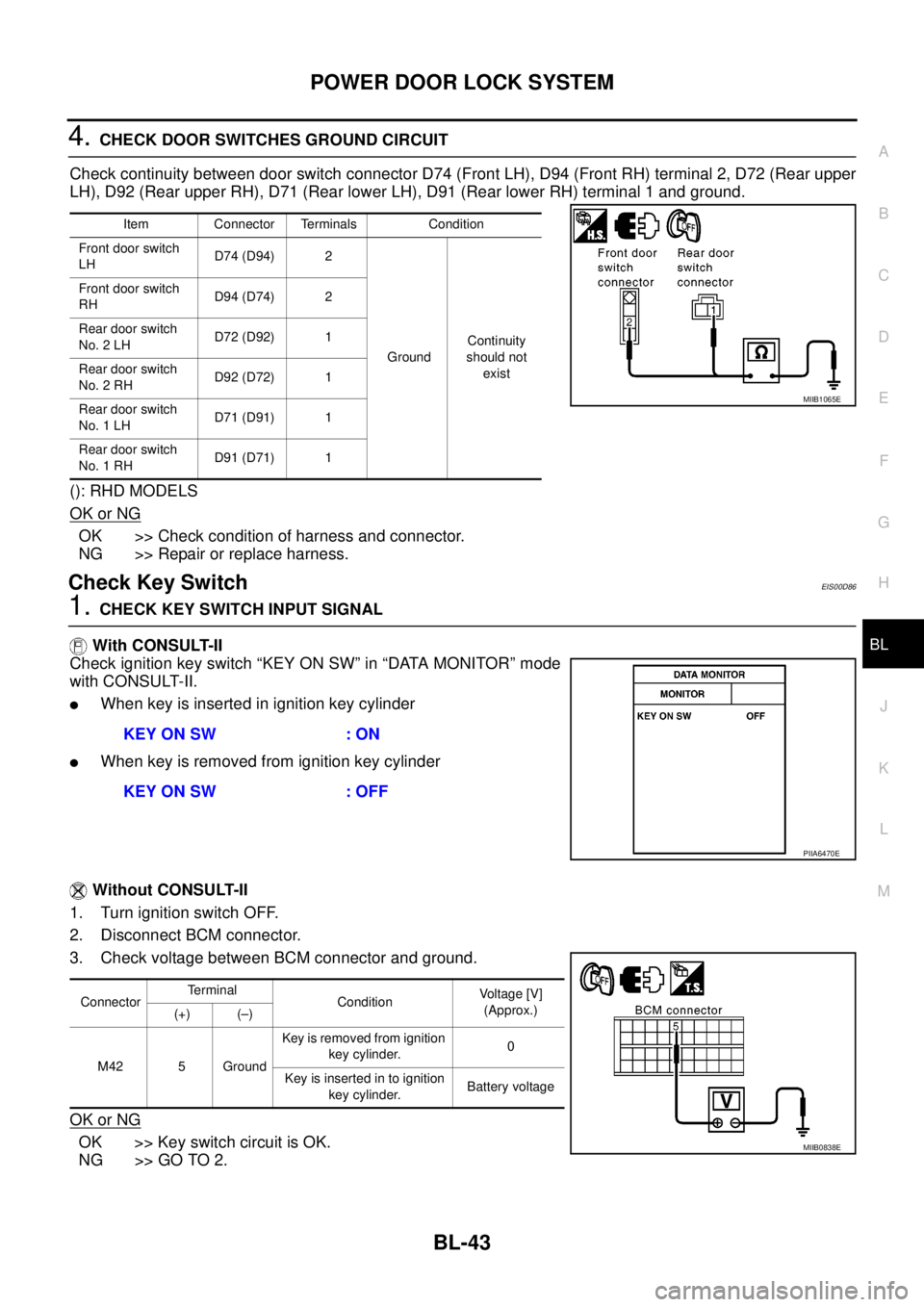
4.CHECK DOOR SWITCHES GROUND CIRCUIT
Check continuity between door switch connector D74 (Front LH), D94 (Front RH) terminal 2, D72 (Rear upper
LH), D92 (Rear upper RH), D71 (Rear lower LH), D91 (Rear lower RH) terminal 1 and ground.
(): RHD MODELS
OK or NG
OK >> Check condition of harness and connector.
NG >> Repair or replace harness.
Check Key SwitchEIS00D86
1.CHECK KEY SWITCH INPUT SIGNAL
With CONSULT-II
Check ignition key switch “KEY ON SW” in “DATA MONITOR” mode
with CONSULT-II.
lWhen key is inserted in ignition key cylinder
lWhen key is removed from ignition key cylinder
Without CONSULT-II
1. Turn ignition switch OFF.
2. Disconnect BCM connector.
3. Check voltage between BCM connector and ground.
OK or NG
OK >> Key switch circuit is OK.
NG >> GO TO 2.
Item Connector Terminals Condition
Front door switch
LHD74 (D94) 2
GroundContinuity
should not
exist Front door switch
RHD94 (D74) 2
Rear door switch
No. 2 LHD72 (D92) 1
Rear door switch
No. 2 RHD92 (D72) 1
Rear door switch
No. 1 LHD71 (D91) 1
Rear door switch
No. 1 RHD91 (D71) 1
MIIB1065E
KEY ON SW : ON
KEY ON SW : OFF
PIIA6470E
ConnectorTerminal
ConditionVoltage [V]
(Approx.)
(+) (–)
M42 5 GroundKey is removed from ignition
key cylinder.0
Keyisinsertedintoignition
key cylinder.Battery voltage
MIIB0838E
Page 628 of 3171
BL-44
POWER DOOR LOCK SYSTEM
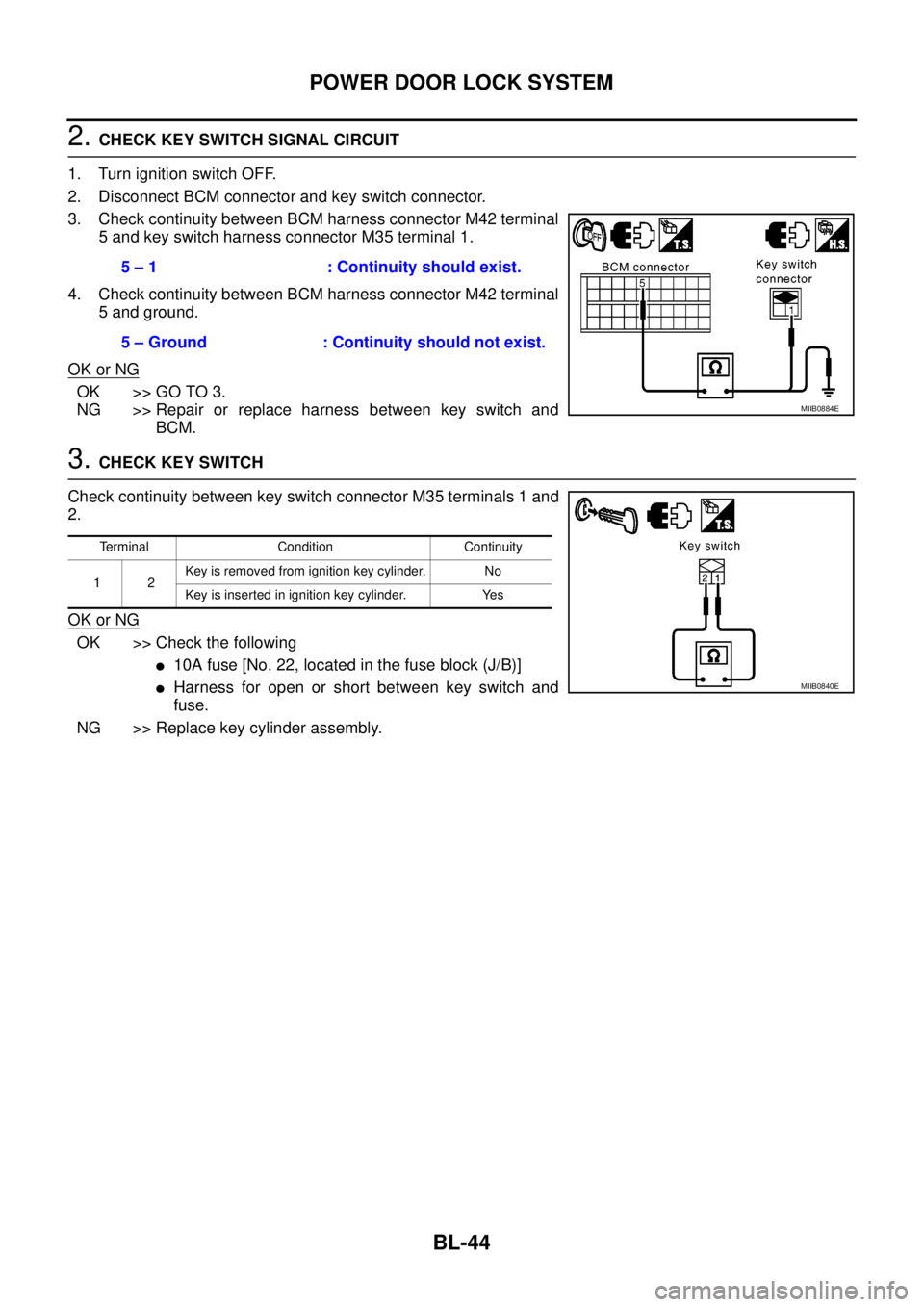
2.CHECK KEY SWITCH SIGNAL CIRCUIT
1. Turn ignition switch OFF.
2. Disconnect BCM connector and key switch connector.
3. Check continuity between BCM harness connector M42 terminal
5 and key switch harness connector M35 terminal 1.
4. Check continuity between BCM harness connector M42 terminal
5 and ground.
OK or NG
OK >> GO TO 3.
NG >> Repair or replace harness between key switch and
BCM.
3.CHECK KEY SWITCH
Check continuity between key switch connector M35 terminals 1 and
2.
OK or NG
OK >> Check the following
l10A fuse [No. 22, located in the fuse block (J/B)]
lHarness for open or short between key switch and
fuse.
NG >> Replace key cylinder assembly.5 – 1 : Continuity should exist.
5 – Ground : Continuity should not exist.
MIIB0884E
Terminal Condition Continuity
12Key is removed from ignition key cylinder. No
Key is inserted in ignition key cylinder. Yes
MIIB0840E
Page 629 of 3171
POWERDOORLOCKSYSTEM
BL-45
C
D
E
F
G
H
J
K
L
MA
B
BL
Check Door Key Cylinder Switch (LHD Model Only)EIS00DGO
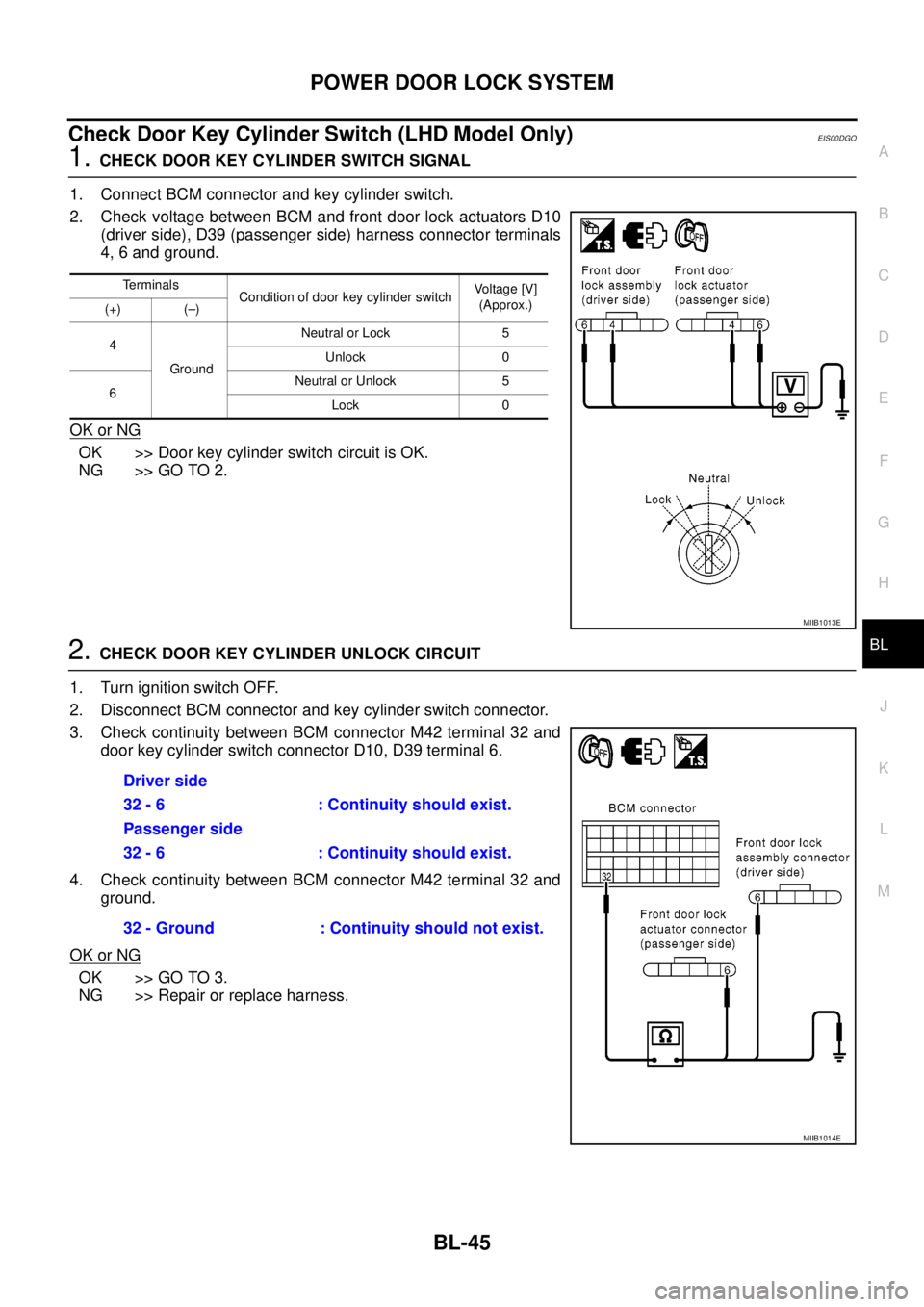
1.CHECK DOOR KEY CYLINDER SWITCH SIGNAL
1. Connect BCM connector and key cylinder switch.
2. Check voltage between BCM and front door lock actuators D10
(driver side), D39 (passenger side) harness connector terminals
4, 6 and ground.
OK or NG
OK >> Door key cylinder switch circuit is OK.
NG >> GO TO 2.
2.CHECK DOOR KEY CYLINDER UNLOCK CIRCUIT
1. Turn ignition switch OFF.
2. Disconnect BCM connector and key cylinder switch connector.
3. Check continuity between BCM connector M42 terminal 32 and
door key cylinder switch connector D10, D39 terminal 6.
4. Check continuity between BCM connector M42 terminal 32 and
ground.
OK or NG
OK >> GO TO 3.
NG >> Repair or replace harness.
Terminals
Condition of door key cylinder switchVo l ta g e [V ]
(Approx.)
(+) (–)
4
GroundNeutral or Lock 5
Unlock 0
6Neutral or Unlock 5
Lock 0
MIIB1013E
Driver side
32 - 6 : Continuity should exist.
Passenger side
32 - 6 : Continuity should exist.
32 - Ground : Continuity should not exist.
MIIB1014E
Page 630 of 3171
BL-46
POWER DOOR LOCK SYSTEM
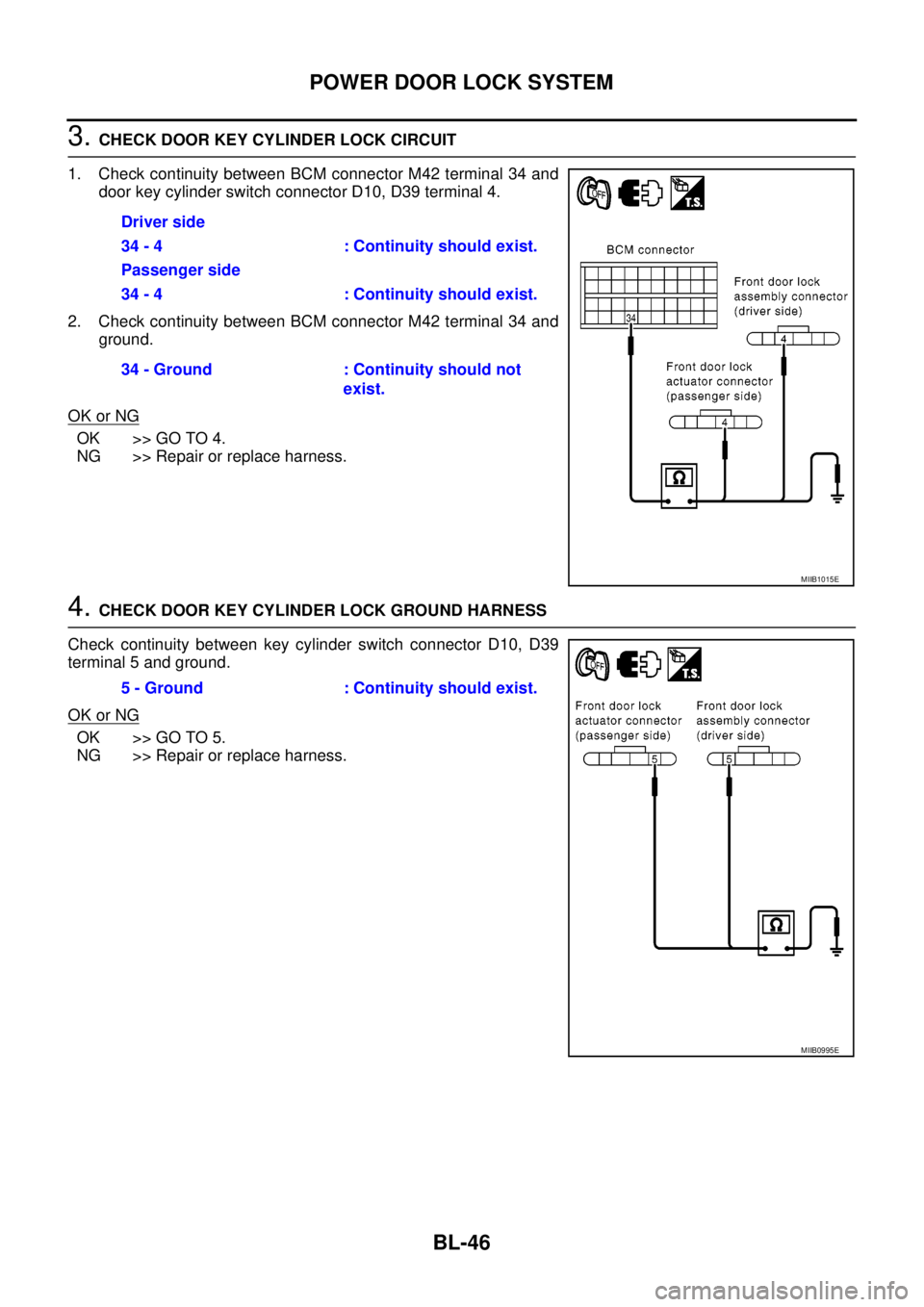
3.CHECK DOOR KEY CYLINDER LOCK CIRCUIT
1. Check continuity between BCM connector M42 terminal 34 and
door key cylinder switch connector D10, D39 terminal 4.
2. Check continuity between BCM connector M42 terminal 34 and
ground.
OK or NG
OK >> GO TO 4.
NG >> Repair or replace harness.
4.CHECK DOOR KEY CYLINDER LOCK GROUND HARNESS
Check continuity between key cylinder switch connector D10, D39
terminal 5 and ground.
OK or NG
OK >> GO TO 5.
NG >> Repair or replace harness.Driver side
34 - 4 : Continuity should exist.
Passenger side
34 - 4 : Continuity should exist.
34 - Ground : Continuity should not
exist.
MIIB1015E
5 - Ground : Continuity should exist.
MIIB0995E
Page 631 of 3171
POWERDOORLOCKSYSTEM
BL-47
C
D
E
F
G
H
J
K
L
MA
B
BL
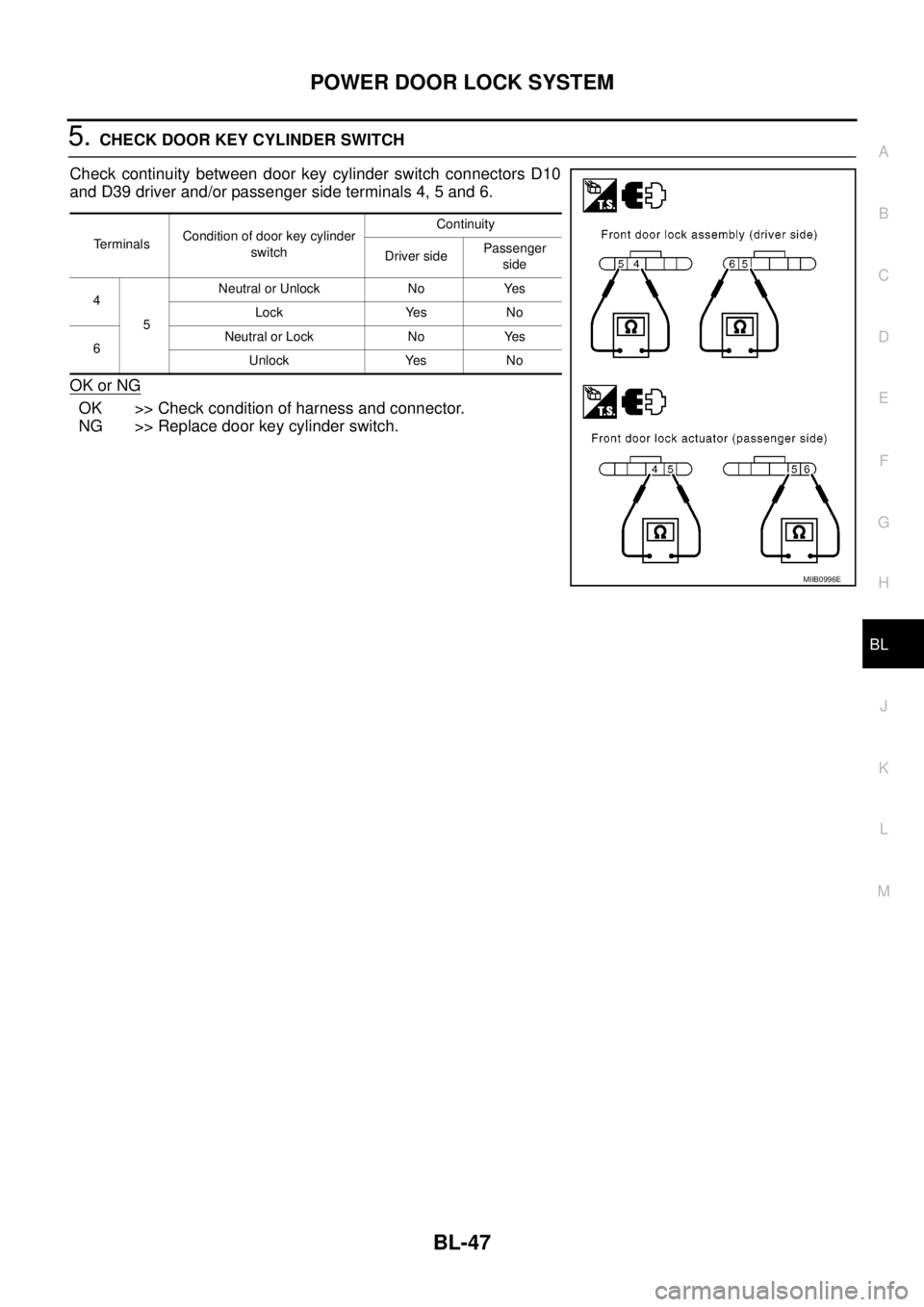
5.CHECK DOOR KEY CYLINDER SWITCH
Check continuity between door key cylinder switch connectors D10
and D39 driver and/or passenger side terminals 4, 5 and 6.
OK or NG
OK >> Check condition of harness and connector.
NG >> Replace door key cylinder switch.
TerminalsCondition of door key cylinder
switchContinuity
Driver sidePassenger
side
4
5Neutral or Unlock No Yes
Lock Yes No
6Neutral or Lock No Yes
Unlock Yes No
MIIB0996E