display NISSAN NAVARA 2005 Repair Workshop Manual
[x] Cancel search | Manufacturer: NISSAN, Model Year: 2005, Model line: NAVARA, Model: NISSAN NAVARA 2005Pages: 3171, PDF Size: 49.59 MB
Page 2763 of 3171
![NISSAN NAVARA 2005 Repair Workshop Manual RFD-60
[WITH ELECTRONIC LOCKING DIFFERENTIAL]
TROUBLE DIAGNOSIS FOR SYSTEM
Differential Lock Position Switch
EDS003B4
CONSULT-II REFERENCE VALUE IN DATA MONITOR MODE
Data are reference value.
DIFFEREN](/img/5/57362/w960_57362-2762.png "NISSAN NAVARA 2005 Repair Workshop Manual RFD-60
[WITH ELECTRONIC LOCKING DIFFERENTIAL]
TROUBLE DIAGNOSIS FOR SYSTEM
Differential Lock Position Switch
EDS003B4
CONSULT-II REFERENCE VALUE IN DATA MONITOR MODE
Data are reference value.
DIFFEREN")
RFD-60
[WITH ELECTRONIC LOCKING DIFFERENTIAL]
TROUBLE DIAGNOSIS FOR SYSTEM
Differential Lock Position Switch
EDS003B4
CONSULT-II REFERENCE VALUE IN DATA MONITOR MODE
Data are reference value.
DIFFERENTIAL CONTROL UNIT TERMINALS AND REFERENCE VALUE
Data are reference value and are measured between each terminal and ground.
CAUTION:
When using a circuit tester to measure voltage for inspection, be sure not to extend forcibly any connector terminals.Monitor item [Unit] Content Condition Display value
D-LOCK POS SW [ON/
OFF]Condition of differential
lock position switch
lVehicle stopped
lEngine running
l4WD shift switch: 4LODifferential lock mode
switch: ON
(DIFF LOCK indicator
lamp: ON)ON
Differential lock mode
switch: OFF
(DIFF LOCK indicator
lamp: OFF)OFF
Te r m i n a lWire
colorItem Condition Data (Approx.)
20 BRDifferential lock position
switch
lVehicle stopped
lEngine running
l4WD shift switch: 4LODifferential lock mode switch: ON
(DIFF LOCK indicator lamp: ON)0V
Differential lock mode switch: OFF
(DIFF LOCK indicator lamp: OFF)Battery voltage
Page 2764 of 3171
![NISSAN NAVARA 2005 Repair Workshop Manual TROUBLE DIAGNOSIS FOR SYSTEM
RFD-61
[WITH ELECTRONIC LOCKING DIFFERENTIAL]
C
E
F
G
H
I
J
K
L
MA
B
RFD
DIAGNOSTIC PROCEDURE
1.CHECK DIFFERENTIAL LOCK POSITION SWITCH SIGNAL
With CONSULT-II
1. Start eng](/img/5/57362/w960_57362-2763.png "NISSAN NAVARA 2005 Repair Workshop Manual TROUBLE DIAGNOSIS FOR SYSTEM
RFD-61
[WITH ELECTRONIC LOCKING DIFFERENTIAL]
C
E
F
G
H
I
J
K
L
MA
B
RFD
DIAGNOSTIC PROCEDURE
1.CHECK DIFFERENTIAL LOCK POSITION SWITCH SIGNAL
With CONSULT-II
1. Start eng")
TROUBLE DIAGNOSIS FOR SYSTEM
RFD-61
[WITH ELECTRONIC LOCKING DIFFERENTIAL]
C
E
F
G
H
I
J
K
L
MA
B
RFD
DIAGNOSTIC PROCEDURE
1.CHECK DIFFERENTIAL LOCK POSITION SWITCH SIGNAL
With CONSULT-II
1. Start engine.
2. Select “DATA MONITOR” mode for “DIFF LOCK” with CONSULT-II.
3. Read out ON/OFF switching action of “D-LOCK POS SW SIG”.
Without CONSULT-II
1. Start engine.
2. Check voltage between differential lock control unit harness
connector terminal and ground.
OK or NG
OK >> GO TO 5.
NG >> GO TO 2.
2.CHECK GROUND CIRCUIT
1. Turn ignition switch “OFF”.
2. Disconnect differential lock position switch harness connector.
3. Check continuity between differential lock position switch har-
ness connector C22 terminal 2 and ground.
Also check harness for short to ground and short to power.
OK or NG
OK >> GO TO 3.
NG >> Repair open circuit or short to ground or short to power
in harness or connectors.
Monitor item ConditionDisplay
value
D-LOCK POS
SW SIG
lVehicle stopped
lEngine running
l4WD shift
switch: 4LODifferential lock mode
switch: ON
(DIFF LOCK indicator
lamp: ON)ON
Differential lock mode
switch: OFF
(DIFF LOCK indicator
lamp: OFF)OFF
SDIA2538E
Connector Terminal ConditionVo l ta g e
(Approx.)
M10720 -
Ground
lVehicle stopped
lEngine running
l4WD shift switch:
4LODifferential lock mode
switch: ON
(DIFF LOCK indicator
lamp: ON)0V
Differential lock mode
switch: OFF
(DIFF LOCK indicator
lamp: OFF)Battery
voltage
SDIA2570E
Continuity should exist.
SDIA3428E
Page 2766 of 3171
![NISSAN NAVARA 2005 Repair Workshop Manual TROUBLE DIAGNOSIS FOR SYSTEM
RFD-63
[WITH ELECTRONIC LOCKING DIFFERENTIAL]
C
E
F
G
H
I
J
K
L
MA
B
RFD
COMPONENT INSPECTION
1. Turn ignition switch “OFF”.
2. Disconnect differential lock position s](/img/5/57362/w960_57362-2765.png "NISSAN NAVARA 2005 Repair Workshop Manual TROUBLE DIAGNOSIS FOR SYSTEM
RFD-63
[WITH ELECTRONIC LOCKING DIFFERENTIAL]
C
E
F
G
H
I
J
K
L
MA
B
RFD
COMPONENT INSPECTION
1. Turn ignition switch “OFF”.
2. Disconnect differential lock position s")
TROUBLE DIAGNOSIS FOR SYSTEM
RFD-63
[WITH ELECTRONIC LOCKING DIFFERENTIAL]
C
E
F
G
H
I
J
K
L
MA
B
RFD
COMPONENT INSPECTION
1. Turn ignition switch “OFF”.
2. Disconnect differential lock position switch harness connector.
3. Remove differential lock position switch. Refer toRFD-45, "
Location of Electrical Parts".
4. Pull differential lock position switch and check continuity
between differential lock position switch harness connector ter-
minals.
5. If NG, replace differential lock position switch.
Differential Lock Solenoid RelayEDS003B5
CONSULT-II REFERENCE VALUE IN DATA MONITOR MODE
Data are reference value.
DIAGNOSTIC PROCEDURE
1.CHECK DIFFERENTIAL LOCK SOLENOID SYSTEM
Perform self-diagnosis. Refer toRFD-51, "
SELF-DIAG RESULTS MODE".
Is
“RELAY [P1844]”displayed?
YES >> Perform trouble diagnosis for differential lock solenoid. Refer toRFD-64, "Differential Lock Sole-
noid".
NO >> GO TO 2.
2.CHECK DIFFERENTIAL LOCK SOLENOID RELAY SIGNAL
With CONSULT-II
1. Start engine.
2. Select “DATA MONITOR” mode for “DIFF LOCK” with CONSULT-II.
3. Read out ON/OFF switching action of “RELAY ON”.
OK or NG
OK >> GO TO 4.
NG >> GO TO 3.
Terminal Condition Continuity
1-2Pull differential position switch Yes
Release Differential position switch No
SDIA3429E
Monitor item [Unit] Content Condition Display value
RELAY ON [ON/OFF]Operating condition of dif-
ferential lock solenoid
relay (integrated in differ-
ential lock control unit)
lVehicle stopped
lEngine running
l4WD shift switch: 4LODifferential lock mode
switch: ONON
Differential lock mode
switch: OFFOFF
Monitor item ConditionDisplay
value
RELAY ON
lVehicle stopped
lEngine running
l4WD shift
switch: 4LODifferential lock mode
switch: ONON
Differential lock mode
switch: OFFOFF
SDIA2642E
Page 2767 of 3171
![NISSAN NAVARA 2005 Repair Workshop Manual RFD-64
[WITH ELECTRONIC LOCKING DIFFERENTIAL]
TROUBLE DIAGNOSIS FOR SYSTEM
3.CHECK DIFFERENTIAL LOCK CONTROL UNIT
Check differential lock control unit input/output signal. Refer toRFD-48, "
Differenti](/img/5/57362/w960_57362-2766.png "NISSAN NAVARA 2005 Repair Workshop Manual RFD-64
[WITH ELECTRONIC LOCKING DIFFERENTIAL]
TROUBLE DIAGNOSIS FOR SYSTEM
3.CHECK DIFFERENTIAL LOCK CONTROL UNIT
Check differential lock control unit input/output signal. Refer toRFD-48, \"
Differenti")
RFD-64
[WITH ELECTRONIC LOCKING DIFFERENTIAL]
TROUBLE DIAGNOSIS FOR SYSTEM
3.CHECK DIFFERENTIAL LOCK CONTROL UNIT
Check differential lock control unit input/output signal. Refer toRFD-48, "
Differential Lock Control Unit Input/
Output Signal Reference Values".
OK or NG
OK >> GO TO 4.
NG >> Check differential lock control unit pin terminals for damage or loose connection with harness con-
nector. If any item is damaged, repair or replace damaged parts.
4.CHECK DTC
Perform the self-diagnosis, after driving the vehicle for a while.
OK or NG
OK >>INSPECTION END
NG >> Replace differential lock control unit. Refer toRFD-76, "
Removal and Installation".
Differential Lock SolenoidEDS003B6
CONSULT-II REFERENCE VALUE IN DATA MONITOR MODE
Data are reference value.
DIFFERENTIAL LOCK CONTROL UNIT TERMINALS AND REFERENCE VALUE
Data are reference value and are measured between each terminal and ground.
CAUTION:
When using a circuit tester to measure voltage for inspection, be sure not to extend forcibly any connector terminals.Monitor item [Unit] Content Condition Display value
RELAY ON [ON/OFF]Operating condition of dif-
ferential lock solenoid
relay (integrated in differ-
ential lock control unit)
lVehicle stopped
lEngine running
l4WD shift switch: 4LODifferential lock mode
switch: ONON
Differential lock mode
switch: OFFOFF
RELAY MTR [ON/OFF]Control status of differen-
tial lock solenoid relay
(integrated in differential
lock control unit)
lVehicle stopped
lEngine running
l4WD shift switch: 4LODifferential lock mode
switch: ONON
Differential lock mode
switch: OFFOFF
SOL MTR [ON/OFF]Control status of differen-
tial lock solenoid
lVehicle stopped
lEngine running
l4WD shift switch: 4LODifferential lock mode
switch: ONON
Differential lock mode
switch: OFFOFF
Te r m i n a lWire
colorItem Condition Data (Approx.)
11 GR Differential lock solenoid (-)
lVehicle stopped
lEngine running
l4WD shift switch: 4LODifferential lock mode switch: ON 0V
Differential lock mode switch: OFF Battery voltage
12 L Differential lock solenoid (+)
lVehicle stopped
lEngine running
l4WD shift switch: 4LODifferential lock mode switch: ON 0V
Differential lock mode switch: OFF Battery voltage
Page 2768 of 3171
![NISSAN NAVARA 2005 Repair Workshop Manual TROUBLE DIAGNOSIS FOR SYSTEM
RFD-65
[WITH ELECTRONIC LOCKING DIFFERENTIAL]
C
E
F
G
H
I
J
K
L
MA
B
RFD
DIAGNOSTIC PROCEDURE
1.CHECK DIFFERENTIAL SOLENOID SIGNAL
With CONSULT-II
1. Start engine.
2. Sele](/img/5/57362/w960_57362-2767.png "NISSAN NAVARA 2005 Repair Workshop Manual TROUBLE DIAGNOSIS FOR SYSTEM
RFD-65
[WITH ELECTRONIC LOCKING DIFFERENTIAL]
C
E
F
G
H
I
J
K
L
MA
B
RFD
DIAGNOSTIC PROCEDURE
1.CHECK DIFFERENTIAL SOLENOID SIGNAL
With CONSULT-II
1. Start engine.
2. Sele")
TROUBLE DIAGNOSIS FOR SYSTEM
RFD-65
[WITH ELECTRONIC LOCKING DIFFERENTIAL]
C
E
F
G
H
I
J
K
L
MA
B
RFD
DIAGNOSTIC PROCEDURE
1.CHECK DIFFERENTIAL SOLENOID SIGNAL
With CONSULT-II
1. Start engine.
2. Select “DATA MONITOR” mode for “DIFF LOCK” with CONSULT-II.
3. Read out ON/OFF switching action of “RELAY ON”, “RELAY
MTR”, “SOL MTR”.
Without CONSULT-II
1. Start engine.
2. Check voltage between differential lock control unit harness
connector terminal and ground.
OK or NG
OK >> GO TO 6.
NG >> GO TO 2.
Monitor item ConditionDisplay
value
RELAY ON
lVehicle stopped
lEngine running
l4WD shift
switch: 4LODifferential lock mode
switch: ONON
Differential lock mode
switch: OFFOFF
RELAY MTRDifferential lock mode
switch: ONON
Differential lock mode
switch: OFFOFF
SOL MTRDifferential lock mode
switch: ONON
Differential lock mode
switch: OFFOFF
Connector Terminal ConditionData
(Approx.)
M10711 -
Ground
lVehicle stopped
lEngine running
l4WD shift switch: 4LODifferential
lock mode
switch: ON0V
Differential
lock mode
switch: OFFBattery
voltage
12 -
GroundDifferential
lock mode
switch: ON0V
Differential
lock mode
switch: OFFBattery
voltage
SDIA2539E
SDIA2565E
Page 2772 of 3171
![NISSAN NAVARA 2005 Repair Workshop Manual TROUBLE DIAGNOSIS FOR SYSTEM
RFD-69
[WITH ELECTRONIC LOCKING DIFFERENTIAL]
C
E
F
G
H
I
J
K
L
MA
B
RFD
CAN Communication LineEDS003B8
DIAGNOSTIC PROCEDURE
1.CHECK CAN COMMUNICATION CIRCUIT
With CONSULT](/img/5/57362/w960_57362-2771.png "NISSAN NAVARA 2005 Repair Workshop Manual TROUBLE DIAGNOSIS FOR SYSTEM
RFD-69
[WITH ELECTRONIC LOCKING DIFFERENTIAL]
C
E
F
G
H
I
J
K
L
MA
B
RFD
CAN Communication LineEDS003B8
DIAGNOSTIC PROCEDURE
1.CHECK CAN COMMUNICATION CIRCUIT
With CONSULT")
TROUBLE DIAGNOSIS FOR SYSTEM
RFD-69
[WITH ELECTRONIC LOCKING DIFFERENTIAL]
C
E
F
G
H
I
J
K
L
MA
B
RFD
CAN Communication LineEDS003B8
DIAGNOSTIC PROCEDURE
1.CHECK CAN COMMUNICATION CIRCUIT
With CONSULT-II
1. Turn ignition switch “ON” and start engine.
2. Select “SELF-DIAG RESULTS” mode for “DIFF LOCK” with in CONSULT-II.
3. Perform the self-diagnosis.
Is the
“CAN COMM CIRCUIT [U1000]”displayed?
YES >> Go toLAN-3, "Precautions When Using CONSULT-II".
NO >>INSPECTION END
SDIA1850E
Page 2773 of 3171
![NISSAN NAVARA 2005 Repair Workshop Manual RFD-70
[WITH ELECTRONIC LOCKING DIFFERENTIAL]
TROUBLE DIAGNOSIS FOR SYMPTOMS
TROUBLE DIAGNOSIS FOR SYMPTOMS
PFP:00007
DIFF LOCK Indicator Lamp Does Not Turn ONEDS003B9
SYMPTOM:
DIFF LOCK indicator lam](/img/5/57362/w960_57362-2772.png "NISSAN NAVARA 2005 Repair Workshop Manual RFD-70
[WITH ELECTRONIC LOCKING DIFFERENTIAL]
TROUBLE DIAGNOSIS FOR SYMPTOMS
TROUBLE DIAGNOSIS FOR SYMPTOMS
PFP:00007
DIFF LOCK Indicator Lamp Does Not Turn ONEDS003B9
SYMPTOM:
DIFF LOCK indicator lam")
RFD-70
[WITH ELECTRONIC LOCKING DIFFERENTIAL]
TROUBLE DIAGNOSIS FOR SYMPTOMS
TROUBLE DIAGNOSIS FOR SYMPTOMS
PFP:00007
DIFF LOCK Indicator Lamp Does Not Turn ONEDS003B9
SYMPTOM:
DIFF LOCK indicator lamp does not turn ON for approx. 1 second when turning ignition switch to
“ON”.
DIAGNOSTIC PROCEDURE
1.CHECK SYSTEM FOR CAN COMMUNICATION LINE
Perform self-diagnosis. Refer toRFD-51, "
SELF-DIAG RESULTS MODE".
Is
“CAN COMM CIRCUIT”displayed?
YES >> Perform trouble diagnosis for CAN communication line. Refer toRFD-69, "CAN Communication
Line".
NO >> GO TO 2.
2.CHECK DIFFERENTIAL LOCK CONTROL UNIT POWER SUPPLY
1. Turn ignition switch “OFF”.
2. Disconnect differential lock control unit harness connector.
3. Check voltage between differential lock control unit harness
connector terminals and ground.
4. Turn ignition switch “ON”. (Do not start engine.)
5. Check voltage between differential lock control unit harness
connector terminals and ground.
OK or NG
OK >> GO TO 3.
NG >> Check the following. If any items are damaged, repair or
replace damaged parts.
l10A fuse [No. 3 or 19, located in fuse block (J/B)]
lHarness for short or open between battery and differential lock control unit harness connector
terminal 15
lHarness for short or open between ignition switch and differential lock control unit harness con-
nector terminals 1 and 2
lBattery and ignition switch. Refer toPG-4, "POWER SUPPLY ROUTING CIRCUIT".
Connector Terminal Voltage (Approx.)
M1071 - Ground 0V
2 - Ground 0V
15 - Ground Battery voltage
SDIA2562E
Connector Terminal Voltage (Approx.)
M1071 - Ground
Battery voltage 2 - Ground
15 - Ground
SDIA2563E
Page 2855 of 3171
SC-22
CHARGING SYSTEM
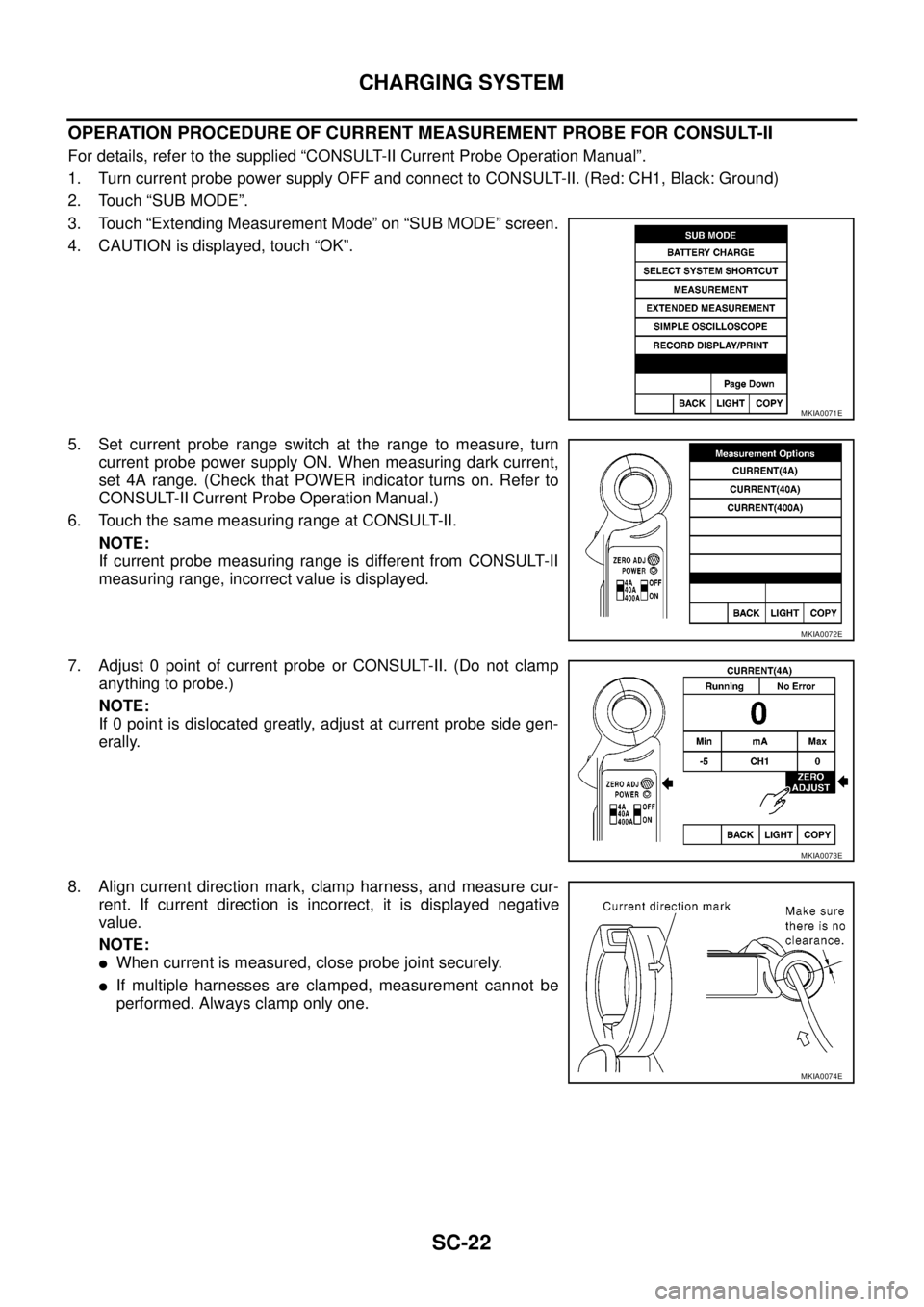
OPERATION PROCEDURE OF CURRENT MEASUREMENT PROBE FOR CONSULT-II
For details, refer to the supplied “CONSULT-II Current Probe Operation Manual”.
1. Turn current probe power supply OFF and connect to CONSULT-II. (Red: CH1, Black: Ground)
2. Touch “SUB MODE”.
3. Touch “Extending Measurement Mode” on “SUB MODE” screen.
4. CAUTION is displayed, touch “OK”.
5. Set current probe range switch at the range to measure, turn
current probe power supply ON. When measuring dark current,
set 4A range. (Check that POWER indicator turns on. Refer to
CONSULT-II Current Probe Operation Manual.)
6. Touch the same measuring range at CONSULT-II.
NOTE:
If current probe measuring range is different from CONSULT-II
measuring range, incorrect value is displayed.
7. Adjust 0 point of current probe or CONSULT-II. (Do not clamp
anything to probe.)
NOTE:
If 0 point is dislocated greatly, adjust at current probe side gen-
erally.
8. Align current direction mark, clamp harness, and measure cur-
rent. If current direction is incorrect, it is displayed negative
value.
NOTE:
lWhen current is measured, close probe joint securely.
lIf multiple harnesses are clamped, measurement cannot be
performed. Always clamp only one.
MKIA0071E
MKIA0072E
MKIA0073E
MKIA0074E
Page 2918 of 3171
TROUBLE DIAGNOSIS
SRS-9
C
D
E
F
G
I
J
K
L
MA
B
SRS
TROUBLE DIAGNOSISPFP:00004
Trouble Diagnosis IntroductionEHS001XG
CAUTION:
lDo not use electrical test equipment on any circuit related to the SRS unless instructed to do so in
this Service Manual. SRS wiring harnesses can be identified by yellow and/or orange harness con-
nectors.
lDo not attempt to repair, splice or modify SRS wiring harnesses. If a harness is damaged, replace
it with a new one.
lKeep ground connections clean.
DIAGNOSIS FUNCTION
The SRS self-diagnosis results can be read by using “AIR BAG” warning lamp and/or CONSULT-II.
The User mode is exclusively prepared for the customer (driver). This mode warns the driver of a system mal-
function through the operation of the “AIR BAG” warning lamp.
The Diagnosis mode allows the technician to locate and inspect the malfunctioning part.
The mode applications for the “AIR BAG” warning lamp and CONSULT-II are as follows:
HOW TO PERFORM TROUBLE DIAGNOSES FOR QUICK AND ACCURATE REPAIR
A good understanding of the malfunction conditions can make troubleshooting faster and more accurate.
In general, each customer feels differently about a malfunction. It is important to fully understand the symp-
toms or conditions for a customer complaint.
Information From Customer
WHAT - Vehicle model
WHEN - Date, Frequencies
WHERE - Road conditions
HOW - Operating conditions, Symptoms
Preliminary Check
Check that the following parts are in good order.
lBattery (Refer toSC-5, "How to Handle Battery".)
lFuse (Refer toSRS-13, "Wiring Diagram–SRS–".)
lSystem component-to-harness connections
User mode Diagnosis mode Display type
“AIR BAG” warning lamp X X ON-OFF operation
CONSULT-II — X Monitoring
Page 2925 of 3171
SRS-16
TROUBLE DIAGNOSIS
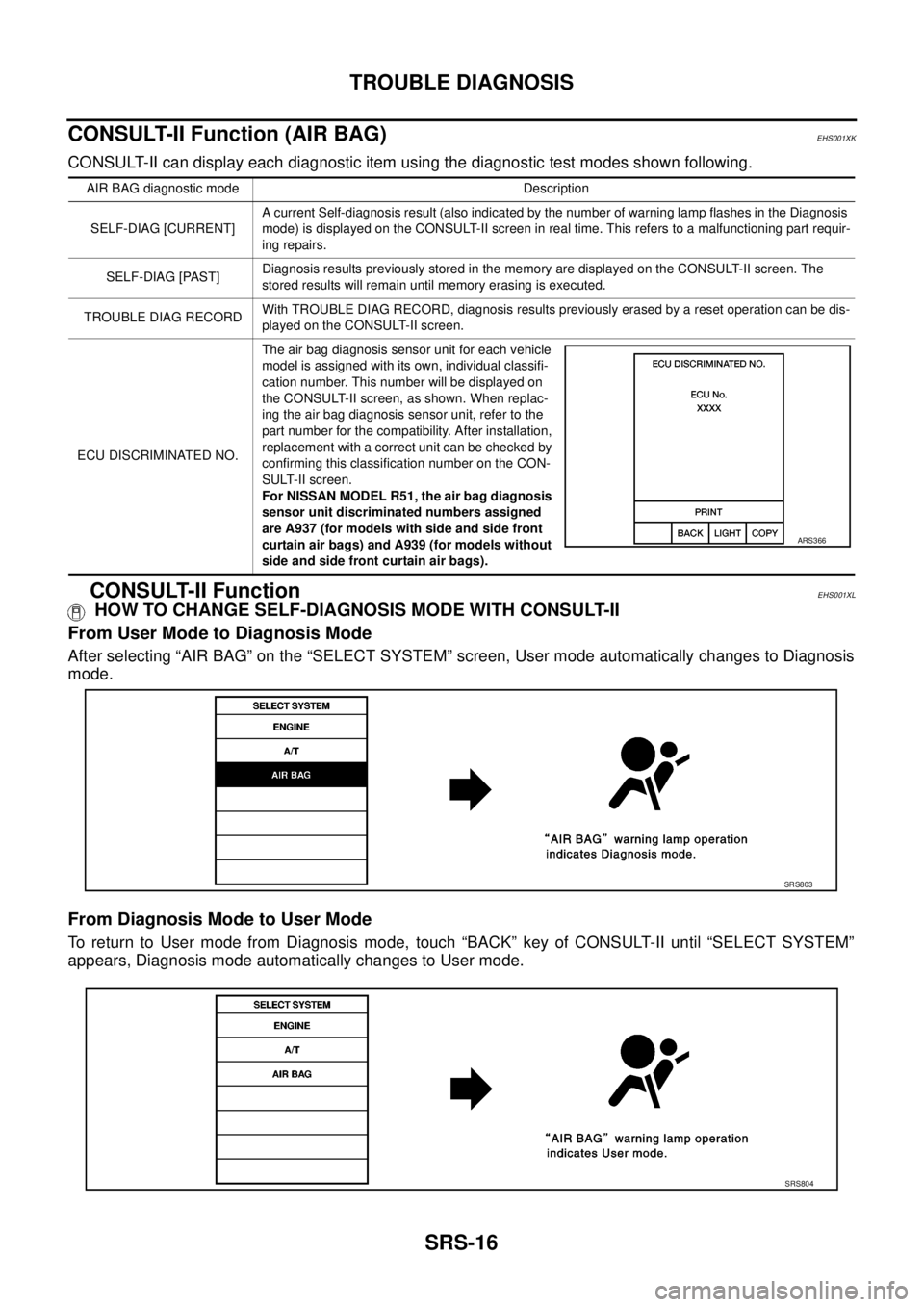
CONSULT-II Function (AIR BAG)
EHS001XK
CONSULT-II can display each diagnostic item using the diagnostic test modes shown following.
CONSULT-II FunctionEHS001XL
HOW TO CHANGE SELF-DIAGNOSIS MODE WITH CONSULT-II
From User Mode to Diagnosis Mode
After selecting “AIR BAG” on the “SELECT SYSTEM” screen, User mode automatically changes to Diagnosis
mode.
From Diagnosis Mode to User Mode
To return to User mode from Diagnosis mode, touch “BACK” key of CONSULT-II until “SELECT SYSTEM”
appears, Diagnosis mode automatically changes to User mode.
AIR BAG diagnostic mode Description
SELF-DIAG [CURRENT]A current Self-diagnosis result (also indicated by the number of warning lamp flashes in the Diagnosis
mode) is displayed on the CONSULT-II screen in real time. This refers to a malfunctioning part requir-
ing repairs.
SELF-DIAG [PAST]Diagnosis results previously stored in the memory are displayed on the CONSULT-II screen. The
stored results will remain until memory erasing is executed.
TROUBLE DIAG RECORDWith TROUBLE DIAG RECORD, diagnosis results previously erased by a reset operation can be dis-
played on the CONSULT-II screen.
ECU DISCRIMINATED NO.The air bag diagnosis sensor unit for each vehicle
model is assigned with its own, individual classifi-
cation number. This number will be displayed on
the CONSULT-II screen, as shown. When replac-
ing the air bag diagnosis sensor unit, refer to the
part number for the compatibility. After installation,
replacement with a correct unit can be checked by
confirming this classification number on the CON-
SULT-II screen.
For NISSAN MODEL R51, the air bag diagnosis
sensor unit discriminated numbers assigned
are A937 (for models with side and side front
curtain air bags) and A939 (for models without
side and side front curtain air bags).
ARS366
SRS803
SRS804