warning NISSAN NAVARA 2005 Repair Repair Manual
[x] Cancel search | Manufacturer: NISSAN, Model Year: 2005, Model line: NAVARA, Model: NISSAN NAVARA 2005Pages: 3171, PDF Size: 49.59 MB
Page 796 of 3171
BR-10
BRAKE FLUID
BRAKE FLUID
PFP:KN100
On-board InspectionEFS005SI
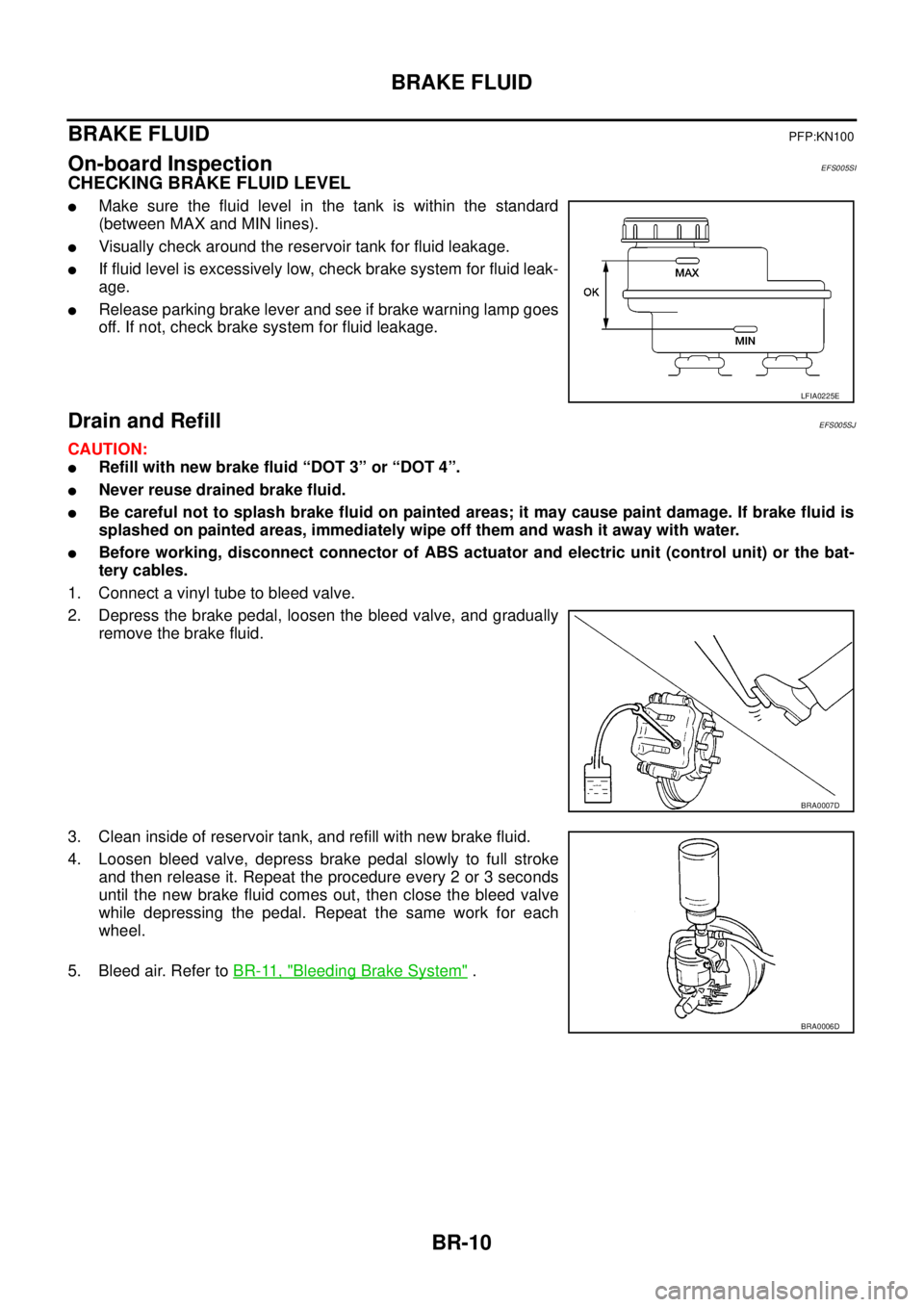
CHECKING BRAKE FLUID LEVEL
lMake sure the fluid level in the tank is within the standard
(between MAX and MIN lines).
lVisually check around the reservoir tank for fluid leakage.
lIf fluid level is excessively low, check brake system for fluid leak-
age.
lRelease parking brake lever and see if brake warning lamp goes
off. If not, check brake system for fluid leakage.
Drain and RefillEFS005SJ
CAUTION:
lRefill with new brake fluid “DOT 3” or “DOT 4”.
lNever reuse drained brake fluid.
lBe careful not to splash brake fluid on painted areas; it may cause paint damage. If brake fluid is
splashed on painted areas, immediately wipe off them and wash it away with water.
lBefore working, disconnect connector of ABS actuator and electric unit (control unit) or the bat-
tery cables.
1. Connect a vinyl tube to bleed valve.
2. Depress the brake pedal, loosen the bleed valve, and gradually
remove the brake fluid.
3. Clean inside of reservoir tank, and refill with new brake fluid.
4. Loosen bleed valve, depress brake pedal slowly to full stroke
and then release it. Repeat the procedure every 2 or 3 seconds
until the new brake fluid comes out, then close the bleed valve
while depressing the pedal. Repeat the same work for each
wheel.
5. Bleed air. Refer toBR-11, "
Bleeding Brake System".
LFIA0225E
BRA0007D
BRA0006D
Page 811 of 3171

FRONT DISC BRAKE
BR-25
C
D
E
G
H
I
J
K
L
MA
B
BR
WARNING:
Clean dust on caliper and brake pad with a vacuum dust collector to minimize the hazard of air- borne
particles or other materials.
CAUTION:
lWhile removing cylinder body, do not depress brake pedal because piston will pop out.
lIt is not necessary to remove bolts on torque member and brake hose except for disassembly or
replacement of caliper assembly. In this case, hang cylinder body with a wire so as not to stretch
brake hose.
lDo not damage piston boot.
lIf any shim is subject to serious corrosion, replace it with a new one.
lAlways replace shim as a set when replacing brake pad.
lKeep rotor out of brake fluid.
Removal and Installation of Brake PadEFS005T0
REMOVAL
1. Remove tyre from vehicle.
2. Remove lower sliding pin bolt.
3. Hang cylinder body with a wire. Remove pad assembly and pad retainer from torque member.
CAUTION:
When removing the pad retainer from the torque member, lift it in the direction indicated by the
arrow in the figure so that it does not deform.
INSTALLATION
1. Install inner shim to inner pad, and outer shim to outer pad.
2. Install pad retainers and pad assembly to torque member.
3. Press in piston until pads can be installed, and then install cylin-
der body to torque member.
CAUTION:
lWhen installing pad retainer, attach it firmly so that it
does not flat up higher than torque member, as shown in
the figure.
lIn the case of replacing pad with new one, check a brake
fluid level in the reservoir tank because brake fluid
returns to master cylinder reservoir tank when pressing
piston in.
4. Install lower sliding pin bolt and tighten to the specified torque. Refer toBR-24, "
Components".
5. Check front disc brake for drag.
6. Install tyre to vehicle.
: Brake fluid
Refer to GI section for symbol marks except in the above.
PFIA0273E
Page 816 of 3171
BR-30
REAR DRUM BRAKE
REAR DRUM BRAKE
PFP:43206
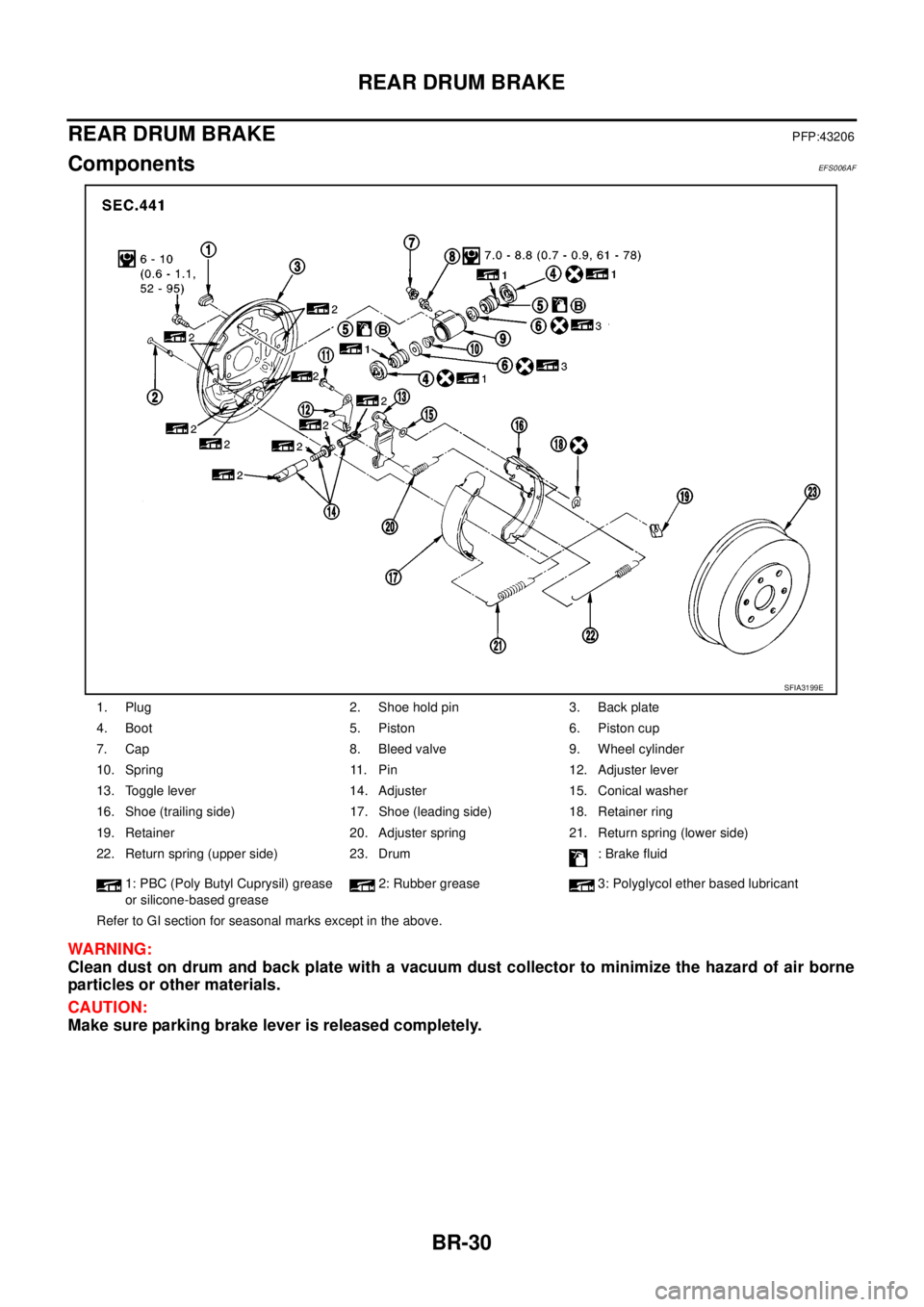
ComponentsEFS006AF
WARNING:
Clean dust on drum and back plate with a vacuum dust collector to minimize the hazard of air borne
particles or other materials.
CAUTION:
Make sure parking brake lever is released completely.
1. Plug 2. Shoe hold pin 3. Back plate
4. Boot 5. Piston 6. Piston cup
7. Cap 8. Bleed valve 9. Wheel cylinder
10. Spring 11. Pin 12. Adjuster lever
13. Toggle lever 14. Adjuster 15. Conical washer
16. Shoe (trailing side) 17. Shoe (leading side) 18. Retainer ring
19. Retainer 20. Adjuster spring 21. Return spring (lower side)
22. Return spring (upper side) 23. Drum : Brake fluid
1: PBC (Poly Butyl Cuprysil) grease
or silicone-based grease2: Rubber grease 3: Polyglycol ether based lubricant
Refer to GI section for seasonal marks except in the above.
SFIA3199E
Page 823 of 3171
BRC-1
BRAKE CONTROL SYSTEM
F BRAKES
CONTENTS
C
D
E
G
H
I
J
K
L
M
SECTIONBRC
A
B
BRC
BRAKE CONTROL SYSTEM
ABS
PRECAUTIONS .......................................................... 3
Precautions for Supplemental Restraint System
(SRS)“AIRBAG”and“SEATBELTPRE-TEN-
SIONER” .................................................................. 3
Precautions for Brake System .................................. 3
Precautions for Brake Control .................................. 3
PREPARATION ........................................................... 4
Special Service Tools (SST) ..................................... 4
SYSTEM DESCRIPTION ............................................ 5
System Diagram ....................................................... 5
Functions .................................................................. 5
Operation That Is Not “System Error” ...................... 5
Fail-Safe Function .................................................... 5
ABS, EBD SYSTEM .............................................. 5
Hydraulic Circuit Diagram ........................................ 6
CAN COMMUNICATION ............................................ 7
System Description .................................................. 7
TROUBLE DIAGNOSIS .............................................. 8
How to Perform Trouble Diagnosis for Quick and
Accurate Repair ....................................................... 8
INTRODUCTION ................................................... 8
DIAGNOSIS FLOWCHART .................................. 9
ASKING COMPLAINTS ...................................... 10
EXAMPLE OF DIAGNOSIS SHEET ................... 10
Component Parts Location ...................................... 11
Schematic — ABS — ............................................. 12
Wiring Diagram — ABS — ..................................... 13
CONSULT- II Functions .......................................... 17
CONSULT-II MAIN FUNCTION ........................... 17
CONSULT-II BASIC OPERATION PROCEDURE
... 17
Self-Diagnosis ........................................................ 18
OPERATION PROCEDURE ............................... 18
ERASE MEMORY ............................................... 18
DISPLAY ITEM LIST ........................................... 18
Data Monitor ........................................................... 20
OPERATION PROCEDURE ............................... 20
DISPLAY ITEM LIST ........................................... 20Active Test .............................................................. 21
OPERATION PROCEDURE ................................ 21
SOLENOID VALVE .............................................. 22
ABS MOTOR ....................................................... 22
For Fast and Accurate Diagnosis ........................... 23
PRECAUTIONS FOR DIAGNOSIS ..................... 23
Basic Inspection ..................................................... 23
BASIC INSPECTION 1 BRAKE FLUID LEVEL,
LEAKS, AND BRAKE PADS ................................ 23
BASIC INSPECTION 2 POWER SYSTEM TER-
MINAL LOOSENESS AND BATTERY INSPEC-
TION .................................................................... 23
BASIC INSPECTION 3 ABS WARNING LAMP
AND BRAKE WARNING LAMP INSPECTION .... 24
Inspection 1 Wheel Sensor System ........................ 24
Inspection 2 ABS Actuator and Electric Unit (Control
Unit) ........................................................................ 26
Inspection 3 ABS Actuator Relay or ABS Motor
Relay Circuit ........................................................... 26
Inspection 4 CAN Communication Circuit .............. 28
Inspection 5 ABS Actuator and Electric Unit (Control
Unit) Power Supply and Ground Circuit .................. 28
Inspection 6 Brake Fluid Level Switch Circuit ......... 30
Inspection 7 Parking Brake Switch Circuit .............. 32
Inspection 8 Warning lamp system ......................... 33
Symptom 1: Excessive ABS Function Operation
Frequency ............................................................... 33
Symptom 2: Unexpected Pedal Reaction ............... 34
Symptom 3: The Stopping Distance Is Long .......... 34
Symptom 4: ABS Function Does Not Operate ....... 35
Symptom 5: Pedal Vibration or ABS Operation
Sound Occurs ......................................................... 35
Symptom 6: ABS Warning Lamp Indication Is Not
Normal .................................................................... 35
WHEEL SENSORS ................................................... 37
Removal and Installation ........................................ 37
REMOVAL ........................................................... 38
INSTALLATION ................................................... 38
Page 825 of 3171
![NISSAN NAVARA 2005 Repair Repair Manual PRECAUTIONS
BRC-3
[ABS]
C
D
E
G
H
I
J
K
L
MA
B
BRC
[ABS]PRECAUTIONSPFP:00001
Precautions for Supplemental Restraint System (SRS) “AIR BAG” and “SEAT
BELT PRE-TENSIONER”
EFS006DM
The Supplement](/img/5/57362/w960_57362-824.png "NISSAN NAVARA 2005 Repair Repair Manual PRECAUTIONS
BRC-3
[ABS]
C
D
E
G
H
I
J
K
L
MA
B
BRC
[ABS]PRECAUTIONSPFP:00001
Precautions for Supplemental Restraint System (SRS) “AIR BAG” and “SEAT
BELT PRE-TENSIONER”
EFS006DM
The Supplement")
PRECAUTIONS
BRC-3
[ABS]
C
D
E
G
H
I
J
K
L
MA
B
BRC
[ABS]PRECAUTIONSPFP:00001
Precautions for Supplemental Restraint System (SRS) “AIR BAG” and “SEAT
BELT PRE-TENSIONER”
EFS006DM
The Supplemental Restraint System such as “AIR BAG” and “SEAT BELT PRE-TENSIONER”, used along
with a front seat belt, helps to reduce the risk or severity of injury to the driver and front passenger for certain
types of collision. Information necessary to service the system safely is included in the SRS and SB section of
this Service Manual.
WARNING:
lTo avoid rendering the SRS inoperative, which could increase the risk of personal injury or death
in the event of a collision which would result in air bag inflation, all maintenance must be per-
formed by an authorized NISSAN/INFINITI dealer.
lImproper maintenance, including incorrect removal and installation of the SRS, can lead to per-
sonal injury caused by unintentional activation of the system. For removal of Spiral Cable and Air
Bag Module, see the SRS section.
lDo not use electrical test equipment on any circuit related to the SRS unless instructed to in this
Service Manual. SRS wiring harnesses can be identified by yellow and/or orange harnesses or
harness connectors.
Precautions for Brake SystemEFS005TG
lRecommended fluid is brake fluid “DOT 3” or “DOT 4”.
lNever reuse drained brake fluid.
lBe careful not to splash brake fluid on painted areas.If brake fluid is splashed, wipe it off and flush area
with water immediately.
lNever use mineral oils such as gasoline or kerosene. They will ruin rubber parts of the hydraulic system.
lUse flare nut wrench when removing flare nuts, and use a flare
nut torque wrench when tighten flare nuts.
lBrake system is an important safety part.If a brake fluid leak is
detected, always disassemble the affected part.If a malfunction
is detected, replace part with new one.
lBefore working, turn ignition switch OFF and disconnect con-
nector of ABS actuator and electric unit (control unit) or the bat-
tery cables.
lWhen installing brake tube and hose, be sure to torque.
WARNING:
Clean brake pads and shoes with a waster cloth, then wipe with
a dust collector.
Precautions for Brake ControlEFS005TH
lJust after starting vehicle after ignition switch ON, brake pedal may vibrate or motor operating noise may
be heard from engine room. This is a normal status of operation check.
lStopping distance may be longer than that of vehicles without ABS when vehicle drives on rough, gravel,
or snow-covered (fresh, deep snow) roads.
lWhen an error is indicated by ABS or another warning lamp, collect all necessary information from cus-
tomer (what symptoms are present under what conditions) and check for simple causes before starting
diagnostic servicing. Besides electrical system inspection, check brake booster operation, brake fluid
level, and fluid leaks.
lIf tyre size and type are used in an improper combination, or brake pads are not Genuine NISSAN parts,
stopping distance or steering stability may deteriorate.
lIf there is a radio, antenna, or antenna lead-in wire (including wiring) near control module, ABS function
may have a malfunction or error.
lIf aftermarket parts (car stereo, CD player, etc.) have been installed, check for incidents such as harness
pinches, open circuits, and improper wiring.
SBR820BA
Page 827 of 3171
![NISSAN NAVARA 2005 Repair Repair Manual SYSTEM DESCRIPTION
BRC-5
[ABS]
C
D
E
G
H
I
J
K
L
MA
B
BRC
SYSTEM DESCRIPTIONPFP:00000
System DiagramEFS005TJ
FunctionsEFS005TK
ABS
lThe Anti-Lock Brake System is a function that detects wheel revoluti](/img/5/57362/w960_57362-826.png "NISSAN NAVARA 2005 Repair Repair Manual SYSTEM DESCRIPTION
BRC-5
[ABS]
C
D
E
G
H
I
J
K
L
MA
B
BRC
SYSTEM DESCRIPTIONPFP:00000
System DiagramEFS005TJ
FunctionsEFS005TK
ABS
lThe Anti-Lock Brake System is a function that detects wheel revoluti")
SYSTEM DESCRIPTION
BRC-5
[ABS]
C
D
E
G
H
I
J
K
L
MA
B
BRC
SYSTEM DESCRIPTIONPFP:00000
System DiagramEFS005TJ
FunctionsEFS005TK
ABS
lThe Anti-Lock Brake System is a function that detects wheel revolution while braking, and it improves
handling stability during sudden braking by electrically preventing 4 wheels lock. Maneuverability is also
improved for avoiding obstacles.
lElectrical system diagnosis by CONSULT-II is available.
EBD
lElectronic Brake Distributor is a function that detects subtle slippages between the front and rear tyre dur-
ing braking, and it improves handling stability by electrically controlling the brake fluid pressure which
results in reduced rear tyre slippage.
lElectrical system diagnosis by CONSULT-II is available.
Operation That Is Not “System Error”EFS005TL
ABS
lWhen starting engine or just after starting vehicle, brake pedal may vibrate or the motor operating noise
may be heard from engine room. This is a normal states of the operation check.
lDuring ABS operation, brake pedal lightly vibrates and a mechanical noise may be heard. This is normal.
lStopping distance may be longer than that of vehicles without ABS when vehicle drives on rough, gravel,
or snow-covered (fresh, deep snow) roads.
Fail-Safe FunctionEFS005TM
ABS, EBD SYSTEM
In case of electrical malfunction with ABS, ABS warning lamp will turn on. In case of electrical incidents with
EBD, brake warning lamp and ABS warning lamp will turn on. Simultaneously, ABS become one of following
conditions of Fail-Safe function.
1. For ABS malfunction, only EBD is activated and condition of vehicle is same condition of vehicles without
ABS system.
NOTE:
ABS self-diagnosis sound may be heard.That is a normal condition because a self-diagnosis for “Ignition
switch ON” and “The first starting” are being performed.
2. For EBD malfunction, EBD and ABS become inoperative, and condition of vehicle is same as condition of
vehicles without ABS, EBD system.
SFIA3001E
Page 840 of 3171
![NISSAN NAVARA 2005 Repair Repair Manual BRC-18
[ABS]
TROUBLE DIAGNOSIS
Self-Diagnosis
EFS005TU
OPERATION PROCEDURE
1. Turn ignition switch OFF.
2. Connect CONSULT-II and CONSULT-II CONVERTER to data link connector.
3. Turn ignition switch O](/img/5/57362/w960_57362-839.png "NISSAN NAVARA 2005 Repair Repair Manual BRC-18
[ABS]
TROUBLE DIAGNOSIS
Self-Diagnosis
EFS005TU
OPERATION PROCEDURE
1. Turn ignition switch OFF.
2. Connect CONSULT-II and CONSULT-II CONVERTER to data link connector.
3. Turn ignition switch O")
BRC-18
[ABS]
TROUBLE DIAGNOSIS
Self-Diagnosis
EFS005TU
OPERATION PROCEDURE
1. Turn ignition switch OFF.
2. Connect CONSULT-II and CONSULT-II CONVERTER to data link connector.
3. Turn ignition switch ON.
4. Start engine and drive vehicle at 30 km/h (19 MPH) or more for approximately 1 minute.
5. After stopping vehicle, with engine running, touch “START (NISSAN BASED VHCL)”, “ABS”, “SELF-DIAG
RESULTS” in order on CONSULT-II screen.
CAUTION:
If “START (NISSAN BASED VHCL)” is touched immediately after starting engine or turn on the
ignition switch, “ABS” might not be displayed in the “SELECT SYSTEM” screen. In this case,
repeat the operation from step 1.
6. The self-diagnostic results are displayed. (Touch “PRINT” to print out self-diagnostic results, If necessary.)
lCheck ABS warning lamp if “NO FAILURE” is displayed.
7. Perform the appropriate inspection from display item list, and repair or replace the malfunctioning compo-
nent. Refer toBRC-18, "
Display Item List".
8. Start engine and drive vehicle at 30 km/h (19 MPH) or more for approximately 1 minute.
CAUTION:
When the wheel sensor malfunctions, after inspecting the wheel sensor system, the ABS warning
lamp and brake warning lamp will not turn off even when the system is normal unless the vehicle
is driving at 30 km/h (19MPH) or more for approximately 1 minute.
ERASE MEMORY
1. Turn ignition switch OFF.
2. Start engine and touch “START (NISSAN BASED VHCL)”, “ABS”, “SELF-DIAG RESULTS”, “ERASE
MEMORY” in order on CONSULT-II screen to erase the error memory.
If “ABS” is not indicated, go toGI-50, "
CONSULT-II Data Link Connector (DLC) Circuit".
CAUTION:
If the error memory is not erased, re-perform the operation from step 4.
3. Perform self-diagnosis again, and make sure that diagnostic memory is erased.
4. Drive vehicle at 30 km/h (19 MPH) or more for approximately 1 minute as the final inspection, and make
sure that the ABS warning lamp turn off.
DISPLAY ITEM LIST
Self-diagnostic item Malfunction detecting condition Check system
RR RH SENSOR-1 Circuit of rear RH wheel sensor is open.
BRC-24, "
Inspection 1
Wheel Sensor System"
(Note 1) RR LH SENSOR-1 Circuit of rear LH wheel sensor is open.
FR RH SENSOR-1 Circuit of front RH wheel sensor is open.
FR LH SENSOR-1 Circuit of front LH wheel sensor is open.
RR RH SENSOR-2When the circuit in the rear RH wheel sensor is short-circuited. Or
when the sensor power voltage is outside the standard. When the
distance between the wheel sensor and sensor rotor is too large
and the sensor pulse cannot be recognized by the control unit.
RR LH SENSOR-2When the circuit in the rear LH wheel sensor is short-circuited. Or
when the sensor power voltage is outside the standard. When the
distance between the wheel sensor and sensor rotor is too large
and the sensor pulse cannot be recognized by the control unit.
FR RH SENSOR-2When the circuit in the front RH wheel sensor is short-circuited. Or
when the sensor power voltage is outside the standard. When the
distance between the wheel sensor and sensor rotor is too large
and the sensor pulse cannot be recognized by the control unit.
FR LH SENSOR-2When the circuit in the front LH wheel sensor is short-circuited. Or
when the sensor power voltage is outside the standard. When the
distance between the wheel sensor and sensor rotor is too large
and the sensor pulse cannot be recognized by the control unit.
Page 841 of 3171
![NISSAN NAVARA 2005 Repair Repair Manual TROUBLE DIAGNOSIS
BRC-19
[ABS]
C
D
E
G
H
I
J
K
L
MA
B
BRC
Note 1: After completing repairs of shorted sensor circuit, when ignition switch is turned ON, ABS warning lamp turns on. Make sure that
ABS w](/img/5/57362/w960_57362-840.png "NISSAN NAVARA 2005 Repair Repair Manual TROUBLE DIAGNOSIS
BRC-19
[ABS]
C
D
E
G
H
I
J
K
L
MA
B
BRC
Note 1: After completing repairs of shorted sensor circuit, when ignition switch is turned ON, ABS warning lamp turns on. Make sure that
ABS w")
TROUBLE DIAGNOSIS
BRC-19
[ABS]
C
D
E
G
H
I
J
K
L
MA
B
BRC
Note 1: After completing repairs of shorted sensor circuit, when ignition switch is turned ON, ABS warning lamp turns on. Make sure that
ABS warning lamp turns off while driving vehicle at 30 km/h (19 MPH) or more for approximately 1 minute according to self-diagnosis
procedure. In addition, if wheel sensor 2 is displayed for wheels, check wheel sensor circuit and also check control unit power voltage.
Note 2: When errors are detected in several systems, including CAN communication system [U1000], troubleshoot CAN communication
circuit. Refer toBRC-28, "
Inspection 4 CAN Communication Circuit". BATTERY VOLTAGE
[MALFUNCTION]ABS actuator and electric unit (control unit) power voltage is too low.BRC-28, "
Inspection 5
ABS Actuator and Elec-
tric Unit (Control Unit)
Power Supply and
Ground Circuit"
CONTROLLER FAILURE Internal malfunction of ABS actuator and electric unit (control unit)BRC-26, "
Inspection 2
ABS Actuator and Elec-
tric Unit (Control Unit)"
PUMP MOTORDuring actuator motor operation with ON, when actuator motor turns
OFF or when control line for actuator motor relay is open.BRC-26, "
Inspection 3
ABS Actuator Relay or
ABS Motor Relay Cir-
cuit"During actuator motor operation with OFF, when actuator motor
turns ON or when control line for relay is shorted to ground.
ABS SENSOR
[MALFUNCTION SIGNAL]Wheel sensor input is malfunction.BRC-24, "
Inspection 1
Wheel Sensor System"
(Note 1)
FR LH IN ABS SOLWhen the control unit detects an error in the front LH inlet solenoid
circuit.
BRC-26, "
Inspection 3
ABS Actuator Relay or
ABS Motor Relay Cir-
cuit"
FR LH OUT ABS SOLWhen the control unit detects an error in the front LH outlet solenoid
circuit.
FR RH IN ABS SOLWhen the control unit detects an error in the front RH inlet solenoid
circuit.
FR RH OUT ABS SOLWhen the control unit detects an error in the front RH outlet solenoid
circuit.
RR LH IN ABS SOLWhen the control unit detects an error in the rear LH inlet solenoid
circuit.
RR LH OUT ABS SOLWhen the control unit detects an error in the rear LH outlet solenoid
circuit.
RR RH IN ABS SOLWhen the control unit detects an error in the rear RH inlet solenoid
circuit.
RR RH OUT ABS SOLWhen the control unit detects an error in the rear RH outlet solenoid
circuit.
ACTUATOR RLY When the control unit detects an error in the actuator relay circuit.
CAN COMM CIRCUIT
[U1000]When there is an error in the CAN communications.BRC-28, "
Inspection 4
CAN Communication
Circuit"(Note 2) Self-diagnostic item Malfunction detecting condition Check system
Page 842 of 3171
![NISSAN NAVARA 2005 Repair Repair Manual BRC-20
[ABS]
TROUBLE DIAGNOSIS
Data Monitor
EFS005TV
OPERATION PROCEDURE
1. Touch “START (NISSAN BASED VHCL)”, “ABS”, “DATA MONITOR” in order on CONSULT-II screen.
CAUTION:
When “START (](/img/5/57362/w960_57362-841.png "NISSAN NAVARA 2005 Repair Repair Manual BRC-20
[ABS]
TROUBLE DIAGNOSIS
Data Monitor
EFS005TV
OPERATION PROCEDURE
1. Touch “START (NISSAN BASED VHCL)”, “ABS”, “DATA MONITOR” in order on CONSULT-II screen.
CAUTION:
When “START (")
BRC-20
[ABS]
TROUBLE DIAGNOSIS
Data Monitor
EFS005TV
OPERATION PROCEDURE
1. Touch “START (NISSAN BASED VHCL)”, “ABS”, “DATA MONITOR” in order on CONSULT-II screen.
CAUTION:
When “START (NISSAN BASED VHCL)” is touched immediately after starting engine or turning on
ignition switch, “ABS” might not be displayed in “SELECT SYSTEM” screen. In this case, repeat
the operation from step 1.
2. At the monitor item selection screen, touch one of the item “ECU INPUT SIGNALS”, “MAIN SIGNALS” or
“SELECTION FROM MENU”.
3. Touch “START” to proceed to the data monitor screen.
DISPLAY ITEM LIST
CAUTION:
The display shows the control unit calculation data, so a normal value might be displayed even in the
event the output circuit (harness) is open or short-circuited.
E:ECU INPUT SIGNALS M:MAIN SIGNALS S:SELECTION FROM MENU
SELECT
MONITOR
ITEMMonitor item Display contentData monitor
ConditionReference value in
normal operation
E, M, SFR LH SENSOR
FR RH SENSOR
RR LH SENSOR
RR RH SENSORWheel speed0 [km/h] Vehicle stopped
Nearly matches the speed-
ometer display (±10% or
less)Vehicle running
(Note 1)
E, M, S STOP LAMP SW Brake pedal operationBrake pedal depressed ON
Brake pedal not depressed OFF
E, M, S BATTERY VOLTBattery voltage supplied to the ABS
actuator and electric unit (control
unit)Ignitionswitch ON 10–16V
M, SFR RH IN SOL
FR RH OUT SOL
FR LH IN SOL
FR LH OUT SOL
RR RH IN SOL
RR RH OUT SOL
RR LH IN SOL
RR LH OUT SOLOperation status of all solenoid
valveActuator (solenoid valve) is
active (“Active Test ”with
CONSULT-II) or actuator
relay is inactive (in fail-safe
mode).ON
When the actuator (sole-
noid valve) is not active
and actuator relay is active
(ignition switch ON).OFF
M, S MOTOR RELAYMotor and motor relay operation
statusWhen the motor relay and
motor are operatingON
When the motor relay and
motor are not operatingOFF
M, S ACTUATOR RLY Actuator relay operation statusWhen the actuator relay is
operatingON
When the actuator relay is
not operatingOFF
M, S ABS WARN LAMPABS warning lamp status
(Note 2)When ABS warning lamp is
ON.ON
When ABS warning lamp is
OFF.OFF
S EBD WARN LAMP Brake warning lamp status (Note 2)Brake warning lamp ON ON
Brake warning lamp OFF OFF
S EBD SIGNAL EBD operationEBD active ON
EBD not active OFF
Page 843 of 3171
![NISSAN NAVARA 2005 Repair Repair Manual TROUBLE DIAGNOSIS
BRC-21
[ABS]
C
D
E
G
H
I
J
K
L
MA
B
BRC
Note 1:Confirm tyre pressure is normal.
Note 2:On and off timing for warning lamp and indicator lamp. Refer toBRC-24, "
BASIC INSPECTION 3 ABS](/img/5/57362/w960_57362-842.png "NISSAN NAVARA 2005 Repair Repair Manual TROUBLE DIAGNOSIS
BRC-21
[ABS]
C
D
E
G
H
I
J
K
L
MA
B
BRC
Note 1:Confirm tyre pressure is normal.
Note 2:On and off timing for warning lamp and indicator lamp. Refer toBRC-24, \"
BASIC INSPECTION 3 ABS")
TROUBLE DIAGNOSIS
BRC-21
[ABS]
C
D
E
G
H
I
J
K
L
MA
B
BRC
Note 1:Confirm tyre pressure is normal.
Note 2:On and off timing for warning lamp and indicator lamp. Refer toBRC-24, "
BASIC INSPECTION 3 ABS WARNING LAMP AND
BRAKE WARNING LAMP INSPECTION".
Active TestEFS005TW
CAUTION:
lDo not perform active test while driving vehicle.
lMake sure to completely bleed air from brake system.
lActive test cannot be performed when ABS warning lamp is on.
lABS and brake warming lamps turn on during active test.
OPERATION PROCEDURE
1. Touch START (NISSAN BASED VHCL), “ABS”, “ACTIVE TEST” in order on CONSULT-II screen.
If “ABS” is not indicated, go toGI-50, "
CONSULT-II Data Link Connector (DLC) Circuit".
CAUTION:
When “START (NISSAN BASED VHCL)” is touched immediately after starting engine or turning on
ignition switch, “ABS” might not be displayed in the “SELECT SYSTEM” screen. In this case,
repeat the operation from step 1.
2. Touch “SELECT TEST ITEM” is displayed.
3. Touch necessary test item.
4. While “MAIN SIGNALS” indication is inverted, touch “START”.
5. “ACTIVE TEST” screen will be displayed so perform the following test.
lSolenoid valve
lABS motor
NOTE:
lWhen active test is performed while depressing the pedal, the pedal depression amount will
change.This is normal.
l“TEST IS STOPPED” is displayed 10 seconds after operation start.
lAfter “TEST IS STOPPED” is displayed, to perform test again, touch “BACK” and repeat step 3.
S ABS SIGNAL ABS operationABS active ON
ABS not active OFF
SEBD FAIL SIG
ABS FAIL SIGSystem error signal statusMalfunctions condition
(When system is malfunc-
tioning)OFF
S CRANKING SIG CRANKING statusCranking ON
Not cranking OFF E:ECU INPUT SIGNALS M:MAIN SIGNALS S:SELECTION FROM MENU
SELECT
MONITOR
ITEMMonitor item Display contentData monitor
ConditionReference value in
normal operation
SFIA1802E