ECU NISSAN NOTE 2012 User Guide
[x] Cancel search | Manufacturer: NISSAN, Model Year: 2012, Model line: NOTE, Model: NISSAN NOTE 2012Pages: 235, PDF Size: 2.29 MB
Page 49 of 235
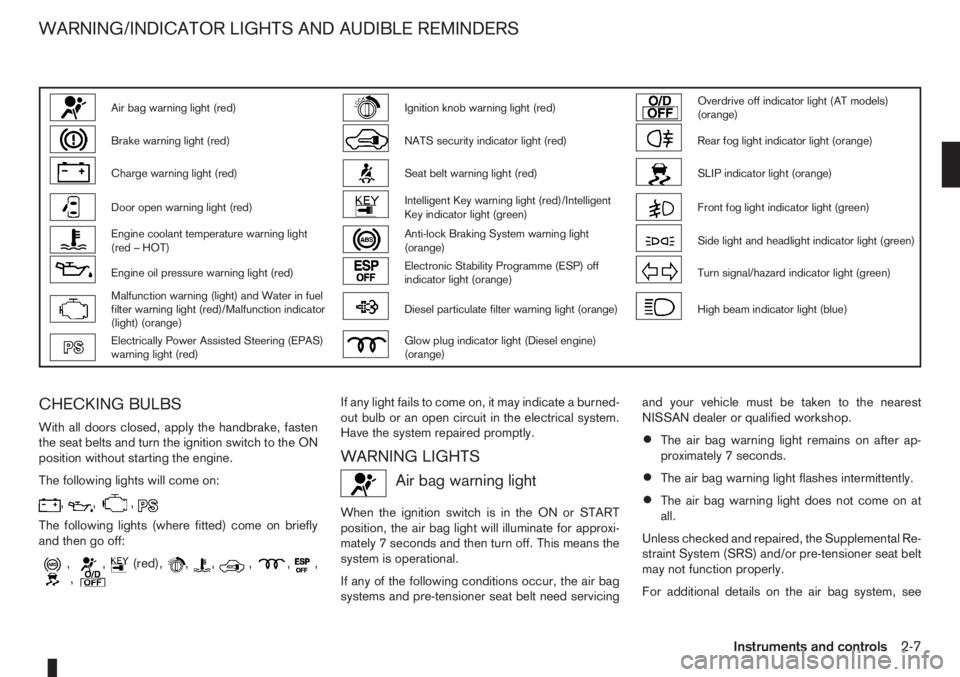
Air bag warning light (red)Ignition knob warning light (red)Overdrive off indicator light (AT models)
(orange)
Brake warning light (red)NATS security indicator light (red)Rear fog light indicator light (orange)
Charge warning light (red)Seat belt warning light (red)SLIP indicator light (orange)
Door open warning light (red)Intelligent Key warning light (red)/Intelligent
Key indicator light (green)Front fog light indicator light (green)
Engine coolant temperature warning light
(red – HOT)Anti-lock Braking System warning light
(orange)Side light and headlight indicator light (green)
Engine oil pressure warning light (red)Electronic Stability Programme (ESP) off
indicator light (orange)Turn signal/hazard indicator light (green)
Malfunction warning (light) and Water in fuel
filter warning light (red)/Malfunction indicator
(light) (orange)Diesel particulate filter warning light (orange)High beam indicator light (blue)
Electrically Power Assisted Steering (EPAS)
warning light (red)Glow plug indicator light (Diesel engine)
(orange)
CHECKING BULBS
With all doors closed, apply the handbrake, fasten
the seat belts and turn the ignition switch to the ON
position without starting the engine.
The following lights will come on:
,,,
The following lights (where fitted) come on briefly
and then go off:
,,(red),,,,,,,
If any light fails to come on, it may indicate a burned-
out bulb or an open circuit in the electrical system.
Have the system repaired promptly.
WARNING LIGHTS
Air bag warning light
When the ignition switch is in the ON or START
position, the air bag light will illuminate for approxi-
mately 7 seconds and then turn off. This means the
system is operational.
If any of the following conditions occur, the air bag
systems and pre-tensioner seat belt need servicingand your vehicle must be taken to the nearest
NISSAN dealer or qualified workshop.
•The air bag warning light remains on after ap-
proximately 7 seconds.
•The air bag warning light flashes intermittently.
•The air bag warning light does not come on at
all.
Unless checked and repaired, the Supplemental Re-
straint System (SRS) and/or pre-tensioner seat belt
may not function properly.
For additional details on the air bag system, see
WARNING/INDICATOR LIGHTS AND AUDIBLE REMINDERS
Instruments and controls2-7
Page 50 of 235
“Supplemental Restraint System (air bag system)”
in the “1. Safety — seats, seat belts and supple-
mental restraint system” section.
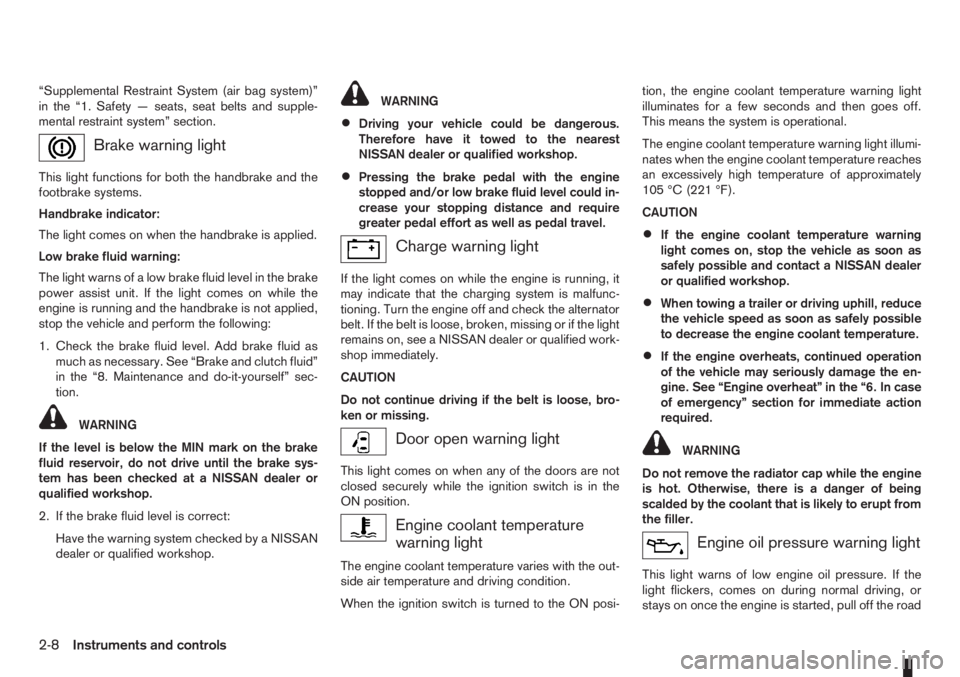
Brake warning light
This light functions for both the handbrake and the
footbrake systems.
Handbrake indicator:
The light comes on when the handbrake is applied.
Low brake fluid warning:
The light warns of a low brake fluid level in the brake
power assist unit. If the light comes on while the
engine is running and the handbrake is not applied,
stop the vehicle and perform the following:
1. Check the brake fluid level. Add brake fluid as
much as necessary. See “Brake and clutch fluid”
in the “8. Maintenance and do-it-yourself” sec-
tion.
WARNING
If the level is below the MIN mark on the brake
fluid reservoir, do not drive until the brake sys-
tem has been checked at a NISSAN dealer or
qualified workshop.
2. If the brake fluid level is correct:
Have the warning system checked by a NISSAN
dealer or qualified workshop.
WARNING
•Driving your vehicle could be dangerous.
Therefore have it towed to the nearest
NISSAN dealer or qualified workshop.
•Pressing the brake pedal with the engine
stopped and/or low brake fluid level could in-
crease your stopping distance and require
greater pedal effort as well as pedal travel.
Charge warning light
If the light comes on while the engine is running, it
may indicate that the charging system is malfunc-
tioning. Turn the engine off and check the alternator
belt. If the belt is loose, broken, missing or if the light
remains on, see a NISSAN dealer or qualified work-
shop immediately.
CAUTION
Do not continue driving if the belt is loose, bro-
ken or missing.
Door open warning light
This light comes on when any of the doors are not
closed securely while the ignition switch is in the
ON position.
Engine coolant temperature
warning light
The engine coolant temperature varies with the out-
side air temperature and driving condition.
When the ignition switch is turned to the ON posi-tion, the engine coolant temperature warning light
illuminates for a few seconds and then goes off.
This means the system is operational.
The engine coolant temperature warning light illumi-
nates when the engine coolant temperature reaches
an excessively high temperature of approximately
105 °C (221 °F).
CAUTION
•If the engine coolant temperature warning
light comes on, stop the vehicle as soon as
safely possible and contact a NISSAN dealer
or qualified workshop.
•When towing a trailer or driving uphill, reduce
the vehicle speed as soon as safely possible
to decrease the engine coolant temperature.
•If the engine overheats, continued operation
of the vehicle may seriously damage the en-
gine. See “Engine overheat” in the “6. In case
of emergency” section for immediate action
required.
WARNING
Do not remove the radiator cap while the engine
is hot. Otherwise, there is a danger of being
scalded by the coolant that is likely to erupt from
the filler.
Engine oil pressure warning light
This light warns of low engine oil pressure. If the
light flickers, comes on during normal driving, or
stays on once the engine is started, pull off the road
2-8Instruments and controls
Page 52 of 235
If the warning light remains illuminated after the en-
gine has been started, there will be no power steer-
ing assistance: the vehicle may be driven using the
mechanical steering system although it is not rec-
ommended as the effort to turn the steering wheel
will be significantly increased compared to normal
operation.
WARNING
•If the EPAS warning light illuminates while
driving, stop as soon as safely possible.
•In certain circumstances, factors external to
the EPAS system may contribute to the illumi-
nation of the warning light. If the warning light
illuminates, stop the vehicle as soon as safely
possible if driving, turn the ignition switch to
the “OFF” position for approximately 20 sec-
onds, then turn the ignition switch to the ON
position again. If the light remains illuminated,
we recommend you to contact a NISSAN
dealer or qualified workshop.
See “Power steering system” in the “5. Starting and
driving” section for further details on the EPAS sys-
tem.
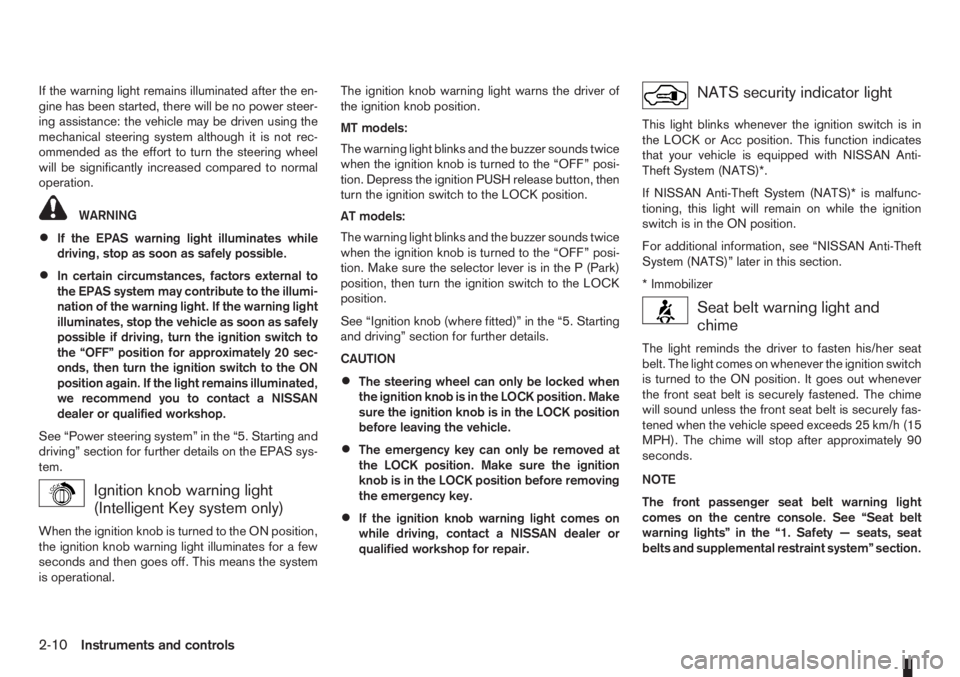
Ignition knob warning light
(Intelligent Key system only)
When the ignition knob is turned to the ON position,
the ignition knob warning light illuminates for a few
seconds and then goes off. This means the system
is operational.The ignition knob warning light warns the driver of
the ignition knob position.
MT models:
The warning light blinks and the buzzer sounds twice
when the ignition knob is turned to the “OFF” posi-
tion. Depress the ignition PUSH release button, then
turn the ignition switch to the LOCK position.
AT models:
The warning light blinks and the buzzer sounds twice
when the ignition knob is turned to the “OFF” posi-
tion. Make sure the selector lever is in the P (Park)
position, then turn the ignition switch to the LOCK
position.
See “Ignition knob (where fitted)” in the “5. Starting
and driving” section for further details.
CAUTION
•The steering wheel can only be locked when
the ignition knob is in the LOCK position. Make
sure the ignition knob is in the LOCK position
before leaving the vehicle.
•The emergency key can only be removed at
the LOCK position. Make sure the ignition
knob is in the LOCK position before removing
the emergency key.
•If the ignition knob warning light comes on
while driving, contact a NISSAN dealer or
qualified workshop for repair.
NATS security indicator light
This light blinks whenever the ignition switch is in
the LOCK or Acc position. This function indicates
that your vehicle is equipped with NISSAN Anti-
Theft System (NATS)*.
If NISSAN Anti-Theft System (NATS)* is malfunc-
tioning, this light will remain on while the ignition
switch is in the ON position.
For additional information, see “NISSAN Anti-Theft
System (NATS)” later in this section.
* Immobilizer
Seat belt warning light and
chime
The light reminds the driver to fasten his/her seat
belt. The light comes on whenever the ignition switch
is turned to the ON position. It goes out whenever
the front seat belt is securely fastened. The chime
will sound unless the front seat belt is securely fas-
tened when the vehicle speed exceeds 25 km/h (15
MPH). The chime will stop after approximately 90
seconds.
NOTE
The front passenger seat belt warning light
comes on the centre console. See “Seat belt
warning lights” in the “1. Safety — seats, seat
belts and supplemental restraint system” section.
2-10Instruments and controls
Page 66 of 235
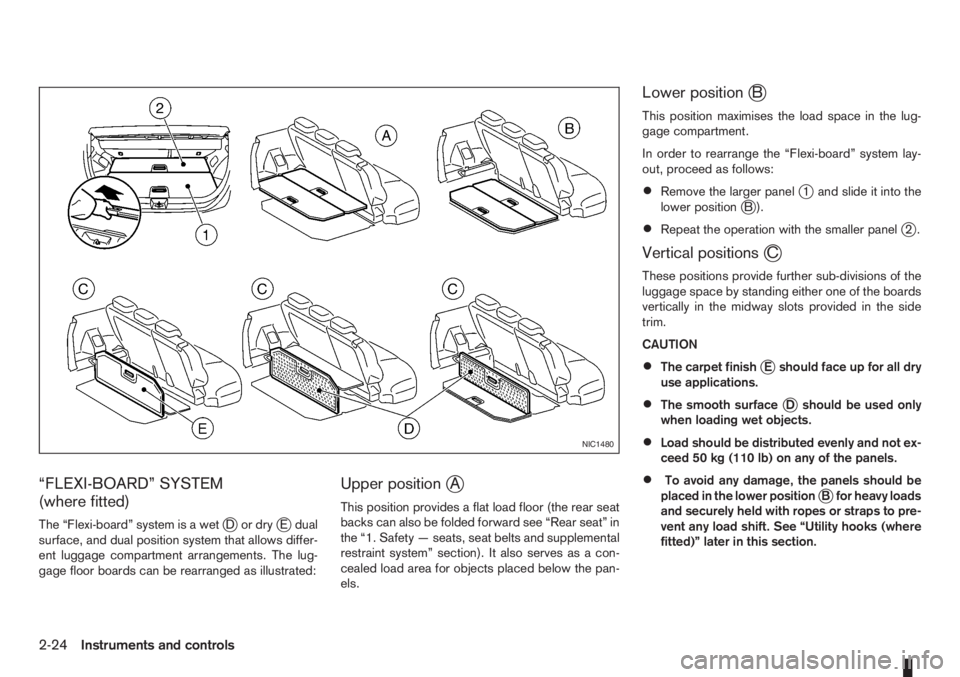
“FLEXI-BOARD” SYSTEM
(where fitted)
The “Flexi-board” system is a wetjDordryjE dual
surface, and dual position system that allows differ-
ent luggage compartment arrangements. The lug-
gage floor boards can be rearranged as illustrated:
Upper positionjA
This position provides a flat load floor (the rear seat
backs can also be folded forward see “Rear seat” in
the “1. Safety — seats, seat belts and supplemental
restraint system” section). It also serves as a con-
cealed load area for objects placed below the pan-
els.
Lower positionjB
This position maximises the load space in the lug-
gage compartment.
In order to rearrange the “Flexi-board” system lay-
out, proceed as follows:
•Remove the larger panelj1 and slide it into the
lower positionjB).
•Repeat the operation with the smaller panelj2.
Vertical positionsjC
These positions provide further sub-divisions of the
luggage space by standing either one of the boards
vertically in the midway slots provided in the side
trim.
CAUTION
•The carpet finishjE should face up for all dry
use applications.
•The smooth surfacejD should be used only
when loading wet objects.
•Load should be distributed evenly and not ex-
ceed 50 kg (110 lb) on any of the panels.
•To avoid any damage, the panels should be
placed in the lower positionjB for heavy loads
and securely held with ropes or straps to pre-
vent any load shift. See “Utility hooks (where
fitted)” later in this section.
NIC1480
2-24Instruments and controls
Page 67 of 235
WARNING
Always secure cargo with ropes or straps to help
prevent it from sliding or shifting. Do not place
cargo higher than the seatbacks. In a sudden
stop or collision, unsecured cargo could cause
personal injury.
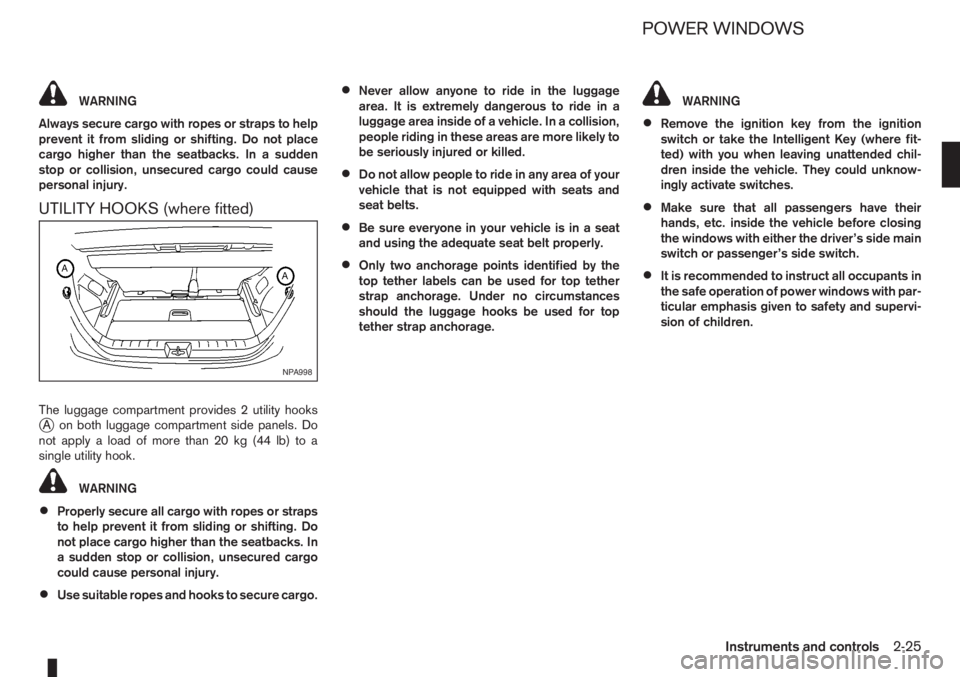
UTILITY HOOKS (where fitted)
The luggage compartment provides 2 utility hooksjA on both luggage compartment side panels. Do
notapplyaloadofmorethan20kg(44lb)toa
single utility hook.
WARNING
•Properly secure all cargo with ropes or straps
to help prevent it from sliding or shifting. Do
not place cargo higher than the seatbacks. In
a sudden stop or collision, unsecured cargo
could cause personal injury.
•Use suitable ropes and hooks to secure cargo.
•Never allow anyone to ride in the luggage
area. It is extremely dangerous to ride in a
luggage area inside of a vehicle. In a collision,
people riding in these areas are more likely to
be seriously injured or killed.
•Do not allow people to ride in any area of your
vehicle that is not equipped with seats and
seat belts.
•Be sure everyone in your vehicle is in a seat
and using the adequate seat belt properly.
•Only two anchorage points identified by the
top tether labels can be used for top tether
strap anchorage. Under no circumstances
should the luggage hooks be used for top
tether strap anchorage.
WARNING
•Remove the ignition key from the ignition
switch or take the Intelligent Key (where fit-
ted) with you when leaving unattended chil-
dren inside the vehicle. They could unknow-
ingly activate switches.
•Make sure that all passengers have their
hands, etc. inside the vehicle before closing
the windows with either the driver’s side main
switch or passenger’s side switch.
•It is recommended to instruct all occupants in
the safe operation of power windows with par-
ticular emphasis given to safety and supervi-
sion of children.
NPA998
POWER WINDOWS
Instruments and controls2-25
Page 71 of 235
3Pre-driving checks and adjustmentsPre-driving checks and adjustments
Keys ........................................................................ 3-2
Integrated keyfob/remote control system .................. 3-3
Using the remote keyless entry system ................ 3-3
Locking the doors ............................................... 3-3
Unlocking the doors – convenience mode ........... 3-4
Unlocking the doors – anti-hijack mode ............... 3-4
Switching from convenience mode to
anti-hijack mode.................................................. 3-4
Keyfob operation failure ...................................... 3-4
Intelligent Key system (where fitted) ......................... 3-5
Locking/unlocking .............................................. 3-5
Starting the engine with the Intelligent Key .......... 3-6
Door locks ............................................................... 3-6
Super Lock System (Right-hand drive models) .... 3-6
Vehicle dead battery – left-hand side door
handle ................................................................ 3-7
Locking with power door lock switch .................. 3-7Child safety rear door lock .................................. 3-8
Back door lock ................................................... 3-8
Security system ....................................................... 3-9
NISSAN Anti-Theft System (NATS)..................... 3-9
Bonnet release ........................................................ 3-10
Fuel filler lid ............................................................. 3-11
Fuel filler lid opener lever .................................... 3-11
Fuel filler cap ...................................................... 3-11
Handbrake lever ...................................................... 3-11
Tilting steering wheel ............................................... 3-12
Mirrors..................................................................... 3-12
Inside rear-view mirror ........................................ 3-12
Outside rear-view mirrors.................................... 3-12
Vanity mirror ....................................................... 3-13
Rear parcel shelf...................................................... 3-14
Rear parcel shelf removal.................................... 3-14
Rear parcel shelf installation................................ 3-14
Page 72 of 235
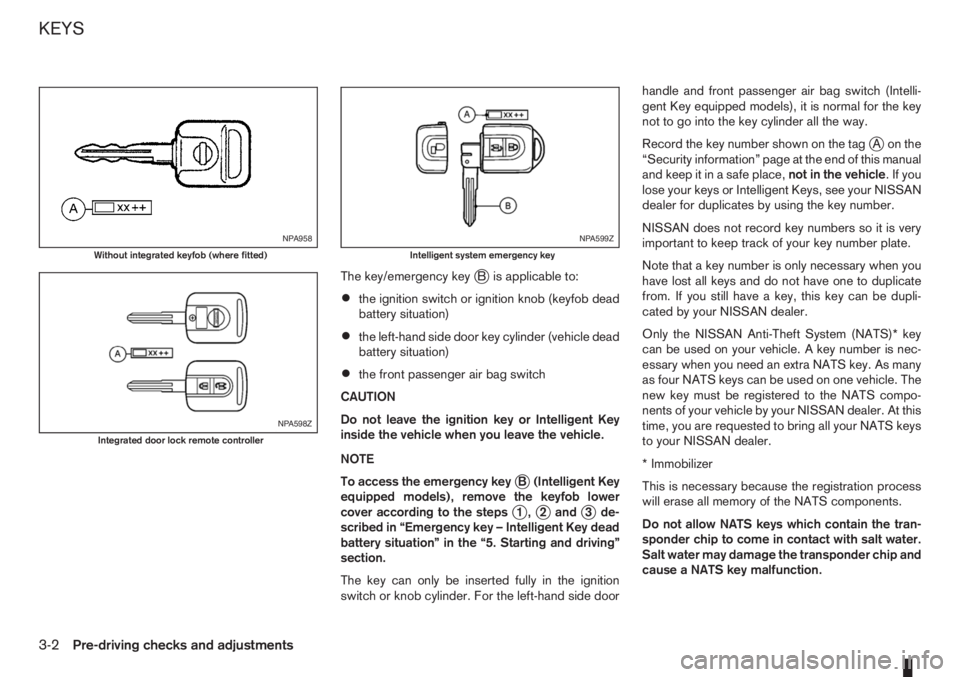
The key/emergency keyjB is applicable to:
•the ignition switch or ignition knob (keyfob dead
battery situation)
•the left-hand side door key cylinder (vehicle dead
battery situation)
•the front passenger air bag switch
CAUTION
Do not leave the ignition key or Intelligent Key
inside the vehicle when you leave the vehicle.
NOTE
To access the emergency key
jB (Intelligent Key
equipped models), remove the keyfob lower
cover according to the steps
j1,j2andj3 de-
scribed in “Emergency key – Intelligent Key dead
battery situation” in the “5. Starting and driving”
section.
The key can only be inserted fully in the ignition
switch or knob cylinder. For the left-hand side doorhandle and front passenger air bag switch (Intelli-
gent Key equipped models), it is normal for the key
not to go into the key cylinder all the way.
Record the key number shown on the tag
jA on the
“Security information” page at the end of this manual
and keep it in a safe place,not in the vehicle.Ifyou
lose your keys or Intelligent Keys, see your NISSAN
dealer for duplicates by using the key number.
NISSAN does not record key numbers so it is very
important to keep track of your key number plate.
Note that a key number is only necessary when you
have lost all keys and do not have one to duplicate
from. If you still have a key, this key can be dupli-
cated by your NISSAN dealer.
Only the NISSAN Anti-Theft System (NATS)* key
can be used on your vehicle. A key number is nec-
essary when you need an extra NATS key. As many
as four NATS keys can be used on one vehicle. The
new key must be registered to the NATS compo-
nents of your vehicle by your NISSAN dealer. At this
time, you are requested to bring all your NATS keys
to your NISSAN dealer.
* Immobilizer
This is necessary because the registration process
will erase all memory of the NATS components.
Do not allow NATS keys which contain the tran-
sponder chip to come in contact with salt water.
Salt water may damage the transponder chip and
cause a NATS key malfunction.
NPA958
Without integrated keyfob (where fitted)
NPA598Z
Integrated door lock remote controller
NPA599Z
Intelligent system emergency key
KEYS
3-2Pre-driving checks and adjustments
Page 73 of 235
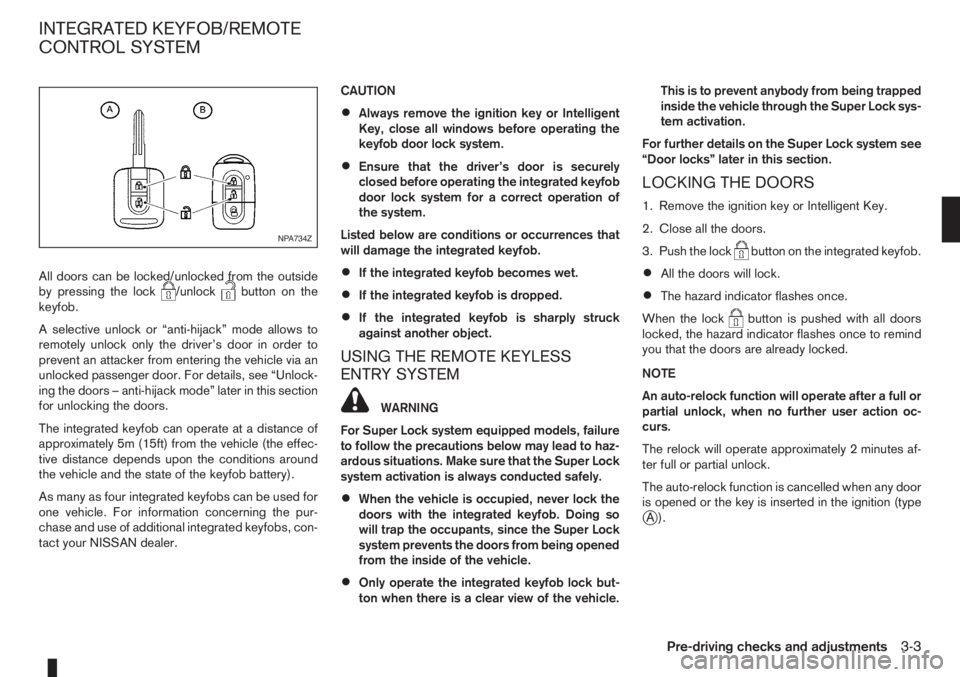
All doors can be locked/unlocked from the outside
by pressing the lock/unlockbutton on the
keyfob.
A selective unlock or “anti-hijack” mode allows to
remotely unlock only the driver’s door in order to
prevent an attacker from entering the vehicle via an
unlocked passenger door. For details, see “Unlock-
ing the doors – anti-hijack mode” later in this section
for unlocking the doors.
The integrated keyfob can operate at a distance of
approximately 5m (15ft) from the vehicle (the effec-
tive distance depends upon the conditions around
the vehicle and the state of the keyfob battery).
As many as four integrated keyfobs can be used for
one vehicle. For information concerning the pur-
chase and use of additional integrated keyfobs, con-
tact your NISSAN dealer.CAUTION
•Always remove the ignition key or Intelligent
Key, close all windows before operating the
keyfob door lock system.
•Ensure that the driver’s door is securely
closed before operating the integrated keyfob
door lock system for a correct operation of
the system.
Listed below are conditions or occurrences that
will damage the integrated keyfob.
•If the integrated keyfob becomes wet.
•If the integrated keyfob is dropped.
•If the integrated keyfob is sharply struck
against another object.
USING THE REMOTE KEYLESS
ENTRY SYSTEM
WARNING
For Super Lock system equipped models, failure
to follow the precautions below may lead to haz-
ardous situations. Make sure that the Super Lock
system activation is always conducted safely.
•When the vehicle is occupied, never lock the
doors with the integrated keyfob. Doing so
will trap the occupants, since the Super Lock
system prevents the doors from being opened
from the inside of the vehicle.
•Only operate the integrated keyfob lock but-
ton when there is a clear view of the vehicle.This is to prevent anybody from being trapped
inside the vehicle through the Super Lock sys-
tem activation.
For further details on the Super Lock system see
“Door locks” later in this section.
LOCKING THE DOORS
1. Remove the ignition key or Intelligent Key.
2. Close all the doors.
3. Push the lock
button on the integrated keyfob.
•All the doors will lock.
•The hazard indicator flashes once.
When the lock
button is pushed with all doors
locked, the hazard indicator flashes once to remind
you that the doors are already locked.
NOTE
An auto-relock function will operate after a full or
partial unlock, when no further user action oc-
curs.
The relock will operate approximately 2 minutes af-
ter full or partial unlock.
The auto-relock function is cancelled when any door
is opened or the key is inserted in the ignition (type
jA).
NPA734Z
INTEGRATED KEYFOB/REMOTE
CONTROL SYSTEM
Pre-driving checks and adjustments3-3
Page 76 of 235
•The Intelligent Key contains a miniature radio
transmitter that may be affected when placed
near metal objects.
•Keep the Intelligent Key away from mobile
phones, lap-top computers and other metal
objects or electronics.
STARTING THE ENGINE WITH THE
INTELLIGENT KEY
See “Ignition knob (where fitted)” in the “5. Starting
and driving” section.
CAUTION
•Make sure you carry the Intelligent Key with
you when starting and driving the vehicle.
•If the Intelligent Key is too far away from the
passenger compartment, the vehicle may not
start.
WARNING
•Always look before opening any doors, to
avoid an accident with oncoming traffic.
•Never leave children or adults who would nor-
mally require the support of others alone in
the vehicle. They could unknowingly activate
switches or controls and inadvertently
become involved in a serious accident.
SUPER LOCK SYSTEM (Right-hand
drive models)
WARNING
For Super Lock System equipped models, failure
to follow the precautions below may lead to haz-
ardous situations. Make sure the Super Lock Sys-
tem activation is always safely conducted.
•When the vehicle is occupied, never lock the
doors with the integrated keyfob. Doing so
will trap the occupants, since the Super Lock
System prevents the doors from being opened
from the inside of the vehicle.
•Only operate the integrated keyfob lock but-
ton when there is a clear view of the vehicle.
This is to prevent anybody from being trapped
inside the vehicle through the Super Lock
System activation.
Locking the doors with the integrated keyfob will
lock all doors including the back door and activate
the Super Lock System. This means that none ofthe doors can be opened from the inside, adding
extra security in case of break-in or theft.
The system will be released when the door is un-
locked with the integrated keyfob.
The Super Lock System will not activate when the
doors are locked with the power door lock switch or
the key.
Emergency situations
If the Super Lock System is activated due to a traf-
fic accident or other unexpected circumstances
while you are in the vehicle:
•Insert the key/emergency key in the ignition
switch, turn it to the ON position, the Super Lock
system will be released and all doors can be
unlocked.
•Open or break the door window on the front
passenger’s side, remove the protection cap on
the passenger’s side door handle, insert the key
into the passenger’s side door key cylinder and
turn it to the unlock position, after which you will
be able to open the door.
•Remove the key from the ignition switch and un-
lock the door using the integrated keyfob.
DOOR LOCKS
3-6Pre-driving checks and adjustments
Page 79 of 235
WARNING
•Do not drive with the back door opened. This
could allow dangerous exhaust gases to be
drawn into the vehicle.
•Closely supervise children when they are
around the vehicle to prevent them from play-
ing and being locked in the luggage compart-
ment where they could be seriously injured.
Keep the vehicle locked, with the back door
closed, when not in use, and prevent chil-
dren’s access to the vehicle’s keys.
NISSAN ANTI-THEFT SYSTEM (NATS)
The NISSAN Anti-Theft System (NATS)* will not
allow the engine to start without the use of the reg-
istered NATS key.
* Immobilizer
If the engine fails to start using the registered NATS
key, it may be due to interference from another
NATS key, an automated toll road device or an auto-
mated payment device on the key ring. Restart the
engine using the following procedure:
1. Leave the ignition switch in the ON position for
approximately 5 seconds.
2. Turn the ignition switch to the “OFF” or LOCK
position and wait approximately 5 seconds.
3. Repeat steps 1 and 2.
4. Restart the engine while holding the device
(which may have caused the interference) sepa-
rated from the registered NATS key or NATS
Intelligent Key (where fitted).
If this procedure allows the engine to start,
NISSAN recommends placing the registered
NATS key or NATS Intelligent Key (where fitted)
on a separate key-ring to avoid interference from
other devices.
NATS security warning light
The security warning light blinks whenever the igni-
tion switch is in the LOCK, “OFF” or Acc position.
This function indicates that NATS is equipped on
the vehicle.
If the NISSAN Anti-Theft System (NATS) is mal-
functioning, this light will remain on while the ignition
key is in the ON position.
If the light remains on and/or the engine will not
start, see your NISSAN dealer for NATS service
as soon as possible. Please bring all NATS keys
or NATS Intelligent Keys when visiting your
NISSAN dealer for service.
Additional information for RHD models
If the NATS is malfunctioning, this light will turn on
after flashing six times while the ignition switch is in
the ON position.
However, if the NATS security warning light turns
off after the light has remained on for 15 minutes,
SIC2045Z
Meters and gauges
SECURITY SYSTEM
Pre-driving checks and adjustments3-9