key NISSAN NOTE 2016 Service Repair Manual
[x] Cancel search | Manufacturer: NISSAN, Model Year: 2016, Model line: NOTE, Model: NISSAN NOTE 2016Pages: 3641, PDF Size: 28.72 MB
Page 393 of 3641
![NISSAN NOTE 2016 Service Repair Manual BCS-132
< DTC/CIRCUIT DIAGNOSIS >[WITHOUT INTELLIGENT KEY SYSTEM]
COMBINATION SWITCH OUTPUT CIRCUIT
COMBINATION SWITCH OUTPUT CIRCUIT
Diagnosis ProcedureINFOID:0000000012432408
Regarding Wiring Diagra](/img/5/57363/w960_57363-392.png "NISSAN NOTE 2016 Service Repair Manual BCS-132
< DTC/CIRCUIT DIAGNOSIS >[WITHOUT INTELLIGENT KEY SYSTEM]
COMBINATION SWITCH OUTPUT CIRCUIT
COMBINATION SWITCH OUTPUT CIRCUIT
Diagnosis ProcedureINFOID:0000000012432408
Regarding Wiring Diagra")
BCS-132
< DTC/CIRCUIT DIAGNOSIS >[WITHOUT INTELLIGENT KEY SYSTEM]
COMBINATION SWITCH OUTPUT CIRCUIT
COMBINATION SWITCH OUTPUT CIRCUIT
Diagnosis ProcedureINFOID:0000000012432408
Regarding Wiring Diagram information, refer to
BCS-117, "Wiring Diagram".
1.CHECK OUTPUT 1 - 5 CIRCUIT FOR OPEN
1. Turn ignition switch OFF.
2. Disconnect BCM and combination switch connectors.
3. Check continuity between BCM connector and combination switch connector.
Is the inspection result normal?
YES >> GO TO 2.
NO >> Repair harness or connectors.
2.CHECK OUTPUT 1 - 5 CIRCUIT FOR SHORT
Check for continuity between BCM connector and ground.
Is the inspection result normal?
YES >> GO TO 3.
NO >> Repair harness or connectors.
3.CHECK BCM INPUT SIGNAL
1. Connect BCM and combination switch connectors.
2. Turn ON any switch in the system that is malfunctioning.
3. Check voltage between BCM connector and ground.
Combination switch signal BCM
Combination switch
Continuity
Connector TerminalConnector Terminal
OUTPUT 1
M186
M28 12
Ye s
OUTPUT 2
514
OUTPUT 3 45
OUTPUT 4 32
OUTPUT 5 28
Combination switch
signal BCM
GroundContinuity
Connector Terminal
OUTPUT 1
M186
No
OUTPUT 2
5
OUTPUT 3 4
OUTPUT 4 3
OUTPUT 5 2
Revision: August 2015 2016 Versa Note
cardiagn.com
Page 394 of 3641
![NISSAN NOTE 2016 Service Repair Manual BCS
COMBINATION SWITCH OUTPUT CIRCUITBCS-133
< DTC/CIRCUIT DIAGNOSIS > [WITHOUT INTELLIGENT KEY SYSTEM]
C
D
E
F
G H
I
J
K L
B A
O P
N
Is the inspection result normal?
Yes >> Replace BCM. Refer to
BCS](/img/5/57363/w960_57363-393.png "NISSAN NOTE 2016 Service Repair Manual BCS
COMBINATION SWITCH OUTPUT CIRCUITBCS-133
< DTC/CIRCUIT DIAGNOSIS > [WITHOUT INTELLIGENT KEY SYSTEM]
C
D
E
F
G H
I
J
K L
B A
O P
N
Is the inspection result normal?
Yes >> Replace BCM. Refer to
BCS")
BCS
COMBINATION SWITCH OUTPUT CIRCUITBCS-133
< DTC/CIRCUIT DIAGNOSIS > [WITHOUT INTELLIGENT KEY SYSTEM]
C
D
E
F
G H
I
J
K L
B A
O P
N
Is the inspection result normal?
Yes >> Replace BCM. Refer to
BCS-137, "Removal and Installation".
No >> Replace combination switch. Refer to BCS-138, "
Removal and Installation".
BCM signal Te r m i n a l s
Voltag e
(+)
(− )
BCM
Ground
Connector
Terminal
INPUT 1
M186
Refer to BCS-101, "
Refer-
ence Value".
INPUT 2
5
INPUT 3 4
INPUT 4 3
INPUT 5 2
Revision: August 2015 2016 Versa Note
cardiagn.com
Page 395 of 3641
![NISSAN NOTE 2016 Service Repair Manual BCS-134
< SYMPTOM DIAGNOSIS >[WITHOUT INTELLIGENT KEY SYSTEM]
COMBINATION SWITCH SYSTEM SYMPTOMS
SYMPTOM DIAGNOSIS
COMBINATION SWITCH SYSTEM SYMPTOMS
Symptom TableINFOID:0000000012432409
WITH VARIABLE](/img/5/57363/w960_57363-394.png "NISSAN NOTE 2016 Service Repair Manual BCS-134
< SYMPTOM DIAGNOSIS >[WITHOUT INTELLIGENT KEY SYSTEM]
COMBINATION SWITCH SYSTEM SYMPTOMS
SYMPTOM DIAGNOSIS
COMBINATION SWITCH SYSTEM SYMPTOMS
Symptom TableINFOID:0000000012432409
WITH VARIABLE")
BCS-134
< SYMPTOM DIAGNOSIS >[WITHOUT INTELLIGENT KEY SYSTEM]
COMBINATION SWITCH SYSTEM SYMPTOMS
SYMPTOM DIAGNOSIS
COMBINATION SWITCH SYSTEM SYMPTOMS
Symptom TableINFOID:0000000012432409
WITH VARIABLE INTERMITTENT FRONT WIPERS
1. Perform the data monitor of CONSULT
to check for any malfunctioning item.
2. Check the malfunction combinations.
Malfunction item: ×
3. Identify the malfunctioning part from the agreed combination and repair or replace the part.
WITHOUT VARIABLE INTERMITTENT FRONT WIPERS
1. Perform the data monitor of CONSULT to check for any malfunctioning item.
Malfunction combination Data monitor item
FR WIPER HI
FR WIPER LOW
FR WASHER SW FR WIPER INTINT VOLUME
RR WIPER ON
RR WIPER INT
RR WASHER SW TURN SIGNAL RTURN SIGNAL L TA I L L A M P S W HI BEAM SW
HEAD LAMP SW 1
HEAD LAMP SW 2 PA S S I N G S WFR FOG SW
A ×× ××
B ×× ××
C ×× ××
D ×××
E ×× ×
F ×× ×
G ××××
H ××
I ××××
J × ×××
K All Items
L If only one item is detected or the item is not applicable to the combinations A to K
Malfunction
combination Malfunctioning part
Repair or replace
A Combination switch INPUT 1 circuit
Inspect the combination switch input circuit applicable to the malfunctioning
part. Refer to BCS-130, "
Diagnosis Procedure".
B Combination switch INPUT 2 circuit
C Combination switch INPUT 3 circuit
D Combination switch INPUT 4 circuit E Combination switch INPUT 5 circuitF Combination switch OUTPUT 1 circuit
Inspect the combination switch output circuit applicable to the malfunction-
ing part. Refer to BCS-132, "
Diagnosis Procedure".
G Combination switch OUTPUT 2 circuit
H Combination switch OUTPUT 3 circuit I Combination switch OUTPUT 4 circuit
J Combination switch OUTPUT 5 circuit
K BCM Replace BCM. Refer to BCS-137, "
Removal and Installation".
L Combination switch Replace the combination switch. Refer to
BCS-138, "
Removal and Installa-
tion".
Revision: August 2015 2016 Versa Note
cardiagn.com
Page 396 of 3641
![NISSAN NOTE 2016 Service Repair Manual BCS
COMBINATION SWITCH SYSTEM SYMPTOMSBCS-135
< SYMPTOM DIAGNOSIS > [WITHOUT INTELLIGENT KEY SYSTEM]
C
D
E
F
G H
I
J
K L
B A
O P
N
2. Check the malfunction combinations.
Malfunction item:
×
3. Ident](/img/5/57363/w960_57363-395.png "NISSAN NOTE 2016 Service Repair Manual BCS
COMBINATION SWITCH SYSTEM SYMPTOMSBCS-135
< SYMPTOM DIAGNOSIS > [WITHOUT INTELLIGENT KEY SYSTEM]
C
D
E
F
G H
I
J
K L
B A
O P
N
2. Check the malfunction combinations.
Malfunction item:
×
3. Ident")
BCS
COMBINATION SWITCH SYSTEM SYMPTOMSBCS-135
< SYMPTOM DIAGNOSIS > [WITHOUT INTELLIGENT KEY SYSTEM]
C
D
E
F
G H
I
J
K L
B A
O P
N
2. Check the malfunction combinations.
Malfunction item:
×
3. Identify the malfunctioning part from the agreed combination and repair or replace the part.
Malfunction combination Data monitor item
FR WIPER HI
FR WIPER LOW
FR WASHER SW
FR WIPER INT
RR WIPER ON
RR WIPER INT
RR WASHER SW TURN SIGNAL R
TURN SIGNAL L TAIL LAMP SW HI BEAM SW
HEAD LAMP SW 1
HEAD LAMP SW 2 PASSING SW
A ×× ××
B ×× ××
C ×××
D ××
E ×
F ××
G ×××
H ××
I ×××
J ××××
K All Items
L If only one item is detected or the item is not applicable to the combinations A to K
Malfunction
combination Malfunctioning part
Repair or replace
A Combination switch INPUT 1 circuit
Inspect the combination switch input circuit applicable to the malfunctioning
part. Refer to BCS-130, "
Diagnosis Procedure".
B Combination switch INPUT 2 circuit
C Combination switch INPUT 3 circuit
D Combination switch INPUT 4 circuit E Combination switch INPUT 5 circuitF Combination switch OUTPUT 1 circuit
Inspect the combination switch output circuit applicable to the malfunction-
ing part. Refer to BCS-132, "
Diagnosis Procedure".
G Combination switch OUTPUT 2 circuit
H Combination switch OUTPUT 3 circuit I Combination switch OUTPUT 4 circuit
J Combination switch OUTPUT 5 circuit
K BCM Replace BCM. Refer to BCS-137, "
Removal and Installation".
L Combination switch Replace the combination switch. Refer to
BCS-138, "
Removal and Installa-
tion".
Revision: August 2015 2016 Versa Note
cardiagn.com
Page 397 of 3641
![NISSAN NOTE 2016 Service Repair Manual BCS-136
< SYMPTOM DIAGNOSIS >[WITHOUT INTELLIGENT KEY SYSTEM]
NORMAL OPERATING CONDITION
NORMAL OPERATING CONDITION
DescriptionINFOID:0000000012432410
SHIPPING MODE
• Shipping mode inhibits battery](/img/5/57363/w960_57363-396.png "NISSAN NOTE 2016 Service Repair Manual BCS-136
< SYMPTOM DIAGNOSIS >[WITHOUT INTELLIGENT KEY SYSTEM]
NORMAL OPERATING CONDITION
NORMAL OPERATING CONDITION
DescriptionINFOID:0000000012432410
SHIPPING MODE
• Shipping mode inhibits battery")
BCS-136
< SYMPTOM DIAGNOSIS >[WITHOUT INTELLIGENT KEY SYSTEM]
NORMAL OPERATING CONDITION
NORMAL OPERATING CONDITION
DescriptionINFOID:0000000012432410
SHIPPING MODE
• Shipping mode inhibits battery power consumption duri
ng transportation or storage of the vehicle. Vehicle is
set to shipping mode before being shipped from the factory.
• When ignition switch is OFF, BCM operates shipping mode.
• BCM control function is limited in shipping mode. Re mote keyless entry function does not operate in ship-
ping mode.
• For shipping mode cancel operation, refer to BCS-125, "
Work Procedure".
NOTE:
Do not cancel shipping mode during storage of the v ehicle. Shipping mode should not be canceled until just
prior to customer delivery.
TRANSIT MODE
• BCM is in transit mode if turn signal indicators in combination meter illuminate for 1 minute when ignition
switch is turned from OFF to ON.
• In this case, cancel operation must be performed.
• For transit mode cancel operation, refer to BCS-126, "
Work Procedure".
NOTE:
Do not cancel transit mode during storage of the vehicle. Transit mode s hould not be canceled until just prior
to customer delivery.
Revision: August 2015 2016 Versa Note
cardiagn.com
Page 398 of 3641
![NISSAN NOTE 2016 Service Repair Manual BCS
BCM (BODY CONTROL MODULE)BCS-137
< REMOVAL AND INSTALLATION > [WITHOUT INTELLIGENT KEY SYSTEM]
C
D
E
F
G H
I
J
K L
B A
O P
N
REMOVAL AND INSTALLATION
BCM (BODY CONTROL MODULE)
Removal and Installa](/img/5/57363/w960_57363-397.png "NISSAN NOTE 2016 Service Repair Manual BCS
BCM (BODY CONTROL MODULE)BCS-137
< REMOVAL AND INSTALLATION > [WITHOUT INTELLIGENT KEY SYSTEM]
C
D
E
F
G H
I
J
K L
B A
O P
N
REMOVAL AND INSTALLATION
BCM (BODY CONTROL MODULE)
Removal and Installa")
BCS
BCM (BODY CONTROL MODULE)BCS-137
< REMOVAL AND INSTALLATION > [WITHOUT INTELLIGENT KEY SYSTEM]
C
D
E
F
G H
I
J
K L
B A
O P
N
REMOVAL AND INSTALLATION
BCM (BODY CONTROL MODULE)
Removal and InstallationINFOID:0000000012432411
REMOVAL
CAUTION:
Before replacing BCM, perform “READ CONFIGURAT
ION” to save or print current vehicle specifica-
tion. Refer to BCS-123, "
Description".
1. Disconnect negative and positive battery terminals, then wait at least three minutes. Refer to PG-70,
"Removal and Installation (Battery)".
2. Remove instrument lower panel LH. Refer to IP-24, "
Removal and Installation".
3. Remove screws (A) and remove the BCM (1) from the steering member and position aside.
: Front
4. Disconnect the harness connectors from the BCM.
5. Remove relays from relay bracket.
6. Remove relay bracket from BCM to transfer to new BCM.
INSTALLATION
Installation is in the reverse order of removal.
CAUTION:
• Perform “CONFIGURATION (BCM)” when replacing BCM. Refer to BCS-123, "
Description".
• Make sure to perform the system initialization (N ATS) (if equipped) when replacing BCM. Refer to
BCS-121, "
Description".
• When replacing BCM, if new BCM does not come with keyfobs attached, all existing keyfobs must be
re-registered.
• For initialization and registration of Intelligent Key, refer to CONSULT Immobilizer mode and fol- lowthe on-screen instructions.
ALMIA0656ZZ
Revision: August 2015 2016 Versa Note
cardiagn.com
Page 399 of 3641
![NISSAN NOTE 2016 Service Repair Manual BCS-138
< REMOVAL AND INSTALLATION >[WITHOUT INTELLIGENT KEY SYSTEM]
COMBINATION SWITCH
COMBINATION SWITCH
Removal and InstallationINFOID:0000000012432412
CAUTION:
• Before servicing, turn the ignit](/img/5/57363/w960_57363-398.png "NISSAN NOTE 2016 Service Repair Manual BCS-138
< REMOVAL AND INSTALLATION >[WITHOUT INTELLIGENT KEY SYSTEM]
COMBINATION SWITCH
COMBINATION SWITCH
Removal and InstallationINFOID:0000000012432412
CAUTION:
• Before servicing, turn the ignit")
BCS-138
< REMOVAL AND INSTALLATION >[WITHOUT INTELLIGENT KEY SYSTEM]
COMBINATION SWITCH
COMBINATION SWITCH
Removal and InstallationINFOID:0000000012432412
CAUTION:
• Before servicing, turn the ignition switch OFF, disconnect both battery terminals and wait at least
three minutes.
• Do not use air or electric tools when remo ving or installing the combination switch.
REMOVAL
1. Disconnect the negative and positive battery terminals, then wait at least three minutes. Refer to PG-70,
"Removal and Installation (Battery)".
2. Remove the steering column covers. Refer to IP-17, "
Removal and Installation".
3. Rotate steering wheel clockwise to access first combination switch screw (A) and remove.
4. Rotate steering wheel counter-c lockwise to access second com-
bination switch screw (A) and remove.
5. Disconnect the harness connector (B) from the combination switch (1) and remove.
INSTALLATION
Installation is in the reverse order of removal.
CAUTION:
• After the work is completed, make sure no system malfunction is detected by air bag warning lamp.
• In case a malfunction is detected by the air bag wa rning lamp, reset with the self-diagnosis function
and delete the memory with CONSULT.
• If a malfunction is still detected after the above operation, perform self-diagnosis to repair malfunc-
tions. Refer to BCS-121, "
Description".
ALMIA0648ZZ
ALMIA0649ZZ
Revision: August 2015 2016 Versa Note
cardiagn.com
Page 481 of 3641
![NISSAN NOTE 2016 Service Repair Manual DIAGNOSIS SYSTEM [ABS ACTUATOR AND ELECTRIC UNIT (CONTROL
UNIT)]
BRC-33
< SYSTEM DESCRIPTION > [VDC/TCS/ABS]
C
D
E
G H
I
J
K L
M A
B
BRC
N
O P
× : Applicable
–: Not applicable
ACTIVE TEST MODE
CAU](/img/5/57363/w960_57363-480.png "NISSAN NOTE 2016 Service Repair Manual DIAGNOSIS SYSTEM [ABS ACTUATOR AND ELECTRIC UNIT (CONTROL
UNIT)]
BRC-33
< SYSTEM DESCRIPTION > [VDC/TCS/ABS]
C
D
E
G H
I
J
K L
M A
B
BRC
N
O P
× : Applicable
–: Not applicable
ACTIVE TEST MODE
CAU")
DIAGNOSIS SYSTEM [ABS ACTUATOR AND ELECTRIC UNIT (CONTROL
UNIT)]
BRC-33
< SYSTEM DESCRIPTION > [VDC/TCS/ABS]
C
D
E
G H
I
J
K L
M A
B
BRC
N
O P
× : Applicable
–: Not applicable
ACTIVE TEST MODE
CAUTION:
• Do not perform active test while driving vehicle.
• Make sure to completely bleed air from brake system.
• The active test cannot be performed with the ABS warning lamp, VDC OFF indicator lamp, SLIP indi-
cator lamp or brake warning lamp on.
• ABS warning lamp, VDC OFF indi cator lamp, SLIP indicator lamp and brake warning lamp turn on
during active test.
NOTE:
• When active test is performed while depressing the pedal, the pedal depression amount will change. This is normal.
• “TEST IS STOPPED” is displayed 10 seconds after operation start.
• After “TEST IS STOPPED” is displayed, to perform test again, touch BACK.
Test Item
ABS SOLENOID VALVE• Select “Up”, “Keep” and “Down”. Then use screen monitor to check that solenoid valve operates as shown in
the table below.
SV1
(On/Off) ––
×Suction valve 1(On/Off) status is displayed.
SV2
(On/Off) ––
×Suction valve 2 (On/Off) status is displayed.
ACCEL POS SIG
(%) ×
– ×Throttle valve open/close status judged by CAN com-
munication signal is displayed.
SIDE G-SENSOR
(m/s
2) ×
– ×Transverse acceleration detected by side G-sensor is
displayed.
STR ANGLE SIG
(deg) ×
– ×Steering angle detected by steering angle sensor is
displayed.
PRESS SENSOR
(bar) ×
– ×Brake pressure detected by pressure sensor is dis-
played.
EBD SIGNAL
(On/Off) ––
×EBD operation (On/Off) status is displayed.
ABS SIGNAL
(On/Off) ––
×ABS operation (On/Off) status is displayed.
TCS SIGNAL
(On/Off) ––
×TCS operation (On/Off) status is displayed.
VDC SIGNAL
(On/Off) ––
×VDC operation (On/Off) status is displayed.
EBD FAIL SIG
(On/Off) ––
×EBD fail signal (On/Off) status is displayed.
ABS FAIL SIG
(On/Off) ––
×ABS fail signal (On/Off) status is displayed.
TCS FAIL SIG
(On/Off) ––
×TCS fail signal (On/Off) status is displayed.
VDC FAIL SIG
(On/Off) ––
×VDC fail signal (On/Off) status is displayed.
CRANKING SIG
(On/Off) ––
×The input state of the key SW START position signal
is displayed.
FLUID LEV SW
(On/Off) ×
– ×Brake fluid level switch (On/Off) status is displayed.
Item
(Unit) Data monitor item selection
Remarks
ECU INPUT
SIGNALS MAIN
SIGNALS SELECTION
FROM MENU
Revision: August 2015 2016 Versa Note
cardiagn.com
Page 624 of 3641
CHG
GENERATORCHG-29
< REMOVAL AND INSTALLATION >
C
DE
F
G H
I
J
K L
B A
O P
N
REMOVAL AND INSTALLATION
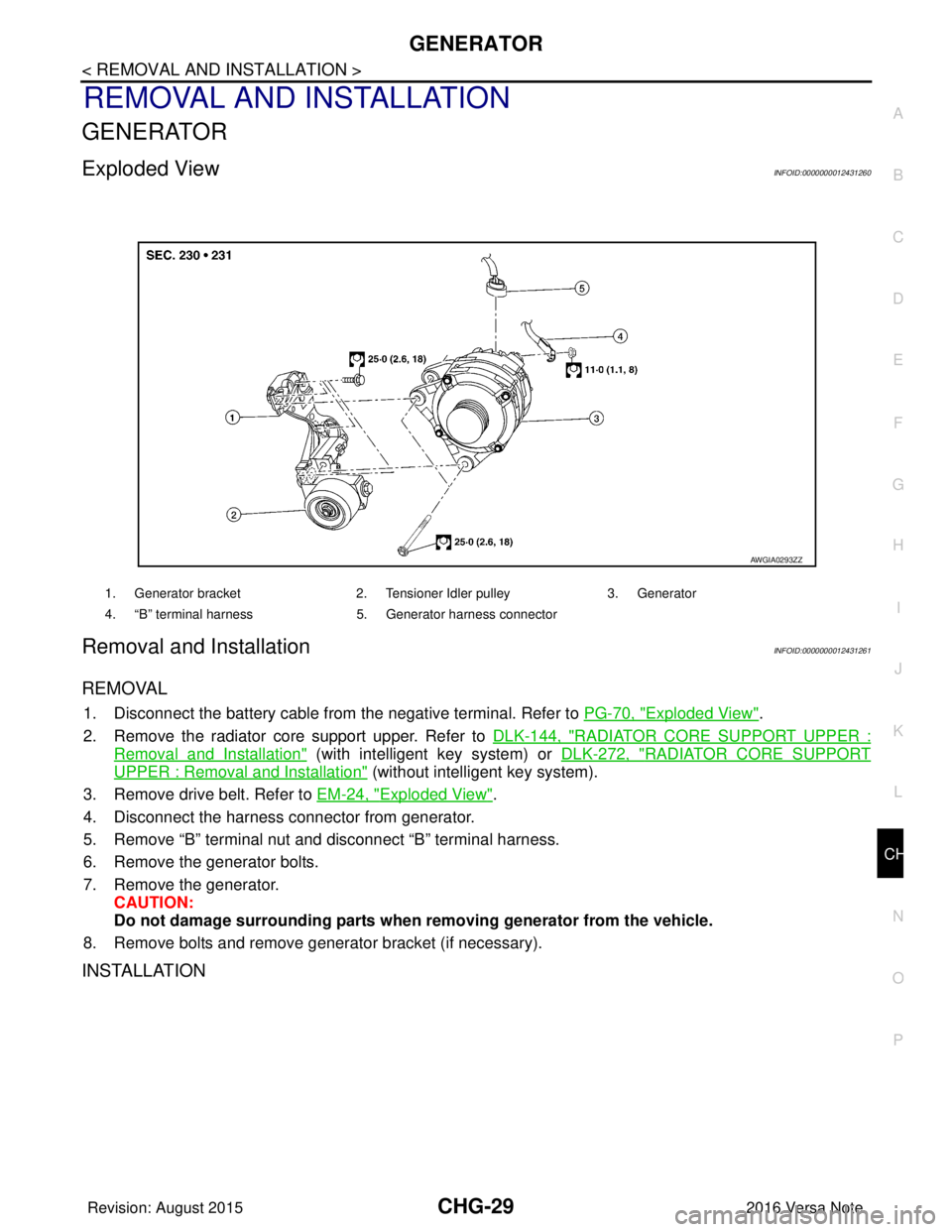
GENERATOR
Exploded ViewINFOID:0000000012431260
Removal and InstallationINFOID:0000000012431261
REMOVAL
1. Disconnect the battery cable from
the negative terminal. Refer to PG-70, "Exploded View".
2. Remove the radiator core support upper. Refer to DLK-144, "
RADIATOR CORE SUPPORT UPPER :
Removal and Installation" (with intelligent key system) or DLK-272, "RADIATOR CORE SUPPORT
UPPER : Removal and Installation" (without intelligent key system).
3. Remove drive belt. Refer to EM-24, "
Exploded View".
4. Disconnect the harness connector from generator.
5. Remove “B” terminal nut and disconnect “B” terminal harness.
6. Remove the generator bolts.
7. Remove the generator. CAUTION:
Do not damage surrounding parts when removing generator from the vehicle.
8. Remove bolts and remove generator bracket (if necessary).
INSTALLATION
1. Generator bracket 2. Tensioner Idler pulley3. Generator
4. “B” terminal harness 5. Generator harness connector
AWGIA0293ZZ
Revision: August 2015 2016 Versa Note
cardiagn.com
Page 652 of 3641

DEF-1
DRIVER CONTROLS
C
DE
F
G H
I
J
K
M
SECTION DEF
A
B
DEF
N
O P
CONTENTS
DEFOGGER
PRECAUTION ....... ........................................3
PRECAUTIONS .............................................. .....3
Precaution for Supplemental Restraint System
(SRS) "AIR BAG" and "SEAT BELT PRE-TEN-
SIONER" ............................................................. ......
3
SYSTEM DESCRIPTION ..............................4
COMPONENT PARTS ................................... .....4
Component Parts Location .................................. ......4
Rear window defogger ..............................................5
Door mirror defogger .................................................5
SYSTEM ..............................................................6
System Description ............................................. ......6
DIAGNOSIS SYSTEM (BCM) (WITH INTELLI-
GENT KEY SYSTEM) ..........................................
7
COMMON ITEM ..................................................... ......7
COMMON ITEM : CONSULT Function (BCM -
COMMON ITEM) .......................................................
7
REAR DEFOGGER ............................................... ......8
REAR DEFOGGER : CONSULT Function (BCM -
REAR DEFOGGER) ........................................... ......
8
DIAGNOSIS SYSTEM (BCM) (WITHOUT IN-
TELLIGENT KEY SYSTEM) ................................
9
COMMON ITEM ..................................................... ......9
COMMON ITEM : CONSULT Function (BCM -
COMMON ITEM) .......................................................
9
REAR DEFOGGER ............................................... ....10
REAR DEFOGGER : CONSULT Function (BCM -
REAR DEFOGGER) ........................................... ....
10
ECU DIAGNOSIS INFORMATION ..............11
BCM ................................................................ ....11
List of ECU Reference ........................................ ....11
WIRING DIAGRAM ......................................12
REAR WINDOW DE FOGGER SYSTEM ..........12
Wiring Diagram .................................................... ....12
BASIC INSPECTION ...................................17
DIAGNOSIS AND REPAIR WORK FLOW .......17
Work Flow ............................................................ ....17
DTC/CIRCUIT DIAGNOSIS .........................20
REAR WINDOW DEFOGGER SWITCH ...........20
Description ........................................................... ....20
Component Function Check ....................................20
Diagnosis Procedure ...............................................20
Component Inspection .............................................21
REAR WINDOW DEFOGGER RELAY .............22
Description ...............................................................22
Component Function Check ....................................22
Diagnosis Procedure ...............................................22
Component Inspection .............................................23
REAR WINDOW DEFOGGER POWER SUP-
PLY AND GROUND CIRCUIT ..........................
24
Description ...............................................................24
Component Function Check ....................................24
Diagnosis Procedure ...............................................24
Component Inspection .............................................25
DRIVER SIDE DOOR MIRROR DEFOGGER ...26
Description ...............................................................26
Component Function Check ....................................26
Diagnosis Procedure ...............................................26
Component Inspection .............................................27
PASSENGER SIDE DOOR MIRROR DEFOG-
GER ...................................................................
28
Description ...............................................................28
Component Function Check ....................................28
Diagnosis Procedure ...............................................28
Revision: August 2015 2016 Versa Note
cardiagn.com