glove box NISSAN NOTE 2016 Service User Guide
[x] Cancel search | Manufacturer: NISSAN, Model Year: 2016, Model line: NOTE, Model: NISSAN NOTE 2016Pages: 3641, PDF Size: 28.72 MB
Page 2024 of 3641
![NISSAN NOTE 2016 Service User Guide HAC-56
< REMOVAL AND INSTALLATION >[MANUAL AIR CONDITIONING]
DOOR CABLE
DOOR CABLE
Exploded ViewINFOID:0000000012430762
INTAKE DOOR CABLE
INTAKE DOOR CABLE : Removal and InstallationINFOID:00000000124](/img/5/57363/w960_57363-2023.png "NISSAN NOTE 2016 Service User Guide HAC-56
< REMOVAL AND INSTALLATION >[MANUAL AIR CONDITIONING]
DOOR CABLE
DOOR CABLE
Exploded ViewINFOID:0000000012430762
INTAKE DOOR CABLE
INTAKE DOOR CABLE : Removal and InstallationINFOID:00000000124")
HAC-56
< REMOVAL AND INSTALLATION >[MANUAL AIR CONDITIONING]
DOOR CABLE
DOOR CABLE
Exploded ViewINFOID:0000000012430762
INTAKE DOOR CABLE
INTAKE DOOR CABLE : Removal and InstallationINFOID:0000000012430763
The intake door cable is not serviced separately. Refer to
HAC-52, "Removal and Installation".
INTAKE DOOR CABLE : AdjustmentINFOID:0000000012430764
1. Remove glove box assembly. Refer to IP-25, "Removal and Installation".
2. Disconnect intake door cable (1) from clip (A).
3. Set intake door lever to REC position.
4. Push intake door link (2) in the direction shown, then carefully pull outer cable to front air control side and connect clip.
1. Heating and cooling unit assembly 2. Plate 3. Air mix door linkage 2
4. Air mix door linkage 1 5. Air mix door cable6. Intake door lever
7. Intake door linkage 8. Intake door cable9. Foot door lever
10. Mode door cable 11. Main linkage12. Ventilator door rod
13. Ventilator door lever
A. To front air control
JMIIA1742ZZ
JMIIA0617ZZ
Revision: August 2015 2016 Versa Note
cardiagn.com
Page 2025 of 3641
![NISSAN NOTE 2016 Service User Guide DOOR CABLEHAC-57
< REMOVAL AND INSTALLATION > [MANUAL AIR CONDITIONING]
C
D
E
F
G H
J
K L
M A
B
HAC
N
O P
5. Operate intake door lever to make sure that inner cable moves smoothly. CAUTION:
When clipp](/img/5/57363/w960_57363-2024.png "NISSAN NOTE 2016 Service User Guide DOOR CABLEHAC-57
< REMOVAL AND INSTALLATION > [MANUAL AIR CONDITIONING]
C
D
E
F
G H
J
K L
M A
B
HAC
N
O P
5. Operate intake door lever to make sure that inner cable moves smoothly. CAUTION:
When clipp")
DOOR CABLEHAC-57
< REMOVAL AND INSTALLATION > [MANUAL AIR CONDITIONING]
C
D
E
F
G H
J
K L
M A
B
HAC
N
O P
5. Operate intake door lever to make sure that inner cable moves smoothly. CAUTION:
When clipping ou ter cable, do not move inner cable.
MODE DOOR CABLE
MODE DOOR CABLE : Re moval and InstallationINFOID:0000000012430765
The mode door cable is not serviced separately. Refer to HAC-52, "Removal and Installation".
MODE DOOR CABLE : AdjustmentINFOID:0000000012430766
1. Remove glove box assembly. Refer to IP-25, "Removal and Installation".
2. Disconnect mode door cable (1) from clip (A).
3. Set mode dial to VENT position.
4. Push main link (2) in the direction shown, then carefully pull outer cable to front air control side and connect clip.
5. Operate mode dial to make sure that inner cable moves smoothly. CAUTION:
When clipping ou ter cable, do not move inner cable.
AIR MIX DOOR CABLE
AIR MIX DOOR CABLE : Removal and InstallationINFOID:0000000012430767
The air mix door cable is not serviced separately. Refer to HAC-52, "Removal and Installation".
AIR MIX DOOR CABLE : AdjustmentINFOID:0000000012430768
1. Remove instrument lower panel LH. Refer to IP-24, "Removal and Installation".
2. Remove foot duct (LH). Refer to VTL-7, "
FOOT DUCT : Removal and Installation".
3. Disconnect air mix door cable (1) from clip (A).
4. Set temperature dial to full cold position.
5. Push air mix door link (2) in the direction shown, then carefully pull outer cable to front air control side and connect clip.
6. Operate temperature dial to make sure that inner cable moves smoothly. CAUTION:
When clipping ou ter cable, do not move inner cable.
JMIIA0618ZZ
JMIIA0619ZZ
Revision: August 2015 2016 Versa Note
cardiagn.com
Page 2069 of 3641

IP-1
BODY INTERIOR
C
DE
F
G H
I
K L
M
SECTION IP
A
B
IP
N
O P
CONTENTS
INSTRUMENT PANEL
PRECAUTION ....... ........................................2
PRECAUTIONS .............................................. .....2
Precaution for Supplemental Restraint System
(SRS) "AIR BAG" and "SEAT BELT PRE-TEN-
SIONER" ............................................................. ......
2
Precaution for Work ..................................................2
PREPARATION ............................................3
PREPARATION .............................................. .....3
Special Service Tools ........................................ ......3
Commercial Service Tools .......................................3
CLIP LIST ............................................................4
Descriptions for Clips ................................................4
SYMPTOM DIAGNOSIS ...............................8
SQUEAK AND RATTLE TROUBLE DIAG-
NOSES ........................ ........................................
8
Work Flow ........................................................... ......8
Generic Squeak and Rattle Troubleshooting ............9
Diagnostic Worksheet .............................................12
REMOVAL AND INSTALLATION ...............14
INSTRUMENT PANEL ASSEMBLY .............. ....14
Exploded View .................................................... ....14
Removal and Installation ..................................... ....15
STEERING COLUMN COVERS .......................17
Removal and Installation .........................................17
CENTER CONSOLE ASSEMBLY ....................18
Exploded View .........................................................18
Removal and Installation .........................................18
CENTER CONSOLE LOWER ...........................20
Removal and Installation .........................................20
CLUSTER LID A ...............................................21
Removal and Installation .........................................21
CLUSTER LID C ...............................................22
Removal and Installation .........................................22
FRONT AIR CONTROL FINISHER ...................23
Removal and Installation .........................................23
INSTRUMENT LOWER PANEL LH ..................24
Removal and Installation .........................................24
GLOVE BOX ASSEMBLY ................................25
Removal and Installation .........................................25
UPPER GLOVE BOX ........................................26
Removal and Installation ..................................... ....26
Revision: August 2015 2016 Versa Note
cardiagn.com
Page 2083 of 3641
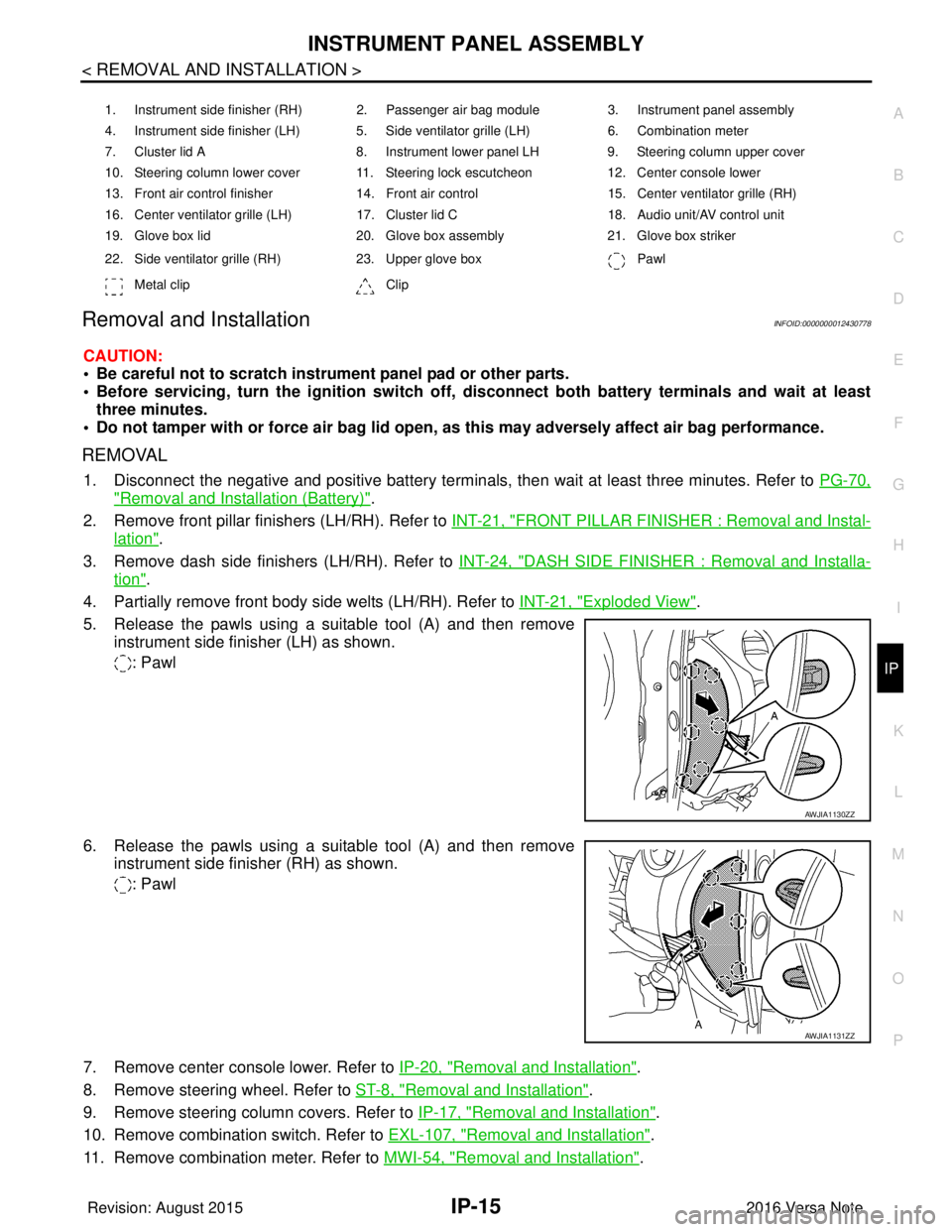
INSTRUMENT PANEL ASSEMBLYIP-15
< REMOVAL AND INSTALLATION >
C
DE
F
G H
I
K L
M A
B
IP
N
O P
Removal and InstallationINFOID:0000000012430778
CAUTION:
• Be careful not to scratch instrument panel pad or other parts.
• Before servicing, turn the ignition switch off, disconnect both battery terminals and wait at least
three minutes.
• Do not tamper with or force air bag lid open, as this may adversely affect air bag performance.
REMOVAL
1. Disconnect the negative and positive battery terminals, then wait at least three minutes. Refer to PG-70,
"Removal and Installation (Battery)".
2. Remove front pillar finishers (LH/RH). Refer to INT-21, "
FRONT PILLAR FINISHER : Removal and Instal-
lation".
3. Remove dash side finishers (LH/RH). Refer to INT-24, "
DASH SIDE FINISHER : Removal and Installa-
tion".
4. Partially remove front body side welts (LH/RH). Refer to INT-21, "
Exploded View".
5. Release the pawls using a suitable tool (A) and then remove instrument side finisher (LH) as shown.
: Pawl
6. Release the pawls using a suitable tool (A) and then remove instrument side finisher (RH) as shown.
: Pawl
7. Remove center console lower. Refer to IP-20, "
Removal and Installation".
8. Remove steering wheel. Refer to ST-8, "
Removal and Installation".
9. Remove steering column covers. Refer to IP-17, "
Removal and Installation".
10. Remove combination switch. Refer to EXL-107, "
Removal and Installation".
11. Remove combination meter. Refer to MWI-54, "
Removal and Installation".
1. Instrument side finisher (RH) 2. Passenger air bag module 3. Instrument panel assembly
4. Instrument side finisher (LH) 5. Side ventilator grille (LH) 6. Combination meter
7. Cluster lid A 8. Instrument lower panel LH9. Steering column upper cover
10. Steering column lower cover 11. Steering lock escutcheon 12. Center console lower
13. Front air control finisher 14. Front air control15. Center ventilator grille (RH)
16. Center ventilator grille (LH) 17. Cluster lid C 18. Audio unit/AV control unit
19. Glove box lid 20. Glove box assembly21. Glove box striker
22. Side ventilator grille (RH) 23. Upper glove box Pawl
Metal clip Clip
AWJIA1130ZZ
AWJIA1131ZZ
Revision: August 2015 2016 Versa Note
cardiagn.com
Page 2084 of 3641
IP-16
< REMOVAL AND INSTALLATION >
INSTRUMENT PANEL ASSEMBLY
12. Remove audio unit. Refer to AV-53, "Removal and Installation" (BASE AUDIO) or AV-113, "Removal and
Installation" (DISPLAY AUDIO).
13. Remove AV control unit (NAVIGATION). Refer to AV-241, "
Removal and Installation".
14. Remove front air control. Refer to HAC-52, "
Removal and Installation".
15. Remove glove box assembly. Refer to IP-25, "
Removal and Installation".
16. Remove front passenger air bag module. Refer to SR-19, "
Removal and Installation".
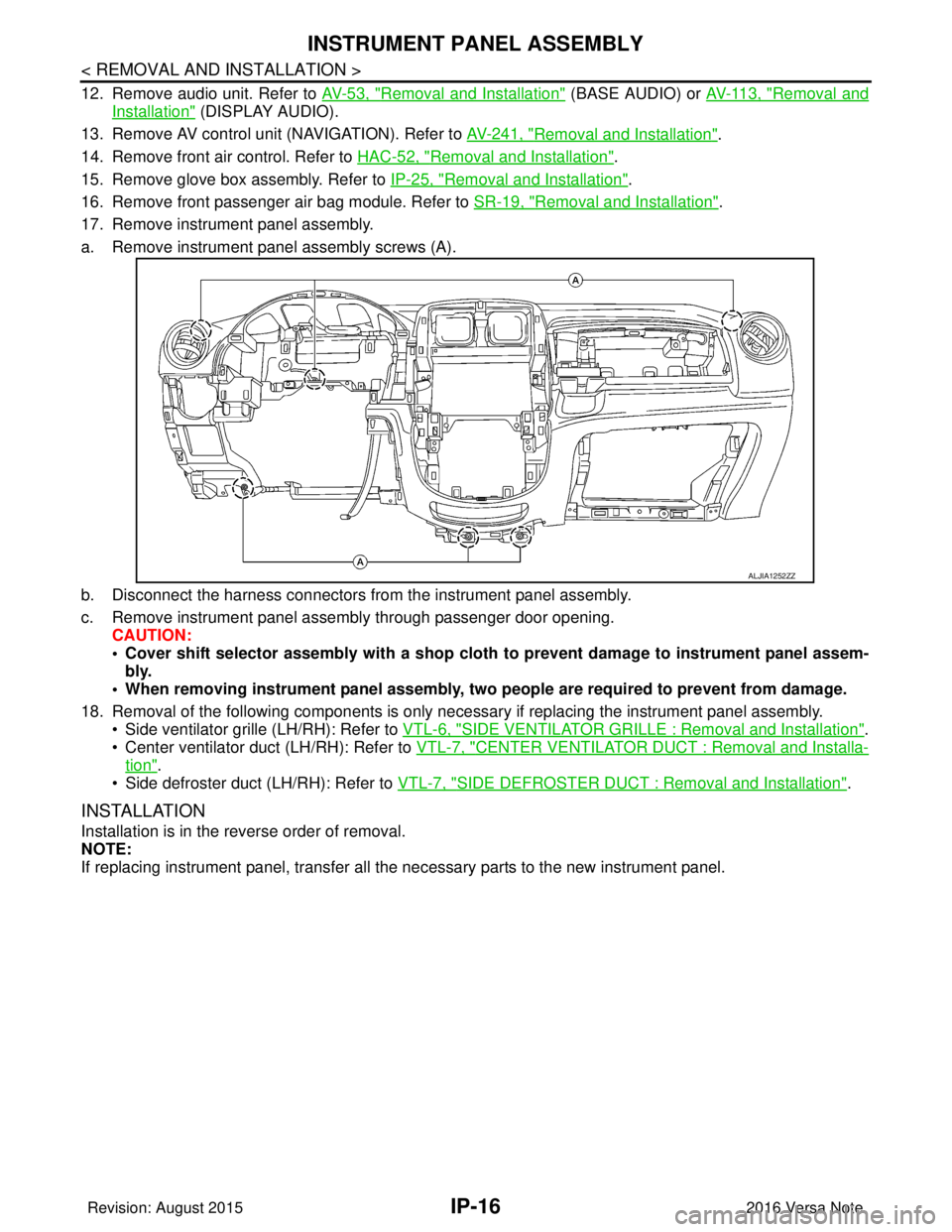
17. Remove instrument panel assembly.
a. Remove instrument panel assembly screws (A).
b. Disconnect the harness connectors from the instrument panel assembly.
c. Remove instrument panel assembly through passenger door opening. CAUTION:
• Cover shift selector assembly with a shop cloth to prevent damage to instrument panel assem-
bly.
• When removing instrument panel assembly, two people are required to prevent from damage.
18. Removal of the following components is only necessary if replacing the instrument panel assembly.
• Side ventilator grille (LH/RH): Refer to VTL-6, "
SIDE VENTILATOR GRILLE : Removal and Installation".
• Center ventilator duct (LH/RH): Refer to VTL-7, "
CENTER VENTILATOR DUCT : Removal and Installa-
tion".
• Side defroster duct (LH/RH): Refer to VTL-7, "
SIDE DEFROSTER DUCT : Removal and Installation".
INSTALLATION
Installation is in the reverse order of removal.
NOTE:
If replacing instrument panel, transfer all the necessary parts to the new instrument panel.
ALJIA1252ZZ
Revision: August 2015 2016 Versa Note
cardiagn.com
Page 2093 of 3641
GLOVE BOX ASSEMBLYIP-25
< REMOVAL AND INSTALLATION >
C
DE
F
G H
I
K L
M A
B
IP
N
O P
GLOVE BOX ASSEMBLY
Removal and InstallationINFOID:0000000012430787
REMOVAL
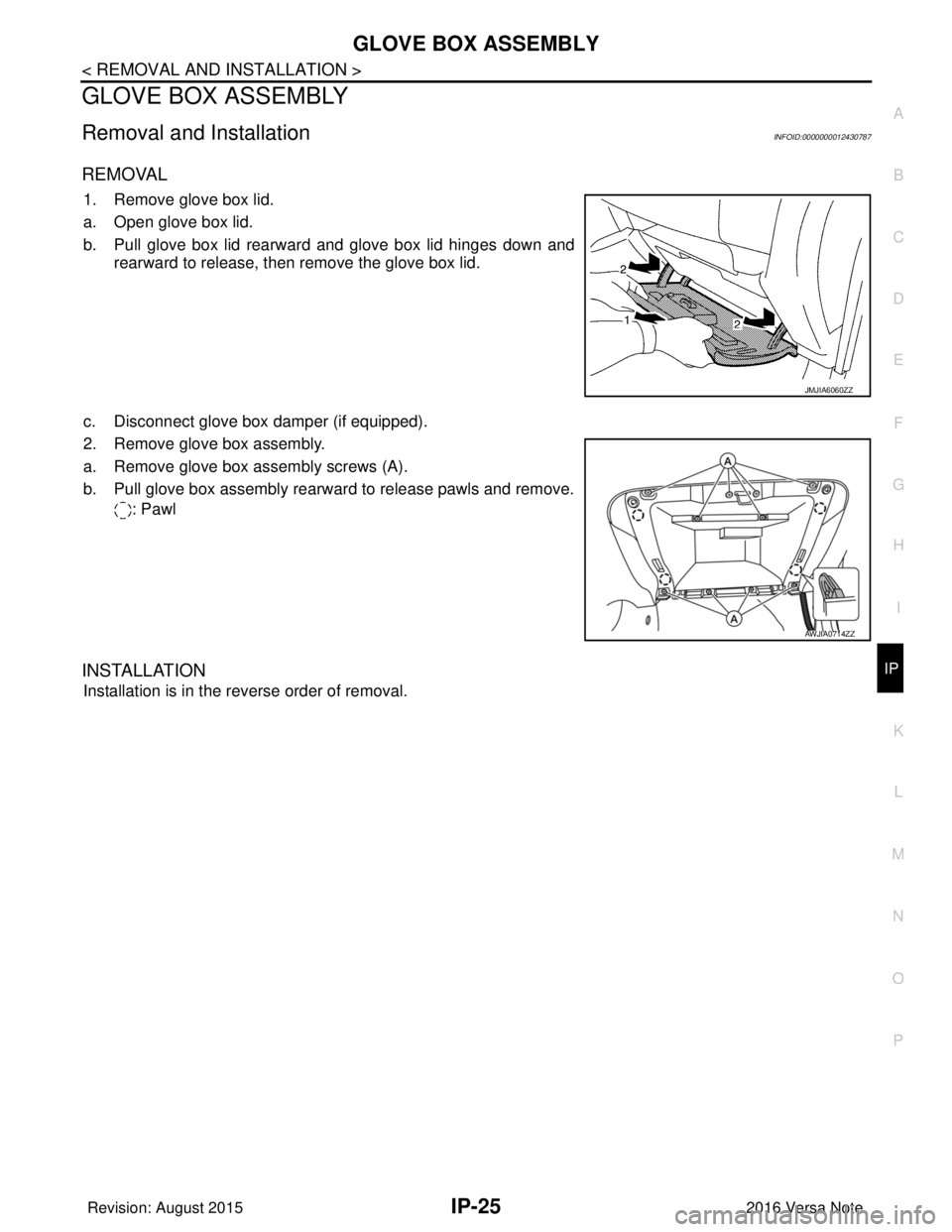
1. Remove glove box lid.
a. Open glove box lid.
b. Pull glove box lid rearward and glove box lid hinges down and rearward to release, then remove the glove box lid.
c. Disconnect glove box damper (if equipped).
2. Remove glove box assembly.
a. Remove glove box assembly screws (A).
b. Pull glove box assembly rearward to release pawls and remove. : Pawl
INSTALLATION
Installation is in the reverse order of removal.
JMJIA6060ZZ
AWJIA0714ZZ
Revision: August 2015 2016 Versa Note
cardiagn.com
Page 2094 of 3641
IP-26
< REMOVAL AND INSTALLATION >
UPPER GLOVE BOX
UPPER GLOVE BOX
Removal and InstallationINFOID:0000000012430788
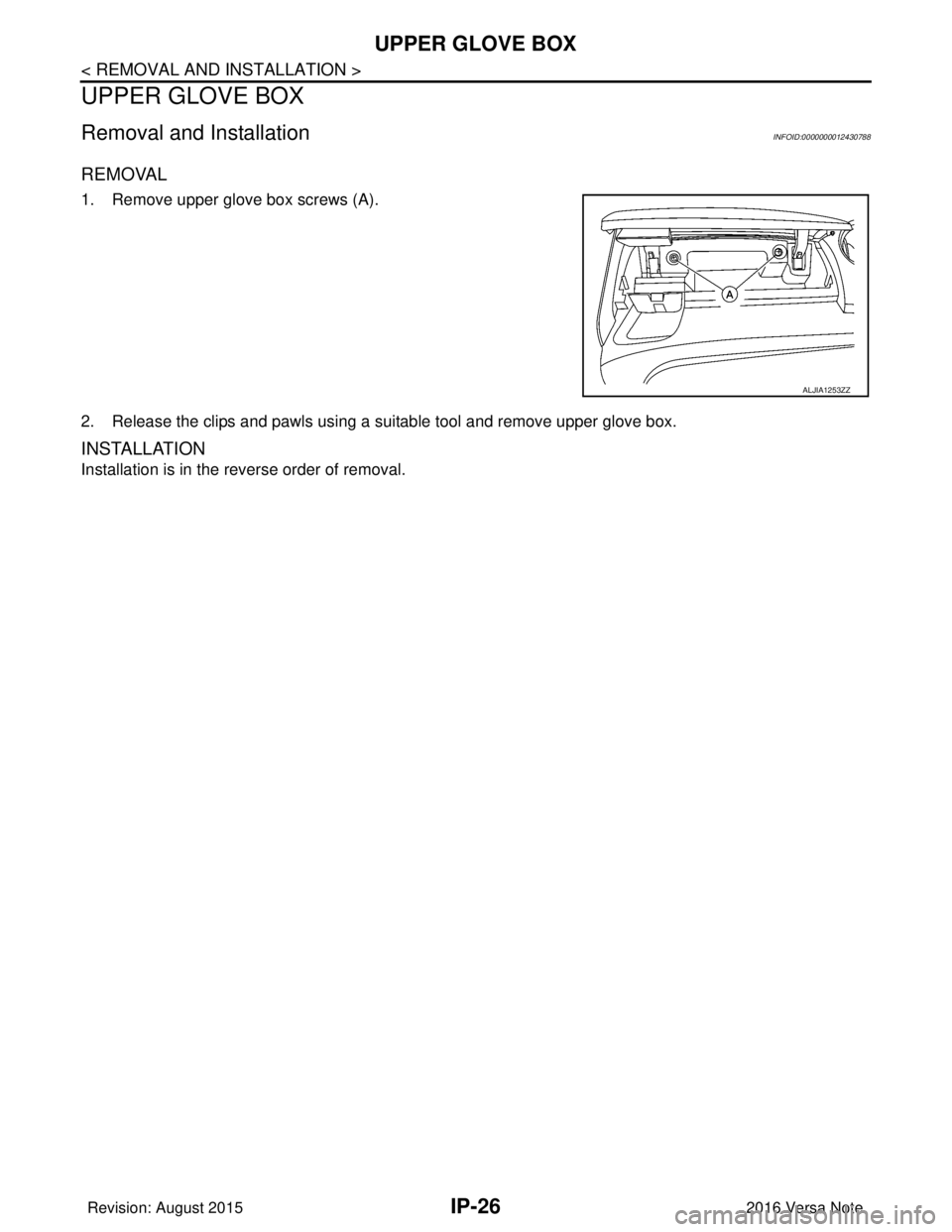
REMOVAL
1. Remove upper glove box screws (A).
2. Release the clips and pawls using a suitable tool and remove upper glove box.
INSTALLATION
Installation is in the reverse order of removal.
ALJIA1253ZZ
Revision: August 20152016 Versa Note
cardiagn.com
Page 2864 of 3641
![NISSAN NOTE 2016 Service User Guide COMPONENT PARTSSEC-7
< SYSTEM DESCRIPTION > [WITH INTELLIGENT KEY SYSTEM]
C
D
E
F
G H
I
J
L
M A
B
SEC
N
O P
SYSTEM DESCRIPTION
COMPONENT PARTS
Component Parts LocationINFOID:0000000012430324
A. View r](/img/5/57363/w960_57363-2863.png "NISSAN NOTE 2016 Service User Guide COMPONENT PARTSSEC-7
< SYSTEM DESCRIPTION > [WITH INTELLIGENT KEY SYSTEM]
C
D
E
F
G H
I
J
L
M A
B
SEC
N
O P
SYSTEM DESCRIPTION
COMPONENT PARTS
Component Parts LocationINFOID:0000000012430324
A. View r")
COMPONENT PARTSSEC-7
< SYSTEM DESCRIPTION > [WITH INTELLIGENT KEY SYSTEM]
C
D
E
F
G H
I
J
L
M A
B
SEC
N
O P
SYSTEM DESCRIPTION
COMPONENT PARTS
Component Parts LocationINFOID:0000000012430324
A. View right of steering column B. View with glove box cover removed No. Component Function
1. Combination meter Combination meter transmits the vehicle
speed signal to BCM via CAN communica-
tion.
BCM also receives the vehicle speed signal
from ABS actuator and electric unit (control
unit) via CAN communication. BCM com-
pares both signals to detect the vehicle
speed.
Security indicator lamp is located on combi-
nation meter.
Security indicator lamp blinks when ignition
switch is in any position other than ON to
warn that NISSAN VEHICLE IMMOBILIZER
SYSTEM-NATS [NVIS (NATS)] is on board.
Refer to MWI-9, "
METER SYSTEM : Combi-
nation Meter".
2. Inside key antenna (instrument center) Inside key antenna (instrument center) de-
tects whether Intelligent Key is inside the ve-
hicle or not, and then transmits the signal to
the BCM.
Refer to SEC-10, "
Inside Key Antenna".
AWKIA3649ZZ
Revision: August 2015
2016 Versa Note
cardiagn.com
Page 2870 of 3641
![NISSAN NOTE 2016 Service User Guide SYSTEMSEC-13
< SYSTEM DESCRIPTION > [WITH INTELLIGENT KEY SYSTEM]
C
D
E
F
G H
I
J
L
M A
B
SEC
N
O P
Refer to SEC-15, "NISSAN ANTI-THEFT SYSTEM : System Description" for any functions other than engin](/img/5/57363/w960_57363-2869.png "NISSAN NOTE 2016 Service User Guide SYSTEMSEC-13
< SYSTEM DESCRIPTION > [WITH INTELLIGENT KEY SYSTEM]
C
D
E
F
G H
I
J
L
M A
B
SEC
N
O P
Refer to SEC-15, \"NISSAN ANTI-THEFT SYSTEM : System Description\" for any functions other than engin")
SYSTEMSEC-13
< SYSTEM DESCRIPTION > [WITH INTELLIGENT KEY SYSTEM]
C
D
E
F
G H
I
J
L
M A
B
SEC
N
O P
Refer to SEC-15, "NISSAN ANTI-THEFT SYSTEM : System Description" for any functions other than engine
start function of Intelligent Key system.
PRECAUTIONS FOR INTELLIGENT KEY SYSTEM
The transponder (the chip for NATS ID verification) is integrated into the Intelligent Key. (For the con-
ventional models, it is integrated into the mechanical key.) Therefore, ID verification cannot be per-
formed by mechanical key only.
In that case, NATS ID verification can be perfor med when Intelligent Key backside is contacted to
push-button ignition switch while brake pedal is depressed. If verification result is OK, engine can be
started.
OPERATION WHEN INTELLIGENT KEY IS CARRIED
1. When the push-button ignition switch is pressed, the BCM activates the inside key antenna and transmits the request signal to the Intelligent Key.
2. The Intelligent Key receives the request signal and transmits the Intelligent Key ID signal to the BCM.
3. BCM receives the Intelligent Key ID signal via remote keyless entry receiver and verifies it with the regis-
tered ID.
4. BCM turns ACC relay ON and transmits the i gnition power supply ON signal to IPDM E/R.
5. IPDM E/R turns the ignition relay ON and starts the ignition power supply.
6. IPDM E/R turns the starter control relay ON for engine starting in advance.
7. BCM detects the selector lever position and brake pedal operation condition.
8. BCM transmits the starter request signal to IPDM E/R and turns the starter relay ON if BCM judges that the engine start condition* is satisfied.
9. Power supply is supplied through the starter relay and the starter control relay to operate the starter motor. CAUTION:
If a malfunction is detected in the Intelligent Key system, the “KEY” warning lamp on the combina-
tion meter illuminates. At that time, the engine cannot be started.
10. When BCM receives feedback signal from ECM indicating that the engine is started, the BCM transmits a stop signal to IPDM E/R and stops cranking by turning OFF the starter motor relay. (If engine start is
unsuccessful, cranking stops aut omatically within 5 seconds.)
CAUTION:
When the Intelligent Key is carried outside of th e vehicle (inside key antenna detection area) while
the power supply is in the ACC or ON position, even if the engine start condition* is satisfied, the
engine cannot be started.
*: For the engine start condition, refer to “IGNIT ION SWITCH POSITION CHANGE TABLE BY PUSH-BUT-
TON IGNITION SWITCH OPERATION”.
OPERATION RANGE
Engine can be started when Intelligent Key is inside the vehicle. However, sometimes engine may not start
when Intelligent Key is on instrument panel or in glove box.
ENGINE START OPERATION WHEN INTELLIGENT KEY IS CONTACTED TO PUSH-BUTTON IG-
NITION SWITCH
When Intelligent Key battery is discharged, NATS ID verification between transponder in Intelligent Key and
BCM is performed when Intelligent Key backside is cont acted to push-button ignition switch while brake pedal
is depressed. If the verification result is OK, engine can be started.
IGNITION SWITCH POSITION CHANGE TABLE BY PUSH-BUTTON IGNITION SWITCH OPERA-
TION
The ignition switch position can be changed by the following operations:
NOTE:
• When an Intelligent Key is within the detection area of inside key antenna or when Intelligent Key backside is contacted to push-button ignition switch, it is equivalent to the operations below:
• When starting the engine, the BCM monitors under the engine start conditions:
- Brake pedal operation condition
- Selector lever position
- Vehicle speed
Vehicle speed: less than 4 km/h (2.5 MPH)
Revision: August 2015 2016 Versa Note
cardiagn.com
Page 2973 of 3641
![NISSAN NOTE 2016 Service User Guide SEC-116
< REMOVAL AND INSTALLATION >[WITH INTELLIGENT KEY SYSTEM]
REMOTE KEYLESS ENTRY RECEIVER
REMOTE KEYLESS ENTRY RECEIVER
Removal and InstallationINFOID:0000000012430438
REMOVAL
1. Remove the glov](/img/5/57363/w960_57363-2972.png "NISSAN NOTE 2016 Service User Guide SEC-116
< REMOVAL AND INSTALLATION >[WITH INTELLIGENT KEY SYSTEM]
REMOTE KEYLESS ENTRY RECEIVER
REMOTE KEYLESS ENTRY RECEIVER
Removal and InstallationINFOID:0000000012430438
REMOVAL
1. Remove the glov")
SEC-116
< REMOVAL AND INSTALLATION >[WITH INTELLIGENT KEY SYSTEM]
REMOTE KEYLESS ENTRY RECEIVER
REMOTE KEYLESS ENTRY RECEIVER
Removal and InstallationINFOID:0000000012430438
REMOVAL
1. Remove the glove box. Refer to IP-25, "Removal and Installation".
2. Disconnect the harness connector (A) from remote keyless entry receiver (1).
3. Remove screw (B) and remove remote keyless entry receiver.
INSTALLATION
Installation is in the reverse order of removal.
ALKIA3178ZZ
Revision: August 2015 2016 Versa Note
cardiagn.com