hood release NISSAN NOTE 2016 Service User Guide
[x] Cancel search | Manufacturer: NISSAN, Model Year: 2016, Model line: NOTE, Model: NISSAN NOTE 2016Pages: 3641, PDF Size: 28.72 MB
Page 962 of 3641
![NISSAN NOTE 2016 Service User Guide RADIATOR CORE SUPPORTDLK-273
< REMOVAL AND INSTALLATION > [WITHOUT INTELLIGENT KEY SYSTEM]
C
D
E
F
G H
I
J
L
M A
B
DLK
N
O P
3. Remove washer tube inlet clip (A).
4. Remove radiator cap adapter bracke](/img/5/57363/w960_57363-961.png "NISSAN NOTE 2016 Service User Guide RADIATOR CORE SUPPORTDLK-273
< REMOVAL AND INSTALLATION > [WITHOUT INTELLIGENT KEY SYSTEM]
C
D
E
F
G H
I
J
L
M A
B
DLK
N
O P
3. Remove washer tube inlet clip (A).
4. Remove radiator cap adapter bracke")
RADIATOR CORE SUPPORTDLK-273
< REMOVAL AND INSTALLATION > [WITHOUT INTELLIGENT KEY SYSTEM]
C
D
E
F
G H
I
J
L
M A
B
DLK
N
O P
3. Remove washer tube inlet clip (A).
4. Remove radiator cap adapter bracket bolt (A) and radiator reser- voir tank bolt (B).
5. Remove horn. Refer to HRN-6, "
Removal and Installation".
6. Remove crash zone sensor. Refer to SR-24, "
Removal and Installation".
7. Remove hood lock assembly. Refer to DLK-292, "
HOOD LOCK : Removal and Installation".
8. Release hood lock release cable clips from radi ator core support upper using a suitable tool.
9. Remove upper air guide. Refer to DLK-272, "
Exploded View".
10. Remove air guide (LH/RH). Refer to DLK-272, "
Exploded View".
11. Release all harness connector clips from radiator core support upper using a suitable tool.
12. Remove bolts (A) and radiator core support upper.
INSTALLATION
Installation is in the reverse order of removal.
CAUTION:
After installation, perform hood assembl y adjustment procedure. Refer to DLK-269, "
HOOD ASSEM-
BLY : Adjustment".
RADIATOR CORE SUPPORT LOWER
RADIATOR CORE SUPPORT LOWE R : Removal and InstallationINFOID:0000000012430238
REMOVAL
1. Remove radiator core support upper. Refer to DLK-272, "RADIATOR CORE SUPPORT UPPER :
Removal and Installation".
2. Reposition the radiator and condenser.
AWKIA2567ZZ
JMKIA8027ZZ
AWKIA2568ZZ
Revision: August 2015 2016 Versa Note
cardiagn.com
Page 965 of 3641
![NISSAN NOTE 2016 Service User Guide DLK-276
< REMOVAL AND INSTALLATION >[WITHOUT INTELLIGENT KEY SYSTEM]
FRONT FENDER
4. Remove front fender stiffener (2) by carefully pulling upper por-
tion of front fender (1) away from body.
: Front](/img/5/57363/w960_57363-964.png "NISSAN NOTE 2016 Service User Guide DLK-276
< REMOVAL AND INSTALLATION >[WITHOUT INTELLIGENT KEY SYSTEM]
FRONT FENDER
4. Remove front fender stiffener (2) by carefully pulling upper por-
tion of front fender (1) away from body.
: Front")
DLK-276
< REMOVAL AND INSTALLATION >[WITHOUT INTELLIGENT KEY SYSTEM]
FRONT FENDER
4. Remove front fender stiffener (2) by carefully pulling upper por-
tion of front fender (1) away from body.
: Front
CAUTION:
Use care when removing the fr ont fender. The front fender
stiffener foam adheres the front fender to the body. Care-
fully release the stiffener foam or damage to front fender
may occur.
5. Remove front fender.
INSTALLATION
Installation is in the reverse order of removal.
CAUTION:
• After installation, apply touc h-up paint (body color) to the head of front fender bolts.
• After installation, adjust th e following components as necessary:
- Hood assembly: Refer to DLK-269, "
HOOD ASSEMBLY : Adjustment".
- Front door assembly: Refer to DLK-278, "
DOOR ASSEMBLY : Adjustment".
JMKIA5633ZZ
Revision: August 2015 2016 Versa Note
cardiagn.com
Page 981 of 3641
![NISSAN NOTE 2016 Service User Guide DLK-292
< REMOVAL AND INSTALLATION >[WITHOUT INTELLIGENT KEY SYSTEM]
HOOD LOCK
HOOD LOCK
Exploded ViewINFOID:0000000012430264
HOOD LOCK
HOOD LOCK : Removal and InstallationINFOID:0000000012430265
REMO](/img/5/57363/w960_57363-980.png "NISSAN NOTE 2016 Service User Guide DLK-292
< REMOVAL AND INSTALLATION >[WITHOUT INTELLIGENT KEY SYSTEM]
HOOD LOCK
HOOD LOCK
Exploded ViewINFOID:0000000012430264
HOOD LOCK
HOOD LOCK : Removal and InstallationINFOID:0000000012430265
REMO")
DLK-292
< REMOVAL AND INSTALLATION >[WITHOUT INTELLIGENT KEY SYSTEM]
HOOD LOCK
HOOD LOCK
Exploded ViewINFOID:0000000012430264
HOOD LOCK
HOOD LOCK : Removal and InstallationINFOID:0000000012430265
REMOVAL
1. Remove hood lock bolts (A).
2. Disconnect hood lock release cable (2) from hood lock (1) and
remove.
INSTALLATION
Installation is in the reverse order of removal.
CAUTION:
1. Hood lock/fuel filler lid release handle 2. Hood lock assembly 3. Hood lock release cable assembly
A. Clip
AWKIA2572ZZ
ALKIA3190ZZ
AWKIA2497ZZ
Revision: August 2015 2016 Versa Note
cardiagn.com
Page 982 of 3641
![NISSAN NOTE 2016 Service User Guide HOOD LOCKDLK-293
< REMOVAL AND INSTALLATION > [WITHOUT INTELLIGENT KEY SYSTEM]
C
D
E
F
G H
I
J
L
M A
B
DLK
N
O P
• After installation, perform hood assem bly adjustment procedure. Refer to DLK-269,](/img/5/57363/w960_57363-981.png "NISSAN NOTE 2016 Service User Guide HOOD LOCKDLK-293
< REMOVAL AND INSTALLATION > [WITHOUT INTELLIGENT KEY SYSTEM]
C
D
E
F
G H
I
J
L
M A
B
DLK
N
O P
• After installation, perform hood assem bly adjustment procedure. Refer to DLK-269,")
HOOD LOCKDLK-293
< REMOVAL AND INSTALLATION > [WITHOUT INTELLIGENT KEY SYSTEM]
C
D
E
F
G H
I
J
L
M A
B
DLK
N
O P
• After installation, perform hood assem bly adjustment procedure. Refer to DLK-269, "HOOD ASSEM-
BLY : Adjustment".
• After adjustment, perform hood lo ck control inspection. Refer to DLK-293, "
HOOD LOCK : Inspec-
tion".
HOOD LOCK : InspectionINFOID:0000000012430266
HOOD LOCK INSPECTION
NOTE:
If hood lock cable is bent or deformed, replace it. Refer to DLK-292, "
HOOD LOCK : Removal and Installa-
tion".
1. Check that secondary latch is properly engage with secondary striker with hoods own weight.
2. While operating hood lock release lever, carefully check that the front end of hood assembly is raised by approximately 20.0 mm (0.79 in). Also check that hood lock release lever returns to original position.
3. Check that hood lock release lever operates at 49 N (5.0 kg-m, 11.0 ft-lb) or below.
4. Install so that static closing force of hood is 315-490 N (32.1-50.0 kg-m, 70.8-110.2 ft-lb).
5. Check hood lock assembly lubrication condition. If necessary, apply a suitable multi-purpose grease.
HOOD LOCK RELEASE CABLE
HOOD LOCK RELEASE CABLE : Removal and InstallationINFOID:0000000012430267
REMOVAL
1. Disconnect hood lock release cable from hood lock. Refer to DLK-292, "Exploded View".
2. Remove radiator cap adapter bracket bolt (A) and radiator reser- voir tank bolt (B).
3. Remove fender protector (LH). Refer to EXT-38, "
Removal and Installation".
4. Release hood lock control cable clips using a suitable tool.
5. Remove hood lock/fuel filler door release handle. Refer to DLK-167, "
HOOD LOCK RELEASE HANDLE :
Removal and Installation".
6. Remove dash side finisher (LH). Refer to INT-24, "
DASH SIDE FINISHER : Removal and Installation".
7. Remove grommet on the lower dash and pull the hood lock release cable into the passenger compart- ment.
CAUTION:
While pulling, be caref ul not to damage (peel) the outsi de of the hood lock release cable.
INSTALLATION
Installation is in the reverse order of removal.
CAUTION:
• Be careful not to bend cable too much, keep the radius 100 mm (3.94 in) or more.
• Check that hood lock release cable is properly engaged with hood lock.
JMKIA8027ZZ
Revision: August 2015 2016 Versa Note
cardiagn.com
Page 983 of 3641
![NISSAN NOTE 2016 Service User Guide DLK-294
< REMOVAL AND INSTALLATION >[WITHOUT INTELLIGENT KEY SYSTEM]
HOOD LOCK
• Check that cable is not offset
from the positioning grommet,
and apply the sealant to the grommet (at * mark).
HOOD](/img/5/57363/w960_57363-982.png "NISSAN NOTE 2016 Service User Guide DLK-294
< REMOVAL AND INSTALLATION >[WITHOUT INTELLIGENT KEY SYSTEM]
HOOD LOCK
• Check that cable is not offset
from the positioning grommet,
and apply the sealant to the grommet (at * mark).
HOOD")
DLK-294
< REMOVAL AND INSTALLATION >[WITHOUT INTELLIGENT KEY SYSTEM]
HOOD LOCK
• Check that cable is not offset
from the positioning grommet,
and apply the sealant to the grommet (at * mark).
HOOD LOCK RE LEASE HANDLE
HOOD LOCK RELEASE HANDLE : Removal and InstallationINFOID:0000000012430268
REMOVAL
1. Remove hood lock/fuel filler door release handle bolts (A).
2. Disconnect hood lock release cable from hood lock/fuel filler door release handle and remove.
INSTALLATION
Installation is in the reverse order of removal.
PIIB5801E
AWKIA2498ZZ
Revision: August 2015 2016 Versa Note
cardiagn.com
Page 995 of 3641
![NISSAN NOTE 2016 Service User Guide DLK-306
< REMOVAL AND INSTALLATION >[WITHOUT INTELLIGENT KEY SYSTEM]
FUEL FILLER LID OPENER
2. Remove fuel filler lid screws (A) and fuel filler lid (1).
INSTALLATION
Installation is in the reverse o](/img/5/57363/w960_57363-994.png "NISSAN NOTE 2016 Service User Guide DLK-306
< REMOVAL AND INSTALLATION >[WITHOUT INTELLIGENT KEY SYSTEM]
FUEL FILLER LID OPENER
2. Remove fuel filler lid screws (A) and fuel filler lid (1).
INSTALLATION
Installation is in the reverse o")
DLK-306
< REMOVAL AND INSTALLATION >[WITHOUT INTELLIGENT KEY SYSTEM]
FUEL FILLER LID OPENER
2. Remove fuel filler lid screws (A) and fuel filler lid (1).
INSTALLATION
Installation is in the reverse order of removal.
CAUTION:
After installation, check fuel filler lid
assembly open/close and lock/unlock operation.
FUEL FILLER OPENER CABLE
FUEL FILLER OPENER CABLE : Removal and InstallationINFOID:0000000012430282
REMOVAL
1. Remove hood lock/fuel filler lid lock release handle. Refer to DLK-167, "HOOD LOCK RELEASE HAN-
DLE : Removal and Installation".
2. Disconnect fuel filler lid opener cable (2) from hood lock/fuel filler lid lock release handle (1).
3. Remove dash side finisher (LH). Refer to INT-24, "
DASH SIDE FINISHER : Removal and Installation".
4. Remove center pillar lower finisher (LH). Refer to INT-25, "
CENTER PILLAR LOWER FINISHER :
Removal and Installation".
5. Remove luggage side lower finisher (LH). Refer to INT-34, "
LUGGAGE SIDE LOWER FINISHER :
Removal and Installation".
6. Disconnect fuel filler lid opener cable (1) by pulling downward and then sliding cable end to the side to remove from fuel filler
lid lock assembly (2).
INSTALLATION
Installation is in the reverse order of removal.
CAUTION:
After installation, check fuel filler li d assembly open/close, lock/unlock operation.
FUEL FILLER LID LOCK
ALKIA3199ZZ
JMKIA7999ZZ
JMKIA8139ZZ
Revision: August 2015 2016 Versa Note
cardiagn.com
Page 1412 of 3641
![NISSAN NOTE 2016 Service User Guide P0420 THREE WAY CATALYST FUNCTIONEC-285
< DTC/CIRCUIT DIAGNOSIS > [HR16DE]
C
D
E
F
G H
I
J
K L
M A
EC
NP
O
P0420 THREE WAY CATALYST FUNCTION
DTC LogicINFOID:0000000012431487
DTC DETECTION LOGIC
The EC](/img/5/57363/w960_57363-1411.png "NISSAN NOTE 2016 Service User Guide P0420 THREE WAY CATALYST FUNCTIONEC-285
< DTC/CIRCUIT DIAGNOSIS > [HR16DE]
C
D
E
F
G H
I
J
K L
M A
EC
NP
O
P0420 THREE WAY CATALYST FUNCTION
DTC LogicINFOID:0000000012431487
DTC DETECTION LOGIC
The EC")
P0420 THREE WAY CATALYST FUNCTIONEC-285
< DTC/CIRCUIT DIAGNOSIS > [HR16DE]
C
D
E
F
G H
I
J
K L
M A
EC
NP
O
P0420 THREE WAY CATALYST FUNCTION
DTC LogicINFOID:0000000012431487
DTC DETECTION LOGIC
The ECM monitors the switching frequency ratio of air fuel ratio (A/F)
sensor 1 and heated oxygen sensor 2.
A three way catalyst (manifold) with high oxygen storage capacity
will indicate a low switching frequency of heated oxygen sensor 2.
As oxygen storage capacity decreases, the heated oxygen sensor 2
switching frequency will increase.
When the frequency ratio of air fuel ratio (A/F) sensor 1 and heated
oxygen sensor 2 approaches a specified limit value, the three way
catalyst (manifold) malfunction is diagnosed.
DTC CONFIRMATION PROCEDURE
1.INSPECTION START
Do you have CONSULT?
Do you have CONSULT?
YES >> GO TO 2.
NO >> GO TO 7.
2.PRECONDITIONING
If DTC Confirmation Procedure has been previously conducted, always perform the following procedure
before conducting the next test.
1. Turn ignition switch OFF and wait at least 10 seconds.
2. Turn ignition switch ON.
3. Turn ignition switch OFF and wait at least 10 seconds.
TESTING CONDITION:
Do not hold engine speed for more than the specified minutes below.
>> GO TO 3.
3.PERFORM DTC CONFIRMATION PROCEDURE-I
With CONSULT
1. Start engine and warm it up to the normal operating temperature.
2. Turn ignition switch OFF and wait at least 10 seconds.
3. Start engine and keep the engine speed between 3,500 and 4,000 rpm for at least 1 minute under no load.
4. Let engine idle for 1 minute.
5. Select “COOLAN TEMP/S” in “DATA MONITOR” mode with CONSULT.
6. Make sure that “COOLAN TEMP/S” indicates more than 70 °C (158° F).
If not, warm up engine and go to next step when “COOLAN TEMP/S” indication reaches to 70°C (158° F).
7. Open engine hood.
8. Select “DTC & SRT CONFIRMATION” then “SRT WORK SUPPORT” mode with CONSULT.
9. Rev engine up to 2,000 to 3,000 rpm and hold it for 3 consecutive minutes then release the accelerator pedal completely.
SEF484YB
DTC No. Trouble diagnosis content DTC detecting conditionPossible cause
P0420 Catalyst system efficiency
below threshold • Three way catalyst (manifold) does not operate
properly.
• Three way catalyst (manifold) does not have
enough oxygen storage capacity. • Three way catalyst (manifold)
•Exhaust tube
• Intake air leaks
• Fuel injector
• Fuel injector leaks
•Spark plug
• Improper ignition timing
Revision: August 2015
2016 Versa Note
cardiagn.com
Page 1899 of 3641
HOW TO READ WIRING DIAGRAMSGI-11
< HOW TO USE THIS MANUAL >
C
DE
F
G H
I
J
K L
M B
GI
N
O P
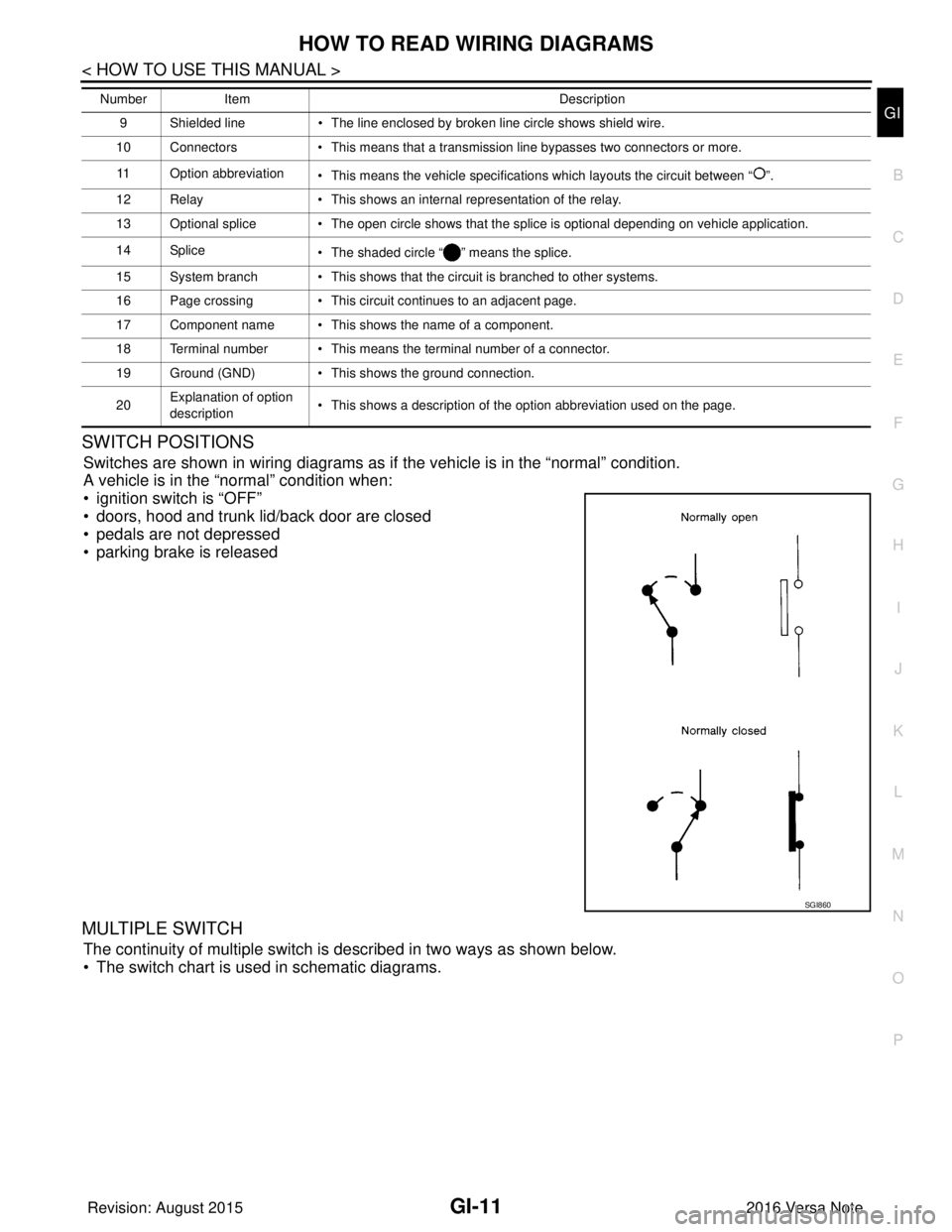
SWITCH POSITIONS
Switches are shown in wiring diagrams as if the vehicle is in the “normal” condition.
A vehicle is in the “normal” condition when:
• ignition switch is “OFF”
• doors, hood and trunk lid/back door are closed
• pedals are not depressed
• parking brake is released
MULTIPLE SWITCH
The continuity of multiple switch is described in two ways as shown below.
• The switch chart is used in schematic diagrams.
9 Shielded line • The line enclosed by broken line circle shows shield wire.
10 Connectors • This means that a transmission line bypasses two connectors or more.
11 Option abbreviation • This means the vehicle specifications which layouts the circuit between “ ”.
12 Relay • This shows an internal representation of the relay.
13 Optional splice • The open circle shows that the splice is optional depending on vehicle application.
14 Splice • The shaded circle “ ” means the splice.
15 System branch • This shows that the circuit is branched to other systems.
16 Page crossing • This circuit continues to an adjacent page.
17 Component name • This shows the name of a component.
18 Terminal number • This means the terminal number of a connector.
19 Ground (GND) • This shows the ground connection.
20 Explanation of option
description • This shows a description of the option abbreviation used on the page.
Number
Item Description
SGI860
Revision: August 2015 2016 Versa Note
cardiagn.com
Page 1938 of 3641
GI-50
< BASIC INSPECTION >
CONSULT/GST CHECKING SYSTEM
CONSULT/GST CHECKING SYSTEM
DescriptionINFOID:0000000012433188
NOTE:
This vehicle is diagnosed using the CONSULT-III plus.
• When CONSULT is connected with a data link connector equippedon the vehicle side, it will communicate with the control unit
equipped in the vehicle and then enable various kinds of diagnos-
tic tests.
• Refer to “CONSULT-III plus Operation Manual” for more informa- tion.
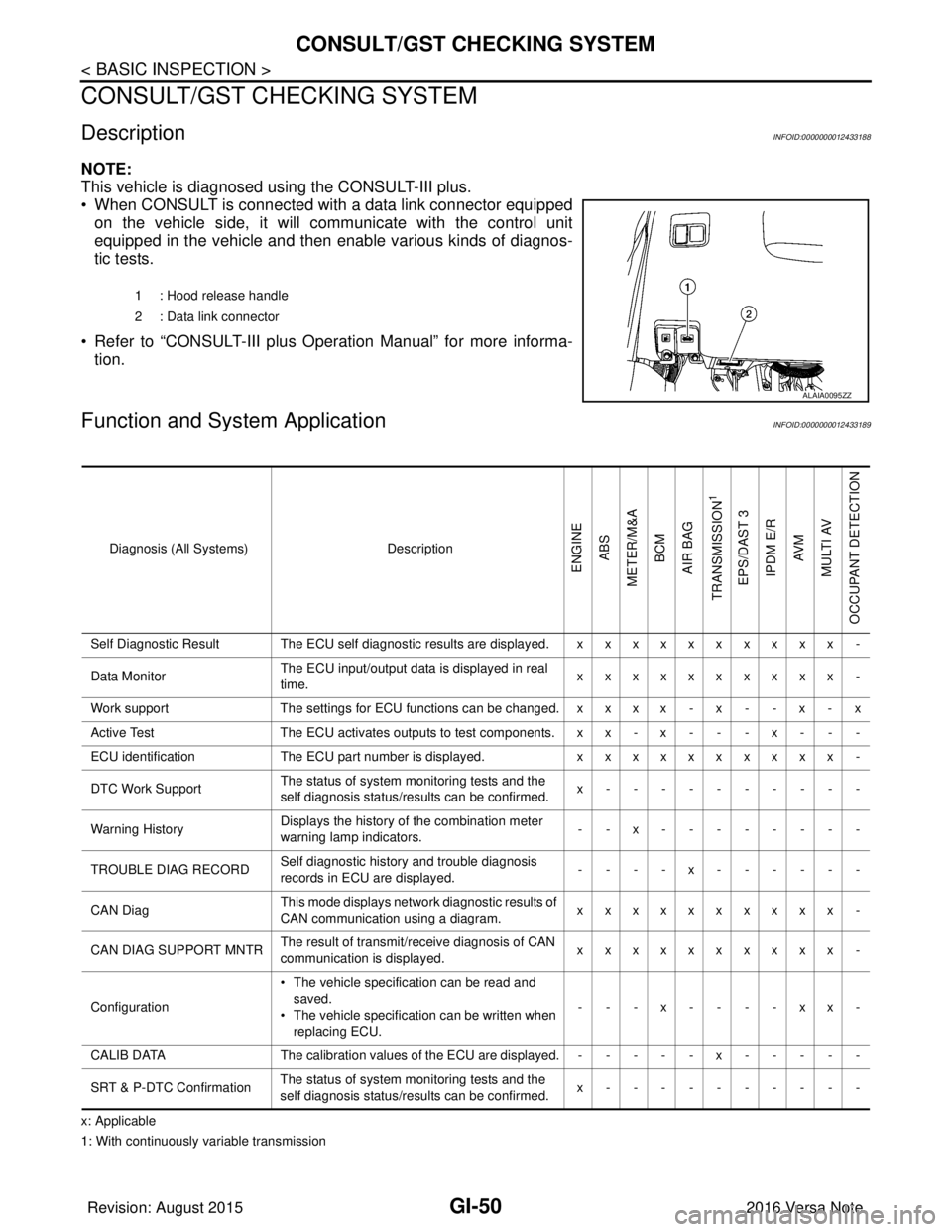
Function and System ApplicationINFOID:0000000012433189
x: Applicable
1: With continuously variable transmission 1 : Hood release handle
2 : Data link connector
ALAIA0095ZZ
Diagnosis (All Systems)
Description
ENGINE
ABS
METER/M&A BCM
AIR BAG
TRANSMISSION
1
EPS/DAST 3 IPDM E/R AV M
MULTI AV
OCCUPANT DETECTION
Self Diagnostic Result The ECU self diagnostic results are displayed. x x x x x x x x x x -
Data Monitor The ECU input/output data is displayed in real
time. xxxxxxxxxx -
Work support The settings for ECU functions can be changed. x x x x - x - - x - x
Active Test The ECU activates outputs to test components. x x - x - - - x - - -
ECU identification The ECU part number is displayed. xxxxxxxxxx -
DTC Work Support The status of system monitoring tests and the
self diagnosis status/results can be confirmed. x----------
Warning History Displays the history of the combination meter
warning lamp indicators.
--x--------
TROUBLE DIAG RECORD Self diagnostic history and trouble diagnosis
records in ECU are displayed. ----x------
CAN Diag This mode displays network diagnostic results of
CAN communication using a diagram. xxxxxxxxxx -
CAN DIAG SUPPORT MNTR The result of transmit/receive diagnosis of CAN
communication is displayed.
xxxxxxxxxx -
Configuration • The vehicle specification can be read and
saved.
• The vehicle specification can be written when
replacing ECU. ---x----xx-
CALIB DATA The calibration values of the ECU are displayed. - - - - - x - - - - -
SRT & P-DTC Confirmation The status of system monitoring tests and the
self diagnosis status/results can be confirmed. x----------
Revision: August 2015
2016 Versa Note
cardiagn.com
Page 2092 of 3641
IP-24
< REMOVAL AND INSTALLATION >
INSTRUMENT LOWER PANEL LH
INSTRUMENT LOWER PANEL LH
Removal and InstallationINFOID:0000000012430786
REMOVAL
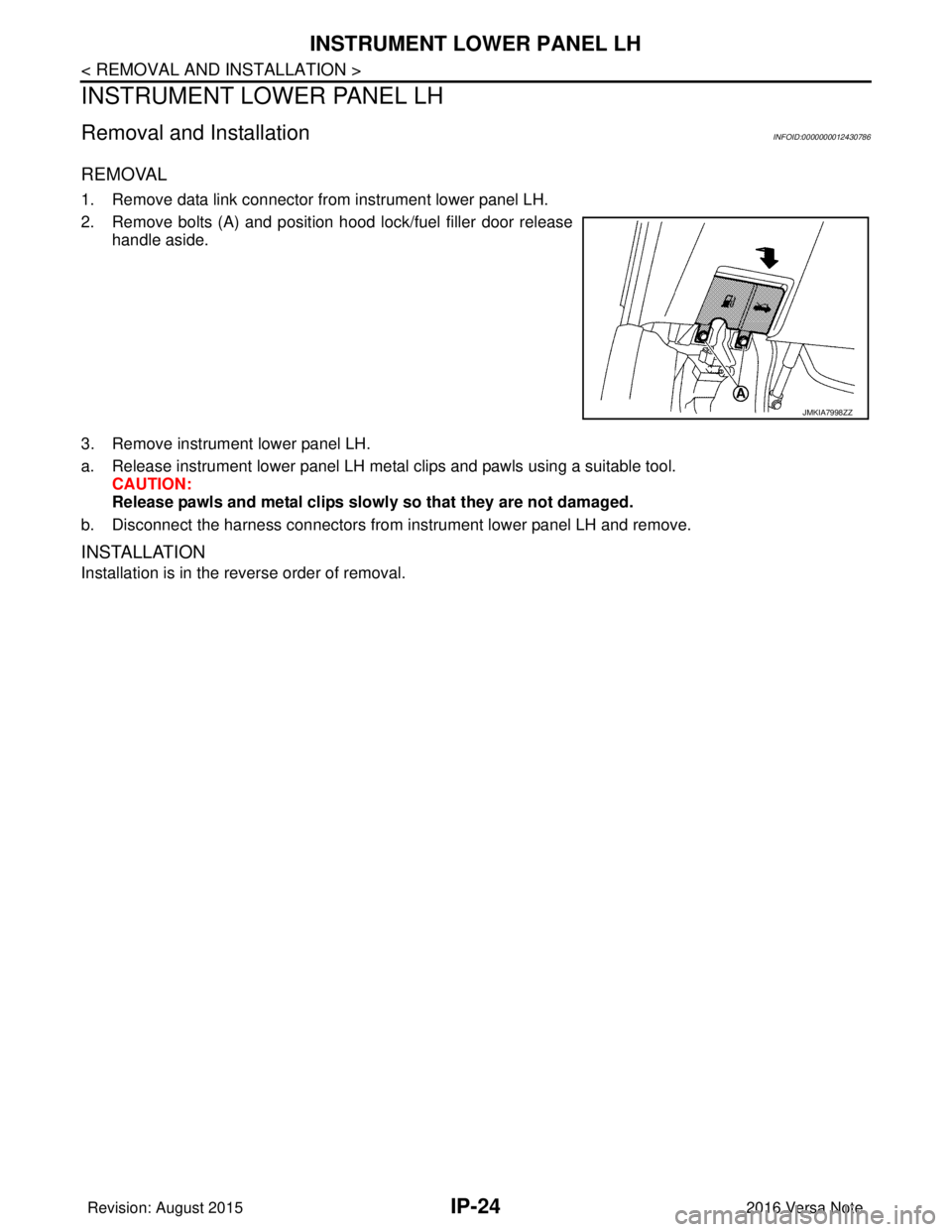
1. Remove data link connector from instrument lower panel LH.
2. Remove bolts (A) and position hood lock/fuel filler door releasehandle aside.
3. Remove instrument lower panel LH.
a. Release instrument lower panel LH metal clips and pawls using a suitable tool. CAUTION:
Release pawls and metal clips slowly so that they are not damaged.
b. Disconnect the harness connectors from instrument lower panel LH and remove.
INSTALLATION
Installation is in the reverse order of removal.
JMKIA7998ZZ
Revision: August 2015 2016 Versa Note
cardiagn.com