instrument panel NISSAN NOTE 2016 Service Owner's Manual
[x] Cancel search | Manufacturer: NISSAN, Model Year: 2016, Model line: NOTE, Model: NISSAN NOTE 2016Pages: 3641, PDF Size: 28.72 MB
Page 1947 of 3641

SQUEAK AND RATTLE TROUBLE DIAGNOSESGW-7
< SYMPTOM DIAGNOSIS >
C
DE
F
G H
I
J
L
M A
B
GW
N
O P
INSTRUMENT PANEL
Most incidents are caused by contact and movement between:
1. Cluster lid A and the instrument panel
2. Acrylic lens and combination meter housing
3. Instrument panel to front pillar finisher
4. Instrument panel to windshield
5. Instrument panel pins
6. Wiring harnesses behind the combination meter
7. A/C defroster duct and duct joint
These incidents can usually be located by tapping or moving the components to duplicate the noise or by
pressing on the components while driving to stop the noi se. Most of these incidents can be repaired by apply-
ing felt cloth tape or silicone spray (in hard to reach areas). Urethane pads can be used to insulate wiring har-
ness.
CAUTION:
Do not use silicone spray to isolate a squeak or ra ttle. If you saturate the area with silicone, you will
not be able to recheck the repair.
CENTER CONSOLE
Components to pay attention to include:
1. Shift selector assembly cover to finisher
2. A/C control unit and cluster lid C
3. Wiring harnesses behind audio and A/C control unit
The instrument panel repair and isolation pr ocedures also apply to the center console.
DOORS
Pay attention to the:
1. Finisher and inner panel making a slapping noise
2. Inside handle escutcheon to door finisher
3. Wiring harnesses tapping
4. Door striker out of alignment causing a popping noise on starts and stops
Tapping or moving the components or pressing on them while driving to duplicate the conditions can isolate
many of these incidents. You can usually insulate the ar eas with felt cloth tape or insulator foam blocks from
the NISSAN Squeak and Rattle Kit (J-50397) to repair the noise.
TRUNK
Trunk noises are often caused by a loose jack or loose items put into the trunk by the owner.
In addition look for:
1. Trunk lid bumpers out of adjustment
2. Trunk lid striker out of adjustment
3. The trunk lid torsion bars knocking together
4. A loose license plate or bracket
Most of these incidents can be repaired by adjusting, se curing or insulating the item(s) or component(s) caus-
ing the noise.
SUNROOF/HEADLINING
Noises in the sunroof/headlining area can often be traced to one of the following:
1. Sunroof lid, rail, linkage or seals making a rattle or light knocking noise
2. Sun visor shaft shaking in the holder
3. Front or rear windshield touching headlining and squeaking
Again, pressing on the components to stop the noise while duplicating the conditions can isolate most of these
incidents. Repairs usually consist of insulating with felt cloth tape.
OVERHEAD CONSOLE (FRONT AND REAR)
Overhead console noises are often caused by the cons ole panel clips not being engaged correctly. Most of
these incidents are repaired by pushing up on the c onsole at the clip locations until the clips engage.
In addition look for:
Revision: August 2015 2016 Versa Note
cardiagn.com
Page 1978 of 3641
![NISSAN NOTE 2016 Service Owners Manual HAC-10
< SYSTEM DESCRIPTION >[MANUAL AIR CONDITIONING]
COMPONENT PARTS
A. LH side of instrument panel B. Behind center of instrument panel C. Center of instrument panel
No. Component Description
1. BC](/img/5/57363/w960_57363-1977.png "NISSAN NOTE 2016 Service Owners Manual HAC-10
< SYSTEM DESCRIPTION >[MANUAL AIR CONDITIONING]
COMPONENT PARTS
A. LH side of instrument panel B. Behind center of instrument panel C. Center of instrument panel
No. Component Description
1. BC")
HAC-10
< SYSTEM DESCRIPTION >[MANUAL AIR CONDITIONING]
COMPONENT PARTS
A. LH side of instrument panel B. Behind center of instrument panel C. Center of instrument panel
No. Component Description
1. BCM The BCM receives the fan ON and A/C ON signals from the front air control and sends a com-
pressor ON request to the ECM.
2. Fuse Block (J/B) Located in the passenger compartment, behind the left lower IP, the Fuse Block (J/B) con-
tains the front blower motor relay and several fuses required for the air conditioner control
system.
3. Blower relay The blower relay controls the flow of current to fuse 20, 21 and 22 in the Fuse Block (J/B).
The relay is connected directly to ground, and is energized when the ignition switch is in the
ON or START position.
4. Front blower motor The front blower motor varies the speed at which the air flows through the ventilation system.
5. Front blower motor resistor Ground for the blower is supplied through blower resistor and the blower speed switch. As
the switch is moved from position 1 through 4, more current is allowed to flow through the
motor, for a higher speed. This is because less resistors are in the path as the switch is
moved to a higher position. When the switch is on the highest position, all resistors are by-
passed.
6. Thermo control amp. Thermo control amp. is composed of thermistor and amplifier. When the A/C switch signal is
received from the front air control, the thermo control amp. transmits the A/C ON signal to the
BCM according to evaporator fin temperature. When the thermistor detecting temperature of
the air that passes through evaporator is extremely low, the thermo control amp. sends the
A/C OFF signal to BCM, and stops the compressor.
7. Front air control The front air control controls the operation of the A/C and heating system.
AWIIA1862ZZ
Revision: August 2015 2016 Versa Note
cardiagn.com
Page 2025 of 3641
![NISSAN NOTE 2016 Service Owners Manual DOOR CABLEHAC-57
< REMOVAL AND INSTALLATION > [MANUAL AIR CONDITIONING]
C
D
E
F
G H
J
K L
M A
B
HAC
N
O P
5. Operate intake door lever to make sure that inner cable moves smoothly. CAUTION:
When clipp](/img/5/57363/w960_57363-2024.png "NISSAN NOTE 2016 Service Owners Manual DOOR CABLEHAC-57
< REMOVAL AND INSTALLATION > [MANUAL AIR CONDITIONING]
C
D
E
F
G H
J
K L
M A
B
HAC
N
O P
5. Operate intake door lever to make sure that inner cable moves smoothly. CAUTION:
When clipp")
DOOR CABLEHAC-57
< REMOVAL AND INSTALLATION > [MANUAL AIR CONDITIONING]
C
D
E
F
G H
J
K L
M A
B
HAC
N
O P
5. Operate intake door lever to make sure that inner cable moves smoothly. CAUTION:
When clipping ou ter cable, do not move inner cable.
MODE DOOR CABLE
MODE DOOR CABLE : Re moval and InstallationINFOID:0000000012430765
The mode door cable is not serviced separately. Refer to HAC-52, "Removal and Installation".
MODE DOOR CABLE : AdjustmentINFOID:0000000012430766
1. Remove glove box assembly. Refer to IP-25, "Removal and Installation".
2. Disconnect mode door cable (1) from clip (A).
3. Set mode dial to VENT position.
4. Push main link (2) in the direction shown, then carefully pull outer cable to front air control side and connect clip.
5. Operate mode dial to make sure that inner cable moves smoothly. CAUTION:
When clipping ou ter cable, do not move inner cable.
AIR MIX DOOR CABLE
AIR MIX DOOR CABLE : Removal and InstallationINFOID:0000000012430767
The air mix door cable is not serviced separately. Refer to HAC-52, "Removal and Installation".
AIR MIX DOOR CABLE : AdjustmentINFOID:0000000012430768
1. Remove instrument lower panel LH. Refer to IP-24, "Removal and Installation".
2. Remove foot duct (LH). Refer to VTL-7, "
FOOT DUCT : Removal and Installation".
3. Disconnect air mix door cable (1) from clip (A).
4. Set temperature dial to full cold position.
5. Push air mix door link (2) in the direction shown, then carefully pull outer cable to front air control side and connect clip.
6. Operate temperature dial to make sure that inner cable moves smoothly. CAUTION:
When clipping ou ter cable, do not move inner cable.
JMIIA0618ZZ
JMIIA0619ZZ
Revision: August 2015 2016 Versa Note
cardiagn.com
Page 2060 of 3641
HEATING AND COOLING UNIT ASSEMBLYHA-35
< REMOVAL AND INSTALLATION >
C
DE
F
G H
J
K L
M A
B
HA
N
O P
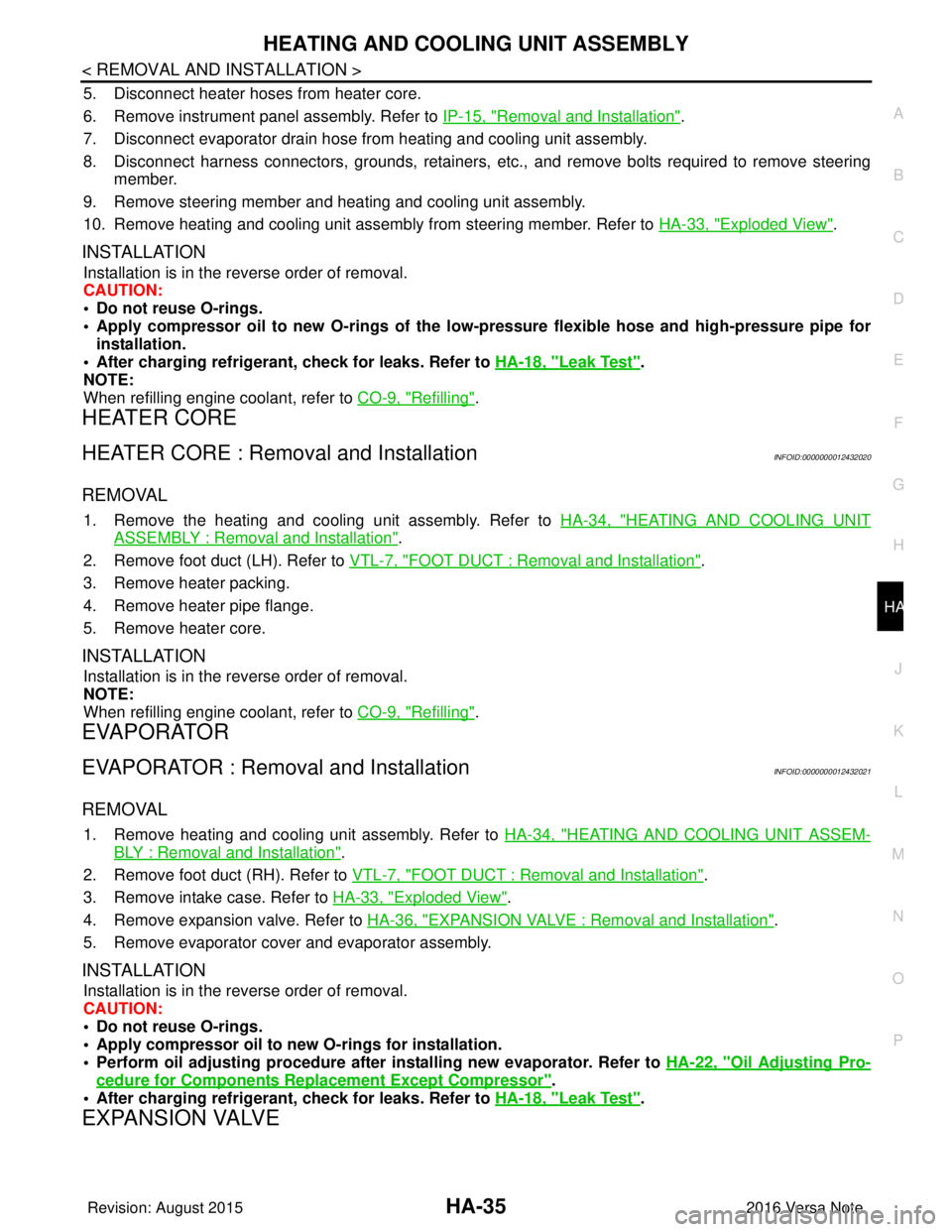
5. Disconnect heater hoses from heater core.
6. Remove instrument panel assembly. Refer to IP-15, "
Removal and Installation".
7. Disconnect evaporator drain hose from heating and cooling unit assembly.
8. Disconnect harness connectors, grounds, retainers, etc. , and remove bolts required to remove steering
member.
9. Remove steering member and heating and cooling unit assembly.
10. Remove heating and cooling unit assembly from steering member. Refer to HA-33, "
Exploded View".
INSTALLATION
Installation is in the reverse order of removal.
CAUTION:
• Do not reuse O-rings.
• Apply compressor oil to new O-rings of the low-pressure flexible hose and high-pressure pipe for
installation.
• After charging refrigerant, check for leaks. Refer to HA-18, "
Leak Test".
NOTE:
When refilling engine coolant, refer to CO-9, "
Refilling".
HEATER CORE
HEATER CORE : Removal and InstallationINFOID:0000000012432020
REMOVAL
1. Remove the heating and cooling unit assembly. Refer to HA-34, "HEATING AND COOLING UNIT
ASSEMBLY : Removal and Installation".
2. Remove foot duct (LH). Refer to VTL-7, "
FOOT DUCT : Removal and Installation".
3. Remove heater packing.
4. Remove heater pipe flange.
5. Remove heater core.
INSTALLATION
Installation is in the reverse order of removal.
NOTE:
When refilling engine coolant, refer to CO-9, "
Refilling".
EVAPORATOR
EVAPORATOR : Removal and InstallationINFOID:0000000012432021
REMOVAL
1. Remove heating and cooling unit assembly. Refer to HA-34, "HEATING AND COOLING UNIT ASSEM-
BLY : Removal and Installation".
2. Remove foot duct (RH). Refer to VTL-7, "
FOOT DUCT : Removal and Installation".
3. Remove intake case. Refer to HA-33, "
Exploded View".
4. Remove expansion valve. Refer to HA-36, "
EXPANSION VALVE : Removal and Installation".
5. Remove evaporator cover and evaporator assembly.
INSTALLATION
Installation is in the reverse order of removal.
CAUTION:
• Do not reuse O-rings.
• Apply compressor oil to ne w O-rings for installation.
• Perform oil adjusting procedure afte r installing new evaporator. Refer to HA-22, "
Oil Adjusting Pro-
cedure for Components Replacement Except Compressor".
• After charging refrigerant, check for leaks. Refer to HA-18, "
Leak Test".
EXPANSION VALVE
Revision: August 2015 2016 Versa Note
cardiagn.com
Page 2069 of 3641

IP-1
BODY INTERIOR
C
DE
F
G H
I
K L
M
SECTION IP
A
B
IP
N
O P
CONTENTS
INSTRUMENT PANEL
PRECAUTION ....... ........................................2
PRECAUTIONS .............................................. .....2
Precaution for Supplemental Restraint System
(SRS) "AIR BAG" and "SEAT BELT PRE-TEN-
SIONER" ............................................................. ......
2
Precaution for Work ..................................................2
PREPARATION ............................................3
PREPARATION .............................................. .....3
Special Service Tools ........................................ ......3
Commercial Service Tools .......................................3
CLIP LIST ............................................................4
Descriptions for Clips ................................................4
SYMPTOM DIAGNOSIS ...............................8
SQUEAK AND RATTLE TROUBLE DIAG-
NOSES ........................ ........................................
8
Work Flow ........................................................... ......8
Generic Squeak and Rattle Troubleshooting ............9
Diagnostic Worksheet .............................................12
REMOVAL AND INSTALLATION ...............14
INSTRUMENT PANEL ASSEMBLY .............. ....14
Exploded View .................................................... ....14
Removal and Installation ..................................... ....15
STEERING COLUMN COVERS .......................17
Removal and Installation .........................................17
CENTER CONSOLE ASSEMBLY ....................18
Exploded View .........................................................18
Removal and Installation .........................................18
CENTER CONSOLE LOWER ...........................20
Removal and Installation .........................................20
CLUSTER LID A ...............................................21
Removal and Installation .........................................21
CLUSTER LID C ...............................................22
Removal and Installation .........................................22
FRONT AIR CONTROL FINISHER ...................23
Removal and Installation .........................................23
INSTRUMENT LOWER PANEL LH ..................24
Removal and Installation .........................................24
GLOVE BOX ASSEMBLY ................................25
Removal and Installation .........................................25
UPPER GLOVE BOX ........................................26
Removal and Installation ..................................... ....26
Revision: August 2015 2016 Versa Note
cardiagn.com
Page 2078 of 3641

IP-10
< SYMPTOM DIAGNOSIS >
SQUEAK AND RATTLE TROUBLE DIAGNOSES
INSTRUMENT PANEL
Most incidents are caused by contact and movement between:
1. Cluster lid A and the instrument panel
2. Acrylic lens and combination meter housing
3. Instrument panel to front pillar finisher
4. Instrument panel to windshield
5. Instrument panel pins
6. Wiring harnesses behind the combination meter
7. A/C defroster duct and duct joint
These incidents can usually be located by tapping or moving the components to duplicate the noise or by
pressing on the components while driving to stop the noise. Most of these incidents can be repaired by apply-
ing felt cloth tape or silicone spray (in hard to reach areas). Urethane pads can be used to insulate wiring har-
ness.
CAUTION:
Do not use silicone spray to isolate a squeak or rattle. If you saturate the ar ea with silicone, you will
not be able to recheck the repair.
CENTER CONSOLE
Components to pay attention to include:
1. Shift selector assembly cover to finisher
2. A/C control unit and cluster lid C
3. Wiring harnesses behind audio and A/C control unit
The instrument panel repair and isolation pr ocedures also apply to the center console.
DOORS
Pay attention to the:
1. Finisher and inner panel making a slapping noise
2. Inside handle escutcheon to door finisher
3. Wiring harnesses tapping
4. Door striker out of alignment causing a popping noise on starts and stops
Tapping or moving the components or pressing on them wh ile driving to duplicate the conditions can isolate
many of these incidents. You can usually insulate the areas with felt cloth tape or insulator foam blocks from
the NISSAN Squeak and Rattle Kit (J-50397) to repair the noise.
TRUNK
Trunk noises are often caused by a loose jack or loose items put into the trunk by the owner.
In addition look for:
1. Trunk lid bumpers out of adjustment
2. Trunk lid striker out of adjustment
3. The trunk lid torsion bars knocking together
4. A loose license plate or bracket
Most of these incidents can be repaired by adjusting, se curing or insulating the item(s) or component(s) caus-
ing the noise.
SUNROOF/HEADLINING
Noises in the sunroof/headlining area c an often be traced to one of the following:
1. Sunroof lid, rail, linkage or seals making a rattle or light knocking noise
2. Sun visor shaft shaking in the holder
3. Front or rear windshield touching headlining and squeaking
Again, pressing on the components to stop the noise while duplicating the conditions can isolate most of these
incidents. Repairs usually consist of insulating with felt cloth tape.
OVERHEAD CONSOLE (FRONT AND REAR)
Overhead console noises are often caused by the c onsole panel clips not being engaged correctly. Most of
these incidents are repaired by pushing up on the c onsole at the clip locations until the clips engage.
In addition look for:
Revision: August 2015 2016 Versa Note
cardiagn.com
Page 2082 of 3641
IP-14
< REMOVAL AND INSTALLATION >
INSTRUMENT PANEL ASSEMBLY
REMOVAL AND INSTALLATION
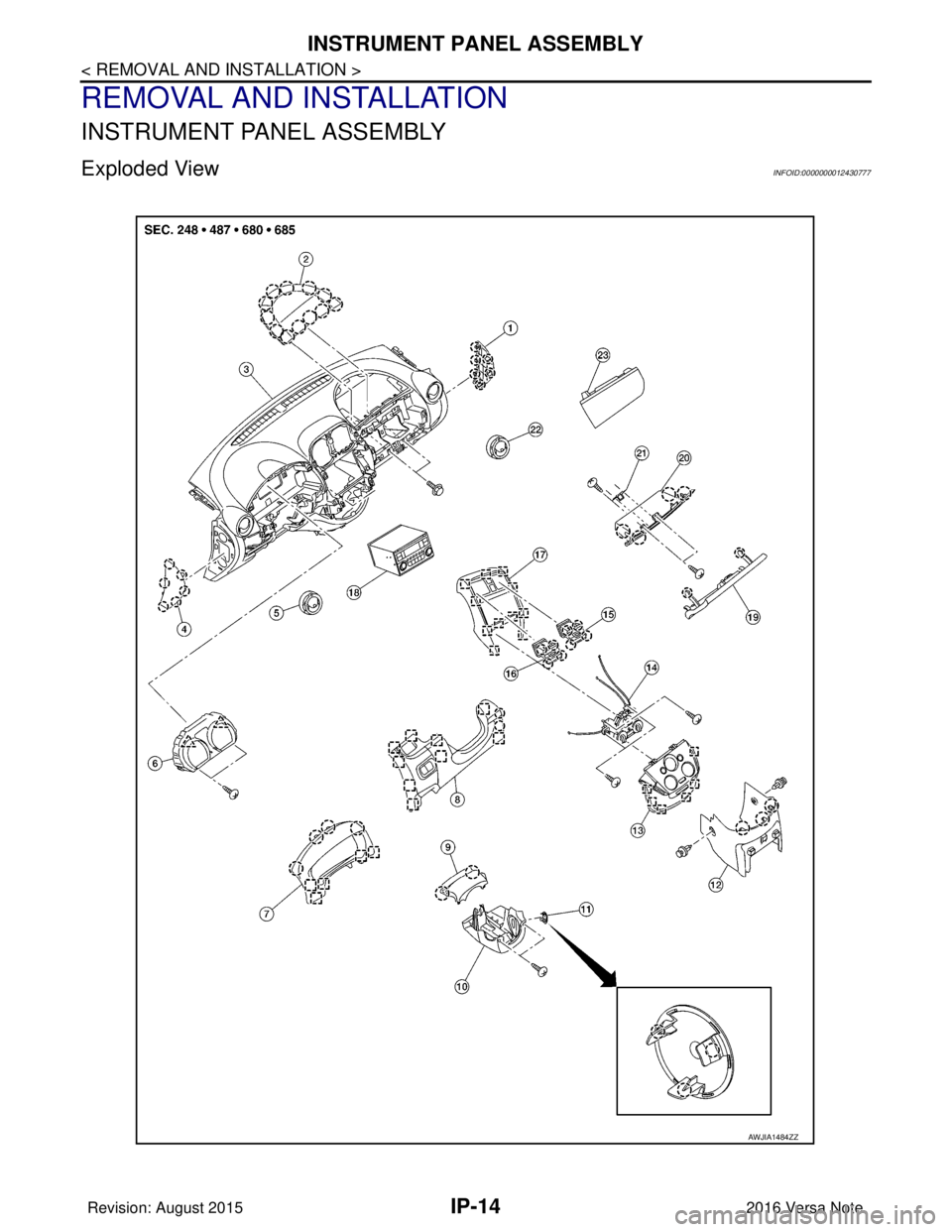
INSTRUMENT PANEL ASSEMBLY
Exploded ViewINFOID:0000000012430777
AWJIA1484ZZ
Revision: August 20152016 Versa Note
cardiagn.com
Page 2083 of 3641
INSTRUMENT PANEL ASSEMBLYIP-15
< REMOVAL AND INSTALLATION >
C
DE
F
G H
I
K L
M A
B
IP
N
O P
Removal and InstallationINFOID:0000000012430778
CAUTION:
• Be careful not to scratch instrument panel pad or other parts.
• Before servicing, turn the ignition switch off, disconnect both battery terminals and wait at least
three minutes.
• Do not tamper with or force air bag lid open, as this may adversely affect air bag performance.
REMOVAL
1. Disconnect the negative and positive battery terminals, then wait at least three minutes. Refer to PG-70,
"Removal and Installation (Battery)".
2. Remove front pillar finishers (LH/RH). Refer to INT-21, "
FRONT PILLAR FINISHER : Removal and Instal-
lation".
3. Remove dash side finishers (LH/RH). Refer to INT-24, "
DASH SIDE FINISHER : Removal and Installa-
tion".
4. Partially remove front body side welts (LH/RH). Refer to INT-21, "
Exploded View".
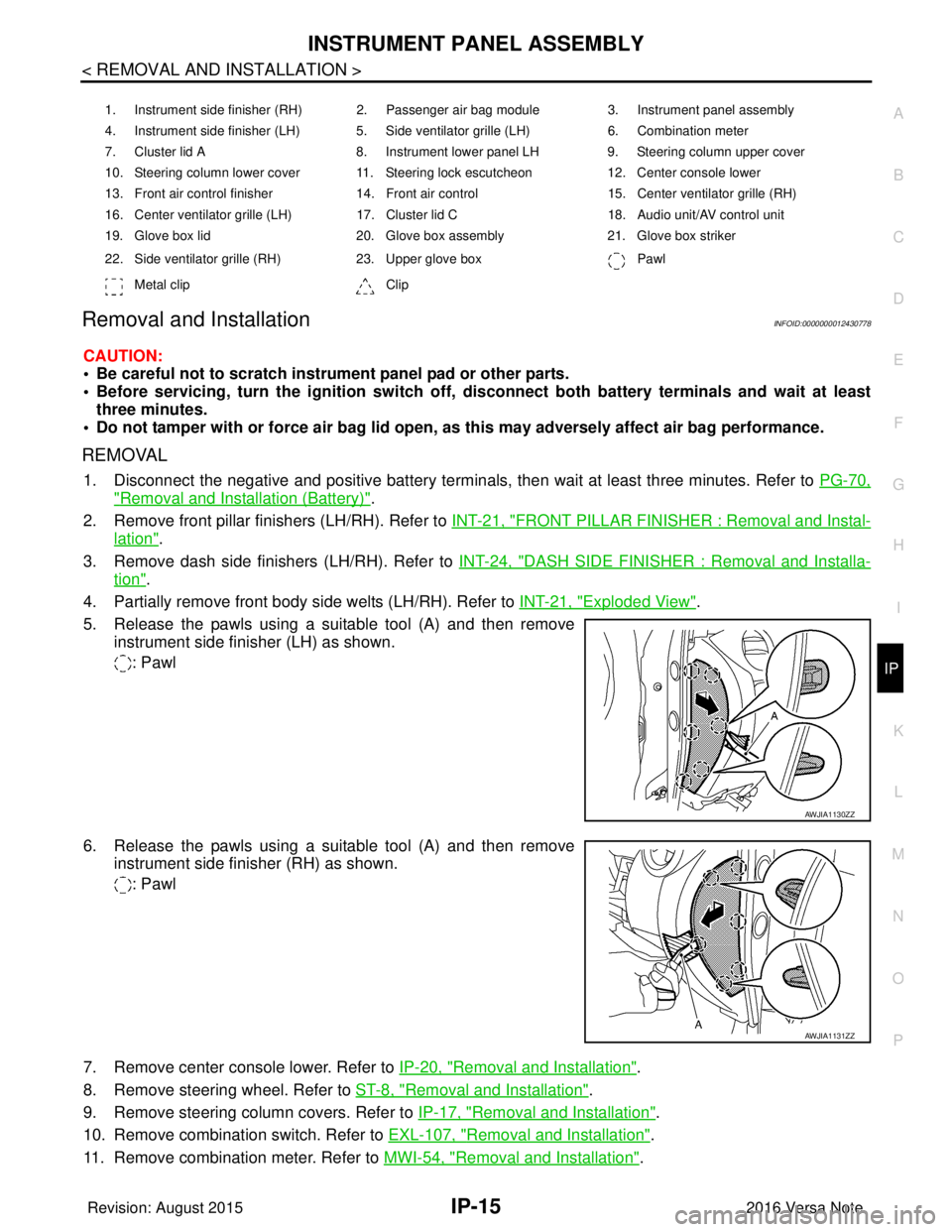
5. Release the pawls using a suitable tool (A) and then remove instrument side finisher (LH) as shown.
: Pawl
6. Release the pawls using a suitable tool (A) and then remove instrument side finisher (RH) as shown.
: Pawl
7. Remove center console lower. Refer to IP-20, "
Removal and Installation".
8. Remove steering wheel. Refer to ST-8, "
Removal and Installation".
9. Remove steering column covers. Refer to IP-17, "
Removal and Installation".
10. Remove combination switch. Refer to EXL-107, "
Removal and Installation".
11. Remove combination meter. Refer to MWI-54, "
Removal and Installation".
1. Instrument side finisher (RH) 2. Passenger air bag module 3. Instrument panel assembly
4. Instrument side finisher (LH) 5. Side ventilator grille (LH) 6. Combination meter
7. Cluster lid A 8. Instrument lower panel LH9. Steering column upper cover
10. Steering column lower cover 11. Steering lock escutcheon 12. Center console lower
13. Front air control finisher 14. Front air control15. Center ventilator grille (RH)
16. Center ventilator grille (LH) 17. Cluster lid C 18. Audio unit/AV control unit
19. Glove box lid 20. Glove box assembly21. Glove box striker
22. Side ventilator grille (RH) 23. Upper glove box Pawl
Metal clip Clip
AWJIA1130ZZ
AWJIA1131ZZ
Revision: August 2015 2016 Versa Note
cardiagn.com
Page 2084 of 3641
IP-16
< REMOVAL AND INSTALLATION >
INSTRUMENT PANEL ASSEMBLY
12. Remove audio unit. Refer to AV-53, "Removal and Installation" (BASE AUDIO) or AV-113, "Removal and
Installation" (DISPLAY AUDIO).
13. Remove AV control unit (NAVIGATION). Refer to AV-241, "
Removal and Installation".
14. Remove front air control. Refer to HAC-52, "
Removal and Installation".
15. Remove glove box assembly. Refer to IP-25, "
Removal and Installation".
16. Remove front passenger air bag module. Refer to SR-19, "
Removal and Installation".
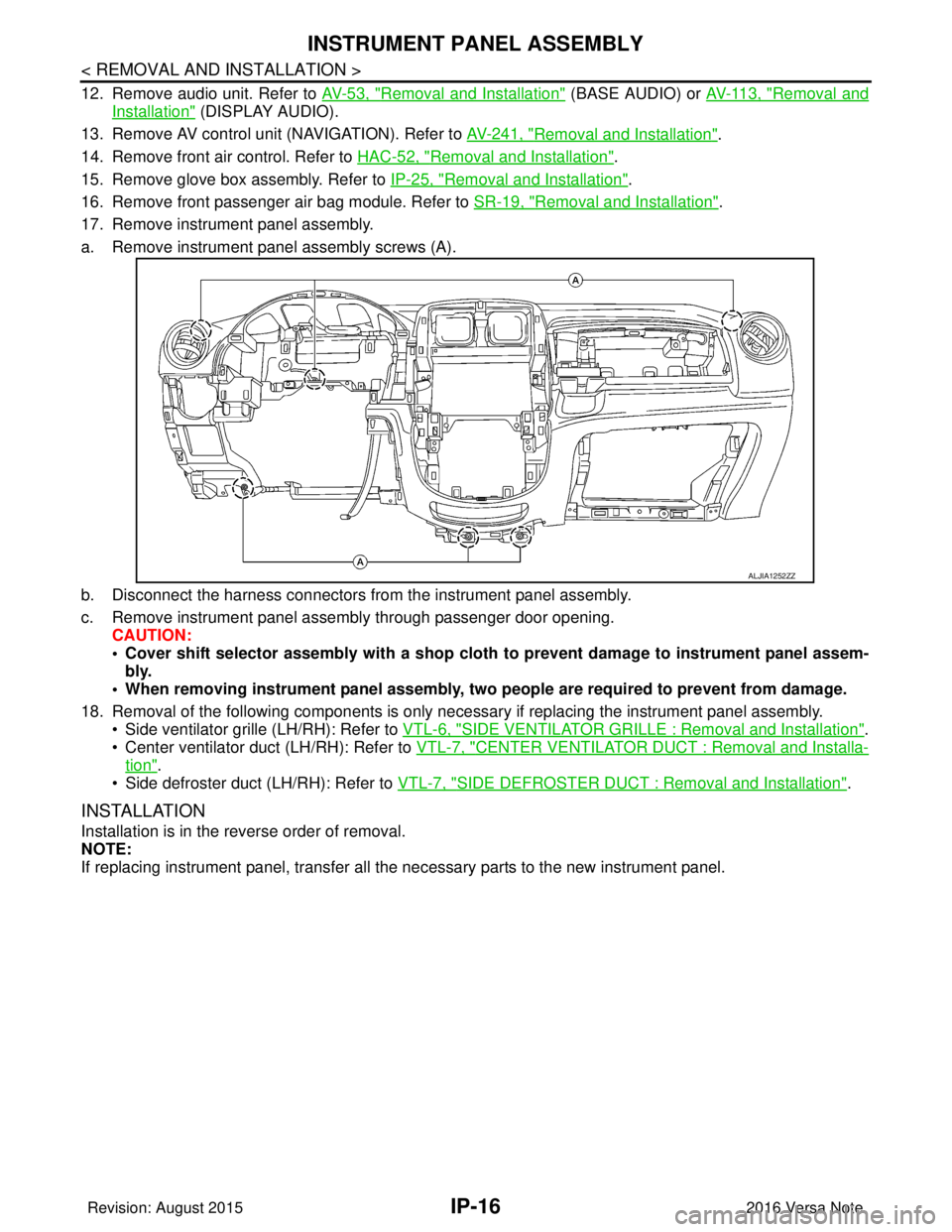
17. Remove instrument panel assembly.
a. Remove instrument panel assembly screws (A).
b. Disconnect the harness connectors from the instrument panel assembly.
c. Remove instrument panel assembly through passenger door opening. CAUTION:
• Cover shift selector assembly with a shop cloth to prevent damage to instrument panel assem-
bly.
• When removing instrument panel assembly, two people are required to prevent from damage.
18. Removal of the following components is only necessary if replacing the instrument panel assembly.
• Side ventilator grille (LH/RH): Refer to VTL-6, "
SIDE VENTILATOR GRILLE : Removal and Installation".
• Center ventilator duct (LH/RH): Refer to VTL-7, "
CENTER VENTILATOR DUCT : Removal and Installa-
tion".
• Side defroster duct (LH/RH): Refer to VTL-7, "
SIDE DEFROSTER DUCT : Removal and Installation".
INSTALLATION
Installation is in the reverse order of removal.
NOTE:
If replacing instrument panel, transfer all the necessary parts to the new instrument panel.
ALJIA1252ZZ
Revision: August 2015 2016 Versa Note
cardiagn.com
Page 2085 of 3641
STEERING COLUMN COVERSIP-17
< REMOVAL AND INSTALLATION >
C
DE
F
G H
I
K L
M A
B
IP
N
O P
STEERING COLUMN COVERS
Removal and InstallationINFOID:0000000012430779
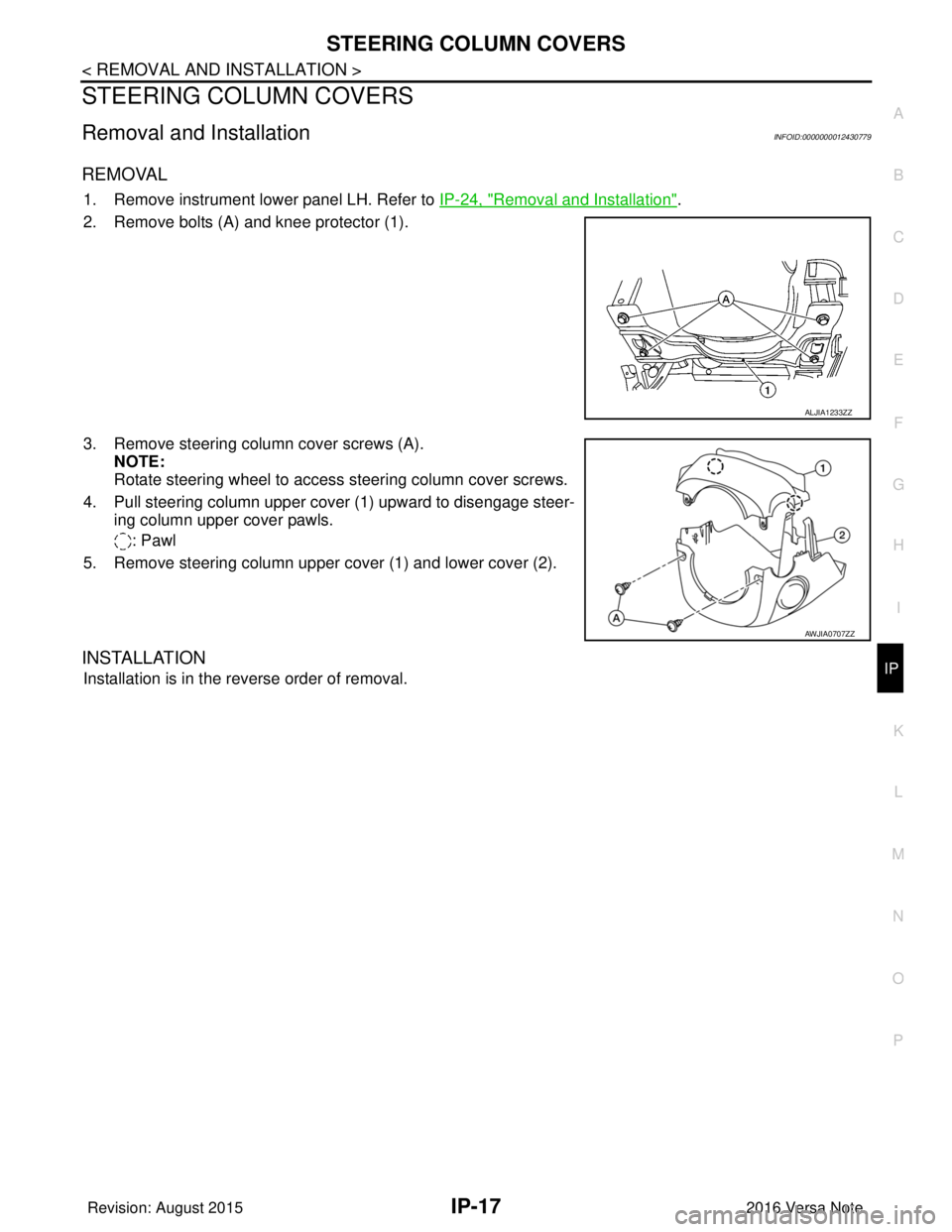
REMOVAL
1. Remove instrument lower panel LH. Refer to IP-24, "Removal and Installation".
2. Remove bolts (A) and knee protector (1).
3. Remove steering column cover screws (A). NOTE:
Rotate steering wheel to access steering column cover screws.
4. Pull steering column upper cover (1) upward to disengage steer- ing column upper cover pawls.
: Pawl
5. Remove steering column upper cover (1) and lower cover (2).
INSTALLATION
Installation is in the reverse order of removal.
ALJIA1233ZZ
AWJIA0707ZZ
Revision: August 2015 2016 Versa Note
cardiagn.com